


Whether you’re grinding ranked matches in Street Fighter, building a custom arcade cabinet for your garage, or just tired of fighting with a standard gamepad during combo execution, the right controller changes everything. This roundup covers everything from drop-in joystick tops to full leverless fight sticks and DIY arcade kits, so you can match the hardware to your play style and budget. Each pick below earns its spot for a different reason, and a few are built for builders rather than casuals.
How The Shortlist Stacks Up

uxcell Joystick Ball Top Handle Yellow 2-Pack

Morostron Wireless Controller for PC and Steam Games (White)

8Bitdo Sn30 Pro+ Bluetooth Gamepad (Blue Classic Edition)
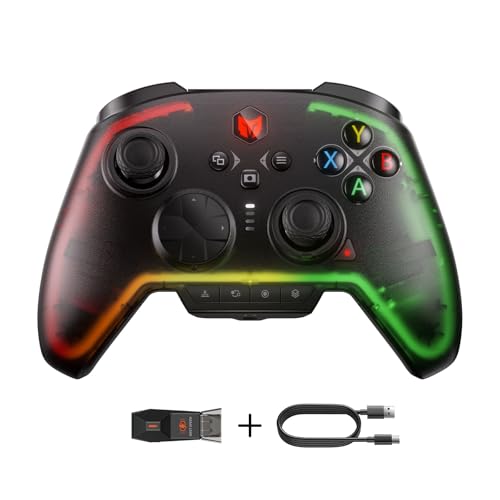
BIGBIG WON Rainbow 2 Pro Wireless Controller

BIGBIG WON Fight Master Leverless Controller

Hikig 2-Player LED Arcade Buttons and Joystick DIY Kit

I-PAC 2 Arcade Game Controller Interface (IPAC2)
Taking A Closer Look At The Options
Building a bartop arcade from scratch usually means sourcing a dozen small parts, and joystick ball tops tend to get overlooked until the last minute. This 2-pack from uxcell solves that problem cheaply, giving you spare handles in case one cracks or you want a backup color scheme for a second player station. The 35mm diameter lands in the comfortable middle ground for most hands, large enough to grip firmly during extended sessions without feeling oversized.
These tops are sized for joysticks that use an M6 threaded shaft, which covers the majority of standard arcade joystick assemblies used in DIY builds. If you’re working with a Japanese-style or snap-in joystick, you’ll want to confirm the thread before ordering. For anyone restoring a worn cabinet or finishing a first-time MAME project, this is a simple, low-risk part to keep on hand.
Reasons It Performs
- Standard 35mm ball diameter fits comfortably in most hands for long sessions
- M6 threading works with the most common arcade joystick shafts in DIY builds
- Two-pack pricing means you get a spare or a matching second-player handle
- Yellow color makes directional controls easy to identify at a glance
- Simple screw-on installation requires no special tools or wiring
Things To Consider
- Only fits M6-threaded joysticks, so verify your shaft size before buying
- Yellow plastic may show scratches and grime faster than darker colors over time
Feature Snapshot
Right Fit For
First-time arcade cabinet builders using M6-threaded joysticks who want a budget-friendly finishing touch.
Look Elsewhere When
The Hikig 2-Player LED Arcade Kit suits you better if you need a complete parts bundle rather than just replacement ball tops.
Juggling a Switch, a gaming PC, and a phone for cloud play usually means owning three different controllers. The Morostron attempts to consolidate that pile by supporting Switch, Switch 2, iOS, Android, and Windows PC through Bluetooth or a wireless adapter, which is a meaningful convenience for anyone who moves between rooms or devices throughout the day. Hall-effect sticks are the headline feature here, a stick technology that uses magnetic sensors to register movement, which avoids the stick-drift problems that plague traditional potentiometer-based sticks over time.
The built-in 2-inch interactive screen is genuinely useful for tweaking settings or checking connection status without diving into a companion app. You trade Xbox and PlayStation compatibility for that multi-platform reach, so console loyalists may need to look elsewhere. For PC and Switch owners who want one pad to cover most situations, this is a reasonable middle ground.
What Helps Most
- Hall-effect sticks resist the stick drift that wears out standard controllers
- Onboard screen lets you adjust settings without opening a phone app
- 1200mAh battery supports extended sessions between charges
- Three connection modes (Bluetooth, wireless adapter, wired) fit different setups
Points To Keep In Mind
- Does not support Xbox, PlayStation, or GeForce Now streaming
- Switch wake-up function is not included, so you’ll press the console power button manually
- Unlisted platforms should be confirmed with the seller before purchasing
Feature Rundown
Made For
Multi-device households where one person plays on Switch, PC, and mobile and wants a single pad that travels between them.
Skip It When
The 8Bitdo Sn30 Pro+ is a better fit if you primarily want a compact wireless pad for Switch and Steam without needing a built-in screen.
Some fighting games feel right on a small pad, especially retro-style titles and indie fighters where the control scheme is simpler. The 8Bitdo Sn30 Pro+ leans into that retro DNA with an SNES-inspired silhouette that fits comfortably in smaller hands and packs shoulder buttons for modern inputs. Compared to the Morostron above, this one drops the onboard screen and the multi-platform ambition in favor of a tighter, more focused experience across Switch, Windows, Mac, Android, and Steam.
The 12-button layout covers everything most 2D fighters demand, and rumble feedback adds a bit of impact for special moves and ultimates. Battery or corded power gives you flexibility for travel versus long desk sessions, and the lightweight plastic body is easy to toss in a bag. This is the kind of controller that disappears in your hands once you start playing.
Where It Excels
- Compact SNES-style shape works well for retro and indie fighters
- Wide platform support includes Switch, PC, Mac, Android, and Steam
- Wireless or corded power lets you choose travel convenience or desk stability
- Rumble feedback adds tactile response without draining battery quickly
Trade Offs
- Small form factor may feel cramped during long sessions for users with larger hands
- Limited customization compared to higher-end feature-rich pads
Quick Facts
Best Suited To
Retro gaming fans and players with smaller hands who want a portable, lightweight pad for indie and classic fighters.
Swap It Out When
The BIGBIG WON Rainbow 2 Pro is a smarter pick if you want back buttons, motion aiming, and deeper customization for modern fighters.
If you like tinkering with button mapping, the Rainbow 2 Pro from BIGBIG WON is the kind of controller that rewards a few evenings in the companion app. Hall-effect triggers and an ALPS joystick, a well-regarded Japanese-made analog stick known for tight tolerances, give you durable inputs that should hold up to thousands of match hours. Two custom back buttons and two top buttons let you bind macros or extra inputs without lifting your thumbs off the sticks.
Motion aiming support makes this pad useful for shooters and action games beyond just fighters, which broadens its appeal for households that play a mix of genres. RGB lighting is purely cosmetic but adds some flair if you stream or just like a colorful desk setup. The companion app is where you’ll spend most of your customization time, and it’s worth budgeting an hour to map things properly before your first ranked match.
The Good Stuff
- Hall-effect triggers deliver precise, drift-free analog input
- Back buttons enable extra bindings without thumb gymnastics
- Motion aiming broadens use beyond fighting games
- Turbo and macro functions speed up repetitive inputs during matches
- Bluetooth wireless plus wired options for desk or couch play
Some Limits To Know
- Companion app learning curve is steeper than plug-and-play alternatives
- RGB lighting adds a bit of battery drain during long wireless sessions
Feature Card
Who Will Love This
Tinkerers and competitive players who want deep customization and don’t mind spending time mapping buttons in the companion app.
Reach For A Different Pick When
The BIGBIG WON Fight Master leverless is the better option if you want the all-button hitbox layout used by serious tournament players.
Leverless fight sticks have quietly become the format of choice for high-level players, and the BIGBIG WON Fight Master is a strong entry point if you’re curious about the switch. Instead of a joystick, every direction is a button, which means faster inputs and less travel for quarter-circle and dragon punch motions. Hot-swappable mechanical switches let you swap the actuation feel without soldering, a small detail that makes a big difference if you like to experiment.
The five-shape all-button layout supports rolling, sliding, and motion inputs that would normally require a stick, and the oversized directional buttons give your fingers enough surface area to stay accurate under pressure. RGB lighting is on board for streamers, and triple connectivity (Bluetooth, 2.4G, wired) means you can use it on Switch, Switch 2, PC, iOS, and Android. It’s a meaningful step up from a standard pad if you’re grinding ranked online.
Everyday Wins
- All-button layout enables faster directional inputs than a traditional stick
- Hot-swappable switches let you tune actuation without any soldering
- Five-shape button configuration supports blind-touch accuracy during matches
- Works across Switch, PC, iOS, and Android through three connection modes
Honest Caveats
- Steeper learning curve for players coming from traditional controllers
- Mechanical switches can be louder than membrane alternatives during late-night play
- Unusual for casual living room use, so expect questions from housemates
Technical Highlights
Who Should Grab It
Competitive fighting game players ready to invest time in a new control scheme for faster combo execution and ranked climb.
Consider Something Else When
The 8Bitdo Sn30 Pro+ is a more approachable choice if you mainly want a familiar wireless pad for casual and indie fighters.
Building a two-player arcade cabinet requires a surprising number of parts, and the Hikig kit bundles most of them in one box. You get two joysticks, twenty LED buttons, a zero-delay encoder, and a USB cable, which covers the essential input layer for a Raspberry Pi or MAME-driven build. Compared to sourcing parts individually, this kit saves a lot of time and helps you avoid compatibility mismatches between joysticks and encoders.
The high-temperature resistant plastic should hold up to long sessions without warping, and the LED illumination adds the classic arcade glow without requiring a separate lighting kit. The zero-delay encoder means inputs register without the lag that some older USB controllers introduce, which matters more for fighters than for slower-paced games. This is a solid foundation kit if you’re starting from scratch.
Positive Takeaways
- Full two-player bundle includes joysticks, buttons, encoder, and USB cable
- Zero-delay encoder minimizes input lag for responsive fighting game play
- LED buttons provide classic arcade aesthetics out of the box
- Compatible with Windows systems for flexible emulator setups
A Few Limitations
- Wiring and enclosure are not included, so you’ll need to source those separately
- Basic documentation may require some online research for first-time builders
Whose Shelf It Belongs On
DIY arcade builders planning a MAME or Raspberry Pi cabinet who want most of the parts in one box to simplify sourcing.
A Better Fit Elsewhere
The I-PAC 2 interface is the smarter move if you’ve already sourced joysticks and buttons and just need a reliable, low-latency encoder.
The I-PAC 2 is the quiet hero of custom arcade builds, an interface board that translates physical button presses into clean keyboard or joystick inputs that any emulator or game can read. It supports two players with up to eight action buttons each, plus coin and start buttons, which covers the standard MAME control layout. You can also wire in a SpinTrak spinner or U-Trak trackball for games that need analog or rotational input.
Where the I-PAC really shines is reliability; the board is widely trusted in the arcade restoration community for clean, debounced signals (a process that filters out the tiny electrical noise created when a button is pressed, preventing accidental double-inputs). For competitive players, that means every press registers exactly once. The interface shows up in countless community builds, and the manufacturer provides a config tool and support docs to help you map inputs to your specific setup.
Well-Handled Touches
- Supports 2 players with 8 buttons each plus coin and start inputs
- Compatible with SpinTrak spinners and U-Trak trackballs for analog games
- Trusted by the arcade restoration community for clean, reliable input signals
- Config tool and support docs simplify button mapping during setup
What To Weigh
- Requires separate purchase of joysticks, buttons, and wiring
- Wiring complexity assumes comfort with basic electronics or careful following of diagrams
Perfect Match For
Experienced custom arcade builders who want a reliable, professional-grade interface for serious cabinet or controller projects.
Where Another Pick Suits Better
The Hikig 2-Player LED Kit is the better starting point if you’d rather have buttons and joysticks included rather than sourcing them separately.
What To Know Before Choosing Your Setup
Fighting games demand more from a controller than most genres, because quarter-circle motions, dragon punch inputs, and frame-perfect combos punish any lag or imprecise hardware. The first decision is whether you want a traditional pad, a leverless fight stick, or a full arcade stick with a joystick. Traditional pads like the 8Bitdo Sn30 Pro+ are portable and familiar, but the small thumbstick and d-pad can feel imprecise for complex motions. Leverless controllers like the Fight Master eliminate travel distance and reward clean execution, though there’s a learning curve. Full arcade sticks give you that classic feel, but they’re larger and less travel-friendly.
For DIY builders, the most important spec is the encoder, the small circuit board that translates physical button presses into digital signals your computer or console can read. Zero-delay or I-PAC-style encoders are the standard for fighting games because they register inputs faster than generic USB controllers. Joystick mounting depth, button spacing, and microswitch quality all matter more than they seem at first, and cheap parts tend to develop loose connections over time.
Key Considerations Across These Picks
Pitfalls Shoppers Hit
A common mistake is buying a fight stick with the wrong connector type for your console; some boards are wired for PC only, while others support multiple platforms but require a wireless adapter. Another trap is assuming any arcade joystick will fit your cabinet cutout; American-style and Japanese-style joysticks use different mounting hole patterns, so measure before you order. Budget kits sometimes ship with thin cables that crimp inside the cabinet and cause intermittent button failures, which is frustrating to debug after the build is sealed up.
When Paying More Pays Off
Premium controllers and arcade parts justify their cost with better microswitches rated for millions of presses, more precise joysticks with tighter tension, and encoders that don’t drop inputs under stress. If you play daily or compete online, the upgrade pays off in longer hardware life and more consistent inputs. For casual weekend play, mid-tier options like the 8Bitdo Sn30 Pro+ deliver most of the experience at a friendlier price, and the money you save can go toward games.
Frequently Asked Questions
What is a leverless fight stick? A leverless fight stick replaces the traditional joystick with individual buttons for each direction, which reduces travel and allows faster directional inputs for combo execution. Players used to a stick typically need a few weeks to retrain muscle memory.
Are arcade sticks better than gamepads for fighting games? Arcade sticks and leverless controllers generally provide more accurate inputs for fighting games because of their larger buttons and shorter travel distances. Gamepads are more portable and versatile for other genres, which makes them a better all-around choice for casual players.
Can I use a PC fight stick on consoles? Some fight sticks support multiple platforms through firmware switches or separate console-compatible boards, but many are built for PC only. Check the product listing for your specific console before purchasing, since compatibility varies widely.
What is stick drift and how do I avoid it? Stick drift happens when a worn analog stick registers movement without being touched, causing characters to walk or menus to scroll on their own. Hall-effect sticks like those in the Morostron and Rainbow 2 Pro use magnetic sensors that avoid this problem, making them a good long-term investment.
How difficult is it to build a custom arcade controller? Building a custom controller is a weekend project for most people, especially with a parts kit like the Hikig bundle. The trickiest steps are usually wiring the buttons to the encoder and configuring the inputs in your emulator or game, both of which have plenty of community tutorials online.
The Takeaway
The right fighting game controller depends on how you play, where you play, and whether you want a finished product or a project. Casual players who want a familiar feel will appreciate the 8Bitdo Sn30 Pro+ or the Morostron, while competitive players will get the most from the BIGBIG WON Fight Master leverless. DIY builders should start with the Hikig kit or the I-PAC 2 depending on whether they want parts included or a proven interface to build around.



