


A good fight stick transforms how a fighting game feels under your hands, turning directionals and inputs into something crisp, repeatable, and genuinely fun. Whether you’re chasing tournament play, building a DIY bartop, or just want a controller that survives years of casual sessions, the right arcade stick makes a real difference. This lineup covers finished products ready to plug in and play, plus the components and encoders you’ll want for a home build project.
The Lineup, Simplified

Qenker 2 Piece Chrome Arcade DIY Shaft Extender

Sehawei Haute42 16-Key Leverless Arcade Stick RGB

8Bitdo Arcade Stick for Switch and Windows

8Bitdo Arcade Stick for Xbox Series and Windows

Easyget 2-Player Zero Delay USB Encoder Kit

MAYFLASH F300 Elite with Sanwa Parts

PDP Victrix Sagat Limited Edition Pro FS
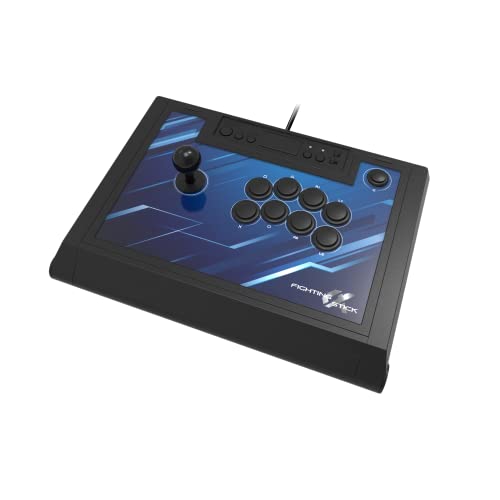
HORI Fighting Stick Alpha for PS5 PS4 PC

Qenker 2-Player LED Arcade DIY Kit

Quimat Zero Delay Arcade USB Encoder QR05
The Details Behind The Selections
This is a small but useful piece for anyone deep into a custom build. The Qenker extender rods slip between a standard joystick shaft and the ball top, adding extra height so the stick sits closer to the player’s hand.
If you find standard Sanwa or Seimitsu sticks a little too short for your cab layout, these are the kind of part that quietly solves the problem. Most DIYers won’t even know this category exists until they finish a build and the controls feel slightly too low.
A Few Highlights
- Adds noticeable height to existing joystick shafts
- Chrome finish matches common Sanwa-style hardware
- Two-piece set covers a player-one and player-two setup
- Saves you from re-drilling a control panel for taller sticks
Worth Noting
- Only useful if you already own compatible joysticks
- Adding height changes the throw distance, so motion feels different
Who It Suits Best
Anyone with a JAMMA harness or custom panel who wants taller sticks without replacing the whole joystick assembly.
Look Elsewhere When
The Qenker 2-Player LED Arcade DIY Kit is the better fit for someone starting a build from scratch rather than tweaking an existing one.
The Sehawei Haute42 skips the joystick entirely in favor of a 16-key leverless layout, which has become the format of choice for many modern Street Fighter and Tekken players. Directional inputs are handled by four dedicated keys, leaving the rest of the panel for buttons and modifiers.
For someone whose hands already think in leverless motion, this stick delivers the format without forcing them into a custom build. The RGB lighting is a fun bonus that lets you match the rest of your battlestation.
What Works In Its Favor
- Compact, all-button layout reduces hand travel
- Programmable inputs adapt to most modern fighters
- Low-profile case is comfortable on a desk
- RGB accents add visual flair without adding weight
Trade Offs
- Leverless format has a real learning curve for traditional stick players
- No joystick means you can’t practice both control styles on one device
Feature Snapshot
Right Fit For
Leverless converts who want a pre-built board rather than wiring their own button-only setup.
Skip It When
The 8Bitdo Arcade Stick for Switch and Windows is a better match for players who want a traditional joystick with wireless flexibility.
The Switch-focused 8Bitdo Arcade Stick earns its spot by offering three connection methods in one box. Bluetooth, 2.4GHz wireless through the included receiver, and a wired USB-C option mean the same controller can move between your Switch dock, your PC tower, and your laptop without any extra dongles cluttering the desk.
Owners of multi-platform households tend to appreciate the universal mounting plate, which supports Sanwa-style joystick swaps. Compared to the Qenker extender in slot 1, this is a complete controller rather than a single component.
Advantages To Know
- Three connection modes cover handheld, docked, and PC use
- Receiver hides in a built-in compartment so it doesn’t get lost
- Universal mounting plate accepts aftermarket Sanwa parts
- Button mapping changes to match the active mode automatically
Points To Keep In Mind
- Not officially licensed for Xbox consoles
- Wireless range can shorten in crowded Bluetooth environments
- Sanwa parts not included, so swapping requires a separate purchase
Built With In Mind
Switch owners who also play fighters on PC and want one controller for both rooms.
Not Your Match When
The 8Bitdo Arcade Stick for Xbox Series and Windows is the better fit for anyone whose primary platform is an Xbox console.
As the first Xbox-licensed wireless arcade stick, the 8Bitdo Xbox version fills a hole that’s existed for years. Xbox players used to be stuck with third-party adapters or wired-only options, and this stick ends that compromise.
The 3.5mm audio jack on the front is a thoughtful touch for late-night training sessions where you don’t want to wake the house. The 8BitDo Ultimate Software support also lets you remap buttons and save profiles per game.
The Good Stuff
- Native wireless support on Xbox Series consoles
- 3.5mm jack routes both audio and mic through the stick
- Profile switching keeps setups ready for different fighters
- Compatible with Windows for cross-platform training
Some Limits To Know
- No Bluetooth support, so it’s 2.4GHz or wired only
- Build is solid but not as heavy as tournament-grade options
Spec Overview
Whose Shelf It Belongs On
Xbox library players who want a wireless stick that pairs cleanly with their console without third-party adapters.
Reach For A Different Pick When
The MAYFLASH F300 Elite with Sanwa Parts is a stronger fit for players who want real Sanwa components from day one.
The Easyget 2-Player kit is a different kind of entry: two zero-delay USB encoders ready to wire into your own arcade cabinet or bartop. These little boards translate button presses into keyboard or joystick inputs that PC and Raspberry Pi recognize instantly.
For someone building a two-player MAME cabinet, having the encoders bundled saves a separate purchase. Compared to slot 4’s finished Xbox stick, this is the bare electronic layer that goes inside a wooden enclosure.
Features That Help
- Two encoders cover a full two-player setup in one purchase
- Zero-delay design keeps inputs lag-free during play
- Standard 4.8mm terminals accept most common arcade buttons
- Works with PC and Raspberry Pi without extra drivers
Honest Caveats
- Just the boards, so you’ll still need joysticks, buttons, and a case
- Wiring requires basic soldering skill or a wiring harness
- No enclosure means exposed terminals until installed
Best Suited To
Hobbyists mid-cabinet-build who need reliable dual encoders and already have their buttons and sticks picked out.
Consider Something Else When
The Qenker 2-Player LED Arcade DIY Kit is a smarter starting point if you haven’t sourced buttons and joysticks yet.
The F300 Elite earns its position in the roundup by combining authentic Sanwa buttons and a Sanwa joystick with broad platform compatibility. Sanwa components are the same Japanese-made parts you’ll find in most arcade cabinets and many high-end aftermarket sticks, so the F300’s responsiveness already feels familiar to anyone with arcade experience.
Across Switch, Xbox Series, PS4, PC, macOS, Steam Deck, and Android, this stick plays nicely with nearly anything you throw at it. The PS5 connection needs a separate Mayflash adapter, which is a small extra step worth knowing about.
Positive Takeaways
- Sanwa buttons and joystick out of the box, no upgrade needed
- Compatible with most current consoles and PC
- Compact case works on crowded desks
- Turbo and macro functions add casual-use flexibility
What To Weigh
- PS5 support requires a separate Mayflash adapter purchase
- Not wireless, so it’s tethered to the host device
Quick Facts
Made For
Multi-platform players who want real Sanwa parts and don’t mind keeping the stick plugged in.
Where Another Pick Suits Better
The 8Bitdo Arcade Stick for Switch and Windows fits better for players who value wireless freedom over Sanwa authenticity.
The PDP Victrix Sagat Limited Edition splits time between being a serious fight stick and a collector’s display piece. The laser-engraved serialization and Kinu Nishimura artwork tie the design to the Street Fighter character’s history, which matters to fans who appreciate that connection.
On the technical side, you get a touch pad, programmable buttons, customizable audio, and lighting. Compared to the F300 Elite in slot 6, this is the more refined, art-forward option for PS5 players who want their setup to look as good as it plays.
A Few Strong Suits
- Limited to 250 serialized units worldwide
- Kinu Nishimura’s original seal adds collector credibility
- Customizable audio and lighting tune the experience
- Touch pad support matches PS5’s DualSense functionality
Potential Drawbacks
- Limited production makes replacements hard if issues arise
- Premium positioning means a higher entry cost
Perfect Match For
Street Fighter fans and serious PS5 players who want a serialized collector piece with pro-level features.
Swap It Out When
The HORI Fighting Stick Alpha for PS5 PS4 PC is the better fit for players who want tournament-grade hardware without the collector markup.
HORI’s Fighting Stick Alpha targets tournament players who plan to open the case and customize. The top panel lifts off without tools, and the replaceable artwork sheet means you can swap the visual design without buying a new enclosure.
Hayabusa buttons and joystick are HORI’s premium in-house parts, designed to match the feel of Japanese arcade components. The official Sony licensing matters for PS5 compatibility, where unlicensed sticks sometimes hit unexpected firmware walls.
Everyday Perks
- Tool-free access for cleaning and modding
- Hayabusa parts offer reliable tournament feel
- Officially licensed for full PS5 compatibility
- Replaceable top-panel artwork lets you refresh the look
Where It May Fall Short
- Wired only, no wireless option
- Lighter case than metal aftermarket enclosures
Feature Card
Who Will Love This
Competitive PS5 players who want a stick they can open, mod, and personalize without sending it back for service.
A Better Fit Elsewhere
The PDP Victrix Sagat Limited Edition Pro FS appeals more to collectors who want numbered artwork alongside the hardware.
The Qenker 2-Player DIY Kit is the most complete starter package in this roundup, bundling two joysticks, twenty LED buttons, and two zero-delay USB encoders in a single order. If you’ve been thinking about building a bartop or a standalone arcade machine, this kit removes most of the sourcing work.
The blue and red LED color split is a fun touch that gives each player a clear visual identity on the panel. Compared to the Easyget encoder kit in slot 5, this version includes the buttons and sticks, so you only need a case and wires to finish.
Points In Its Favor
- Joysticks, buttons, and encoders ship together
- Color-coded LEDs distinguish player one and player two
- Heat-resistant plastic shell on the buttons
- Works across Windows versions and most MAME setups
Possible Compromises
- Plastic buttons feel lighter than metal or Sanwa alternatives
- LED wiring adds a small step beyond a basic button install
Who Should Grab It
First-time arcade builders who want most of the parts in one box and are ready to wire a simple panel.
Where A Sibling Pick Shines
The Easyget 2-Player Zero Delay USB Encoder Kit is the cleaner choice for builders who already own their preferred joysticks and buttons.
The Quimat QR05 is a single-board encoder that handles one player’s worth of buttons and a joystick. It is the simplest piece in the roundup, but in a small MAME build, single-player setup, or test rig, that simplicity is exactly what you want.
Installation is straightforward: connect your buttons and joystick to the 4.8mm terminals, plug the USB into your PC, and the system sees a generic gamepad. Compared to the Qenker DIY Kit in slot 9, this is a focused single-player solution rather than a full two-cabinet bundle.
Everyday Advantages
- Compact board fits in tight control panel layouts
- 4.8mm terminals accept the most common arcade components
- Plug-and-play recognition on Windows PCs
- Compatible with Raspberry Pi retro gaming projects
Things To Consider
- Single-player only, so two-cabinet builds need two boards
- No included harness, so wiring is on you
Right Fit For
Compact MAME projects and single-player bartops where a small, simple encoder is enough.
Not Your Match When
The Easyget 2-Player Zero Delay USB Encoder Kit is a smarter pick for two-cabinet builds that need dual-player support from one order.
What To Match Between Stick, System, and Skill Level
The first decision is platform. PS5 players should look for officially licensed sticks like the HORI Fighting Stick Alpha to avoid firmware headaches, while Xbox users have only recently gained a clean wireless option through the 8Bitdo Xbox stick. Switch and PC owners have more flexibility, including the 8Bitdo Switch stick’s triple-mode connection, which makes it easy to move between handheld and docked play.
The next call is parts. Sanwa buttons and joysticks (found in the F300 Elite) and Hayabusa components (in the HORI Alpha) are the two big names in arcade hardware. Both deliver crisp, repeatable inputs. Off-brand components often feel softer or wobblier, which matters once you start hitting ranked matches.
Build matters too. Tournament-grade sticks tend to have metal mounting plates and tool-free access for cleaning. DIY kits like the Qenker 2-Player set need a case, wiring, and basic soldering, but they let you choose enclosure materials and layout. Leverless boards like the Sehawei Haute42 suit a specific hand motion and feel foreign to anyone trained on a stick.
Where To Spend and Where To Save
Paying more usually buys three things: better components, official platform licensing, and modding access. A licensed stick survives firmware updates that brick unlicensed competitors, and metal mounting plates hold up to years of travel. The PDP Victrix Sagat Limited adds collector value on top of the hardware, which can matter to fans of a specific franchise.
Saving makes sense for first projects and casual players. Encoder boards, basic buttons, and joystick sets cover the fundamentals without the tournament polish. A beginner can wire a single-player MAME setup with one Quimat QR05 and learn whether the hobby sticks before investing in premium parts.
Pitfalls Shoppers Hit
Buying a stick before checking platform licensing is the most common mistake. PS5 in particular rejects unlicensed controllers, so a generic stick that worked on PS4 may not connect at all. Confirming official licensing for your primary console saves a return trip.
Overlooking modding access is the second trap. A sealed case looks clean, but cleaning dust off the contacts or swapping a sticky button becomes a chore without a removable panel. Tournament players almost always need to open the case eventually, so picking a stick that opens easily from day one is worth the small premium.
The Upgrade Payoff
Higher-tier sticks buy meaningful longevity, not just nicer aesthetics. Sanwa and Hayabusa components typically outlast budget buttons by years, and metal mounting plates keep everything aligned through constant travel. For players who log serious weekly hours, that durability shows up in fewer replacements and more consistent inputs.
Licensing is the quieter upgrade. Officially licensed PS5 sticks receive firmware support after platform updates, while unlicensed competitors sometimes stop working overnight. Paying a bit more for licensing is buying future-proofing, which is hard to appreciate until you need it.
Frequently Asked Questions
What’s the difference between a joystick and a leverless layout? A joystick uses a single stick for directional inputs, while a leverless board uses four or more keys for the same purpose. Leverless designs often feel faster for some motions but require retraining if you’re used to a stick.
Do I need Sanwa parts to enjoy a fight stick? No. Many off-brand sticks play perfectly well, though Sanwa and Hayabusa parts tend to feel crisper and last longer. Casual players often can’t tell the difference, while competitive players usually can.
Can I use one fight stick across multiple consoles? Most multi-platform sticks support several consoles through different connection modes or adapters, but you should check PS5 compatibility carefully since licensing affects recognition. Wired sticks tend to work across more platforms than wireless ones.
Are DIY kits hard to build? Basic kits need a screwdriver, wire strippers, and a soldering iron for the buttons and joystick terminals. Most first-time builders finish a single-player panel in a few hours, and the wiring is a transferable skill for future projects.
What maintenance does a fight stick need? Dust and debris collect under the buttons and around the joystick shaft, so opening the case every few months for a quick clean keeps inputs crisp. Buttons and sticks can also be swapped individually if a single one wears out, which is much cheaper than replacing the whole unit.
Bottom Line
A great fight stick fits the platform you play on, the way you grip the controls, and the level of maintenance you’re willing to do. Match those three things first, then decide whether a custom build, a tournament-grade controller, or a simple encoder board is the right answer. Whichever path fits, the picks above cover the main roads through this corner of gaming gear.



