


Custom arcade cabinets live in two worlds: a ready-to-play home unit you unbox and plug in, or a DIY build you wire up yourself with joysticks, buttons, and an encoder. The list below covers both, so the right pick depends on whether you want a finished machine tonight or a weekend project with solder and a drill.
A retro corner of a game room, a basement bar setup, or a family room centerpiece all ask for something slightly different. The picks below span plug-and-play cabinets, replacement components for an existing panel, and full DIY kits for builders who want every switch and shaft chosen by hand. Read the profile that matches your comfort level, and the rest falls into place.
The Leading Options At A Glance
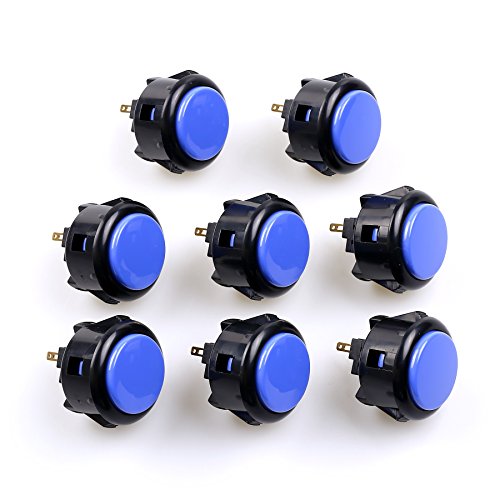
Sanwa OBSF-30 30mm Push Buttons 8-Pack (Black & Blue)

Sanwa OBSF-30 30mm Push Buttons 12-Pack (Mixed Colors)

Sanwa OBSF-30 30mm Push Buttons 8-Pack (Gray)

SANWA JLF-TP-8YT Joystick (Yellow Ball Top)

Arcade1Up PAC-Man Plus Deluxe Arcade Machine (14 Games)
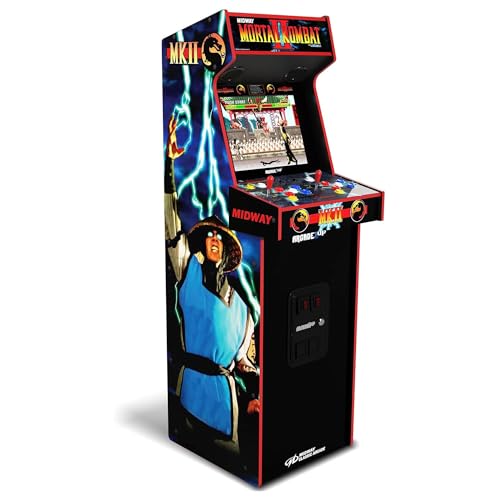
ARCADE1UP Mortal Kombat II Deluxe Arcade Machine (14 Games)

Qanba Gravity KS 24mm Silent Pushbuttons 12-Pack (Clear Red)

Sanwa OBSF-30 30mm Push Buttons 6-Pack (Dark Blue)

Qenker 2-Player LED Arcade DIY Kit (USB MAME, Raspberry Pi)

Arcade1Up Pac-Man Deluxe Arcade Cabinet (14 Games)
Taking A Closer Look At The Options
These Sanwa OBSF-30 buttons are the workhorse option most custom arcade cabinets end up wearing. At 30mm, they fit the standard 24mm-to-30mm mounting holes that virtually every JAMMA-style panel uses, and the snap-in body drops into place without specialty hardware. The non-clicking microswitch (the small electrical component that registers each press) under each cap gives you a quiet, linear feel that suits long sessions where your neighbors or family might not appreciate loud clicks.
Compared with the gray 8-pack listed later, this set leans into a black-and-blue colorway that pops nicely on a dark control panel. The Japanese-made construction tends to feel sturdier than budget clones, which often develop mushy springs after a year of daily play. For anyone refreshing a tired fight stick or finishing a first MAME build, these deliver the kind of reliability that defines a solid control deck.
Notable Upsides
- Snap-in mounting fits the most common Hori and MadCatz fight stick openings, so a swap rarely requires a new enclosure
- Quiet, non-clicking microswitch keeps late-night play from disturbing people in the next room
- Long switch lifespan suits a control panel that sees daily traffic from a serious player
- Black and blue color split adds visible contrast for a six-button Street Fighter-style layout
Things To Consider
- Eight buttons is a tight count for two-player cabinets where each side wants six actions, so double up for larger builds
- Owners commonly report the smooth, clickless feel takes a session or two to adapt to if you’re used to leaf-switch (the older clicky style found in original cabinets)
Key Specs
Made For
Anyone replacing tired buttons in a Hori or MadCatz fight stick, or finishing a single-player panel where a six-button Street Fighter layout is the goal.
Look Elsewhere When
The SANWA JLF-TP-8YT Joystick (Yellow Ball Top) is the better starting point if the joystick, not the buttons, is the part of your build that needs the upgrade.
This 12-button Sanwa bundle covers a full two-player panel in one purchase, with each color appearing as a pair. For a six-button-per-side fighting cabinet, that means every action button is accounted for without running back to the retailer for a second order. The same 30mm Japanese-made body and snap-in mounting carry over from the 8-pack, so the feel on the panel is consistent with the rest of the Sanwa ecosystem.
Color coding matters more than people expect on a multi-button deck. Matching the buttons to the classic Capcom layout (light punch, heavy punch, kick rows) reduces misinputs during long sessions. For a finished custom arcade cabinet where you want it to look the part and play accurately, a coordinated set like this saves a lot of trial-and-error.
Real Benefits
- Twelve buttons cover a complete two-player six-button-per-side layout, eliminating a second parts order
- Color pairs help you mirror the original Capcom and NeoGeo button conventions, which speeds muscle memory
- Snap-in install works with most Hori and MadCatz mounting holes, so retrofitting an existing panel is straightforward
- Quiet microswitch design fits shared living spaces where loud clicky buttons would be a problem
Worth Noting
- Buying twelve when you only need eight leaves extras on the bench, so it’s a heavier upfront commitment than the 8-pack
- The mixed-color set requires a planned layout; without a sketch, you may end up swapping caps mid-build
Best Suited To
Builders wiring up a full two-player panel who want the button count, color coding, and feel of authentic Japanese parts sorted in a single order.
Skip It When
The Qenker 2-Player LED Arcade DIY Kit is a smarter pick for someone starting from zero, because it bundles joysticks and an encoder alongside the buttons.
The gray variant of the Sanwa OBSF-30 is the same core button, just wearing a different skin. For custom arcade cabinets that lean into a modern, monochromatic look, the muted tone blends into a brushed-metal panel or a black T-moulding (the rubber edging that runs along cabinet seams) without screaming for attention. The snap-in body and quiet microswitch are identical to the black-and-blue 8-pack covered earlier.
If your build follows a brushed-aluminum aesthetic or you want the buttons to read as a single neutral surface, gray is the cleanest choice. Players tend to focus on the joystick ball and screen art in that setup, which is the point. The trade-off is that color-coding is harder, so you may need printed decals or engraved panels to keep actions distinct.
Reasons It Performs
- Neutral color integrates into minimalist, brushed-metal, or all-black cabinet designs without visual clutter
- Japanese build quality matches the rest of the OBSF-30 line, so feel and longevity are consistent
- Snap-in fit accepts the same Hori and MadCatz mounting holes as the colored variants
Honest Caveats
- Eight buttons limits you to a single-player six-button deck with two spares, similar to the black-and-blue set
- Without color contrast, distinguishing punch from kick takes printed labels or engraved panels to avoid misinputs
- Gray caps show dust and skin oils more visibly than darker colors, so weekly wiping is a reasonable expectation
Right Fit For
Design-focused builders who care about a unified panel aesthetic and don’t mind adding labels to keep actions clear.
Consider Something Else When
The Qanba Gravity KS 24mm Silent Pushbuttons 12-Pack (Clear Red) is worth a look if the quietness matters more than the exact 30mm Sanwa footprint.
The Sanwa JLF is the joystick the fighting-game community built its tournaments around, and the TP-8YT version with a yellow ball top is the most recognizable form. It uses a tight, short-throw microswitch action (the lever actuates the switch after a small travel distance) that rewards precise inputs like quarter-circles and dragon-punch motions. If you’ve ever picked up a Japanese arcade stick in a tournament, the feel in your hand is almost certainly this part.
For custom arcade cabinets, dropping a JLF onto a panel transforms the experience. The same shaft fits standard 24mm panel holes, so installing one into a MAME cabinet, a bartop, or a Hori case is a clean swap. The yellow ball is purely cosmetic, but it’s the color most players associate with the genuine Sanwa feel, and it makes the lever easy to spot on a dark panel.
The Upside
- Reference-grade joystick that defines the modern fighting-game control feel
- Standard 24mm mounting makes it a direct drop-in upgrade for most pre-drilled panels
- Sanwa’s microswitch longevity keeps the lever responsive through years of daily use
Points To Keep In Mind
- One joystick per order, so a two-player cabinet needs two units, plus an encoder if the panel isn’t already wired
- The short-throw action feels aggressive to players used to looser American-style sticks from older cabinets
- Owners commonly replace the stock dust cover after extended play, since debris can find its way under the actuator
Key Specs
Who Will Love This
Competitive or hobbyist fighting-game players building a panel who want the same stick that powers tournament setups.
Reach For A Different Pick When
The Qenker 2-Player LED Arcade DIY Kit is a better starting point if you don’t have joysticks, buttons, and an encoder yet, since it bundles all three.
The PAC-Man Plus Deluxe is the path of least resistance into custom arcade cabinets: it’s a finished, 5-foot-tall stand-up unit you assemble from a flat box and plug in. A 17-inch BOE color monitor sits behind a light-up marquee, and the deck uses real-feel joysticks and buttons rather than a soft gamepad. WiFi leaderboards are baked in, so high scores can be measured against the world instead of whoever happens to be in the room.
For a home game room, this kind of cabinet is the difference between a project and a piece of furniture. The faux-molded coin door is a nice decorative touch that sells the arcade aesthetic, though it isn’t a real coin mechanism. Where this picks earns its spot is in the convenience column: no soldering, no software configuration, no panel drilling. You set it up once and start chasing ghosts.
What It Does Well
- All-in-one cabinet with no building required, ideal for anyone who wants the look without the labor
- Fourteen built-in classics stretch beyond a single franchise, so the unit doesn’t grow stale after a week
- Light-up marquee and faux coin door deliver genuine visual presence in a finished game room
- WiFi leaderboards add a competitive layer that pure solo play never offers
A Few Limitations
- You don’t get to choose the joystick or button feel, so a stick-focused player may want a more responsive panel elsewhere
- The 5-foot cabinet takes meaningful floor space, so apartment dwellers should measure first
- Internal components aren’t user-upgradable in the way an open PC-based cabinet is, which limits long-term expansion
Perfect Match For
PAC-Man nostalgia fans and households that want a centerpiece arcade unit without picking up a soldering iron.
Look Elsewhere When
The ARCADE1UP Mortal Kombat II Deluxe Arcade Machine is a better match if the library should lean toward fighters rather than maze games.
Where the PAC-Man Plus focuses on maze games, the Mortal Kombat II Deluxe leans into fighters. The 14-title library pulls in Mortal Kombat I through Ultimate MK3 alongside arcade staples like Rampage, Paperboy, and Gauntlet, so a household can swap between two-player brawls and single-player runs without leaving the cabinet. The 17-inch BOE color monitor and real-feel controls match what the PAC-Man Plus offers, just with a different game mix.
This is the cabinet to anchor a multiplayer room around. Fighting games demand a room with at least two willing players, and the included classics support that from day one. You don’t need to install anything or wire up an encoder: it ships ready to play, and the dual speakers carry the kind of arcade audio that a TV speaker setup never quite matches.
Everyday Advantages
- MK-heavy library suits two-player rooms where fighting games drive the night
- Real-feel joystick and button deck makes a clean transition from fighting pads to arcade inputs
- Plug-and-play setup avoids the time cost of a DIY MAME project
- Dual speakers deliver a fuller arcade sound than a living-room TV setup
Practical Considerations
- The deck isn’t built for modding, so players chasing tournament-grade controls will eventually want a separate fight stick
- Larger cabinet footprint means it competes for floor space with couches, pool tables, and other furniture
Built With In Mind
Two-player households and game rooms where Mortal Kombat sessions anchor the evening and extra classics extend the replay value.
A Better Fit Elsewhere
The Qenker 2-Player LED Arcade DIY Kit is a smarter start for hobbyists who’d rather build the deck themselves and load their own game library.
The Qanba Gravity KS buttons bring a different feel to the table from the Sanwa OBSF-30 line covered earlier. They use a mechanical shaft with a silicone inner cover to dampen sound, so each press lands with a soft, muted thud instead of the click you’d get from a traditional microswitch. At 24mm, they’re slightly smaller than the 30mm Sanwa standard, which suits tighter control panels and most modern fight stick layouts.
The clear-red caps also let any internal LED shine through, so a wired-up panel with backlighting reads as a finished, lit-up deck. Compared to the snap-in Sanwa buttons, these feel more like modern keyboard switches: a quick pre-travel, a defined actuation point, and a quiet bottom-out. For a home setup in a shared room, that sound profile alone can justify the swap.
Noteworthy Benefits
- Silent mechanical-shaft actuation keeps the cabinet usable in apartments and shared rooms
- Clear-red caps transmit light, so internal LEDs make the deck glow once wired
- Snap-in mount fits the same Hori and MadCatz fight stick openings as the Sanwa line
- Defined pre-travel and reset give every press a clean, repeatable feel during long sessions
Where It May Fall Short
- 24mm size is smaller than the classic 30mm arcade standard, so older arcade panels may need a different hole saw
- Mechanical-shaft feel differs from Sanwa’s clickless microswitch; players with a strong preference may want to compare first
- Twelve buttons is generous for a single-player deck, so budget-conscious builders might prefer the Sanwa 6-pack
Key Specs
Who Should Grab It
Apartment dwellers and shared-room players who want a quiet, modern-feeling button deck and don’t mind the smaller 24mm footprint.
Swap It Out When
The Sanwa 6 pcs OBSF-30 30mm Push Buttons (Dark Blue) is a more traditional fit for a classic 30mm panel, especially for full-size arcade cabinet builds.
The 6-pack Sanwa OBSF-30 is the smallest quantity in the OBSF-30 line covered above, and that makes it the most practical option for tight, single-player panels. A six-button Street Fighter or NeoGeo layout is the exact match here, with no leftover caps cluttering a parts drawer. The dark blue colorway reads as a single block of color on a black panel, which suits moodier cabinet aesthetics.
For anyone who just needs to replace the action buttons on a worn fight stick or finish a one-player control deck, this 6-pack is the cleanest unit of purchase. It’s also a useful supplement to a 12-pack if you burned through extras on a layout mistake. The feel and quality match the rest of the Sanwa line, so it slots in seamlessly next to the larger packs.
Features That Help
- Six-button count fits a one-player six-button layout exactly, with zero wasted spares
- Same Sanwa construction and quiet microswitch as the larger 8 and 12 packs
- Dark blue tone suits black-panel builds where contrast is enough to read individual caps
Smaller Caveats
- Single-player quantity means a two-player cabinet needs two of these, plus a second order
- Dark blue blends into black panels under low light, so position labeling helps in dim game rooms
Whose Shelf It Belongs On
One-player builders who want a precise six-button set without the overhead of larger packs or the color sorting of a 12-button bundle.
Not Your Match When
The Sanwa 12 pcs OBSF-30 (Mixed Colors) is the smarter buy for two-player builds, since it covers a full panel in one order.
The Qenker 2-Player Kit is the closest thing on this list to a complete DIY starter pack. You get two arcade joysticks, twenty LED buttons in red and blue, and two zero-delay USB encoders (the small boards that translate joystick and button presses into USB signals your computer understands) in a single bundle. The encoders are plug-and-play with Windows, so a MAME PC build or a Raspberry Pi retro console can recognize the panel without custom drivers.
For a first-time MAME builder, this is the kit that takes the parts-list headache off the table. Twenty buttons give you enough for a generous two-player six-button-per-side deck with extras for start, select, or admin actions. The blue and red LED color split also gives the finished cabinet that lit-up arcade look without separate lighting work.
Points In Its Favor
- Complete two-player kit removes the parts-list guesswork for a first MAME or Pi build
- Zero-delay USB encoders keep input lag low, which matters in fighting games and shmups
- Twenty LED buttons offer headroom for start, select, coin, and admin buttons beyond the main actions
- Heat-resistant plastic body suits a long-running cabinet that sees extended play sessions
Less Ideal Details
- The kit doesn’t include a cabinet, monitor, or computer, so the rest of the build is still on you
- Joysticks and buttons don’t carry the same brand-name pedigree as the standalone Sanwa parts covered above, so premium-feel seekers may want to mix in a JLF
Best Suited To
First-time cabinet builders and Raspberry Pi hobbyists who want a coordinated parts bundle instead of sourcing joysticks, buttons, and encoders separately.
Not Your Match When
The Arcade1Up PAC-Man Plus Deluxe Arcade Machine is a better pick for anyone who wants a finished, plug-and-play cabinet instead of a build project.
The Pac-Man Deluxe is the entry point of the Arcade1Up line, and it does the basic job without the extra features that push the price up on the PAC-Man Plus. You still get a 17-inch color screen, real-feel joysticks and buttons, and a 14-game library that includes Pac-Man, Galaga, Dig Dug, Pac-Land, and Mappy. The marquee and cabinet artwork sell the arcade aesthetic in any spare corner of a home.
For first-time cabinet owners, this is the version that asks the least. There’s no WiFi leaderboard, no light-up marquee, and no faux coin door, so the experience is more about the games than the theatrical touches. As a starter unit, it does the job and leaves room to decide whether a fancier cabinet or a full DIY build is the next step.
Useful Strengths
- Straightforward setup gets a finished cabinet running in an afternoon, even for a first-time owner
- 14 built-in games deliver recognizable Namco and arcade classics without extra purchases
- Real-feel joystick and button deck makes the move from gamepads to arcade controls easy
Some Limits To Know
- No light-up marquee or faux coin door, so the visual flair is more limited than the PAC-Man Plus covered earlier
- Internal hardware isn’t designed for tinkering, so owners wanting to expand the game list will eventually look at PC-based builds
Right Fit For
First-time arcade owners and casual retro fans who want a clean, simple Pac-Man cabinet without the extra cost of deluxe features.
Where Another Pick Suits Better
The Qenker 2-Player LED Arcade DIY Kit is the better fit for hobbyists who want to build the cabinet themselves and choose every component.
What To Weigh Before Picking A Custom Arcade Cabinet
A few details decide whether a finished cabinet, a parts bundle, or individual components is the right path. The first is the room itself. A 5-foot stand-up Arcade1Up demands floor space and a reachable power outlet, while a Sanwa parts pack fits anywhere you can mount a control panel. Measure the spot, then choose between a full cabinet and a DIY build accordingly.
The second detail is your comfort with wiring. A plug-and-play cabinet needs nothing more than an outlet and a Phillips screwdriver. A Qenker DIY kit or a custom panel built from Sanwa buttons and a JLF joystick requires an encoder, a computer, and a willingness to crimp connectors. If the words “zero-delay encoder” feel unfamiliar, the safer start is a finished cabinet, and the DIY path can come later as a second project.
The third detail is the player profile. Casual retro fans tend to be satisfied with a stock Arcade1Up library, since the classics carry the experience. Competitive fighting-game players benefit more from a JLF joystick and authentic Sanwa buttons, because input feel becomes the difference between landing and missing a combo. Match the build depth to the player, and the room will get used.
Key Considerations Across These Picks
Where Shoppers Go Wrong
The most common slip is buying a finished cabinet when the goal is modding, or buying DIY parts when the goal is a one-evening setup. Both are valid, but mixing them leads to frustration. A second mistake is underestimating the noise of clicky buttons in a shared space; the Sanwa OBSF-30 and Qanba Gravity KS lines are clickless for exactly this reason, while older leaf-switch parts are loud.
What The Higher Tier Buys
A premium JLF joystick and a full Sanwa button set cost more than a generic parts bundle, and the difference shows up in feel and longevity. Tournament-grade Sanwa components tend to hold their switch action through years of daily play, while cheaper clones can develop mush or inconsistent registers within months. For a cabinet that will be the centerpiece of a game room, the upgrade tends to be worth the spend.
Frequently Asked Questions
How much space does a custom arcade cabinet need?
A 5-foot stand-up unit like the Arcade1Up models needs roughly 2 by 3 feet of floor space plus clearance to sit down. A bartop or control-panel build on an existing desk needs much less, often just the area of a large cutting board.
Can you swap parts between these picks?
Yes, with limits. Sanwa and Qanba buttons generally fit the same 24mm or 30mm mounting holes, depending on the model, so a Sanwa cap can replace a Qanba cap on a panel drilled for the right size. A JLF joystick drops into any standard 24mm cutout, so it can anchor either a Sanwa button deck or a generic DIY build.
Do these cabinets need a separate computer?
The Arcade1Up units are self-contained, with games stored on internal hardware. A Qenker DIY kit or a custom Sanwa-and-JLF build needs a host computer, which can be a Windows PC, a Raspberry Pi, or a dedicated MAME box running emulation software.
Are Sanwa buttons worth the higher cost over generic buttons?
For a cabinet that gets daily use, the Sanwa build quality and microswitch longevity tend to justify the spend over no-name clones. For a one-time event build or a kid’s playroom cabinet, a generic kit may be enough.
How hard is it to wire a DIY kit like the Qenker bundle?
The Qenker bundle is on the easier end of DIY arcade projects, since the encoders are plug-and-play with Windows. A first-time builder should still expect a few hours of crimping, button mapping, and software setup before the first game loads.
Wrap Up
The right pick comes down to whether you want a finished centerpiece, a refresh of an existing panel, or a build project from scratch. For a one-evening setup, an Arcade1Up cabinet gets you there fastest. For a control deck you can tune over time, the Sanwa buttons, the JLF joystick, and the Qanba silent line are the parts the custom scene keeps coming back to. Match the depth of the project to the time and tools you actually have, and the cabinet will get played instead of sitting in a corner.



