


A wide field of view changes how a sim actually feels: apexes arrive sooner, side mirrors stop clipping, and the sense of speed stops living in your imagination. Picking the right curved screen for racing is its own decision tree, though, and the wrong panel can leave you squinting at stretched pixels or fighting a stand that barely tilts. The picks below cover the spread that real sim setups ask for, from compact single screens to wraparound ultrawides.
The Main Contenders

AOC 27″ Curved Gaming Monitor FHD 240Hz VA (C27G2Z)

INNOCN 49″ Curved Ultrawide 5K2K 120Hz Monitor (49C1R)

Sceptre 24″ Curved Gaming Monitor 1080p (C248W-1920RN)
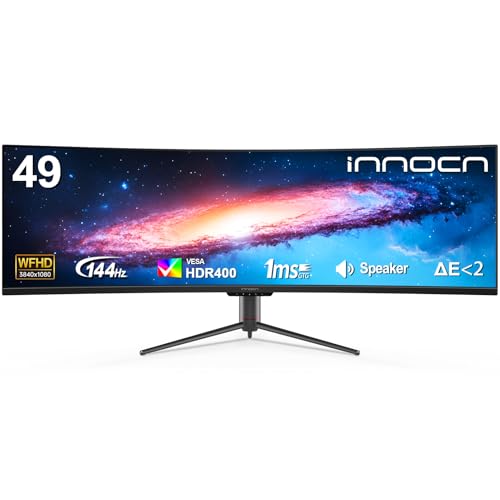
INNOCN 49″ Curved Ultrawide 144Hz Monitor (32:9)
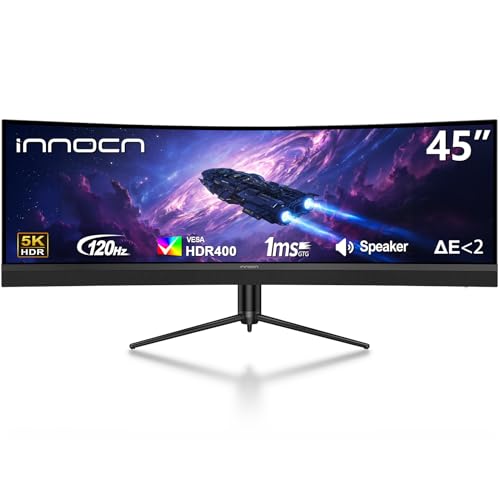
INNOCN 45″ 5K2K 120Hz Ultrawide Curved Monitor

INNOCN 40″ WQHD 144Hz Ultrawide IPS Monitor

INNOCN 45C1R 45″ 5K2K Ultrawide Curved Monitor

INNOCN 49″ QD-OLED 5K2K 144Hz Ultrawide (49Q1R)

INNOCN 49″ Curved 144Hz Ultrawide 32:9 (49C1G)
INNOCN 40″ 5K 100Hz Ultrawide IPS Monitor (40C1U)
Why These Options Stand Out
The AOC C27G2Z is the entry door into curved sim racing for a reason. A 27-inch VA panel with a 1500R curve (the radius of the arc, where smaller numbers mean a tighter bend) keeps your eye line consistent across the screen, so a braking zone at the edge of your peripheral reads about as clearly as the one dead ahead.
Refresh rate, in plain terms, is how many times per second the picture redraws, and 240Hz is fast enough that the kind of micro-corrections you make under trail braking feel immediate rather than laggy. The 0.5ms MPRT response (Moving Picture Response Time, a measure of how quickly a pixel transitions) helps the same on fast apex swings. Compare that to the Sceptre C248W-1920RN coming up next, which trades that speed for a tighter budget, and the case for the AOC as a first serious racing screen gets clearer.
Reasons It Performs
- 240Hz refresh rate keeps high-frame-rate sims smooth and readable at corner entry.
- 0.5ms MPRT response trims blur on quick direction changes.
- 1500R curvature wraps the cockpit view without forcing an enormous desk footprint.
- AMD FreeSync Premium reduces screen tearing when your GPU dips below the panel’s ceiling.
- Full HD resolution on a 27-inch panel is light on your graphics card, which matters on older rigs.
Things To Consider
- 1080p on 27 inches can show individual pixels at typical desk distance, so text and dash readouts may look slightly soft.
- Owners commonly report that the included stand offers tilt only, so a VESA arm becomes a likely add-on for proper sim seating.
Who Should Grab It
Beginners and mid-tier sim racers running older GPUs who want real speed without rebuilding their whole cockpit.
Skip It When
The INNOCN 49C1G makes more sense if you’re ready to leave single-screen life behind and chase a wraparound field of view.
The 49C1R is the screen that makes a triple-monitor rig feel redundant. Its 5120×1440 resolution, often called 5K2K, sits in a 32:9 aspect ratio (twice the width of a standard 16:9 screen), and the 1800R curve draws side mirrors and cars alongside you into your natural peripheral vision.
For endurance racing, where you read traffic in both lanes and chase a delta for hours, the canvas changes the experience. The stand is height and tilt adjustable, which matters once you set the screen at cockpit-eye height rather than desk height. Step up to this from the AOC C27G2Z above and you’re moving from a tight single screen to a full dashboard of room.
Features That Help
- 32:9 super ultrawide replaces a triple-screen rig with one continuous panel and no bezels in your peripheral view.
- 5120×1440 gives meaningful headroom for HUD elements without crushing the central driving view.
- USB Type-C, DisplayPort, and HDMI inputs let you connect a racing PC and a console side by side.
- HDR400 and 99% sRGB coverage make dusk and night tracks read with real depth rather than washed-out shadows.
Points To Note
- Driving 120Hz at 5120×1440 asks serious hardware, so older GPUs will bottleneck the experience.
- The 49-inch footprint demands a wide, deep desk, and users commonly report the box is heavy and awkward to move solo during setup.
Right Fit For
Sim racers ready to commit to a single-screen cockpit and run a modern graphics card.
Look Elsewhere When
The INNOCN 49Q1R is the smarter target if OLED contrast and a snappier 144Hz ceiling matter more to you than saving on cost.
The C248W-1920RN is a 24-inch 1500R curved panel that fits where nothing else on this list does. A small sim rig, a bedroom corner, or a kid’s first wheel all benefit from a screen that doesn’t demand two feet of free desk behind it. 1080p on 24 inches is a comfortable pixel density, which means dash readouts stay sharp without taxing your GPU.
It also keeps things simple with two HDMI ports and a VGA input, plus a VESA mount pattern for those who want to clamp the screen to a wheel stand. You won’t get the inky blacks of OLED, but for learning racing lines and braking markers the panel does the job without fuss.
Standout Benefits
- Compact 24-inch size fits tight cockpits and small desks where a 27-inch panel feels oversized.
- Built-in speakers cover basic audio needs for casual sessions without adding external gear.
- VESA compatibility lets you mount to a wheel stand for proper racing seating posture.
- 1080p resolution keeps frame rates high on modest graphics cards.
Worth Noting
- Refresh rate is modest, so fast-twitch competitive racing feels less fluid than on the AOC C27G2Z above.
- Owners commonly report that the included speakers are serviceable but thin, so headphones remain the practical choice.
Built With In Mind
First-time sim racers, students in dorm setups, or anyone testing the hobby before a bigger investment.
A Better Fit Elsewhere
The AOC 27″ Curved Gaming Monitor (C27G2Z) earns its place if you can stretch the budget for that 240Hz ceiling.
Where the 49C1R above goes for maximum pixel count, this 49-inch 32:9 panel holds to a friendlier 3840×1080 and bumps the refresh to 144Hz. For sim racers whose priority is fluid motion rather than razor-sharp dashboards, that trade makes sense. The lower vertical resolution (1080p tall instead of 1440p tall) also lightens the load on your graphics card, so a mid-range GPU can push high frame rates in titles like iRacing or ACC.
The 1800R curve and the screen-split feature also work well for streamers, since you can run a race on one half and a chat window on the other without a second monitor cluttering the rig.
Positive Takeaways
- 144Hz refresh rate gives noticeably smoother motion than the 120Hz 49C1R for fast corner sequences.
- Lower 3840×1080 resolution is friendlier to mid-range GPUs than 5K2K alternatives.
- Screen-split support turns the panel into a dual-monitor replacement for racing plus streaming.
- USB-C, DisplayPort, and HDMI cover modern and legacy connections.
Honest Caveats
- 3840×1080 in a 32:9 frame stretches vertical UI elements, which some sim dashboards handle awkwardly.
- Stand adjustability is solid, but a 49-inch panel still demands careful desk measurement before ordering.
Made For
Sim racers who race often, stream occasionally, and want ultrawide immersion without a top-tier GPU.
Not Your Match When
The INNOCN 49C1R is the right call if you need extra vertical room for HUD-heavy sims like DCS or flight titles.
Step down in size from the 49-inch panels and you step up in pixel density. The 45-inch 5K2K INNOCN delivers 5120×1440 across a slightly smaller canvas, so the same horizontal real estate arrives with crisper text and sharper MFD displays (Multi-Function Displays, the secondary screens in cockpits). For sim racers who also tinker with iRacing setups or ACC tuning apps, the extra clarity pays off when reading telemetry.
The 1500R curve is a touch tighter than the 1800R on the 49-inch picks, so the wraparound effect feels closer to your face. USB-C with 65W power delivery means a single cable can run the panel and charge a laptop at the same time, which suits racers who dock a work machine during the week.
Useful Touches
- 5K2K resolution on a 45-inch screen gives excellent pixel density for HUD and dash clarity.
- USB-C with 65W power delivery simplifies cable management for laptop-tethered setups.
- 1500R curve offers a snugger wraparound than the gentler 1800R alternatives.
- PIP/PBP (Picture-in-Picture / Picture-by-Picture) lets you view two sources at once without a second panel.
Trade Offs
- At 120Hz, motion is smooth but not as crisp as the 144Hz options above.
- 45 inches is still a large footprint, so users commonly report measuring twice before committing to the desk space.
Best Suited To
Pixel-density fans and laptop-tethered sim setups that want one cable to drive everything.
Swap It Out When
The INNOCN 45C1R earns your attention if you want a higher 90W USB-C power delivery ceiling for a beefier laptop.
There’s a sweet spot between a 27-inch standard screen and a 49-inch super ultrawide, and this 40-inch 21:9 panel sits right in it. WQHD at 3440×1440 (Wide Quad HD, the standard ultrawide resolution) is the resolution most sim racers learn to love, since it offers genuine horizontal width without demanding a 4K-tier GPU. The IPS panel (In-Plane Switching, known for color accuracy and wide viewing angles) also holds color and contrast well at the screen edges, which matters when you’re glancing at mirrors.
Pair it with a 144Hz refresh and you get the motion clarity racers want at a desk size that still leaves room for a wheelbase and pedal tray. The 90W USB-C power delivery is a quiet win for anyone running a USB-C laptop dock.
Practical Advantages
- 21:9 ultrawide is a meaningful field-of-view upgrade over 16:9 without the desk demands of 32:9.
- IPS panel keeps colors and contrast consistent at off-center viewing angles.
- 144Hz refresh rate is well-matched to mid-to-high tier GPUs in modern sims.
- AMD FreeSync Premium smooths frame handoffs when GPU load shifts.
Points To Keep In Mind
- 21:9 still stretches the field beyond what older sim titles natively support, so check compatibility before counting on a clean ultrawide feed.
- IPS contrast is typically lower than VA panels, so deep night scenes can look slightly lifted in shadows.
The Right Fit
Sim racers who want a real ultrawide upgrade but need to keep a moderate desk footprint.
Consider Something Else When
The INNOCN 49″ Curved Ultrawide 144Hz Monitor earns its spot if you have the desk width for a full 32:9 wraparound.
The 45C1R takes the 45-inch 5K2K canvas and pushes the USB-C power delivery to 90W, which is enough to charge a 15-inch performance laptop while driving the display. If your sim rig doubles as your work-from-home desk, that single-cable convenience reshapes how the whole setup feels. The 1500R curve stays consistent with the rest of the 45-inch INNOCN family, and PIP/PBP (Picture-in-Picture / Picture-by-Picture, which lets two inputs share the panel) keeps a second input ready in a corner of the screen.
Where the AOC C27G2Z earlier is about speed, and the 49-inch 49C1R is about scale, this one is about flexibility. It plays well for racers who run a sim during evenings and a productivity workflow during the day.
What Helps Most
- 90W USB-C power delivery covers most productivity laptops on a single cable.
- 5K2K resolution keeps the panel sharp for spreadsheets as well as sim HUDs.
- PIP/PBP enables two-source viewing without a second physical monitor.
- Height-adjustable stand supports proper cockpit seating posture over long sessions.
A Few Limitations
- 120Hz ceiling is fine for sims, but it sits below the 144Hz options above for high-frame-rate racing.
- 45 inches is still a large display, so wall mounting or a deep desk helps it feel settled rather than looming.
Perfect Match For
Hybrid sim-and-work setups that lean on USB-C docking for a clean desk during the week.
Where Another Pick Suits Better
The INNOCN 49Q1R is the better fit when you want OLED contrast alongside 144Hz for a more cinematic night-racing feel.
OLED changes the conversation. The 49Q1R uses a QD-OLED panel (Quantum Dot OLED, which combines OLED’s perfect blacks with a quantum-dot color layer for higher brightness), and that means each pixel switches off completely for true black. Headlight beams at night, brake disks glowing red, and the darkness between cars all read with a depth that LCD panels cannot match.
The 0.03ms response time (a measure of pixel transition, where lower is better) and 144Hz refresh keep motion pristine, and the KVM switch (Keyboard, Video, Mouse, a built-in hub that lets you share peripherals between two computers) is a quiet win if you toggle between a sim PC and a work machine on the same panel. The 49-inch 5K2K canvas also matches the 49C1R above in pure size, so you can compare them on panel technology rather than footprint.
What Stands Out
- QD-OLED contrast delivers true blacks for night and wet-weather sim racing.
- 0.03ms response time keeps motion trails near invisible at high frame rates.
- 144Hz refresh rate pairs with HDMI 2.1 for clean console support up to modern standards.
- Built-in KVM simplifies swapping between a sim PC and a daily driver without replugging.
Potential Drawbacks
- OLED panels are commonly noted to need care with static HUD elements, and owners commonly enable pixel refresh routines to mitigate burn-in (permanent image retention from static elements).
- 5K2K at 144Hz is a heavy lift for any GPU, so budget for a top-tier graphics card.
Who It Suits Best
Sim racers chasing cinematic image quality and willing to invest in the GPU to push 5K2K at high frame rates.
Reach For A Different Pick When
The INNOCN 45C1R is the better value if OLED contrast isn’t worth the price jump for your racing titles.
The 49C1G is the lighter entry into the 32:9 ultrawide world. It shares the 1800R curve and 49-inch canvas with the 49C1R above, but it drops the resolution to 3840×1080 and holds the refresh at 144Hz. The result is a panel that is friendlier to a wider range of graphics cards, and the wider field of view is the actual point for sim racing.
Endurance racers in particular will appreciate the soft learning curve. The horizontal width shows you the cars alongside without forcing you to chase 5K-tier frame rates, and 99% sRGB coverage keeps liveries looking the way their designers intended. It is also a sensible way to step up from the AOC C27G2Z if you’ve outgrown a single 16:9 screen.
A Few Highlights
- 32:9 ultrawide offers real side-mirror visibility without a triple-screen rig.
- 144Hz refresh balances motion clarity and GPU demand.
- USB Type-C, DisplayPort, and HDMI cover PC plus console racing.
- Height and tilt adjustments help the panel sit at cockpit-eye level.
Some Limits To Know
- 3840×1080 in a 32:9 frame makes the vertical space feel short for HUD-heavy sims.
- 49 inches still commands a deep, wide desk for proper seating distance.
Whose Shelf It Belongs On
Casual endurance racers and newcomers to ultrawide sim setups who want immersion without 5K demands.
Another Choice May Suit
The INNOCN 49″ Curved Ultrawide 144Hz Monitor (the 49-inch 3840×1080 sibling) is the close alternative if you want the same canvas with similar flexibility.
The 40C1U is the only 5K option in the lineup, and that resolution changes how the cockpit reads. At 5120×2160 in a 21:9 frame, the pixel density is high enough that steering wheels, dash digits, and rear-view mirror text look genuinely crisp rather than softly interpreted. For sim racers who also edit video or grade photos, the factory-calibrated Delta E under 2 (a color-accuracy measurement where lower is better, indicating minimal color deviation from the source) makes it a dual-purpose tool.
The 100Hz refresh rate is the trade you accept for that pixel count, and IPS holds the colors steady when you lean in close to check a corner. It is a quiet specialist on a list full of wide-and-fast options, and that is its strength.
The Upside
- 5K resolution in 21:9 delivers outstanding text and dash clarity for sims and creative work.
- Delta E under 2 means colors are accurate out of the box for grading or liveries.
- IPS panel maintains color consistency across wide viewing angles.
- USB-C, HDMI, and DisplayPort inputs handle laptops and desktops with ease.
Where It Is Less Suited
- 100Hz refresh rate trails the 144Hz panels above for pure racing motion.
- 5K demands a strong GPU to push high frame rates, and users commonly find that older mid-range cards struggle.
Right Fit For
Sim racers who also do creative work and value pin-sharp detail over the fastest refresh rate.
Not Your Match When
The INNOCN 40″ WQHD 144Hz Ultrawide IPS Monitor makes more sense if racing speed is the priority and creative color work is secondary.
What Matters Most Before Choosing Curved Monitors For Sim Racing
Field Of View And Curvature
The radius number, like 1500R or 1800R, describes how tightly the panel bends. Smaller numbers mean a tighter curve and a stronger wraparound feel. For sim racing, anything from 1500R to 1800R sits in the comfortable range, and going tighter than that on a large screen can feel unnatural at standard desk distance.
Refresh Rate And Response
Refresh rate (in Hz) is how many times per second the picture redraws, and response time (in ms) is how quickly a pixel can change color. For racing, both matter: high refresh keeps motion fluid, and low response keeps fast apex swings from smearing. Pair the panel with a GPU that can actually push high frame rates, since a 240Hz screen running at 80fps leaves performance on the table.
Resolution And Aspect Ratio
Standard 16:9 panels are familiar and easy to drive, while 21:9 ultrawide adds side visibility without overwhelming your hardware. The 32:9 super ultrawide panels simulate a triple-screen rig with one continuous image, but they ask more from your graphics card. Match the resolution to your GPU, not just your ambition.
Panel Technology
VA panels (Vertical Alignment) offer strong contrast and deep blacks, which suit moody night tracks well. IPS panels (In-Plane Switching) hold color and viewing angles more consistently, which helps at ultrawide sizes. OLED panels switch pixels off individually for true black, but commonly need care around static HUD elements to avoid burn-in (permanent image retention).
Mounting And Ergonomics
A racing seat sits lower than a typical office chair, so a height-adjustable stand or a VESA-mounted arm (a standardized mounting interface on the back of the panel) matters more than most spec sheets suggest. Plan for the panel to sit at eye level when you’re belted in, and confirm the desk depth supports the screen size before ordering.
Key Considerations Across These Picks
Pitfalls Shoppers Hit
The most common miss is buying a 49-inch super ultrawide without measuring the desk. Those panels need real width and depth, and a 32:9 image at the wrong distance looks stretched rather than immersive. The second is chasing 240Hz without checking that the GPU can actually feed those frame rates at the chosen resolution. A 1080p 240Hz screen and a 4K 60Hz screen sit at opposite ends of the use-case map, and the right one depends on the rest of the rig.
When Paying More Pays Off
Higher-tier models earn their cost in panel type, pixel density, and connectivity. OLED contrast changes night racing meaningfully, 5K resolution sharpens every dash readout, and 90W USB-C power delivery turns a single cable into a complete docking solution. None of that matters if your GPU cannot push the resolution, so the upgrade is worth it when the rest of the system is ready to keep up.
Frequently Asked Questions
What Curvature Works Best For Sim Racing?
For most cockpit setups, 1500R to 1800R delivers a natural wraparound without forcing you to sit too close. Tighter curves can feel cinematic but may distort straight track edges at normal desk distance.
Is Ultrawide Better Than Triple Screens?
A 32:9 super ultrawide replaces a triple-screen rig with one continuous image and no inner bezels breaking the peripheral view. Triple screens still offer more total resolution, but most sim racers find the single-panel approach simpler and more immersive.
Do I Need A High-End GPU For A Curved Ultrawide?
The more resolution and refresh you buy, the more your GPU has to push. A mid-range card handles 3440×1440 at 144Hz comfortably, while 5120×1440 at 120Hz or higher typically asks for a high-end GPU to stay smooth.
Does Panel Type Really Matter For Racing?
Yes, but in different ways. VA gives deep blacks for night tracks, IPS keeps colors accurate across wide angles, and OLED combines both with near-instant response. Each has a case, and the right choice depends on whether you value contrast, color, or motion most.
Is Burn-In Still A Concern With OLED?
Modern OLED panels include pixel refresh routines and shift features that reduce the risk, but static HUD elements over thousands of hours can still leave faint traces. Enabling built-in compensation and varying your content helps mitigate that.
Bottom Line
The right curved monitor for sim racing depends on the rig around it: a tight desk and modest GPU suit the Sceptre C248W-1920RN, while a wide cockpit and serious graphics card open the door to the INNOCN 49Q1R. Match the panel to the rest of your setup, and the wraparound effect stops being a spec sheet number and starts feeling like the cockpit itself.



