


Competitive Counter-Strike rewards gear that disappears in your hand. A sensor that tracks cleanly, a shell you can flick without wrist strain, and a wireless signal that doesn’t stutter when the round’s on the line. This roundup walks through ten mice, plus one keyboard and one pad that fit naturally into a CS2 setup, focusing on weight, sensor specs, polling rate, and the small details that affect daily play. Most picks here are wireless and lightweight, since that’s where the modern CS2 mouse market has settled, and a couple cover budget-friendly shapes for newer players.
The Leading Options At A Glance

MCHOSE Ace 68 Turbo Hall Effect Gaming Keyboard (Pink)

LEMOKEY G1 8K Wireless Gaming Mouse (Black)

Taodaliy Glass Gaming Mouse Pad XL (White)

Pulsar X2 Crazylight Wireless Mouse Mini (Aqua Zest)

Keychron M3 Mini 8K Wireless Gaming Mouse (Black)
Keychron M3 Mini Wireless Mouse (Black)

Keychron M3 Mini Wireless Mouse (White)

Pulsar X2 Crazylight Wireless Mouse Mini (Jet Black)

Pulsar X2 Crazylight Wireless Mouse Mini (Sunset Haze)
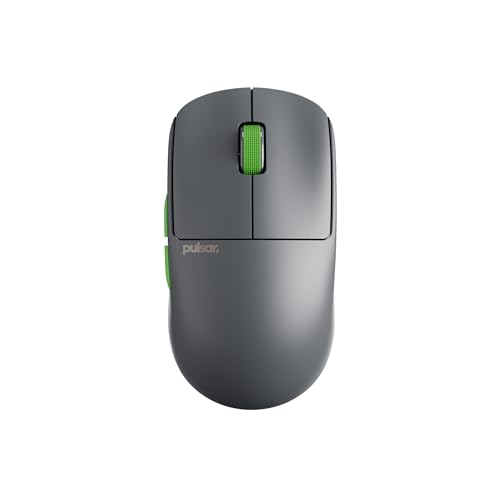
Pulsar X2 Crazylight Wireless Mouse Mini (Volt Shadow)
The Strengths Of Each Pick
The MCHOSE Ace 68 Turbo earns its place here because a CS2 setup lives and dies on input consistency, and this board leans hard into that. The 65% layout (compact, no numpad or arrow cluster) keeps your mouse hand closer to the action, which matters during long practice sessions.
Where it gets interesting is the magnet-based switch tech, often called Hall effect. Unlike standard mechanical switches that register a single fixed actuation point, Hall effect switches detect key depth via magnetism, letting you set actuation anywhere from 0.1mm to 3.4mm and configure a rapid trigger window as tight as 0.001mm. The CNC aluminum shell adds heft that keeps the board planted during aggressive counter-strafing. For a player chasing the same low-latency feel that pro FPS players favor, this is a meaningful upgrade over a typical rubber-dome keyboard.
Well-Handled Touches
- Up to 16K polling on Windows and 8K on Mac delivers ultra-frequent input reports, reducing the delay between press and on-screen response.
- Rapid trigger window as tight as 0.001mm means a key re-registers the moment it travels back past your set threshold, perfect for rapid counter-strafing and micro-adjustments.
- CNC aluminum chassis resists flex and stays planted on cloth surfaces during intense play.
- Compact 65% layout frees up desk space, letting you swing the mouse across a wider arc.
Worth Noting
- The pink finish may clash with darker battlestation themes; it’s a strong color commitment.
- Magnetic switch tech requires driver-level configuration, which adds a learning curve for first-time Hall effect users.
Made For
Competitive FPS players on Windows who want keyboard-side rapid trigger to match a high-polling wireless mouse.
Consider Something Else When
The Pulsar X2 Crazylight Mini suits you better if you only need a mouse upgrade and want to skip the keyboard entirely.
LEMOKEY sits under the Keychron umbrella, and the G1 reads like the brand’s flagship wireless gaming mouse distilled into a 55g shell. That weight lands it in the same conversation as the lightest mice on this list, while the sensor package is anything but stripped down.
The PixArt 3950 sensor is a current-generation flagship capable of 30,000 DPI and high-speed tracking, paired with 8K polling over a 2.4GHz wireless connection. Polling rate, measured in hertz, tells you how often the mouse reports its position to your computer: 8000Hz means eight times per millisecond, which can smooth out micro-corrections in CS2 spray transfers. The 140-hour battery rating means you can go roughly a week of casual play between charges. Tri-mode connectivity (Bluetooth, 2.4GHz, USB-C wired) covers almost every setup scenario.
Benefits That Matter
- 8K wireless polling over 2.4GHz gives you a near-instant feedback loop, with no perceptible lag versus wired for most users.
- PixArt 3950 sensor handles high-speed flicks and slow micro-adjustments alike, with strong tracking consistency on a variety of pad surfaces.
- 55g weight makes it competitive with the lighter mice on this list, easing wrist fatigue across long ranked sessions.
- 140-hour battery life spans a full competitive week without needing the cable.
Points To Note
- The 8K polling rate typically requires a USB 3.0 or higher port; older laptops may not expose the full speed.
- At 55g it is not the absolute lightest here, so fingertip-grip users chasing sub-50g shells should compare with the Pulsar X2 Crazylight Mini.
Key Attributes
Right Fit For
Competitive CS2 players who want flagship wireless performance and a comfortable ergonomic shape for claw or palm grip.
Look Elsewhere When
The Keychron M3 Mini 8K fits better if you want a smaller, mini-shape form factor with the same sensor tier.
A glass pad is an unusual choice in 2026, but the Taodaliy glass surface makes a strong case for CS2 players who want absolute consistency. Cloth pads wear and change glide over months, while this glass top holds the same texture from day one to day three hundred.
The 19.3″ x 16.5″ surface gives you generous room for low-sensitivity crosshair placement, which most CS2 pros use. The marketed balance between speed and control leans toward the control side: you can stop an AWP flick cleanly without over-shooting. The anti-slip base keeps the pad planted on a wood or laminate desk, and the water-resistant surface makes spills an easy wipe rather than a disaster. It’s noticeably heavier than fabric, so it’s a stationary setup piece, not a travel companion.
Why It Works Well
- Glass surface maintains identical glide characteristics over time, so your muscle memory stays consistent through months of play.
- XL footprint suits low-DPI aimers who need wide sweeping room for big flicks.
- Water-resistant top wipes clean in seconds, a real ownership perk if you snack at the desk.
Trade Offs
- Glass pads feel cold and have a different acoustic profile than cloth, and some players report finger drag noise on the smooth surface.
- Heavier than fabric pads, so repositioning during LAN trips is less convenient.
- Mouse feet wear faster on hard glass than on cloth, depending on the skater material.
Best Suited To
CS2 players who play at a fixed desk, prefer low sensitivity, and want a surface that doesn’t degrade over time.
Skip It When
The LEMOKEY G1 or Keychron M3 Mini 8K suit you better if your priority is the mouse itself rather than the pad beneath it.
The Pulsar X2 Crazylight Mini is built around a simple idea: less mass means less effort per click. The Aqua Zest colorway adds a clean pastel note to a category that tends toward aggressive blacks and reds.
For claw and fingertip grippers, a mini shell keeps the mouse tucked under your palm without forcing your fingers to splay. The 35g claim, lighter than a standard chicken egg, sounds dramatic until you actually use one, and the difference shows up in long session comfort more than you’d expect. Pulsar targets this mouse at the FPS competitive crowd, and the shape works for most 18.5cm-or-smaller hand sizes in a claw or fingertip grip. Compared with the LEMOKEY G1, this is the lighter, more compact option for those who prioritize agility over palm support.
Useful Strengths
- Sub-40g weight class makes micro-adjustments easier and reduces fatigue over multi-hour sessions.
- Mini shell suits claw and fingertip grips where palm support would actually slow you down.
- Wireless design keeps the desk clean, a real quality-of-life upgrade over cable-bound mice.
Honest Caveats
- The mini shell may feel cramped for palm-grip users with larger hands.
- Lighter shells can feel slightly floaty if you are used to a 70-80g mouse, so an adjustment period is common.
- Glossy color finishes on the Aqua Zest variant can show fingerprints more readily than matte black options.
Who Will Love This
Competitive players with smaller-to-medium hands who prefer claw or fingertip grips and want a featherlight wireless shell.
Swap It Out When
The LEMOKEY G1 fits better if you want a similar wireless experience with a fuller shape for palm grip.
The M3 Mini 8K is the Keychron version of the same formula LEMOKEY built, with one important difference: full Linux, Mac, and Windows support baked into the design. If you split your gaming time between a Windows desktop and a MacBook, this is the mouse that handles both without driver headaches.
You get the same PixArt 3950 sensor at 30,000 DPI and 8K polling in both 2.4GHz wireless and wired modes. The 55g weight matches the LEMOKEY G1, but the mini shape here is more pronounced, which makes it a stronger fit for fingertip and aggressive claw grips. Bluetooth 5.3 support means you can pair it with a tablet or smart TV when the gaming PC is busy. The 140-hour battery claim holds up under moderate RGB use. For a CS2 player who also does creative work, this is the most flexible choice in the list.
Notable Upsides
- Cross-platform compatibility removes the need for a second mouse when switching between Mac, Windows, and Linux setups.
- 8K polling in both wireless and wired modes gives you consistent high-speed response regardless of cable state.
- Programmable buttons through Keychron’s launcher software let you remap for clutch bindings or productivity shortcuts.
Small Caveats
- The mini shape may feel undersized for palm-grip users with hands over 19cm.
- Software customization is more limited than some competitors’ tools, depending on your OS.
Feature Snapshot
Perfect Match For
Multi-platform users who split time between a Mac, a Windows rig, and maybe a Linux machine, and want one mouse to handle all three.
Another Choice May Suit
The Pulsar X2 Crazylight Mini fits better if you want a lighter, more compact shell and don’t need Mac/Linux support.
Stepping down from the 8K version, this M3 Mini keeps the same chassis but swaps in a PixArt 3395 sensor and tops out at 4K polling. For a CS2 player who doesn’t need 8K, that trade-off is a meaningful one: 4K still feels extremely responsive, and the 3395 sensor is a proven performer.
The 55g weight and mini shape match the 8K sibling, so ergonomics are identical. The PixArt 3395 supports up to 26,000 DPI with 650 IPS tracking, which is more than enough headroom for any CS2 playstyle. Tri-mode connectivity, including Bluetooth 5.1, covers the same use cases. If you mainly play CS2 and don’t need the absolute top of the sensor tier, this version keeps the shape and the wireless experience at a friendlier price point.
What Earns Its Place
- 4K polling provides noticeably smoother tracking than 1K without the full cost jump to 8K hardware.
- PixArt 3395 sensor is a well-regarded mid-tier flagship with proven reliability in competitive use.
- Same 55g weight and mini shape as the 8K version, so the ergonomic experience carries over.
Factors To Consider
- Bluetooth 5.1 is one generation behind the 8K sibling’s 5.3, which can show up slightly in multipoint scenarios.
- Lower max DPI ceiling than the 3950-equipped M3 Mini 8K, though this rarely matters in practice for CS2.
Built With In Mind
Value-focused players who want a 4K wireless mouse in a proven Keychron chassis and don’t need 8K hardware.
Reach For A Different Pick When
The Keychron M3 Mini 8K suits you better if you want the flagship 3950 sensor and 8K polling at the cost premium.
This is the white edition of the M3 Mini, and the difference is purely cosmetic. Same PixArt 3395 sensor, same 4K polling ceiling, same 55g weight, same 26,000 DPI capability. The white finish simply pairs better with light-themed desks and minimalist setups.
For a CS2 player with a clean white keyboard and a wood-grain desk, the matching aesthetic matters more than spec sheets suggest. The white shell is more prone to visible wear on the mouse buttons and palm area over time, depending on grip and hand chemistry, so it rewards careful handling. Everything else about ownership, including the same Bluetooth 5.1, 2.4GHz, and wired options, carries over identically from the black version.
What Stands Out
- White finish complements minimalist and light-themed battlestations where black mice look out of place.
- Same 4K polling and proven 3395 sensor as the black variant, so no performance compromise for the color choice.
- Compact mini shape suits claw and fingertip grips on small-to-medium hands.
Things To Consider
- White plastic tends to show skin oils and discoloration on grip areas faster than darker shells, depending on use.
- No spec advantage over the black M3 Mini, so you’re paying a modest premium for the colorway.
Whose Shelf It Belongs On
Style-focused players with light or minimalist desk setups who want the M3 Mini’s performance in a matching color.
Where A Sibling Pick Shines
The Pulsar X2 Crazylight Mini in Sunset Haze fits better if you want a lighter shell and a more colorful aesthetic.
The Jet Black edition of the X2 Crazylight Mini strips away the color personality of the Aqua Zest and Sunset Haze variants in favor of a stealthy, all-black look. For a CS2 player with a dark battlestation, this is the version that disappears into the desk.
Mechanically it’s identical to the other X2 Crazylight Mini colorways: the same 35g-class shell, the same mini shape, the same wireless design. The all-black finish is the most practical of the bunch for daily use, since it hides fingerprints and grip wear far better than the pastel or gradient options. If you have a black deskmat, black keyboard, and dark monitor arms, this is the color that ties the setup together without becoming a visual distraction mid-match.
Real Benefits
- All-black finish hides fingerprints, smudges, and minor wear far better than lighter colorways.
- Sub-40g shell keeps wrist fatigue low across long competitive sessions.
- Mini shape is well-tuned for claw and fingertip grips on smaller hands.
Points To Keep In Mind
- Lacks the visual flair of the Aqua Zest and Sunset Haze variants if personality matters to you.
- Glossy black plastic can show light scratches more readily than matte options, depending on storage.
Who Should Grab It
Dark-themed battlestation owners who want the lightest Pulsar shell in a finish that stays clean-looking over time.
A Better Fit Elsewhere
The Keychron M3 Mini in black fits better if you need 4K or 8K polling and prefer a more traditional ergonomic shape.
Sunset Haze is the warm gradient option in the X2 Crazylight Mini lineup, blending orange and pink tones into a single shell. It’s the colorway that shows up best in desk photos and pair lighting rigs, but the hardware underneath is identical to the other X2 Crazylight Mini variants.
For a CS2 player who treats their battlestation as a personal project, the Sunset Haze finish is a way to add personality without sacrificing the same competitive shape. The mini form factor keeps it focused on claw and fingertip users, and the sub-40g weight is the main reason to choose this over the heavier Keychron siblings. Owners commonly note that the gradient finish can look slightly different under warm versus cool monitor light, which is part of the appeal for style-conscious players.
Positive Points
- Warm gradient finish stands out on stream overlays and desk photos without being loud.
- Featherlight shell reduces effort per click and helps during long ranked sessions.
- Mini shape stays consistent across the X2 Crazylight lineup, so grip familiarity transfers.
Some Limits To Know
- Color-sensitive buyers may want to see the actual finish in person, since gradient mice vary in look from product photos.
- Same mini-size trade-offs as the other X2 Crazylight variants: not ideal for palm-grip users with larger hands.
Right Fit For
Style-conscious competitive players who want a recognizable colorway on a proven sub-40g shell.
Not Your Match When
The Pulsar X2 Crazylight Mini Jet Black is the better call if you prefer a low-key finish that hides wear over time.
Volt Shadow closes out the X2 Crazylight Mini color family with a subtler two-tone treatment than Sunset Haze. It’s a mature alternative that still carries the same competitive shape and weight class.
For a CS2 player who likes the idea of a colored shell but doesn’t want a fully saturated pastel, Volt Shadow sits in the middle ground between Jet Black and Sunset Haze. The shape, weight, and wireless performance match the rest of the X2 Crazylight Mini family exactly, so your buying decision here is purely about aesthetic. If you want the lightest competitive shell from Pulsar in a finish that reads as professional rather than playful, this is the version to consider.
Strong Points
- Two-tone Volt Shadow finish reads as professional and pairs with both light and dark desk setups.
- Sub-40g shell keeps the X2 Crazylight Mini’s signature low-effort feel intact.
- Wireless design removes cable drag, helping maintain a clean line during long aim sessions.
Where It May Fall Short
- Same mini-size caveats as the rest of the X2 Crazylight lineup, so palm-grip users should look at the LEMOKEY G1 instead.
- Two-tone finish is harder to match with third-party accessories like grips and cable extensions.
Who Will Love This
Competitive players who want a featherlight shell with a finish that works in both home and office-style setups.
Where Another Pick Suits Better
The LEMOKEY G1 is a stronger fit if you want a fuller ergonomic shell with the 8K polling tier and don’t mind a heavier 55g weight.
Picking The Right Cs2 Mouse Setup For Your Playstyle
Sensor tier, weight, and shape are the three pillars that matter most in a CS2 mouse. The PixArt 3950 sensor in the LEMOKEY G1 and Keychron M3 Mini 8K represents the current flagship, while the 3395 in the standard M3 Mini is a proven step down that still handles competitive play easily. Anything above 26,000 DPI is overkill for CS2, so prioritize polling rate and tracking consistency over raw DPI numbers.
Weight determines how your arm feels after a long session. Sub-50g shells like the Pulsar X2 Crazylight Mini family let you play for hours without wrist fatigue, while 55g mice like the LEMOKEY G1 sit at the comfortable middle ground. Above 70g, you start feeling it across multi-hour ranked sessions.
Shape is the most personal variable. Mini shells work best for claw and fingertip grips on smaller hands. Mid-size and full ergonomic shapes suit palm grip and larger hands. If you’re between sizes, the LEMOKEY G1’s fuller profile is a safer bet than the mini M3 Mini.
Polling rate tells you how often your mouse reports its position. 1000Hz is standard and fine for most players. 4000Hz (4K) adds noticeable smoothness for high-refresh monitor owners. 8000Hz (8K) is the current ceiling and the difference is real but subtle, so it matters most if you play on a 360Hz or higher display.
Match The Mouse To Your Grip Style
Claw grippers benefit most from the mini shells on this list, like the Pulsar X2 Crazylight Mini and Keychron M3 Mini. Palm grip users get better support from a fuller shape like the LEMOKEY G1, where the rear hump fills the palm and reduces finger strain. Fingertip grippers want the lightest shell possible, which is where sub-40g mice pay off.
Decide How Much Wireless Matters
All the mice here are wireless except for the MCHOSE keyboard. Wireless at 1K feels nearly identical to wired. At 4K and 8K, the smoothness during fast flicks is the real upgrade. If you play on a 144Hz or 165Hz monitor, 1K is fine. On 240Hz and up, 4K and 8K become more meaningful.
Consider Your Desk Space And Pad
The Taodaliy glass pad pairs well with low-sensitivity CS2 play, but it is heavy and stationary. If you move your setup between locations, a cloth pad makes more sense. Glass rewards a fixed desk and rewards players who hate pad wear over time.
Key Considerations Across These Picks
Pitfalls Shoppers Hit
The most common mistake in this category is chasing the highest DPI or polling number without considering whether your monitor and PC can actually use it. An 8K mouse connected to a 144Hz display leaves most of the polling advantage on the table, and a high-end sensor feels the same as a mid-tier sensor in everyday use. The second trap is picking a shape based on looks rather than grip. A mini shell looks compact in photos but feels cramped after two hours of palm-grip play. Always match the shape to your grip, not the other way around.
The Case For Spending Up
The premium tier in CS2 mice usually buys you three things: a flagship sensor like the PixArt 3950, higher polling rates up to 8K, and lighter shells. These matter most if you play at high refresh rates (240Hz+), already have your sensitivity and grip dialed in, and want to remove every possible input barrier. Beginners benefit more from a mid-tier 4K mouse like the standard M3 Mini, where the learning curve is gentler and the price is friendlier. The honest read: once your aim and game sense are stable, the upgrade from 4K to 8K becomes meaningful. Before that point, it’s mostly visual.
Frequently Asked Questions
What DPI should a CS2 mouse run at?
Most CS2 professionals use 400 to 800 DPI, paired with in-game sensitivity that produces a 360-degree turn within a moderate mousepad sweep. Modern sensors support far higher DPI ranges, but those are not typically what you actually use in CS2.
Does polling rate really matter in CS2?
Yes, but the effect scales with monitor refresh rate. On a 240Hz or higher display, 4000Hz and 8000Hz polling produce smoother visual feedback during fast movements. On a 144Hz or 165Hz display, 1000Hz feels nearly identical to 8000Hz in practice.
Are wireless gaming mice good enough for CS2?
Modern wireless mice from the brands on this list use 2.4GHz connections with latency that is not perceptible to most players. Top-tier wireless options like the LEMOKEY G1 and Keychron M3 Mini 8K now match or exceed wired response in real-world play.
How important is mouse weight for CS2?
Lightweight shells reduce arm fatigue during long sessions and make micro-adjustments feel easier. Most competitive players prefer mice under 60g, and the sub-40g category is gaining popularity among claw and fingertip grippers.
How often should I replace my mouse feet?
Standard PTFE skates on a cloth pad typically last 3 to 6 months with regular use, depending on surface and grip pressure. Glass pads wear feet faster, so plan to swap more often on the Taodaliy glass surface.
Bottom Line
A solid CS2 mouse starts with the right sensor and shape, then layers on weight, polling rate, and battery life. The LEMOKEY G1 and Keychron M3 Mini 8K lead on raw specs, the Pulsar X2 Crazylight Mini wins on weight, and the standard M3 Mini gives you a sensible middle ground. Pick by grip first, polling rate second, and aesthetics third, and the right choice tends to make itself.



