


The Xbox Series X runs hot, and anyone who has logged marathon sessions during a summer heatwave knows how loud that internal fan can get. A dedicated cooling fan accessory pulls heat off the chassis, keeps thermals steady during long play sessions, and often doubles as a tidy stand for controllers, headsets, and game cards. The ten options below cover the main styles you’ll find: wall-mount solutions, vertical stands with built-in fans, all-in-one charge-and-cool hubs, and a true internal replacement for tinkerers. Pick by your setup, not by who shouts loudest online.
A Side-By-Side Look

TotalMount for Xbox Series X – Pro Quality Wall Mount

Wiilkac Cooling Fan Stand for Xbox Series S

Ankey Automatic Cooling Fan for Xbox Series X
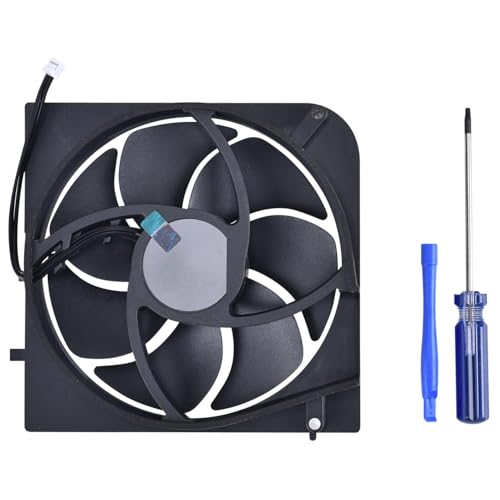
KBRPARTS Replacement Internal Cooling Fan for Xbox Series X

Gam3Gear Ipega Auto Sensing Cooling Fan for Xbox One

MENEEA Cooling Fan with Charging Stand for Xbox Series S

FYOUNG Upgraded Vertical Cooling Fan Stand for Xbox Series S

G-STORY Cooling Fan for Xbox Series X with Temp Display

MENEEA Auto Cooling Fan Charge Stand for Xbox Series X

MENEEA Upgrade Cooling Fan & Dual Charge Stand for Xbox Series X
More On The Choices That Made The List
The TotalMount takes a different route from the rest of this list. Instead of parking your console on a desk, it hangs the Series X on the wall, securing both sides of the chassis so a casual bump won’t send it tumbling. If your entertainment center is already crowded, reclaiming that vertical wall space is genuinely useful, and the included hardware is sized for drywall studs or wood framing.
Heat management is handled passively: lifting the console off the shelf lets air move around the vents that would otherwise sit flush against a surface. Owners commonly pair this mount with the console running in its vertical orientation, which is how Microsoft designed the thermal path. For someone who already wall-mounts their TV, this is the most furniture-friendly option on the list.
What Helps Most
- Side-gripping bracket design prevents accidental drops better than hook-style mounts.
- Frees up an entire shelf for soundbars, collectibles, or cable boxes.
- Compatible with every Series X revision released through 2026, so future console swaps are painless.
- Passive cooling approach means zero extra fan noise in a quiet room.
Things To Consider
- Wall mounting requires a drill and a stud finder, which isn’t a five-minute job for renters.
- You lose easy access to the disc drive, expansion slot, and rear ports without unmounting.
Who It Suits Best
Homeowners or apartment dwellers with a dedicated gaming wall and a slim entertainment setup benefit most.
Skip It When
The MENEEA Upgrade Cooling Fan & Dual Charge Stand for Xbox Series X is a better fit if you want active cooling plus a controller dock on the desk.
The Wiilkac stand is built around the smaller Series S, which is good news for anyone whose entertainment nook can’t fit a full-size tower. The base houses a fan with three manual speed settings, two rechargeable battery packs for the controllers, and a charging dock that tops them up between sessions. An LED indicator tells you which speed you’re on so you’re not guessing.
For a desk that’s already crowded with a monitor, keyboard, and headset hook, the compact footprint is the main draw. The dual-battery approach means you always have a fresh pack ready, especially handy during long RPG sessions. If your setup lives in a bedroom, the lower fan speeds are quiet enough not to bother a light sleeper.
The Helpful Details
- Three manually selected fan speeds let you balance noise against cooling for your room temperature.
- Two rechargeable battery packs ship in the box, so you don’t have to buy AAs separately.
- USB passthrough port keeps a free charging slot for a phone or headset.
Worth Noting
- It’s Series S only, so the higher-thermal Series X isn’t compatible with this base.
- Manual speed control means you have to remember to bump it up during summer.
Made For
Series S owners on tight desks who want a charger and a fan in one footprint will appreciate this design.
Where Another Pick Suits Better
The FYOUNG Upgraded Vertical Cooling Fan Stand for Xbox Series S is a smarter choice if you prefer your console standing upright rather than horizontal.
Ankey’s top-mounted fan takes the thinking out of cooling. The unit sits on top of the Series X, pulls power from the rear USB port, and shifts speeds based on the chassis temperature rather than a fixed dial. The fan stays at standby below 104°F, ramps to 1500 RPM, then 1750, and tops out near 2000 RPM when the internals cross 120°F.
The 9-blade design stays quiet even at the highest setting, which matters when you’re playing a story-driven game with the volume low. Flowing RGB lighting wraps the edges of the fan housing for ambient mood lighting, and a long-press on the power button kills the light when you need darkness. Two USB ports on the back add passthrough charging for headsets or mobile devices.
Notable Gains
- Automatic fan curve means you set it once and forget it, even as room temperature changes with the seasons.
- Low-noise 9-blade fan keeps the audio mix clean for headphones or late-night play.
- Two rear USB ports keep your charging options open without hogging the console’s own ports.
Trade Offs
- Mounting on top of the console adds vertical height, which may not clear low media shelves.
- The RGB ring is decorative and not customizable, which may bother owners who want a fixed color.
Best Suited To
Series X owners who play long sessions and want a set-and-forget thermal solution will find this the most hands-off pick.
A Better Fit Elsewhere
The G-STORY Cooling Fan for Xbox Series X with Temp Display is a stronger match if you want to actually see the temperature reading during play.
This is the only internal-fan swap in the roundup, and it’s a category of its own. KBRPARTS bundles a 5-blade replacement fan, a small tube of thermal paste, and the screwdrivers you’d need to crack open a Series X chassis. Each fan is bench-checked before shipping, which is the kind of detail you want when the part lives behind warranty-voiding screws.
The genuine use case here is repair, not upgrade. If your original internal fan has developed the famous “whine of death” or outright failed, this is the part that brings the console back from a thermal shutdown. The thermal paste is the kind of consumable that experienced builders expect to see in a kit, and it lets you reseat the heatsink cleanly during the swap.
What Earns Its Place
- Pre-tested fan units reduce the chance of a dead-on-arrival part, which is a real risk for internal electronics.
- Includes thermal paste and screwdrivers so you don’t need to source a separate toolkit.
- Designed specifically for the Series X chassis, so no trimming or shimming is required.
Worth Noting
- Opening the Series X voids the manufacturer warranty, so this is firmly a post-warranty repair.
- Only compatible with the full-size Series X, not the Series S variant.
- Requires a steady hand and a YouTube walkthrough if you’ve never opened a console before.
Who Will Love This
Tinkerers and out-of-warranty owners with a failing internal fan get the most value from this kit.
Consider Something Else When
The TotalMount wall mount is a smarter pick if you’d rather relocate the console than crack the case open.
The Ipega auto-sensing fan is the one outlier on this list because it’s built for the older Xbox One generation, not the current Series X or S. A USB cable pulls power directly from the console, no AC adapter needed, and a high-speed motor with a low-noise profile handles the airflow. It’s slim, it sits behind the console, and it quietly does the job.
It earns its place here because plenty of households still have an Xbox One or Xbox One S hooked up to a secondary TV, a kids’ room, or a retro-style setup. If you haven’t moved to the current generation, this is a no-frills cooling add-on that just works.
Real-World Strengths
- USB-powered design means no extra wall outlet or adapter brick to find space for.
- Compact form factor tucks behind the original Xbox One without crowding your shelf.
Trade Offs
- Not compatible with Xbox Series X or Series S consoles despite the shared brand.
- Auto-sensing feature is limited compared to the multi-tier curves on the newer Series X fans.
Perfect Match For
Long-time Xbox One owners running a secondary console still benefit from the steady airflow.
Look Elsewhere When
The Ankey Automatic Cooling Fan for Xbox Series X is the right move if you’ve already moved up to the current generation.
MENEEA’s Series S dock bundles a console cooling station with a dual-controller charging cradle, a pair of 1400mAh rechargeable battery packs, and a small bracket for stashing a headset. The whole rig runs on a single USB connection, so cable management stays tidy behind the TV.
For a Series S owner who keeps the console parked under the monitor anyway, this is a one-cable solution that replaces a stack of separate accessories. The dock pulls the console up off the desk for better airflow underneath, and the controllers sit at a comfortable angle for grabbing mid-session.
Practical Advantages
- Integrated dock replaces a separate fan, charger, and battery pile, which simplifies the setup.
- 1400mAh battery packs are sized for solid session runtimes between charges.
- Headset hanger keeps your most-used accessory within reach.
Honest Caveats
- Series S only, so Series X owners need a different pick from this list.
- The extended USB port supports charging but not data passthrough.
The Right Fit
Series S owners who want a single tidy dock for cooling, charging, and headset storage will land here comfortably.
Swap It Out When
The FYOUNG Upgraded Vertical Cooling Fan Stand for Xbox Series S is a better call if you want your console standing vertically rather than horizontal.
FYOUNG’s stand keeps the Series S standing tall, the orientation that lets the console’s bottom intake vent pull in cool air. The dock holds two controllers for charging while they’re on display, and the included 1400mAh battery packs slot into the back of each Xbox pad.
If your media shelf has more vertical room than horizontal, this orientation makes the console look like a small tower PC and frees up the width for a soundbar. Owners commonly report the visual upgrade is a small but welcome change from the standard horizontal lay-flat.
The Upside
- Vertical orientation aligns with the Series S thermal design for steadier intake airflow.
- Display-mode styling suits shelf setups next to a soundbar or bookshelf speakers.
Points To Note
- Series S only, so it’s a non-starter for full-size Series X owners.
- The vertical base has a smaller footprint, so the console feels tippier in a kid-heavy playroom.
Built With In Mind
Series S owners who prefer the vertical display stance and a charging dock in one piece will find this a clean fit.
Reach For A Different Pick When
The MENEEA Cooling Fan with Charging Stand for Xbox Series S is the better answer if you want the console lying flat under the monitor.
The G-STORY fan is the most data-forward option on the list. A small LED temperature display sits on the front of the unit and reads out the Series X chassis temp in real time, so you can watch the curve shift as you load into a demanding game. Three auto-adjusted fan speeds ramp up and down based on that reading, with RGB lighting tucked around the housing.
The honest read is that the display is a fun flex more than a necessity, but for owners who like to see the numbers, it changes how the accessory feels. Compared to the Ankey unit earlier in the list, the visible readout is the main differentiator. The chassis-mount design is the same idea, and the manual override mode still lets you pin a fan speed if you’d rather not trust the auto curve.
What Pays Off
- Visible temperature readout turns cooling into a trackable, observable part of the setup.
- Three automatic speeds plus a manual override handle both hands-off and hands-on preferences.
- RGB lighting adds accent color for owners who already lean into ambient setup lighting.
Soft Spots
- The display pulls a small amount of attention away from the TV, which can be distracting in a dark room.
- Mounted on top, it adds a few inches of vertical height to the console footprint.
Right Fit For
Series X owners who enjoy monitoring their hardware and tweaking ambient lighting will appreciate the extra feedback.
Not Your Match When
The Ankey Automatic Cooling Fan for Xbox Series X is a quieter, less flashy pick if you’d rather not look at a temperature readout during sessions.
MENEEA’s Series X stand leans hard into accessory consolidation. A top-mounted fan runs in automatic or manual mode, a separate charge station holds the controllers with two rechargeable battery packs included, and the rest of the base pulls double duty as a headset hanger, an expansion-card holder, and storage for up to eight game discs. RGB lighting runs through 15 color modes for the playroom crowd.
The trade-off is footprint: this is a wider base than the simpler single-fan models earlier in the list. On a long media console, the storage slots earn their keep, but on a small desk the unit may dominate the space. For households with a lot of physical games and a headset always in use, the consolidation is genuinely useful.
Key Advantages
- Eight-disc storage and two expansion-card slots keep the most-used media accessible.
- Top-mounted fan with both auto and manual control modes covers most user preferences.
- Headset hanger replaces a separate desk hook or stand.
Less Ideal Details
- Larger base footprint than single-purpose fans, so it’s not a fit for narrow shelves.
- The charge station is separate from the fan unit, so two cables run to the console.
Whose Shelf It Belongs On
Series X owners with a large physical game library and a fixed media console get the most out of this hub.
Another Choice May Suit
The Ankey Automatic Cooling Fan for Xbox Series X is a slimmer, cooling-only alternative if storage isn’t a priority.
The flagship MENEEA stand is the most feature-dense option in the roundup, layering a top-mounted cooling fan, a dual-controller charger with two 1400mAh battery packs, 15 RGB light modes, an eight-slot game card holder, two expansion-card slots, a headset hanger, and a passthrough USB port. The integration is the pitch: one base replaces a stack of separate accessories on a crowded shelf.
It shares a lot of DNA with the MENEEA unit at number nine, and the upgrade pays for itself if you value the game-card slots and expansion-card slots over the disc storage. For owners who buy digital deluxe editions and keep a few favorite physical titles, that mix lands well. Compared to the simpler Ankey and G-STORY fans, you’re paying for the full media-command-center design rather than cooling alone.
Bright Spots
- All-in-one design reduces cable clutter to a single USB run from the console.
- 15 RGB modes give more lighting variety than the simpler RGB rings on competing fans.
- Eight game-card slots and two expansion-card slots suit digital-first libraries.
A Few Limitations
- Largest footprint of any fan accessory on this list, so plan shelf space accordingly.
- More features mean more assembly steps during the initial setup.
Who Should Grab It
Series X owners building a tidy command center for headsets, expansion cards, and controllers will use every slot.
Where A Sibling Pick Shines
The G-STORY Cooling Fan for Xbox Series X is the leaner pick if you mainly want cooling plus a temperature readout and nothing else.
What Matters Before Choosing a Cooling Fan for Your Xbox Series X
Cooling fans for the Series X generally fall into three buckets. Top-mounted active fans blow air across the chassis vents. Vertical stands rely on the console’s own orientation for airflow. Wall mounts use passive convection once the console is off the shelf. Most buyers pick the first two because they also double as charging docks, while wall mounts appeal to owners with very tight entertainment units.
Fan speed control matters more than raw RPM. A unit that only offers “high” is louder than you want during a quiet single-player session. Look for at least three speeds, ideally with an automatic mode that ramps up as the chassis heats up. Compared to the simpler Ipega unit on the legacy side, the newer Ankey and G-STORY fans run tighter curves with quieter low settings.
Compatibility is the next filter. Series X and Series S consoles have different footprints and vent placements, so a stand built for one won’t fit the other. Check the listing twice if you own the smaller Series S. Internal fan replacements, like the KBRPARTS kit, are Series X only and require opening the case.
Finally, think about what else lives near the console. A full-featured hub replaces a separate charger, headset stand, and game storage, which matters in a kid’s bedroom or a small apartment. A simpler top-mount fan is enough for a primary TV setup where the controllers already have their own dock.
Key Considerations Across These Picks
Mistakes Worth Dodging
Picking a Series S stand for a Series X console is the single most common slip-up, since the listings often look interchangeable at a glance. Measure the console and double-check the model number before you commit. Another trap is buying a fan-only unit when what you really needed was a charging dock, then stacking a separate charger behind the console and undoing the cable cleanup the fan was supposed to deliver. For Series X owners in a warm room, a fixed-speed fan without an auto curve can also leave the console throttling during long summer sessions.
Where The Extra Money Goes
Higher-tier picks like the MENEEA Upgrade Cooling Fan & Dual Charge Stand for Xbox Series X pack in storage slots, a headset hanger, and richer RGB lighting on top of a smart fan curve. You pay for the integration, the controller batteries, and the build tolerances that keep the larger base stable. For households with a real physical library and a headset always in use, the upgrade earns its place. For single-controller setups on a clean desk, a simpler top-mount fan gets you 80% of the cooling benefit at a smaller footprint.
Frequently Asked Questions
Do cooling fans for Xbox Series X actually make a difference?
They help the console’s internal fan run less aggressively by pulling heat off the chassis, which keeps noise down during long sessions. The Series X already has a strong internal thermal design, so an external fan is more about quiet operation than survival.
Can a Series S cooling stand work with a Series X?
No, the chassis dimensions and vent placements are different, and Series S stands are not built to hold the larger tower. Always match the stand to the console model you own.
Is opening the console to replace the internal fan a good idea?
It makes sense for out-of-warranty units with a failing stock fan, especially if you’re comfortable with Torx screwdrivers and a steady hand. Otherwise, an external top-mount fan avoids the warranty question entirely.
Will a top-mounted fan scratch the Series X?
Most include soft pads or rubber feet at the contact points, and a clean console surface keeps the fit snug. Owners commonly report no scratching when the unit ships with proper padding, but it’s worth confirming the listing mentions protective feet before installing.
Are wall mounts better than active fans for cooling?
Wall mounts handle cooling passively by lifting the console off the shelf, which works in well-ventilated rooms. Active fans give you more control in enclosed media consoles or warm environments, so the choice depends on your setup.
The Takeaway
A cooling fan accessory for the Series X is mostly about quieter sessions and a tidier shelf, not about saving the console from itself. Match the pick to your console model, your desk space, and how much accessory consolidation you actually want. The right one is the one that disappears into your setup and just works session after session.



