


A great PC gamepad should disappear in your hands, letting muscle memory take over while you focus on the action, not the hardware. Whether you spend evenings in sprawling RPGs, late nights in fighting game lobbies, or quick sessions between work calls, the right controller shapes the whole experience. The picks below cover every common PC setup, from hybrid couch-and-desk players to dedicated competitive fighters. Each one earned its place by solving a real problem that standard pads tend to ignore.
A Snapshot Of The Selections

Joy-Con (L)/(R) – Pastel Purple/Pastel Green
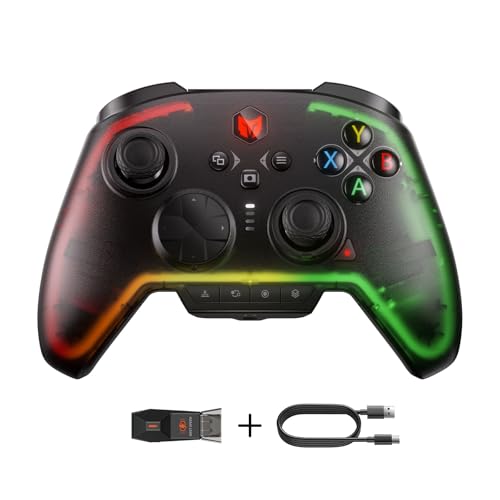
BIGBIG WON Rainbow 2 Pro Wireless Controller

BIGBIG WON Fight Master Leverless Controller

8Bitdo Ultimate 2 Wireless Controller (Purple)

casmilee Hard Case for Backbone One

Xbox Core Wireless Controller – Deep Pink

Xbox Core Wireless Controller – Astral Purple
More Details On Our Top Picks
Two-piece controllers earn their place on a PC desk by being genuinely different from every other pad on this list. The Joy-Con pair ships with one pastel purple unit and one pastel green unit, plus a black wrist strap, so you can hand each half to a friend for split-screen sessions or play solo with one controller in each hand for a different ergonomic feel.
Pairing over Bluetooth keeps the desk free of dongles, and the small footprint means they slip into a bag without bulk. They feel especially at home in indie titles, platformers, and party games where two-player local co-op is the whole point.
Where It Helps
- Modular design lets one pair cover solo and two-player setups
- Wireless Bluetooth connection avoids eating a USB port
- Compact size travels well in backpacks and laptop sleeves
- Pastel color split makes identifying left and right quick at a glance
Honest Caveats
- No analog triggers, which limits comfort in racing sims and shooters that rely on pressure-sensitive input
- Battery life per Joy-Con is shorter than full-size gamepads, so heavier sessions mean swapping or charging mid-week
- Requires a Bluetooth-capable PC for the cleanest setup
Built With In Mind
Switch owners who also dabble in PC indies, and anyone who hosts regular two-player couch nights.
Reach For A Different Pick When
The 8Bitdo Ultimate 2 Wireless Controller suits you better if you want traditional full-size ergonomics with broader PC compatibility.
Where the Joy-Con pair leans on charm, the Rainbow 2 Pro leans on specs. Hall-effect triggers (a trigger design that uses magnetic sensors instead of physical contact, reducing stick drift over time) sit behind the bumpers, an ALPS joystick anchors the left side, and motion aiming adds gyroscope control for fine aiming in shooters.
Two custom back buttons and two top-mounted extras give you a full remap surface, while dual vibration motors and a 3.5mm audio jack round out the package. Compared to the Xbox pad covered later, this one trades a familiar shape for a much deeper feature list.
Useful Strengths
- Hall-effect triggers and ALPS joystick are built to resist the stick drift that plagues older pads
- Motion aiming helps precision in shooters when thumbsticks feel too coarse
- Back paddles and top buttons open up remap-heavy playstyles in MMOs and competitive shooters
- Multi-platform support means one pad follows you across PC, Switch, mobile, and tablet
Points To Note
- The companion app controls lighting, mapping, and firmware, so tweaking requires a second device
- RGB lighting and motion sensors draw more power, meaning battery life depends heavily on which features stay active
- Body shape sits between a traditional Xbox layout and a smaller pad, so the first hour takes adjustment
Spec Overview
Right Fit For
Multi-platform households where one pad needs to follow you between a Windows desktop, a docked Switch, and a phone.
A Better Fit Elsewhere
The Xbox Core Wireless Controller in Astral Purple is the smarter pick if you mainly play on PC and Xbox and want plug-and-play simplicity without app-driven setup.
Fighting game players have been migrating away from joysticks for years, and leverless controllers (button-only arcade controllers with no joystick) are now standard at high-level tournaments. The Fight Master leans into that shift with an all-button hitbox layout, oversized directional keys, and hot-swappable mechanical switches (switches you can pull out and replace without soldering) so you can tune the feel to your hands.
Tri-mode connectivity, RGB lighting, and a Switch 2-ready spec list make this the most specialized pick in the roundup. Compared to the Xbox pad below, the Fight Master trades casual versatility for serious combo execution in titles like Street Fighter 6, Tekken 8, and Guilty Gear Strive.
Practical Pluses
- All-button layout supports rolling and motion inputs faster than a traditional joystick
- Hot-swappable switches let you swap to lighter or heavier tactility without buying a new stick
- Bluetooth, 2.4G, and wired modes cover tournament setups and casual play alike
- Multi-platform support includes Switch 2, original Switch, PC, iOS, and Android
Worth Bearing In Mind
- Learning curve is real, and most fighting games assume a stick or pad by default
- Useless outside the fighting genre, so it pairs best with a second, more general controller
- RGB adds visual flair but no functional value, which some shoppers may see as wasted battery
Who Will Love This
Competitive and ranked fighting game players who already know their preferred button layout and want tournament-grade inputs.
Skip It When
The 8Bitdo Ultimate 2 Wireless Controller is the better call if your library spans genres and you want one pad for everything.
8Bitdo built its reputation on retro-styled pads, and the Ultimate 2 is the company’s flagship for modern multi-platform play. TMR joysticks (tunneling magnetoresistance sensors that read stick position magnetically, similar in spirit to Hall-effect tech) bring higher sensitivity and tighter centering, and the proprietary 2.4G wireless claims sub-1ms latency with strong interference rejection up to 10 meters.
A trigger mode switch toggles between linear Hall-effect and a clicky digital feel, which is the kind of small but useful detail that separates a thoughtful pad from a generic one. Compared to the BIGBIG WON Rainbow 2 Pro, this one feels more restrained, with fewer lights and a cleaner button layout.
What Stands Out
- TMR joysticks aim for sharper aim and longer sensor life than older potentiometer-based designs
- Sub-1ms 2.4G wireless keeps response feeling wired-fast in competitive shooters
- Trigger mode switch adapts the pull distance and resistance to racing or platforming games
- Works across PC, Steam, Apple devices, and Android without juggling drivers
Trade-Offs To Consider
- No dock or charging station included, so charging happens over a cable
- Body is lighter than the Xbox pad, which some players prefer and others find less anchored
- Companion app unlocks the deepest customizations, adding a setup step
Feature Snapshot
Made For
Enthusiast PC players who split time between Steam, an iPad, and a phone, and care about low-latency wireless.
Look Elsewhere When
The Xbox Core Wireless Controller in Deep Pink is a more natural fit if you game mostly on a TV-connected PC and want instant Xbox ecosystem handoff.
The casmilee case breaks the all-controller pattern on purpose, because protecting a controller is just as practical as buying one. The shell is built from hard EVA (a dense, semi-rigid foam that absorbs shock and resists splashes), shaped specifically for the Backbone One in both first- and second-generation versions, and sized to fit cables, a power bank, and small accessories alongside the pad.
This is the kind of accessory that earns its keep on a commuter train, a dorm room, or a family road trip. Where the other picks focus on input feel, this one focuses on the boring but important job of keeping your gear in one piece.
Everyday Advantages
- Hard EVA shell defends against splashes, dust, and the everyday drop
- Tailored cutout keeps the Backbone One from shifting during transport
- Interior space fits cables and a compact power bank for charging on the move
Possible Compromises
- Controller and accessories are not included, so this only matters if you already own a Backbone One
- Hard shell adds bulk compared to a soft pouch, so backpack space matters
- White exterior shows scuffs faster than darker finishes
Product At A Glance
Perfect Match For
Mobile gamers who already use a Backbone One and commute, travel, or share space with kids and pets.
Swap It Out When
The BIGBIG WON Rainbow 2 Pro is a better starting point if you don’t yet own a mobile-first pad and want a controller first, case later.
The Xbox controller has been the unofficial PC gamepad standard for years, and the current Core design refines that formula. Sculpted surfaces, a hybrid D-pad (a four-direction pad that blends the precision of a disc-style pad with the classic cross shape), textured grips on the triggers and back case, and a dedicated Share button all add up to a pad that feels modern without reinventing the wheel.
Pairing covers Xbox Series X and S, Xbox One, Windows PCs, Android, and iOS, with a 3.5mm audio jack and USB-C plug-and-play. The Deep Pink finish stands out from the standard black pads, which is a small but real perk for anyone tired of monochrome desks.
A Few Highlights
- Up to 40 hours of wireless battery life covers most weeks on a single charge
- Hybrid D-pad handles fighting games and platformers with cleaner inputs than the old cross design
- Share button captures screenshots and clips without alt-tabbing
- 3.5mm jack and USB-C port keep headset and wired options open
Small Caveats
- Uses AA batteries by default in many bundles, so rechargeable cells or a play-and-charge kit are worth budgeting for
- Lacks the Hall-effect triggers and back paddles of the BIGBIG WON Rainbow 2 Pro
Who Should Grab It
Anyone who plays a mix of Xbox and PC games and wants one pad that works everywhere without learning new layouts.
Where Another Pick Suits Better
The 8Bitdo Ultimate 2 Wireless Controller is the stronger call if you care about rear paddles and a more tactile trigger feel.
The Astral Purple version shares the same hardware as the Deep Pink Core pad above, so the choice between them is mostly cosmetic. The sculpted geometry, hybrid D-pad, textured triggers, and Share button are all here, paired with a deeper, moodier finish that fits gaming setups with cooler accent lighting.
Functionally, you get the same Xbox Wireless and Bluetooth pairing across consoles, PC, and mobile, the same up-to-40-hour battery life, and the same 3.5mm audio and USB-C connections. If you already own one Xbox pad in a brighter color, the Astral Purple is a clean way to add a second without the controllers looking identical on the couch.
Bright Spots
- Identical feature set to the Deep Pink Core pad, so reviews translate directly
- Astral Purple finish complements RGB-heavy PC setups better than bright pinks or basic black
- Bluetooth pairing keeps Android and iOS cloud gaming sessions cable-free
Areas To Watch
- No hardware upgrade over the standard Core pad, so the premium here is purely aesthetic
- Color-matching can be harder to find for grip wraps and thumbstick caps
- Same AA-or-rechargeable battery decision as the Deep Pink version
Core Details
Whose Shelf It Belongs On
Living-room PC players who want a pad that disappears into a darker setup aesthetic and works across every screen in the house.
Not Your Match When
The BIGBIG WON Fight Master is a better match for fighting game specialists who need an all-button hitbox layout.
What To Weigh Before Choosing Your Next Gamepad
Comfort comes first, because a controller that fights your hand after an hour will collect dust regardless of its spec sheet. Pick a shape that matches the way you grip, then check the stick layout, trigger pull, and weight before reading the marketing copy.
Connectivity is the next filter. Bluetooth-only pads keep USB ports free but add a small amount of latency (a delay between your input and the action on screen) and depend on your PC’s wireless stack. A 2.4G dongle delivers steadier response, while wired remains the gold standard for tournament play. Cross-device support matters when one pad needs to follow you between a desktop, a docked console, and a phone.
Trigger and joystick technology has changed quickly, so look for Hall-effect or TMR sensors if stick drift is a deal-breaker. Finally, software support determines how deep the remapping goes, and extras like back paddles, rumble intensity, and audio passthrough decide whether the pad feels premium or just looks the part.
Cross-Cutting Tips For PC Controller Shoppers
Pitfalls Shoppers Hit
The most common mistake is buying a pad on aesthetics alone and finding out the trigger feel or stick tension is wrong after a week of play. Read past the color photos and check for user discussion of ergonomics, especially for hands larger or smaller than average.
Another trap is assuming every wireless pad works the same on PC as on console. Some features, like motion controls or advanced rumble, depend on drivers that may or may not be present on Windows. Confirm PC compatibility before assuming a pad will deliver its full feature set on a desktop.
What The Higher Tier Buys
Spending more generally buys you better sensors, lower-latency wireless, and more input options like back paddles. Hall-effect sticks, faster 2.4G connections, and app-based remapping are the real upgrades, not glossy finishes.
The honest read is that mid-range pads cover 90% of what most players need, and premium models make sense for competitive or multi-platform users who will actually use the extra features. Casual couch players get more value from a sturdy standard pad than from a flagship with features they will never touch.
Frequently Asked Questions
Do PC controllers work with all games?
Most modern PC games have native Xbox controller support, so an Xbox-style pad will work out of the box. Older titles may need Steam Input remapping or third-party tools to recognize non-Xbox layouts.
Is wireless latency a real concern on PC?
For casual and single-player games, Bluetooth and 2.4G wireless feel identical to wired input. In competitive shooters or fighting games, wired or a low-latency 2.4G dongle is the safer pick.
Can one pad really work across PC, console, and phone?
Yes, most modern multi-platform pads support Bluetooth pairing with phones and tablets, and many also pair with consoles. Switching between devices usually means holding a pairing button rather than installing new drivers.
How long should a PC controller last?
Three to five years is typical for pads with traditional analog sticks, and Hall-effect or TMR sensor designs aim to extend that further by removing the physical contact that wears out. Battery longevity on rechargeable pads depends heavily on RGB and rumble use.
Are fight sticks worth it for casual fighting game play?
Leverless controllers shine in ranked and tournament play, but casual players often adapt faster to a standard gamepad they already own. A fight stick is worth it once you know you will commit to the genre.
Final Verdict
The honest read is that the right PC controller depends on what you play and where you sit. Xbox-style pads cover the broadest case, feature-rich options like the BIGBIG WON Rainbow 2 Pro and 8Bitdo Ultimate 2 bring modern sensors and remapping, and specialty picks like the Fight Master serve specific genres. Pick the one that matches your most-played games, and the rest tends to take care of itself.



