


PC gaming on Steam covers everything from cinematic single-player adventures to twitchy competitive shooters, and the right controller changes how every session feels. Maybe your keyboard-and-mouse setup grows tiring during long couch sessions, or your old gamepad has developed the dreaded stick drift that ruins precision aiming. The picks below cover both traditional wireless gamepads built for Steam and dedicated stream-deck controllers that handle shortcuts, scenes, and live broadcast controls, so you can find the match that fits how you actually play.
A Side-By-Side Look

GameSir Nova Lite Wireless Gamepad (Gray)
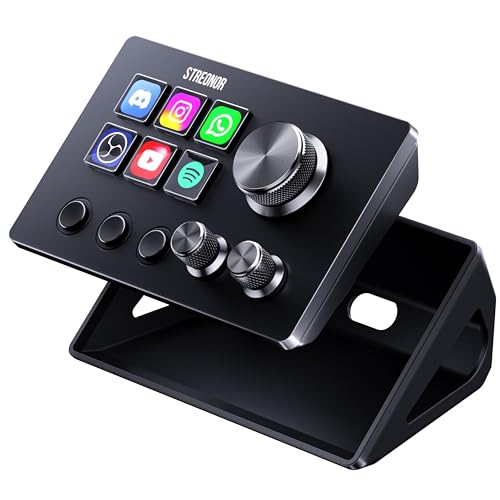
Streonor S6 Mini Stream Controller (Black)
ActionRing Stream Dock N1 Macro Pad

ActionRing Stream Controller Deck

Streonor S15 15-Key Studio Control Deck
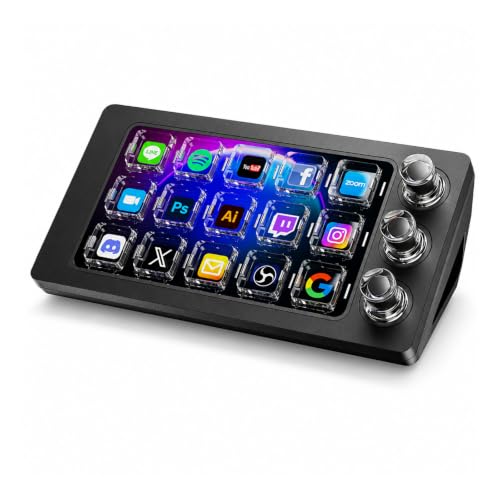
ActionRing Megtran M3 Stream Deck

GameSir Nova Lite Wireless Gamepad (Black)
Inside Each Recommended Option
GameSir’s Nova Lite lands in that sweet spot where a controller does not lock you into one ecosystem. The wireless gamepad pairs with PC, Steam, Switch, iOS, and Android, so a household that hops between a desktop tower, a docked Switch, and a phone-based cloud session can share one device. Hall effect joysticks (a stick design that uses magnetic sensors instead of physical contact, which dramatically reduces wear and drift over time) sit at the center of the design, which is a meaningful upgrade for anyone tired of analog sticks that wander after a year of use.
Turbo function rounds out the package, letting you fire off repeated inputs in older arcade ports and retro-friendly Steam titles without wearing out your thumb. The gray finish is understated enough to blend into a tidy desk setup, and the overall weight feels balanced for both desktop and couch play. Compared with the rest of the list, this is the only true gamepad here, so it suits someone who actually wants to play games rather than manage shortcuts.
What Earns Its Place
- Hall effect joysticks resist the stick drift that plagues older controllers
- Works across PC, Steam, Switch, iOS, and Android without re-pairing headaches
- Turbo function adds comfort during long retro or shmup sessions
- Wireless design keeps your desk clear of cable clutter
Things To Consider
- Battery life varies widely with rumble and lighting settings, so heavy users may need a weekly top-up
- The gray finish shows fingerprint oils faster than darker variants
Feature Snapshot
Built With In Mind
Multi-platform households and couch players who split time between a Switch, a Steam library, and a phone.
Consider Something Else When
The Streonor S6 Mini is the better pick for streamers and editors who want shortcut control rather than a traditional gamepad.
The Streonor S6 Mini is the kind of deck that earns its place on a desk where every square inch matters. Six customizable LCD keys (small screens embedded in each key, so the icon or label updates with the action assigned to it) form the main control surface, while three rotary knobs handle the tweaks you reach for constantly: volume, microphone gain, timeline scrubbing, or zoom inside an editor. Three dedicated scene-switching keys sit beside them, giving OBS users a fast lane to flip between cameras, overlays, and fullscreen layouts without memorizing hotkey combos.
For first-time deck owners, the S6 Mini is friendlier than the larger 15-key siblings. The STREONOR software store lists more than 100 plugins, icon packs, and tutorials, so setup does not feel like decoding a manual. The Macropad label is accurate: this is a small, programmable control surface for anyone who wants shortcuts, not a full streaming studio.
The Helpful Details
- Six LCD keys, three knobs, and three scene keys cover common streaming controls
- Plugin library and tutorials help beginners ramp up without frustration
- Compact footprint fits beside a tenkeyless keyboard without crowding the mouse
Worth Noting
- Only six LCD keys may feel tight for power streamers running many scenes
- Knob customization depends on app support, so verify your software is on the plugin list
Made For
Beginners and small-desk creators who want a simple, programmable deck for streaming and editing basics.
A Better Fit Elsewhere
The Streonor S15 is a better match for advanced streamers who need fifteen keys and status displays for system metrics.
Most shortcut decks lay flat and stretch wide, which is exactly the problem the ActionRing Stream Dock N1 refuses to repeat. The vertical orientation stands tall beside a monitor or keyboard, freeing up desk real estate for a mouse, drawing tablet, or a second screen. For left-hand operation, the N1 is shaped to keep your dominant hand free for typing and clicking while the deck handles the supporting cast.
Three switchable modes give the N1 unusual flexibility. Left-hand shortcut mode puts macros under your fingertips, calculator mode works without launching companion software, and numeric keypad mode pairs nicely with a tenkeyless mechanical board that lacks a built-in number pad. That triple identity makes it a useful desk tool even on days when you are not streaming.
Where It Excels
- Vertical layout saves desk space compared with horizontal decks
- Three modes cover streaming, calculations, and numeric entry in one device
- Left-hand ergonomics complement a full-size keyboard and mouse setup
Points To Note
- Calculator and numeric modes need occasional driver updates to stay accurate
- Vertical footprint may feel tall next to short monitors on riser stands
Feature Card
Best Suited To
Productivity-focused users and accountants who want shortcut control plus a real number pad on a crowded desk.
Skip It When
Creators running many OBS scenes should consider the ActionRing Stream Controller Deck, which offers six LCD keys for visual feedback.
ActionRing’s Stream Controller Deck leans into the side of customization. Six LCD keys anchor the layout, and each one accepts JPG, PNG, or GIF artwork, so a single key can shift from a still icon to a looping animation depending on the action. Drag-and-drop assignment through the companion software keeps the learning curve gentle, and multi-action macros (a sequence of several commands triggered by one key press) mean a single tap can launch an app, open a folder, and start a recording.
Beyond streaming, the deck works as a gaming shortcut keyboard for combos, a media remote for playback, and a productivity launcher for office tools. Compare it to the Streonor S6 Mini: the S6 Mini adds three rotary knobs, while the ActionRing trades those for richer visual customization. For anyone whose priority is making each key instantly recognizable, the artwork support here is the headline feature.
A Favorable Mix
- Six LCD keys accept custom JPG, PNG, and GIF artwork for fast visual recognition
- Multi-action macros chain several commands into one key press
- Drag-and-drop software setup lowers the barrier for first-time users
Honest Caveats
- Custom icon uploads require manual sizing to look crisp on the small LCD panels
- No rotary knobs, so volume and timeline adjustments still rely on keyboard shortcuts
- Software updates can occasionally reset custom layouts, so back up profiles regularly
Right Fit For
Streamers and editors who value visual key recognition and want a flexible macro pad for both work and play.
Look Elsewhere When
Users who prefer tactile knob control should consider the Streonor S6 Mini, which adds three rotary dials for live adjustments.
The Streonor S15 is the deck to look at once your workflow outgrows six keys. Fifteen customizable LCD keys give a full studio enough room for OBS scenes, microphone controls, export commands, browser tabs, and meeting shortcuts without grouping everything onto shared pages. The honest read is that 15 keys may feel like overkill for casual streamers, but for full-time creators, the extra real estate pays for itself in fewer page swaps during a busy broadcast.
Three non-touch status display panels add a second layer of utility. They can show weather, time, CPU temperature, GPU status, or memory usage, which means you can keep an eye on system health without alt-tabbing out of a game or editor. Preset control pages let you build separate layouts for streaming, editing, office work, and gaming, so the same deck transforms depending on the task.
Standout Benefits
- Fifteen LCD keys handle dense workflows without forcing page swaps
- Status panels display CPU, GPU, and memory metrics at a glance
- Preset pages for streaming, editing, office, and gaming keep each task organized
Room For Improvement
- Larger footprint demands more desk space than the six-key siblings
- Setup time grows with each preset page, so casual users may not tap the full potential
Key Attributes
Who Will Love This
Full-time streamers, video editors, and content creators juggling multiple apps during long sessions.
Another Choice May Suit
Casual users who only need a handful of shortcuts will find the Streonor S6 Mini friendlier and more desk-friendly.
ActionRing’s Megtran M3 takes a different swing at the deck concept by focusing on the feel of each press. Transparent magnetic keys (switches that use magnets instead of physical contacts, offering smoother travel and longer lifespan) replace traditional mechanical switches, which translates to lower trigger latency and a softer bottom-out. For creators who hammer shortcuts during a long edit or live broadcast, that responsiveness matters.
Customization reaches into the visual layer as well. Dynamic backgrounds can be pulled from a built-in library or uploaded directly, so the deck can match a branded stream overlay or a specific editing project. The M3 sits between the six-key ActionRing deck and the fifteen-key Streonor S15 in capability, leaning toward users who care about typing feel as much as shortcut count.
Points In Its Favor
- Magnetic keys deliver low trigger latency for responsive shortcut work
- Custom dynamic backgrounds let the deck match a stream or project aesthetic
- Transparent key design creates a clean, modern look on a tidy desk
Small Caveats
- Magnetic key feel is different from mechanical switches, so traditionalists may need an adjustment period
- Background library can grow repetitive, so most users will eventually upload their own
Perfect Match For
Creators and gamers who type heavily and want a smoother, more responsive key feel during long sessions.
Where A Sibling Pick Shines
Users who need the largest key count available should look at the Streonor S15, which offers fifteen customizable LCD keys plus status panels.
The black version of the GameSir Nova Lite is the same controller as the gray pick earlier, with the same Hall effect sticks, the same broad device compatibility, and the same turbo function. What changes is the finish: the darker shell hides smudges better, blends into a black-and-RGB battlestation, and looks more at home next to a stealthy PC build. For shoppers who care about visual cohesion as much as performance, that color choice is more meaningful than it sounds.
Functionally, this is the controller for anyone who plans to play on a Switch tonight, a Steam Deck tomorrow, and a phone running a cloud-gaming app over the weekend. Hall effect joysticks mean the sticks should stay accurate long after traditional analog units start drifting, which is a real value-add for a household that games daily.
Where It Helps
- Black finish hides fingerprints and pairs well with dark-themed setups
- Hall effect joysticks hold calibration across long-term use
- Multi-platform support covers PC, Steam, Switch, iOS, and Android
A Few Limitations
- Functionally identical to the gray model, so color is the only differentiator
Quick Facts
Who Should Grab It
Shoppers who want the GameSir Nova Lite formula in a darker, smudge-resistant finish for a clean desk aesthetic.
Swap It Out When
Buyers who want shortcut control rather than a gamepad should consider the ActionRing Stream Controller Deck instead.
What To Weigh Before Choosing Controllers For Steam
Gamepad Or Stream Deck
The first fork in the road is whether you need a traditional gamepad or a stream-deck-style controller. Gamepads like the two GameSir Nova Lite models handle actual gameplay: analog sticks, triggers, face buttons, and rumble. Stream decks and macro pads, on the other hand, act as sidecar control surfaces for shortcuts, OBS scenes, and editor commands. The honest read is that mixing them up is a common mistake, so start by deciding which role you need filled.
Stick Technology And Longevity
For gamepads, joystick type matters more than marketing copy suggests. Hall effect joysticks use magnetic sensors rather than physical contact, which dramatically reduces the stick drift that ruins older controllers. If you play daily or share a gamepad across a household, that single spec can extend the useful life of the controller by years.
Key Count And Layout
For stream decks, key count is the headline number, but layout matters just as much. A six-key deck like the Streonor S6 Mini fits tight desks, while a fifteen-key deck like the Streonor S15 handles dense workflows. Vertical layouts like the ActionRing N1 save horizontal space, and dedicated rotary knobs add live control for volume, zoom, and timeline scrubbing. Choose the layout that matches your desk before falling in love with a key count.
Software And Plugin Support
Even a well-built deck is only as good as its companion software. Look for a plugin library, drag-and-drop setup, and active updates. The Streonor software store and ActionRing’s companion app both support custom icon uploads, but backup your layouts, since updates can occasionally reset profiles.
Key Considerations Across These Picks
Common Buying Slip Ups
A frequent misstep is buying a stream deck when the real need is a gamepad, or vice versa. Gamers expecting analog control from a macro pad, or streamers expecting OBS scene switching from a controller, end up with a device that does half the job. Match the device type to your actual workflow before comparing specs. Another trap is overlooking software support. A deck with sparse plugins and no community resources becomes a paperweight the moment your favorite app falls out of compatibility.
Where The Extra Money Goes
Stepping up from a six-key deck to a fifteen-key deck like the Streonor S15 adds status display panels, preset pages, and a denser shortcut layout that power streamers actually use. The premium is real, but the upgrade pays off only when your daily routine fills those extra keys. For casual users, a compact six-key deck delivers most of the value at a friendlier entry point. The same logic applies to gamepads: Hall effect sticks, broader compatibility, and turbo functions justify the cost for daily players, while occasional couch gamers can often get by with simpler options.
Frequently Asked Questions
What Is A Stream Deck Used For In Gaming?
A stream deck is a small control surface with customizable keys that trigger shortcuts, scene switches, sound effects, or app launches. In gaming, it helps streamers and creators manage broadcasts, chat commands, and recording controls without memorizing dozens of hotkeys.
Do I Need A Special Controller For Steam Games?
Most modern controllers work with Steam, including the GameSir Nova Lite, Xbox, and PlayStation pads. Steam’s Big Picture mode and per-game remapping tools help configure non-native controllers, so compatibility is rarely a hard barrier.
What Is Stick Drift And Why Does It Matter?
Stick drift happens when analog joysticks register movement without being touched, usually from worn internal sensors. Hall effect joysticks use magnets instead of contact points, which significantly reduces drift and extends the controller’s useful life.
How Many Keys Do I Need On A Stream Deck?
Six keys cover basics like scene switching, mute toggles, and a few app launches. Heavy streamers running many scenes, alerts, and audio sources usually want twelve to fifteen keys, plus preset pages for different tasks.
Can A Macro Pad Replace A Keyboard Shortcut?
A macro pad complements a keyboard rather than replacing it. Assigning your most-used shortcuts to a deck keeps your main keyboard focused on typing and gameplay, which is faster and easier on your memory during long sessions.
Closing Verdict
The right pick depends on what your desk actually needs. Gamepads like the two GameSir Nova Lite models cover the play side of Steam, while decks from Streonor and ActionRing handle the production side with shortcuts, scenes, and live controls. A small setup with a single Switch and a Steam library leans toward the GameSir; a creator juggling OBS, editors, and multiple scenes will get more mileage from a six- or fifteen-key deck. Match the tool to the job, and any of these options will feel right at home on your desk.



