


Mac gaming has quietly grown into something serious, and the right gamepad can be the difference between a frustrating session and a great one. The catch is that not every controller plays nicely with macOS out of the box, and the wrong layout can ruin a fighting game, a platformer, or anything in between. This shortlist focuses on gamepads that actually work with Mac, cover the platforms you likely already own, and feel good across long sessions.
The Main Contenders

Retro-Bit SEGA Genesis 8-Button USB Wired Controller (Black)

8Bitdo Sn30 Pro+ Bluetooth Gamepad (Blue Classic Edition)

8Bitdo Sn30 Pro Wireless Bluetooth Controller, G Classic Edition

8Bitdo SN30 Pro Purple Wireless Controller

GENKI x 8BitDo PocketPro Portable Wireless Controller
Retro-Bit SEGA Genesis 6-Button Wired USB Controller (Clear Blue)
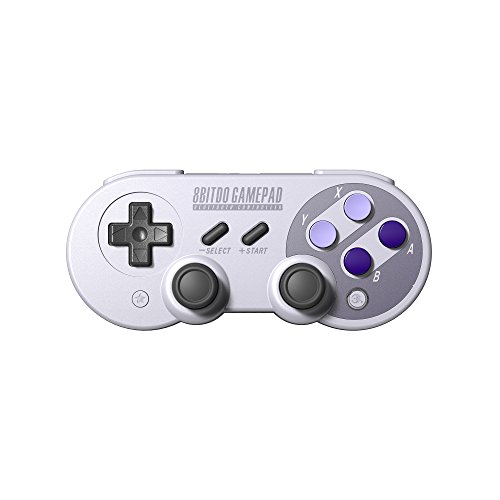
8Bitdo SN30 Pro Wireless Bluetooth Controller (Dual Joystick)

8Bitdo SN30 Pro+ Bluetooth Gamepad (Black Edition)

Qenker 2-Player LED Arcade DIY Kit for USB MAME (Blue & Red)
What Each Pick Brings To The Table
The Retro-Bit Genesis pad leans into the six-button Genesis layout that fighting game fans and retro enthusiasts remember, then adds L and R shoulder buttons for modern extras. Plug it in over USB and it shows up on macOS, PC, Switch, and Steam with no fuss. Holding START for five seconds toggles between D-Input and X-Input (the two main protocols gamepads use to talk to a computer), which is handy when a particular emulator or game expects one over the other.
For anyone splitting time between a Mac and a Genesis Mini, the wired design means no battery anxiety, and the long cable reaches a desk setup without strain.
Points In Its Favor
- Faithful six-button Genesis face layout that mirrors the original hardware, which is the real reason fighting game fans still love this shape.
- Extra shoulder buttons give you extra inputs in modern emulators and remapped games.
- USB plug-and-play across Mac, PC, Switch, and Steam, with a D-Input/X-Input toggle for picky software.
- Wired power means zero charging downtime and stable input in long sessions.
Things To Consider
- The cable length is generous, but a wired pad still tethers you to the desk, which can feel limiting on a couch setup.
- Source listing flags this model as currently unavailable in some regions, so availability can be patchy.
Best Suited To
Retro and Genesis Mini owners who want an authentic face layout on a Mac without wireless fuss.
Look Elsewhere When
You need a wireless pad for couch play, in which case the 8Bitdo Sn30 Pro+ in this list is the better match.
The Sn30 Pro+ in Blue Classic keeps the SNES-style face buttons and adds modern conveniences: dual analog sticks, rumble feedback, and Bluetooth that pairs with macOS, Windows, Android, Steam, and the Switch. Compared to the Retro-Bit pad above, this is a wireless, more versatile design for someone who jumps between genres and systems daily.
The classic colorway looks great next to a MacBook on a clean desk, and the 12-button layout covers the shoulder triggers plus select, start, and the home cluster.
Advantages To Know
- Wireless Bluetooth cuts the cable clutter on a Mac desk, which is a real upgrade during long indie or platforming sessions.
- Rumble feedback adds tactile punch in supported games without overwhelming the small form factor.
- Twelve-button layout covers modern control schemes, not just retro-style inputs.
- Broad platform support means one pad can move between Mac, Switch, and Steam with minimal re-pairing.
Points To Note
- The SN30 Pro+ relies on a rechargeable battery, so you will need to top it up between longer sessions.
- Smaller hand-feel than full-size modern pads, which can feel cramped in extended FPS play for some users.
Key Specs
Right Fit For
Multi-platform gamers who want a wireless pad that travels between Mac, Switch, and Steam.
A Better Fit Elsewhere
Anyone focused only on Genesis-era games on a wired setup should consider the Retro-Bit 8-Button pad instead.
This G Classic edition of the SN30 Pro introduces hall effect joysticks, which use magnetic sensors instead of physical contact, so the sticks do not drift the way older analog designs eventually do. That single change matters a lot for anyone who has been burned by a wandering stick on a heavily used pad. The full button set, rumble, motion controls, and USB-C connector keep it firmly in modern territory.
For a Mac user who games daily, the magnetic stick design tends to outlast the standard analog versions and saves you from an early replacement.
Real-World Strengths
- Hall effect joysticks resist drift, which in practice means years of reliable play without recalibration.
- Clickable joysticks, rumble, and motion controls cover nearly every modern input a Mac game might ask for.
- USB-C charging is a small detail, but it means the same cable as your MacBook powers the pad.
- Bluetooth wireless keeps the desk clean and supports easy pairing across systems.
Worth Noting
- Some buyers see protection-plan offers bundled at checkout, which adds cost beyond the pad itself.
- The classic SNES-style shell still feels compact in larger hands, similar to the Sn30 Pro+ above.
Who It Suits Best
Daily Mac players who want modern features and longer-lasting joysticks in a small shell.
Skip It When
You want the most travel-friendly pad, in which case the GENKI x 8BitDo PocketPro later in the list is a smarter pick.
The purple SN30 Pro brings the same classic look as the standard 8Bitdo pads but lands in a friendlier price tier, with a rechargeable battery and Bluetooth that pairs with macOS, Switch, and more. Owners commonly report around 18 hours of play per charge with a one to two hour top-up, which is plenty for a few days of casual play between charges.
It works as a second pad in a household, or as a primary gamepad for someone who does not need the hall effect upgrades of the G Classic edition.
Everyday Perks
- USB-C charging plus roughly 18 hours of battery life covers most gaming weeks without a daily cable.
- The classic SNES cross D-pad feels excellent for 2D platformers and fighters on a Mac.
- Bluetooth pairs with Mac, Switch, and other platforms, so one pad handles several systems.
- The purple color stands out on a desk cluttered with silver and gray gadgets.
Some Limits To Know
- No hall effect joysticks, so long-term drift is still a possibility with heavy use.
- Smaller hand-feel like the other 8Bitdo SN30 models, which can be tight for large hands.
Perfect Match For
Switch and Mac crossover users who want the SN30 Pro feel at a lower entry point.
Another Choice May Suit
If you game hard and want the longest-lasting sticks, the 8Bitdo Sn30 Pro G Classic is the smarter buy.
The PocketPro is a collaboration between GENKI and 8BitDo, and it shows in the details. Hall effect joysticks keep drift at bay, gyro controls open up motion aiming, and the slim shell is built to slip into a laptop bag next to a MacBook. The 19-button layout sounds dense on paper, but the face buttons still feel familiar thanks to the SNES-inspired design.
It is a strong match for Steam Deck, ROG Ally, Switch, and Mac users who travel and want one pad that handles every system.
Where It Helps
- Hall effect sticks cut the drift problem, which matters on a travel pad you cannot easily swap mid-trip.
- Compact shell fits a laptop sleeve, and you can pack up to four controllers for a small couch co-op night.
- Gyro, rumble, and a clicky D-pad give it pro-level inputs in a small frame.
- USB-C cable in the box and broad platform support make it flexible across Mac, Switch, and PC handhelds.
Honest Caveats
- Smaller shell means people with larger hands may find the grips shallow, depending on grip style.
- Switch 2 support requires a firmware download from the 8BitDo site, so plan for an update on first use.
Key Specs
Made For
Travelers and handheld PC users who want drift-free sticks in a slim shell that pairs with a Mac.
Where A Sibling Pick Shines
For a more desk-bound, classic look without the travel focus, the 8Bitdo SN30 Pro+ Black Edition is worth a look.
This clear blue Genesis pad from Retro-Bit is the simpler sibling to the 8-button model that opened the list. You still get the licensed six-button Genesis layout, USB plug-and-play, and the same D-Input and X-Input toggle, but you skip the extra shoulder buttons. The translucent shell is a fun touch if you like seeing the internals of your gear.
For a beginner setting up a retro gaming corner on a Mac, this is a low-friction entry point.
Useful Strengths
- Plug-and-play USB works on Mac without any driver fiddling, which is ideal for first-time retro users.
- The classic six-button layout suits Genesis-era fighting and action games exactly the way the original hardware did.
- Input mode toggle covers picky emulators that expect a specific protocol.
- Wired design means you never stop mid-boss to charge anything.
A Few Limitations
- No shoulder buttons, so modern remapping options are more limited than on the 8-button Retro-Bit above.
- A cable still ties you to the desk, which is less flexible for a living room setup.
Whose Shelf It Belongs On
Beginners who want a clean, plug-and-play Genesis-style pad on a Mac without extra buttons in the way.
Swap It Out When
You want modern extras like shoulder buttons or wireless, in which case the Retro-Bit 8-Button earlier in the list is the upgrade path.
The original dual-joystick SN30 Pro pairs the familiar SNES face layout with twin analog sticks, Bluetooth, and Switch compatibility, all from a slim shell. Compared to the Purple edition earlier in the list, this version is the more established base model that has been on the market longest and has the widest accessory support.
For someone running a Mac plus a Switch plus a Raspberry Pi retro box, this one pad can hop between all of them with minimal fuss.
The Upside
- Cross-platform pairing covers Mac, Windows, Android, Linux, Raspberry Pi, Steam, and Switch in a single pad.
- Dual analog sticks unlock modern 3D games that the six-button-only Genesis pads cannot handle.
- Wireless Bluetooth means fewer cables on a clean Mac desk.
- Compact shell is comfortable for anyone who found full-size pads too bulky.
Trade Offs
- Older model without hall effect sticks, so long-term drift is a possibility on heavily used units.
- Smaller form factor can feel cramped in marathon FPS sessions.
Who Will Love This
Cross-platform retro enthusiasts who want a single wireless pad for Mac, Switch, and Pi projects.
Reach For A Different Pick When
You specifically need the drift-free magnetic sticks, in which case the 8Bitdo Sn30 Pro G Classic is the better fit.
The Black Edition SN30 Pro+ is the more muted counterpart to the Blue Classic covered earlier. It keeps the full Pro+ button set, dual analog sticks, rumble, and Bluetooth pairing across macOS, Windows, Android, Steam, Switch, and Raspberry Pi. The understated color fits a darker desk or a Mac mini setup next to a studio display.
For a primary everyday pad that needs to blend in rather than stand out, this is a sensible choice.
What Makes Sense
- Full Pro+ layout handles both modern and retro games without compromise.
- Black finish pairs well with a darker Mac setup or a battlestation that already has plenty of color.
- Broad platform support makes it easy to lend to a friend on Switch or PC without reconfiguration.
- Bluetooth wireless keeps the desktop tidy, which matters in smaller workspaces.
Practical Considerations
- No hall effect joysticks, so the sticks will eventually show wear on heavily used units.
- Rechargeable battery means planning a top-up between long sessions.
Quick Facts
Built With In Mind
Daily mixed-platform players who want a quiet-looking pad that disappears into a darker Mac setup.
Consider Something Else When
You want a colorful statement piece, in which case the 8Bitdo Sn30 Pro+ Blue Classic earlier in the list is a fun swap.
The Qenker kit is a different kind of Mac controller entirely: a two-player arcade build set rather than a handheld gamepad. You get two arcade joysticks, twenty LED buttons in blue and red, and two zero-delay USB encoders (small boards that translate arcade button presses into standard USB inputs your computer can read). The encoders plug into a Mac or Raspberry Pi and show up as standard input devices, so MAME, RetroPie, and similar frontends see them without extra drivers.
This is the right pick for someone building a bartop cabinet or a dedicated MAME box at home.
Key Advantages
- Two-player kit covers head-to-head arcade games out of the box, with a layout you can mount in a custom cabinet.
- LED buttons add a real arcade feel and make the controls easier to see in a dimly lit game room.
- Zero-delay USB encoders keep input lag minimal, which matters in fast fighting and shoot-em-up titles.
- Heat-resistant plastic shell on the buttons, which helps with long sessions in enclosed cabinets.
Factors To Consider
- This is a DIY kit, not a plug-and-play pad, so you will need to drill, wire, and mount the controls yourself.
- You supply the enclosure, the cables, and the Mac-side software configuration, none of which are included.
Feature Snapshot
Who Should Grab It
Cabinet builders and MAME hobbyists who want a two-player arcade foundation for a Mac or Raspberry Pi.
Not Your Match When
You want a couch-friendly pad and not a full cabinet project, in which case the 8Bitdo SN30 Pro Black Edition is a more practical pick.
What To Weigh Before Choosing A Mac Gamepad
Start with the platforms you actually game on, since not every pad lists macOS alongside Switch and PC. The 8Bitdo models in this list broadly cover macOS, Windows, Android, and Steam, which is the widest net for mixed households. If you live inside one ecosystem, you can ignore the cross-platform extras and focus on layout.
Next, think about wireless versus wired. A wireless Bluetooth pad like the 8Bitdo SN30 Pro+ keeps the desk clean but adds charging into your routine, while a wired Retro-Bit Genesis pad removes charging entirely at the cost of cable reach. For retro and emulator setups, the cable rarely feels like a real limitation.
Pay attention to stick technology if you play daily. Hall effect joysticks, found on the 8Bitdo Sn30 Pro G Classic and the GENKI PocketPro, use magnets to register movement and tend to outlast standard analog sticks, which drift over time. For casual weekend play, classic analog sticks still hold up, but heavy use rewards the magnetic option.
Key Considerations Across These Picks
Common Shopping Slip Ups
The most common mistake is buying a pad for the wrong use case. A six-button Genesis layout feels great in fighting games and platformers but fights you in modern 3D shooters that expect twin analog sticks. Check the genres you actually play before locking in a layout.
Another slip is assuming every Bluetooth pad pairs with macOS out of the box. Most modern 8Bitdo pads do, but older pads and off-brand options sometimes need a firmware update or a separate dongle. The models in this list all list macOS support, which removes that guesswork.
What The Higher Tier Buys
Paying more in this category usually buys you hall effect joysticks, longer battery life, or extra features like gyro and rumble. A higher tier also tends to bring a more refined shell with better shoulder buttons and a sturdier D-pad, which shows up over months of use rather than days. For a casual setup, the lower tier still works well, but daily players tend to feel the upgrade quickly.
Frequently Asked Questions
Do all of these controllers work with macOS without extra software?
The 8Bitdo and Retro-Bit models in this list all list macOS support and pair over Bluetooth or plug in over USB without additional drivers. The Qenker arcade kit shows up as a standard USB input device and works once your MAME or emulator software is configured to read it.
Are hall effect joysticks worth the extra cost?
For daily play, hall effect sticks tend to pay for themselves by avoiding the drift that eventually shows up on standard analog sticks. For casual weekend gaming, classic analog sticks still work fine, so the upgrade is more about long-term peace of mind than immediate performance.
Can I use these pads with Steam and RetroPie at the same time?
Yes. Steam has built-in gamepad support and recognizes most modern pads, while RetroPie and similar frontends handle Bluetooth pairing through their standard menus. Switching between systems usually means re-pairing or pressing a small mode button on the pad, not buying anything extra.
Will a wireless pad lag on macOS?
For most genres, modern Bluetooth pads on a Mac feel responsive enough that the lag is not noticeable. Fast fighting games and rhythm titles are where input delay matters most, so for those a wired pad like the Retro-Bit Genesis model removes the variable entirely.
Is the arcade DIY kit practical for a small desk?
The Qenker kit is built for a cabinet or a mounted panel, not a small desk. For a compact workspace, a handheld pad from earlier in the list will be a better everyday fit, and the arcade kit is the right call only when you have room to build it out properly.
Bottom Line
Pick the pad that matches your genres, your platforms, and how often you actually play, rather than chasing features you will not use. The 8Bitdo models carry most Mac users comfortably, the Retro-Bit pads cover retro purists, and the Qenker kit is the right detour for cabinet builders. Any of these will turn a Mac into a much more capable game machine, and the right one for you depends on the games already on your dock.



