


A good flight sim setup turns clicking a mouse into wrestling a yoke, modulating thrust, and feeling the rudder respond as the runway centers up. The wrong controller keeps you fighting the rig instead of the airplane. This list rounds up yokes, HOTAS sticks, rudder pedals, throttle quadrants, and add-on panels that pair well with Microsoft Flight Simulator 2020/2024, X-Plane, and Prepar3D. Whether you’re building your first desk-mount rig or fine-tuning a multi-engine workflow, the picks below map to specific use cases, so you can match the right hardware to how you actually fly.
The Lineup, Simplified

Honeycomb Dust Cover for Alpha Yoke & Bravo Quadrant

ThrustMaster Hotas Warthog PC Bundle with TFRP Rudder

Honeycomb Alpha Flight Controls Yoke & Switch Panel

Logitech G USB PRO Flight Rudder Pedals

Thrustmaster TPR Rudder Pedals (PC)
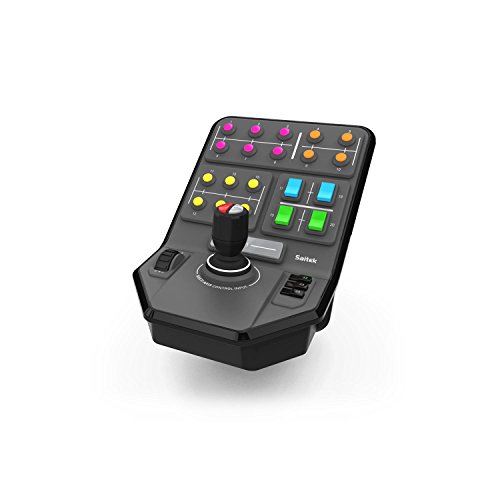
Logitech G PC Farm Sim Vehicle Side Panel

Cessna Style Vernier Controls for Flight Sim

Thrustmaster TCA Quadrant Add-On Airbus Edition (PC)

Honeycomb Bravo Throttle Quadrant
Why These Options Stand Out
Mounted yokes collect dust, pet hair, and the occasional spilled coffee faster than you’d expect, especially in a home office that doubles as a sim pit. The Honeycomb Dust Cover slips over the Alpha Yoke and Bravo Throttle Quadrant while they’re still clamped to the desk, so you don’t have to unmount anything to keep things clean. For sim pilots who leave their rig set up between sessions, that convenience tends to be the whole point.
The fit is tailored to Honeycomb’s own hardware, so it won’t stretch across third-party throttles. You get a quick visual cue that the cockpit is “off” when you walk away, which can be surprisingly useful in a shared space.
Standout Benefits
- Snaps on and off without unmounting the yoke or quadrant from the desk
- Tailored fit for Honeycomb Alpha and Bravo hardware specifically
- Adds a tidy visual boundary to a permanent desk-mounted rig
Honest Caveats
- Limited to Honeycomb Alpha and Bravo products, nothing else
- Material is thin and may need gentle handling to avoid tears over time
Whose Shelf It Belongs On
Honeycomb Alpha or Bravo owners who keep their rig bolted to a desk and want to protect it from dust, spills, and curious pets.
Where Another Pick Suits Better
Anyone running a Thrustmaster HOTAS setup will find the Honeycomb Dust Cover useless, since the ThrustMaster Hotas Warthog PC Bundle with TFRP Rudder ships as its own complete system with no matching dust protection.
The Warthog is the heavyweight choice in this list, modeled after the A-10C “Warthog” attack jet’s actual controls. Almost every surface is metal, including a detachable joystick handle and a removable metal base plate that lets you swap between desk-mount and cockpit-mount setups. For DCS World pilots who want their fingers on the real switchology, the button count and layout map closely to the in-game A-10C module.
The bundle pairs the joystick with the TFRP (Thrustmaster Flight Rudder Pedals) for a complete rudder-and-throttle setup right out of the box. You may find the joystick’s heft demands a sturdy mounting solution, since the dual-throttle assembly has meaningful leverage when you push it forward.
Benefits That Matter
- All-metal construction across the joystick, throttle, and rudder pedal cores for long-term durability
- 19 action buttons plus an 8-way “point of view” hat switch on the stick for complex bindings
- Detachable metal handle and base plate ease transition from desk to cockpit rigs
- Dual-throttle system with a metal hand rest supports left- or right-handed layouts
Trade Offs
- Heavier and more expensive than entry-level yokes and sticks
- Best paired with combat sims like DCS, less ideal for casual general aviation
- Owners commonly report a learning curve mapping 19 buttons before flying smoothly
Key Specs
Who It Suits Best
Hardcore combat sim pilots flying DCS A-10C or similar military modules who want a near-1:1 replica and don’t mind a steeper learning curve.
Not Your Match When
Casual general aviation pilots in Microsoft Flight Simulator will likely prefer the smoother flow of the Honeycomb Alpha Flight Controls Yoke & Switch Panel instead.
The Honeycomb Alpha is the yoke most sim pilots picture when they imagine a desktop Cessna panel. A solid steel shaft runs through two linear ball bearings, giving the wheel 180 degrees of rotation that feels closer to a real general aviation yoke than a toy. The included switch panel adds main, alternator, avionics, and light switches, plus a 5-position ignition, which covers the routine startup drill for most single-engine trainers.
Pair it with the Bravo Throttle Quadrant later and you have a matched Honeycomb ecosystem on your desk. The red LED backlighting on the switch panel is genuinely useful during night VFR (Visual Flight Rules) sessions, where white light would otherwise blow out your night vision.
What Pays Off
- Steel shaft and dual linear ball bearings deliver a smooth, accurate 180-degree yoke swing
- Self-centering mechanism has no center detent, so fine corrections stay natural
- Built-in switch panel covers master, alternator, avionics, lights, and 5-position ignition
- Red LED backlighting keeps the panel readable without ruining dark-cockpit night flying
Worth Noting
- Yoke-only setup means you’ll still want a separate throttle quadrant for full realism
- Clamp design fits typical desks but may need modification for very thick tabletops
Spec Overview
Made For
General aviation sim pilots in MSFS 2020/2024 or X-Plane who want a realistic yoke feel without going full HOTAS combat setup.
Skip It When
Combat-oriented DCS pilots should jump straight to the ThrustMaster Hotas Warthog PC Bundle, which is purpose-built around the A-10C.
Adding rudder pedals to a desktop sim rig is the moment taxiing, crosswind landings, and coordinated turns stop feeling awkward. The Logitech G USB PRO Flight Rudder Pedals are a long-standing entry point, with self-centering action, adjustable damping, and foot rests that slide to fit a wide range of shoe sizes. The non-slip surface on the foot plates keeps your feet planted when you’re stomping differential braking during a rejected takeoff.
Compatibility is broad across Windows XP through Windows 10, and the Saitek Smart Technology programming software lets you remap axes for non-standard sims. Tension adjustment is a real knob on the unit, not buried in software.
The Case For It
- Self-centering pedals with adjustable damping for smoother taxi and takeoff runs
- Foot rests adjust to fit various sizes and feature non-slip material
- Onboard tension adjustment lets you match resistance to your flying style
- Partial metal construction improves long-term durability over all-plastic units
Small Caveats
- USB 2.0 connection is dated, and driver support focuses on older Windows releases
- Plastic gear internals may wear faster than magnetic sensor designs from competitors
Right Fit For
First-time sim pilots adding their first set of rudder pedals to a desk rig who want proven Logitech/Saitek reliability.
Consider Something Else When
Pilots chasing higher precision and contactless sensors should look at the Thrustmaster TPR Rudder Pedals, which use magnetic HallEffect AccuRate Technology (H.E.A.R.T) sensors instead.
Thrustmaster’s TPR pedals take a different approach from traditional sliding pedal sets. The Pendul_R suspended mechanism lets the pedal platform pivot in a fluid, arcing motion that more closely mimics how a real aircraft’s rudder pedals hang and respond. Underneath, H.E.A.R.T HallEffect magnetic sensors provide frictionless input, so there’s no contact wear over time, and accuracy holds up across thousands of flight hours.
For sim pilots who do a lot of crosswind work or carrier landings, the difference between a traditional sliding pedal and a suspended magnetic one is most visible at small deflections. The TPR’s design tends to make those tiny corrections easier to dial in.
Features That Help
- Pendul_R suspended mechanism delivers fluid, natural pedal motion
- H.E.A.R.T HallEffect magnetic sensors avoid contact wear for long-term accuracy
- Frictionless operation supports precise small inputs during crosswind or carrier work
Points To Note
- PC-only compatibility, with no console support
- Larger footprint than basic sliding pedal sets, so plan desk space accordingly
Feature Card
Best Suited To
Sim pilots flying precision approaches, carrier ops, or crosswind work where small pedal corrections matter.
Reach For A Different Pick When
Casual desk-rig flyers may find the Logitech G USB PRO Flight Rudder Pedals more familiar and easier to set up at the entry level.
This side panel is the odd one out in a flight sim roundup, but it earns its slot because Farm Simulator players and heavy-equipment sim fans share the same desk space and the same appetite for proper controls. A six-axis loader stick handles complex logging and tractor attachments, while a set-and-forget cruise control dial keeps you at a steady operating speed without holding a key. With 37 programmable buttons, you can map most of a vehicle’s functions without touching the keyboard.
The clamp uses Saitek’s proven screw-thread adjustment, so it stays locked to your desk once you tighten it down. If you split your sim time between aircraft and ground vehicles, this fills a niche nothing else in this list covers.
Key Advantages
- Six-axis loader stick handles complex implements like forestry grapples
- Set-and-forget cruise control dial removes the need to hold a key at working speed
- 37 programmable buttons map most vehicle functions without a keyboard
- Durable screw-thread clamp keeps the unit locked to the desk
Where It May Fall Short
- Niche appeal, useful mainly for farm, construction, and heavy-equipment sims
- Doesn’t integrate with the same ecosystem as Logitech’s flight-specific hardware
Perfect Match For
Sim pilots who also play Farming Simulator, Construction Simulator, or similar heavy-equipment games and want a dedicated side panel.
A Better Fit Elsewhere
Dedicated flight sim pilots will get more value from the Honeycomb Alpha Flight Controls Yoke & Switch Panel, which is built around aircraft procedures.
Cessna pilots obsess over vernier controls for good reason: small prop and mixture adjustments make a real difference in engine management during a leaned approach. The Flight Sim Stuff vernier set reproduces that feel with a twist for fine adjustments, plus a push-in-and-pull motion for large ones. The throttle adds a friction lock nut, so you can set cruise power and twist the lock to hold it in place, mimicking the friction lock on a real Cessna quadrant.
Compatibility is broad across Microsoft Flight Simulator 2020/2024, X-Plane, and Prepar3D, with Windows and Mac support and no driver installation required. It does not work with Xbox or PlayStation, so console sim pilots will need to look elsewhere.
What It Does Well
- True vernier prop and mixture with both fine and large adjustment modes
- Friction lock nut on the throttle mirrors a real Cessna quadrant’s lock behavior
- Flaps control with self-centering switch for one-notch increments
- No-driver installation across Windows and Mac, with broad sim compatibility
Practical Considerations
- PC and Mac only, no Xbox or PlayStation support
- Compact form factor lacks a switch panel, so you’ll still pair it with a separate unit for full realism
Spec Snapshot
Who Should Grab It
Cessna 172, 182, and other general aviation sim pilots who want realistic prop and mixture handling without paying for a full quadrant.
Swap It Out When
Airbus airliner fans will find the Thrustmaster TCA Quadrant Add-On Airbus Edition a better stylistic match for their virtual cockpit.
The TCA Airbus Edition Quadrant is the base unit, and this add-on panel slides onto it to expand your cockpit. You get 15 additional Airbus-inspired controls, including lift and drag management surfaces that map well to airliner procedures from flap selection to speedbrake deployment. For pilots who fly the A320neo or A380 in MSFS, having a dedicated physical location for each function changes how connected the cockpit feels.
Worth noting: this is an add-on, so it requires the existing TCA Airbus Edition Quadrant to function. Anyone starting fresh should plan on the combined purchase, not just this piece.
Everyday Advantages
- 15 additional Airbus-style functions expand the base TCA Quadrant
- Dedicated lift and drag controls mirror airliner panel layouts
- Slides onto the existing TCA unit for an integrated cockpit feel
Where It Is Less Suited
- Add-on only, requires the base TCA Quadrant to function at all
- PC-only, no console support, and not useful for general aviation workflows
Who Will Love This
Existing TCA Airbus Quadrant owners who fly airliners in MSFS 2020/2024 and want a more complete Airbus-style panel without leaving the Thrustmaster ecosystem.
Look Elsewhere When
General aviation pilots flying Cessnas or Pipers will find the Cessna Style Vernier Controls a more natural fit than an Airbus-specific add-on.
The Honeycomb Bravo rounds out the brand’s ecosystem alongside the Alpha Yoke, and it does a lot more than just move a throttle. The throttle itself is configurable from a single-engine general aviation layout to a four-engine commercial setup, so you can fly everything from a Cherokee to a 747 without swapping hardware. The built-in autopilot panel, gear and flap levers, trim wheel, and annunciator panel with 7 programmable switches and 14 warning lights mean most of the cockpit’s secondary controls live on one unit.
The gear lever has red and green LED landing gear indicator lights, which adds a small but real touch when running a pattern in a complex twin. Pair it with the Alpha yoke, add a rudder pedal set, and you have a clean three-piece Honeycomb cockpit on one desk.
Reasons It Performs
- Configurable throttle supports single-engine to four-engine aircraft profiles
- Autopilot panel, trim wheel, and gear/flap levers cover most secondary controls
- Annunciator panel with 7 two-way switches and 14 warning lights adds realism
- LED landing gear indicators show safe and unsafe gear states at a glance
Some Limits To Know
- Doesn’t include a yoke, so the Alpha Flight Controls is a separate purchase for a matched setup
- Larger desk footprint than a simple standalone throttle lever
Core Details
Built With In Mind
Sim pilots flying a mix of general aviation and multi-engine airliners who want one throttle unit that reconfigures for different aircraft types.
Where A Sibling Pick Shines
Combat-oriented pilots flying DCS should stay with the ThrustMaster Hotas Warthog PC Bundle, which is purpose-built for military aircraft throttles.
What To Weigh Before Buying Flight Sim Controllers
The first call is between a yoke and a HOTAS stick. A yoke fits single-engine and twin general aviation flying in Microsoft Flight Simulator or X-Plane, since the wheel motion maps to the way you steer a Cessna. A HOTAS stick, where the hand rests on the stick and the throttle simultaneously, fits combat sims like DCS World and space sims where you manage thrust and stick input together. Pilots who split time between both should consider how much desk real estate they have, since a HOTAS rig plus rudder pedals can crowd a small workspace.
Compatibility matters more than people expect. Check that the controller’s driver works with your sim of choice, and confirm PC versus console support. The Cessna Style Vernier Controls work across Windows and Mac, while the Thrustmaster TCA Airbus Add-On is PC-only, for example. If you already own a Thrustmaster base unit, sticking with the same brand often means plug-and-play mapping instead of remapping dozens of axes from scratch.
Build materials and sensor type are where prices separate. Magnetic sensors, like the H.E.A.R.T system in the Thrustmaster TPR Rudder Pedals, tend to outlast potentiometer-based designs (which use a physical wiper that wears against a resistive track over time). Steel shafts, metal throttle quadrants, and adjustable damping all add weight, which helps the unit stay put during aggressive maneuvers. If you can, try the clamp style on your desk before committing, since a clamp that doesn’t fit a thick tabletop is a real annoyance.
Key Considerations Across These Picks
Common Shopping Slip Ups
A frequent mistake is buying a HOTAS setup for general aviation flying, or a yoke for combat sim work. The mapping just doesn’t translate, and you end up remapping half the controls and still fighting the hardware. Another trap is ignoring the rudder pedal question. People focus on the stick or yoke and forget that real aircraft need coordinated rudder input on every takeoff and landing, so skipping pedals means leaving realism on the table. Finally, watch for software compatibility, since older Logitech/Saitek drivers sometimes need manual updates to talk to the latest MSFS or X-Plane release.
Where The Extra Money Goes
Spending more usually buys better sensors, heavier construction, and more configurable controls. The Honeycomb Bravo’s reconfigurable throttle, the Thrustmaster TPR’s magnetic sensors, and the Warthog’s all-metal build all translate into gear that feels closer to a real aircraft and lasts longer. For sim pilots logging serious hours, that upgrade often pays for itself in durability and immersion. For casual weekend flyers, a mid-range setup like the Logitech G rudder pedals or the Honeycomb Alpha often hits the right balance between realism and cost.
Frequently Asked Questions
Do I need rudder pedals for a flight sim?
Yes, real aircraft require coordinated rudder input during takeoff, landing, and turns, and a stick or yoke alone won’t reproduce that. Adding pedals makes taxiing and crosswind landings dramatically more realistic.
Will these controllers work with Microsoft Flight Simulator 2024?
Most modern PC flight controllers, including the Honeycomb Alpha and Bravo and the Thrustmaster Warthog, work with MSFS 2020 and 2024 through standard driver support. Always confirm the latest compatibility on the product page before buying.
Can I mix brands in one flight sim rig?
Absolutely. Many sim pilots run a Honeycomb yoke, Thrustmaster rudder pedals, and a Logitech switch panel side by side. The trick is remapping axes in your sim software so each control does what you expect.
What does HOTAS mean?
HOTAS stands for Hands On Throttle And Stick, a setup where your hand rests on the throttle and the other on the stick, so you can control thrust and direction without moving your hands. It’s the standard layout for military and combat sims.
Are yokes or sticks better for beginners?
Yokes are more intuitive for general aviation flying in MSFS or X-Plane, since the wheel mimics how you steer a real Cessna. Sticks are better for beginners focused on combat sims or space flight.
Closing Remarks
The right flight sim controller comes down to which aircraft you fly most and how much desk space you have. A general aviation pilot building a Cessna panel will feel at home with a Honeycomb Alpha and Bravo, while a combat simmer chasing the A-10C belongs behind the Warthog. Match the controller to the sim, the aircraft, and the room you have, and the rest of the cockpit comes together naturally.



