


VR has quietly moved from novelty to a real corner of the living room, and the gear around it matters just as much as the headset itself. Storage solutions, comfort mods, controllers, and storage cards all shape how often you actually want to put the headset on. The picks below cover the full stack: dedicated headsets, ways to carry or mount them, comfort upgrades, and the small accessories that make daily sessions feel friction-free.
The Essentials At A Glance

ENHANCE Xbox Backpack – Xbox Carrying Case (Green)
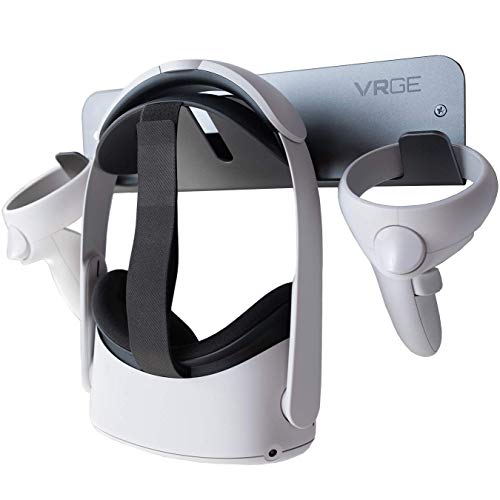
VRGE VR Wall Mount Storage Stand Hook
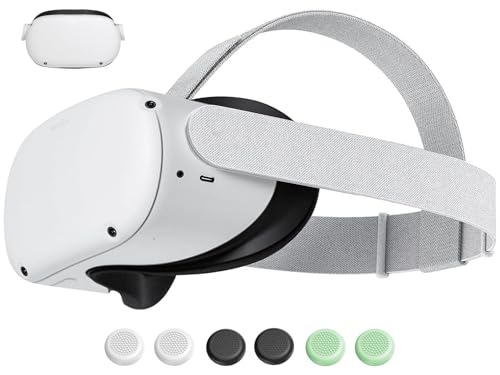
Saqico Replacement Head Strap for Meta Quest 2

Big Hero Baymax 6-Inch Vinyl Decal for Oculus VR

Globular Cluster CMP2 Comfort Mod for PS VR 2

Xbox Wireless Controller (Shock Blue)
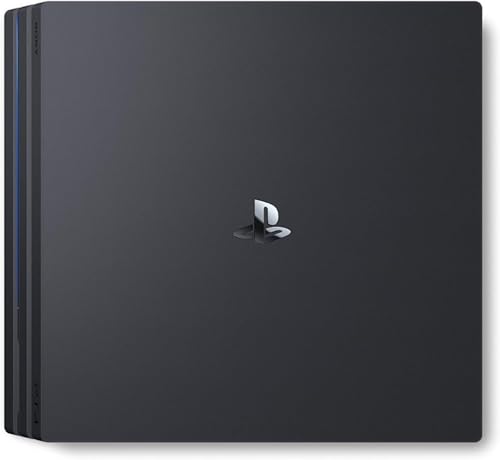
PlayStation 4 Pro 1TB Console

Meta Quest 2 Advanced All-In-One VR Headset 256GB

Meta Quest 2 Advanced All-In-One VR Headset 128GB

SanDisk 1TB Gameplay microSD Card
The Strengths Of Each Pick
When your VR rig travels with you, the ENHANGE backpack steps in as more than a carrying case, it acts as a padded shell for the whole setup. The main compartment is shaped to swallow an Xbox console or a laptop alongside a VR headset, with a soft divider that keeps screens from grinding against controllers.
Front-facing accessory slots handle cables, chargers, and game cases, so the bag feels organized rather than stuffed. You may find the green color louder than expected in a professional setting, but for living-room-to-friend’s-house runs, the padding and layout are the real headline.
Good Reasons To Consider
- Dedicated main cavity fits Series S, One X, and most full-size VR rigs
- Padded dividers reduce rattle and screen contact during transit
- Front organizer pockets keep controllers and cables from tangling
- Backpack straps leave both hands free for carrying a second bag or tripod
Things To Consider
- Green finish may clash with adult-professional environments
- Bulk can be heavy when fully loaded for long walks
Feature Snapshot
Who It Suits Best
Roommates and parents hauling a console plus VR rig between houses on weekends.
Consider Something Else When
You mostly game at a single desk and just need a tidy mount, where the VRGE VR Wall Mount Storage Stand Hook handles the job with less bulk.
Headsets left on coffee tables are how lenses get scratched and how the whole hobby gets abandoned. The VRGE wall mount offers a clean under-desk or wall-mounted home for Quest, Rift-S, Vive, PS VR2, and Index hardware, with the aluminum body lending a grown-up feel.
Mounting screws and anchors ship in the box, so the install leans toward a 15-minute job. For most small rooms, a single hook is plenty, and the gunmetal finish blends into most office setups without drawing attention.
Everyday Wins
- Wide headset compatibility across Quest, Vive, PS VR2, and Valve Index
- Aluminum build with a neutral gunmetal finish that ages well
- Includes screws and anchors for a single-tool install
- Frees up desk and shelf space in tight rooms
Worth Noting
- Single hook holds one headset plus controllers, not multiple full rigs
- Drywall anchors may need a stud finder in older plaster walls
Key Specs
Made For
People working from a small home office who want their headset off the desk between sessions.
Not Your Match When
You travel with the gear every weekend, where the ENHANCE Xbox Backpack keeps things padded on the move.
The original Quest 2 strap is the part most often blamed for forehead pressure, and the Saqico replacement sidesteps that with a redesigned fit that mirrors the official Elite Strap shape. You get the same halo-style stability without committing to a full third-party rig.
Because it uses the same mounting points as the stock strap, swapping takes minutes and does not require recalibrating lens spacing. Heads-up, it is only for Quest 2, so Quest 3 owners will need to look elsewhere.
Standout Benefits
- Mirrors the Elite Strap shape for a more balanced fit
- Soft padding reduces forehead pressure during long sessions
- Direct fit to Quest 2 mounts, no adapter needed
Trade Offs
- Quest 3 and Quest 3S are not supported
- Adjusting the dial takes a small learning curve versus the old velcro strap
Best Suited To
Quest 2 owners whose original strap has stretched out or feels uncomfortable after 30-minute sessions.
Look Elsewhere When
You own a PS VR2, where the Globular Cluster CMP2 Comfortable Mod tackles similar pressure issues on that platform.
Decals live outside the main conversation about VR gear, but they earn a spot when the headset otherwise looks identical to every other visor on the shelf. The Baymax decal is a six-inch vinyl cut designed to lay flat on the smooth Oculus faceplate, and the included instructions walk through application without leaving bubbles.
You get one sticker per pack, sized for a Quest face, and the vinyl peels off cleanly when you want a fresh look. It is purely cosmetic, so think of it as a personalization layer rather than a functional upgrade.
Everyday Perks
- Gives a plain Quest face a recognizable character
- High-quality vinyl applies to any smooth surface
- Application instructions included for bubble-free placement
Room For Improvement
- Decorative only, no protective or functional benefit
- Limited to one decal per purchase
Who Will Love This
Teens and collectors who want a headset that looks distinct on stream or in a multiplayer session.
Skip It When
You care more about fit and storage than flair, where the VRGE wall mount gives a more useful upgrade.
PS VR 2 sessions tend to outlast a single movie, and forehead pressure builds up. The CMP2 mod answers that with a soft forehead pad and a top strap that pulls weight upward, taking load off the face and distributing it across the crown of the head.
A larger anti-slip rear pad keeps the sweet spot stable so the lenses stay aligned even during fast camera turns. Owners commonly find the difference most noticeable after the one-hour mark, when the original foam starts to feel warm.
Useful Touches
- Top strap reduces forehead pressure during long sessions
- Larger rear pad keeps the sweet spot stable
- Soft forehead padding improves comfort on warm days
Points To Keep In Mind
- Sweat can build up against the new pad during intense workouts
- Adds a small amount of bulk above the visor
Feature Card
Right Fit For
PS VR 2 owners who game in two-hour stretches and feel the front weight by the second hour.
A Better Fit Elsewhere
You wear a Quest 2 most days, where the Saqico Replacement Head Strap offers the same kind of pressure relief on that platform.
Not every VR title wants motion controllers. Racing sims, flight games, and many flat-to-VR ports feel better with a traditional gamepad, and the Shock Blue Xbox Wireless Controller is the most flexible option for that role thanks to its wide device support.
USB-C charging, Bluetooth pairing, and a textured grip keep the controller comfortable across long sessions. It pairs quickly with the Meta Quest lineup and works across consoles, PCs, and mobile, so one pad covers multiple rooms.
Strengths Worth Knowing
- Works across consoles, PCs, TVs, and mobile via Bluetooth
- Textured grip on triggers, bumpers, and back for steadier handling
- USB-C charging cable included for fast top-ups
- Hybrid D-pad supports both classic and modern inputs
Honest Caveats
- Some Quest 2 games still expect motion controllers, limiting its role
- Battery life depends heavily on whether you use Bluetooth or the wireless dongle
Key Product Details
Built With In Mind
Anyone who plays racing, flight, or adventure VR titles that play better with a gamepad than motion controls.
Another Choice May Suit
You need a full console setup, where the PlayStation 4 Pro 1TB Console offers a dedicated VR base rather than just a controller.
The PS4 Pro sits in a sweet spot for budget PSVR setups, where the original PS4 sometimes struggles with smoother frame rates. The 1TB drive gives you room to install a chunky PSVR library without constantly shuffling games.
Hooked to a 4K TV, it pushes sharper imagery and, with an HDR screen, a wider color range. Boost Mode quietly speeds up older PS4 titles, which matters most when you swap between flat and VR versions of the same game.
Notable Upsides
- 1TB storage holds a large PSVR catalog without forced deletions
- 4K output improves non-VR games on a compatible TV
- HDR support adds richer color on HDR screens
- Boost Mode speeds up older titles in the background
Trade Offs
- Does not match the latest consoles in raw CPU power
- Older generation, so future PSVR support is limited
Whose Shelf It Belongs On
Shops building a low-cost entry into PSVR with room for a sizable game library.
Reach For A Different Pick When
You want a wireless, PC-free VR experience out of the box, where the Meta Quest 2 128GB runs standalone without a console at all.
Meta’s Quest 2 lineup is where most people first experience modern VR, and the 256GB model answers the biggest complaint about the original setup, which was storage pressure. You can install a full library of fitness apps, social worlds, and full-length games before running out of room.
Because the headset runs standalone, no PC or console is required, and 3D positional audio plus responsive controllers keep immersion consistent. Owners commonly pair it with a third-party strap like the Saqico option above, since the stock fit can feel tight on longer play sessions.
Practical Pluses
- 256GB internal storage holds dozens of VR titles at once
- Standalone operation removes the need for a separate PC or console
- 3D positional audio adds depth to compatible games
- Hand tracking and controllers work together in supported apps
Some Limits To Know
- Stock strap can press on the forehead during long sessions
- Heavier library means the headset benefits from a microSD add-on later
Spec Overview
Who Should Grab It
VR-curious households who want a single device that handles fitness, gaming, and social apps without extra hardware.
Swap It Out When
Your budget is tighter and you can manage with a smaller library, where the Meta Quest 2 128GB covers the basics for less.
For shoppers stepping into VR for the first time, the 128GB Quest 2 keeps the entry cost low while still delivering the same core experience as the larger model. The 500+ title library covers everything from short social apps to full-length games.
You trade raw internal space, which matters most if you install large fitness apps or multiple full games at once. A microSD card can stretch that further down the line, so the smaller drive is rarely a permanent limit.
Real Benefits
- Lower entry cost than the 256GB sibling
- Same standalone hardware and tracking as the larger model
- Access to the full Meta Quest content library
Practical Considerations
- 128GB fills up quickly with large fitness or multiplayer apps
- Future-proofing means budgeting for a microSD card later
Perfect Match For
First-time VR owners testing the waters with a focused starter library before committing to bigger installs.
Where A Sibling Pick Shines
You plan to load dozens of games from day one, where the Meta Quest 2 256GB saves the hassle of managing space.
Once you own a standalone headset, the next bottleneck is storage. The SanDisk 1TB Gameplay card adds room for a deep game library without the slowdowns that plagued older cards, with read speeds up to 190MB/s that keep loading screens short.
A2-rated app performance means switching from a game to a social or messaging app feels snappy, which matters when you want to check a friend request mid-session. The card is designed for portable consoles, so make sure your headset accepts the full 1TB before assuming the swap is seamless.
Benefits That Matter
- 1TB capacity holds a deep VR or portable-console library
- Read speeds up to 190MB/s reduce in-game loading
- A2 app performance keeps app-switching quick
Less Ideal Details
- Not all headsets support 1TB cards, so compatibility is worth confirming
- Write speeds vary based on the host device’s bus
Quick Facts
The Right Fit
Quest 2 owners who want a buffer between their current 256GB drive and a few years of new releases.
Where Another Pick Suits Better
You mostly play PSVR on a console, where the PlayStation 4 Pro 1TB Console already provides ample built-in storage.
Picking The Right VR Setup For Your Space
Choosing the right VR gear starts with where the headset actually lives. A wall or desk-mounted stand keeps optics safe in small rooms, while a backpack-style case fits anyone who moves a console between locations. Comfort mods, straps, and pads matter most for sessions over an hour, since the difference between a 30-minute and a two-hour session often comes down to how the headset distributes weight.
Storage decisions hinge on the platform. Standalone headsets lean heavily on microSD cards, and the jump from 128GB to 256GB inside the device or to a 1TB card reshapes how you manage installs. Console-based VR still benefits from a 1TB internal drive, so older PSVR builds stay relevant without a separate storage purchase.
Controllers vary more than people expect. Some VR titles handle driving and flying best with a traditional gamepad, especially when paired with positional audio on a standalone headset. Motion controllers remain the standard for action and rhythm games, so households with mixed tastes often end up with both a pad and the included controllers in active rotation.
Key Considerations Across These Picks
Pitfalls Shoppers Hit
A common slip is buying a headset first and only then realizing there is no plan for storage, mounting, or transport. Headsets left on a coffee table pick up dust and scratches, while a busy library fills a 128GB drive in months. Mapping out the full setup before adding anything to the cart saves the headache of a second order a week later.
Another easy miss is assuming comfort straps are universal. Quest 2 straps do not fit Quest 3, and PS VR 2 mods do not transfer to other platforms. Matching accessories to the exact headset model prevents returns and avoids adapters that never quite feel right.
Where The Extra Money Goes
Higher-tier models in this category tend to add storage, build quality, or a more refined comfort fit. A 256GB headset costs more than the 128GB version mostly because of internal space, while a metal wall mount costs more than a plastic hook because of the materials. Comfort mods that redistribute weight to the crown of the head cost more than basic foam pads for the same reason: they replace pressure points instead of just cushioning them.
The upgrade is worth it when the headset gets daily use, since comfort and storage bottlenecks show up within weeks. For a once-a-month setup, the budget-friendly options usually get the job done.
Frequently Asked Questions
Do I need a console to use a VR headset?
Standalone headsets like the Meta Quest 2 run independently and do not need a console or PC. Console-tied systems like PSVR require a PlayStation, while PC-tethered headsets need a compatible computer.
How much storage does a VR library actually need?
A handful of large games can fill 128GB quickly, especially fitness and social apps that download extra content over time. 256GB covers most casual setups, while 1TB microSD cards give heavy users room to grow.
Are third-party head straps worth it?
For most people, yes. The default straps on many headsets focus the weight on the forehead, and a redesigned top strap reduces pressure during long sessions, especially after the first hour.
Can I use one controller across VR and flat-screen games?
Many modern controllers, including recent Xbox pads, support Bluetooth and USB-C pairing across consoles, PCs, and mobile. That makes a single gamepad useful for both VR titles that prefer traditional inputs and regular couch gaming.
Will a wall mount damage my headset?
Quality mounts use smooth hooks or cradles that do not press on the lenses or facial interface. Hanging the headset by the strap, rather than the visor, keeps the optics safe over time.
Wrap Up
The right VR setup depends less on chasing the newest headset and more on matching accessories to your space and habits. Start with how and where you play, then add storage, comfort, and transport pieces one at a time. Once those basics click into place, the headset becomes a daily habit instead of a special-occasion gadget.



