


Chasing every console generation from a single box sounds tidy, but the hardware behind it is anything but. Modern emulators push CPUs and integrated GPUs harder than they were ever designed for, so the right pick depends on which systems you actually want to revisit. This roundup walks through compact PCs, mini desktops, and one all-in-one retro unit, each evaluated for real emulation workloads, daily usability, and the kind of setup you already have at home.
Your Options, Compared

BOSGAME P6 Neo Mini Gaming PC Ryzen 7 6800H

GMKtec M5 Ultra Mini PC Ryzen 7 7730U 32GB
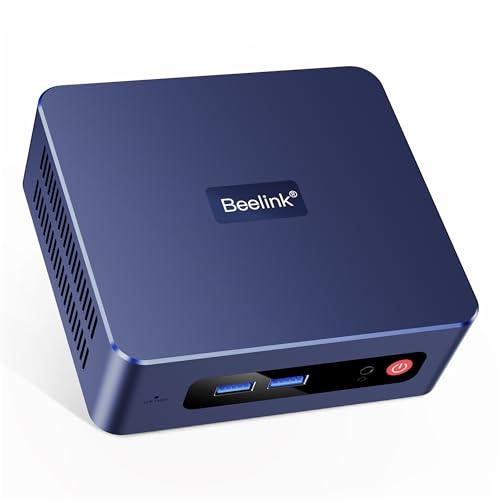
Beelink SER3 Mini PC Ryzen 3 3200U
GMKtec K11 Mini PC Ryzen 9 8945HS

BOSGAME E3 Neo Mini PC Intel N95
wo-we Mini PC AMD Ryzen 5 3500U

KAMRUI Hyper H1 Mini PC Ryzen 7 7735HS
GMKtec M5 Ultra Mini PC Ryzen 7 7730U
MUSBOY Wireless Retro Console 9 Emulators
A Deeper Look At The Lineup
The P6 Neo leans hard into the most demanding end of PC emulation. The Ryzen 7 6800H pairs eight Zen 3+ cores with Radeon 680M integrated graphics built on RDNA 2 (a modern AMD graphics architecture that brings hardware-level video decoding and improved shader performance to iGPUs), so heavier systems like GameCube, Wii, and even some PS2 titles run with less fuss than they would on a comparable Zen 2 chip.
Outside of emulation, 24GB of DDR5 memory means large multi-system frontends like LaunchBox or RetroBat stay snappy while a game is running in the background. The triple-output design (HDMI, DisplayPort, and USB4 pushing 8K at 60Hz) gives you room for a main display plus a CRT-style upscaler or a side panel showing system stats.
Real Benefits
- Radeon 680M graphics handle most emulators up through the PS2/GameCube era at native resolutions.
- 24GB DDR5 is generous headroom for frontends, shaders, and background tools.
- Dual 2.5GbE LAN (gigabit-class wired networking at 2.5 Gbps, useful for high-speed network play) and WiFi 6E give you flexible networking for LAN multiplayer setups and ROM transfers.
- USB4 8K output supports high-resolution modern displays alongside a secondary panel.
Worth Noting
- Higher power draw than the entry-level N95-based options in this list, so the chassis will run warmer during long sessions.
- Premium price tier, which may feel heavy for shoppers focused only on 8-bit and 16-bit games.
Key Specs
Who It Suits Best
Emulation hobbyists targeting GameCube, Wii, and PS2-era libraries with consistent performance.
Where Another Pick Suits Better
Casual collectors revisiting only 8-bit and 16-bit systems will find the Beelink SER3 a more comfortable match.
Where the BOSGAME P6 Neo pushes the upper limits of integrated graphics, this GMKtec leans on memory and connectivity. The Ryzen 7 7730U is a Zen 3+ part (a slightly older AMD CPU architecture that still holds up for emulation), so it lags the 6800H in raw GPU power, but the 32GB of RAM and the dual-NIC layout cover a lot of operational ground.
Triple 4K display output via HDMI 2.0, DisplayPort, and USB-C makes it a natural fit for a multi-monitor emulation battlestation or a main display paired with a dedicated CRT emulator. WiFi 6E and the dual 2.5GbE ports give you flexibility if you want to host LAN parties or move ROMs over a fast wired link.
Everyday Wins
- 32GB RAM handles multi-system frontends and browser-based setup tools with no slowdown.
- Triple 4K output gives you options for a primary panel plus secondary tools or stat readouts.
- Dual 2.5GbE LAN supports internal network play and faster file transfers between machines.
Trade Offs
- Zen 3+ graphics trail the Radeon 680M in heavier PS2/GameCube emulation, so expect some tweaking.
- 512GB SSD is workable but tight for multi-system collections, depending on your game count.
Right Fit For
Shoppers who juggle many frontends, use multi-monitor setups, and want headroom for productivity alongside emulation.
Not Your Match When
Gamers chasing smooth performance in the toughest PS2-era titles may be better served by the GMKtec K11 further down the list.
The Beelink SER3 is the kind of unit that gets out of your way. The Ryzen 3 3200U is a dual-core, four-thread chip with Vega 3 graphics (a small but capable integrated GPU from AMD’s older generation), so it’s happiest running emulators up through the SNES, Genesis, and early PlayStation eras without any fuss.
What makes it work as a starter unit is the practical side. You get 16GB of DDR4 and a 500GB PCIe SSD out of the box, plus a straightforward port layout with 4K dual-screen support, gigabit Ethernet, and WiFi 5. For most bedrooms or game-room setups, that is enough hardware to plug in, install a frontend, and start playing without drama.
Useful Highlights
- Dual-core Ryzen 3 handles 8-bit and 16-bit emulators with no tuning required.
- 16GB DDR4 is generous for an entry unit and keeps the desktop responsive.
- 4K dual-screen output and gigabit LAN cover the common living room setup.
Small Caveats
- Vega 3 graphics hit a wall quickly on N64-era and up, depending on the specific title.
- WiFi 5 is older than the WiFi 6/6E options elsewhere, which may matter in crowded networks.
Made For
First-timers putting together a low-fuss retro console-style emulation box for classic systems.
Consider Something Else When
Gamers planning to push into N64, Dreamcast, or PSP will get more usable headroom from the wo-we Ryzen 5 3500U unit.
For a multi-system library that has quietly grown into the hundreds of gigabytes, the GMKtec K11 is the most spacious unit on this list. The Ryzen 9 8945HS is a flagship-class mobile chip with eight cores, sixteen threads, and boost speeds up to 5.4 GHz, which is overkill for SNES but exactly the kind of muscle that helps PS2 and Wii U emulation feel relaxed rather than strained.
The 2TB PCIe 4.0 SSD matters as much as the CPU. With that much fast storage on tap, you can keep a deep multi-system library on the local drive without juggling external storage. The 32GB of DDR5 dual-channel memory (a memory configuration where two RAM modules work in parallel, doubling data bandwidth) keeps big frontends like LaunchBox responsive, even with metadata scraping and image caches enabled.
Points In Its Favor
- Ryzen 9 8945HS handles PS2/Wii U emulation with a generous performance margin.
- 2TB PCIe 4.0 SSD stores a large multi-system library without external drives.
- 32GB DDR5 dual-channel RAM keeps big frontends and tools running smoothly.
Honest Caveats
- Top-of-line pricing, so the value calculus depends on how much library space you need.
- Higher thermal output under heavy load, depending on the room and ventilation.
Feature Snapshot
Who Will Love This
Long-time collectors with a sprawling library and a strong preference for high-end performance.
Look Elsewhere When
Casual players focused on lighter 8-bit to 32-bit systems may be happier with the BOSGAME P6 Neo and its lower tier price.
The E3 Neo is the most power-sipping pick in this list. The Intel N95 is a 12th-generation Alder Lake-N chip (a low-power Intel family designed for small-form-factor desktops and embedded use) with four cores and modest integrated graphics, so it targets the same era as the Beelink SER3 while drawing noticeably less power at the wall.
You still get 16GB of DDR4 and a 512GB SSD, which is plenty for a curated 8-bit to 16-bit library plus a frontend like RetroBat. The N95 also has Intel’s quick-sync video block (hardware-accelerated video encoding and decoding, useful when streaming or capturing emulation output), so the box doubles as a small streaming or media server if you set it up that way.
What Makes Sense
- Low power draw keeps running costs down for always-on emulation or streaming use.
- 16GB DDR4 and 512GB SSD cover the common classic-era library.
- Compact, quiet chassis fits unobtrusively behind a TV.
A Few Limitations
- Intel UHD graphics trail AMD’s integrated options for PS1 and N64-era titles.
- Smaller upgrade path for the kind of demanding emulators further up this list.
The Right Fit
Casual retro players who care more about low noise and low power than pushing the latest emulators.
Skip It When
Gamers targeting PSP, Dreamcast, or PS2 should look at the wo-we Ryzen 5 3500U unit for noticeably better headroom.
The wo-we lands in a sweet spot a lot of shoppers will recognize. The Ryzen 5 3500U is a four-core, eight-thread chip with Vega 8 graphics (AMD’s older integrated GPU, still capable for mid-tier emulation), which slots it above the Beelink SER3 for CPU-bound workloads while keeping the price closer to the entry tier.
The compromise shows up in the memory and storage configuration. 8GB of DDR4 and a 256GB NVMe SSD (a small-form-factor solid-state drive that connects directly to the motherboard’s PCIe lanes) are workable but tight. For most home setups, you may end up adding a SATA SSD (a 2.5-inch drive using the older SATA connection, slower than NVMe but cheaper per gigabyte) for a deeper library or upgrading the RAM to 16GB to keep things snappy.
Noteworthy Benefits
- Ryzen 5 3500U outperforms entry chips in N64, Dreamcast, and PSP emulation.
- Quad-core CPU gives headroom for frontend tools running in the background.
- Compact form factor works well in a living room or bedroom cabinet.
Practical Considerations
- 8GB RAM and 256GB SSD fill up fast with multi-system libraries, so plan for upgrades.
- No WiFi 6 or 2.5GbE LAN, depending on the specific configuration you receive.
Best Suited To
Couch gamers who want a step up from entry hardware without stretching into premium pricing.
Another Choice May Suit
Collectors who prefer a more polished out-of-box experience should consider the KAMRUI Hyper H1 with its 24GB of memory.
The KAMRUI Hyper H1 takes a different angle than the BOSGAME P6 Neo. The Ryzen 7 7735HS pairs the same Radeon 680M integrated graphics with LPDDR5 memory running at 5500 MT/s (a low-power RAM standard with higher transfer rates than typical DDR4, which improves responsiveness in memory-bound tasks), which trims load times and keeps emulators responsive even when a frontend is scraping metadata in the background.
Triple 4K display output plus 2.5GbE LAN makes this unit a comfortable fit for a multi-monitor retro setup or a streaming-focused configuration. With Windows 11 Pro preinstalled, the box is also ready to drop into a Kodi or RetroBat frontend without a long setup pass.
Where It Delivers
- LPDDR5 5500MT/s memory gives the CPU a faster pipeline for emulator workloads.
- Triple 4K display output is a strong base for multi-monitor retro setups.
- 2.5GbE LAN handles fast ROM transfers and LAN multiplayer sessions.
Less Ideal Details
- 512GB storage fills up quickly with multi-system libraries.
- WiFi 6 is one step behind WiFi 6E units elsewhere on this list.
Quick Facts
Who Should Grab It
Gamers and streamers who want modern integrated graphics without stepping into flagship pricing.
Swap It Out When
Collectors with massive multi-system libraries will appreciate the GMKtec K11’s 2TB of local storage.
The other GMKtec M5 Ultra configuration shares the same Ryzen 7 7730U silicon as the unit reviewed earlier in this list, so the daily experience is similar. The 8-core, 16-thread Zen 3+ chip is dependable for multi-system emulation and steady for long sessions where you might be swapping between frontends, scraping box art, or hosting a small LAN party.
What sets this listing apart is the price positioning. If you find the higher-memory variant out of step with your budget, the lower-RAM configuration brings the same chip and chassis to a more accessible tier. For a typical 8-bit to PS1 library, that is enough machine.
Practical Pluses
- Ryzen 7 7730U handles classic through early-3D emulators with consistent performance.
- BIOS-level performance and quiet mode toggles let you balance heat and noise.
- Established mini-PC chassis with reasonable thermals for long play sessions.
Where It May Fall Short
- Lower memory tier may require a manual RAM upgrade for very large frontends.
- Storage tier may feel small for collectors with multi-terabyte game archives.
Perfect Match For
Shoppers who want a proven Zen 3+ unit and don’t mind opening the chassis for an upgrade later.
Reach For A Different Pick When
Gamers who want the 32GB out-of-box experience can move up to the 32GB M5 Ultra reviewed earlier.
This MUSBOY unit is the only pick here that isn’t a mini PC. It’s a self-contained retro console with nine preinstalled emulators and a large built-in game library, designed to plug into a TV over HDMI and run with no setup, no operating system, and no frontends to configure. For someone who wants the retro experience without the tinkering, the trade-off is appealing.
Two 2.4GHz wireless controllers come in the box, and 4K HDMI output means the unit scales to most modern televisions. The 25,000-plus game count covers a wide swath of 8-bit, 16-bit, and arcade-era titles, depending on what’s actually bundled. For shared family setups, it slots into a TV room with no fuss.
Useful Strengths
- Plug-and-play operation removes the entire PC emulation learning curve.
- Dual 2.4GHz wireless controllers come in the box, no extra accessories needed.
- 4K HDMI output works with most modern televisions without adapters.
Points To Note
- Fixed emulator set and game list, so you cannot add custom ROMs or tune settings freely.
- Build quality and controller longevity tend to vary across the category, in most cases.
Whose Shelf It Belongs On
Casual players and families who want a low-maintenance retro box hooked up to the main TV.
Where A Sibling Pick Shines
Hobbyists who want to customize emulators and manage their own library will be happier with the BOSGAME E3 Neo Mini PC.
What Matters When Picking A PC Emulation Console
The right console for PC emulation depends on which generation of games you actually want to revisit. Older systems like the NES, SNES, Genesis, and most arcade boards will run comfortably on a budget chip, while PS1, N64, and Dreamcast push into mid-range territory, and PS2, GameCube, and Wii lean on stronger integrated graphics like AMD’s Radeon 680M or better. Matching the hardware to the heaviest system in your library avoids the common frustration of a great mini PC that stutters on the one game you really wanted to play.
Port layout and expansion matter more than the box itself. A clean setup typically needs HDMI for the main display, USB for controllers, and wired or wireless networking for ROM transfers and updates. WiFi 6 or 6E (the latest wireless standards, offering faster speeds and lower latency than older WiFi 5) and a 2.5GbE LAN port are nice upgrades if you plan to stream or move large files around. Storage is the other practical lever. An emulator collection grows fast, so a 1TB or 2TB NVMe SSD saves you from juggling external drives within a year.
Software flexibility is the real differentiator between a mini PC and a dedicated retro console. Mini PCs let you install RetroBat, LaunchBox, or Batocera and tailor every emulator to your preferences. Plug-and-play retro consoles remove that step entirely, which is great for living rooms but limiting for hobbyists. Pick the path that matches how much tinkering you actually want to do.
Things To Watch In The Emulation Hardware Aisle
Common Shopping Slip Ups
The most common mistake is buying a chip that looks fast on paper but has weak integrated graphics. Emulators lean heavily on single-thread CPU performance and decent GPU throughput, so an entry-level Intel N-series chip may surprise you with sluggish PS1-era performance while a mid-range Ryzen 5 with Vega graphics handles the same titles comfortably. Always cross-check the heaviest console in your library against the integrated GPU, not the raw CPU name.
A second trap is underestimating storage. A small curated library of 8-bit and 16-bit favorites fits in 256GB, but multi-system collections can balloon into the terabytes quickly. Pick the largest SSD your budget allows, or plan to add a SATA drive later.
Where The Extra Money Goes
Spending up usually buys three things: a faster CPU with more cores, a stronger integrated GPU, and faster memory. The first two translate directly into smoother performance for the heavier emulators further up the timeline. Faster LPDDR5 or DDR5 memory (the current generation of system RAM, offering higher bandwidth and lower power use than DDR4) trims load times and keeps frontends snappy when a game is running in the background. None of those upgrades are strictly necessary for the older end of the spectrum, but they make a real difference the moment you push into PS2 and Wii U territory.
Frequently Asked Questions
Do mini PCs actually work for PC emulation in 2026? Yes, modern mini PCs with Ryzen 7 or Ryzen 9 mobile chips and Radeon 680M graphics handle most emulators up through PS2 and Wii with good results. Heavier systems like Wii U and Switch emulation still benefit from stronger hardware.
What specs matter most for emulation? Single-thread CPU performance and integrated GPU strength matter most. Memory bandwidth also helps, especially when a frontend is running alongside the emulator. Storage speed affects load times but not in-game performance.
Can I use a retro game console instead of a mini PC? A dedicated retro console is fine for casual 8-bit to 16-bit play and removes the need to configure emulators. A mini PC is the better choice if you want to add your own games, customize settings, or expand into heavier systems.
How much storage do I need for an emulation library? Plan on at least 1TB if you want a multi-system collection with room to grow. 512GB works for curated libraries, while 2TB makes sense for collectors who want to keep most of their collection on the local drive.
Do I need WiFi 6E or 2.5GbE LAN? Neither is strictly required, but both help. Faster networking speeds up ROM transfers and improves wireless streaming performance. A gigabit Ethernet port and WiFi 5 are enough for basic setups.
The Takeaway
The best console for PC emulation is the one that matches the heaviest system in your library without overpaying for the ones you’ll never touch. Entry-level mini PCs handle the classic eras comfortably, mid-range Ryzen units open up PS2 and GameCube, and high-end boxes with flagship mobile chips give you headroom for the more demanding emulators. Match the hardware to your goals, and the rest of the setup tends to fall into place.



