


Your game room doesn’t have to choose between authentic arcade feel and modern practicality. Some of you want to wire up genuine Japanese buttons, while others just need a shelf piece that nods to the era. A few of you are hunting a ready-to-play mini cab that doesn’t dominate the room. This list pulls together hardware, decor, and ready-to-play options so you can build, decorate, or just plug in.
The Choices Worth Comparing

Sanwa OBSF-30 30mm Push Buttons, 8-Pack (White)
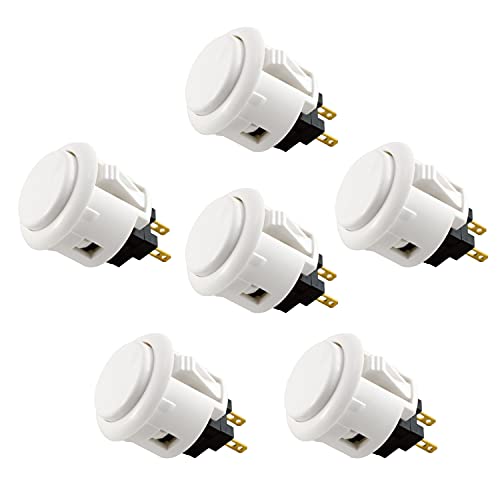
Sanwa OBSF-24 24mm Push Buttons, 6-Pack (White)

Tinworld Out Run Marquee Metal Sign

Sanwa OBSF-30 30mm Push Buttons, 12-Pack (Multicolor)

Taito Egret II Mini Limited Blue Edition
58″ Fluted Sideboard Buffet (Blue)

58″ Fluted Sideboard Buffet (Green)

58″ Fluted Sideboard Buffet (Walnut)

EG Starts 10x 33mm LED Square Push Buttons
More On The Choices That Made The List
Sanwa’s OBSF-30 has been the gold standard among arcade enthusiasts for decades, and the 8-pack gives you a clean two-player layout. Each button is 30mm across, the size most fighting games and classic shmups expect, and the Japanese-made construction delivers the firm, linear feel that defines the arcade experience. You’ll find these snap into most Hori and MadCatz fight sticks without modification, which is huge for a first custom build.
For anyone building a home console arcade cabinet and wanting the real-deal feel, these are the starting point. They feel noticeably crisper than most budget clones, and for a dedicated two-button layout per player, eight covers it exactly.
Standout Benefits
- Genuine Sanwa build from Japan delivers consistent, smooth actuation most clones can’t match.
- Snap-in mounting means no soldering or drilling in most fight sticks, which keeps the upgrade approachable.
- Non-clicking micro switch gives a quiet, linear press that many tournament players prefer.
- Eight-button count maps cleanly to a two-player, two-button-per-side setup like puzzle or fighter games.
Points To Keep In Mind
- All-white color means you’ll likely need to swap or color-code caps if you’re doing a six-button fighter layout.
- These don’t include a wiring harness, so factor in quick-disconnect terminals or a separate harness for first-time builders.
Built With In Mind
Two-player classic arcade projects and fight stick owners ready to upgrade from stock buttons without overthinking the install.
Look Elsewhere When
The Taito Egret II Mini Limited Blue Edition suits anyone who’d rather skip the build and plug into a finished mini cabinet with 40 pre-installed games.
The OBSF-24 trades the 30mm standard for a slightly slimmer 24mm profile, which gives your fingers a bit more room on densely populated control panels. You get the same Sanwa switch architecture, the same smooth, quiet actuation, and the same Japanese manufacturing pedigree as its bigger sibling. For curved or angled control surfaces, the smaller footprint often feels more natural.
Where the 30mm pack targets classic two-player layouts, this 6-pack fits a one-player control panel with breathing room. It’s the subtle choice for builders who care about ergonomics over convention.
Well-Handled Touches
- 24mm size reduces accidental presses on panels with closely spaced buttons.
- Snap-in fit matches most Hori and MadCatz enclosures, so retrofits stay painless.
- Same non-clicking switch as the OBSF-30 keeps the feel consistent if you mix sizes on one panel.
Honest Caveats
- Six buttons leaves you one short of a full six-button fighter layout, so plan carefully or pair with another pack.
- Smaller buttons can feel unfamiliar to anyone used to standard 30mm arcade hardware.
The Right Fit
Single-player fight stick builders and custom controller projects where a slimmer button profile matters more than count.
Reach For A Different Pick When
The Sanwa OBSF-30 30mm Push Buttons, 12-Pack (Multicolor) is a better fit for a full six-button Street Fighter-style layout in mixed colors.
This isn’t hardware, but the Out Run marquee sign is one of the fastest ways to anchor a game room in a specific era. Tinworld reproduces the iconic arcade artwork on aluminum, so it doesn’t bow, fade, or tear the way a paper poster eventually does. The marquee shape itself doubles as a design statement, mimicking the top of an actual cab.
You can hang it above a console arcade cabinet, behind a TV, or in a hallway to telegraph the room’s personality. For a renter or anyone who can’t drill into brick, a pre-drilled metal sign is one of the easier installations around.
Where It Helps
- Aluminum construction handles humidity and temperature swings better than printed paper alternatives.
- Pre-drilled mounting holes keep the install to a single nail or two screws.
- The Out Run branding is instantly recognizable to anyone who spent quarters in the late 80s.
Things To Consider
- It’s decor only, so don’t expect any function beyond visual impact.
- Aluminum can dent if knocked hard, so pick a wall location away from foot traffic.
Who Should Grab It
Game room owners who want a recognizable visual hook without committing to a full-size cabinet build.
Where Another Pick Suits Better
The 58″ Fluted Sideboard Buffet (Walnut) makes more sense for shoppers who need actual storage for a full-size cab plus controllers and accessories.
The 12-pack solves the layout question the 8-pack leaves open. You get a full six-button Vewlix or Noir layout per side, with each color appearing in pairs so the cap arrangement stays clean. The colors mirror the standard Japanese arcade color scheme, which matters for muscle memory if you also play on real cabinets at tournaments or bars.
Compared to the 8-pack reviewed earlier, this trades color flexibility for button count. If you’re committing to one build, having all twelve on hand removes the second-order decision of sourcing matched caps later.
Key Advantages
- Twelve buttons cover a complete two-player six-button layout out of the box.
- Standard arcade color set (red, blue, yellow, white) keeps visual cues familiar.
- Same Sanwa switch architecture means the feel matches the 8-pack if you use both.
Trade Offs
- Higher upfront count means extras go into storage if your project only needs six or eight.
- Color choices are fixed, so custom color schemes require sourcing third-party caps.
Best Suited To
Builders planning a dedicated Street Fighter or Neo Geo-style control panel with a six-button-per-player layout.
Swap It Out When
The EG Starts 10x 33mm LED Square Push Buttons are a better fit for builders who want backlit buttons and don’t need Sanwa’s exact feel.
The Egret II Mini is the closest thing to a plug-and-play console arcade cabinet on this list. You get 40 pre-installed Taito classics including Space Invaders and Bubble Bobble, a tilt-able 5-inch 4:3 display (a screen aspect ratio matching original CRT arcades, so games don’t look stretched), and a true six-button arcade layout with a real joystick. The blue limited edition adds a paint job that stands out on a shelf.
For a small apartment or a desk at the office, the footprint is the appeal. You’re not building anything, not wiring anything, and not hauling a full-size cab up a stairwell.
Points In Its Favor
- 40 pre-installed games mean immediate play without any setup, which is rare in the mini-cab category.
- The 5-inch screen can tilt or rotate, and an HDMI output lets you push to a TV for couch play.
- Authentic six-button layout gives fighting games room to breathe.
- SD card slot allows library expansion for collectors who want more than the stock roster.
Softer Spots
- The 5-inch built-in screen feels small for two players sitting side by side, so plan on using the HDMI output for group play.
- Limited edition pricing can run higher than the standard colorway, depending on stock at your retailer.
Feature Snapshot
Who Will Love This
Anyone who wants the genuine arcade feel without soldering, drilling, or building a control panel from scratch.
Not Your Match When
The Sanwa OBSF-30 30mm Push Buttons, 8-Pack (White) is the better pick for hobbyists who actually want to wire up their own control panel.
Sideboards don’t usually belong in a console arcade cabinet roundup, but hear this out: at 58 inches wide and 30.3 inches tall, this fluted credenza is genuinely the right size to swallow a full-size cab when you want it out of sight. The blue finish picks up the same palette as the Taito Egret II Mini Limited Blue Edition, so the two can share a room without clashing.
Adjustable interior shelves let you stash controllers, fight sticks, and even a spare mini cab. The 13.9-inch depth is the honest tradeoff: deep enough for consoles and gear, shallow enough not to dominate the room.
Strong Points
- Width and height match common full-size cab dimensions, so hiding one behind arched doors is feasible.
- Adjustable shelves adapt to fight sticks, controllers, or media gear without forcing one fixed layout.
- Fluted door fronts add mid-century texture that doesn’t scream “gaming furniture” in a shared living space.
Worth Noting
- Assembly is required, and 58-inch-wide pieces are awkward to maneuver through narrow doorways.
- At 13.9 inches deep, oversized CRT-style cabs may not fit; check your cab’s depth before ordering.
Made For
Living room owners who need to tuck a full-size cab behind closed doors and want a color that complements an arcade-themed setup.
Skip It When
The 58″ Fluted Sideboard Buffet (Walnut) is the better pick for game rooms going for a warm, wood-toned retro look instead of a bold blue.
Same dimensions and shelf layout as the blue sideboard, finished in a deep green that fits a moodier game room aesthetic. The green reads as more grown-up than primary color finishes, which helps in apartments where the cabinet doubles as a TV stand. Functionally, you get the same cab-hiding width and adjustable interior.
Pick this color if your walls lean neutral and you want the sideboard to make a statement without competing with the cabinet artwork on top.
The Helpful Details
- Deep green finish pairs well with wood tones and neutral walls common in rental apartments.
- Adjustable shelves accommodate both slim consoles and chunkier CRT-era gear.
- Arched door fronts add architectural interest without ornate hardware.
Small Caveats
- Same 13.9-inch depth as the other sideboards, so wider cabs may not fit fully inside.
- The bold color reads as a deliberate choice; it’s not the easiest piece to repaint later if you change your mind.
Perfect Match For
Apartment dwellers with a single shared living space who need their arcade storage to look intentional and design-forward.
Where A Sibling Pick Shines
The Taito Egret II Mini Limited Blue Edition makes more sense for shoppers prioritizing play time over storage furniture.
The walnut finish ties the sideboard to the warm wood trim that real arcade cabinets have carried since the golden age. If you’re restoring or building a cab with original-style T-molding and side art, this color anchors the room without competing for attention. You give up the bold statement of the blue and green finishes in exchange for something that blends into most mid-century decor.
It’s the same shell as the other two sideboards, so dimensions, shelf adjustability, and the arched door layout all carry over. The honest read is that the choice here is purely about the color story.
A Favorable Mix
- Walnut tone complements traditional arcade wood-grain side art without clashing.
- 58-inch width fits a full-size cab behind the doors for tidy storage.
- Adjustable shelves handle controllers, fight sticks, and board games in the same unit.
Possible Compromises
- Walnut finish shows dust and fingerprints more than the painted blue and green options.
- Matching existing furniture is harder with a specific wood tone than with a neutral color.
Right Fit For
Game rooms aiming for a wood-paneled, 80s-arcade aesthetic where the furniture should recede into the background.
Consider Something Else When
The 58″ Fluted Sideboard Buffet (Blue) is the better pick for shoppers wanting a bolder color statement against neutral walls.
The EG Starts set is the entry ticket to backlit arcade buttons. You get ten 33mm square buttons with built-in LEDs, two of each color (red, yellow, blue, green, white), and a 12V power requirement that matches common arcade wiring harnesses. The square shape is a different look from the round Sanwa buttons reviewed earlier, leaning into a more modern or pixel-art aesthetic.
For first-time builders who want a finished, glowing panel on night one, this set removes the need to source separate LEDs and buttons. The trade-off is that the switch feel is a step below Sanwa, so it suits hobby projects more than tournament-grade fight sticks.
What It Does Well
- Integrated LEDs eliminate the extra wiring step most DIY kits require.
- Color-matched pairs simplify button layout decisions for newcomers.
- 33mm square shape works on both wood and metal control panels, giving flexibility on enclosure material.
Trade-Offs To Consider
- LED polarity matters; reversing the connection means no light, which is a common first-time wiring slip.
- Switch feel is a clear step below Sanwa, so this isn’t the right pick for players chasing tournament feel.
- You’ll need a 12V power supply, which is often sold separately from the buttons themselves.
Quick Technical Notes
Whose Shelf It Belongs On
First-time cabinet builders who want illuminated buttons and a forgiving install without chasing premium switch feel.
A Better Fit Elsewhere
The Sanwa OBSF-30 30mm Push Buttons, 12-Pack (Multicolor) suits experienced builders who prioritize switch quality over built-in lighting.
What Matters Most When Choosing Console Arcade Cabinet Hardware and Storage
A console arcade cabinet lives or dies on the control panel. Buttons are the surface your hands actually touch, so switch feel, mounting style, and size matter more than sticker count. A 30mm round button is the most common and most forgiving for general arcade play. A 24mm button is slimmer and better for tight layouts. A 33mm square button is louder visually and often easier to hit with your thumb.
Mounting style decides how much work the install becomes. Snap-in buttons drop into a pre-cut hole with no extra hardware, which is why Sanwa OBSF parts are so popular for retrofits. LED buttons add a polarity step, meaning the positive and negative wires must connect the right way or the light won’t work, so they reward builders who plan their wiring before cutting panels.
For storage and room integration, depth and width decide what actually fits. A 58-inch-wide sideboard can hide a full-size cab behind its doors, but the 13.9-inch depth rules out some bulkier cabs. Measure your existing gear before ordering furniture, and pick a finish that matches the mood you want the room to give off: walnut for warm and woodsy, blue for bold and modern, green for something in between.
Key Considerations Across These Picks
Mistakes Worth Dodging
Buying buttons before measuring your panel leads to a common first-timer trap. Sanwa OBSF-30 and OBSF-24 buttons use different cut sizes, so a panel cut for 24mm won’t accept 30mm without re-drilling. Always check the cut-hole spec of your enclosure or fight stick before picking a button size.
A second slip-up is treating storage furniture like a one-size-fits-all solution. Sideboards that look the right width can be too shallow for the cab you already own, leaving the marquee sticking out beyond the doors. Measure depth, not just width, when planning hidden storage.
What The Higher Tier Buys
The jump from generic buttons to genuine Sanwa parts pays for itself in switch consistency, the engineering that makes every press feel identical. Over thousands of matches, that consistency matters more than LED flash or a novelty shape. The same logic applies to a ready-to-play mini cabinet like the Egret II over a no-name clone: licensed emulation, proper aspect ratio, and a real six-button layout add up to a noticeably cleaner experience.
If your goal is the authentic arcade feel for daily play, spending up on Sanwa buttons or a licensed mini cab is the move that compounds over time. If you just want a one-off project piece, the EG Starts LED set gets you most of the way there at a friendlier entry point.
Frequently Asked Questions
What size button do most arcade cabinets use?
Most cabinets use 30mm round buttons for action keys, since that size balances fingertip accuracy with fast play. Smaller 24mm buttons suit compact fight sticks, while 33mm square buttons are common in modern or pixel-style builds.
Do I need special tools to install snap-in buttons?
Snap-in buttons usually only need a correctly sized hole and firm thumb pressure to seat. LED-equipped buttons add a wiring step, but no soldering is required if you use quick-disconnect terminals or a pre-made harness.
Can a mini arcade machine replace a full-size cabinet?
A mini cabinet covers casual play and small spaces well, but it doesn’t match the presence, two-player comfort, or screen size of a full-size build. For shared living rooms where the cabinet is part of the decor, full size still wins on visual impact.
How much depth do I need to store a full-size cab behind doors?
Most full-size cabs are 24 to 30 inches deep, so a sideboard under 18 inches deep won’t fully conceal one. The 13.9-inch depth on the sideboards reviewed here is generous for consoles and fight sticks, but tight for an actual full-size cab; measure yours before relying on closed-door storage.
Are LED buttons worth the extra wiring?
LED buttons add a single polarity step and a 12V power line, which is manageable for most first-time builders. The visual payoff is significant in dim game rooms, and the added wiring time is usually under an hour for a standard panel.
Wrap Up
The right pick depends entirely on which direction you’re heading. Builders chasing authentic arcade feel will want Sanwa buttons; ready-to-play fans will find the Egret II Mini hard to beat; and anyone integrating a cab into a shared living space should weigh the sideboard options carefully. Match the choice to your actual time, skill, and room, and the rest tends to fall into place.



