


A solid gamepad quietly transforms how you play, whether you spend your evenings grinding through indie titles on a laptop, replaying the classics on a Raspberry Pi, or building a battlestation that finally ditches the keyboard-and-mouse compromise. The challenge is that the category splits into two worlds: modern multi-platform controllers with hall-effect sensors and high polling rates, and retro-styled pads designed for original console hardware or emulators. You want the right tool for the setup you already own, not a flashy spec sheet that doesn’t translate to your desk. This list covers both lanes, with honest trade-offs and clear picks for different player types.
The Main Contenders

Exquisite Gaming Crash Bandicoot Cable Guys Controller Holder

8Bitdo Ultimate 2C Wireless Controller (Green)

8Bitdo Sn30 Pro+ Bluetooth Gamepad (Blue Classic)

miadore 4 Pack Classic 64 Controller (Wired)

8Bitdo Ultimate 2 Wireless Controller (Purple)

8Bitdo Ultimate 2 Wireless Controller (Black)
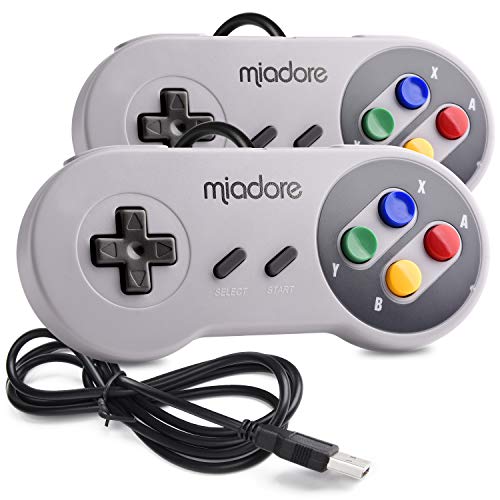
miadore 2 Pack USB Controller for SNES Retro Gaming

miadore 2 Pack USB Wired N64 Controller (Black/Gray)

miadore 2 Packs Classic 64 Wired Controller (Jungle Green/Orange)
miadore 2 Packs USB Retro Controllers for N64 Gaming
Taking A Closer Look At The Options
If you treat your gaming space like a display case, this Crash Bandicoot figure earns its keep before you even pick up a controller. Standing 8.5 inches tall, the sculpted PVC character grips your gear with both hands, and the weighted base keeps the whole thing planted on a crowded desk.
It’s the only entry on this list that isn’t a controller at all, but for anyone juggling DualSense pads, Xbox pads, and a phone, it doubles as a tidy rest station. The hands cradle PlayStation 5 and Xbox Series X/S controllers comfortably, and the same cradle holds most smartphones, remotes, or even business cards. If your battlestation doubles as a Crash shrine, the styling is a feature, not a gimmick.
Notable Gains
- Officially licensed character sculpt with detail pulled from the modern Crash era
- Solid PVC body feels substantial and resists tipping during one-handed grabs
- Multi-device cradle handles controllers, phones, and remotes in the same slot
- Keeps frequently used gear off the desk, reducing clutter around your monitor
Points To Keep In Mind
- Not a controller, so it doesn’t add any input options to your setup
- Licensed character art means it fits best in Crash or PlayStation-themed rooms
Whose Shelf It Belongs On
Crash fans, character-figure collectors, and anyone whose desk needs a stable, themed rest for a modern gamepad.
Where Another Pick Suits Better
Choose the miadore 4 Pack Classic 64 Controller if you actually need to play four-player N64 games rather than display a single pad.
For a PC-first player chasing snappy inputs, this 8Bitdo model lands in a sweet spot between casual gamepad and competitive pad. The 1000Hz polling rate on the 2.4GHz and wired connections means the controller reports stick and button positions a thousand times per second, far above older Bluetooth pads.
Hall-effect joysticks and triggers use magnetic sensing instead of physical contact, which is the key reason they resist the stick drift that plagues older controllers after heavy use. You also get metal joystick rings, a turbo function, and remappable rear bumpers that don’t require companion software. For anyone who plays shooters, fighting games, or precision platformers on Windows or Android, this pad is the kind of upgrade you feel in the first session.
Everyday Advantages
- 1000Hz polling rate keeps inputs feeling immediate in fast-paced PC titles
- Hall-effect sticks and triggers sidestep the drift issue common in older pads
- Remappable L4 and R4 rear bumpers add extra inputs without software setup
- Wear-resistant metal joystick rings handle aggressive play over time
Honest Caveats
- No console support listed beyond Windows and Android, so it’s not a multi-room hub
- Turbo and remapping live on the pad itself, which can feel cramped at first
Feature Snapshot
Best Suited To
Competitive PC and Android players who want low-latency response and a drift-resistant stick in a single pad.
Look Elsewhere When
Pick the 8Bitdo Sn30 Pro+ Bluetooth Gamepad instead if your main setup is a Switch, Steam Deck, or classic emulator library.
The Sn30 Pro+ borrows the silhouette of a Super Nintendo controller, then adds dual analog sticks, rumble, and modern wireless. That mashup matters for anyone bouncing between a Switch, a Steam library, and an emulator folder on the same desk.
The 12-button layout is approachable for retro games but doesn’t leave you stuck on modern twin-stick shooters. Wireless Bluetooth frees the pad from a cable, and the rumble motor gives enough tactile feedback for racing and action games. Compatibility stretches across Windows, Mac, Android, and Steam, which makes it a great all-rounder if you’re not ready to commit to one ecosystem.
What Helps Most
- Classic SNES-style shape appeals to players who dislike modern grippy pads
- Wireless Bluetooth cuts the cord without a dongle on supported devices
- Rumble feedback adds presence to racing and action titles
- Battery or corded power means you can keep playing during a charge
Some Limits To Know
- Smaller grips aren’t ideal for long sessions in shooters
- Classic button count forces menu diving in some modern PC games
Who It Suits Best
Multi-platform retro fans who want a single pad that handles Switch, Steam, Android, and Raspberry Pi emulation.
Swap It Out When
Choose the 8Bitdo Ultimate 2C Wireless Controller if competitive PC play and drift-free Hall-effect sticks matter more than classic styling.
This is the rare bundle that solves a very specific problem: you have an original N64, you want to host four-player Mario Kart nights, and you need spare pads that don’t cost collector prices. The four-color set mirrors the original gray, green, blue, and orange lineup, which keeps the couch sorted.
The upgraded joystick is the key spec, because the original N64 stick was notorious for wearing out under heavy use. Each pad still has the M-shaped ten-button layout, the analog stick, and the expansion port on the bottom for a rumble or memory accessory. Note the packaging clearly: this is the non-USB version, so it’s built for the real console rather than PC emulation.
A Favorable Mix
- Four-pad bundle covers the full couch for classic four-player titles
- Upgraded joystick addresses the original N64 stick’s weak point
- Color-coded shells match the era’s original N64 lineup
- Expansion port keeps rumble and memory accessories compatible
Trade Offs
- Wired only and console-only, so it doesn’t double as a PC pad
- Four pads in one box is more than a single-player household needs
Made For
N64 owners hosting multiplayer nights with friends or family who need durable, era-correct spares.
Not Your Match When
Choose the miadore 2 Pack USB Wired N64 Controller if you want pads that work on a PC or Raspberry Pi instead of the original console.
The Ultimate 2 in purple steps up from the 2C with TMR joysticks, which use tunneling magnetoresistance to detect stick position. In plain terms, the precision and sensitivity are higher than standard Hall-effect designs, and the durability advantage is the same: no physical contact, so no drift over time.
The 8Speed 2.4GHz wireless tech claims under 1ms latency at a 10-meter range, which is the kind of spec that matters if you sit far from your PC or your TV setup. A trigger mode switch lets you flip between linear and Hall-effect trigger behavior, so racing sims and platformers can share the same hardware. It’s the premium pick on this list for multi-platform players who don’t want to think about stick drift again.
What Earns Its Place
- TMR joysticks deliver higher sensitivity than standard Hall-effect designs
- Under-1ms wireless latency keeps input feel tight across the room
- Trigger mode switch adapts the pad to racing and platform games
- Broad platform support across PC, Apple, Steam, and Android
Worth Bearing In Mind
- Higher tier commands a noticeable jump in cost over the 2C
- Trigger mode switch adds a learning curve for first-time premium pad owners
Spec Overview
Right Fit For
Multi-platform players who treat the gamepad as a long-term purchase and want flagship stick tech without stepping into console-first brands.
Consider Something Else When
Pick the 8Bitdo Ultimate 2C Wireless Controller if you want most of the same experience at a lower tier without TMR precision.
The black version of the Ultimate 2 shares its TMR-stick internals and 2.4GHz wireless tech with the purple edition, so the performance pitch is identical. What changes is purely the look: this is the pad to match a black monitor, dark desk mat, or a setup where you don’t want a bright accent color competing for attention.
For multi-platform households bouncing between a Windows desktop, an Apple device, and a Steam library, the broad compatibility saves you from owning two or three pads. The trigger mode switch and under-1ms latency carry over from the purple model, so you’re not trading function for color. If you’ve read the purple review and decided TMR sticks make sense for your play style, this is the same pad in a quieter shell.
Points In Its Favor
- TMR joysticks match the purple Ultimate 2 for precision and durability
- Black shell fits darker setups and professional-looking desks
- Works across PC, Apple, Steam, and Android without juggling dongles
- Trigger mode switch supports both racing and action play styles
Where It May Fall Short
- Premium price puts it out of reach for casual single-platform players
- No motion controls or adaptive triggers mean console-style features are missing
Who Will Love This
Multi-platform players who want flagship stick tech in a low-key color that doesn’t clash with a clean desk setup.
Reach For A Different Pick When
Pick the 8Bitdo Sn30 Pro+ Bluetooth Gamepad if your main library is Switch and retro titles rather than modern multi-platform releases.
If you run RetroPie on a Raspberry Pi or keep a Windows machine loaded with SNES emulators, this two-pack gives you a couch co-op setup without the sticker shock of modern pads. The two-tone shells and round buttons look the part, which matters if your retro setup lives in a visible corner of the room.
USB plug-and-play keeps the setup simple, with no driver installs on modern Windows, Mac, or Linux systems. The pad uses a standard D-pad and four face buttons rather than dual analog sticks, which is closer to authentic SNES feel but less versatile for modern games. For two-player runs through classic platformers and RPGs, it covers the basics and doesn’t ask for much.
Everyday Perks
- Two-pad bundle covers local two-player sessions out of the box
- USB plug-and-play works on Windows, Mac, Linux, and Raspberry Pi
- Classic SNES-style layout feels right for emulated 16-bit games
- No driver installs needed on supported modern operating systems
Soft Spots
- Button mapping in emulators may require manual configuration per game
- No analog sticks limits use beyond classic 2D-style titles
Perfect Match For
Retro gaming enthusiasts running SNES emulators on a Raspberry Pi or older PC who want a no-fuss wired pad.
A Better Fit Elsewhere
Choose the miadore 2 Pack USB Wired N64 Controller if your emulator library leans toward N64 titles with analog stick gameplay.
The black-and-gray twin pack lands in a different lane from the original-console N64 pads earlier in this list. This is the USB version, designed for PCs, Macs, Linux boxes, and Raspberry Pi rigs running N64 emulators like Project64 or Mupen64Plus.
Plug-and-play support across Windows 98 through Windows 10, Mac OS X, and a stack of Linux distros means you don’t have to dig for drivers when you swap devices. Compatibility also covers RetroPie, Recalbox, Lakka, and other retro-gaming operating systems, so the same pair of pads travels between your main PC and a dedicated emulation box. The two-pad format handles local co-op, which most N64 multiplayer titles still demand.
The Helpful Details
- USB plug-and-play covers Windows, Mac, Linux, and Raspberry Pi systems
- Two-pad format handles N64-style local multiplayer out of the box
- Works with RetroPie, Recalbox, Lakka, and similar retro OS projects
- Standard USB input means the pad is recognized as a generic controller
Some Limits To Know
- Android TV boxes are not supported, despite broader Android compatibility
- Android phones require a separate USB OTG cable for connection
Quick Facts
Who Should Grab It
Retro emulation enthusiasts who want N64-style analog control on PCs, Macs, or Raspberry Pi without original console hardware.
Skip It When
Pick the miadore 2 Packs Classic 64 Wired Controller if you’re plugging into a real N64 console rather than an emulator.
For households that still own a working N64, this jungle green and orange two-pack replaces dead or worn-out original pads without the eBay hunt. The shell colors land squarely in the 1990s nostalgia zone, and the M-shaped ten-button layout keeps muscle memory intact for anyone who grew up on the system.
Each pad carries the analog stick, shoulder buttons, Z-trigger, and a functional expansion port on the bottom for rumble or memory accessories. Wired-only operation is consistent with the original hardware, and the form factor mirrors the era. It’s a straightforward replacement option for a console that’s still very much alive in many living rooms.
Practical Pluses
- Direct replacement pads for original N64 console hardware
- Color-coded shells match the era’s signature jungle green and orange
- Expansion port supports rumble and memory accessories
- Two-pack covers local co-op for two-player N64 titles
Small Caveats
- Wired-only with no PC or emulator support listed
- Original N64 stick design has the same wear concerns as the first-party pad
Built With In Mind
Owners of original N64 consoles who want era-correct replacement pads for nostalgic gaming sessions or kids’ first retro experience.
Where A Sibling Pick Shines
Choose the miadore 4 Pack Classic 64 Controller if you host four-player N64 nights and need pads for every player on the couch.
This USB twin pack is the other emulator-focused N64 option on the list, but it carries one practical advantage: spare replacement joysticks ship in the box. The N64 stick is the wear point that kills most pads over time, so having a backup on hand turns a future failure into a five-minute fix.
It works on the Switch in docked mode, PCs, Macs, Raspberry Pi setups, and Android phones with an OTG cable, which gives you flexibility beyond a single machine. The pad supports a wide range of emulators including Project64, 1964, MAME, Mupen64Plus, and Sixtyforce, so you can match it to whichever software you already run. For anyone who plays a lot of N64 games through emulation, the joystick spares alone justify the choice.
Good Reasons To Consider
- Replacement joysticks included to extend the pad’s usable life
- Works on Switch (docked), PC, Mac, Raspberry Pi, and Android via OTG
- Broad emulator support across current and historical N64 software
- Two-pack handles two-player sessions over long emulator marathons
A Few Limitations
- Switched N64 controllers require manual input mapping in emulators
- USB cable length may be short for couch setups far from the console
The Right Fit
Long-term N64 emulation users who play often enough to wear a stick and value having a backup joystick on the shelf.
Not Your Match When
Pick the miadore 2 Pack USB Controller for SNES Retro Gaming if your library is 16-bit rather than N64, since the SNES layout suits those games better.
What To Weigh Before Choosing Your Next Pad
Platform fit comes first. A modern multi-platform pad with Hall-effect or TMR sticks makes sense for PC, Switch, Steam, or Android duty, but it’s wasted on someone whose only gaming happens on an original N64. A retro-styled USB pad solves the emulation problem but does nothing for a Switch in handheld mode, and the reverse is also true. List the systems you actually touch in a typical week, and the right lane becomes obvious.
Stick technology matters more than it used to. Older analog sticks use physical contact points that wear down and cause drift, the slow leftward creep your character makes when you let go of the stick. Hall-effect joysticks use magnets to detect position, so there’s no contact to wear out. TMR sticks go a step further with higher sensitivity, which is helpful in shooters where tiny stick inputs change your aim. If you’re a heavy or competitive player, the upgrade pays off in fewer replacements and steadier control.
Connection type changes the feel of play. Wired pads have zero latency and never need charging, which is why they remain the default for emulators and tournament play. Wireless 2.4GHz pads with sub-1ms latency feel almost as tight as wired, while standard Bluetooth pads add a few milliseconds of lag that’s noticeable in fast games but fine for casual play. Pick the connection type that matches the games you play most, and the rest of the spec sheet becomes easier to evaluate.
Multiplayer count reshapes the value math. A single premium pad makes sense for solo PC play, but a couch co-op household running N64 or SNES classics needs two or four pads to make the library playable. Bundle packs cost less per pad, and the included color coding often helps with player order. For anyone hosting retro game nights, the bundle math usually wins over buying premium individual pads.
Key Considerations Across These Picks
Where Shoppers Go Wrong
The most common mistake is choosing a pad by spec sheet alone. A 1000Hz polling rate means nothing if the pad doesn’t fit the games you play, and a heavy premium controller is a poor match for a casual emulator user. Match the pad to your platform, your genres, and your session length, and the spec sheet becomes a useful filter rather than the whole decision.
Another trap is ignoring the wear point. The N64 analog stick is famous for dying early, which is why one of the picks on this list ships replacement sticks. For modern pads, the equivalent is stick drift from old potentiometer designs. Choosing a Hall-effect or TMR stick up front often costs less over the lifespan of the pad than a cheaper alternative that gets replaced.
Where The Extra Money Goes
Premium tiers earn their price through stick technology, latency, and build quality. TMR joysticks, sub-1ms wireless, and metal internal components all add up, and the result is a pad that feels precise in competitive games and outlasts its cheaper siblings. For casual single-player use, the upgrade is hard to justify, but for daily PC or multi-platform play, the smoother feel shows up in every session.
Software support is the other place higher tiers differentiate. Better pads offer on-the-fly remapping, profile switching, and trigger mode toggles without launching companion apps, which streamlines the experience if you hop between genres. The premium buy is rarely about one killer feature, more about the combination of build, sensors, and software that makes a pad disappear into your hands.
Frequently Asked Questions
What Is Stick Drift And Why Does It Matter?
Stick drift happens when an analog stick registers input even when you’re not touching it, usually because internal contact points wear down. Hall-effect and TMR joysticks use magnetic sensing instead, which removes the contact wear and largely eliminates the problem for the life of the pad.
Are Wireless Pads Good Enough For PC Gaming?
Modern 2.4GHz wireless pads with sub-1ms latency are responsive enough for most genres, including competitive shooters. Standard Bluetooth pads add a bit more latency, which is fine for casual play but noticeable in fast-paced titles. If you play competitively, a 2.4GHz or wired pad is the safer choice.
Can A Retro USB Pad Work On A Raspberry Pi?
Most USB controllers work on a Raspberry Pi running RetroPie, Recalbox, or Lakka with little or no configuration. The pads on this list cover those retro operating systems explicitly, and you typically just plug in and map buttons in the emulator’s input menu.
Do I Need Multiple Pads For Multiplayer?
Local co-op titles usually require one pad per player, so a two-pack handles most two-player games and a four-pack covers the N64’s signature four-player lineup. Buying a bundle is usually cheaper per pad and removes the hassle of mixing mismatched controllers on the couch.
How Do I Choose Between Hall-Effect And TMR Sticks?
Both technologies avoid stick drift, but TMR offers higher sensitivity and precision, which helps in shooters and fighting games. Hall-effect sticks are plenty accurate for most genres and usually cost less, so the upgrade to TMR is most worthwhile for competitive or daily-use players.
The Takeaway
The right gamepad is the one that disappears into your hands and matches the systems you actually play. Modern multi-platform buyers with PC, Steam, or Android habits get the most from the 8Bitdo Ultimate 2C or Ultimate 2 wireless pads, while retro enthusiasts running emulators are well served by the miadore USB packs. Owners of original hardware should stick to the console-specific pads, and a themed holder like the Crash figure is a nice desk upgrade once the gameplay is sorted. Pick the lane that fits your setup, and the rest of the choice gets easier.



