


Whether you’re grinding ranked lobbies, chasing tournament spots, or just tired of mushy laptop keys holding you back, the right gear makes a real difference. Competitive keyboards focus on speed, accuracy, and consistency under pressure, where a few milliseconds separate a clean win from a frustrating loss. The lineup below covers wired and wireless models across tenkeyless, 75%, and 60% layouts, so you can match the board to your hand size, desk setup, and game of choice.
A Quick View Of The Lineup

Razer Huntsman V3 Pro TKL 8KHz Esports Gaming Keyboard

Razer Huntsman V3 Pro TKL Esports Gaming Keyboard

Razer Huntsman V3 TKL 8KHz Analog Optical Gaming Keyboard

Razer Huntsman V3 Pro 8KHz Esports Gaming Keyboard

Razer Huntsman V3 Pro Mini 60% Esports Gaming Keyboard

Razer BlackWidow V4 Pro 75% Wireless Gaming Keyboard

Razer BlackWidow V4 TKL Wireless Gaming Keyboard
Razer Pro Type Ergo Wireless Split Ergonomic Keyboard
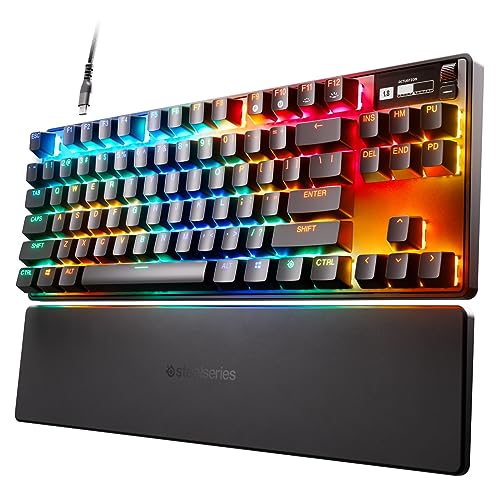
SteelSeries Apex Pro TKL HyperMagnetic Gaming Keyboard
Meet The Standout Selections
The Razer Huntsman V3 Pro TKL 8KHz is built for players who measure reaction windows in microseconds. The tenkeyless layout (TKL means it drops the numpad, freeing up desk space for wide mouse sweeps) keeps your hands closer to your aim while still giving you arrow keys and a function row. Razer pairs analog optical switches (light-based sensors that register a keypress based on how far down you press, not just whether it bottoms out) with an 8KHz polling rate, meaning the keyboard reports its state to your PC up to 8,000 times per second.
Rapid Trigger mode and an adjustable actuation range of 0.1 to 4.0 mm let you set each key to register a press with barely a graze. For Valorant or CS2 mains, that translates into quicker counter-strafing and faster repeated movement inputs. The wired connection keeps latency at a minimum, which is a non-negotiable for serious ranked play.
Where It Delivers
- 8KHz polling rate delivers near-instant input feedback, a meaningful edge in twitchy FPS duels
- Adjustable actuation from 0.1 to 4.0 mm per key, so you can tune light taps for movement and deep presses for utility binds
- Rapid Trigger lets you reset a keypress the moment the switch moves back up, shaving milliseconds on strafing
- TKL form factor gives arrow keys and function row without cramping your mouse hand
- Analog optical switches are rated for 100 million keystrokes, so heavy-handed players aren’t wearing it out anytime soon
Points To Keep In Mind
- Wired only, so cable management on a small desk takes some planning
- The full feature set relies on Razer’s Synapse software, which some users find heavier than alternatives
Feature Snapshot
Who It Suits Best
Tournament-minded FPS players who want analog precision and don’t mind staying tethered.
A Better Fit Elsewhere
If your setup needs to be completely cable-free, the Razer BlackWidow V4 TKL Wireless is the obvious swap.
The Razer Huntsman V3 Pro TKL sits a step below the 8KHz model in Razer’s analog lineup, but for many players it’s the sweet spot. The 1KHz polling rate (the standard 1,000 reports per second) is plenty fast for most ranked play, and the same Gen-2 analog optical switches carry over. Razer Snap Tap, a feature that prioritizes the most recent input when two opposing keys are pressed at once, helps with clean directional changes in clutch moments.
Where the previous pick pushes every spec to the max, this one keeps the analog feel and Rapid Trigger benefits in a more approachable package. You still get that satisfying 0.1 to 4.0 mm actuation range, which is the real star for movement-heavy games. It also has the same TKL footprint, so swapping between the two boards doesn’t require relearning hand position.
What Works In Its Favor
- Analog optical switches with the same 0.1 to 4.0 mm actuation range as the flagship
- Rapid Trigger and Snap Tap for cleaner counter-strafing and direction changes
- TKL layout keeps arrow keys and function row intact
Honest Caveats
- 1KHz polling is the category norm rather than the ceiling
- Still wired, which may bother minimal-cable setups
- Advanced tuning lives inside Synapse, an extra install some prefer to avoid
Made For
Competitive FPS players who want analog flexibility without paying for the bleeding-edge polling rate.
Look Elsewhere When
Low-sensitivity aimers should consider the Razer Huntsman V3 Pro Mini 60% for a wider mousepad canvas.
The Razer Huntsman V3 TKL 8KHz is the newer spin on the analog TKL formula, slotting between the standard V3 Pro and the 8KHz Pro flagship. It keeps the 8KHz polling rate that competitive players have come to expect, paired with Razer’s Gen-2 analog optical switches. In practice, the feel lands close to the more expensive Huntsman V3 Pro TKL 8KHz, but with a slightly dialed-back feature list.
Rapid Trigger returns for fast reset behavior, and Snap Tap handles simultaneous opposite-directional inputs without the keyboard locking up. For someone graduating from a basic mechanical board, this model offers a meaningful leap in responsiveness without forcing a full flagship spend.
Benefits That Matter
- 8KHz polling gives top-tier input reporting for fast-paced titles
- Gen-2 analog optical switches with adjustable actuation suit both movement and combat binds
- Rapid Trigger and Snap Tap streamline the most common FPS micro-movements
- TKL design preserves the function row for macros and media controls
Trade Offs
- Wired connection only, so no wireless convenience
- Customization still hinges on Razer’s Synapse software
Spec Overview
Best Suited To
Players who want flagship-level polling without stepping into the full Huntsman V3 Pro price tier.
Not Your Match When
Cable-cluttered battlestations call for the Razer BlackWidow V4 TKL Wireless instead.
The full-size Razer Huntsman V3 Pro 8KHz is the same flagship engine as the TKL version, just with the numpad intact. You get the 8KHz polling rate, Gen-2 analog optical switches, Rapid Trigger, Snap Tap, and the full 0.1 to 4.0 mm actuation range. For most FPS players, TKL is the better call, but the numpad is genuinely useful for MOBAs, strategy games, or productivity tasks where macros and number inputs matter.
The build quality carries the same premium feel as the rest of the Huntsman V3 Pro family, with a sturdy chassis and quiet, controlled key travel. Razer rates the switches for 100 million keystrokes, so daily grinding won’t wear them out quickly. If you split time between competitive shooters and games that benefit from dedicated macro keys, this is the most versatile Huntsman in Razer’s analog stack.
Well-Handled Touches
- Full-size layout with numpad for MOBAs, RTS, and productivity
- 8KHz polling matches the TKL flagship for input responsiveness
- Adjustable actuation lets you tune movement keys independently from ability keys
- 100-million-keystroke switch lifespan supports heavy daily use
Softer Spots
- Wider footprint means less mouse room on smaller desks
- Premium build comes at a notable price step up
- Heavier to pack if you travel to LANs or tournaments
Who Will Love This
Multi-genre players who want flagship analog features plus the productivity benefits of a numpad.
Skip It When
Dedicated FPS players running low mouse sensitivity should look at the Razer Huntsman V3 Pro Mini 60% instead.
The Razer Huntsman V3 Pro Mini drops everything except the core keys, giving you a 60% form factor that maximizes mousepad real estate. Low-sensitivity aimers who swing wide in Valorant, CS2, or Apex Legends benefit the most, since the smaller board leaves room for a full-size pad without bumping your mouse into a chassis edge mid-flick. Despite the size, you still get Razer’s analog optical switches, adjustable actuation, Rapid Trigger, and Snap Tap.
The trade is real, though. There’s no arrow cluster, no function row, and no numpad, so you lean heavily on layers and shortcuts. Travelers and tournament grinders who already use 60% boards will feel right at home. Anyone new to the compact life should plan for a few days of adjustment.
The Practical Payoff
- 60% form factor frees up significant desk space for low-sens aimers
- Analog optical switches with the same 0.1 to 4.0 mm actuation range as larger Huntsman boards
- Rapid Trigger and Snap Tap carry over for consistent FPS feel
- Lightweight and portable for LAN trips and travel setups
Worth Noting
- No dedicated arrow keys or function row, which slows down non-gaming tasks
- Wired only, so cable routing on a tiny desk still needs attention
- Some players find the learning curve for 60% layouts steeper than TKL
Perfect Match For
Low-sensitivity FPS players who want maximum mouse room and don’t mind mastering layer shortcuts.
Consider Something Else When
If you game and type extensively, the Razer Pro Type Ergo Wireless offers a more comfortable everyday layout.
The Razer BlackWidow V4 Pro 75% takes a different approach to competitive keyboards, blending wireless freedom with the brand’s signature mechanical Orange switches. The 75% layout keeps arrow keys and a compact function row while shaving off the numpad. Built around an OLED display paired with a Razer Command Dial, you can monitor system metrics or scrub through settings without alt-tabbing out of a match.
Where the Huntsman V3 lineup pushes analog actuation, this one focuses on wireless versatility and onboard control. Hot-swappable switches mean you can pull the Orange switches out and drop in your own 3 or 5-pin alternatives without soldering. The wireless implementation uses Razer’s HyperSpeed tech, so the latency stays competitive for most game types outside the most demanding FPS ranks.
Useful Highlights
- OLED display plus Command Dial for at-a-glance system info and media control
- Wireless connectivity with low-latency HyperSpeed performance
- Hot-swappable PCB supports 3 and 5-pin switch replacements
- 75% layout balances compactness with arrow keys and function row
Minor Gripes
- No analog actuation, so movement tuning is fixed per switch type
- Wireless adds battery management to your routine
- More features mean a higher learning curve for first-time Razer users
Feature Card
Right Fit For
Gamers who split time between competitive play and content or productivity work on the same board.
Reach For A Different Pick When
Pure FPS competitors chasing top analog precision will get more from the Razer Huntsman V3 Pro TKL 8KHz.
The Razer BlackWidow V4 TKL Wireless trims the 75% Pro down to a true TKL wireless board, dropping the OLED and Command Dial in favor of a cleaner, more focused package. It still uses HyperSpeed 2.4 GHz wireless along with Bluetooth, and you can pair a compatible Razer mouse to the same dongle for a one-receiver setup. The TKL footprint keeps the desk open without sacrificing the function row.
Like the larger V4 Pro 75%, this board uses hot-swappable Razer Orange switches compatible with both 3 and 5-pin alternatives. That makes it a solid entry point if you want to experiment with switch types without a soldering iron. The build feels sturdy, and the wireless performance holds up well for everyday competitive play.
Noteworthy Benefits
- Wireless TKL design with HyperSpeed 2.4 GHz and Bluetooth options
- Hot-swappable PCB supports both 3 and 5-pin switches
- Multi-device pairing through a single dongle cuts down on USB clutter
- TKL layout suits most FPS and MMO play styles
Less Ideal Details
- No analog actuation, so it can’t match Huntsman V3 boards for fine movement tuning
- Battery life depends on RGB and wireless mode, requiring occasional top-ups
Who Should Grab It
Wireless-first competitive players who want hot-swap flexibility in a streamlined TKL form factor.
Swap It Out When
Analog movement precision is the priority, in which case the Razer Huntsman V3 TKL 8KHz is the better match.
The Razer Pro Type Ergo is the odd one out in this competitive roundup, and that’s the point. Built around a split ergonomic layout with a 10-degree slope and adjustable 4 or 7 degree tilt, plus dual B keys for natural thumb placement, it targets developers, writers, and competitive players who log long sessions. The wireless connection keeps your desk clean, and the ultra low-profile fingertip-shaped keycaps reduce finger travel.
For pure FPS rank grinding, it won’t replace a Huntsman V3 Pro. The lack of analog actuation and the split design make quick directional inputs a different experience. Where it shines is supporting your hands and wrists through marathon sessions of typing, coding, or any mix of productivity and gaming. The 75% board is the natural cross-reference here, since both share wireless convenience but target very different users.
Everyday Perks
- Split design with adjustable tilt reduces wrist strain over long sessions
- Low-profile keycaps shorten finger travel for faster typing
- Wireless setup keeps your desk clear of cable clutter
- Dual B keys accommodate natural thumb positioning
Areas To Watch
- No analog actuation, so the FPS tuning tools in the Huntsman V3 lineup aren’t available
- Split layout requires an adjustment period, especially for fast key combos
- Not the first choice for high-level FPS play
Quick Facts
Built With In Mind
Coders, writers, and gaming-adjacent pros who type for hours and want wrist-friendly ergonomics.
Another Choice May Suit
Dedicated FPS competitors will get more value from the Razer BlackWidow V4 Pro 75% Wireless instead.
The SteelSeries Apex Pro TKL rounds out the roundup as the non-Razer alternative, and it earned its spot by popularizing per-key adjustable actuation. Using OmniPoint 2.0 HyperMagnetic switches, each key can be tuned independently between 0.1 and 4.0 mm, so you can set WASD for featherlight taps and ability keys to deeper, accidental-press-resistant presses. The TKL layout keeps the desk open, and the integrated OLED screen handles at-a-glance info.
Rapid Trigger support activates and deactivates keys based on travel distance rather than a fixed reset point, shaving input delay during repeated movements. PBT keycaps (a tougher, more wear-resistant plastic than standard ABS) hold up to heavy daily use without developing that shiny, slick look. The wired USB-C connection keeps latency predictable for ranked play.
Points In Its Favor
- 40 levels of per-key actuation from 0.1 to 4.0 mm for unmatched individual key tuning
- Rapid Trigger enables faster resets based on travel distance
- Durable PBT keycaps resist shine and wear over time
- Integrated OLED screen displays system info, profile data, and media
Some Limits To Know
- Wired only, so cable management is part of the setup
- SteelSeries GG software is required to unlock the deepest customization
- Heavier than the Huntsman V3 lineup, which matters for travel
Whose Shelf It Belongs On
Players who want per-key tuning depth and don’t mind using SteelSeries GG to unlock the full feature set.
Where A Sibling Pick Shines
Travel-heavy gamers get a lighter, more compact option in the Razer Huntsman V3 Pro Mini 60%.
What Matters Most Before Choosing Competitive Keyboards
Switch Type And Actuation Depth
Analog optical and HyperMagnetic switches changed the category by making actuation depth adjustable per key, instead of fixed by the switch. Lighter actuation around 0.1 to 0.4 mm suits movement keys in FPS games, where a featherlight tap registers. Deeper actuation between 1.5 and 4.0 mm works better for ability binds where accidental presses cost you. The Huntsman V3 Pro lineup and the SteelSeries Apex Pro TKL both support this kind of fine-tuning, while the BlackWidow V4 boards stick to traditional mechanical feel.
Polling Rate And Latency
Polling rate measures how often the keyboard reports its state to the PC, with 1KHz being the standard and 8KHz being the new high-water mark. For most game types, 1KHz feels identical to 8KHz, but in high-rank FPS play the difference can be measurable. Wireless boards have closed the gap considerably, though wired still wins on pure consistency and zero battery concerns.
Form Factor And Layout
Layout shapes your daily experience more than most specs. TKL boards strike a balance, keeping arrow keys and the function row while saving desk space. 75% boards are similar but slightly more compact. 60% boards maximize mouse room but force you to lean on layers and shortcuts. The split ergonomic layout on the Pro Type Ergo is a different beast altogether, prioritizing wrist health over competitive FPS tuning.
Connection And Customization
Wired boards offer consistent low latency and no battery management. Wireless boards trade a small latency bump for desk cleanliness and easier transport. Hot-swappable PCBs add a layer of future-proofing, letting you swap in custom switches without a soldering iron, which is a meaningful upgrade if you like to tinker with feel over time.
Key Considerations Across These Picks
Common Shopping Slip Ups
Many shoppers fixate on polling rate or switch brand and ignore layout fit. A flashy 8KHz board doesn’t help if your mouse keeps bumping the chassis during wide swings, which is why low-sensitivity players should weigh 60% or 75% boards heavily. Others overlook software dependencies, since the deepest tuning on both Razer and SteelSeries boards lives inside their respective apps. Finally, budget shoppers sometimes chase the cheapest analog board and forget that keycap quality, build rigidity, and switch longevity separate good boards from great ones.
Where The Extra Money Goes
Stepping up to flagship analog keyboards buys you adjustable actuation, 8KHz polling, and refined switch tech that genuinely changes how movement inputs feel in FPS games. Mid-tier boards keep the wireless convenience and hot-swap flexibility, but skip the per-key analog tuning. The premium tier adds OLED screens, command dials, and premium materials, which matter most for hybrid gaming and productivity setups rather than pure competitive play. For ranked FPS only, mid-tier often delivers most of the benefit at a meaningful discount.
Frequently Asked Questions
What is Rapid Trigger on a competitive keyboard?
Rapid Trigger activates and resets a key based on how far it travels rather than a fixed point, so the key re-registers the instant it moves back up. That makes repeated strafing and counter-strafing faster in shooters.
Are 8KHz keyboards worth it over 1KHz models?
For most players, the difference is hard to feel, but high-rank FPS competitors in fast-twitch duels may notice the smoother input. Casual and mid-rank players usually save money staying at 1KHz.
Should competitive players get a 60% or TKL keyboard?
Low-sensitivity aimers benefit most from 60% boards, since the smaller footprint leaves more room for wide mouse sweeps. TKL boards are a safer all-rounder for mixed gaming and typing.
Is a wireless competitive keyboard fast enough now?
Modern HyperSpeed and 2.4 GHz wireless implementations are competitive with wired for most genres. Wired still wins on absolute consistency, but the gap is small enough that comfort and desk cleanliness often win the trade.
Do I need analog optical switches for competitive play?
Analog switches unlock per-key actuation tuning, which is genuinely useful for FPS movement keys. They’re not required, but if you already play at a high rank, the tuning headroom is hard to give up.
Wrap Up
The right competitive keyboard depends less on chasing the highest spec sheet and more on matching layout, feel, and connection style to how you actually play. Tournament-focused FPS players will find the most value in analog-equipped Huntsman V3 Pro boards, while hybrid users benefit from the wireless BlackWidow V4 series. Take your time, think about your desk and your games, and the right board will make itself obvious.



