


You don’t need to spend a lot to sound sharp in ranked lobbies or hear footsteps in open-world games. This roundup sorts through the budget end of the Xbox headset shelf, mixing actual audio gear with a few stands and combo kits that stretch a small spending budget. Each pick is judged on what genuinely helps a console gamer on a tighter wallet, not just the cheapest box on the page.
How The Shortlist Stacks Up

HyperX Cloud III Wired Gaming Headset (White)

OAPRIRE RGB Controller and Headset Stand 3 Tier

Tilted Nation RGB Headset Stand with Mouse Bungee

cozoo RGB Headphone Stand with USB and AC Outlets

CHONCHOW Gaming Headset Keyboard Mouse Combo
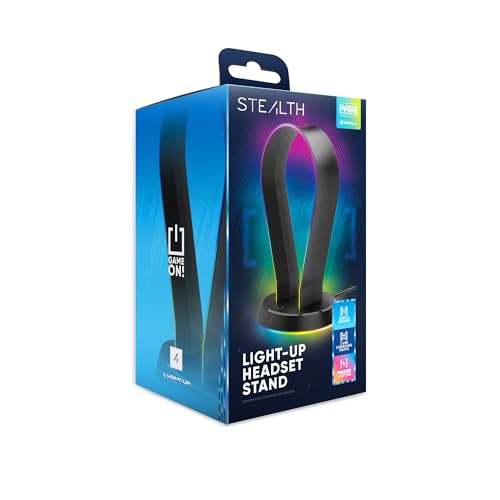
STEALTH RGB Headset Stand with USB Ports

KAFRI RGB Headphone Stand with Wireless Charger

WESEARY Wired Gaming Headset for Xbox

AOC Wireless Gaming Headset 2.4GHz with Mic
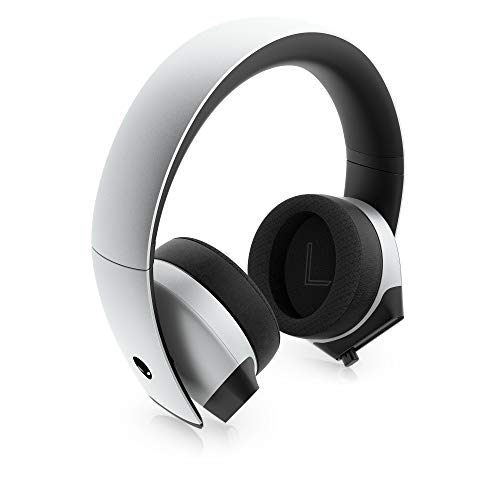
Alienware AW510H 7.1 Gaming Headset (Gray)
The Picks, Examined More Closely
Comfort over flashy extras, that’s the HyperX Cloud III’s pitch. Angled 53mm drivers (the speaker units inside each cup that handle mid and high frequencies) sit inside memory-foam ear cushions and a matching headband, which together keep pressure distributed across longer Xbox sessions without the usual hot-spot pinch. It connects over USB-C, USB-A, or a 3.5mm jack, so swapping between an Xbox controller, a PC, and a Nintendo Switch is as simple as unplugging and moving on.
Versus the storage-focused stands later in this roundup, this one is the only pick that’s actually worn on your head. The 10mm mic (a fairly small condenser element, the kind of mic that picks up voice through a thin diaphragm) handles party chat fine, and the aluminum frame gives it a sturdier feel than most budget alternatives. It is, fairly plainly, a workhorse wired headset for someone who values comfort above RGB.
Real Benefits
- Angled 53mm drivers position audio toward the ear for clearer directional cues in shooters.
- Memory-foam headband and ear cushions reduce fatigue during multi-hour ranked play.
- Triple connection options (USB-C, USB-A, 3.5mm) cover Xbox, PC, and mobile without dongles.
- Durable aluminum frame stands up to daily use and the occasional drop off a desk edge.
- Compatible with Xbox Series X|S, PS5, and PC right out of the box.
Things To Consider
- Wired-only design, so range is limited to cable length.
- The 10mm mic is solid for chat but won’t match the clarity of larger boom mics on premium sets.
Key Specs
Who It Suits Best
Xbox owners logging long sessions who want a comfortable, plug-and-play wired headset without chasing wireless extras.
Where Another Pick Suits Better
Gamers who refuse to deal with cables at all should look at the AOC Wireless Gaming Headset instead.
Where the HyperX above covers audio, this OAPRIRE stand handles the clutter around it. The three-tier layout holds two or three Xbox controllers plus a headset on top, keeping the desk surface clear between sessions. RGB lighting runs through the base in 21 modes, which is more than most budget stands bother to offer, and the touch control on the front makes swapping colors quick.
It is a plain plastic build, so expectations should match the price. For someone with multiple controllers and a headset, the storage math alone is enough to justify the spend. You may find the lighting modes more about atmosphere than polish, and the assembly is genuinely tool-free.
The Good Stuff
- Three tiers hold multiple controllers and a single headset in one compact footprint.
- 21 RGB lighting modes add personality without needing extra software.
- Touch-sensitive base control cycles colors without a separate remote.
- Lightweight plastic construction keeps the price low for first-time buyers.
Worth Noting
- Plastic body flexes more than the aluminum stands later in the list.
- Lighting requires USB power, so a free port is necessary.
Made For
Multi-controller households who want a clean shelf-style stand and don’t mind plastic construction.
Consider Something Else When
Anyone needing charging built into the stand will get more from the KAFRI option below.
This is the stand for someone who looks at their desk and sees three problems to solve at once. Tilted Nation bundles a headset hanger, a mouse bungee (a small weighted arm that holds the mouse cable up so it doesn’t drag or snag during play), and a 2-port USB 2.0 hub into one weighted base. The white RGB housing blends cleanly into lighter setups, and the non-slip grip pads underneath keep the whole unit planted during rage-quit table slams.
Compared with the OAPRIRE above, this stand sacrifices multi-controller storage for genuine cable management. The USB hub runs at 2.0 speeds, so it’s fine for a wireless mouse receiver or controller charging cable but not ideal for fast external SSDs. Owners commonly find the weighted base heavier than expected for the size.
Everyday Advantages
- Built-in mouse bungee keeps cable drag off the desk during fast aiming.
- Two USB 2.0 ports handle wireless dongles and charging cables without a separate hub.
- Weighted base with non-slip pads keeps the stand planted during intense play.
- Plug-and-play assembly, no tools or drivers required.
- RGB lighting in static or cycling modes adds visual punch to a white desk setup.
Trade Offs
- Headset hanger holds a single pair, so no second headset storage.
- USB 2.0 limits data transfer for anything beyond peripherals and charging.
Best Suited To
Gamers who want a tidy desk with a single headset, a mouse bungee, and a couple of USB ports in one footprint.
Not Your Match When
Anyone needing AC outlets alongside USB ports should look at the cozoo RGB Headphone Stand instead.
cozoo essentially fused a power strip into a headset stand. The aluminum hanger on top keeps one pair of cans off the desk, while the base houses two AC outlets, two USB-A ports, and one USB-C port. That mix is unusual at this price tier, and the 9-mode RGB lighting along the rim gives it some visual personality without making the unit look gaudy.
The base is built from fire-resistant plastic over an aluminum post, with multi-protection circuitry against overloads and short circuits. At roughly 9.86 inches tall and 5.45 inches wide, it fits compactly next to a monitor. Owners commonly report using the AC outlets to power a monitor lamp and the USB-C port to top off a phone mid-session.
Key Advantages
- Two AC outlets plus three USB ports cover a phone, a controller, and a lamp from one base.
- USB-C port supports modern phones and tablets without an extra adapter.
- 9 lighting modes cycle through colors with a long-press on the base switch.
- Aluminum post with silicone non-slip pad keeps headsets from sliding off.
- Multi-protection system guards against overloads and short circuits.
Points To Keep In Mind
- Only one headset hanger, so multi-headset households need a different stand.
- Power strip functionality means it needs a free wall outlet nearby to function fully.
Right Fit For
Desk-bound Xbox players who want fewer adapters and a single hub for headset, phone, and controller charging.
Look Elsewhere When
Anyone wanting wireless Qi charging built in should consider the KAFRI RGB Headphone Stand instead.
The CHONCHOW combo is a four-piece starter kit aimed at first-timers building a full desktop setup on a tight budget. It bundles a 104-key RGB backlit keyboard, a gaming mouse, an LED headset, and a mouse pad into one box, and the components use a shared rainbow lighting theme to keep the look cohesive. It’s the kind of package that makes sense for a bedroom battlestation or a gift.
The trade-off, as with most combo kits, is that no single piece excels. The keyboard handles basic gaming fine but won’t satisfy a typing enthusiast, and the headset is wired only. For a newer gamer or a kid’s first setup, it’s a practical all-in-one that covers the basics without forcing multiple purchases.
Standout Benefits
- Four pieces cover the entire desktop in one purchase, simplifying shopping.
- 10 RGB backlight effects give the keyboard and mouse a unified look.
- Wired USB connections avoid battery replacements across the whole kit.
- Mouse pad is sized for low-DPI (dots per inch, the unit that measures how sensitive a mouse is to movement) gaming without taking over the desk.
Honest Caveats
- Build quality is entry-level; plastic parts wear faster than premium alternatives.
- Headset audio won’t match dedicated options like the HyperX Cloud III reviewed above.
- Mouse uses a basic sensor (the internal component that tracks movement across surfaces), so competitive FPS players may want an upgrade later.
Quick Facts
Who Should Grab It
First-time Xbox players or parents building a starter setup who want a single affordable purchase.
A Better Fit Elsewhere
Anyone prioritizing audio quality should skip the bundle and buy the HyperX Cloud III separately.
STEALTH’s stand leans into the visual side of the gaming shelf. The black base holds a single headset on top, and 12 RGB lighting modes run around the body, more pattern variety than the OAPRIRE’s 21 modes claim, though STEALTH prioritizes smoother transitions. Two USB 2.0 ports sit on the back for pass-through charging or wireless dongles.
It’s broadly compatible with Xbox, PS4, PS5, Switch, and PC, but the compatibility claim refers to the headset, not the stand itself; the stand is platform-neutral. Owners commonly find the rubber base grip firm on glass desks, which is a quiet win for anyone with a glossy surface.
The Value In It
- 12 RGB lighting modes create a smooth ambient effect across the stand.
- Two USB 2.0 ports pass through power for charging cables and receivers.
- Storage base keeps small accessories like cables or extra ear pads contained.
- USB-powered, so no separate power brick is required.
Soft Spots
- Single headset hanger; no room for a second pair.
- USB 2.0 limits data transfer for fast external drives.
Perfect Match For
Xbox owners with a darker battlestation who want lighting that matches a black or matte theme.
Skip It When
Anyone needing real charging ports beyond basic USB should look at the cozoo stand instead.
KAFRI’s stand takes the cozoo concept and adds a wireless charging pad to the base. The Qi pad (the universal wireless charging standard used by most modern phones) outputs up to 10W on supported Android devices and 7.5W on iPhones, with a 5W standard fallback for anything older. An 18W QC 3.0 USB port handles a second device simultaneously.
The RGB lighting runs through 9 modes with up to 16.8 million color options, switched via a touch button on the base. Compared with the simpler STEALTH stand, this one earns its place purely on charging utility, since dropping a phone on the base after a session removes a cable from the desk entirely. Owners commonly report the Qi pad working best without a thick case.
Where It Helps
- Built-in Qi wireless charging supports 10W Android and 7.5W iPhone fast charge.
- 18W QC 3.0 USB port tops off a controller or second phone simultaneously.
- 9 RGB modes with 16.8 million colors offer a wide aesthetic range.
- Fire-resistant shell with multi-protection circuitry for safer charging.
Things To Weigh
- Wireless charging requires a Qi-compatible phone, otherwise the pad is wasted space.
- Single headset hanger limits the stand to one pair of cans.
Whose Shelf It Belongs On
Xbox players who also use a Qi-enabled phone and want fewer cables near the monitor.
Swap It Out When
Anyone who doesn’t need wireless charging can save money on the Tilted Nation stand above.
Where the HyperX Cloud III earlier in this roundup offers a flagship wired experience, the WESEARY keeps things much simpler. It targets multi-platform households running Xbox, PS5, PS4, Switch, and PC on a rotation, with a 3.5mm jack and surround-sound processing through the inline cable. There’s no software and no USB dongle to install.
For younger gamers or anyone who just wants a functional headset for the price, this delivers without a learning curve. The trade-off shows up in build materials; the plastic frame won’t survive drops like an aluminum-bodied alternative. You may find the cable length comfortable for couch play but slightly short for standing-desk setups.
What It Does Well
- Single 3.5mm connection works across Xbox, PlayStation, Switch, and PC without adapters.
- Surround-sound processing adds directional cues for shooters and racing games.
- Lightweight frame keeps ear fatigue low during short-to-medium sessions.
- Inline controls handle volume and mic mute without on-headset buttons.
Where It Is Less Suited
- Plastic frame is more vulnerable to drops than the aluminum HyperX build.
- Surround processing depends on the source device, so results vary across consoles.
Feature Card
Built With In Mind
Multi-console households on a strict budget who want a no-fuss headset that just works across systems.
Another Choice May Suit
Anyone who values premium audio detail should invest in the Alienware AW510H instead.
The AOC wireless headset is the strongest argument here for going cord-free without spending much. A 2.4GHz USB dongle (a small transmitter that plugs into the console or PC and sends audio with minimal delay) handles primary connectivity, with Bluetooth 5.2 and a 3.5mm cable as fallbacks. Battery life reaches up to 45 hours on a single charge, and a 2.5-hour recharge cycle keeps downtime manageable.
For Xbox specifically, a 3.5mm wired connection is the route to take, since most Xbox consoles don’t accept generic 2.4GHz dongles. Owners commonly find the 50mm drivers deliver clear stereo audio and that the ultra-low latency on the dongle connection helps in shooters where every frame counts.
What Works In Its Favor
- 2.4GHz wireless with low latency for responsive game audio.
- Up to 45 hours of battery life covers a full week of casual sessions.
- Bluetooth 5.2 and 3.5mm wired options cover phones, tablets, and Switch.
- 50mm drivers deliver clear stereo sound with directional cues.
A Few Limitations
- Xbox requires the 3.5mm wired path since the 2.4GHz dongle isn’t Xbox-compatible.
- Wireless mode means the headset needs regular charging to stay usable.
Who Will Love This
Late-night gamers who want wireless freedom for PC and PlayStation without recharging every other day.
Where A Sibling Pick Shines
Pure Xbox users who don’t need wireless should grab the simpler WESEARY wired headset above.
The Alienware AW510H closes the list as the most audio-focused pick. Custom-tuned 50mm Hi-Res drivers (speaker units rated to reproduce a wider frequency range than standard gaming headsets) span 20Hz to 40kHz, and 7.1 surround sound with the included USB DAC (digital-to-analog converter, a small inline device that processes multi-channel audio from USB and outputs it through the headset) places directional cues precisely across competitive maps. Ear pads blend memory foam, sports fabric, and leatherette, balancing cooling with isolation.
Compared with the HyperX Cloud III earlier, this set trades a bit of plush comfort for higher audio fidelity and a more aggressive clamp. The detachable USB cable swaps for a 3.5mm jack, opening up Xbox One, PS4, Switch, and mobile use. Discord and TIA-920 certification (a telecommunications industry standard for headset voice clarity) on the noise-cancelling mic means chat comes through clearly, and the retractable boom disappears when not in use.
Notable Upsides
- 50mm Hi-Res drivers cover 20Hz to 40kHz for detailed game and music audio.
- 7.1 surround sound via USB DAC adds positional accuracy in shooters.
- Hybrid memory foam, sports fabric, and leatherette ear pads balance cooling and isolation.
- Detachable USB-to-3.5mm cable supports Xbox One, PS4, Switch, and mobile.
- Noise-cancelling retractable mic with Discord and TIA-920 certification.
Factors To Consider
- Tighter clamp than the HyperX Cloud III, which can press on glasses during long sessions.
- 7.1 surround only activates through the USB DAC on PC, not via 3.5mm.
Technical Reference
The Right Fit
Audiophile-leaning Xbox gamers who want detailed directional audio and a versatile cross-platform cable.
Reach For A Different Pick When
Anyone prioritizing all-day comfort over audio precision will be happier with the HyperX Cloud III.
What Matters Most Before Choosing Cheap Headsets For Xbox
Wired vs Wireless on a Budget
Wired headsets consistently cost less at any tier because there’s no battery, no DAC, and no wireless radio to engineer. The HyperX Cloud III, WESEARY, and Alienware AW510H in this roundup are all wired, and they each deliver better audio quality per dollar than wireless competitors. Wireless freedom, like the AOC option, is worth it for couch play or shared living rooms, but expect to trade some audio detail for that mobility.
Driver Size and Audio Quality
Driver size, measured in millimeters, refers to the speaker element inside each ear cup. Larger drivers (50mm and up) tend to push more air and reach lower bass frequencies, which adds rumble to explosions and engines. Smaller drivers (40mm to 45mm) can still sound clear but usually emphasize mids and highs over bass depth. For open-world games and shooters, 50mm drivers give a fuller sound.
Comfort Materials Over Hours
Memory foam, leatherette, and breathable fabric each handle heat and pressure differently. Memory foam distributes weight evenly and works for most head shapes, while leatherette seals in sound but can get warm. The HyperX Cloud III and Alienware AW510H both lean heavily on memory foam, which is why they tend to win long-session comfort comparisons.
Compatibility Across Consoles
Not every cheap Xbox headset works on every console. Many rely on a 3.5mm jack, which is the most universal path. USB-only headsets may work on PC and PlayStation but skip Xbox entirely. The WESEARY, AOC, and HyperX Cloud III cover the broadest platform lists without extra adapters.
Key Considerations Across These Picks
Mistakes Worth Dodging
One common trap is buying a headset or stand with a USB-only connection, assuming it will plug into an Xbox controller. Most Xbox controllers don’t pass through USB audio, so a 3.5mm or wireless path is safer. Another slip is choosing a combo kit for the headset alone; the CHONCHOW bundle is great value as a starter, but if audio quality is the priority, a dedicated headset like the HyperX Cloud III serves better.
When Paying More Pays Off
Stepping up to the Alienware AW510H in this list brings Hi-Res drivers and a wider frequency range, which translates to more detail in soundtrack-heavy games and clearer footstep audio. The trade-off is a tighter clamp and a higher entry price, so the upgrade is worth it mainly for gamers who already have a comfortable setup and now want better audio, rather than those starting from scratch.
Frequently Asked Questions
Are cheap Xbox headsets actually worth buying?
For most casual and mid-core gamers, yes. Wired options like the HyperX Cloud III deliver audio quality that competes with older flagship headsets, and the build quality on most has improved significantly. The main thing you give up versus premium sets is wireless freedom, advanced EQ software, and brand-name noise-cancelling microphones.
Can cheap Xbox headsets use surround sound?
Some can, but the experience varies. The Alienware AW510H offers true 7.1 surround through a USB DAC on PC, and the WESEARY adds virtual surround through inline processing. On Xbox consoles, surround support depends on the headset, so check that the source device supports the feature before expecting the full effect.
What is the difference between 3.5mm and USB headsets for Xbox?
A 3.5mm headset plugs into the controller’s audio jack and works across Xbox, PlayStation, Switch, and most PCs without drivers. A USB headset typically requires PC or a console with USB audio support. For pure Xbox play, 3.5mm or wireless is the more flexible choice.
Do I need a headset stand?
A stand isn’t required, but it keeps the desk tidy and prevents the headband from being bent or crushed when the headset sits on a flat surface. Stands like the cozoo or KAFRI also add charging and USB ports, which is useful if the rest of the desk is short on outlets.
How long should a budget gaming headset last?
A well-made wired budget headset typically lasts two to four years with daily use, assuming the cable isn’t yanked repeatedly. Wireless models have shorter lifespans because the battery degrades over time. Either way, storing the headset on a stand and avoiding cable strain will extend its useful life.
Wrap Up
Budget gaming gear has quietly closed the gap with mid-range options, and the picks above show how much value now sits in the cheap end of the Xbox shelf. Match the headset to your play style first: wired for pure audio quality, wireless for couch freedom, or a stand plus an existing headset for a cleaner desk. From there, the right call usually comes down to comfort and platform fit, not brand hype.



