


VR used to feel like a four-figure hobby tethered to a gaming PC. That era is mostly over. Standalone headsets from Meta, plus a small army of comfort and travel accessories, now bring the cost of entry down to a level that fits normal monthly budgets. The catch is that “budget” means very different things depending on whether you want a full headset or just a better strap for the one you already own.
The list below pulls together the best budget PC VR headsets and the accessories that make them livable, from a $300-ish entry point up to a refurbished flagship. Each pick is judged on what you actually do with it: setup time, comfort during long sessions, game library access, and how it travels.
The Essentials At A Glance

Anker Head Strap for Oculus Quest 2
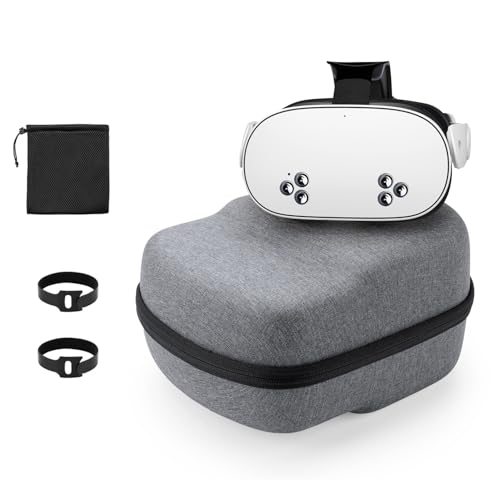
Yinke Hard Carrying Case for Quest 2

APEXINNO Comfort Head Strap for Quest 3/3S

Meta Quest 3S 256GB VR Headset

Meta Quest 3S 128GB VR Headset
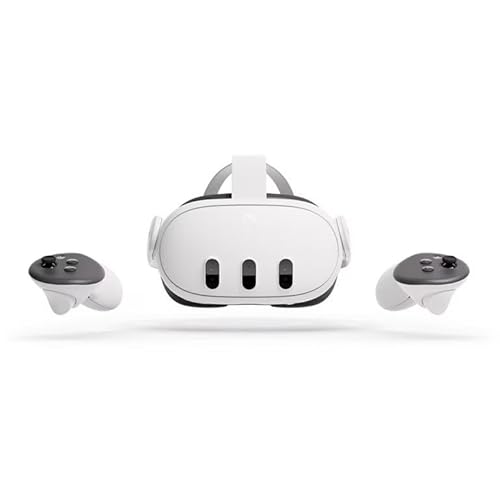
Meta Quest 3 128GB Renewed Premium

Meta Quest 2 128GB VR Headset

Meta Quest 2 256GB VR Headset
What Each Pick Brings To The Table
Quest 2 owners know the default strap is the weakest part of an otherwise capable headset. Anker’s replacement fixes the front-heavy feel without rebuilding the whole rig, using a side hinge that lets you flip the visor up to grab a drink or answer the door without removing the whole unit.
That hinge also makes the strap glasses-friendly, which matters for the many users who game in prescription lenses. A rear dial handles size, and a padded backplate spreads weight across the crown of the head rather than the forehead.
What Works In Its Favor
- Flip-up hinge cuts down the constant put-on, take-off cycle between VR and the real world
- Adjustable rear dial keeps fit consistent across different head sizes in one household
- Memory foam cushioning reduces the forehead pressure that long Beat Saber sessions tend to cause
- Lets you play from a couch or bed without the rear knob digging into a pillow
Honest Caveats
- Adds bulk on top of the headset, which can clash with hard travel cases designed for the stock strap
- Faux leather padding can feel warm during summer-long play sessions, owners commonly report
Feature Snapshot
Right Fit For
Quest 2 owners who game for more than 30 minutes at a stretch and want a real upgrade to the bundled strap without buying a whole new headset.
Reach For A Different Pick When
Meta Quest 3S owners should look at the APEXINNO Comfort Head Strap instead, since the Anker strap is built specifically for Quest 2 dimensions and hinge geometry.
VR gear does not love backpacks. Lenses scratch, controllers rattle, and one bad drop on a tile floor can end a headset. The Yinke case solves the obvious problem: a hard shell, custom-cut interior, and room for the strap and accessories you actually carry.
Where it beats a generic electronics case is the cutouts. The interior is shaped for Quest 2, the Elite Strap, and the battery strap variant, so you can move the whole rig in one piece. The EVA shell (a firm, foam-like material that absorbs shock) handles the bumps of real travel, and a mesh pouch holds cables and chargers.
Notable Gains
- Hard EVA shell absorbs the kind of drops and bumps a backpack can’t protect against
- Custom interior fits the headset with the Elite Strap attached, no disassembly required
- Splash-resistant exterior survives an unexpected rain shower on a commute
- Carrying handle stays comfortable even with a fully loaded setup inside
Soft Spots
- Interior cutouts are designed around the stock Quest 2 shape, so third-party straps from other brands may sit loosely
- Larger than a soft pouch, which matters if you’re packing light for a flight carry-on
Whose Shelf It Belongs On
Commuters, dorm dwellers, and anyone taking the headset to a friend’s place for multiplayer nights.
A Better Fit Elsewhere
Quest 3S owners should pair the Meta Quest 3S 128GB with a Quest 3S-specific case, since the newer headset’s lens housing sits closer to the face and the Yinke interior won’t cushion it correctly.
Quest 3 and 3S are lighter than Quest 2, but the bundled strap still concentrates weight on the forehead. APEXINNO’s strap moves that load to a wider rear pad, the kind of design that turns a 45-minute session into something you can actually finish without red marks.
The non-battery variant keeps the price low and the weight down, which fits the budget mindset of this entire list. A rear dial handles size, and the side hinge lets you lift the visor without pulling the strap over your head.
Practical Pluses
- Enlarged rear pad spreads headset weight across the back of the skull instead of the forehead
- Rear adjustment dial locks in fit quickly, which helps when multiple people share the headset
- Side hinge supports quick reality checks without breaking the strap’s seal
- Works on both Quest 3 and Quest 3S, so one accessory covers two headsets in your home
Points To Note
- No built-in battery, so extended sessions still depend on the headset’s internal charge
- Padding wears over time with daily use, a common report on third-party straps in this category
Best Suited To
Quest 3 and Quest 3S owners who play long sessions of rhythm games, simulators, or fitness apps where face pressure becomes a real distraction.
Swap It Out When
If you’re still on Quest 2, the Anker Head Strap fits that older geometry better and costs roughly the same.
The Quest 3S is the headset that put mixed reality within reach of normal households, and the 256GB version removes the one regret people hit six months in: not enough storage. The Snapdragon XR2 Gen 2 chip (Qualcomm’s processor built specifically for XR devices) handles the full Meta library plus mixed reality passthrough without the slowdown that plagued older Quest models.
The bundled Batman: Arkham Shadow title is a real full game, not a demo, and the 256GB of internal storage means you can install it alongside Beat Saber, Walkabout Mini Golf, and a fitness app without juggling uninstalls. Setup is genuinely fast: charge, sign in, draw a room boundary.
Useful Highlights
- 256GB storage holds 20+ full VR titles without forcing uninstalls
- Includes a full Batman: Arkham Shadow copy as part of the bundle
- Standalone design means no PC tether, no sensor setup, no external cameras
- Mixed reality passthrough lets you blend digital objects into your actual room
Worth Noting
- Lenses are a step behind the full Quest 3, so the sweet spot is narrower than flagship headsets
- Battery life lands around 2.5 hours of active play, depending on the title’s demands
Spec Overview
Perfect Match For
Shoppers who want one headset for VR gaming, mixed reality apps, and the occasional workout session, and who hate deleting games to make room.
Look Elsewhere When
Buyers focused purely on price should look at the Meta Quest 3S 128GB, which shares the same chipset and game library at a lower entry cost.
The 128GB Quest 3S is the lowest-friction way to step into modern standalone VR. You get the same Snapdragon XR2 Gen 2 processor and the same mixed reality passthrough as the larger 256GB model, just with less room for downloads. For first-time owners that tradeoff usually makes sense, since the bundled Batman title and a handful of free apps rarely push past 50GB.
It pairs naturally with the Meta Horizon store, which is essentially Meta’s app marketplace for Quest headsets, and supports the same library of 500+ titles as every other modern Quest. The passthrough cameras (front-facing cameras that show your real room inside the headset) make it feel less isolating than older VR, which matters for households sharing one device.
A Strong Showing
- Lowest entry price for a current-generation mixed reality headset
- Standalone form factor removes the need for a gaming PC or external sensors
- Multi-screen mode lets you pull up multiple apps at once, useful for productivity experiments
- Access to the full Meta Horizon game and app library
Less Ideal Details
- 128GB fills up fast with modern VR games, which commonly run 10–25GB each
- Headphones and 3.5mm adapters are not included, so plan for that accessory
Quick Facts
Who Should Grab It
First-time VR owners who want a current-generation headset without committing to the higher storage tier, especially if you mostly stream content rather than download large games.
Skip It When
If you already own a Quest 2, jumping to a Meta Quest 3 128GB Renewed Premium gives you meaningfully better lenses and visuals for a modest step up in cost.
The Quest 3 is the headset the 3S is built on top of, with the better pancake lenses (a slim lens design that improves clarity at the edges of the view) and a higher-resolution display. Buying it renewed in the Premium tier means you get the flagship experience without the flagship price, which is exactly the trade-off this list is built around.
The 4K+ Infinite Display delivers a meaningful visual jump over Quest 2, especially in titles with detailed environments. The Renewed Premium designation typically means the unit has been inspected, cleaned, and tested, and arrives with a fresh-looking shell rather than a heavily worn one.
Notable Upsides
- Pancake lenses deliver a wider sweet spot (the area where the image stays sharp) than the Quest 3S’s fresnel design (a thicker, ridged lens style that can blur at the edges)
- Higher pixel count produces noticeably crisper text and detail in productivity apps
- Direct Touch hand tracking (gesture control without controllers) feels natural for quick navigation
- Touch Plus controllers offer finer haptic feedback (subtle vibrations that simulate touch) than older Quest 2 controllers
Practical Considerations
- Renewed condition means cosmetic wear can vary unit to unit, which is worth checking on arrival
- Higher resolution draws more power, so real-world battery life is shorter than the 3S in some titles
Key Attributes
Made For
Spec-focused shoppers who want flagship Quest visuals at a price closer to midrange, and who don’t mind a renewed unit to get there.
Consider Something Else When
Buyers who want a brand-new unit with a full manufacturer warranty should look at the Meta Quest 3S 256GB instead, which costs a bit more but arrives factory-sealed.
The Quest 2 is the headset that taught the mainstream what standalone VR looks like, and that maturity shows in the library and accessory ecosystem. Even with newer Quest models out, the 128GB Quest 2 remains a legitimate starting point for households curious about VR without committing to a higher tier.
It uses the older fresnel lens design, which is the main visual compromise compared to Quest 3, but the 3D positional audio (sound that shifts as you move your head) and hand tracking still feel modern. The Meta store treats Quest 2 as a supported device, so the 500+ title library is fully accessible.
Key Advantages
- Lowest cost entry to the full Meta Quest library, including Beat Saber and Walkabout Mini Golf
- Hand tracking and 3D positional audio carry over from the more expensive models
- Mature ecosystem means third-party accessories, straps, and cases are widely available
- Standalone design means no PC, no base stations, no cable drama
Some Limits To Know
- Fresnel lenses show visible god-rays (bright streaks of light) in high-contrast scenes, owners commonly report
- Older chipset means some newer mixed reality titles run at lower fidelity than on Quest 3
- Default strap is the most common comfort complaint, though third-party straps like the Anker fix that
Who Will Love This
Budget-first households stepping into VR for casual gaming, fitness apps, and social experiences, and who don’t need the latest mixed reality passthrough quality.
Not Your Match When
Shoppers planning to use VR daily for fitness or productivity should look at the Meta Quest 3S 128GB, since the newer chipset handles longer sessions more comfortably.
Stepping up to 256GB on Quest 2 costs more than the 128GB model, but it solves the storage wall that hits anyone installing multiple modern games. Beat Saber with DLC, a fitness app like Supernatural, and a few rhythm or shooter titles can easily blow past 100GB, and that’s before you add video apps.
The hardware is identical to the 128GB Quest 2 covered earlier, which means the same mature game library, the same hand tracking, and the same accessory ecosystem. The difference is purely capacity, and for some households that’s the difference between enjoying VR and constantly managing it.
Positive Takeaways
- 256GB holds a large personal library without forcing weekly uninstalls
- Same Snapdragon XR2 Gen 1 platform (the previous generation of Meta’s XR chip) as the 128GB Quest 2, just with more room
- Access to the full Meta library of 500+ titles, including exclusive releases
- Mature accessory ecosystem, including the Anker strap reviewed earlier
Trade Offs To Consider
- Costs more than the 128GB Quest 2 for the same chipset and visual experience
- Still uses fresnel lenses, so the visual ceiling is lower than Quest 3 or 3S
Perfect Match For
Heavy downloaders, fitness app users with large video libraries, and households where multiple people share one Quest 2 and want their own installed games.
Where A Sibling Pick Shines
Shoppers who can stretch the budget a bit further should look at the Meta Quest 3S 256GB, which delivers the same storage tier with a meaningfully newer chipset and mixed reality passthrough.
What Matters Before You Pick A Budget VR Setup
VR shopping is mostly about deciding which compromises you’re willing to live with. The three trade-offs that matter most are tethered versus standalone, storage tier, and whether you need a brand-new unit or are comfortable going renewed.
Standalone headsets like the Quest 3S and Quest 2 free you from a gaming PC, which is why they dominate the budget end of the market. PC-tethered options (headsets that connect by cable to a powerful computer) deliver sharper graphics but require a recent graphics card and a wired connection that limits movement. For most households, standalone is the better starting point, with PC VR as an upgrade path later.
Storage is the second big lever. The 128GB tier handles casual use, but anyone installing multiple modern games will hit the ceiling fast. The 256GB versions reviewed here cost more up front and save the frustration of constant uninstalls.
Comfort is the third factor, and it’s why two of the picks in this list are straps, not headsets. A better strap on a Quest 2 or Quest 3 can transform the experience for under $50, and for households where multiple people share a headset, the dial-fit design is the single most useful upgrade you can make.
Key Considerations Across These Picks
Mistakes Worth Dodging
The most common slip-up is buying a headset on storage alone, then realizing the chipset is two generations behind. A 256GB Quest 2 with an older processor can feel slower than a 128GB Quest 3S in modern mixed reality apps, so always weigh the chipset alongside the storage number.
Another trap is ignoring the strap. The default strap that ships with most Quest models is genuinely the weakest part of the package, and a $30 third-party strap often does more for daily enjoyment than stepping up to a more expensive headset.
Where The Extra Money Goes
Stepping up from a 128GB Quest 2 to a 256GB Quest 3S buys you three things: a newer processor that handles modern mixed reality titles smoothly, pancake lenses that show less edge blur, and a future-proofed chipset that will keep getting software support longer. For shoppers planning to use the headset more than a few times a month, that upgrade typically pays for itself in the first year.
Frequently Asked Questions
Do budget PC VR headsets need a gaming PC?
No, the picks in this list are all standalone, which means the processing happens inside the headset itself. You only need a PC if you specifically want to run high-end PC VR titles, which is a different category entirely.
Is the Quest 3S better than the Quest 2 for beginners?
The Quest 3S uses a newer processor, supports mixed reality passthrough, and has access to the same game library, so it is the better long-term starting point. The Quest 2 costs less and remains a fine choice for casual use.
How important is storage on a VR headset?
Very important for anyone installing more than a handful of games, since modern VR titles regularly run 10–25GB each. The 128GB tier works for starters, but heavy users hit the wall within months.
Can I use these headsets without a Meta account?
The Quest lineup requires a Meta account for setup and store access, which is worth knowing before purchasing. Once set up, the headset functions normally without ongoing sign-ins for most apps.
What accessories are worth buying first?
A better head strap and a hard carrying case are the two upgrades that deliver the most for the least. A silicone face cover (a soft cover that sits between your face and the headset’s foam) is a useful hygiene add-on for shared household use.



