


Starting out as a bedroom DJ used to mean dropping serious money on gear before you knew whether mixing was really your thing. Today’s budget controllers pack real functionality into approachable packages: onboard audio interfaces, performance pads, and bundled software that walks you through the basics without skimping on creative tools. The picks below cover everyone from absolute first-timers to bedroom DJs who want club-style layouts without the pro price tag.
Your Options, Compared

Pioneer DJ DDJ-FLX4 2-Channel DJ Controller, 16 Pads, White
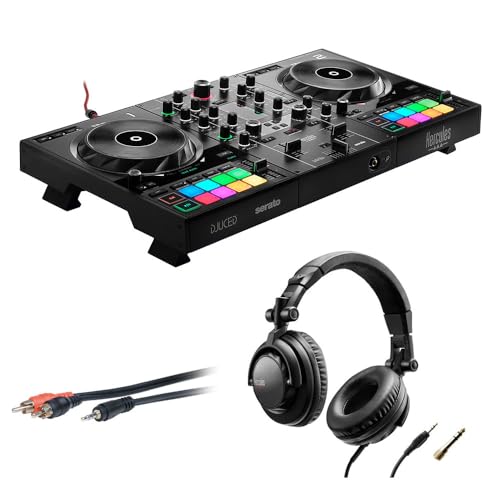
Hercules DJControl Inpulse 500 with HDP DJ45 Headphones

Numark Mixtrack Platinum FX DJ Controller

Numark Mixtrack Pro FX DJ Controller

Hercules DJControl Inpulse 500 2-Deck USB Controller

Hercules DJControl Inpulse 300 2-Channel Controller

Hercules DJControl Inpulse 300 MK2 2-Deck Controller

Pioneer DJ DDJ-REV1 2-Deck Serato DJ Controller, Black

Pioneer DJ DDJ-FLX4 2-Channel DJ Controller, Graphite
Hercules DJControl Inpulse 300 MK2 2-Deck Controller
More On The Choices That Made The List
The DDJ-FLX4 is a beginner-friendly 2-channel controller with 16 performance pads. The layout mirrors Pioneer’s pro club gear, so muscle memory built here translates to pricier setups later. You get rekordbox, Serato, and djay compatibility across Mac, PC, iOS, and Android, which means the same box travels from bedroom to party to small venue without a swap.
Smart Fader automatically balances volume, bass, and BPM as you slide between tracks, removing the steepest learning curve for new DJs. Smart CFX layers in dramatic effects with a single knob press, giving mixes polish on the fly. The clean white finish is a design bonus for anyone setting up a visible home booth.
Useful Highlights
- Smart Fader handles track-to-track EQ and tempo blending with one motion
- Pro Pioneer layout means skills transfer straight to club-standard gear
- 16 RGB performance pads light up for hot cues, loops, and slicer effects
- Multi-software support across rekordbox, Serato, and djay widens your options
- USB-C bus power keeps cable clutter down for mobile setups
Things To Consider
- No standalone mixer section, so traditionalists accustomed to a four-channel layout may need time to adapt
- Plastic chassis construction is light for travel but can pick up scuffs in a busy gig bag
Right Fit For
First-time DJs who want a controller that won’t feel limiting once their skills progress past the basics.
A Better Fit Elsewhere
Scratch-focused DJs should look at the Pioneer DJ DDJ-REV1, whose battle-style layout supports open-format techniques far better.
This bundle version of the Inpulse 500 throws in HDP DJ45 over-ear headphones and a 6-foot RCA cable alongside the controller itself. Anyone starting from zero gets a complete practice rig in one box, no extra shopping required. The two-deck layout with hardware input mixer keeps the workflow familiar, while DJUCED and Serato DJ Lite both ship included.
Compared to the standalone Inpulse 500, the bundle’s main draw is convenience, with closed-back headphones that handle cueing in shared spaces. Owners commonly report the included cable and cans cover the basics well enough that you can skip the “what else do I need” rabbit hole for a while.
Notable Upsides
- All-in-one package removes the guesswork from building a first setup
- Dual software support (DJUCED and Serato DJ Lite) lets you pick your learning curve
- Hardware input mixer opens up DVS expansion later for vinyl-style control
Trade Offs
- Bundle pricing can fluctuate, and occasionally the controller alone offers better value if you already own decent headphones
- RCA cable is short for large rooms, so venue DJs may want a longer run
Made For
First-timers who want a complete starter kit delivered in a single order, no extra accessory hunting required.
Look Elsewhere When
You already own a solid pair of monitoring headphones, in which case the standalone Hercules DJControl Inpulse 500 gives you the same controller without duplicating gear.
The Mixtrack Platinum FX stands out with built-in displays embedded in each jog wheel, showing BPM, deck position, and pitch without staring at the laptop. Four-deck control expands your layering options well past what a basic two-deck rig offers. The 24-bit audio interface handles headphone cueing and main output independently, so you can preview tracks silently during a live mix.
Where the Numark Mixtrack Pro FX keeps things simple, the Platinum FX goes wider, adding visual feedback and FX control that helps DJs who think in terms of on-screen readouts. It pairs with Serato DJ Lite out of the box, and you can upgrade to Serato DJ Pro for full access.
Practical Advantages
- Jog wheel displays reduce laptop-glancing during sets, keeping your focus on the crowd
- Four-deck control opens layering and remixing options earlier in your learning curve
- 24-bit onboard audio interface delivers clean sound for bedroom and small-venue work
- Six dedicated FX buttons offer quick access to transitions without menu diving
Worth Noting
- Larger footprint demands more desk space than slimmer two-deck options
- Four-deck button density can overwhelm complete beginners during the first weeks of practice
Key Specs
Best Suited To
DJs who learn visually and want expanded deck control without jumping to a pro-tier price bracket.
Consider Something Else When
You want a slim two-deck layout for a tight desk, in which case the Numark Mixtrack Pro FX delivers the same software experience in a smaller package.
The Mixtrack Pro FX trims the Platinum FX down to a clean two-deck layout while keeping the 6-inch capacitive jog wheels and 24-bit interface. Serato DJ Lite comes in the box, and the plug-and-play USB connection works on both Mac and Windows without driver headaches. Six performance pads per deck give you hot cues, loops, and samples at your fingertips.
Bedroom DJs who want a straightforward rig often land here because the button layout stays uncluttered, and the smaller footprint fits a standard desk. Where the Platinum FX pushes into four-deck territory, this one stays focused on the essentials and lets the software do the heavy creative lifting.
The Value In It
- Compact two-deck layout fits small desks and tight home setups
- Plug-and-play USB cuts setup time down to literal seconds
- 6-inch touch jog wheels feel close to actual vinyl response for scratch practice
- Serato DJ Lite included keeps initial cost predictable
Points To Note
- No built-in display in the jog wheels, so you’ll rely on the laptop screen for visual feedback
Who It Suits Best
Bedroom DJs with limited desk space who want a clean, no-fuss path into Serato-based mixing.
Swap It Out When
You want visual readouts built into the controller, in which case stepping up to the Numark Mixtrack Platinum FX gives you the same feel with on-wheel displays.
The standalone Inpulse 500 keeps the same control surface as the bundle version but ships without the extra accessories. Its hardware input mixer is a rare find at this tier, letting you route external sources like a CDJ or turntable without a separate audio interface. DJUCED and Serato DJ Lite both come included, and the controller works with either out of the box.
Compared to the Hercules DJControl Inpulse 300 MK2 later in this list, the 500 adds the input mixer, vinyl function buttons, and a more substantial feel under the hands. Retractable feet lift the chassis for a more ergonomic angle, a thoughtful touch during long practice sessions.
Notable Gains
- Hardware input mixer supports DVS upgrades and external source routing down the line
- 16 RGB backlit pads give you expressive hot-cue, loop, and slicer control
- Filter and FX section sits right where club-mixer habits expect it
- Retractable feet adjust the playing angle for comfort during long sessions
Honest Caveats
- More knobs and faders than the Inpulse 300, so absolute beginners may face a steeper first session
- Plastic chassis, while light, can show wear if the controller travels in a soft bag without padding
Feature Snapshot
Perfect Match For
DJs who want a controller that grows with them, room for a turntable or DVS setup without upgrading the whole rig.
Another Choice May Suit
Absolute beginners who want the gentlest learning curve will find the Hercules DJControl Inpulse 300 MK2 a friendlier first step.
The original Inpulse 300 was built around the idea that new DJs shouldn’t have to fail silently. Built-in light guides above the tempo faders glow to show when your tracks are beatmatched, training your ear and eyes together. The DJ Academy and IM (Intelligent Music Assistant) features inside DJUCED add interactive lessons and track suggestions, so the learning curve feels less lonely.
It’s the most stripped-back of the Hercules lineup here, and that’s the point. Anyone who’s never touched a controller before can plug in, follow the lights, and hear a clean transition within their first session. You may eventually outgrow the coaching features, which is exactly when the MK2 version on this list makes sense.
Good Reasons To Consider
- Light-guided tempo faders give real-time feedback while you learn beatmatching
- DJUCED software includes tutorial videos and track suggestions built in
- Compact chassis fits a laptop-and-controller setup in a small bedroom
- Lightweight enough to toss in a backpack for house-party gigs
Points To Keep In Mind
- Coaching lights are helpful early on but become visual clutter once skills develop
- Older generation than the MK2 version, so feature set lags slightly behind
Built With In Mind
Brand-new DJs who want guided feedback rather than trial-and-error learning from the start.
Reach For A Different Pick When
You want the latest hardware revision, in which case the Hercules DJControl Inpulse 300 MK2 updates the design and adds Serato support.
The MK2 refreshes the original Inpulse 300 with Serato support alongside DJUCED, plus a cleaner cosmetic update. The same Beatmatch Guide lights still train your ear and timing, but the chassis now reads better under low light, a real plus for late-night bedroom sessions. The pad bank, fader feel, and jog wheel response all carry forward from the prior generation.
This sits between the entry Inpulse 300 and the more elaborate Inpulse 500 on Hercules’ lineup. Anyone who learned on the older MK1 and feels ready for Serato compatibility should find the MK2 a natural step without the price jump of a 500-series upgrade.
Features That Help
- Adds Serato support so DJs don’t need to choose one ecosystem from day one
- Updated surface graphics stay legible in dim room lighting
- Same coaching lights as the original, useful during the first few months of practice
- 2-deck layout keeps the button count approachable for newer DJs
Some Limits To Know
- Still a learning-focused controller, so advanced DJs may want more hands-on FX control than it offers
At A Glance
Whose Shelf It Belongs On
Learners who want gentle coaching features now with the option to graduate into Serato-based mixing later.
Where A Sibling Pick Shines
If you want hardware input mixing and more pad real estate, the Hercules DJControl Inpulse 500 offers the bigger sibling with the same dual-software philosophy.
The DDJ-REV1 throws the typical club layout on its head, placing the tempo faders vertically along the outside and the performance pads right where the jog wheels sit. It mirrors the Pioneer DJM-S mixer plus PLX turntable battle setup, so the muscle memory you build transfers directly to pro gear. The controller is built for open-format and scratch DJs who want to cut and chop rather than blend.
If the Pioneer DJ DDJ-FLX4 is about learning smooth transitions, the REV1 is about learning the battle-style techniques that turn DJ sets into performances. The dedicated Scratch CFX pad bank is a teaching tool for first-time scratchers, giving you complex routines at the press of a single button.
A Favorable Mix
- Battle-style layout mirrors pro Pioneer DJM-S setups, so skills transfer straight up
- Large performance pads include a Scratch CFX bank for guided scratch routines
- Serato DJ Lite comes bundled, with Pro upgrade available for advanced features
- Compact enough to fit in a small booth or bedroom desk
Less Ideal Details
- Unusual layout feels awkward at first for DJs trained on traditional horizontal-mixer designs
- Not the right pick for DJs who want smooth, long-blend transitions as their default style
Who Should Grab It
Scratch-focused and open-format DJs who want to practice the techniques used in DMC-style and club battle sets.
Not Your Match When
Your goal is smooth, genre-blending transitions, which is where the Pioneer DJ DDJ-FLX4 proves a more natural fit.
The graphite-finish DDJ-FLX4 delivers identical functionality to the white version reviewed earlier, with the same Smart Fader, Smart CFX, and 16 performance pads. The darker finish blends more easily into a low-light booth or studio aesthetic, and it tends to hide scuffs and dust better during travel. You can pair it with the white unit later for a matching two-controller rig if your setup grows.
For home DJs who want the Pioneer ecosystem without the bright, broadcast-ready look, the graphite option is purely a cosmetic choice. Functionally, no reason to favor one finish over the other, just pick the one that fits your room.
Strengths Worth Knowing
- Same Pioneer engineering as the white version, just a different finish
- Darker color hides wear in a mobile gig bag better than light plastic
- Matches low-light studio and bar aesthetics more naturally
Factors To Consider
- Functionally identical to the white version, so don’t expect performance differences
Who Will Love This
Style-conscious beginners who want the Pioneer DDJ-FLX4 experience in a darker, booth-friendly finish.
Skip It When
You don’t care about finish, in which case the white Pioneer DJ DDJ-FLX4 saves you from having to choose between two equivalent options.
This MK2 version of the Inpulse 300 is sold with an explicit focus on the built-in sound card, which is great news for anyone using a laptop with a noisy headphone output. The 16 pads give you ample hot-cue, loop, and slicer control without crowding the surface, and the Beatmatch Guide lights carry over from the original to help with timing. The modern cosmetic update reads cleaner in low light than the older MK1 design.
It overlaps with the other MK2 listing earlier in the roundup, so the choice between them often comes down to which retailer listing and bundle configuration fits your budget. Either way, you get the same learning-friendly, Serato-and-DJUCED-ready platform.
The Case For It
- Built-in sound card keeps audio clean even when a laptop’s headphone jack is noisy
- 16 performance pads give plenty of room for cue and loop routines
- Dual software support covers both major beginner ecosystems
- Compact chassis fits a small desk and travels well
Where It Is Less Suited
- Overlaps significantly with the other Hercules Inpulse 300 MK2 listing, so the choice often comes down to availability
- Still learning-focused, so veteran DJs may want more FX control than this surface offers
The Right Fit
Home DJs whose laptop audio is unreliable and who want the cleanest path to Serato or DJUCED mixing.
A Better Fit Elsewhere
You want a hardware input mixer for external sources, which the Hercules DJControl Inpulse 500 provides at a similar tier.
Choosing A Budget Dj Controller That Actually Fits
Software Matters More Than You Think
The controller you pick locks you into a software ecosystem for as long as you own it. Serato DJ Lite and DJUCED both ship free with most picks here, but they behave differently. Serato has wider industry adoption, so skills transfer more easily to club setups, while DJUCED feels friendlier during the learning phase thanks to built-in tutorials. If you already have a preference, lean into it. The hardware is largely interchangeable for beginners, but the software shapes your daily practice.
Layout And Skill Progression
The two main layout families on this list are traditional club-style (horizontal mixer, faders near the center) and battle-style (vertical faders, pads near the jog wheels). Traditional layouts like the Pioneer DJ DDJ-FLX4 line reward smooth, long-blend mixing, while the Pioneer DJ DDJ-REV1 battle setup pushes you toward scratching and open-format sets. Pick the layout that matches the kind of DJ you want to become, since switching layouts later means relearning muscle memory.
Audio Interface And Connectivity
Every controller on this list has a built-in audio interface, so you don’t need a separate sound card for laptop mixing. The difference is in extra features: the Hercules DJControl Inpulse 500 adds a hardware input mixer for routing external sources, while most others keep things to a single headphone and main output pair. For bedroom practice, basic dual output is plenty. If you plan to add turntables or a DVS upgrade down the line, that input mixer becomes a meaningful advantage.
Real-World Use Scenarios
Bedroom DJs who mostly practice and stream online mixes can get by with a slim two-deck layout and minimal footprint. Mobile DJs heading to house parties need a chassis that survives the trip, a padded bag is a smart add-on. Anyone hoping to play small venues eventually should prioritize controllers with traditional club layouts and Serato compatibility, since those gigs will likely use the same software you’re practicing on at home.
Key Considerations Across These Picks
Where Shoppers Go Wrong
The most common mistake is buying on aesthetics alone. A glossy white Pioneer DDJ-FLX4 looks great in product photos, but if your real goal is scratching, the DDJ-REV1’s battle-style layout serves you better despite the less flashy marketing. Another slip-up is ignoring software requirements: a controller that ships with DJUCED only can feel limiting the moment you start playing gigs that expect Serato. Check the software compatibility before you commit, not after.
What The Higher Tier Buys
Moving up from a budget controller to a mid-tier Pioneer DDJ-400 or DDJ-200 class unit typically buys you sturdier build quality, more dedicated FX controls, and better integration with pro club software. The performance gap shows up most in live situations, where metal faders and weighted jog wheels feel more precise under hand. For pure bedroom learning, the budget tier on this list covers everything you need, and the upgrade becomes worth it when you start playing real rooms rather than practicing in one.
Frequently Asked Questions
Are budget DJ controllers good enough to learn on?
Yes, every pick on this list supports full mixing workflows with bundled software, so the skills you build transfer to pro gear later.
Do I need a laptop to use these controllers?
Most budget controllers require a connected computer running DJ software, with a few supporting iOS and Android apps for mobile setups.
What’s the difference between Serato and DJUCED?
Serato is the industry standard for club work, while DJUCED is Hercules’ own software with stronger built-in tutorials for beginners.
Can I perform live with a two-deck controller?
Plenty of working DJs play clubs with just two decks, since most live sets use two tracks blended at a time, with extra decks saved for layered drops.
How long does a budget controller typically last?
Owners commonly report years of regular use from these controllers, though plastic chassis and faders can wear faster under heavy gigging.
Closing Remarks
Budget DJ controllers have closed the gap with pro gear in ways that matter most for learners. Pick the layout that matches your style goals, lean into the bundled software for your first six months, and the rest of your skills will follow naturally. The right controller is the one you actually practice on, so choose the one that makes you want to keep coming back.



