


Touchscreens get old fast when a boss fight runs long or a racetrack demands hair-trigger steering. A solid gamepad turns Android gaming from a tap-and-pray exercise into something closer to console comfort, with thumbsticks that actually have throw and triggers you can find without looking.
The ten picks below cover home-console crossovers, retro throwbacks, and clip-on mobile grips, each matched to a different kind of gamer. You will see multi-platform heavyweights, a few specialty controllers for fighting-game fans, and a couple of phone-first designs that travel well in a jacket pocket.
A Fast Comparison Of The Options

8Bitdo Pro 3 Bluetooth Controller (Yellow) – TMR Joysticks

8Bitdo SN30 Pro Bluetooth Wireless Gamepad – Gray

8Bitdo NEOGEO Wireless Controller – Black Edition
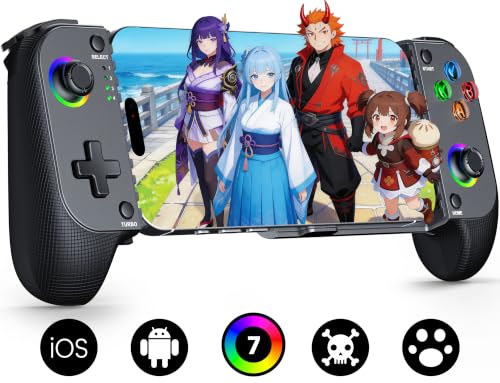
Mocagen MC1 Phone Controller for iPhone & Android (Black)

FIOTOK Wireless Switch Controllers for Switch/2/Lite/OLED

8Bitdo Ultimate 2C Wireless Controller (Dark Blue)

Mocagen MC1 Phone Controller with Turbo

Mocagen MC1 Phone Controller (Blue)

PB TAILS CRUSH Controller with TMR Joysticks

AOC PC Controller with Interactive Screen
More Details On Our Top Picks
Cross-platform households need a controller that hops between devices without babysitting, and the 8Bitdo Pro 3 lands in that sweet spot. The yellow shell stands out on a cluttered desk, while the TMR (tunnel magnetoresistance) joysticks track micro-movements more crisply than the older carbon-film designs, which matters when a third-person camera demands slow, deliberate nudges.
It works across Switch, Switch 2, Windows PC, Apple hardware, SteamOS, and Android, so swapping between phone and docked setup is mostly a button-press affair. Compared to the SN30 Pro reviewed below, this one trades retro charm for full-size comfort and a deeper feature set. For households where one pad has to cover every screen, this is a strong daily driver.
Reasons It Performs
- TMR joysticks resist stick drift longer than traditional carbon-film designs, which keeps the camera steady in long RPG sessions.
- Multi-platform support covers Android, Switch family, PC, and Apple, so one pad replaces several.
- Swappable magnetic faceplates let you re-skin the controller when the mood shifts.
- Profile-switching on the fly keeps button layouts tuned to each game.
Worth Noting
- The full-size body is bulkier than the SN30 Pro and won’t slip into a jacket pocket.
- Premium internal hardware pushes it above bare-bones budget pads.
Made For
Multi-device households and cross-platform gamers who want one flagship pad to anchor every screen in the house.
Consider Something Else When
The 8Bitdo SN30 Pro Bluetooth Wireless Gamepad suits commuters who want a pocketable retro shape over a full-size chassis.
Retro libraries on Android feel right at home in the SN30 Pro’s classic SNES-style shell. The Hall Effect joysticks use magnetic sensors instead of physical contact, which sidesteps the drift that plagues older pads after a year of heavy play, so fighting-game inputs stay clean.
It pairs over Bluetooth, charges via USB-C, and packs rumble, motion controls, and clickable sticks into a body that fits in a coat pocket. Where the Pro 3 above leans into flagship ambition, this one leans into nostalgia without feeling like a toy. Indie and shmup fans who travel light will appreciate the size.
Why It Works Well
- Hall Effect joysticks deliver precision without the wear pattern of carbon-film sticks.
- Compact frame slips into bags, making it travel-ready for daily commutes.
- Full button layout, rumble, and motion controls cover modern game expectations.
- USB-C charging means one cable lives in the kitchen drawer.
Trade Offs
- The smaller grip is less comfortable for hands used to full-size pads like the Pro 3.
- Build quality feels lighter than the Ultimate 2C covered later in the list.
Who It Suits Best
Retro enthusiasts, indie game fans, and commuters who prize portability over full-size ergonomics.
Skip It When
The 8Bitdo Ultimate 2C Wireless Controller is the better call for gamers who want Hall Effect sticks in a full-size frame for couch sessions.
Anyone who grew up feeding quarters into a NEOGEO cabinet will feel at home the moment they pick up this officially licensed pad. The classic click-style joystick gives every direction input a satisfying tactile snap, and the four-button row mirrors the original layout so quarter-circles and dragon punches land where muscle memory expects them.
It connects to Android over Bluetooth, and to Windows or the NEOGEO mini through the included 2.4G adapter or a USB cable. Bumpers and Turbo functions sit where modern fighting games need them, and a button-layout swap helps in titles that mirror the inputs. The feel is genuinely arcade, though the design is a clear trade-off if you want a standard twin-stick layout.
Bright Spots
- Click-style joystick faithfully recreates the arcade response, which fighting games reward.
- Officially licensed by SNK, with four character-themed editions for collectors.
- Turbo function supports grindy retro ports and boss-rush modes.
- Triple connectivity (Bluetooth for Android, 2.4G and wired for Windows) covers most setups.
Honest Caveats
- The click-style stick demands a learning curve for gamers raised on analog inputs.
- Niche layout makes it a poor general-purpose pick outside fighters and shmups.
Right Fit For
Fighting game fans, arcade enthusiasts, and SNK collectors who want authenticity over a modern twin-stick layout.
Another Choice May Suit
The PB TAILS CRUSH Controller is the stronger pick for competitive players who want modern TMR joysticks and a 1000Hz polling rate.
Mobile gamers juggling cases, commutes, and long bus rides need something that hugs the phone without crushing it. The Mocagen MC1 stretches across the handset and locks in via Bluetooth, leaving the screen clear for touch menus and aiming. Hall Effect joysticks drive the experience, using electromagnetic sensors to avoid the drift that ruins older carbon-film sticks after months of casual use.
It claims a 5 million-cycle stick lifespan, roughly 2.5x the typical carbon-film benchmark, which translates to years of daily play before the analog stick loosens up. The laser-engraved grip texture keeps sweaty hands planted during a Genshin session, and the layout feels intuitive after a few minutes. Unlike the home-console flagships above, this lives in a backpack rather than a TV stand.
Notable Upsides
- Hall Effect joysticks with a 5M-cycle rating mean far longer stick life than standard pads.
- Ergonomic grip with anti-slip texture reduces fatigue during long mobile sessions.
- Case-friendly clamp design fits most phones without removing the case.
- Broad iPhone and Android compatibility covers the latest flagships.
Points To Note
- The clamp form factor is bulkier than a standalone pad, though smaller than a Switch.
- Build materials feel lighter than the 8Bitdo Ultimate 2C for serious couch gaming.
Who Will Love This
Commuters, travelers, and casual mobile gamers who want console-like controls on the bus or in the back seat.
Look Elsewhere When
The 8Bitdo Ultimate 2C Wireless Controller fits better for PC-and-Android users who mostly play at a desk.
Switch households burn through extra pads, especially in four-player Mario Kart nights or co-op Splatoon matches. The FIOTOK pad covers the full Switch family, including Switch 2, plus Windows PC, PS3, and Android, which makes it a flexible backup or guest controller. The pairing process differs between Switch 2 and Switch 1, so the manual is worth a quick read.
Two rear programmable buttons take the worst finger acrobatics out of complex moves. The GL/GR mapping can target up to 16 face buttons, which shortens the learning curve for players still building muscle memory. The wake-up function saves the small annoyance of tapping the console manually each time.
What Earns Its Place
- Two rear programmable buttons with multi-mapping support simplify complex in-game moves.
- One-button wake-up for the Switch family saves a small daily annoyance.
- Broad compatibility covers Switch 2, older Switch models, PC, PS3, and Android.
Small Caveats
- Pairing behavior differs between Switch 2 and Switch 1, so the manual matters.
- Build quality feels a tier below the 8Bitdo Pro 3 flagship covered earlier.
Best Suited To
Switch households needing a guest or backup pad, especially for multiplayer nights where extra controllers matter most.
Where A Sibling Pick Shines
The 8Bitdo Pro 3 Bluetooth Controller suits a single primary gamer who values premium sticks and swappable parts over rear paddles.
Hall Effect technology used to live in flagship pads, and the Ultimate 2C drags it down to a more accessible tier. Wear-resistant metal joystick rings reinforce the sticks, which matters for anyone logging long hours in competitive shooters. The 1000Hz polling rate under 2.4G and wired modes (the rate at which the controller reports its position to the host) keeps input lag tight enough for twitch play.
It runs on Windows 10 and above through 2.4G or wired, and shifts to Bluetooth for Android 9.0 and up. The mode-switch button sits on the back, so the swap is out of the way but reachable. Extra R4/L4 bumpers and a no-software Turbo function round out a strong everyday package.
What Makes Sense
- 1000Hz polling rate over 2.4G and wired keeps competitive inputs feeling sharp.
- Hall Effect joysticks and triggers, plus metal joystick rings, fight stick drift over time.
- Extra R4/L4 bumpers expand the button layout for personalized shortcuts.
- No software required for Turbo, which keeps setup simple.
Points To Keep In Mind
- Bluetooth is the only Android option, leaving the 1000Hz mode for PC sessions.
- Lacks the swappable parts of the Pro 3 covered at the top of this list.
Whose Shelf It Belongs On
PC gamers who also play on Android and want a single pad that handles both without giving up flagship features.
Not Your Match When
The Mocagen MC1 Phone Controller is the better call for travelers who want a clamp-style design that holds the phone.
Grindy mobile titles and auto-battler sessions punish your thumbs, and a Turbo function gives tired fingers a break. This version of the Mocagen MC1 keeps the same ergonomic clamp and Hall Effect joysticks as the model above, with Turbo added to handle the repetitive tapping that defines gacha farming and shoot-em-up scores. The case-friendly clamp means you do not have to strip the phone each session.
For travelers and long-session players, the design philosophy is comfort first. The laser-engraved texture helps in humid weather, and the scientifically positioned sticks and buttons reduce fatigue. It pairs with the latest iPhone and Android flagships, then reconnects quickly after the first pairing.
Everyday Wins
- Turbo function spares thumbs during grindy or score-chase mobile sessions.
- Hall Effect joysticks hold up to the daily pairing-and-play cycle better than carbon-film alternatives.
- Ergonomic clamp design reduces hand strain on long commutes or flights.
Where It May Fall Short
- Bulkier than a standalone pad, so it eats more backpack space than the SN30 Pro.
Built With In Mind
Long-session mobile RPG players and gacha grinders who want Turbo and a comfortable grip on the go.
Reach For A Different Pick When
The 8Bitdo SN30 Pro Bluetooth Wireless Gamepad is a slimmer choice for gamers who care more about pocket size than Turbo.
Style matters when a controller lives in your daily bag, and the blue edition of the Mocagen MC1 trades the standard black finish for something with a bit more personality. Underneath, the feature set is identical to the black model: Hall Effect joysticks, an ergonomic clamp, and broad iPhone and Android compatibility.
For shoppers who want the same drift-resistant stick technology and ergonomic grip in a calmer color, this is the easy answer. It pairs fast, reconnects automatically, and fits over a cased phone. The trade-off is the same as the other MC1 variants, namely a clamp form factor that is bulkier than a standalone pad.
Positive Points
- Hall Effect joysticks with a long-rated lifespan resist the drift common in cheaper pads.
- Anti-slip laser-engraved grip texture keeps the controller secure during heated rounds.
- Case-friendly clamp design skips the hassle of removing the phone case each session.
Practical Considerations
- Clamp form factor adds bulk compared to a traditional standalone controller.
- Color choice is purely aesthetic and does not affect performance.
Perfect Match For
Phone-first gamers who want the proven MC1 design in a calmer blue color rather than the standard black.
Swap It Out When
The 8Bitdo Ultimate 2C Wireless Controller is the stronger pick for gamers who mostly play at a desk and want a full-size pad with a 1000Hz polling rate.
Competitive players live and die by input timing, and the CRUSH pad pushes the spec sheet harder than most. TMR joysticks (a magnetic sensor technology that delivers smoother and more drift-resistant tracking than carbon-film alternatives) deliver precise tracking for both Switch 2 and PC, while Hall Effect triggers add magnetic sensor reliability to the shoulder buttons. The 1000Hz polling rate over the appropriate wireless mode keeps inputs feeling immediate.
Triple-mode wireless covers Switch family, PC, Steam, iOS, and Android, and the X-S Mode switch flips between Xbox and Switch input conventions. RGB lighting is a fun flourish, though users with strict battery routines may want to dim it. For gamers who want a performance-first pad that does not lock them into one ecosystem, the CRUSH delivers.
Good Reasons To Consider
- 1000Hz polling rate over wireless gives competitive inputs the responsiveness they need.
- TMR joysticks and Hall Effect triggers resist the wear that ends cheaper pads.
- Triple-mode wireless covers Switch, PC, Steam, iOS, and Android.
- X-S Mode switch toggles between Xbox and Switch button conventions on the fly.
Details To Watch
- RGB lighting shortens battery life if left at full brightness for long sessions.
- Heavier feature set puts the price above entry-level pads.
Who Should Grab It
Competitive and multi-platform gamers who want flagship polling rates, magnetic-sensor sticks, and visual flair in one pad.
A Better Fit Elsewhere
The 8Bitdo Pro 3 Bluetooth Controller is a calmer choice for gamers who want cross-platform support without RGB or aggressive specs.
Few controllers ship with a built-in display, and the AOC pad uses it to show connection status, battery level, and profile info at a glance. Hall Effect sticks and triggers anchor the core, providing the magnetic-sensor reliability that competitive and long-term players expect. Triple-mode wireless covers Bluetooth, 2.4G, and wired, so a single pad can juggle PC, Switch 2, Steam Deck, and phone.
The on-pad screen removes the small annoyance of guessing which mode is active or how much charge remains. For tinkerers and multi-device households, that little readout is more useful than it sounds. It is bulkier than the minimalist SN30 Pro, but the trade is functionality you will not find in most pads at this tier.
A Few Strong Suits
- Built-in interactive screen shows connection status, battery, and profile info without checking the host device.
- Hall Effect sticks and triggers improve long-term durability over carbon-film alternatives.
- Triple-mode wireless (Bluetooth, 2.4G, wired) covers PC, Switch, Steam Deck, and phone.
Some Limits To Know
- The on-pad screen adds weight and bulk versus minimalist designs like the SN30 Pro.
- Feature set is denser than beginners may need on day one.
The Right Fit
Tinkerers, multi-device households, and gamers who appreciate at-a-glance status readouts on the pad itself.
Where Another Pick Suits Better
The 8Bitdo SN30 Pro Bluetooth Wireless Gamepad is the simpler call for gamers who want a lighter, pocket-friendly retro pad.
What Matters Most Before Choosing Bluetooth Joysticks For Android
Joystick Technology And Longevity
Traditional carbon-film sticks wear out as the resistive pads inside them rub together, which leads to the dreaded stick drift where a character slowly walks without input. Hall Effect and TMR joysticks use magnetic sensors instead, so there is no physical contact to wear down. That is why a 5M-cycle Hall Effect stick will outlast a carbon-film equivalent many times over, and why it is worth paying attention to the stick type in any Android pad you consider.
For casual mobile players, a basic carbon-film stick is fine, but anyone logging hours on Genshin Impact or competitive shooters should target magnetic-sensor designs.
Connectivity Modes And Polling Rate
Bluetooth covers most Android phones out of the box, but a 2.4G wireless receiver or wired connection can offer a tighter polling rate. Polling rate is how often the controller reports its position to the phone, so 1000Hz feels noticeably snappier than the standard 125Hz Bluetooth rate. Match the connection to the genre: Bluetooth is great for RPGs and indie games, while 2.4G or wired is worth the trade for competitive shooters and fighting games.
Ergonomics And Form Factor
Full-size pads suit long couch sessions, while compact retro pads or mobile clamps work better for travel. A clamp-style controller adds bulk to the phone, but it leaves the screen free for touch menus, which matters in shooters and MOBAs. Hand size matters too, so smaller grips are easier on smaller hands even if the trade is fewer buttons.
Compatibility And Profile Switching
Android is only part of the story for many gamers. Cross-platform pads that cover Switch, PC, and Android cut down on controller clutter, and profile-switching helps when moving between genres. Always check whether the controller pairs through standard Android Bluetooth or requires a dedicated app, and whether key Android games support external controllers natively.
Practical Angles Worth Considering Across These Picks
Common Shopping Slip Ups
The most common mistake is buying on looks alone and missing the joystick tech inside. A sleek pad with carbon-film sticks will start drifting long before a slightly plainer pad with Hall Effect sensors. Check whether the controller pairs via standard Android Bluetooth or needs a proprietary dongle, and confirm that your favorite Android games actually support external input.
Another trap is assuming all “wireless” controllers mean the same thing. A pad that only does Bluetooth cannot hit the 1000Hz polling rate that competitive genres benefit from, so gamers who play shooters should look for 2.4G or wired options.
Where The Extra Money Goes
Spending up usually buys three things: better joystick sensors, faster polling rates, and richer feature sets like RGB lighting or on-pad displays. For a casual mobile gamer, a mid-tier pad with Hall Effect sticks is the practical sweet spot. For competitive or multi-device households, the upgrade to TMR sticks, 1000Hz polling, and triple-mode wireless is worth the extra outlay.
The honest read is that a well-made Hall Effect pad will outlast a cheaper carbon-film alternative several times over, so the upgrade often pays for itself in replacement cost alone.
Frequently Asked Questions
Do Bluetooth controllers work with all Android games?
Most modern Android games detect standard Bluetooth controllers automatically, though some competitive titles still prefer touch input. Check the game description or community forums to confirm external controller support before relying on a pad for a specific title.
Emulators and cloud gaming services generally work well with external controllers, which makes a Bluetooth pad a versatile tool across multiple play styles.
What is stick drift and how do I avoid it?
Stick drift happens when a controller reports movement even when you are not touching the stick, usually because the internal sensors wear out. Hall Effect and TMR joysticks avoid this by using magnetic sensors instead of physical contact pads, so they tend to stay drift-free much longer than older designs.
Storing the pad in a clean, dry place and avoiding heavy impacts also helps extend the life of any stick type.
Can I use one controller across phone and PC?
Yes, multi-platform controllers handle phone and PC through Bluetooth, 2.4G, or wired connections. Many of the picks above cover both ecosystems, so a single pad can replace a dedicated phone controller and a PC gamepad.
Switching between devices usually takes a button press or two, and some controllers even store profiles per platform.
What is polling rate and does it matter on Android?
Polling rate is how often the controller reports its position to the host device, measured in hertz. A higher rate means more frequent updates, which translates to tighter input response. For casual mobile games, the standard Bluetooth rate is fine, but competitive shooters and fighters benefit from 1000Hz polling.
Bluetooth typically tops out at lower polling rates, so competitive gamers often reach for 2.4G or wired connections on PC instead.
How do I pair a Bluetooth controller with an Android phone?
Most controllers follow a similar flow: hold the pairing button until an LED flashes, then select the controller from the phone’s Bluetooth settings. Detailed steps vary by model, so the manual is worth a quick read, especially for pads that pair differently across Switch 1, Switch 2, and Android.
After the first successful pairing, most controllers reconnect automatically the next time you power them on near the phone.
Wrap Up
The right Android pad depends on where and how you play. Cross-platform flagships like the 8Bitdo Pro 3 anchor a household setup, while compact retro pads or mobile clamps suit travel and casual sessions. Magnetic-sensor sticks and decent polling rates are the two specs that pay off most in daily use, so prioritize those before color choices and extra buttons. Pick the controller that matches your main device and play style, and the rest tends to fall into place.



