


A fast display changes how every match feels, especially in shooters where a single frame decides a duel. Competitive players chasing that edge tend to focus on refresh rate, response time, and panel type, while streamers and creators want sharp resolution and accurate color alongside speed. This roundup covers ten monitors built for that FPS-minded crowd, with picks spanning compact 24-inch desks, wide 32-inch curved panels, and value-oriented 1080p workhorses. Each entry below is built around real specs, clear use cases, and honest trade-offs so you can match the panel to your setup, your games, and your wallet.
A Snapshot Of The Selections

KTC 27 Inch QHD 2K 120Hz IPS Monitor H27D9

KTC 32 Inch 240Hz Curved Gaming Monitor H32S17F

KTC 32 Inch FHD 1080p 165Hz Curved Monitor H32S17C
KTC 32 Inch 2K 120Hz IPS QHD Monitor H32T13
KTC 24 Inch QHD 100Hz IPS Monitor H24T27
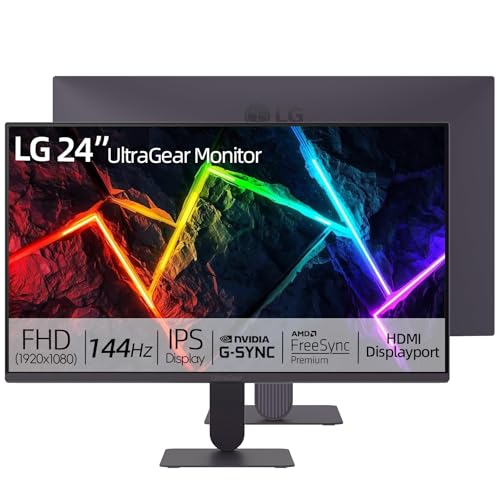
LG 24″ Ultragear FHD 144Hz IPS Gaming Monitor
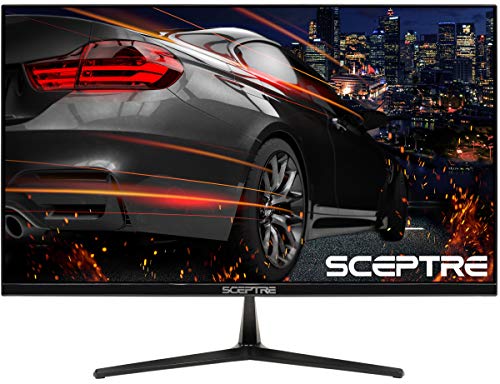
Sceptre E255B-1658A 25″ FHD 165Hz Gaming LED Monitor

KTC 32 Inch 240Hz Curved 2K Gaming Monitor H32S25E
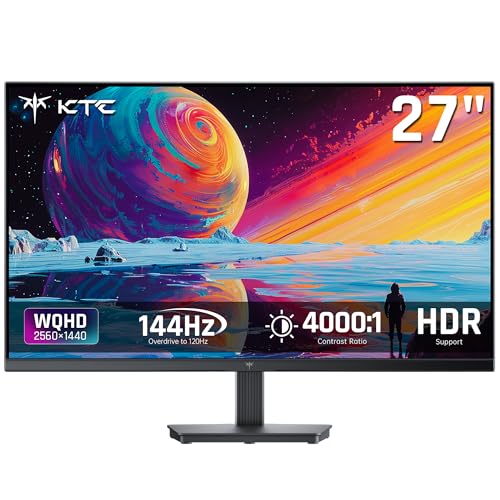
KTC 27 Inch QHD 144Hz Gaming Monitor H27T27S

KTC 32 Inch 2K 1440P 120Hz IPS Monitor H32D6
A Breakdown Of The Leading Choices
The KTC H27D9 sits in the sweet spot many FPS players look for: a 27-inch QHD canvas (2560×1440) that gives you noticeably sharper sight lines than 1080p without the GPU tax of 4K. The IPS panel, 120Hz refresh, and Adaptive Sync support mean motion stays clean during fast swings in games like Valorant or Apex. In a home office that doubles as a battle station after hours, that balance earns its keep.
For mixed-use desks, the 123% sRGB color coverage and HDR support also keep movies and editing work looking reasonable, while HDMI and DisplayPort inputs give you flexibility for both a PC and a console. Most users will appreciate the VESA mount option when they want to free up desk space or pair it with a monitor arm.
Points In Its Favor
- 1440p resolution sharpens target outlines at typical viewing distance
- IPS panel keeps color and viewing angles solid during long sessions
- Adaptive Sync helps reduce tearing when frame rates fluctuate
- VESA mount support opens up clean, arm-mounted setups
- Works well as a do-everything display for work, movies, and play
Worth Noting
- 120Hz tops out lower than dedicated esports panels
- IPS glow can creep in during very dark scenes
- Built-in speakers are typically modest at best
Feature Snapshot
Who It Suits Best
Players who split time between ranked FPS sessions and everyday office work, and who want sharp 1440p without overspending on raw speed.
Consider Something Else When
Hardcore competitive players chasing maximum frames should look at the LG 24″ Ultragear FHD 144Hz IPS Gaming Monitor for a faster, esports-tuned panel.
If you measure a monitor in milliseconds, the KTC H32S17F is built around that obsession. A 240Hz refresh rate (how many times the image redraws per second) combined with a 1ms response time keeps motion blur at arm’s length during flick shots and rapid peeks. The 32-inch curved panel wraps the field of view in a way that pulls you deeper into cinematic single-player campaigns too.
It runs at 1080p, so the pixel density is lower than a 1440p panel, but that lighter resolution is also what lets mid-range GPUs push frame rates high enough to actually use 240Hz. For gamers who already run a capable rig and want every frame to land cleanly, the trade-off tends to feel worth it.
Where It Delivers
- 240Hz refresh keeps fast motion crisp and competitive-ready
- 1ms response reduces ghosting on quick directional changes
- Curved screen adds presence to wide maps and cutscenes
- Lower 1080p load lets GPUs sustain higher frame rates
Trade Offs
- 1080p on a 32-inch panel means looser pixel density up close
- Curved screens demand more desk depth for comfortable viewing
Best Suited To
Competitive FPS players with a capable GPU who prize frame rate over pixel count and want a room-filling curved experience.
Look Elsewhere When
You want both speed and sharper 1440p detail; the KTC H32S25E delivers 240Hz on a QHD panel instead.
The KTC H32S17C trades a bit of raw speed for a more laid-back 165Hz experience, which still feels plenty fluid for most shooters. The 1500R curve, a measure of how tightly the screen bends, wraps the panel around your field of view, making mid-range gaming sessions feel cinematic. Pair that with Adaptive Sync and you get a smoother, less juddery picture when frame rates wobble.
Casual FPS players who like longer sessions in story-driven games will appreciate the comfortable reach of the curve and the way the panel handles wide scenes. The 1080p resolution keeps your GPU free to push higher frame rates without sweating.
Useful Highlights
- 1500R curve adds depth to maps and cutscenes
- 165Hz refresh keeps motion noticeably smoother than 60Hz
- Adaptive Sync helps stabilize fluctuating frame rates
Small Caveats
- 1080p density is forgiving only at a typical viewing distance
- Not aimed at the highest-tier competitive crowd
Who Will Love This
Gamers who value immersion and comfort over top-end speed, especially for open-world and campaign shooters.
Swap It Out When
You need a faster ceiling for ranked play; the KTC H32S17F bumps refresh to 240Hz on a similar curved footprint.
The KTC H32T13 leans into the roomy side of desktop gaming with a 32-inch QHD IPS panel. That extra screen real estate makes side-by-side windows comfortable for work, while the 2560×1440 resolution keeps text and HUD elements sharp during play. Thin bezels help the monitor feel less like a chunky box in tighter setups.
HDR support adds a little more punch to bright explosions and dim corridors, even if it doesn’t match full-array local dimming. The 120Hz refresh rate lands in that comfortable middle zone, smooth enough for most FPS titles without demanding a flagship GPU.
Good Reasons To Consider
- 32-inch QHD screen balances immersion and desk practicality
- IPS panel keeps color steady at off-center angles
- Thin bezels suit multi-monitor configurations
Honest Caveats
- 120Hz is solid but trails the 240Hz options above
- Large footprint needs a deep, sturdy desk
Quick Facts
Made For
Home office gamers who want one panel that handles spreadsheets, video calls, and casual FPS sessions without compromise.
A Better Fit Elsewhere
Competitive players chasing higher refresh should consider the KTC H27T27S, a 27-inch QHD panel tuned to 144Hz.
Small desks don’t have to mean small resolution. The KTC H24T27 crams a 2560×1440 IPS panel into a 24-inch frame, which gives you noticeably sharper text and in-game detail than 1080p at the same size. The 100Hz refresh rate is a modest step up from 60Hz, and FreeSync and G-Sync compatibility help keep things smooth when frame rates dip.
For cramped dorm rooms, bedroom battlestations, or anywhere depth is limited, the smaller footprint is the real headline. You’re not sacrificing pixel density to get a more compact display.
Notable Gains
- 1440p sharpness in a 24-inch frame
- IPS color and viewing angles hold up across the screen
- Adaptive Sync support smooths out frame rate dips
- Compact footprint suits tight desks
Points To Note
- 100Hz won’t satisfy players chasing 144Hz or higher
- Smaller screen means less peripheral vision in wide games
Right Fit For
Apartment dwellers, students, and anyone building a tidy, sharp-looking setup where desk space is the limiting factor.
Reach For A Different Pick When
Speed matters more than size; the Sceptre E255B-1658A delivers 165Hz in a similarly compact 25-inch form factor.
LG’s UltraGear line has a long track record in competitive gaming, and the 24-inch FHD 144Hz IPS model continues that focus. A 144Hz refresh rate pairs with a 1ms MBR (Motion Blur Reduction) setting to keep fast action legible, and HDR10 support adds a touch of contrast to supported titles. The IPS panel is the real differentiator for color, covering 99% of the sRGB color gamut.
NVIDIA G-SYNC compatibility and AMD FreeSync support mean the panel can sync cleanly with a wide range of graphics cards. For streamers who also care about how their desktop or OBS preview looks on camera, that color accuracy earns its keep.
Strengths Worth Knowing
- 144Hz refresh strikes a sweet spot for competitive play
- IPS panel with strong sRGB coverage for accurate color
- HDR10 support adds depth to supported games
- Compatible with both G-SYNC and FreeSync
Worth Bearing In Mind
- 1080p resolution is starting to feel modest at this size
- Stands and stands are typically tilt-only without added accessories
Feature Card
Built With In Mind
Esports-minded players and streamers who want a reliable, color-accurate 144Hz panel from a well-known brand.
Not Your Match When
You want higher resolution on a 24-inch screen; the KTC H24T27 packs 1440p into a similar size for sharper detail.
The Sceptre E255B-1658A is the kind of monitor that gets the basics right without draining the budget. A 25-inch FHD panel with a 165Hz refresh rate (overclocked above its 144Hz native) gives FPS players meaningful headroom over a standard 60Hz display. AMD FreeSync support keeps tearing at bay when frame rates bounce around.
It also throws in built-in speakers and a pair of HDMI 2.0 ports plus a DisplayPort input, which is generous at the price. For a starter rig, dorm setup, or secondary screen, the value here is hard to argue with.
Features That Help
- 165Hz refresh gives competitive feel without flagship cost
- 1ms response handles quick camera movement well
- FreeSync reduces tearing on AMD and compatible NVIDIA cards
- Anti-flicker tech helps during long sessions
- Built-in speakers cover the basics when no headset is handy
Practical Considerations
- Color accuracy is functional rather than professional
- Plastic build feels light on the stand
Specs At A Glance
Perfect Match For
First-time builders and budget-focused gamers who want a real high-refresh experience without overspending.
Skip It When
You want sharper 1440p detail; the LG 24″ Ultragear FHD 144Hz IPS Gaming Monitor trades a bit of speed for better color and brand polish.
The KTC H32S25E is the rare monitor that refuses to pick between speed and sharpness. A 240Hz refresh rate sits on top of a 2560×1440 panel, and the 1000R curve matches the shape of the human eye more closely than gentler curves. The result feels more enveloping in big shooters, with deep blacks from the 4000:1 contrast ratio adding atmosphere to dark maps.
Adaptive Sync support keeps things stable, and HDMI plus DisplayPort inputs cover most rigs and consoles. It’s a bigger investment than the 1080p models above, but for a serious gaming setup the combination of resolution and refresh is hard to match at this level.
A Favorable Mix
- 240Hz refresh on a QHD panel hits both speed and clarity
- 1000R curve feels deeply immersive for wide games
- 4000:1 contrast makes dark scenes richer
- Adaptive Sync support reduces tearing
Some Limits To Know
- Heavy GPU demand to push QHD at high frame rates
- Curved design may not suit every desk layout
Whose Shelf It Belongs On
Dedicated gaming setups where the build can feed a QHD panel at high frame rates, and the desk can support a 32-inch display.
Where A Sibling Pick Shines
Players with mid-range GPUs should look at the KTC H32T13, a 32-inch QHD panel that runs at a more forgiving 120Hz.
The KTC H27T27S is built around a 4000:1 contrast ratio, which gives darker shooters and horror titles more depth than typical IPS panels can manage. Shadows hold detail, blacks feel genuinely black, and bright highlights pop without looking washed out. A 144Hz refresh rate keeps motion smooth for both single-player and competitive sessions.
For gamers who like moody maps, night raids, and atmospheric campaigns, that contrast boost can be more impactful than another 30Hz of refresh. Adaptive Sync support rounds out the spec sheet for tear-free play.
Positive Takeaways
- 4000:1 contrast adds depth to dark scenes
- 144Hz refresh balances speed and clarity
- Adaptive Sync reduces tearing during frame rate swings
Factors To Consider
- Not the highest refresh option on this list
- Color leans toward utility rather than professional grading
Who Should Grab It
Single-player and atmospheric FPS fans who want richer dark scenes without giving up smooth motion.
Another Choice May Suit
Players who want speed and immersion together should look at the KTC H32S25E, which pairs 240Hz with a deep 1000R curve.
The KTC H32D6 closes the list as a versatile 32-inch QHD IPS panel with HDR support. A 120Hz refresh rate gives you a smooth step up from older 60Hz displays, and the IPS panel keeps color consistent whether you’re gaming, editing, or working through spreadsheets. For a household where one monitor has to do it all, that flexibility is genuinely useful.
It’s not aimed at the highest tier of competitive play, but for a shared family PC or a content creator who games on the side, the mix of size, sharpness, and HDR color covers most needs without overcomplicating the choice.
Strong Points
- 32-inch QHD panel handles work and play comfortably
- IPS color holds up across wide viewing angles
- HDR support adds punch to supported content
Soft Spots
- 120Hz trails the 144Hz and 240Hz options in this list
- Big screen demands generous desk depth
Technical Highlights
Right Fit For
Households and content creators who want a single display that handles gaming, work, and streaming without compromise.
Not Your Match When
Competitive players want every frame; the LG 24″ Ultragear FHD 144Hz IPS Gaming Monitor leans into faster refresh in a more compact frame.
What To Weigh Before Picking An Fps Gaming Monitor
Refresh Rate And Response Time
Refresh rate, measured in hertz (Hz), is how many times the screen redraws each second. Response time, measured in milliseconds (ms), is how quickly a pixel can change color. For FPS play, a higher refresh rate (144Hz and up) makes motion feel more responsive, while a low response time (1ms or close) reduces ghosting trails behind fast-moving targets. Most modern GPUs can push 1080p at high frame rates easily, which is why entry-level competitive monitors often pair high refresh with lower resolution. If your build is more modest, a 120Hz or 144Hz 1440p panel still feels dramatically better than a 60Hz display.
Panel Type And Image Quality
IPS panels offer wide viewing angles and accurate color, making them a strong all-around choice for both work and play. VA panels tend to deliver deeper contrast, which helps dark scenes in horror or night missions. TN panels were once the speed kings, but most gamers now prefer IPS or VA for the better image quality. For FPS gaming specifically, IPS strikes a strong balance for most users, with VA worth considering if you play moody, atmospheric games frequently.
Resolution, Size, And Desk Space
Resolution affects how sharp everything looks. 1080p remains easy to run and pairs well with smaller 24 to 25-inch panels. 1440p (QHD) hits a sweet spot of sharpness without crushing your GPU, especially on 27-inch screens. 32-inch panels look great at 1440p, though the pixel density is lower than on 27-inch models. Always match the monitor’s footprint to your actual desk depth; a 32-inch curved panel on a shallow desk can force you to sit closer than you’d like.
Adaptive Sync And HDR
Adaptive Sync (FreeSync on AMD, G-SYNC compatibility on NVIDIA) helps your monitor match the frame rate your GPU is actually producing, cutting down on screen tearing and stuttering. It’s especially helpful when frame rates vary during busy scenes. HDR (High Dynamic Range) adds brighter highlights and richer colors in supported games, though the effect depends on the panel’s HDR certification level. For most gamers, Adaptive Sync is more impactful day to day than entry-level HDR.
Smart Considerations Across These Picks
Pitfalls Shoppers Hit
A common mistake is chasing the highest refresh rate without checking resolution; a 240Hz 1080p panel can look soft on a 32-inch screen, while a 144Hz 1440p panel often feels more impressive. Another trap is ignoring desk size. A 32-inch curved monitor sounds great until it overwhelms a small desk and forces you to sit too close. Finally, don’t overlook Adaptive Sync; without it, even a fast monitor can show tearing when frame rates dip during chaotic firefights.
Where The Extra Money Goes
Spending more in this category typically buys sharper resolution, higher refresh rates, and better HDR performance. A premium 240Hz QHD panel like the KTC H32S25E adds both speed and clarity, while entry-level picks like the Sceptre E255B-1658A keep things simple with solid 165Hz performance. The upgrade is most worth it when your GPU can actually feed the higher frame rates; otherwise, you’re paying for headroom your system can’t use.
Frequently Asked Questions
Is 144Hz Enough For FPS Gaming?
For most players, 144Hz is the sweet spot between smooth motion and affordable hardware. Competitive esports players may push to 240Hz or higher, but casual and mid-level FPS gamers see a big jump in clarity going from 60Hz to 144Hz without needing a flagship GPU.
What Resolution Is Best For FPS Gaming?
1440p (QHD) is widely considered the best balance for modern FPS gaming, offering sharper detail than 1080p without the heavy GPU demand of 4K. On smaller 24 to 27-inch panels, 1080p still works well, especially if your goal is maximum frame rates.
Does Response Time Really Matter?
Yes, but in practical terms, anything at 1ms is fast enough for most FPS players. The visible difference between 1ms and 5ms is small for casual play, but competitive gamers may notice reduced ghosting with the lowest response times.
Are Curved Monitors Better For FPS Games?
Curved monitors can feel more immersive, especially on larger 32-inch panels, by wrapping the field of view. For competitive FPS play, a flat panel is usually preferred since it keeps the image geometry accurate, particularly for aim training or strategy games that rely on straight lines.
Do I Need G-SYNC Or FreeSync?
Adaptive Sync (FreeSync on AMD cards, G-SYNC compatibility on NVIDIA cards) is highly recommended for FPS gaming. It reduces screen tearing and stuttering when frame rates fluctuate, which happens often during busy combat moments. Even a modest FreeSync monitor feels noticeably smoother than a non-adaptive display.
Bottom Line
Your best pick comes down to matching the monitor to your rig, your desk, and the kind of games you play most. Competitive players with capable GPUs will appreciate the speed of the 240Hz panels, while mixed-use households often do best with a 32-inch QHD display that handles both spreadsheets and shooters. Take stock of your space, your hardware, and your favorite genres, then let the spec list guide you toward the panel that fits your routine.


