


Gaming setups keep getting bigger, and so does the gear that surrounds them. The right foldable gaming desk lets you claim a real battle station in a small bedroom, fold it flat when guests arrive, and still have a sturdy surface for a monitor or two when the session starts. This roundup focuses on folding and L-shaped desks that genuinely balance footprint, structure, and the little conveniences like power outlets and LED lighting that turn a plain table into a proper gaming corner.
The Choices Worth Comparing

alawooder 39.4″ Folding Desk with Wood Top
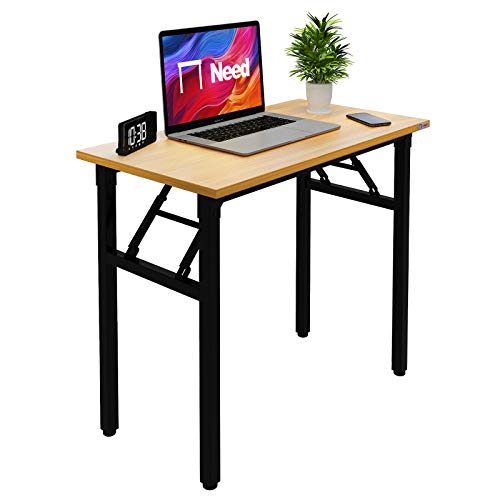
Need Small Folding Computer Desk in Teak

SEDETA 67″ L Shaped Gaming Desk with Pegboard

PayLessHere 47″ R-Shaped Gaming Table in Blue

ODK 66″ Large L Shaped Gaming Desk in Black

ODK 53″ L Shaped Gaming Desk with Shelves

ODK 48″ L Shaped Gaming Desk with LED Lights

Bestier 42″ L Gaming Desk with Power Outlets
A Closer Look At Each Pick
The alawooder 39.4″ folding desk takes the most frustrating part of buying furniture and erases it. The unit arrives fully assembled, and the “unboxing” basically means flipping the wood top open and clicking the legs into place. For renters who dread Allen keys, that’s the whole pitch.
Unlike the L-shaped picks further down the list, this one keeps a slim, rectangular footprint that disappears against a wall. The smooth wood top handles a monitor and a laptop without wobble. You trade LED lighting and pegboards for a desk that feels more like a piece of grown-up furniture than a gaming prop.
Standout Benefits
- Setup takes seconds: no tools, no screws, no missing hardware
- Splash-resistant wood top wipes clean after late-night snack raids
- Sturdy metal frame supports a heavier monitor load than most folding desks
- Folds flat quickly, which matters in studio apartments and shared rooms
Things To Consider
- No integrated power outlets, so a surge strip becomes essential
- Rectangular shape leaves no corner cubby for a tower or speakers
Best Suited To
Renters and small-space dwellers who want a tool-free setup that still looks like proper home furniture.
Reach For A Different Pick When
You need built-in outlets, LED lighting, and a corner footprint for a multi-monitor rig, in which case the SEDETA 67″ L Shaped Gaming Desk with Pegboard is the better match.
At roughly 31.5 by 15.7 inches, the Need folding desk in teak is barely wider than a large keyboard tray. For a dorm corner or a tight studio, that scale is the whole appeal. It folds down flat and leans against a wall when not in use, freeing the room for other activities.
Compared to the alawooder folding desk above, this one is a step simpler. There are no gaming flourishes, no LED strips, no integrated outlets, just a clean teak-finish surface on a foldable frame. For casual gaming, schoolwork, or a single-monitor setup, it does the job without taking over the room.
Useful Touches
- One of the smallest folding footprints on this list, ideal for closet desks
- Teak-style finish blends into plain home decor without screaming “gamer”
- Lightweight build makes it easy to move between rooms
Honest Caveats
- Modest weight capacity rules out heavy dual-monitor loads
- Lacks any cable management, so wires tend to drape visibly underneath
- Surface feels compact for a full-sized keyboard plus mousepad
Feature Snapshot
Who Will Love This
Students in dorms and anyone working with a single-monitor, single-laptop routine in a very small room.
Not Your Match When
You want built-in power outlets, LED lighting, and storage for a full gaming rig, in which case the ODK 53″ L Shaped Gaming Desk with Shelves is the smarter reach.
The SEDETA 67″ L-shaped desk is where this list pivots from “small-space folding table” to “actual gaming battlestation.” You get a corner layout, a top hutch, a pegboard, a keyboard tray, a headphone hook, and LED lighting, all built around a long L-shape that can host three monitors and a desktop tower plus laptop.
Power is the headline feature. A built-in power outlet keeps chargers, headsets, and RGB accessories plugged in without crawling under the desk. Where the Need folding desk above keeps things bare and minimal, this one is the opposite: a full command center that happens to fold down for storage or moving day.
A Strong Showing
- Reversible L-shape lets you choose which side the long return sits on
- Pegboard and storage bag tame controller, cable, and accessory clutter
- Built-in power outlet removes the need for a separate surge strip on the surface
- LED lighting and a top hutch add personality without adding a second piece of furniture
Worth Bearing In Mind
- Large 67-inch footprint overwhelms smaller bedrooms and dorms
- Assembly is involved and can take an hour or more for one person
Perfect Match For
Multi-monitor gamers and streamers who want outlets, lighting, and storage baked into a single corner unit.
Look Elsewhere When
Your space is too tight for a 67-inch L-shape, in which case the Bestier 42″ L Gaming Desk with Power Outlets gives you a similar feature set in a much smaller corner footprint.
The PayLessHere R-shaped gaming table in blue leans into the “streamer setup” look. The 47-inch top is a carbon-fiber-style surface, and the R-shaped frame carves out a wraparound feel that pulls the keyboard and mouse closer than a flat slab allows. It is a desk that looks like it belongs under a ring light.
Versus the SEDETA 67″ L-shape above, this one drops the pegboard and storage bag in favor of a simpler racing-style silhouette. You still get a sturdy steel frame meant for long sessions, just without the corner sprawl. For a single-player battlestation in a medium-sized bedroom, the trade-off makes sense.
A Favorable Mix
- Carbon-fiber-style surface resists scuffs from keyboard swaps and headset drops
- R-shape brings the action zone closer, which helps in long FPS sessions
- Steel frame is built for the daily wear of intense play
- Blue finish stands out without looking juvenile
Less Ideal Details
- No built-in power outlets, so charging gear still needs a strip
- R-shape takes getting used to if you share the desk for schoolwork
Feature Rundown
Right Fit For
Streamers and competitive gamers who want a racing-style surface with a sturdy steel frame.
Swap It Out When
You need outlets and storage built into the desk, in which case the SEDETA 67″ L Shaped Gaming Desk with Pegboard pulls double duty as a workspace and a gaming rig.
The ODK 66″ L-shaped desk goes big. With a built-in monitor stand, three standard outlets, two USB ports, and color-changing LED lighting, it functions as a full desk-and-media-shelter in one piece. For someone running a full tower, two monitors, and a console, that consolidation matters.
Stacked against the PayLessHere R-shape above, this one trades the racing silhouette for a longer work-surface return and an actual monitor shelf. The memory function on the LEDs is a small touch that saves you from re-tweaking colors every time you flip the lights on.
Bright Spots
- Built-in monitor stand lifts screens to a more ergonomic viewing height
- Three outlets plus two USB ports keep chargers and peripherals within reach
- LED memory mode restores the last color setting after a power cycle
- Long 66-inch span fits two desktops and a laptop side by side
Trade Offs
- Large footprint, so a small bedroom will feel crowded
- LED controls and cable runs add setup time on first build
Built With In Mind
Gamers running dual desktops, large monitors, and a full accessory loadout who want a single piece of furniture to host it all.
Consider Something Else When
Your room can’t accommodate 66 inches of corner desk, in which case the ODK 48 Inch L Shaped Gaming Desk with LED Lights gives you a similar feature list in a more compact corner footprint.
The ODK 53″ L-shaped desk feels like the practical middle of the ODK lineup. You get dual shelves, a CPU stand, an accessory hook, and a tool bag, which is more built-in storage than most corner gaming desks bother with. For someone whose bedroom doubles as a study, that organization is the selling point.
Three outlets and two USB ports sit on the surface, and the LED strip rounds out the gaming aesthetic. The 53-inch span fits tighter rooms than the 66-inch ODK above while still leaving room for a dual-monitor setup. It is the kind of desk that quietly absorbs a lot of clutter.
A Few Strong Suits
- Dual shelves and a CPU stand create real storage, not just decoration
- Built-in outlets and USB ports keep the cable mess off the floor
- Compact L-shape works in bedrooms where a 66-inch desk would dominate
- Accessory hook and tool bag corral controllers, cables, and small gear
Possible Compromises
- Color options and finishes skew limited, mostly black variants
- Shelves are open, so dust collects on displayed items over time
Quick Facts
Who Should Grab It
Gamers and remote workers who need actual storage and a corner footprint that doesn’t swallow the room.
Skip It When
You prefer a simple rectangular folding desk for a small room, in which case the alawooder 39.4″ Folding Desk with Wood Top keeps things minimal and tool-free.
The ODK 48″ L-shaped desk sits in the sweet spot for most bedrooms. It is small enough to fit a typical 10-by-10 room and large enough to host a gaming PC, a monitor, and accessories without feeling cramped. Three outlets, two USB ports, and an accessory hook cover the daily charging needs.
Compared to the larger ODK 66″ above, this one sacrifices a bit of surface area in exchange for a friendlier footprint. The LED lighting is the same flavor, the steel frame is similar, but the build is more approachable for a first gaming desk. For most bedroom setups, it is the right size.
Why It Works Well
- 48-inch L-shape fits most bedrooms without dominating the layout
- Built-in power outlets and USB ports eliminate a surface-level power strip
- Accessory hook keeps headphones and bags off the work surface
- LED lighting adds ambiance without requiring a separate accessory
Practical Considerations
- Smaller shelves than the 53″ ODK, so storage is more limited
- Single monitor is the realistic fit, with limited space for a second screen
Made For
Bedroom gamers running a single monitor and a tower who want the L-shape look and built-in power without going full 66 inches.
Where A Sibling Pick Shines
You want a slightly larger surface and more storage for a real workstation feel, in which case the ODK 53″ L Shaped Gaming Desk with Shelves is the natural next step up.
The Bestier 42″ L-shaped desk is the smallest of the L-shaped picks on this list, and that is its strength. The carbon-fiber-style top reads as gaming without the heavy visual presence of a 66-inch corner unit, and the 32.5-inch depth gives you a real work surface for a single monitor and a laptop side by side.
Against the ODK 48″ above, this one trims a few inches off the span and adds a slightly more compact carbon-fiber look. Power outlets and LED lighting still come standard. For an apartment where every inch counts, the smaller footprint is the point.
Noteworthy Benefits
- Compact L-shape fits apartments and small bedrooms where larger desks won’t
- Carbon-fiber-style top is easy to clean and visually low-key
- Built-in power outlets keep chargers and RGB gear in one place
- LED lighting adds personality without overwhelming a calm room
Where It Is Less Suited
- Modest 42-inch span rules out a true triple-monitor setup
- Smaller return surface means less room for a full keyboard and mousepad
Feature Card
Whose Shelf It Belongs On
Apartment dwellers and small-bedroom gamers who want a single-monitor L-shape with built-in power and lighting.
A Better Fit Elsewhere
You need more surface area for dual monitors or storage shelves, in which case the ODK 53″ L Shaped Gaming Desk with Shelves gives you the room to grow.
What Matters Most Before Choosing a Foldable Gaming Desk
Footprint and Folded Storage
The whole point of a foldable gaming desk is flexibility. Measure your room’s open floor space and the corner you plan to use, then check both the assembled and folded dimensions. Slim rectangular folding desks like the alawooder 39.4″ lean against a wall and disappear, while L-shaped units need a dedicated corner to feel right.
Weight Capacity and Frame Material
A steel frame handles heavier monitor loads and aggressive keyboard play better than a lightweight folding frame. If you run a full tower plus dual monitors, look for desks that publish a clear weight rating and pair that with a wide stance. Carbon-fiber-style tops add scratch resistance, but the frame underneath does the structural work.
Built-In Power, Lighting, and Storage
Modern gaming desks increasingly bundle in power outlets, USB ports, and LED strips. These conveniences matter most in rooms where outlets are scarce or in setups that travel between rooms. Shelves, hooks, and pegboards add genuine storage and reduce the need for a separate media stand. For multi-monitor gaming rigs, the extra organization tends to pay off within a week of ownership.
Surface Size and Shape
A single monitor fits comfortably on a 40-inch surface, while dual monitors generally want 48 inches or more. L-shaped desks return that extra span on the side, useful for keeping a tower, speakers, or a second laptop within reach. Match the surface to your monitor count, not the other way around.
Key Considerations Across These Picks
Pitfalls Shoppers Hit
The most common mistake is choosing an L-shaped desk for a room that only fits a rectangle. Measure first, then shop, in that order. Another trap is underestimating the weight of a full gaming setup; a folding desk with a modest weight limit will bow over time if you load it with a 30-pound monitor and a tower. Finally, overlooking cable management turns even the cleanest desk into a tangle within a month.
Where The Extra Money Goes
Higher-tier models in this category tend to add a built-in power strip, a monitor shelf, and stronger LED systems with memory modes. Those features replace separate accessories you would otherwise buy, so the upgrade often pays for itself in the first few months. The trade-off is footprint and assembly time, both of which climb with size.
Frequently Asked Questions
Are foldable gaming desks sturdy enough for heavy monitors?
Sturdiness depends on the frame material and weight rating more than the foldable design itself. Steel-framed units handle heavier monitor loads than lightweight folding frames. Always check the published weight limit before pairing a desk with a large ultrawide or dual-monitor setup.
Do foldable gaming desks come with built-in power outlets?
Some do, and some do not. L-shaped models in the mid-to-large range, like the SEDETA 67″ and the ODK 66″, typically include power outlets and USB ports. Slim folding desks, like the Need and alawooder options, usually leave power management to an external surge strip.
How much space do L-shaped gaming desks need?
L-shaped desks fit best in corners, where the two surfaces meet at a right angle. A 42-inch L-shape fits most apartments, while 66-inch and 67-inch units want a dedicated room. Always measure the diagonal of the corner as well as the wall lengths to avoid surprises on assembly day.
Can foldable gaming desks support a full desktop tower?
Many can, especially when a CPU stand or under-desk shelf is part of the design. Slim folding desks without a designated tower spot may require you to place the tower on the floor, which can affect airflow. If a tower is part of your setup, prioritize a desk with a CPU stand or enough lower clearance.
Are LED lights and pegboards worth the upgrade?
LED lights and pegboards add personality and storage without taking up extra floor space. For streamers and content creators, the lighting alone justifies the bump. For casual gamers, those features are nice-to-haves rather than essentials, so the value depends on how much time you spend at the desk.
Wrap Up
The right foldable gaming desk comes down to your room and your gear. Slim folding options like the alawooder and Need work wonders in tight spaces, while the L-shaped ODK and SEDETA models turn a corner into a full battlestation. Pick the footprint first, the frame second, and the conveniences third, and the choice tends to make itself.


