


A proper flight sim rig transforms Microsoft Flight Simulator, X-Plane, and DCS from a mouse-and-keyboard exercise into something that actually feels like flying. The right combination of yoke or HOTAS, rudder pedals, mounts, and seating decides whether you reach for the sim during a weeknight or let it gather dust. Simmers who fly a mix of airliners, warbirds, and helicopters all need different things from their setup, so this list pairs each rig with a clear reader profile rather than chasing a one-size-fits-all answer.
A Side-By-Side Look

Logitech G Pro Flight Yoke + Rudder Pedals Bundle

Conquer Racing Simulator Cockpit Wheel Stand
OpenWheeler Advanced Racing Simulator Seat

Thrustmaster TPR Rudder Pedals (PC)
SimFab Modular Flight Sim Cockpit (DCS)

Thrustmaster T.Flight Hotas One MSFS Edition

Wheel Stand Pro S Flight Stand (Deluxe V2)
Saitek Pro Flight Switch Panel (PZ55)

Meza Mount HOTAS Desk Mount Set of 2
A Deeper Look At The Lineup
The Logitech G Pro Flight Yoke pairs naturally with the matching Pro Flight Rudder Pedals, which is why this bundle sits at the top of the list. The yoke brings 14 buttons, a POV (point-of-view) hat for looking around the cockpit, and a three-position mode switch that opens up around 54 programmable commands. Pair that with self-centering rudder pedals and differential toe brakes, and a beginner airliner pilot can practice coordinated turns and runway alignment without fighting the gear.
It feels more like real aviation hardware than a toy, especially once you assign flaps, gear, and trim to the yoke’s switches. For most home simmers, this combo is the gentle on-ramp that the rest of the list builds on.
Positive Takeaways
- Self-centering rudder pedals give smooth, predictable control inputs.
- Around 54 programmable commands cover nearly every cockpit function in popular airliners.
- Adjustable footrests with non-slip materials fit a wide range of shoe sizes.
- Differential toe brakes mimic the feel of braking a real aircraft during rollout.
Trade Offs
- The plastic yoke housing shows wear over years of daily use, depending on storage conditions.
- Not ideal for combat sims, where a HOTAS joystick makes more sense than a yoke.
Feature Snapshot
Who It Suits Best
New airliner and general aviation pilots who want a realistic yoke-and-pedal foundation without building a full cockpit.
Consider Something Else When
Combat-focused DCS pilots get a better experience from the Thrustmaster T.Flight Hotas One, which handles a stick and throttle layout.
The Conquer wheel stand is a crossover pick: marketed for racing wheels, but its frame accepts a Logitech or Saitek yoke just as well. The foldable design collapses against a wall in seconds, which makes it a natural fit for simmers who share a living room with a couch and a TV. Compared with a permanent cockpit chassis, this stand keeps your floor space livable while still giving your yoke a steady base.
It also includes a gear shifter mount, a small bonus that proves handy if you dabble in driving sims between flights. For someone who wants stability without committing to a full rig, it’s a sensible middle ground.
Key Advantages
- Foldable frame clears floor space when not in use.
- Adjustable height and angle suit most seated positions.
- Included shifter mount adds value for occasional racing detours.
Worth Noting
- Frame is built around racing-wheel ergonomics, so throttle placement requires creative clamping.
- Lightweight tubing can flex under hard yoke inputs during long sessions.
Built With In Mind
Apartment simmers who want a sturdy mount that disappears into a closet between flights.
Look Elsewhere When
Heavy HOTAS users with a Thrustmaster Warthog will want the rigidity of the Meza Mount-HOTAS Desk Mount instead.
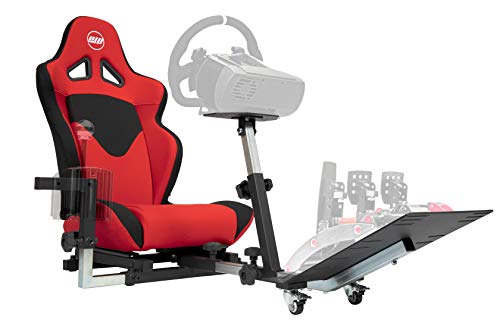
OpenWheeler’s fiberglass seat reads like a small piece of furniture rather than a toy. It supports an unusually wide range of consoles and PC wheels, so households that bounce between PlayStation, Xbox, and PC setups get real flexibility. The gear shifter bracket can be mounted on either side, and the lightweight construction makes it easy to reposition.
For flight sim specifically, the seat works best when paired with a separate joystick mount, since its frame is shaped for steering wheels. That’s a small limitation, but the build quality makes up for it.
What It Does Well
- Compatible with PlayStation, Xbox, Nintendo, and PC wheels out of the box.
- Lightweight frame is easy to slide across the floor for repositioning.
- Reversible shifter mount adapts to left- or right-handed driving positions.
Honest Caveats
- Frame geometry is wheel-first, so a HOTAS stick often needs a separate desk clamp.
- Lower back support leans toward racing posture, which may feel upright for long cruise legs.
Made For
Multi-console households who want a single seat that follows them from PS4 to Xbox to PC without swapping hardware.
A Better Fit Elsewhere
Pilots flying airliners for hours at a stretch will find better ergonomics with the Wheel Stand Pro S Flight Stand and a reclined office chair.
The Thrustmaster TPR pedals are a focused upgrade for simmers who already own a yoke or stick and want sharper rudder authority. H.E.A.R.T HallEffect AccuRate Technology uses magnetic sensors to track pedal position, so there’s no friction from physical contact parts wearing down over time. The Pendul_R suspended mechanism gives the pedals a smooth, floating feel that mirrors how a real rudder responds under your feet.
For taildraggers and crosswind landings, the precision here is meaningful. Where the Logitech pedals in pick 1 cover casual flying well, these step in when you want finely tuned yaw input.
What Works In Its Favor
- Magnetic sensors keep accuracy consistent over thousands of flight hours.
- Suspended pedal mechanism delivers smooth, natural rudder deflection.
- Wide pedal base accommodates crosswind rudder technique without slipping.
Room For Improvement
- PC-only compatibility limits console pilots.
- Lacks toe brakes, so you’ll need a separate axis for differential braking.
Quick Facts
Best Suited To
Intermediate and advanced simmers flying taildraggers, warbirds, and big iron airliners where precise rudder matters.
Swap It Out When
Casual MSFS newcomers can save money with the Logitech rudder pedals in the yoke bundle and upgrade later.
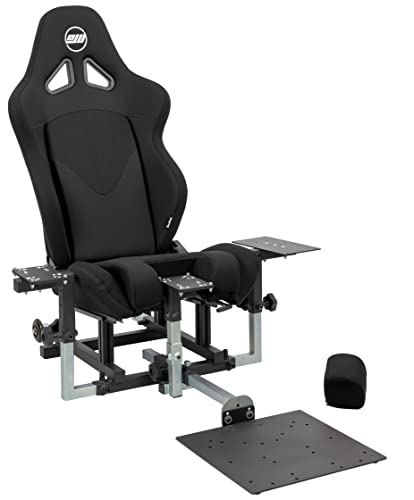
The SimFab Modular Cockpit is a serious piece of hardware aimed squarely at DCS World pilots. It accommodates a stick on the right, a center-mounted cyclic, and a throttle on the left, with rudder pedals slotted in below. The included full-foam seat has sliders and a recliner, plus a patented removable foam insert that opens up room for a center stick without flattening your seating position.
What makes it stand out is the modular path: the chassis can be reconfigured for general aviation, space sims, or even sim racing. For someone committed to a long-term sim hobby, that future-proofing carries real weight.
The Upside
- Patented foam insert supports both side-stick and center-stick layouts.
- Mounting hardware and wrenches ship in the box for full assembly.
- Modular design accepts Thrustmaster, WinWing, VirPil, and VKB controls.
Points To Keep In Mind
- Large footprint demands a dedicated sim room or office corner.
- Premium build quality sits at a higher cost tier than entry-level stands.
Right Fit For
Dedicated combat and warbird simmers who already own a high-end HOTAS and want a chassis that matches it.
Not Your Match When
Light sim dabblers get more value from the Wheel Stand Pro S Flight Stand, which disappears between sessions.
The T.Flight Hotas One is the entry point most console pilots should start with. Officially licensed for Microsoft Flight Simulator on Xbox Series X|S and PC, it ships as a complete joystick and throttle bundle, which is rare at this tier. The detachable throttle makes storage easier and lets you dial in ergonomics for a couch or desk.
For someone who just installed MSFS and wants to feel the difference a stick makes, this is the path of least resistance. The honest read is that experienced simmers will outgrow it, but the learning curve it removes is real.
The Helpful Details
- Console licensing means plug-and-play support on Xbox Series X|S.
- Detachable throttle frees up desk space during cruise phases.
- Wide button count supports the most-used cockpit functions out of the box.
Minor Gripes
- Plastic gimbal and throttle resistance feel light under hard maneuvers.
- Not ideal for DCS-level precision, where a Warthog or VirPil setup is the better path.
Technical Sheet
Perfect Match For
Console and PC newcomers who want one purchase that covers joystick, throttle, and starter ergonomics.
Reach For A Different Pick When
Combat sim regulars get a more realistic experience from the SimFab cockpit paired with a Thrustmaster Warthog.
The Wheel Stand Pro S Flight Stand is built for simmers who can’t dedicate a room to their setup. The Deluxe V2 frame uses quick-release clamps instead of knobs, so adjustments happen in seconds without tools. It folds flat against a wall when you’re done, which is a quiet quality-of-life win for shared spaces.
It is designed specifically for Logitech and Saitek yokes, which is the most common yoke family in home sim setups. If your hardware matches, the fit is genuinely solid.
Useful Touches
- Tool-free quick-release clamps speed up session setup.
- Folds flat for storage in closets or behind furniture.
- Full stepless adjustment range covers most seated and standing positions.
Some Limits To Know
- Not compatible with Honeycomb yoke systems, so check your hardware first.
- Flight system hardware is not included, just the stand itself.
Who Should Grab It
Apartment dwellers and shared-space simmers who need a yoke stand that disappears between flights.
Where A Sibling Pick Shines
Honeycomb yoke owners should look at the Conquer Racing Cockpit, which accepts a wider range of wheel and yoke bases.
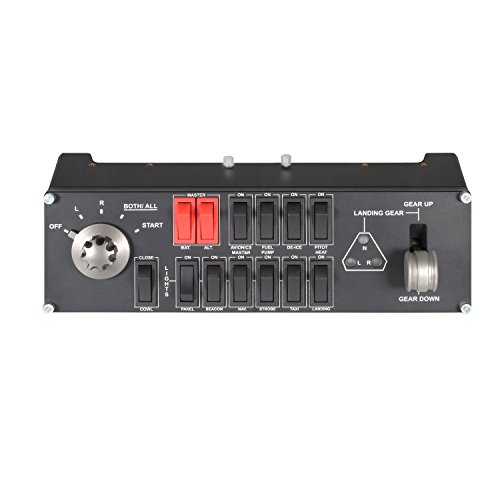
The Saitek Switch Panel is a small accessory with an outsized effect on immersion. It mirrors the landing gear lever arrangement from a real airliner, with LEDs that reflect the actual gear state in Microsoft FSX. Engine start switches and additional cockpit functions live on the same panel, so a single USB plug turns your desk into a recognizable flight deck.
The catch is platform age. It’s compatible with Windows 7, XP, XP64, and Vista, which signals an older product. Owners in modern MSFS and X-Plane environments commonly report mixed results, so this panel suits hobbyists with legacy setups more than cutting-edge simmers.
Features That Help
- LEDs indicate real landing gear position from the sim.
- Engine start switches consolidate startup procedures onto one panel.
- USB 2.0 connection keeps cabling simple.
Factors To Consider
- Officially listed compatibility targets older Windows versions, which may need workarounds in current sims.
- Designed to attach to the Saitek Pro Flight Yoke base, so standalone use needs a separate mount.
Spec Overview
Whose Shelf It Belongs On
Airliner sim enthusiasts building a Saitek-based cockpit who want authentic landing-gear feel and don’t mind legacy software.
Skip It When
Modern MSFS and X-Plane pilots get cleaner integration from a current-generation multi-panel or stream deck setup.
The Meza Mount set solves one of the most common HOTAS headaches: keeping a heavy Warthog or VPC base from sliding across the desk. Two adjustable clamps anchor a joystick and throttle to a standard desk, freeing your hands from fighting the rig during sharp maneuvers. The clamps are compatible with Thrustmaster Warthog, WinWing Orion 2, VPC WarBRD-D, and VPC MongoosT bases, which covers the most popular high-end setups.
It’s not flashy, but for combat and space sim pilots, a stable mount is the difference between immersion and frustration. This is the kind of accessory you forget you bought because it just works.
Bright Spots
- Set of two mounts covers joystick and throttle in one purchase.
- Wide compatibility across Thrustmaster, WinWing, and VPC ecosystems.
- Desk clamp design avoids permanent modifications to your workspace.
Worth Bearing In Mind
- Clamp grip depends on a thick, solid desk edge; thin tabletops may not hold under hard pulls.
Who Will Love This
HOTAS pilots flying DCS, Star Citizen, or Elite Dangerous who want stable controls without bolting down a full cockpit.
Another Choice May Suit
Yoke-based airliner pilots will appreciate the Wheel Stand Pro S Flight Stand more, since it’s purpose-built for that hardware family.
Picking The Right Rig For Your Sim Style
Start with the aircraft you actually fly most. Airliner and general aviation pilots get the most from a yoke, rudder pedals, and switch panels, while DCS, warbird, and space sim pilots lean toward a HOTAS stick and throttle with rudder pedals underneath. Mixing those two worlds in one rig is possible, but the ergonomics tend to favor whichever aircraft type you fly 80% of the time.
Budget matters more than beginners expect. A $200 yoke-and-pedal bundle delivers most of the immersion benefit of a $2,000 cockpit, especially for a first setup. Reserve premium spending for upgrades you’ll feel every session, like a magnetic-sensor pedal set or a proper HOTAS mount, rather than chasing chassis rigidity you won’t notice during cruise flight.
Desk versus floor versus full cockpit is the second decision. Desk clamps work for HOTAS pilots with a small footprint. Foldable stands suit shared rooms. A full cockpit chassis only earns its space once you fly serious combat sims several nights a week.
Smart Choices Across These Picks
Where Shoppers Go Wrong
The most common mistake is buying controls before checking platform support. A PC-only pedal set does a console pilot no good, and an Xbox-licensed stick feels redundant on a dedicated PC racing setup. Match the hardware to where you actually fly before you worry about sensor quality or build materials.
When Paying More Pays Off
Higher-tier hardware earns its keep in two places: sensor longevity and chassis rigidity. Magnetic sensor pedals hold calibration over years where potentiometer (variable resistor) sensors drift, and a rigid cockpit frame removes the micro-movements that distract during long flights. Spend up where those details touch every session, and save where they don’t.


