


Long sessions at a desk have a way of catching up with your wrists, shoulders, and lower back. The right keyboard and chair setup can turn hours of competitive play or focused work into something your body actually tolerates. This roundup looks at six picks, mostly mechanical boards with a couple of seating companions, that prioritize posture, joint comfort, and adjustability without sacrificing the feel of a proper gaming setup.
A Quick View Of The Lineup
SOLAKAKA A99 Pro Wireless Gaming Keyboard 96% Layout

AutoFull G7 RGB Ergonomic Gaming Chair

AutoFull G7 Gaming Chair White

SOLAKAKA A99 Pro Mechanical Keyboard with LCD Screen

SOLAKAKA A99 Pro Wireless Mechanical Keyboard
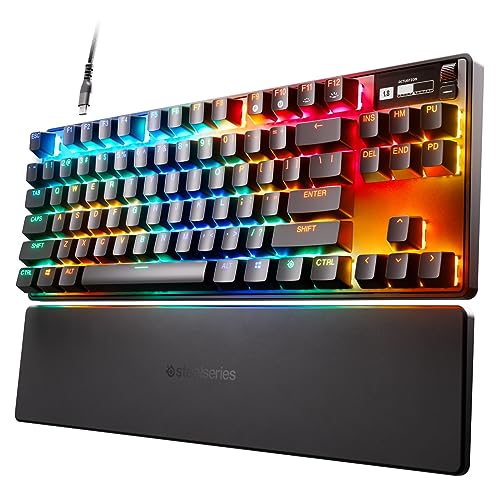
SteelSeries Apex Pro TKL HyperMagnetic Gaming Keyboard
Inside Each Recommended Option
The SOLAKAKA A99 Pro is the most decked-out board in the SOLAKAKA trio, packing a built-in LCD display and a metal control knob into a compact 96% layout. A gasket-mounted chassis (a design where the internal plate floats on soft mounts, softening each keystroke) gives the board a softer, less hollow feel than typical tray-mount keyboards, and hot-swappable switches let you swap your feel without soldering. Tri-mode connectivity covers 2.4GHz wireless, Bluetooth 5.0, and USB-C wired, which matters if you bounce between a gaming PC, a laptop, and a tablet.
For streamers and tinkerers, the screen and knob are more than a gimmick. You can monitor battery level, switching mode, and the connected system at a glance, and the knob handles volume, lighting, and system switching in a way that keeps your hands off the keyboard mid-match. If you tend to forget to charge devices, the visible battery readout solves that problem quietly.
Real Benefits
- Tri-mode wireless plus USB-C covers nearly any setup, from a desktop tower to a tablet on the couch.
- Hot-swappable switches mean you can change the typing feel without buying a new board.
- The LCD screen and metal knob cut down on alt-tabbing just to check battery or change profiles.
- Gasket structure delivers a cushioned, low-fatigue typing feel for long sessions.
Things To Consider
- The 96% layout squeezes arrow keys in tight, which takes a day or two to retrain muscle memory.
- Wireless mode still requires charging, and the LCD screen draws more power than a basic board.
- Owners commonly report the included keycaps feel thinner than the board itself deserves.
Who It Suits Best
Streamers, tinkerers, and multi-device households who want one board that handles PC, laptop, and console duty without missing a beat.
Where Another Pick Suits Better
Competitive players chasing per-key actuation precision will find the SteelSeries Apex Pro TKL a more focused tool for ranked play.
Your keyboard is only half the comfort equation. The AutoFull G7 RGB leans hard into the ergonomic side of the chair conversation, with a 3-zone lumbar system designed to follow the natural curve of your spine and IGR certification for postural support. Twenty-two adjustment points cover everything from seat depth to armrest angle, and the 720-degree rotating armrests swing completely out of the way when you need to lean forward for a close call.
The mesh seat and back breathe far better than the leather-and-foam chairs that dominate gaming setups, which matters the moment summer hits and your back stops being a comfortable place to sit. An LED back panel adds the visual flair streamers want without screaming for attention in a home office. If you routinely lose feeling in your lower back after a long ranked session, the targeted lumbar support is the real headline feature.
The Value In It
- 3-zone lumbar support targets the lower back specifically, the area most gamers complain about first.
- 720-degree armrests clear out of the way during leaning-forward play or when pulling the chair close to the desk.
- Breathable mesh keeps your back cool in warm rooms or during summer sessions.
- IGR certification suggests the chair has been evaluated for ergonomic fit, not just looks.
- 22 adjustment points let you dial in a fit for taller or shorter frames without compromise.
Worth Noting
- Assembly takes time, and the LED wiring can be tricky to tuck cleanly.
- Mesh seats feel firmer than padded alternatives, which takes adjustment for anyone used to plush cushioning.
Made For
Gamers and remote workers logging four-hour-plus sessions who run hot and want a chair that actually supports their spine instead of sinking under them.
A Better Fit Elsewhere
If you prefer a lighter color scheme to match a white setup, the AutoFull G7 Gaming Chair in white offers the same core ergonomics with a different finish.
The white version of the AutoFull G7 keeps the same ergonomic core as its RGB sibling but trades the LED back panel for a cleaner, custom backplate finish. BIFMA certification, an industry standard covering commercial furniture durability and safety, adds a layer of confidence for anyone treating the chair as a long-term work tool rather than a casual gaming accessory. A 140-degree recline is generous enough for a break between rounds without tipping into full flat territory.
Where this chair quietly outshines competitors is the floating lumbar system with side-wing tilt, which wraps around your lower back instead of pressing flat against it. The 3-zone design actively moves with micro-shifts in your posture, so the support stays in the right spot even when you lean forward during a tense team fight. The white finish also photographs better for content creators, though it does demand a bit more cleaning attention.
Well-Handled Touches
- 3-zone floating lumbar adjusts to side-to-side movement, not just forward lean.
- BIFMA certification covers structural and material standards for daily commercial-grade use.
- 140-degree recline supports proper breaks without fully leaving your seat.
- Custom backplate gives the chair a cleaner, office-friendly look than typical gaming chairs.
Honest Caveats
- The white mesh and frame show dust, spills, and denim transfer more than darker chairs.
- BIFMA certification suggests a higher build standard, but the chair is still heavier than mesh office competitors.
Best Suited To
Hybrid work-and-play setups where the chair needs to look at home next to a bookshelf as well as a battle station.
Look Elsewhere When
Setup-heavy RGB enthusiasts who want lighting on the chair itself should turn to the AutoFull G7 RGB Ergonomic Gaming Chair instead.
Key Specs
This SOLAKAKA A99 Pro shares the same LCD screen and metal knob as the wireless variant but lands at a slightly different price tier with the same tri-mode connectivity. The LCD pulls double duty as both an information panel and a control surface, showing date, time, battery status, and connection mode without launching software. The metal knob handles volume, system switching, and lighting profiles in a way that feels closer to a hi-fi component than a gaming accessory.
The gasket-mounted chassis returns here, and combined with hot-swappable switches, the board rewards anyone who likes to fine-tune their feel over time. RGB backlighting rounds out the gaming aesthetic without overwhelming a more minimal desk. The honest read is that this sits in a slightly awkward middle ground between the feature-rich wireless model and simpler boards, so you should want the screen-and-knob combo specifically to justify the spend.
Strengths Worth Knowing
- Tri-mode connectivity handles desktop, laptop, and mobile workflows from one board.
- Hot-swappable switches extend the board’s life as your switch preferences evolve.
- Gasket mount reduces the hollow ping of cheaper mechanical keyboards.
- RGB backlight gives gaming presence without dominating a clean desk setup.
Points To Note
- The LCD-and-knob premium only pays off if you actually use those features regularly.
- No dedicated numpad means spreadsheet-heavy work takes a productivity hit.
Perfect Match For
Hybrid users who split time between gaming, coding, and writing and want one board to bridge all three.
Skip It When
Hardcore competitive players will find the SteelSeries Apex Pro TKL’s adjustable actuation more directly relevant to ranked play.
The third SOLAKAKA entry keeps the same A99 Pro DNA but skips some of the fancier add-ons for a more focused wireless mechanical experience. You still get the gasket structure, hot-swappable switches, and tri-mode wireless, all of which are the ergonomic features that actually affect how the board feels under your fingers. RGB backlighting is present but the LCD screen and metal knob get simplified, which helps trim the price closer to mainstream mechanical keyboard territory.
For most home users, this is the SOLAKAKA board that hits the right balance. The cushioned gasket mount reduces finger fatigue during long typing sessions, and the wireless flexibility means you can swap the board between your gaming PC and a work laptop without re-plugging. Owners commonly report the typing feel is the standout feature here, even more so than the connectivity.
Where It Excels
- Tri-mode wireless gives flexibility across desktop, laptop, and tablet.
- Gasket structure softens each keystroke for less finger fatigue over hours of typing.
- Hot-swappable design extends the board’s life as switch preferences change.
- RGB backlight adds personality without being overwhelming.
Small Caveats
- Lacks the LCD screen and metal knob found on pricier A99 Pro variants.
- Battery life is shorter when running both wireless mode and active RGB.
Who Should Grab It
Daily typists and casual gamers who care more about feel and wireless flexibility than flashy extras.
Reach For A Different Pick When
Streamers who want on-board screen feedback and a tactile control knob will find the SOLAKAKA A99 Pro Wireless Gaming Keyboard 96% Layout better equipped.
Key Specs
The SteelSeries Apex Pro TKL is the odd one out in this lineup, and for good reason. It skips the wireless features and LCD screens of the SOLAKAKA boards in favor of OmniPoint 2.0 switches, which use adjustable magnetic actuation (meaning you set how far each key must be pressed before it registers) rather than traditional mechanical contacts. Each key can be tuned from 0.1mm to 4.0mm of travel, which lets you set movement keys feather-light and ability keys deep enough to avoid misfires.
For ergonomic comfort, the TKL layout (a tenkeyless board, meaning no numpad) pulls your mouse hand closer to your body, which reduces shoulder strain over long sessions. The OLED screen is small but useful for showing in-game stats, Discord status, or volume at a glance. This is a board built for people who care about every millisecond, and the trade-off is a wired-only design with a higher entry cost than the mechanical options above.
The Good Stuff
- 40 levels of per-key actuation let you fine-tune each key to your playstyle.
- Rapid trigger registers key releases faster than standard mechanical switches, useful in fast-paced shooters.
- TKL layout reduces shoulder reach, easing strain during long competitive sessions.
- PBT keycaps resist shine and wear better than ABS plastic alternatives.
Trade Offs
- Wired-only, which rules out couch or living-room play.
- Software tuning takes time; first-time users may find the actuation settings overwhelming.
- Per-key customization requires the SteelSeries software to access most of the headline features.
Right Fit For
Competitive esports players and FPS-focused gamers who want every input advantage and don’t mind sitting at a desk to get it.
Swap It Out When
Anyone wanting wireless flexibility and a cushioned typing feel should look at the SOLAKAKA A99 Pro Wireless Mechanical Keyboard instead.
Key Specs
What Matters Most When Choosing Ergonomic Gaming Gear
Switch Feel and Actuation Style
The switch under each keycap is the single biggest factor in long-session comfort. Linear switches (smooth, no bump) feel light and fast for gaming, tactile switches (with a small bump mid-press) give clear feedback for typing, and clicky switches (tactile plus an audible click) suit people who want confirmation with every press. Adjustable actuation boards like the SteelSeries Apex Pro TKL blur those lines by letting each key behave differently. Try to find switches that match your dominant activity, or accept that one board will rarely be perfect for both typing and gaming.
Layout and Desk Footprint
Full-size boards include a numpad, which helps spreadsheet work but forces your mouse hand further from your body and can aggravate shoulder tension. TKL boards (about 87 keys) drop the numpad, while 96% layouts keep arrow keys and a few extras in a tighter body. If your desk runs narrow, a smaller layout also opens up room for a wider mouse pad and a lower mouse position, both of which reduce strain on your wrist and forearm.
Wireless Versus Wired
Tri-mode wireless boards have come a long way, and for most users, a 2.4GHz dongle is indistinguishable from wired for daily gaming. The trade-off shows up in battery life, especially when running RGB at full brightness, and in long-term reliability. Wired boards still win on raw input lag and zero maintenance, so competitive players may still prefer a cable. For mixed work-and-play setups, tri-mode wireless is the most practical middle ground.
Chair Support and Posture
No keyboard, no matter how good, saves your back if the chair beneath you is a flat plank. Look for adjustable lumbar support, breathable materials for warm rooms, and armrests that can swing out of the way when you need to lean forward. BIFMA and IGR certifications suggest the chair has been evaluated for ergonomic fit, but the real test is whether you can sit in it for three hours without shifting constantly to relieve pressure.
Key Considerations Across These Picks
Common Shopping Slip Ups
The biggest mistake is buying a board that looks flashy on a desk photo but doesn’t match the switches that suit your hands. Linear, tactile, and clicky switches feel completely different after an hour, so check the switch type before anything else. Another common miss is ignoring layout: a 96% board is great until you realize your muscle memory keeps hitting a numpad that’s no longer there. Finally, treat RGB and screen features as extras, not priorities. They cost money and battery life, and you’ll stop noticing them after a week.
What The Higher Tier Buys
The jump from a basic mechanical to a feature-rich board buys you things you can feel, not just things you can see. Gasket mounting softens each keystroke, hot-swappable switches let you change the feel later, and tri-mode wireless adds real flexibility. On the chair side, the upgrade pays for adjustable lumbar that actually wraps your lower back, breathable mesh that keeps you cool, and certified ergonomics tested against real posture standards. The honest read is that premium picks cost more because the small details add up to fewer aches after months of use.
Frequently Asked Questions
Are mechanical keyboards better for wrist health than membrane boards?
Mechanical boards offer a more consistent keypress and a defined actuation point, which can reduce the force your fingers need. They are not a substitute for proper posture, breaks, and wrist positioning, but a quality mechanical board with smooth linear or light tactile switches can feel noticeably less fatiguing over long sessions.
How important is a gasket-mounted keyboard for comfort?
A gasket mount places the internal plate on soft rubber or silicone mounts, which reduces the harsh bottom-out feel of a tray-mount design. The result is a softer, less hollow typing experience that many people find easier on their fingers over hours of use. It is not a medical device, but it is a meaningful comfort upgrade for daily typists and gamers.
Do ergonomic gaming chairs actually help with back pain?
A chair with proper lumbar support, adjustable armrests, and breathable materials can reduce the strain that builds up during long sessions. The fit has to be right, though, since a poorly adjusted ergonomic chair can be worse than a simple well-fitted office chair. Look for certifications and adjustable parts rather than relying on the word “ergonomic” alone.
What is adjustable actuation on a gaming keyboard?
Adjustable actuation lets you change how far each key must be pressed before it registers. Lighter actuation (around 0.1 to 0.5mm) makes movement keys feel instant, while deeper actuation (2mm or more) prevents accidental keypresses on ability keys. It is most useful in competitive games where misinputs cost rounds.
Is a wireless gaming keyboard good enough for competitive play?
Modern 2.4GHz wireless keyboards have input lag that is effectively identical to wired for most players. Bluetooth mode adds more latency and is best reserved for non-gaming tasks. For tournament-level play, wired is still the safe default, but for daily ranked sessions, a quality tri-mode board is a perfectly fine choice.
The Takeaway
The right gear for your hands and posture comes down to matching tools to your actual routine: how long you sit, how many devices you bounce between, and whether you prioritize typing feel or competitive precision. Pick the board that matches your dominant activity, pair it with a chair that supports your spine, and your body will thank you after the next long session.


