


Long sessions at the desk punish a weak chair, and a sore lower back by hour three ruins any run, raid, or deadline. The right seat keeps your spine neutral, your shoulders loose, and your focus locked in. This roundup breaks down six solid options built to handle marathon hours, from minimalist mesh task chairs to cushier recliners with footrests.
The Essentials At A Glance

Humergo Ergonomic Office Chair with Footrest

COMHOMA Pink Gaming Chair with Cat Ears

Hbada E3 Pro 2026 Edition Mesh Desk Chair Black

TRALT Office Chair Ergonomic Desk Chair with Lumbar Support
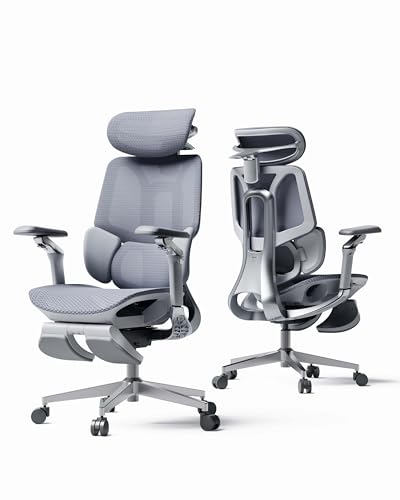
Hbada E3 Pro 2026 Edition Mesh Desk Chair Grey
Hbada E3 Air 2026 Ergonomic Office Chair with Auto Recline
More On The Choices That Made The List
Most gaming setups run on a desk-to-monitor grind, but every so often you want to kick back without leaving the seat. The Humergo ergonomic office chair with footrest leans into that hybrid rhythm, pairing a 90 to 145 degree reclining backrest with a slide-out footrest for proper recline sessions. The mesh headrest rotates 45 degrees and adjusts in height, so you can dial in neck support whether you’re sitting upright or leaned back for a cutscene.
Lower-back support comes from a 2-way adjustable lumbar panel that moves up and down and slides forward about 2 cm. That micro-adjustment matters more than people expect: a lumbar block that floats just behind your L3 vertebra keeps the spine from slumping into a C-shape during a long queue. Compared to the COMHOMA cat-ear chair coming up next, this one skips the playful aesthetic in favor of a more traditional mesh-and-frame look.
What Stands Out
- Footrest extends for true recline, not just a tilt
- Lumbar panel adjusts in two directions, not just one
- Mesh headrest rotates and lifts for tall and short users
- Recline range covers both work and break angles
Honest Caveats
- The mesh material can trap crumbs and dust, so regular vacuuming keeps it fresh
- Assembly runs a little longer than simpler task chairs, so set aside a calm afternoon
Who It Suits Best
Anyone whose day splits between focused desk work and laid-back gaming sessions will appreciate the dual recline angles and built-in leg support.
Where Another Pick Suits Better
Gamers chasing a bold aesthetic over functional adjustability may prefer the COMHOMA Pink Gaming Chair with Cat Ears, which trades a footrest for personality.
Gaming chairs have settled into a predictable black-and-red rut, so a velvet-wrapped seat with cat-ear toppers and embroidered emoji backrest actually breaks the pattern. The COMHOMA pink gaming chair leans fully into kawaii desk energy, with plush detailing and a soft-touch fabric that feels different from the leatherette most seats ship with. The cat-shaped memory foam lumbar pillow and matching headrest pillow are removable, so you can reposition them based on your frame.
Underneath the styling it’s still a proper reclining office chair, with tilt tension and height adjustment that work for standard desk heights. Where the Humergo chair goes for adjustability, this one bets on character. Velvet does run warmer than mesh, so in stuffy rooms you may find the fabric less breathable than a mesh alternative like the Hbada E3 Pro.
The Value In It
- Memory foam lumbar and headrest pillows stay soft without flattening fast
- Velvet finish gives the room a softer, lighter visual anchor
- Cat-ear and embroidery details work for themed setups
Points To Note
- Velvet needs gentle vacuuming and the occasional lint roller pass to look fresh
- The look is specific, so moving to a different room aesthetic may feel jarring
Right Fit For
Streamers, content creators, and anyone decorating a pastel or anime-themed setup who wants the chair to be part of the room’s personality.
Skip It When
Shoppers who want breathable mesh and silent adjustability should look at the Hbada E3 Pro 2026 Edition in black instead.
Ergonomic chairs have a habit of overpromising lumbar support and delivering a foam pad that flattens in a year. The Hbada E3 Pro 2026 Edition takes a different route with a 3-zone floating lumbar system that pivots laterally and adjusts 60 mm vertically, mapping support across the L1 to L5 vertebrae. In plain terms, the backrest moves with you rather than staying static, so the support stays consistent whether you’re leaning forward into a tense FPS round or reclining during a slower-paced RPG.
The upgraded 4D dual-axis headrest adds 70 mm of depth and 40 mm of height adjustment, which sounds minor until you actually hit the right neck angle. The 720-degree armrests rotate in any direction, so mouse-and-keyboard players, controller users, and note-takers can all find a wrist position that doesn’t bend sideways. Where the TRALT chair coming up keeps the spec list tight, this E3 Pro adds adjustment points across nearly every contact area.
Features That Help
- 3-zone lumbar tracks movement instead of forcing one fixed shape
- 4D headrest reaches users between roughly 5’2″ and 6’2″ without a struggle
- 720-degree armrests cover keyboard, controller, and laptop setups
- Mesh construction keeps airflow steady through warm gaming rooms
Trade Offs
- More adjustment points mean more time spent dialing everything in on day one
Key Advantages
Made For
Daily gamers and remote workers logging eight-hour days who want posture support that adapts to movement rather than locking in one position.
Consider Something Else When
Shoppers on a tighter budget looking for simpler lumbar support should reach for the TRALT Office Chair Ergonomic Desk Chair with Lumbar Support instead.
Budget office chairs tend to fail in one predictable place: the seat cushion sags after a season, and suddenly you’re sitting on a hard frame. The TRALT office chair addresses that with a high-resilience, high-density molded foam seat designed to bounce back day after day. The trade-off is fewer bells and whistles than the Hbada E3 Pro, but for many setups that’s a feature, not a flaw.
The lumbar support is adjustable rather than fixed, which means it slides to match your lower back height instead of sitting in one preset zone. For a chair at this tier, that adjustability plus the resilient foam gives it staying power over a 12-month stretch. Compared to the COMHOMA cat-ear chair, this one targets a completely different shopper: someone who values the foam density over the velvet look.
Bright Spots
- Molded foam resists the sag-and-flatten cycle common in budget seats
- Lumbar panel adjusts vertically, not just mounted in a fixed slot
- Neutral silhouette fits work and gaming setups without clashing
Room For Improvement
- Fewer armrest and headrest adjustments than premium-tier picks
- Lighter frame means it may shift during aggressive leaning or big posture shifts
Best Suited To
First-time ergonomic chair shoppers, students, and home offices that need a dependable daily seat without paying for premium adjustment hardware.
Look Elsewhere When
Gamers who want a built-in footrest and wider recline range should consider the Humergo Ergonomic Office Chair with Footrest instead.
The grey E3 Pro shares the same 3-zone floating lumbar system, 4D dual-axis headrest, and 720-degree armrests as its black sibling, just in a lighter finish. For minimalist rooms or Scandinavian-leaning setups, the grey mesh reads cleaner against pale walls and wood desks than the black version. The mechanical performance is identical, so the choice here is about visual weight, not feature trade-offs.
Mesh in general stays cooler than leatherette or velvet, which matters during summer gaming sessions or in rooms without strong air circulation. The grey weave also hides dust better than black, which is a small but real maintenance plus. If you like the E3 Pro spec sheet but want a softer visual footprint, this is the version to track down.
Real-World Strengths
- Grey mesh blends into light-themed rooms without dominating the visual space
- Identical 3-zone lumbar support as the black E3 Pro
- Lighter color hides dust and minor debris between cleanings
Things To Consider
- Grey mesh can show staining from spilled drinks more visibly than black
- Same adjustment curve as the black E3 Pro, so plan a tuning session after assembly
Who Should Grab It
Anyone who likes the Hbada E3 Pro feature set but wants a chair that disappears into a minimalist or natural-light workspace.
Reach For A Different Pick When
Buyers wanting auto-recline and a hybrid work-and-relax tilt should check the Hbada E3 Air 2026 Ergonomic Office Chair with Auto Recline.
Most office chairs recline by manual lever, and that works fine until you’re mid-match and don’t want to fish around for a knob. The Hbada E3 Air 2026 uses an auto-recline mechanism with a 140-degree tilt range, so leaning back engages the recline without you having to lock anything in. The 3-zone elastic lumbar system adapts to your spine through the recline motion, so the support doesn’t drop out the moment you lean back.
The 4D headrest and 4D armrests share adjustment DNA with the E3 Pro line, so the touch points stay familiar. Where the E3 Pro focuses on upright posture, the E3 Air shifts the balance toward longer, looser sessions. Compared to the Humergo chair, this one skips the footrest in favor of a cleaner silhouette and a smoother recline mechanism.
The Case For It
- Auto-recline engages through body weight, no manual locking required
- 140-degree tilt covers the full work-to-rest spectrum
- 3-zone lumbar stays engaged across the recline range
- Mesh seat pan keeps airflow consistent during long sessions
A Few Limitations
- No footrest, so full leg support requires a separate ottoman
- Auto-recline may feel too sensitive for users who prefer a fixed upright angle
Key Product Details
Whose Setup It Belongs On
Hybrid users who split the day between focused work blocks and rest-mode gaming, especially in rooms where a separate ottoman isn’t a problem.
Swap It Out When
Shoppers who want a built-in footrest in the same Hbada family should look at the Hbada E3 Pro 2026 Edition Mesh Desk Chair in black or grey.
What To Weigh Before Choosing Your Gaming Chair
Lumbar Support That Actually Moves
Lumbar support is the single biggest difference between a chair you tolerate and a chair you forget you’re sitting in. A static foam pad in the lower back looks right on a spec sheet but tends to miss the L3 vertebra, where most lower-back tension builds up. The 3-zone floating lumbar systems on the Hbada E3 Pro and E3 Air pivot and adjust vertically, so the support stays aligned whether you’re upright, leaned forward, or reclined. Simpler adjustable lumbar panels, like the one on the TRALT chair, slide up and down but don’t pivot, which works fine for one fixed posture. Gamers who shift between intense focus and laid-back sessions benefit from the moving systems; gamers who lock in one position all night can save with a fixed panel.
Recline Range and Footrest Synergy
A reclining backrest only helps if your legs have somewhere to land. The Humergo chair pairs a 90 to 145 degree recline with a slide-out footrest, so the full body goes horizontal together. The Hbada E3 Air pushes a wider 140-degree tilt with auto-recline but skips the footrest, so the lower legs hang unsupported unless you add an ottoman. For marathon sessions where you want a true lounge position, a built-in footrest removes one extra purchase. For hybrid work-and-play use, the auto-recline without footrest keeps the silhouette tighter under a desk.
Material and Climate Fit
Mesh breathes, velvet runs warm, and leatherette sits in the middle. The Hbada mesh chairs stay cooler in warm rooms and during summer months, while the COMHOMA velvet option feels cozier in air-conditioned spaces. If your gaming room runs hot or you live in a humid climate, mesh is the safer call for sweat and airflow. If you climate-control the room year-round and want a softer tactile experience, velvet earns its keep. None of these materials is wrong; they just map to different room conditions.
Key Considerations Across These Picks
Mistakes Worth Dodging
Picking a chair purely on look leads to flat foam and fixed lumbar pads that feel fine for a week and painful by month three. Measure your sitting height and desk depth first, then match the chair’s range, because a 4D headrest on a chair too tall for your frame won’t help. Test the recline lever or auto-engage mechanism in your head: manual locks are fine for static posture, but they get annoying when you shift constantly between typing and gaming.
Where The Extra Money Goes
Premium ergonomic chairs spend the budget on three things: lumbar articulation, headrest range, and armrest rotation. The Hbada E3 Pro adds 720-degree armrests and a pivoting 3-zone lumbar that budget chairs skip. If you sit in one posture all day, those upgrades are nice-to-have. If you shift between keyboard, controller, and note-taking, the upgrade pays off within a week. The mesh and frame materials also scale up, but the adjustment hardware is where the real comfort difference lives.
Frequently Asked Questions
How do I know if a gaming chair actually supports my lower back?
Look for a lumbar system that adjusts in at least two directions: vertical height and either depth or pivot. A static pad in one position rarely lines up with the L3 vertebra, which is where most lower-back tension builds during long sessions.
Is mesh better than velvet or leatherette for a gaming chair?
Mesh breathes better and stays cooler in warm rooms, while velvet and leatherette feel softer but trap heat. In air-conditioned spaces the difference shrinks, but in warm or humid rooms mesh is the safer call for sweat and airflow.
What recline range matters most for gaming?
Anything between 110 and 145 degrees covers both work and rest positions. Below 110 you get an upright lean, not a real recline, and above 145 the posture gets awkward without a footrest to support the legs.
Do I need a footrest on a gaming chair?
A footrest matters most if you recline past 130 degrees, because the lower legs need support to keep circulation steady. Uright gamers typing or mousing rarely use one, so the footrest is a comfort upgrade rather than a baseline need.
How long should a good ergonomic chair last?
High-resilience foam seats like the TRALT chair are built to keep their shape past the one-year mark where budget foam usually flattens. Mesh and frame components can stretch longer with proper care, but the cushion typically sets the replacement timeline.
Closing Thoughts
The right ergonomic chair turns long sessions from a strain into a steady rhythm. Match the chair to your posture habits first, then to the room’s climate and aesthetic, and the rest of the decision lines up naturally. Your back will tell you which one earned the seat by hour four.


