


Choosing a gaming mouse isn’t just about chasing the highest DPI number on the box. Tracking accuracy, sensor behavior, weight, button layout, and the surface you play on all shape how every flick and click actually lands. Wired picks still dominate raw reliability, while newer wireless options have closed the latency gap almost completely. Add the right pad underneath, and the whole setup tightens up fast.
A solid surface is just as important as the sensor reading it, so the list mixes both. You’ll find sensor-loaded mice for serious ranked play, themed designs for shelf appeal, and a few mousepads engineered to make low-DPI tracking feel more controlled. The point is fit, not just raw numbers on a spec sheet.
A Side-By-Side Look

Logitech G502 Hero + G440 Mouse Pad Bundle

Corsair MM300 Anti-Fray Cloth Gaming Mouse Pad (Extended)

Legion Gaming XL Cloth Mouse Pad (Black)

FRTEC Batman Edition Gaming Mouse (Wired, Yellow LED)

SOLAKAKA SM900 Gaming Mouse (White, 12800 DPI)

Redragon NOTHOSAUR Gaming Mouse (Black M606)

GravaStar Mercury M2 Wireless Gaming Mouse (26,000 DPI)

SOLAKAKA SM900 Honeycomb Gaming Mouse (Green)
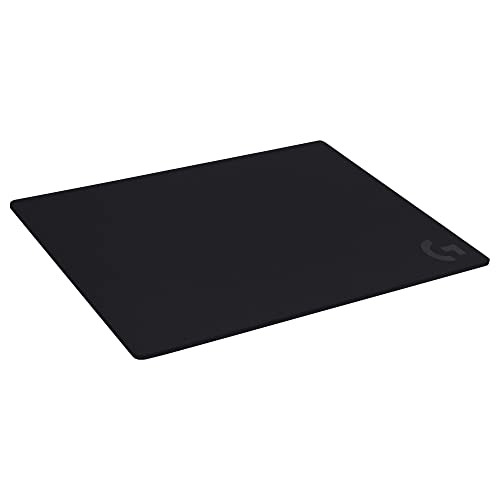
Logitech G740 Large Thick Gaming Mouse Pad

SOLAKAKA SM900 Honeycomb Gaming Mouse (Black)
The Picks, Examined More Closely
The Logitech G502 Hero has been a long-running favorite for a reason, and pairing it with a hard surface changes the feel under your hand. The Hero 25K sensor (DPI, or dots per inch, the unit that measures how far the cursor moves per inch of physical mouse movement, sits in a range of 100 to 25,600 here) tracks without smoothing or acceleration artifacts, which matters when flicking across a target. IPS, or inches per second, is how fast you can move the mouse before the sensor loses tracking, and 400-plus is comfortably above what most players reach in a real match.
Eleven programmable buttons and onboard memory for up to five profiles make this a strong pick for swapping between games, or between MMO keybinds and standard shooter layouts, without rebuilding settings each time. The included G440 hard pad gives a consistent reading surface, which keeps the sensor behaving the same way at low and high speeds. For most desks, the bundle removes a guesswork step and gets a matched setup running quickly.
The Value In It
- Wide DPI range (100 to 25,600) with no smoothing or acceleration injected
- Eleven programmable buttons and onboard storage for five profiles, useful for MMO-style keymaps
- Hard G440 pad provides a uniform texture for steady sensor behavior across long swipes
- Tunable weight tuning lets you shift the balance and heft of the mouse
- Wide G HUB software ecosystem for fine-tuning lift-off distance and per-button macros
Things To Consider
- The wired cable is heavy, which can tug during wide-arm swings on a smaller pad
- Right-hand-only shape isn’t friendly to lefties or ambidextrous grippers
Feature Snapshot
Who It Suits Best
Right-handed competitive players who want deep customization and a pad that won’t fight the sensor on fast directional changes.
Where Another Pick Suits Better
The GravaStar Mercury M2 makes more sense if you want a wireless setup under 80 grams for cable-free play.
The Corsair MM300 is one of those cloth pads that just shows up, lays flat, and stays out of your way. The extended footprint swallows a full keyboard plus mouse, which is what most people running low-DPI aim actually need: real estate to swing. The reinforced stitched edges fight the classic cloth-pad failure mode of fraying after a few months, especially at the corners where the mouse kicks hardest.
The woven textile top is built for control, meaning there’s just enough friction to slow sudden stops and stops mid-flick without feeling draggy. The MM300 pairs well with sensors that lean toward high tracking speed, where you want a bit of resistance to keep micro-corrections accurate. You can roll it for transport without it trying to spring back into a tube, which makes it friendly to LAN-style setups.
Positive Takeaways
- Reinforced stitched edges resist peeling at the corners over time
- Extended footprint gives low-DPI arm aimers room to breathe
- Textile weave delivers control-oriented feedback on fast stops
Worth Noting
- Cloth surfaces absorb spills and sweat, so plan on periodic cleaning
- Extended size demands a deep desk to keep the front edge useful
Best Suited To
Players who already favor a cloth pad and want something durable for low-DPI aim across both keyboard and mouse area.
A Better Fit Elsewhere
The Logitech G740 is a better fit if cushioning under the wrist matters more than sheer footprint for your long sessions.
The Legion Gaming XL leans into the one thing most cloth pads do badly: surviving accidents. The top has a water-repellent coating that beads drinks up long enough for a quick wipe, and the non-slip rubberized base keeps the pad planted when you’re hammering the keyboard during a tense round. Available in multiple dimensions, including an 11.8 by 35.4-inch desk-spanning XL, it’s built for setups where the mouse has room to roam.
The ultra-thin 2 mm profile keeps your wrist at a near-flat angle, which a lot of palm-grippers prefer for long sessions. The braided locked edge fights the fraying that ends the life of most cloth pads. If your setup already includes a glass or wood desk that gets a little cold, the thin profile is friendlier than the chunkier 5 mm pads on this list.
Why It Works Well
- Water-repellent top layer shrugs off coffee and energy drink spills
- Non-slip rubber base holds position during aggressive play
- Multiple size options including an XL desk-spanning layout
- 2 mm ultra-thin profile keeps the wrist at a comfortable flat angle
Trade Offs
- The thin build offers little wrist cushioning compared to thicker pads
- Water-repellent top can feel slick if you prefer a grabbier cloth surface
Right Fit For
Cluttered desks and shared spaces where drinks and snacks tend to land a little too close to the mouse area.
Look Elsewhere When
You’d rather have wrist padding under your palm, in which case the Logitech G740 is the better match.
The FRTEC Batman Edition leans into shelf appeal first, but it isn’t empty underneath. The ambidextrous shape welcomes both left- and right-hand use, which is rare at this tier, and the configurable side buttons free up thumb reach for games that pile on commands. The yellow LED under-lighting gives it a clear thematic identity on a dim desk, and the wired USB connection keeps setup simple.
Adjustable DPI lets you cycle through sensitivity steps on the fly, which makes a single mouse serviceable across different games. Compared to the SOLAKAKA SM900 entries below, the FRTEC trades a bit of raw sensor reach for licensed character design. For a younger player or a DC fan setting up a themed battlestation, that’s a real tradeoff worth making.
Strong Points
- Ambidextrous shape suits left and right hands equally
- Configurable side buttons expand the available command surface
- Licensed DC design adds shelf presence to a themed setup
Room For Improvement
- Sensor ceiling is lower than the 12,800 DPI SOLAKAKA mice in this roundup
- Themed plastic finish shows wear faster than matte alternatives
Perfect Match For
DC Comics fans building a character-themed desk who still want a working adjustable-DPI mouse at the core.
Not Your Match When
You’re chasing a featherlight or wireless setup, in which case the GravaStar Mercury M2 is the better match.
The SOLAKAKA SM900 in white is the easy first-gaming-mouse recommendation. It hits a usable 12,800 DPI ceiling with six adjustable steps, which is more than enough range to find a comfort zone without software tweaking. The 1,000 Hz polling rate (the rate at which the mouse tells the PC where it is) keeps cursor updates feeling responsive for FPS work, and the plug-and-play USB interface removes driver headaches on day one.
The shell stays closed (no honeycomb here), so it’s friendly to anyone who doesn’t love the airy feel of perforated mice. Side buttons extend the command layout, and the RGB lighting is adjustable for mood over performance. For someone stepping up from an office mouse, the SM900 white is a comfortable entry point that doesn’t punish the wallet.
Practical Advantages
- Six DPI steps up to 12,800 cover most play styles without external software
- 1,000 Hz polling rate keeps cursor input feeling tight
- Solid shell design feels more familiar to first-time gaming-mouse shoppers
- Plug-and-play USB works across Windows, macOS, and most laptops
Soft Spots
- Heavier than the honeycomb-shelled SM900 variants on this list
- RGB customization requires the macro software, not a simple button
Built With In Mind
First-time gaming mouse shoppers who want a familiar solid shell and a generous DPI range without paying for premium branding.
Skip It When
You want a lighter feel under your fingers; the SOLAKAKA SM900 Honeycomb Gaming Mouse in green shaves noticeable weight from the same chassis.
The Redragon NOTHOSAUR M606 leans into the macro side of gaming. The PMW3168 optical sensor runs through four DPI steps with a single button press, which is the right number of stops for cycling between map-panning sensitivity, combat, and inventory work. Side buttons sit right under the thumb, ready for command binds or in-game macros.
The shape suits palm and claw grips equally, which gives it some flex across genres. Compared to the SOLAKAKA entries, the NOTHOSAUR delivers a more macro-friendly button layout but at a lower DPI ceiling, so it’s less of a fit for high-sensitivity players who live in the 8,000-plus range. For a MOBA or RPG main, the macro story carries the day.
Everyday Wins
- Four DPI steps are easy to cycle mid-game without looking
- Side buttons are positioned for thumb access during long sessions
- Versatile shape accommodates palm and claw grippers
Points To Note
- Sensor tops out lower than the 12,800 DPI mice on this list
- Software customization lives in Redragon’s ecosystem, which is less polished than Logitech’s
Whose Shelf It Belongs On
MOBA and RPG mains who bind a lot of commands to side buttons and want a mouse that feels purpose-built for that workflow.
Reach For A Different Pick When
You’re mainly playing fast FPS games at high sensitivity, where the Logitech G502 Hero offers more headroom on the sensor side.
The GravaStar Mercury M2 is the most aggressive spec sheet in this list. A 26,000 DPI ceiling from the PAW3395DM sensor sits well above what most people will actually use, but the high IPS ceiling means the sensor stays accurate during those violent flicks you only commit to in clutch moments. Wireless at 1 kHz polling closes the old latency gap with wired rivals, and the 79-gram weight puts it firmly in featherweight territory.
The hollowed-out shell reduces mass and adds a sci-fi look that stands out on a desk. Five programmable buttons keep the layout disciplined, and the dynamic RGB syncing ties the look together. For players who want a wireless mouse that doesn’t ask them to compromise on tracking speed, this is the pick on the list that earns that description. Just be ready to keep an eye on the battery if you game long hours daily.
Where It Excels
- 26,000 DPI ceiling with a high-IPS sensor for high-speed tracking
- Wireless 1 kHz polling rivals wired response times
- Sub-80 gram weight is among the lightest in this roundup
- Hollowed-out shell gives the mouse a distinctive visual signature
Honest Caveats
- Wireless operation means charging breaks during long sessions
- Five programmable buttons are limiting for MMO or MOBA macro setups
Feature Snapshot
Made For
Competitive players who want a wireless mouse with the lowest possible weight and a high-end optical sensor for fast-paced shooters.
Where Another Pick Suits Better
The Logitech G502 Hero is the better fit if you need 11 programmable buttons and never want to think about charging.
The honeycomb-shell SM900 in green is the cut-down version of the white SM900 covered above. The perforated shell drops weight noticeably, and the breathability keeps sweaty palms from getting sticky during long summer sessions. The same 12,800 DPI ceiling and 1,000 Hz polling rate apply, so the sensor doesn’t take a step down for the lighter build.
Seven programmable buttons sit slightly above the white SM900’s count, giving you one extra thumb-side option for the games that ask for it. ABS plastic keeps the chassis rigid despite the cutouts, which prevents the flex you sometimes feel in cheap hollow shells. The green colorway also stands out clearly on a busy desk.
Everyday Advantages
- Honeycomb shell trims weight for faster, less wrist-tiring movement
- Perforated design improves airflow during long warm-weather sessions
- Seven programmable buttons add macro flexibility over the solid-shell SM900
- Rigid ABS plastic prevents flex despite the cutouts
Practical Considerations
- Open shell can trap dust in the holes over time
- Honeycomb perforations feel unusual to anyone used to a solid shell
Right Fit For
Players who want a lighter mouse than the solid-shell SM900 without dropping below the 12,800 DPI ceiling.
Swap It Out When
You want wireless freedom, in which case the GravaStar Mercury M2 is the better match.
The Logitech G740 is the comfort-first pad in the Logitech pad line. The 5 mm cushioned surface flattens the small bumps and uneven spots on a desk, and the soft rubber base keeps the pad planted during fast directional changes. The cloth top provides moderate friction, which is what you want for low-DPI arm aim where sudden stops need a bit of grab.
At 18.1 by 23.6 inches, the G740 leaves room for both keyboard and mouse without running off the edge of a standard desk. The consistent surface texture is what Logitech tunes its mice against, so pairing a G502 or G Pro with a G740 keeps the sensor reading in its comfort zone. For longer sessions, the wrist cushioning is the headline feature and the main reason to pick this over thinner cloth options.
Positive Points
- 5 mm cushioning softens desk edges for long-session wrist comfort
- Moderate surface friction supports low-DPI arm aim
- Soft rubber base stays put during aggressive keybinds
- Tuned cloth texture pairs well with Logitech G-series sensors
Some Limits To Know
- Thick profile raises the wrist height compared to flat pads
- Cloth surface still needs the occasional cleaning after heavy use
Best Suited To
Long-session players who want wrist cushioning and a cloth surface tuned for low-DPI arm aim.
Consider Something Else When
Your priority is water resistance over cushioning, in which case the Legion Gaming XL is a better match.
The black SM900 honeycomb is the same featherlight chassis as the green version above, just with a stealthier finish. The three-sided perforated shell improves breathability and cuts weight, and the ergonomic shape reduces fatigue on long work-or-play stretches. ABS plastic keeps things rigid, and the 12,800 DPI sensor ceiling matches the rest of the SM900 family.
Macro support, RGB effects, and DPI cycling all run through the same bundled software, so switching between machines doesn’t mean relearning an interface. Compatibility covers Windows 7 and up without a driver hunt, and the USB plug-and-play setup keeps day-one friction low. If you want a lighter mouse than the white solid-shell SM900 but don’t need the green colorway, this is the most flexible all-rounder in the lineup.
A Strong Showing
- Honeycomb shell trims weight and improves grip breathability
- Solid ergonomic shape holds up across long sessions
- Broad OS support including legacy Windows installs
- Software-driven macro and lighting customization
Details To Watch
- Dust collects in the perforations over weeks of use
- Macro setup lives in the bundled software, not on the hardware itself
Who Should Grab It
Everyday PC and laptop gamers who want a light, ergonomic mouse with broad compatibility and don’t need a wireless setup.
Where Another Pick Suits Better
The Logitech G502 Hero is the better fit if you prefer a heavier, more tunable right-hand shape and a sensor ceiling well above 12,800 DPI.
What Matters Most Before Choosing Dpi Mouses For Gaming
Sensor Type And Tracking Behavior
Optical sensors dominate the gaming mouse market, and for good reason. They handle fast directional changes well and tend to behave predictably on cloth and hard pads. The two numbers that matter most are the DPI range and the IPS ceiling, the second of which tells you how fast you can move the mouse before the sensor loses your hand. Higher IPS handles aggressive flicking and lift-replace swings; lower IPS can cause cursor jitter when you push past its limit.
Wired Versus Wireless
Wireless gaming mice have caught up to wired in polling rate, and the GravaStar Mercury M2 on this list proves it. The trade-off is battery life, which forces a charging habit you don’t have with a wired mouse. Wired mice still win on consistent input, no charging breaks, and often a lower entry cost. For most people, the choice is about where the cable management headache is bigger than the charging break.
Weight And Shell Design
Honeycomb shells cut weight by perforating the chassis, but they collect dust and feel different under the palm. Solid shells stay familiar and don’t trap debris. Weight matters more than most new players expect: every gram adds up across a four-hour session, and lighter mice let you react faster during flick-heavy play. Match the shape to your grip, palm, claw, or fingertip, and the mouse disappears in your hand.
Pad Surface And Size
Your mouse is only as accurate as the surface it reads. Cloth pads give control and a bit of friction, which helps low-DPI arm aim. Hard pads deliver a consistent texture for the sensor, ideal for fast flicks. Size matters too: low-DPI arm aim needs real estate, while high-sensitivity wrist play fits on smaller pads. Pick the pad for your aim style, not the other way around.
Key Considerations Across These Picks
Where Shoppers Go Wrong
Chasing the highest DPI number on the box is a common trap, since most players never use settings above 4,000 to 6,000 DPI. A second mistake is pairing a featherlight mouse with a thick pad that fights fast flicks, or a heavy mouse with a thin pad that lets micro-tremors through. The pad and the mouse have to match each other, and your aim style has to match both. Look for the IPS ceiling and shape before you look at the DPI sticker.
Where The Extra Money Goes
Premium mice like the GravaStar Mercury M2 cost more because of lighter materials, higher-IPS sensors, and wireless polling rates that match wired. Software ecosystems like Logitech G HUB also add real value when you swap between games. For most casual players, the budget and mid-tier options on this list deliver 90 percent of the experience at a fraction of the cost. Spend up when the weight, battery, or sensor ceiling actually matters for how you play, and skip the premium tier if you don’t push the limits.
Frequently Asked Questions
What DPI Is Actually Good For Gaming?
Most competitive players run between 800 and 1,600 DPI for FPS games, then raise it for MOBAs or RPGs. The 12,000-plus ceilings on modern mice are future-proofing rather than daily-use settings. Pick a DPI that lets you swing across the screen with a comfortable arm motion and stop there.
Is A Higher DPI Always Better?
No. Higher DPI doesn’t mean better tracking; it just means more cursor movement per inch of mouse movement. Sensor accuracy, IPS, and acceleration behavior matter more than the headline number. A 1,600 DPI mouse with a great sensor usually beats a 26,000 DPI mouse with a sloppy one.
Do I Need A Gaming Mouse Pad If I Have A Desk?
A dedicated gaming pad gives the sensor a consistent surface, which translates to more predictable tracking. Bare desks, especially glass or polished wood, can introduce tracking errors at high speeds. Even a basic cloth pad cleans up the feel significantly.
Wired Or Wireless For Competitive Play?
Either works in 2026. Wireless 1 kHz polling on premium mice has effectively closed the latency gap with wired. The choice comes down to whether you’d rather manage a cable or a charging cycle. Most pro players still use wired for absolute reliability, but the gap is smaller than ever.
How Long Do Gaming Mice Typically Last?
Most quality gaming mice last three to five years with normal use, and pads last one to three years depending on surface and cleaning habits. Sensor technology stays relevant longer than the chassis does, so you usually replace the mouse for wear or a preference shift rather than broken internals.
Final Verdict
The right pick depends on what your hand actually does on the desk. A Logitech G502 Hero bundle covers most right-handed competitive players, the GravaStar Mercury M2 wins the wireless featherweight category, and the SOLAKAKA SM900 trio makes sense for shoppers who want a capable mouse without a premium tax. A cloth or hard pad underneath ties the whole setup together. Pick the combo that matches your grip, your aim style, and the games you play most, and the rest tends to fall into place.


