


Competitive FPS players, MMORPG grinders, and productivity-focused typists all share a common frustration: a keyboard that treats every key the same. The best customizable gaming keyboards solve this by letting you adjust actuation, swap switches, and remap layouts to match how you actually play or work.
Below are ten tenkeyless, 75%, and split designs that lean hardest into personalization, from analog optical switches that respond to how hard you press, to hot-swap boards that invite you to tinker.
An Overview Of The Picks

Razer Huntsman V3 Pro TKL 8KHz

Razer Huntsman V3 Pro TKL

Razer Huntsman V3 TKL 8KHz

Razer Huntsman V3 Pro 8KHz

Razer Huntsman V3 Pro Mini 60%

Razer BlackWidow V4 Pro 75% Wireless

Razer BlackWidow V4 TKL Wireless
Razer Pro Type Ergo Wireless Split
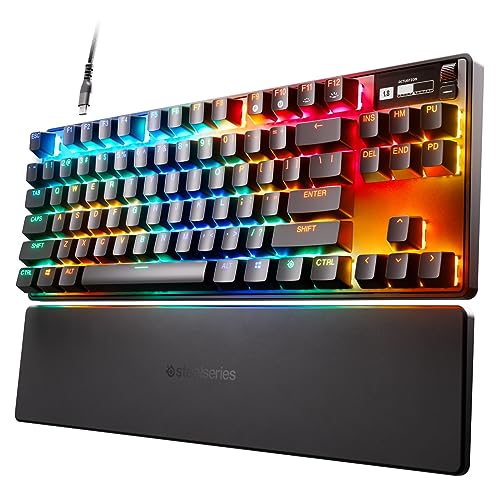
SteelSeries Apex Pro TKL HyperMagnetic

GravaStar Mercury K1 75% Wireless
A Breakdown Of The Leading Choices
For ranked Valorant nights or sweaty CS2 lobbies, the tenkeyless Huntsman V3 Pro 8KHz sits at the front of Razer’s analog lineup. The tenkeyless form factor (no numpad) frees up desk space for wide mouse sweeps, which matters when you run low-DPI aim styles. Quick Trigger mode and per-key actuation depth let you decide exactly how light a tap counts as input.
Wired connectivity keeps latency minimal, and the 8000Hz polling reports input state far more often than the 1000Hz standard found on most boards. You don’t need to chase tournament titles to feel the responsiveness in everyday play, but competitive-minded users will appreciate it most.
Practical Advantages
- Per-key actuation depth tuning, useful when you want feather-light WASD and firmer ability keys.
- Quick Trigger mode responds to repeated directional changes, helping in fast strafing duels.
- 8000Hz wired polling keeps input reporting extremely granular for high-refresh play.
- Tenkeyless footprint (no numpad) leaves room for sweeping mouse movement.
- PBT keycaps tend to resist shine and keep legends readable over months of heavy use.
Worth Noting
- No wireless option means another cable to manage on your desk.
- Analog features take meaningful time in the software to dial in for each game.
Built With In Mind
Competitive FPS players who want Razer’s deepest analog feature set in a tournament-friendly tenkeyless size.
Swap It Out When
The Razer Huntsman V3 Pro Mini 60% is a better fit for low-sensitivity players who want even more mouse space.
The earlier Huntsman V3 Pro TKL delivers the same analog optical experience as the 8KHz version above, just without the higher polling rate. For most people, that’s a reasonable trade, since the 1000Hz baseline still feels snappy in games that don’t chase millisecond advantages.
The same tenkeyless shape applies, giving you dedicated arrow keys without the bulk of a full-size board. Razer’s Synapse software handles the per-key actuation depth, and Razer Snap Tap prioritizes the most recent directional input when you press two keys at once.
Useful Highlights
- Analog optical switches register input based on how far (and sometimes how hard) you press.
- Razer Snap Tap helps with quick counter-strafing in tactical shooters.
- TKL layout preserves arrow keys, useful for productivity and some game genres.
Honest Caveats
- Wired only, so you’ll need a spare USB port close to your mouse hand.
- Some reported sensitivity to accidental palm presses on the spacebar area during intense moments.
- Software dependency for full customization may frustrate users who prefer onboard profiles.
The Right Fit
Esports-minded enthusiasts who want most of the analog goodness without paying extra for the 8KHz polling tier.
Look Elsewhere When
The SteelSeries Apex Pro TKL HyperMagnetic offers similar per-key tuning with an OLED display for live system info.
The non-Pro V3 TKL 8KHz drops the analog optical switches in favor of standard optical switches, but keeps the 8000Hz polling in a tournament-appropriate tenkeyless form. For players who don’t need actuation depth tuning, this is a clean middle path.
Razer Snap Tap still helps with simultaneous direction presses, and the wired setup stays out of the way of clean cable management. The result feels like a focused esports tool without the complexity of per-key analog tuning.
Real-World Strengths
- 8000Hz polling for highly granular input reporting during competitive play.
- Tournament-friendly TKL shape with arrow keys intact.
- Razer Snap Tap smooths rapid direction changes in FPS titles.
Points To Note
- Lacks adjustable actuation, so you can’t fine-tune each key the way analog boards allow.
- Wired design means one more cable to route cleanly on your desk.
Who It Suits Best
Players in ranked and tournament play who value polling speed and a familiar shape over analog tuning.
Consider Something Else When
The Razer Huntsman V3 Pro TKL 8KHz is the upgrade pick if adjustable actuation matters for your game library.
The full-size Huntsman V3 Pro 8KHz brings the analog optical switches and Quick Trigger mode to a layout that includes a dedicated numpad. Streamers juggling OBS shortcuts, creators entering data, and anyone who frequently uses the numpad for spreadsheets will appreciate the extra real estate.
Per-key actuation lets you tune gameplay keys without affecting how the numpad or function row feels for everyday typing. Wired-only operation keeps latency predictable for broadcast and recording setups.
Noteworthy Benefits
- Full-size layout retains numpad and function row for productivity tasks.
- Analog optical switches with Quick Trigger mode for nuanced FPS inputs.
- 8000Hz polling supports high-frame-rate competitive and streaming workflows.
Possible Compromises
- Larger footprint requires more desk space than the TKL sibling above.
- Wired-only design may feel restrictive if you want to reposition the board for streaming angles.
Made For
Streamers and creators who game and crunch numbers on the same desk without swapping boards.
Reach For A Different Pick When
The Razer BlackWidow V4 Pro 75% Wireless offers a more compact footprint with an OLED command dial if you can skip the numpad.
The Mini takes the analog optical Huntsman V3 Pro experience and shrinks it to a 60% layout, dropping arrow keys, the function row, and the numpad in favor of maximum mouse-pad territory. Low-sensitivity FPS players who swipe wide benefit most from the extra horizontal room.
Dual-purpose keys handle arrows and other functions through a layered layout, which takes practice. Razer Snap Tap and Quick Trigger mode carry over from the larger siblings, keeping the competitive feature set intact.
What Earns Its Place
- 60% form factor maximizes available mouse movement for low-DPI aim styles.
- Analog optical switches bring per-key actuation to a compact footprint.
- Snap Tap and Quick Trigger support keep competitive features consistent across the lineup.
Things To Consider
- No dedicated arrow keys or numpad limits productivity and certain game genres.
- Layered key functions require a learning curve for muscle memory.
Who Will Love This
Low-sensitivity FPS players who want every centimeter of mouse space and live in the WASD cluster.
Where Another Pick Suits Better
The Razer Huntsman V3 Pro TKL 8KHz keeps arrow keys and the function row for players who multitask between genres.
The BlackWidow V4 Pro 75% breaks from the analog optical family and brings tactile mechanical switches with a hot-swap PCB. You can pull out the stock switches and drop in 3-pin or 5-pin alternatives without soldering, which is great for tinkerers who like to experiment.
The OLED display paired with a command dial surfaces system metrics, custom images, and shortcuts without alt-tabbing. Wireless operation via Razer’s HyperSpeed dongle adds flexibility, while Bluetooth opens up easy pairing with tablets and phones.
Where It Excels
- Hot-swap PCB supports 3-pin and 5-pin switch swaps without soldering.
- OLED display and command dial put system info and shortcuts at your fingertips.
- Wireless HyperSpeed plus Bluetooth cover both gaming and multi-device workflows.
- 75% layout balances compactness with a function row.
Some Limits To Know
- More features typically mean a higher price tier than simpler boards.
- Wireless mode requires charging or keeping the battery topped up between long sessions.
Best Suited To
Tinkerers and macro users who enjoy hot-swapping switches and want a built-in info display.
A Better Fit Elsewhere
The Razer BlackWidow V4 TKL Wireless skips the OLED and dial for a simpler, lower-cost wireless path.
The V4 TKL Wireless pairs the same hot-swap switch socket as the 75% sibling above with a clean tenkeyless shape, making it a strong choice for clutter-free desks. Wireless via HyperSpeed keeps latency tight for gaming, while Bluetooth handles quick pairing with laptops and phones.
You lose the OLED and command dial found on the Pro version, but you keep the core hot-swap flexibility. The result is a board that adapts as your taste in switches changes over time.
Well-Handled Touches
- Hot-swap PCB supports 3-pin and 5-pin switch changes without soldering.
- Wireless via 2.4GHz plus Bluetooth covers both gaming and casual multi-device use.
- TKL layout preserves arrow keys and function row in a manageable footprint.
Trade Offs
- Battery life requires routine charging for daily wireless use.
- Lacks the OLED display and command dial found on the 75% Pro sibling.
Perfect Match For
Clean-desk enthusiasts who want hot-swap flexibility in a cable-free tenkeyless layout.
Skip It When
The Razer BlackWidow V4 Pro 75% Wireless is the upgrade if the OLED dial matters to your workflow.
The Pro Type Ergo steps away from gaming-centric features and focuses on long-session typing comfort. A split layout with adjustable tilt (4 or 7 degrees) and a 10-degree slope encourages a more natural wrist posture, which is helpful if your hands fatigue after hours of writing, coding, or editing.
Low-profile, fingertip-shaped keycaps reduce the distance your fingers travel on each press, easing strain over long days. Wireless connectivity keeps the desk uncluttered, and dual “B” keys accommodate left- and right-handed typists.
The Value In It
- Split layout with adjustable tilt and slope supports neutral wrist posture.
- Low-profile keycaps reduce finger travel for faster, more comfortable typing.
- Wireless operation keeps the desk setup clean.
Soft Spots
- Not optimized for high-speed competitive gaming the way the Huntsman boards are.
- Split layout and unconventional key positions take meaningful adjustment time.
Whose Shelf It Belongs On
Writers, developers, and anyone typing for hours who prioritizes ergonomic comfort over gaming features.
Not Your Match When
The SteelSeries Apex Pro TKL HyperMagnetic is the better match for gamers who still want adjustable actuation.
The Apex Pro TKL earned its reputation by pioneering per-key adjustable actuation, and the HyperMagnetic refresh refines that idea with magnetic switches. Each key registers based on travel distance rather than a fixed contact point, which means you can dial WASD down to a hair trigger and leave heavier keys deeper for typing.
40 levels of actuation per key give you granular control that adapts as you switch between an FPS session and a long writing sprint. The integrated OLED screen and PBT keycaps round out a board that handles gaming and productivity with equal seriousness.
The Helpful Details
- OmniPoint 2.0 switches offer 40 levels of per-key actuation from 0.1mm to 4.0mm.
- Quick Trigger mode dynamically activates and deactivates keys based on travel distance.
- OLED display surfaces system info, profiles, and animations.
- PBT keycaps resist shine and keep legends crisp over long-term use.
Points To Keep In Mind
- Software configuration takes time to learn, especially for first-time analog users.
- Premium feature set typically sits at a higher price tier than entry-level boards.
- Magnetic switch feel differs from traditional mechanical, and not everyone prefers it.
Who Should Grab It
Gamers with mixed libraries who want the deepest per-key tuning and a built-in info display.
Another Choice May Suit
The Razer Huntsman V3 Pro TKL 8KHz is a strong alternative for shoppers who prefer Razer’s ecosystem and 8000Hz polling.
Key Specs
The Mercury K1 leans into visual flair, with an aluminum alloy frame in a Sakura Pink finish that doubles as a desk centerpiece. The 75% layout keeps a function row while trimming the numpad, and dual-layer PBT keycaps add durability against shine.
Wireless operation and mechanical switches round out a board that prioritizes aesthetic and feel over analog tuning. It’s a natural match for creators and battlestation builders who want something that photographs as well as it types.
Real Benefits
- Aluminum alloy frame with a distinct color finish elevates desk aesthetics.
- 75% layout balances function row access with a compact footprint.
- PBT keycaps hold up well to long-term typing without shiny wear.
- Wireless connection keeps the desk setup clean and uncluttered.
Honest Caveats
- Lacks analog optical or magnetic switches, so per-key actuation tuning isn’t available.
- The bold colorway may not fit traditional or minimal desk setups.
Made For
Showpiece battlestation builders and content creators who care as much about aesthetics as they do about feel.
Where A Sibling Pick Shines
The Razer BlackWidow V4 Pro 75% Wireless is the better choice if hot-swap switches and an OLED display matter more than color.
Choosing The Right Customizable Gaming Keyboard for Your Setup
A customizable board is only as useful as the features you’ll actually tweak. Start by identifying which customization paths match your habits, then narrow the form factor and connectivity from there.
Actuation Tuning: Analog Optical and Magnetic Switches
Analog optical switches (Razer’s Gen-2 family) and magnetic switches (SteelSeries OmniPoint 2.0) both register input based on how far a key travels, rather than at a single fixed point. That lets you set WASD to a hair-trigger 0.1mm and leave heavier keys deeper for confident typing. Quick Trigger mode then makes the reset point dynamic, so repeated inputs register faster in strafing duels. Pick analog or magnetic if you play competitive FPS and want fine-grained control over feel.
Hot-Swap Boards: Switch Experimentation Without Soldering
Hot-swap sockets accept 3-pin and 5-pin switches, so you can pull out a linear switch and drop in a tactile or clicky alternative without touching a soldering iron. The Razer BlackWidow V4 Pro 75% and the TKL Wireless sibling both offer this, and the GravaStar Mercury K1 leans into aesthetic customization instead. Hot-swap is a good fit for tinkerers who want to experiment over time.
Form Factor: Tenkeyless, 75%, 60%, and Full-Size
Tenkeyless boards drop the numpad but keep arrow keys and the function row, which is a versatile middle ground. 75% layouts trim further while keeping the function row. 60% boards, like the Razer Huntsman V3 Pro Mini, free up maximum mouse space but require layered key functions. Full-size designs keep the numpad for streamers and productivity users.
Connectivity: Wired, Wireless, and Bluetooth
Wired boards avoid charging and minimize latency, while 2.4GHz wireless (Razer HyperSpeed) keeps latency tight for gaming. Bluetooth is best for pairing with phones, tablets, and laptops in mixed workflows. If you want a clean desk, prioritize wireless; if you want predictable performance, stick with wired.
Key Considerations Across These Picks
Common Shopping Slip Ups
One of the easiest traps is buying a board with analog features you’ll never configure. Per-key actuation and Quick Trigger only help if you actually open the software and tune profiles per game. Another slip is ignoring form factor: a beautiful 60% board loses appeal fast if you use arrow keys daily. Finally, overlooking switch compatibility on hot-swap boards can lead to disappointment when your favorite switches don’t fit the socket standard.
When Paying More Pays Off
Higher-tier boards earn their cost by bundling features that matter for specific workflows. A board with an OLED display and command dial pays off if you like seeing system metrics without alt-tabbing. Wireless and Bluetooth pay off when you share your desk between a PC, a laptop, and a tablet. And if you tinker, a hot-swap PCB can outlast a single set of switches, making it a meaningful long-term investment.
Frequently Asked Questions
What does adjustable actuation actually do?
Adjustable actuation lets each key register input at a different travel depth, so light taps can count on movement keys while heavy presses avoid accidental triggers on abilities. It shines in competitive FPS where muscle memory and reaction speed matter most.
Are analog optical switches better than mechanical?
Not universally. Analog optical switches support variable actuation and Quick Trigger, which is helpful for nuanced inputs, while traditional mechanical switches deliver consistent feel that many typists prefer. The right choice depends on whether gaming precision or typing comfort matters more to you.
Is a hot-swap PCB worth it?
Hot-swap is worth it for anyone who likes to experiment with switch feel or replace a worn switch without tools. Casual users who never swap switches may not need the feature, but it does add long-term flexibility to the board.
Do I need 8000Hz polling?
8000Hz polling reports input state far more often than the 1000Hz standard, and the difference shows up in highly competitive FPS. For casual or mixed use, 1000Hz feels responsive enough, and the higher polling rate is mostly meaningful at the top of the ladder.
What is Quick Trigger mode?
Quick Trigger dynamically changes the reset point of a key based on how far you’ve released it, allowing faster repeated inputs during strafing or rapid taps. It’s a defining feature of Razer’s analog optical Huntsman V3 Pro lineup and the SteelSeries OmniPoint switches.


