


Spending hours at a desk calls for a keyboard that keeps up with how you actually play and type. A custom board earns its place by matching the switches, layout, and feel to your exact habits, whether you grind ranked matches, stream late into the night, or split your time between gaming and writing. The trick is sorting through the endless feature lists to find the ones that genuinely improve your day, not just pad the spec sheet.
Below is a curated set of nine custom gaming keyboards covering everything from compact 75% wireless builds to full-featured tenkeyless boards with magnetic switches. Each pick calls out the layout, switches, and connectivity so you can match it to your desk space, your hand position, and the games you play most.
The Lineup, Simplified

Logitech G713 Wired Gaming Keyboard with GX Brown Tactile Switches (White Mist)
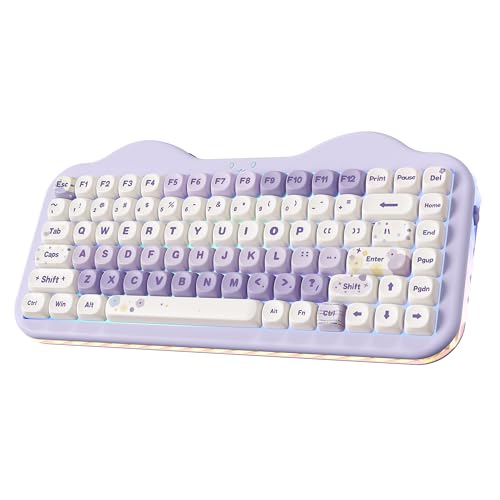
YUNZII C75 Cute 75% Wireless Mechanical Keyboard (Purple, Candy Switch)

YUNZII C98 Cute Cake Wireless Mechanical Keyboard (Purple, Milk Switch)

EPOMAKER x LEOBOG Hi75 Wired Aluminum Alloy Gaming Mechanical Keyboard (White Green)

GravaStar Mercury K1 75% Wireless Mechanical Gaming Keyboard RGB Backlit

GravaStar Mercury K1 Pro 75% Wireless Mechanical Gaming Keyboard, Hot-Swap

MechLands Aula F99 PRO 96% Mechanical Gaming Keyboard, BT5.0/USB-C/2.4GHz
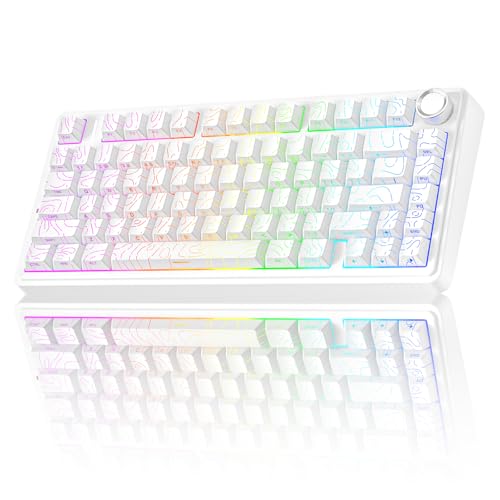
AULA F75 Pro Wireless Mechanical Keyboard with Knob, 75% Hot-Swappable (Line White)
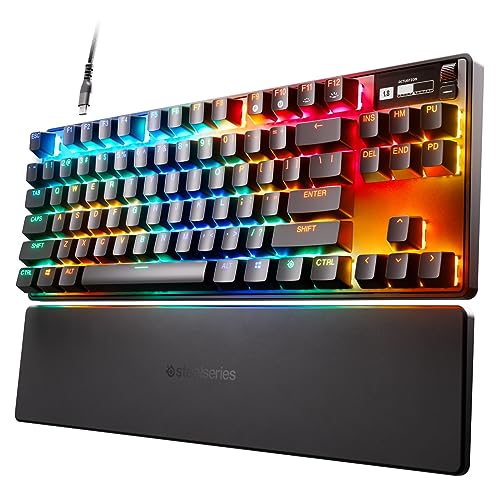
SteelSeries Apex Pro TKL HyperMagnetic Gaming Keyboard, Adjustable Actuation
A Closer Look At Each Pick
The G713 from Logitech’s Aurora Collection takes a softer approach to gaming gear, and that calm aesthetic carries into how it feels under your fingers. The cloud-shaped palm rest is unusually soft, so marathon sessions don’t punish your wrists the way a hard plastic wrist pad would. The tenkeyless layout (a compact design that drops the number pad to save desk space) keeps your mouse hand closer to the action.
Compared to the flashier options further down this list, the G713 leans into subtle style and ergonomic comfort rather than headline-grabbing specs. The GX Brown tactile switches (mechanical keys with a small bump you feel but don’t hear loudly when pressed) split the difference between clicky and silent, which matters for shared rooms.
The Good Stuff
- The included palm rest genuinely reduces fatigue during long sessions, a benefit most plastic wrist pads don’t deliver.
- GX Brown tactile switches feel responsive without the loud click of blue switches, so the keyboard suits late-night play.
- LIGHTSYNC RGB syncs with other Logitech gear for a cohesive desk aesthetic, a real perk if you already own Logitech peripherals.
- Wired USB-C connection means no battery anxiety during extended tournaments or work sessions.
Things To Consider
- The wired-only design may frustrate anyone hoping to clear cable clutter or switch between devices seamlessly.
- White Mist finish shows dust and fingerprints more readily than darker boards, so regular wiping becomes part of the routine.
Who It Suits Best
Anyone who games and works at the same desk and values a soft wrist rest over wireless freedom will appreciate this board.
Where Another Pick Suits Better
The AULA F75 Pro makes more sense for shoppers who want wireless flexibility and quieter pre-lubed switches.
The YUNZII C75 wears its personality right on the keycaps, with a pastel purple chassis and “cake-themed” color story that turns the keyboard into a desk accessory rather than a hidden tool. Underneath the playful exterior sits a 75% layout that keeps arrow keys and a function row (the top row of secondary commands accessed with the Fn key) within reach, so you don’t sacrifice usability for looks.
Unlike the all-business Logitech G713 above, this board leans into charm without skipping the practical stuff. The tri-mode connectivity (the ability to connect via Bluetooth, a 2.4GHz wireless dongle, or a wired USB cable) covers desktops, laptops, and tablets, which is rare in this price tier.
Features That Help
- Tri-mode wireless means you can pair with a phone, laptop, and desktop and switch between them without re-plugging.
- The 75% footprint saves desk real estate while still giving you a dedicated function row, something the 60% picks below skip.
- Candy Switches (YUNZII’s named linear-style switch) aim for a creamy typing sound, helpful if you record audio or share a room.
- The aesthetic reads as a gift-ready item, which matters if you’re shopping for a setup-focused friend.
Points To Note
- Wireless mode requires charging, so heavy users will want to keep the USB-C cable handy for back-to-back sessions.
- Light-colored keycaps tend to show oil buildup over time, depending on how often you snack at your desk.
Right Fit For
Creators and streamers who want a board that photographs beautifully and works across multiple devices on the same desk.
Skip It When
The Logitech G713 is a better match for shoppers who want a built-in palm rest and quieter mainstream switches.
The C98 takes the cake-themed styling of the smaller C75 and stretches it into a 96% layout (a near-full-size design that squeezes in a number pad while trimming gaps between key groups). You get 99 keys, including a real number pad, without the wide footprint of a traditional 108-key board. For spreadsheet warriors who also game, that numpad is the whole point.
Where the C75 above trades keys for compactness, the C98 makes the opposite call, and it pays off for anyone who lives in Excel or design software. The Milk Switches (YUNZII’s named linear switch tuned for a soft sound) continue the creamy-sound theme from the smaller sibling.
What Works In Its Favor
- Side-printed PBT keycaps (durable plastic keycaps with labels printed on the edge rather than the top) resist shine from long typing sessions, a common issue with cheaper ABS plastic.
- The 96% layout includes a numpad without the wide bezel of a full-size board, saving a few inches on the desk.
- Tri-mode connectivity (Bluetooth, 2.4GHz, or USB-C wired) matches the C75, so you can move between devices fluidly.
Trade Offs
- The 96% layout compresses some keys together, so muscle memory from a standard full-size board takes a few days to rebuild.
- Battery life in wireless mode depends on RGB brightness, and heavy users will need to top up weekly.
Made For
Productivity-focused gamers who want a numpad for data entry without giving up a charming desk setup.
Consider Something Else When
The MechLands Aula F99 PRO makes more sense if you want a tri-mode board with a dedicated rotary knob for media control.
The EPOMAKER x LEOBOG Hi75 takes a more serious tone with its aluminum alloy chassis (the keyboard’s outer frame, made of metal for rigidity and weight) and a mode-switching knob that handles volume, backlight, and system toggles. The 81-key 75% layout keeps things tight, and the pre-lubed Nimbus switches come ready to type on, no break-in period required.
Compared to the wireless YUNZII boards above, the Hi75 commits to a wired-only build, which trades portability for a more solid feel. Hot-swap sockets (sockets that let you pull out switches and replace them without soldering) let you experiment with different switch types down the line, a real perk for tinkerers.
Notable Upsides
- Aluminum alloy body gives the keyboard a planted, desk-staying weight that plastic boards struggle to match.
- Pre-lubed Nimbus switches feel smooth out of the box, saving the cost of aftermarket lubing.
- South-facing RGB LEDs (lights mounted on the bottom of the switch so they don’t clash with most keycap profiles) play nicely with a wide range of aftermarket keycap sets.
- Hot-swap compatibility means you can swap switch types without soldering, a big plus for modders.
Minor Gripes
- Wired-only connectivity limits where you can place it, depending on how close your desk sits to your tower.
- The knob cannot wake your PC from sleep, a small quirk worth knowing before you mount the keyboard.
Quick Facts
Best Suited To
Hobbyists who enjoy swapping switches and tuning their typing feel will get the most out of this board’s hot-swap design.
Reach For A Different Pick When
The GravaStar Mercury K1 Pro fits better if you want a wireless aluminum board with a more sculptural visual style.
The Mercury K1 looks like nothing else on this list, with an aluminum alloy exoskeleton (an exposed metal frame that wraps around the keyboard instead of hiding inside a plastic shell) and flowing curves that read more like sculpture than peripheral. Underneath the futuristic shell sits a 75% wireless mechanical board built around custom GravaStar x Kailh linear switches (smooth, non-bumpy keys favored for fast gaming).
Where the EPOMAKER above focuses on modder appeal, the K1 chases visual identity first. Linear switches favor speed over tactile feedback, so this board suits players who prioritize rapid key resets during fast-paced shooters.
What Makes Sense
- The sculpted aluminum frame doubles as a design statement, useful if you want your keyboard to anchor the desk aesthetic.
- Wireless connectivity cleans up cable clutter for minimalists who prefer a sparse workspace.
- Custom Kailh linear switches offer smooth travel for competitive genres where rapid tapping matters.
Honest Caveats
- Linear switches provide no tactile bump, so touch typists who prefer feedback may want a tactile option instead.
- The exposed aluminum frame collects dust in crevices, depending on how clean you keep your workspace.
Perfect Match For
Style-focused gamers who want a board that looks as striking as it plays and don’t mind paying for industrial design.
Another Choice May Suit
The AULA F75 Pro fits better if you want a quieter, more office-friendly typing experience with hot-swap flexibility.
The K1 Pro takes the K1’s signature skeletal aluminum frame and adds hot-swap sockets, so you can change switches without touching a soldering iron. The open-frame design leaves the metal structure visible from the side, which makes the keyboard feel like a piece of industrial art rather than a slab.
Against the standard K1 above, the Pro model trades a bit of structural simplicity for modding flexibility. It’s the pick for someone who already knows they’ll want to experiment with switch types in a year or two.
Key Advantages
- Hot-swap support lets you swap in different switch families to compare feel, useful for first-time customizers.
- Wireless aluminum design keeps the desk clean while still feeling substantial under your hands.
- Open-frame look suits minimalist or sci-fi-themed setups where plastic shells would look out of place.
Potential Drawbacks
- The open frame offers less protection against crumbs and spills than a closed chassis, so eating at the desk carries more risk.
- Wireless mode needs regular charging, depending on RGB brightness and how often you type.
Spec Overview
Who Should Grab It
Tinkerers who want a wireless aluminum board with the freedom to swap switches as their taste evolves.
Look Elsewhere When
The EPOMAKER Hi75 is a stronger fit for shoppers who want wired reliability and pre-lubed switches out of the box.
The Aula F99 PRO stretches into the 96% layout crowd alongside the YUNZII C98 above, but it brings a gasket-mounted structure (a build style that uses soft pads between the plate and case to soften typing feel and noise) and a rotary knob to the table. Bluetooth 5.0, 2.4GHz wireless, and USB-C wired options cover just about any device you can throw at it.
Where the C98 leans on charm, the F99 PRO leans on configurability. The rotary knob is genuinely useful for volume scrubbing in shooters or scrubbing through timelines if you edit video.
What Pays Off
- Tri-mode wireless (Bluetooth 5.0, 2.4GHz, USB-C) covers laptops, tablets, phones, and consoles, a real perk for hybrid setups.
- The rotary knob speeds up volume control and timeline scrubbing, depending on what software you use it with.
- Gasket-mounted structure dampens typing noise, so shared rooms and open offices stay quieter.
- The 96% layout keeps a numpad for productivity without the wide footprint of a full-size board.
Softer Spots
- The gasket mount is a soft preference, so players who prefer a firm, snappy typing feel may want a traditional tray-mount board instead.
Built With In Mind
Multi-device users who bounce between a desktop tower, a laptop, and a tablet will appreciate the tri-mode flexibility.
Swap It Out When
The SteelSeries Apex Pro TKL is a better fit for competitive players who prioritize per-key actuation (the travel distance needed to register a keypress) over wireless flexibility.
The AULA F75 Pro focuses on one thing very well: a creamy, muted typing sound that won’t wake the household. Pre-lubed switches and side-printed PBT keycaps arrive ready to use, and the 75% layout covers the function row without crowding your mouse space. A rotary knob handles volume and backlight tweaks on the fly.
Where the more sculptural GravaStar boards above make a visual statement, the F75 Pro keeps a low, clean profile. Hot-swap sockets mean you can change the sound profile later by trying different switch types, useful if you start with linear and want to experiment with tactile options.
What Helps Most
- Pre-lubed switches deliver a smooth, muted sound out of the box, sparing you the cost of aftermarket tuning.
- Side-printed PBT keycaps keep legends (the letters and symbols printed on each keycap) from fading with heavy use, a common issue with cheaper shine-through caps.
- Tri-mode wireless matches the F99 PRO above, so you can pair with up to five devices and switch between them with shortcuts.
Room For Improvement
- Wireless mode requires charging, depending on how bright you run the RGB and how often you use the board.
Feature Snapshot
The Right Fit
Anyone in a shared space, whether a partner sleeping nearby or a thin-walled apartment, will appreciate the creamy acoustic profile.
A Better Fit Elsewhere
The Logitech G713 is a smarter pick for shoppers who want a built-in palm rest and mainstream brand support.
The Apex Pro TKL is the serious contender on this list, built around OmniPoint 2.0 switches (SteelSeries’s magnetic switches that register keypresses via a sensor instead of physical contact) and rapid trigger technology (a feature that lets keys re-register the moment they move back up, rather than waiting for a fixed reset point). The headline feature is per-key adjustable actuation, which lets you tune each key’s trigger depth from 0.1mm to 4.0mm through the SteelSeries Engine software.
Unlike the wireless YUNZII and AULA boards above, the Apex Pro TKL is wired-only and built for one job: competitive play. An OLED screen sits in the corner for in-game stats and profile switching, and PBT keycaps resist the shine that builds up on cheaper plastic during marathon play.
Advantages To Know
- 40 levels of per-key actuation mean you can set WASD to feather-light taps while keeping ability keys deep enough to avoid misfires.
- Rapid trigger eliminates the delay between lifting and re-pressing a key, which matters in games like Valorant where counter-strafing (quickly tapping the opposite key to stop momentum) defines the meta.
- HyperMagnetic switches use a sensor rather than physical contact, so they avoid the debounce delay (a small built-in pause to prevent a single press from registering twice) that traditional mechanical switches include.
- PBT keycaps resist the glossy wear that builds up on ABS plastic over years of heavy play.
Worth Bearing In Mind
- Wired-only connectivity limits placement flexibility, and the tenkeyless design trades the numpad for mouse room, depending on your priorities.
- Adjustable actuation only unlocks its full benefit through the SteelSeries Engine software, so plan on a setup session before competitive play.
Feature Rundown
Whose Shelf It Belongs On
Competitive FPS and MOBA players who want measurable input advantages and don’t mind a wired-only, software-tied board.
Not Your Match When
The MechLands Aula F99 PRO is a smarter pick for shoppers who want tri-mode wireless and a gasket-mounted typing feel.
What Matters Most Before Choosing Custom Gaming Keyboards
Layout sets the foundation. A 60% board saves the most space but drops the function row and arrows, a 75% board keeps both while trimming the bezel, a tenkeyless board trades the numpad for mouse room, and a 96% board squeezes in a numpad without the wide footprint of a full-size 108-key design. Match the layout to how you actually use the keyboard, not just how it looks on a desk photo.
Switches define how the keyboard feels. Linear switches (smooth, no bump) favor fast gaming, tactile switches (a small bump on each press) help with typing accuracy, and clicky switches (a bump plus an audible click) suit typists who want feedback. Magnetic switches, like the OmniPoint 2.0 in the Apex Pro TKL above, go further by letting you adjust actuation depth per key, useful for competitive play.
Connectivity shapes your daily routine. Wired boards never run out of battery and avoid input lag, but they tether you to your desk. Tri-mode wireless boards (Bluetooth, 2.4GHz, and USB-C) let you pair with phones, tablets, and laptops, but they need regular charging depending on RGB brightness.
Build materials affect long-term feel. Aluminum alloy frames add weight and rigidity, plastic shells stay light and budget-friendly, and gasket-mounted structures soften typing noise. Hot-swap sockets let you change switches without soldering, which matters if you want to experiment with different feel over time.
Key Considerations Across These Picks
Common Shopping Slip Ups
Chasing RGB brightness over switch feel is a frequent misstep. Backlighting looks great in product photos, but the switches under the keycaps determine how the board actually performs during long sessions. Prioritize switch type and layout first, then pick a lighting scheme you like.
Assuming all 75% boards are the same size also trips up first-time shoppers. Some compact 75% designs squeeze the function row tightly together, while others spread it out. Check the key spacing if you’re coming from a full-size board, since compressed layouts can feel cramped for a few days until muscle memory adjusts.
What The Higher Tier Buys
Paying more for a flagship board usually buys you better switches, a sturdier chassis, and software that lets you fine-tune the typing experience. The Apex Pro TKL above, for example, justifies its tier with adjustable actuation per key, a feature that simply isn’t available on budget boards.
For casual players and hybrid work-and-game setups, a mid-tier board with hot-swap sockets and pre-lubed switches often delivers 90% of the experience at a fraction of the cost. Reserve the premium tier for competitive players who will actually use per-key actuation tuning, or for shoppers who want a specific industrial design like the GravaStar aluminum frames.
Frequently Asked Questions
What is a 75% keyboard?
A 75% keyboard is a compact layout that keeps the function row, arrow keys, and essential navigation keys while trimming the numpad and some spacing. It suits gamers and writers who want more desk space for mouse movement without losing everyday keys.
Are hot-swappable switches worth it?
Hot-swappable switches let you pull out and replace switches without soldering, so you can experiment with different feels. For anyone new to mechanical keyboards, this feature removes the biggest barrier to trying new switch types.
What’s the difference between linear, tactile, and clicky switches?
Linear switches press smoothly with no bump, tactile switches add a small bump you can feel, and clicky switches add both a bump and an audible click. Linear favors fast gaming, tactile helps typing accuracy, and clicky gives the most feedback but the most noise.
Do wireless gaming keyboards have input lag?
Modern wireless gaming keyboards using 2.4GHz dongles typically have input lag low enough for competitive play. Bluetooth mode may add more delay, so competitive players usually stick to 2.4GHz or wired connections for ranked matches.
How important is gasket mount for a keyboard?
Gasket mount uses soft pads between the plate and case to soften typing feel and reduce noise. It matters most for typists who want a cushioned, quieter sound, and less for competitive gamers who prefer a firm, snappy response.
Wrap Up
A custom gaming keyboard is one of the few peripherals you touch every day, so the right pick depends on your hands, your games, and your desk. Start with layout and switch type, then narrow down by connectivity and build material. Each board above solves a different problem, and the honest read is that the best one is the one that disappears into your routine rather than fighting it.


