


Walk into any prebuilt gaming PC market in 2026 and you’ll see a maze of model numbers, RGB fan arrays, and “AI-powered” stickers. Choosing between them gets old fast, especially when every brand claims its tower is the one that handles the next five years of games. This roundup cuts through that by laying out seven prebuilt towers and full custom systems side by side, with honest notes on where each one earns its keep and where it asks you to compromise. The goal is a match between a chassis and the way you actually play, stream, and store your library.
How The Shortlist Stacks Up

The Horizon Autherium Dragon RGB I9 RTX Gaming PC, 64GB RAM, 5TB Storage, RTX 5070 OC

CYBERPOWERPC Gamer Master Gaming PC, Ryzen 5 7600, RTX 4060, 16GB DDR5

Skytech Gaming PC Azure 3, Ultra 7, RTX 5060, 32GB RAM, 1TB SSD
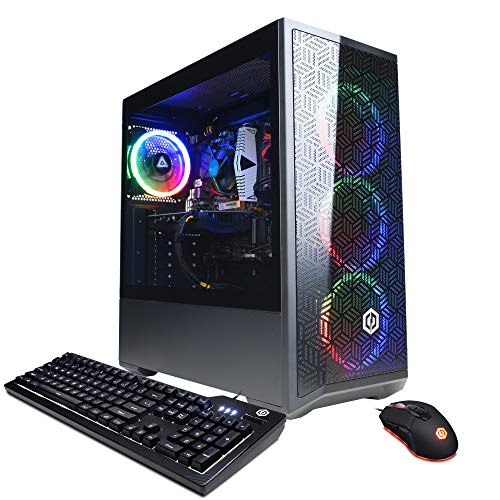
CYBERPOWERPC Gamer Xtreme VR Gaming PC, i5-12400F, RTX 3050, 16GB DDR4

Skytech Gaming PC Storm, Ryzen 5, RTX 5050, 32GB RAM, 1TB SSD

Skytech Gaming King 95 Gaming PC, Ultra 7 270K, RTX 5070 Ti, 32GB DDR5

Lenovo Legion Tower 5i, Ultra 7 265F, RTX 5070 Ti, 32GB
What Each Pick Brings To The Table
The Horizon Autherium Dragon is the most ambitious tower in this roundup, pairing a high-end Core i9 unlocked processor with an RTX 5070 OC (factory overclocked, meaning the GPU ships with higher boost clocks than the stock reference design) and 64GB of RAM. Storage stands out too, with 1TB on a fast NVMe SSD (a solid-state drive that plugs directly into the motherboard for several times the bandwidth of older SATA drives) backed by a 4TB mechanical hard drive for your full game library. It is built for people who want one rig to do everything: heavy 1440p and 4K gaming, streaming, video editing, and large mod folders without ever shuffling files around.
A 360mm AIO liquid cooler (an all-in-one liquid cooling unit with a 360mm radiator, larger than the common 240mm size and better at taming hot-running CPUs) keeps thermals steady under long sessions, and the board leaves an extra M.2 slot and an extra HDD bay open for future expansion. Windows 11 Pro is preinstalled, which adds BitLocker drive encryption and more granular device management that home and remote workers tend to appreciate. Compared with the budget CYBERPOWERPC Gamer Master reviewed later, this is a meaningful step up in every component that matters for frame rates and multitasking.
Why It Works Well
- 64GB of RAM is double what most prebuilts offer, so heavy Chrome, OBS, and game loadouts run without slowdowns.
- 5TB of combined storage means a year of new releases can live on the system without external drives.
- Factory-overclocked RTX 5070 with 12GB of VRAM (video memory dedicated to the graphics card) handles 1440p at high refresh and 4K in most modern titles.
- 360mm AIO liquid cooling keeps the unlocked Core i9 thermally stable during long streaming and rendering sessions.
- Windows 11 Pro unlocks BitLocker and remote desktop features that Home editions leave out.
- Extra M.2 and HDD slots mean you can add storage later without replacing anything.
Things To Consider
- The 5TB split means the mechanical 4TB drive will be noticeably slower than the NVMe boot drive, so keep active games on the SSD.
- An unlocked, high-core CPU plus a 360mm AIO draws real power, so older surge protectors may not be the right companion for this tower.
Who It Suits Best
Hardcore gamers, streamers, and creators who want one tower to handle AAA titles, recording, and editing without compromise.
Look Elsewhere When
You mostly play esports at 1080p and do not need 64GB of RAM, in which case the Skytech Gaming PC Storm stretches the budget much further.
The CYBERPOWERPC Gamer Master lands as the most accessible entry on this list, built around AMD’s Ryzen 5 7600 on the AM5 platform (AMD’s modern CPU socket that supports DDR5 memory and future processor upgrades). That alone is a quiet win: the AM5 platform is expected to host several more CPU generations, so this tower has a real upgrade path. The RTX 4060 with 8GB of VRAM targets 1080p gaming with ray tracing (a lighting technique that simulates how light bounces in real time, demanding but visually rich) toggled on in lighter modes, and the 16GB of DDR5 memory (the latest generation of system RAM, faster and more efficient than DDR4) is the right floor for modern gaming in 2026.
The case leans into the gamer aesthetic with a tempered glass side panel, custom RGB case lighting, and a 7-color gaming mouse included. Six USB 3.1 ports, two USB 2.0, gigabit Ethernet, and 802.11ac Wi-Fi cover your peripheral and networking needs. A 500GB PCIe Gen4 NVMe SSD (a fast NVMe drive using PCIe 4.0 bandwidth, roughly twice as fast as PCIe 3.0) keeps boot and load times snappy, though heavier game libraries will likely need a second drive down the road. For anyone stepping up from console gaming, this is a forgiving first PC that still has legs.
What Earns Its Place
- Ryzen 5 7600 on the AM5 platform gives you a real upgrade path for future CPU generations.
- RTX 4060 handles 1080p gaming comfortably in most current releases.
- 16GB of DDR5 RAM is the right modern baseline, faster than DDR4 in bandwidth and latency.
- Tempered glass side panel and RGB lighting deliver the look many first-time PC shoppers want.
- Includes a keyboard and mouse so you can plug in and play the same day.
Worth Noting
- 500GB of NVMe storage fills up fast with modern titles, many of which exceed 100GB each, so budgeting for a secondary drive is wise.
- 802.11ac Wi-Fi is a step behind the Wi-Fi 6 (802.11ax) standard used in newer towers like the Skytech Azure 3.
Best Suited To
Entry-level gamers stepping up from a console who want a forgiving, ready-to-run system with an upgrade path.
Consider Something Else When
You want more VRAM and storage out of the box, in which case the CYBERPOWERPC Gamer Xtreme VR or Skytech Storm offer a more generous spread.
The Skytech Azure 3 sits in the comfortable middle of this roundup, pairing an Intel Core Ultra 7 270K with an RTX 5060 and 32GB of DDR5 RAM running at 5200 MT/s (megatransfers per second, a measure of how much data the RAM can move per cycle). That balance matters: 32GB of fast memory is the sweet spot for modern gaming plus Discord, a browser, and maybe a recording tool running in the background, without paying for the 64GB tier most casual users never fully use. The 1TB NVMe SSD holds a respectable game library out of the box, and the 360mm AIO keeps the unlocked K-series CPU in check.
Connectivity is forward-looking too, with Wi-Fi 6 (802.11ax) and Windows 11 Home preinstalled with no bloatware. The RTX 5060 brings 8GB of GDDR7 video memory (the latest generation of VRAM, faster and more power-efficient than GDDR6) and DLSS (NVIDIA’s AI-driven rendering that renders at a lower resolution and upscales intelligently to boost frame rates) support, so frame rates in demanding titles climb nicely when you let the AI upscaling do the heavy lifting. Against the CYBERPOWERPC Gamer Master above, the Azure 3 doubles the RAM, swaps to a faster Wi-Fi standard, and adds a real liquid cooler in place of a basic air tower.
Strengths Worth Knowing
- 32GB of DDR5 at 5200 MT/s gives headroom for gaming, streaming, and dozens of browser tabs without stutter.
- 360mm AIO liquid cooling handles the unlocked K-series CPU during long sessions without thermal throttling (when a chip slows itself down to avoid overheating).
- RTX 5060 with GDDR7 and DLSS support delivers strong 1080p and respectable 1440p frame rates in current titles.
- Wi-Fi 6 (802.11ax) means faster, more stable wireless on modern routers.
Honest Caveats
- RTX 5060 with 8GB of VRAM will start to feel tight in a few years as 1440p textures get heavier, so future-proofing for 4K is limited.
- ARGB fans look great but add cable management work, so plan a little extra time on the first setup.
Made For
Mainstream 1080p and entry-level 1440p gamers who want a balanced tower that will not feel outdated in two years.
Reach For A Different Pick When
You want more VRAM for 1440p at high refresh, in which case the Skytech Gaming King 95 with its 16GB RTX 5070 Ti is the better fit.
The CYBERPOWERPC Gamer Xtreme VR is the most approachable tower on this list, designed for shoppers who want a working gaming PC on day one without picking parts. The Intel Core i5-12400F is a six-core processor without integrated graphics (the “F” suffix means you need a dedicated GPU, which this build has), and paired with 16GB of DDR4 RAM and a 500GB NVMe SSD, it handles everyday tasks and 1080p gaming with low-to-medium settings without breaking a sweat. The RTX 3050 8GB card is the entry-level current-generation pick, enough for esports titles at high frame rates and single-player games at modest settings.
The case includes Wi-Fi and a clean Windows 11 Home install, so the unboxing-to-desktop time is short. Where it differs from the Skytech Storm and CYBERPOWERPC Gamer Master is the use of DDR4 rather than DDR5, which is a real-world cost-saver but does cap your long-term memory bandwidth. For a first PC, especially for a student or a household where the rig doubles as a homework and gaming machine, the value here is hard to argue with.
The Practical Payoff
- Six-core i5-12400F handles modern games, schoolwork, and general productivity without strain.
- Plug-and-play experience with Wi-Fi and Windows 11 Home preinstalled.
- RTX 3050 with 8GB of VRAM is a workable entry point for 1080p gaming.
Some Limits To Know
- DDR4 memory caps long-term bandwidth, so you will want a full platform upgrade rather than just a GPU swap down the road.
- The RTX 3050 is the lowest-tier card in this roundup, and 1080p on demanding AAA titles will require lowered settings.
- 500GB of NVMe storage fills quickly with modern game installs.
Perfect Match For
First-time PC owners, students, and families who want a reliable starter rig for 1080p gaming and general use.
Swap It Out When
You want a current-generation platform with DDR5 and a stronger GPU out of the box, in which case the Skytech Gaming PC Storm is a smarter first step up.
The Skytech Gaming PC Storm finds a nice stride between cost and capability, building around an AMD Ryzen 5 5500, an RTX 5050 with 8GB of GDDR6 video memory, and 32GB of DDR4 RAM at 3200 MT/s. That last number matters: 32GB of system memory is generous for a tower at this tier, and the 1TB NVMe SSD gives you room to install a respectable mix of multiplayer and single-player games without juggling drive space. The RTX 5050 supports DLSS, so lighter esports titles run at high refresh and modern single-player games stay smooth with AI upscaling doing some of the rendering work.
Cooling is handled by a high-performance air cooler rather than an AIO liquid unit, which means quieter fans under typical load and fewer moving parts to worry about over the years. Wi-Fi 5 (802.11ac) and Windows 11 Home round out a no-bloatware setup. Compared with the CYBERPOWERPC Gamer Xtreme VR, you move from DDR4 at lower speeds to DDR4 at 3200 with twice the capacity, and you gain a more efficient current-generation GPU with DLSS.
A Few Strong Suits
- 32GB of DDR4 RAM is unusually generous at this tier, keeping multitasking and browser-heavy sessions smooth.
- 1TB NVMe SSD holds a solid library of modern games without forcing immediate storage upgrades.
- RTX 5050 with DLSS support delivers strong 1080p frame rates in current titles.
- Air cooler means fewer points of failure and quieter operation under typical gaming load.
Points To Keep In Mind
- Wi-Fi 5 (802.11ac) is a generation behind Wi-Fi 6, so homes with a newer router will not see peak wireless throughput.
- The Ryzen 5 5500 lacks integrated graphics on some motherboards, so troubleshooting without the GPU installed is harder.
Whose Shelf It Belongs On
Mainstream 1080p gamers who want a comfortable balance of memory, storage, and current-generation GPU without paying for high-end extras.
A Better Fit Elsewhere
You want a 360mm AIO and Wi-Fi 6 with newer DDR5 RAM, in which case the Skytech Azure 3 is the natural step up.
The Skytech Gaming King 95 is the most over-the-top tower in this shortlist, and the spec sheet reads like a wish list for high-refresh 1440p and confident 4K gaming. The Intel Core Ultra 7 270K sits at the top of the mainstream Intel stack with boost clocks up to 5.4GHz, paired with 32GB of DDR5 RAM at a snappy 6000 MT/s. The RTX 5070 Ti brings 16GB of GDDR7 VRAM, which is the single biggest reason to pick this rig for anyone who games at 1440p or higher: that frame buffer (the dedicated pool of video memory used to hold rendered frames and textures) gives modern titles room to breathe at high texture settings.
An 850W 80 Plus Gold ATX 3.0 power supply (a certification indicating 90%+ energy efficiency at typical loads, paired with the latest ATX 3.0 connector standard for modern GPUs) leaves headroom for the GPU and any future upgrades, and a 360mm ARGB AIO keeps the unlocked CPU thermally comfortable. A 1TB Gen4 NVMe SSD is the right modern boot drive, and Wi-Fi 6 (802.11ax) plus Windows 11 Home round out a clean build. This is the tower to shortlist if you already own a 1440p or 4K monitor and want to stop thinking about settings menus for the next few years.
Everyday Wins
- 16GB of GDDR7 VRAM on the RTX 5070 Ti keeps high-resolution textures and frame buffers comfortable in demanding 2026 titles.
- 32GB of DDR5 at 6000 MT/s keeps the unlocked CPU fed and supports heavy multitasking.
- 850W 80 Plus Gold ATX 3.0 PSU has real headroom for the GPU and future upgrades.
- 360mm ARGB AIO handles sustained loads with quiet fan curves.
Small Caveats
- ARGB lighting and a 360mm radiator add weight and cable management, so plan space under your desk before it arrives.
- 1TB of NVMe storage is the same as several mid-range builds, so larger game libraries will need a second drive.
Built With In Mind
High-refresh 1440p and entry-level 4K gamers who already own a capable monitor and want a tower that will not bottleneck it.
Where Another Pick Suits Better
You want a similar GPU paired with a creator-friendly feature set and a quieter aesthetic, in which case the Lenovo Legion Tower 5i is worth a close look.
The Lenovo Legion Tower 5i closes out this list as the most versatile of the seven, pairing an Intel Core Ultra 7 265F with an RTX 5070 Ti and 32GB of memory, plus a 1TB SSD for the boot drive. The “F” suffix on the CPU means it ships without integrated graphics, so the discrete GPU is doing all the rendering work, which is fine since you bought this for a real graphics card. Where the Legion stands out is Legion Coldfront cooling (Lenovo’s branded thermal design with dedicated airflow paths for the CPU and GPU), which keeps the system cool and quiet during long gaming or rendering sessions, and an industrial design that looks at home in a home office, not just a battlestation.
The RTX 5070 Ti with 16GB of VRAM brings real-time ray tracing and DLSS for hyper-realistic visuals and AI-driven frame rate boosts, which is a meaningful advantage if you also edit video or do 3D work. The bundle includes three months of PC Game Pass, which is a nice way to test a wide library without buying each title. Against the Skytech Gaming King 95 above, the Legion leans a little more toward quiet, creator-friendly operation and a less aggressive aesthetic, while giving up very little in raw GPU power.
What Stands Out
- RTX 5070 Ti with 16GB of VRAM handles 1440p gaming, video editing, and 3D work comfortably.
- Legion Coldfront cooling keeps the system quiet under load, which matters in shared living spaces.
- 32GB of memory is the right ceiling for both gaming and creator workflows without overspending.
- Three months of PC Game Pass is a practical way to try a wide library on day one.
Factors To Consider
- 1TB of SSD storage matches mid-range builds, so creators with large raw footage libraries will need a secondary drive.
- Lenovo’s case is more conservative than the glass-and-RGB towers from Skytech, which may not appeal to shoppers who want the gamer look.
Who Should Grab It
Streamers, content creators, and gamers who split time between AAA titles and creative software and want one rig to do both well.
Not Your Match When
You specifically want the unlocked “K” CPU for overclocking and aggressive RGB, in which case the Skytech Gaming King 95 is the better fit.
Choosing a Tower That Earns Its Place in Your Setup
A great prebuilt gaming PC is less about the loudest part on the spec sheet and more about the fit between your monitor, the games you play, and how long you expect to keep the tower. Resolution matters first. A 1080p monitor with a 144Hz refresh rate asks for an RTX 4060 or 5050, while 1440p at high refresh wants an RTX 5070 or RTX 5070 Ti with 12 to 16GB of VRAM. If you are already on a 4K panel, plan for a current-generation high-tier GPU and accept that very heavy ray tracing may still ask you to lean on DLSS.
CPU choice follows a similar logic. For most gaming, a six-core modern chip like the Ryzen 5 7600, Ryzen 5 5500, or Core i5-12400F is plenty, and stepping up to a Core i7 or Ryzen 7 helps most when you also stream, record, or run background tasks. Memory is a quiet differentiator: 16GB of DDR4 was the floor for years, but 32GB of DDR5 is the right target in 2026 for anyone who keeps a browser, Discord, and a recording tool open alongside a game.
Storage is the spec that quietly decides your day-to-day satisfaction. A 500GB NVMe boot drive feels small fast, and 1TB is the more comfortable minimum. Liquid cooling (AIO) is worth the upgrade if you plan to keep the tower in a warm room or push a high-core CPU hard. A solid warranty and accessible support matter more than people think: prebuilts save you build time, but only if the brand stands behind the parts when something goes sideways.
Cooling and Power You Can Trust
A prebuilt’s cooling solution determines how loud it runs and how long the components last. Towers with 360mm AIO liquid coolers handle high-core CPUs under sustained load far better than stock air coolers, which matters for unlocked “K” and “X” series processors. A quality 80 Plus Gold power supply with ATX 3.0 connectors gives you clean power delivery and headroom for a future GPU swap without rewiring the whole build.
Connectivity and Expansion
Front-panel USB-C, Wi-Fi 6 or Wi-Fi 7, and a generous I/O cluster on the back of the case make daily life with a tower much easier. Two M.2 slots and at least one extra 3.5-inch drive bay mean you can add storage later without dismantling the system, which is the kind of quiet feature that pays off two or three years in.
Aesthetics, Size, and Noise
Glass side panels, RGB fans, and bold front-panel designs are the most visible part of any build, but they also affect airflow and noise. A quieter case with restrained lighting tends to age better and fit more rooms. If your tower will sit in a living room or shared home office, prioritize acoustic design over RGB flash.
Key Considerations Across These Picks
Where Shoppers Go Wrong
A common slip is chasing the largest SSD or the most RGB and under-budgeting the GPU. Frame rates depend almost entirely on the graphics card at 1080p and 1440p, so a balanced system with a current-generation mid-range GPU will outperform a tower with a flagship CPU and an older entry-level GPU. Another mistake is buying a tower with only 500GB of NVMe storage; modern titles regularly exceed 100GB, so a 1TB boot drive is the more comfortable floor in 2026.
What Separates Premium From Basic
The jump from a budget build to a premium one usually buys you three things: more VRAM on the GPU, faster DDR5 memory, and a more capable cooling solution. Those three upgrades are what let you run modern games at higher settings with ray tracing on and keep frame rates steady over long sessions. If your monitor is 1440p or higher, the premium tier pays for itself in the first year of use; at 1080p, a balanced mid-range build is often the smarter buy.
Frequently Asked Questions
How much RAM do I really need in 2026?
For most gamers, 32GB of DDR4 or DDR5 is the new sweet spot, since modern games plus Discord, Chrome, and a recording tool can easily push past 16GB. 64GB is useful for heavy creators and streamers, but it is more than a pure gamer will use.
Is a prebuilt gaming PC a good value compared to building one?
Prebuilts charge a premium for assembly, testing, and warranty, but they save you the time, the compatibility research, and the risk of a bad first build. For shoppers who would rather unbox and play, the price difference is reasonable. If you enjoy the process and already own Windows, building your own saves real money.
How long should a prebuilt gaming PC last?
A well-chosen prebuilt in 2026 should comfortably handle new releases for four to five years at high settings in 1080p, and two to three years at 4K. The first thing to age out is usually GPU power, followed by storage capacity, while the CPU and memory tend to hold up longer.
Do I need a 1440p or 4K monitor to use these towers?
A current-generation 1080p monitor with a 144Hz or higher refresh rate is still a great match for the mid-range picks in this roundup. If you already own or plan to buy a 1440p or 4K panel, focus on the RTX 5070 and above, where the extra VRAM really earns its keep.
Are liquid-cooled prebuilts more reliable than air-cooled ones?
Both approaches are reliable when implemented well, and an AIO liquid cooler is not automatically better than a high-end air cooler. The real difference shows up under sustained heavy load, where a 360mm AIO keeps an unlocked CPU thermally stable in a way a basic air tower cannot. For most mainstream gaming, a quality air cooler is perfectly fine.
The Takeaway
The right tower for you is the one that matches your monitor, your game library, and the next two or three years of your gaming plans. A budget pick like the CYBERPOWERPC Gamer Master or Gamer Xtreme VR is a comfortable place to start, the Skytech Azure 3 and Storm hit a confident middle ground, and the Horizon Autherium, Skytech King 95, and Lenovo Legion Tower 5i push toward the high end with more VRAM, faster memory, and stronger cooling. Match the rig to the way you actually play, and the rest takes care of itself.


