


A curved ultrawide can turn a desk into a command center, swallowing your game world in one wide sweep of glass. The catch is that panel size, curve radius, and resolution all trade against each other in ways a spec sheet does not always spell out. This roundup walks through ten options across the most useful sizes, with notes on who each one actually fits.
A Quick View Of The Lineup

LG 34WN80C-B UltraWide Monitor 34″ 21:9 Curved WQHD IPS

LG 34″ Curved UltraWide QHD IPS Monitor HDR 10

INNOCN 34C1R Ultrawide Monitor WQHD 180Hz IPS

INNOCN 49″ Curved DQHD 240Hz 1800R Ultrawide Gaming Monitor
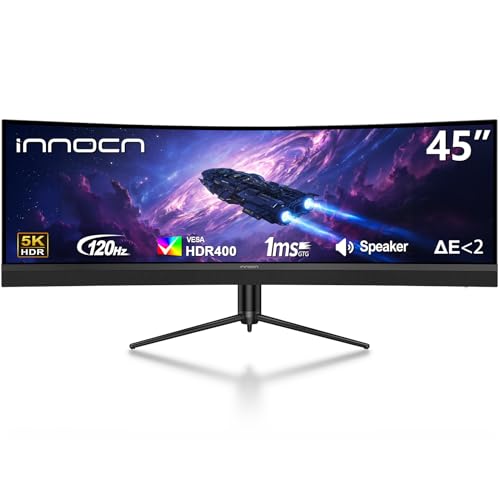
INNOCN 45″ 5K2K 120Hz Ultrawide Curved Gaming Monitor

INNOCN 40″ WQHD 144Hz Ultrawide IPS Monitor

INNOCN 49″ WFHD 144Hz Flat Screen Productivity Monitor

INNOCN 49C1G Curved Gaming Monitor 32:9 WDFHD 144Hz

INNOCN 45C1R 45″ 5K2K Ultrawide Curved Gaming Monitor

INNOCN 40C1R Ultrawide Monitor 40″ WQHD 144Hz
What Each Pick Brings To The Table
The LG 34WN80C-B leans into a calm, productive sweet spot that work-from-home desks tend to need. A 34-inch 21:9 curved IPS panel with WQHD resolution keeps documents and video calls side by side without feeling cramped, while a three-side virtually borderless frame keeps the silhouette clean on a tidy desk.
USB Type-C with 60W power delivery (a charging standard that sends power, video, and data through one cable) means a single cable can run a modern laptop and charge it at the same time, which is a small but very real workflow win. You also get HDR 10 compatibility, sRGB 99% color coverage, and a tilt/height adjustable stand, all wrapped in a panel that handles everyday games without breaking a sweat.
The Value In It
- USB-C with 60W power delivery keeps laptop setups to one cable.
- sRGB 99% color coverage is plenty for general photo and design work.
- Three-side borderless design keeps the focus on the screen, not the bezel.
- Tilt and height adjustment help with long sessions and shared desks.
Things To Consider
- 5ms response time is fine for casual play but trails dedicated gaming panels.
- Owners commonly report that the single USB-C input becomes a constraint when juggling multiple sources.
Who It Suits Best
Hybrid workers who stream, browse, and lightly game on the same panel and want a tidy USB-C setup will get plenty from this LG.
Look Elsewhere When
Hardcore sim racers chasing high refresh rates will be better served by the INNOCN 34C1R Ultrawide Monitor WQHD 180Hz IPS, which trades some office polish for serious motion clarity.
Where the first LG leans toward office calm, this sibling stretches a bit further into gaming and content work. The 34-inch curved QHD IPS panel keeps the same roomy 21:9 canvas, while HDR 10 support and 99% sRGB coverage make colors pop without going overboard.
Dynamic Action Sync is LG’s name for a low-latency mode that reduces input delay, and Dual Controller lets two connected systems share one keyboard and mouse, which is genuinely useful on a hybrid desk. Height, tilt, and pivot adjustment round out a flexible stand, and OnScreen Control gives you an on-screen toolkit for splitting the panel into layouts.
What Stands Out
- Dynamic Action Sync trims input lag for twitchy play.
- Dual Controller makes it painless to hop between work and personal PCs.
- Pivot adjustment is rare on curved panels and helps with long documents.
- HDR 10 and 99% sRGB serve both movies and creative tasks.
Worth Noting
- No USB-C power delivery is specified, so laptop charging needs its own brick.
- Heavier than typical 34-inch monitors, so the included stand deserves a sturdy desk.
Made For
Creators, hybrid workers, and casual gamers who want one display that handles documents, edits, and weekend play with equal grace.
Consider Something Else When
Esports-leaning shoppers will find the INNOCN 34C1R Ultrawide Monitor WQHD 180Hz IPS more compelling for its 180Hz refresh rate and Adaptive-Sync (a variable refresh technology that syncs the display to the GPU to kill screen tearing) support.
Stepping away from the LG twins, the INNOCN 34C1R is built for the player who wants the 34-inch ultrawide format without giving up speed. The 180Hz IPS panel is a big jump from standard 60Hz and 75Hz office displays, and Adaptive-Sync plus G-SYNC compatibility mean your GPU and monitor stay in lockstep.
PIP/PBP (Picture-in-Picture and Picture-by-Picture, which let you run two sources on one screen) covers the productivity side, while HDMI 2.0 and DisplayPort 1.4 inputs keep consoles and PCs both happy. The included stand gives 130mm of height travel and tilt, so dialing in a comfortable angle is straightforward. You may find the built-in speakers useful as a fallback, though most gamers will still reach for headphones.
Why It Works Well
- 180Hz refresh makes fast games feel noticeably smoother.
- Adaptive-Sync and G-SYNC compatibility cover both major GPU camps.
- PIP/PBP adds real multitasking flexibility for streamers and remote workers.
- Plenty of height and tilt range for shared desks and standing setups.
Trade Offs
- Built-in speakers are convenient but not particularly loud or full.
- No USB-C input is listed, so laptop users will need a separate docking solution.
Best Suited To
Mid-to-high refresh gamers, sim racers, and FPS players who want a 34-inch ultrawide that can keep up with a serious GPU.
A Better Fit Elsewhere
MacBook or thin-and-light laptop users who depend on USB-C should look at the INNOCN 40″ WQHD 144Hz Ultrawide IPS Monitor, which lists USB-C with 90W power delivery.
Now we are in serious ultrawide territory. The INNOCN 49-inch DQHD panel delivers a 5120 x 1440 resolution, which is essentially two 1440p screens fused into one, paired with a 240Hz refresh rate that few monitors at this size can match. The 1800R curve (a measure of how tightly the screen bends; lower numbers mean a more aggressive curve) wraps the edges inward enough to keep the far corners readable.
Built around a VA panel for deep contrast, it tilts, swivels, and adjusts in height to fit a wide range of desks. USB Type-C, DisplayPort, and HDMI cover modern and legacy sources, and the sheer horizontal space turns sim racing and flight games into something close to a wraparound cockpit. Depending on your GPU, you may find the resolution more demanding than expected at 240Hz.
Useful Touches
- 5120 x 1440 over a 32:9 canvas replaces a true dual-monitor setup.
- 240Hz refresh keeps fast motion in sim racers and shooters sharp.
- Full ergonomic stand with tilt, swivel, and height travel.
- USB-C, DisplayPort, and HDMI give you flexible source options.
Points To Keep In Mind
- The desk footprint is huge, so a deep, sturdy surface is essentially required.
- Pushing 240Hz at 5120 x 1440 demands a high-end GPU, especially in newer titles.
Who Will Love This
Sim racing, flight sim, and MMO players who want the most immersive curved ultrawide canvas they can sit at a desk.
Not Your Match When
Players on mid-range GPUs will find the INNOCN 49C1G Curved Gaming Monitor 32:9 WDFHD 144Hz a saner match, since 3840 x 1080 is far easier to drive.
Where the 49-inch INNOCN leans into sheer speed, this 45-inch sibling tilts the trade toward pixel density. The 5K2K (5120 x 1440) resolution across a 32:9 panel gives a noticeably crisper image at normal viewing distance, and the gentler R1500 curve keeps the screen from feeling too tight. HDR400 support, 120Hz refresh, and a VA panel round out a strong creative-work foundation.
USB Type-C with 65W power delivery covers a chunk of modern laptops, and PIP/PBP lets you run a work laptop and a gaming PC side by side without an extra screen. Tilt, swivel, and height adjustment are all built in, and the built-in speaker pair is a quiet bonus for video calls. Owners commonly report that VESA mounting (a standard pattern of screw holes on the back that lets you attach third-party arms or wall mounts) is worth the effort given the panel size.
A Favorable Mix
- 5K2K resolution makes text and timelines easier on the eyes.
- USB-C with 65W power delivery streamlines laptop setups.
- PIP/PBP handles two inputs cleanly for work and play.
- Full ergonomic stand plus VESA compatibility for mounting.
Honest Caveats
- 120Hz is solid but trails the 240Hz of the 49-inch INNOCN for hard-core competitive play.
- HDR400 is a noticeable step below higher-tier HDR for movie nights.
The Right Fit
Video editors, developers, and creative pros who want a single screen for timelines, code, and games on the same panel.
Swap It Out When
FPS-focused players chasing every frame will appreciate the INNOCN 49″ Curved DQHD 240Hz 1800R Ultrawide Gaming Monitor for its higher refresh ceiling.
The 40-inch ultrawide slot has quietly become the sweet spot between 34 and 49 inches, and this INNOCN leans into that middle ground. A 3440 x 1440 IPS panel runs at 144Hz with AMD FreeSync Premium and HDR400, which is a sensible set of specs for a do-everything display.
The stand-out feature is USB-C with 90W power delivery, which is high enough to charge most productivity laptops at full speed. PIP/PBP and a screen split utility make two-source workflows painless, and 95% DCI-P3 color coverage (a wide color space used in digital cinema) means photo and video work looks more accurate. For most backyards of desk space, the 40-inch frame is a lot friendlier than the 49-inch monsters earlier in this list.
What Helps Most
- 40-inch 21:9 fits desks that cannot quite hold a 49-inch panel.
- USB-C with 90W PD handles most laptops on a single cable.
- 95% DCI-P3 coverage is unusually wide for the category.
- FreeSync Premium and 144Hz cover most modern gaming needs.
Some Limits To Know
- IPS panels can show mild backlight bleed in dark rooms, especially near the edges.
- No built-in KVM (a feature that lets one keyboard and mouse control two connected computers) is specified, so dual-PC users will need a separate switch.
Perfect Match For
Hybrid office-and-gaming desks that need a single screen for work, content, and weekend play without dominating the room.
Where A Sibling Pick Shines
Shoppers who want a more cinematic wraparound should look at the INNOCN 45″ 5K2K 120Hz Ultrawide Curved Gaming Monitor, which adds the extra horizontal canvas.
This is the odd duck in the lineup, and that is exactly the point. Instead of a curve, INNOCN ships a flat 49-inch 32:9 panel at 1080p vertical resolution with 144Hz. The flat shape keeps text and spreadsheets uniform edge to edge, which is why this monitor leans toward work rather than wraparound gaming.
The 32:9 aspect ratio is the same horizontal canvas as two 27-inch 16:9 monitors sitting side by side, so you can split the screen into true multi-window layouts without bezels cutting the middle. 144Hz keeps the desktop experience snappy, and the screen split utility helps tame the chaos of dozens of open tabs. You may find that the 1080p vertical resolution looks a touch soft if you sit close, but for spreadsheets, terminals, and trading charts, the wide real estate is the main draw.
Useful Strengths
- Flat 32:9 panel keeps text uniform across the full width.
- 144Hz keeps the desktop feel responsive even with many windows open.
- Screen split utility is genuinely useful for multi-window workflows.
- Eliminates the bezels that come with a true dual-monitor setup.
Less Ideal Details
- 1080p vertical resolution looks softer than the 1440p alternatives in this list.
Built With In Mind
Traders, analysts, coders, and project managers who live in spreadsheets and tab-heavy browsers and value a seamless canvas.
Another Choice May Suit
Gamers who want the 32:9 format with a curve and sharper vertical detail should consider the INNOCN 49C1G Curved Gaming Monitor 32:9 WDFHD 144Hz instead.
The 49C1G is the friendlier price point for shoppers who want the 32:9 curved format without paying for the 5120 x 1440 tier. With WDFHD 3840 x 1080 resolution, this panel asks far less of mid-range GPUs while still delivering the wraparound feel that makes racing and flight sims so immersive.
The 1800R curve is slightly tighter than the 1500R options elsewhere, which helps keep the edges of a 49-inch panel within natural sightlines. USB Type-C, DisplayPort, and HDMI cover the usual bases, and 99% sRGB coverage handles everyday content work without fuss. Height and tilt adjustment keep the stand flexible, and the built-in speakers are handy for casual sessions. Owners commonly report that 1080p vertical looks clean enough for sim play at typical desk distances.
A Few Strong Suits
- 32:9 144Hz curved canvas at a friendlier entry cost than 5K2K models.
- 99% sRGB coverage suits everyday content tasks.
- USB-C, DisplayPort, and HDMI give you flexible source options.
- Height and tilt adjustment support a comfortable setup.
Potential Drawbacks
- 3840 x 1080 looks softer than 5120 x 1440 for text-heavy work.
- Speakers are basic; most users will want separate audio.
Whose Shelf It Belongs On
Casual sim racers, flight sim fans, and ultrawide curious gamers who want the wraparound feel on a tighter budget.
Reach For A Different Pick When
Productivity-heavy shoppers who want sharper text should step up to the INNOCN 49″ Curved DQHD 240Hz 1800R Ultrawide Gaming Monitor for the 5120 x 1440 resolution.
The 45C1R is the older sibling of the 5K2K 45-inch INNOCN we covered earlier, and it shares the same winning formula with a slightly different feature balance. You get the 5120 x 1440 resolution, R1500 curve, HDR400, and a height adjustable stand, paired with USB-C that pushes a robust 90W of power delivery for laptop users.
PIP/PBP keeps the dual-source workflow alive, and the built-in speaker set is useful for calls when headphones are not on. The 120Hz refresh rate is a measured choice that favors image quality over absolute speed, and the VA panel gives that satisfying depth for cinematic single-player games. Depending on your setup, you may find the 45-inch size more desk-friendly than the 49-inch models while still offering the full 32:9 horizontal canvas.
Where It Delivers
- 5K2K resolution makes text and timelines feel razor sharp.
- USB-C with 90W PD is strong enough for power-hungry laptops.
- PIP/PBP handles work-and-play dual sources without extra gear.
- R1500 curve is gentle enough for long reading sessions.
Worth Bearing In Mind
- 120Hz caps the ceiling for competitive gamers chasing 240Hz panels.
- Built-in speakers are functional but unremarkable.
Who Should Grab It
Power users and creators who want premium 5K2K sharpness, USB-C charging, and a desk-friendlier footprint than 49-inch displays.
Skip It When
Hardcore sim racers who want maximum refresh and width will be better served by the INNOCN 49″ Curved DQHD 240Hz 1800R Ultrawide Gaming Monitor.
Rounding out the list is the 40C1R, a familiar formula that has earned a loyal following. The 40-inch 21:9 WQHD panel runs at 144Hz with AMD FreeSync Premium and HDR400, built around an IPS panel that handles both color work and fast gaming.
95% DCI-P3 color coverage is wide for the category, and 500 nits peak brightness gives HDR content a little more pop. USB Type-C, HDMI, and tilt plus height adjustment round out a versatile package that fits on most desks. Depending on your viewing distance, the extra 6 inches of diagonal over a 34-inch screen adds immersion without the spatial commitment of a 49-inch panel, which is a useful middle path to keep in mind.
Points In Its Favor
- 144Hz with FreeSync Premium handles fast play and color work.
- 95% DCI-P3 coverage and 500 nits peak brightness lift HDR content.
- 40-inch 21:9 footprint fits more desks than 49-inch ultrawides.
- Tilt and height adjustment support ergonomic positioning.
Practical Considerations
- No USB-C power delivery wattage is specified, so laptop charging is unclear.
The Right Fit
All-round desktop gamers and content creators who want a proven 40-inch ultrawide that handles work, color, and play without dominating the room.
Look Elsewhere When
Shoppers who specifically need USB-C laptop charging should look at the INNOCN 40″ WQHD 144Hz Ultrawide IPS Monitor, which lists 90W PD.
Choosing The Right Curved Ultrawide For Your Desk
Matching Panel Size To Desk Depth
A 34-inch 21:9 panel fits comfortably on a standard 24-inch-deep desk and rarely overwhelms a small room. The 40-inch options add noticeable immersion without the spatial commitment of 49-inch models, and the 49-inch screens genuinely need a deep, sturdy surface and a chair that can roll back a few inches. Curved ultrawide gaming monitors in the 32:9 class basically ask for a dedicated command-center setup.
Reading Resolution, Refresh, And Panel Type Together
WQHD 3440 x 1440 is the comfortable mainstream choice, while 5K2K 5120 x 1440 and DQHD panels add sharpness at the cost of GPU demand. Refresh rate (how many times per second the screen redraws, measured in hertz) above 144Hz is most useful for fast shooters, and IPS panels tend to give better color and viewing angles while VA panels deliver deeper contrast. Adaptive-Sync support, whether FreeSync, FreeSync Premium, or G-SYNC compatible, smooths out frame-rate dips when paired with a matching GPU.
Ports, Power, And Ergonomics That Matter
USB-C with power delivery turns a single cable into a docking station for modern laptops, and the wattage listed (60W, 65W, 90W) decides which machines charge at full speed. Tilt, swivel, height, and pivot adjustment make long sessions easier on the neck and shoulders, and VESA compatibility opens the door to monitor arms. PIP/PBP support helps when you want to run a work laptop and a gaming PC from the same screen.
Key Considerations Across These Picks
Pitfalls Shoppers Hit
Plenty of curved ultrawide gaming monitors look great on paper but trip people up in real setups. A 49-inch screen on a 24-inch desk simply does not fit, and a 240Hz panel is wasted on a GPU that cannot push half those frames in demanding games. Buying on refresh rate alone is a common trap; check that the resolution, panel type, and ports match the rest of your setup, especially USB-C wattage for laptop users.
Where The Extra Money Goes
The premium tier earns its keep through sharper pixel density, more aggressive curves, and stronger USB-C power delivery, plus better HDR brightness. The honest read is that the upgrade is worth it for creators, sim racers, and laptop-heavy workflows where color, space, and cable simplicity all matter. Casual gamers who only play a few nights a week will likely be happy saving that money for a stronger GPU or a better chair.
Frequently Asked Questions
What Size Curved Ultrawide Gaming Monitor Is Best For A Standard Desk?
A 34-inch 21:9 panel is the most desk-friendly pick and fits comfortably on most surfaces. Step up to 40 inches if you have a deeper desk and want more immersion, and reserve 49 inches for a true command-center setup with enough space to sit back from the panel.
Is A Higher Refresh Rate Worth It On A Curved Ultrawide?
A higher refresh rate makes motion smoother, which is most noticeable in fast shooters, racing, and competitive games. For slower-paced strategy, RPG, and productivity work, 100Hz to 144Hz is plenty, and the savings can go toward a sharper panel or stronger USB-C power delivery.
Do Curved Ultrawides Work Well For Office And Productivity?
Yes, especially 21:9 panels in the 34 to 40-inch range, which let you keep documents, calls, and reference material side by side. PIP/PBP support is a major plus for splitting work and personal devices, and a height adjustable stand helps prevent neck strain over long days.
How Important Is USB-C Power Delivery On These Monitors?
USB-C power delivery is the single biggest quality-of-life feature for laptop users, since one cable can carry video, data, and charging. Look for at least 65W for general productivity laptops and 90W if you use a higher-powered machine that needs full-speed charging.
Should You Prioritize Resolution Or Refresh Rate?
That depends on what you play and what your GPU can drive. A 5K2K 120Hz panel is the sweet spot for cinematic single-player and creative work, while a 1440p 180Hz or 240Hz screen is a better match for competitive gaming. Most users benefit more from a balanced middle than from maxing out either spec.
The Takeaway
The best curved ultrawide gaming monitor is the one that matches your desk, your GPU, and the kind of work and play you actually do. A 34-inch 21:9 panel is the safest all-rounder, a 40-inch hits a satisfying middle ground, and a 49-inch 32:9 screen is a real commitment that pays off in immersion. Pick the size that fits your space, the resolution your hardware can drive, and the ports that match the way you connect, and the rest tends to fall into place.


