


Competitive players live and die by refresh rate, and a flat panel starts to feel like a handicap once you spend hours in fast-paced shooters. The right curved screen adds depth to your peripheral vision while keeping the action in focus, which matters more than spec sheets suggest during long sessions. This roundup sorts through ten models that cover every common shopper profile, from casual couch co-op to daily ranked grind.
The Picks In Brief

ASUS TUF Gaming VG27VH1B 27″ Curved Monitor 165Hz FreeSync Premium

ASUS TUF Gaming 27″ 1440P Curved HDR Gaming Monitor (VG27WQ3B) QHD 180Hz
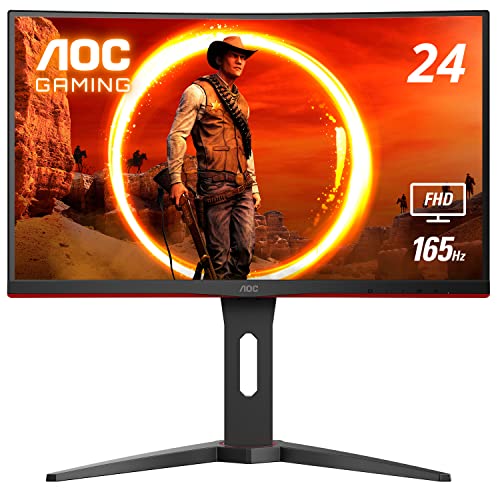
AOC C24G1A 24″ Curved Frameless Gaming Monitor 165Hz FreeSync Premium

Sceptre Curved 27-inch Gaming Monitor 1500R 100Hz (C275W-FW100T)

Acer Nitro XZ270 27″ Curved 280Hz FHD Gaming Monitor
LG 27GL83A-B 27″ Ultragear QHD IPS Gaming Monitor 144Hz G-SYNC

INNOCN 27″ QD-OLED QHD 280Hz Gaming Monitor HDR400 (2780s)
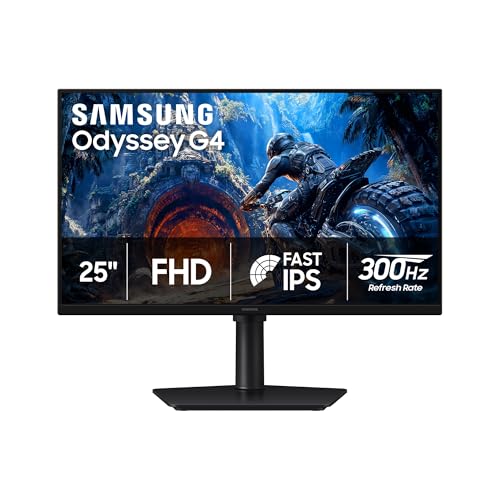
Samsung 25″ Odyssey G4 (G40H) Series FHD Gaming Monitor

Sceptre Curved 24-inch Gaming Monitor 1080p R1500 (C248W-1920RN Series)

acer Nitro 27″ 1500R Curved FHD Gaming Monitor 240Hz FreeSync Premium
More Details On Our Top Picks
The VG27VH1B sits at a comfortable middle ground for shoppers who want esports speed without paying for a QHD panel they may not fully appreciate. Its 27-inch 1500R curve pulls the edges of the screen into your natural field of view, which helps during long Apex Legends or Valorant sessions where peripheral awareness matters. For a dorm desk or shared bedroom setup, the size feels right without overwhelming the space.
Compared to the Sceptre C275W below, this ASUS offers notably higher refresh and a more robust adaptive-sync feature set, which competitive players tend to notice immediately. Owners commonly report that the stand is light and the VESA mount pattern makes wall-mounting simple when desk real estate is tight.
Bright Spots
- 165Hz refresh with FreeSync Premium keeps fast motion smooth in ranked play.
- 1500R curvature wraps the picture into your peripheral vision, easing eye strain during multi-hour sessions.
- Extreme Low Motion Blur (ELMB) reduces smear on hard camera pans, which helps in cinematic single-player games too.
- HDMI and D-Sub ports give flexibility for older GPUs alongside current graphics cards.
Things To Consider
- The 1080p resolution on a 27-inch panel looks softer than QHD alternatives like the LG 27GL83A-B below.
- VA panel contrast is strong, but viewing angles narrow when you share the screen with a friend.
- The included stand offers tilt only, so a third-party arm is useful for height adjustment.
Key Specs
Right Fit For
Mid-range PC builders and console gamers who want 165Hz speed without stepping up to a QHD panel.
A Better Fit Elsewhere
Color-focused shoppers who play story-rich games should look at the LG 27GL83A-B instead, since its IPS panel handles color and viewing angles more gracefully.
For shoppers who want crisper text and more screen real estate than a Full HD panel offers, the VG27WQ3B delivers a meaningful upgrade without veering into 4K territory. Its 180Hz refresh and 0.5ms response time make it a strong candidate for both competitive shooters and visually rich RPGs. The 90% DCI-P3 color coverage gives game art a more cinematic feel than standard sRGB panels, which matters in titles like Cyberpunk 2077 or Alan Wake 2.
Where the earlier VG27VH1B pushes speed at 1080p, this model trades some pixel density headroom for sharper image quality that pays off on a 27-inch display. DisplayWidget software lets you tune settings with a mouse instead of fiddling with the rear joystick.
Useful Touches
- QHD 2560×1440 resolution sharpens text in spreadsheets and adds detail in open-world games.
- 180Hz refresh handles fast-paced shooters and racing games without motion blur on hard turns.
- HDR support and 90% DCI-P3 color give single-player titles a richer look than typical sRGB monitors.
- Extreme Low Motion Blur and FreeSync work together to reduce tearing during variable frame-rate scenes.
- Three-year warranty adds peace of mind for shoppers planning to keep the panel long-term.
Honest Caveats
- QHD at high refresh demands a stronger GPU than 1080p, so older graphics cards may struggle.
- VA panel contrast is excellent, but color shift can occur at the far edges of the curve.
Made For
Multi-tasking PC users who split time between spreadsheets, single-player adventures, and competitive multiplayer.
Reach For A Different Pick When
Hardcore competitive Valorant players chasing pure speed should consider the Acer Nitro XZ270 (pick 5) for its 280Hz refresh at 1080p.
The C24G1A solves a problem many shoppers forget to plan for: not every desk has room for a 27-inch display. Its 24-inch class panel keeps the 1500R curve tight enough to wrap around your focus point without forcing you to turn your head. The height-adjustable stand with swivel and tilt means you can dial in posture without needing an aftermarket arm, which is a real win for first-time buyers.
Versus the larger ASUS TUF VG27VH1B, this AOC saves depth on the desk and gives up an inch of screen, which is a reasonable trade for tighter workspaces. FreeSync Premium support keeps the 165Hz refresh honest during frame-rate dips in games like Fortnite or Destiny 2.
The Upside
- Compact 24-inch footprint fits small desks and dorm setups comfortably.
- 165Hz refresh with FreeSync Premium (FreeSync Premium is AMD’s higher-tier adaptive-sync standard) keeps action smooth at variable frame rates.
- Three-sided frameless design simplifies a multi-monitor battle station if you ever add a second screen.
- Height, swivel, and tilt adjustments come built in, saving the cost of a separate monitor arm.
Trade Offs
- 23.6-inch viewable area feels tight for split-screen co-op or heavy multitasking.
- VA panel viewing angles narrow when you lean back or share the screen.
- 1080p resolution on this size looks sharp, but QHD screens show more detail in AAA games.
Quick Facts
Best Suited To
Apartment dwellers and students with limited desk depth who still want high-refresh gameplay.
Where A Sibling Pick Shines
Shoppers wanting a deeper, more immersive curve on a small budget should check the Sceptre C248W-1920RN, which uses an even tighter 1500R curve on a similar 24-inch panel.
The C275W-FW100T is built for the shopper who treats their monitor like a household tool rather than a flagship purchase. A 100Hz refresh rate delivers noticeably smoother scrolling and gameplay than the 60Hz panels still common in office setups, while built-in speakers keep the desk uncluttered from extra peripherals. For a shared family PC or a home office that doubles as a gaming station, this is a sensible middle path.
Compared to the Sceptre 24-inch model later in this list, you trade some desk-friendly sizing for a more immersive 27-inch screen and dual HDMI ports for easy console switching. You may find 100Hz modest if you main Valorant, but for most single-player and casual play it lands in a comfortable spot.
Advantages To Know
- Two HDMI ports plus DisplayPort make it simple to connect a PC and console without swapping cables.
- Built-in speakers remove the need for external desktop audio in tight setups.
- 100% sRGB coverage suits everyday photo editing and content viewing in addition to gaming.
A Few Limitations
- 100Hz refresh feels less fluid than the 144Hz-plus options from the ASUS TUF and Acer Nitro panels above.
- Built-in speakers are functional, but audiophiles and competitive players will still want dedicated headphones or speakers.
- The stand offers tilt only, which may push you toward a VESA mount if you sit low at the desk.
Who It Suits Best
Remote workers and casual gamers who want one panel that handles spreadsheets, streaming, and weekend gaming sessions.
Skip It When
You primarily play twitch shooters and want every frame advantage, since the Acer Nitro XZ270 at pick 5 doubles the refresh rate.
Reflex-driven players who track flick shots in Counter-Strike 2 or Apex Legends care about every extra hertz, and 280Hz on a 27-inch panel is a meaningful step up from the 165Hz tier. The XZ270’s aggressive 1500R curve keeps the action centered in your vision during 360-degree enemy checks. Its zero-frame design makes the panel feel lighter on the desk than the bezels suggest.
Versus the ASUS TUF VG27VH1B, this Acer trades QHD potential for raw speed, assuming you already have a GPU that can push frame rates high enough to take advantage. The 1080p resolution keeps the GPU workload manageable, so a mid-range graphics card still benefits.
A Favorable Mix
- 280Hz refresh rate is among the highest in this price tier for serious competitive play.
- 1500R curve matches the natural arc of your eye for fast target acquisition.
- Zero-frame bezel design reduces visual interruption when you line up a multi-monitor rig.
Points To Keep In Mind
- 1080p on a 27-inch panel can look softer than QHD, which may bother detail-oriented shoppers.
- To benefit from 280Hz, you need a GPU that can sustain very high frame rates in the games you play.
- Like most VA panels in this category, color shift is more visible at the screen’s edges than with an IPS display.
Perfect Match For
Competitive FPS players who already own a strong GPU and prioritize speed over pixel density.
Where Another Pick Suits Better
Shoppers who want both speed and rich color reproduction should look at the INNOCN 2780s, which combines QD-OLED contrast with high refresh in a similar form factor.
IPS panels (IPS stands for In-Plane Switching, a screen technology known for wide viewing angles and strong color accuracy) earn their reputation in color-sensitive work, and the 27GL83A-B carries that pedigree into gaming. With G-SYNC compatibility and FreeSync support, you can pair the monitor with either an NVIDIA or AMD GPU without picking sides. Black Stabilizer helps you spot enemies hiding in shadows, which matters in games like Destiny 2 or Valorant.
For shoppers comparing it to the ASUS TUF VG27WQ3B above, the LG leans on color accuracy and viewing angles rather than chasing the highest refresh. The fully adjustable stand (tilt, height, pivot) makes it easy to share the screen or rotate for a long document, which is rare in this category.
Standout Benefits
- IPS panel delivers wide viewing angles and consistent color from edge to edge.
- 1ms GtG response keeps ghosting minimal during fast camera pans in single-player games.
- G-SYNC compatibility and FreeSync support give you flexibility across GPU brands.
- Tilt, height, and pivot adjustments make long sessions easier on your neck and posture.
- HDR10 support gives supported games and movies a richer contrast profile than SDR panels.
Worth Noting
- 144Hz refresh is solid, but the 180Hz and 240Hz panels in this list give competitive players more headroom.
- IPS contrast is lower than VA panels, so dark scenes in horror games can look slightly washed out without local dimming.
Feature Snapshot
Who Should Grab It
Single-player enthusiasts and creative hobbyists who want color accuracy alongside smooth gaming performance.
Not Your Match When
Hardcore esports players chasing top refresh rates should look at the Acer Nitro XZ270 above for 280Hz speed.
QD-OLED combines quantum-dot color layering with OLED’s self-emissive pixels (each pixel produces its own light, allowing true blacks and infinite contrast), and the result on the 2780s is striking in dark, atmospheric games like Alan Wake 2 or Returnal. A 0.03ms response time and 280Hz refresh mean you don’t sacrifice speed for the upgrade. The 2780s also works as a console companion for PS5 and Xbox, since QHD resolution splits the difference between 1080p and 4K nicely.
Where the LG 27GL83A-B above relies on traditional IPS strengths, this INNOCN gives you a step up in contrast and motion clarity that you can actually see in dimly lit scenes. The height and pivot stand lets you tweak the viewing angle for late-night sessions, and the built-in speakers remove the need for desk clutter when you just want to game casually.
Features That Help
- QD-OLED panel delivers near-instantaneous response and true blacks for atmospheric games.
- 280Hz refresh handles competitive titles without compromise.
- Wide console compatibility covers PS5, Xbox, and Switch alongside PC inputs.
- Height and pivot stand supports ergonomic long sessions.
Points To Note
- QD-OLED brightness (HDR400) is modest compared to high-end HDR1000 displays, so daylight viewing can feel less punchy.
- Premium panel technology often comes with long-term burn-in considerations worth reading up on before daily desktop use.
- To fully use 280Hz at QHD, you need a high-end GPU, otherwise you’ll be running well below the panel’s ceiling.
Key Product Details
Whose Shelf It Belongs On
PC enthusiasts and console players who want the deepest blacks and highest refresh in a single curved panel.
Look Elsewhere When
Budget-focused shoppers or those needing a bright panel for sunlit rooms should look at the Sceptre C275W-FW100T instead.
The Odyssey G4 punches above its size class with a 300Hz refresh rate (over DisplayPort) and G-SYNC compatibility, which is rare at 25 inches. For cramped gaming nooks or shared bedrooms, that compact footprint is a real advantage, and the 1080p resolution keeps the image sharp at this size. Full adaptive G-SYNC and FreeSync Premium support means your frame rate will hold steady whether you run an NVIDIA or AMD card.
Compared to the AOC C24G1A earlier, this Samsung offers noticeably higher refresh in a similar compact profile, with the trade-off being a smaller feature list on the stand. If you main CS2 or Valorant on a tight desk, the speed jump is worth a serious look.
What Stands Out
- 300Hz refresh rate (via DisplayPort) is one of the highest in this roundup for serious esports play.
- 1ms GtG response keeps action crisp during flick shots and tracking.
- Compact 25-inch form factor suits small desks and dual-monitor setups where 27-inch panels would crowd each other.
- Full G-SYNC compatibility and FreeSync Premium support cover both major GPU ecosystems.
Trade-Offs To Consider
- Smaller screen means less real estate for spreadsheets, browsers, or split-screen co-op.
- Stand adjustability is more limited than the AOC C24G1A, so a VESA mount may be necessary for proper ergonomics.
- 1080p on a 25-inch panel looks sharp, but QHD screens in this list show more detail in cinematic games.
Built With In Mind
Esports competitors running a small-form-factor PC who want maximum refresh without giving up the curve.
Swap It Out When
Shoppers wanting a similar compact curve with a more adjustable stand should consider the AOC C24G1A from pick 3 instead.
First-time gaming monitor shoppers who want a curved screen without committing to a premium price will find the C248W-1920RN a practical starting point. The 1500R curvature pulls the image into your field of view in a way flat panels never quite match, which makes casual gaming or streaming more comfortable for hours. Its brushed metal finish gives the chassis a more refined look than the price suggests.
Versus the AOC C24G1A above, this Sceptre costs less and trades a high-refresh panel for everyday use cases like schoolwork and casual play. You may find the lack of FreeSync Premium a sticking point for fast titles, but for slower-paced RPGs and indie games, the experience holds up well.
Practical Advantages
- 1500R curve on a 24-inch panel fits a tighter desk footprint while still feeling immersive.
- 98% sRGB coverage gives accurate color for everyday content and casual photo work.
- Built-in speakers remove the need for extra desk clutter in a first gaming setup.
- VESA wall mount compatibility supports clean installations on monitor arms.
Possible Compromises
- Refresh rate is lower than other 24-inch picks in this list, so competitive shooters may feel less fluid.
- No FreeSync Premium support means frame stutter can show up during variable frame-rate scenes.
- Stand adjustability is minimal, so plan on a monitor arm for serious ergonomics.
Who Will Love This
New gamers, students, and parents building a first gaming station for a kid’s room or a dorm.
Consider Something Else When
Shoppers who want adaptive sync and higher refresh on the same form factor should look at the AOC C24G1A above.
The XZ270 X2bmiiphx rounds out the list with a comfortable combination of speed and ergonomics, the kind of balance that pays off during 8-hour work-then-game sessions. The ErgoStand (Ergostand refers to Acer’s flexible monitor arm that clamps to your desk for full tilt, swivel, pivot, and height adjustment) is a genuine highlight, letting you tilt, swivel, pivot, and adjust height without buying a separate arm. With a 240Hz refresh and FreeSync Premium, it lands between the 165Hz entry tier and the 280Hz-plus speed leaders earlier in the roundup.
Compared to the Acer Nitro XZ270 at pick 5, this model gives up 40Hz of refresh headroom in exchange for the flexible stand and HDR10 support. For shoppers who game competitively but also sit at the desk for work, the ergonomic flexibility tips the scales.
The Case For It
- 240Hz refresh hits a strong sweet spot for both competitive and single-player games.
- FreeSync Premium support reduces stutter and tearing across the 48-240Hz range.
- ErgoStand gives full ergonomic adjustment out of the box, no extra purchase needed.
- DisplayPort 1.4 and dual HDMI 2.0 ports handle modern GPUs and consoles comfortably.
- Built-in speakers are a welcome fallback for casual viewing sessions.
Things To Weigh
- 1080p resolution on a 27-inch panel will feel soft to shoppers used to QHD sharpness.
- HDR10 support is entry-level, so the visual upgrade in HDR games is subtle.
- VRB (Visual Response Boost) is Acer’s backlight-strobing feature, and it can dim the image in well-lit rooms.
Right Fit For
Hybrid work-and-play shoppers who want a fast refresh, a flexible stand, and reliable FreeSync support in one package.
Another Choice May Suit
Shoppers prioritizing top-tier speed over ergonomics should consider the Acer Nitro XZ270 at pick 5 for its 280Hz ceiling.
Buying Guide: Matching The Curve To Your Setup
Picking The Right Curvature
Curvature is measured in radius, with smaller numbers meaning a more aggressive bend. A 1500R panel matches the natural arc of the human eye at typical viewing distances, which is why most gaming monitors on this list sit at 1500R. Tighter curves look more dramatic in marketing photos but can feel distorted on smaller screens, so pairing the curvature with the panel size matters more than chasing the lowest number.
Resolution Versus Refresh Trade-Offs
Going from 1080p to 1440p (QHD) sharpens text and game detail, but it also doubles the workload on your graphics card. Pairing a QHD monitor with a mid-range GPU often means frame rates drop, which can undercut the benefit of a 240Hz panel. For shoppers with older or entry-level GPUs, a high-refresh 1080p panel like the Acer Nitro XZ270 makes more sense than a QHD screen that the system cannot push to its ceiling.
Panel Type And Real-World Viewing
VA panels (VA, or Vertical Alignment, is a panel technology known for deep contrast ratios) deliver strong contrast and deep blacks, which is why most curved gaming monitors use them. IPS panels (IPS, or In-Plane Switching, offers wider viewing angles and more accurate color) trade some contrast for more accurate color and wider angles, which matters when you share the screen or watch from off-center. QD-OLED combines the best of both, though brightness levels and burn-in considerations deserve attention before daily desktop use.
Connectivity And Stand Flexibility
Count your inputs before you commit. Dual HDMI ports are helpful if you switch between a PC and a console, while DisplayPort 1.4 unlocks the highest refresh rates on most modern GPUs. Adjustable stands save the cost of a separate monitor arm, which is a quiet but real benefit for anyone sitting at the desk for eight hours a day.
Key Considerations Across These Picks
Common Shopping Slip Ups
A frequent mistake is buying the highest-refresh panel available without checking whether your GPU can actually push frame rates that high. A 280Hz monitor running 90 frames per second delivers little extra value over a 144Hz panel at the same frame count. Match the refresh to your hardware, not to the spec sheet, and consider pixel density as much as speed.
Where The Extra Money Goes
Premium pricing on this list tends to land in three places: panel technology, refresh ceiling, and stand quality. The INNOCN 2780s costs more because QD-OLED panels remain expensive to manufacture, not because of cosmetic upgrades. Shoppers who do not need OLED contrast or 280Hz-plus speed can save meaningful money by choosing a solid 144Hz QHD IPS panel like the LG 27GL83A-B without losing day-to-day usability.
Frequently Asked Questions
What Is The Ideal Curvature For A Gaming Monitor?
For most 24 to 27-inch gaming panels, 1500R curvature offers the most natural wrap without distorting straight lines in productivity apps. Tighter curves work on ultra-wide displays, where the wrap feels balanced across the wider field of view.
Do Curved Monitors Help With Eye Strain?
A gentle curve aligns the screen surface closer to the natural shape of your eye, which can reduce refocusing effort during long sessions. The benefit shows up most when you sit centered at the recommended distance, roughly an arm’s length away for a 27-inch panel.
Is 1080p Still Acceptable For Gaming In 2026?
Yes, especially on 24-inch panels or competitive 27-inch screens where higher refresh matters more than pixel density. For 27-inch displays used for both work and games, QHD is worth the upgrade if your GPU can handle it.
Does FreeSync Premium Work With NVIDIA GPUs?
Modern NVIDIA drivers support FreeSync and FreeSync Premium panels through G-SYNC Compatible mode, so most AMD-certified adaptive-sync monitors work on both GPU brands. Check NVIDIA’s compatibility list if you want to confirm before purchasing.
How Long Do Curved Gaming Monitors Typically Last?
LED-backlit LCD panels in this category commonly last five to seven years with normal daily use, though brightness gradually declines over time. OLED and QD-OLED models can show temporary image retention, so a varied workload helps preserve long-term panel health.
Wrap Up
The right curved gaming monitor depends less on chasing a single number and more on matching the panel to your desk, your GPU, and the games you play most. Competitive shooters benefit from refresh speed, RPG players gain from color depth, and work-from-home shoppers often need both. Trust your use case, and the choice tends to make itself.


