


A curved screen pulls you into a game in a way flat panels rarely manage, wrapping the action around your peripheral vision so enemies at the edges of the screen feel closer. Picking the right one gets tricky fast, since refresh rates, panel types, and curve depths all shape how the picture actually looks on your desk. The picks below cover a range of needs, from a 49-inch ultrawide built for sim racing to compact 24-inch options that fit tighter setups without skimping on speed.
The Essentials At A Glance
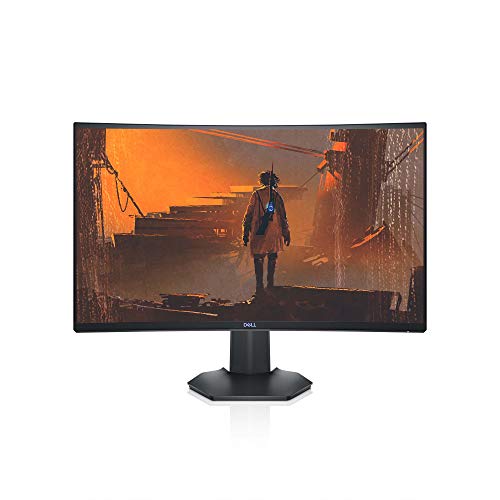
Dell S2721HGF 27 Inch 144Hz Curved Gaming Monitor

KTC H24F7 24 Inch 240Hz Gaming Monitor

MSI MAG 274CF X24 27 Inch 240Hz Curved Monitor
KTC H24T27 24 Inch QHD 100Hz IPS Monitor

KTC H24F8 24 Inch 190Hz HDR 400 Monitor

KTC H24S17P 24 Inch Curved 240Hz 1500R Monitor

KTC H24T7 24 Inch 180Hz QHD Ergonomic Monitor

KTC H24B9S 24 Inch 144Hz Frameless IPS Monitor

KTC H24V27 24 Inch 100Hz Frameless Office Monitor

INNOCN 49C1G 49 Inch Ultrawide Curved Monitor
A Breakdown Of The Leading Choices
The Dell S2721HGF has been around long enough to earn a loyal following among mainstream PC gamers, and it shows in how balanced the spec sheet feels. A 27-inch 1500R curved VA panel pairs with a 144Hz refresh rate (how many times the image redraws each second) and a 1ms MPRT response time, which together handle fast motion without the smearing cheaper panels tend to show. Nvidia G-SYNC Compatible certification and AMD FreeSync Premium (technologies that sync the monitor’s refresh to your GPU’s frame output to kill screen tearing) help keep the picture clean whether you run an NVIDIA or AMD card. For someone upgrading from a 60Hz office display, the jump in smoothness is the kind of thing you notice within the first match.
Where the S2721HGF genuinely earns its place is in the comfort details. The stand adjusts for height and tilt, which matters more during a long ranked session than most spec sheets acknowledge. The rear-mounted joystick for navigating the on-screen display (OSD, the menu system built into the monitor) is also a small but meaningful quality-of-life touch, since tapping physical buttons blind gets old fast. Set at a normal desk depth, the 1500R curve wraps the edges of the screen toward your eyes just enough to make FPS games and racing sims feel more involving.
Where It Excels
- 144Hz refresh rate keeps motion clean enough for both fast shooters and open-world games
- Dual adaptive sync support covers most modern GPU setups without compatibility guesswork
- Height- and tilt-adjustable stand supports longer play sessions without neck strain
- 27-inch 1500R curve is the sweet spot for most desks, wrapping the screen without overwhelming your field of view
- Rear joystick and shortcut buttons make menu tweaks quick once you set up your presets
Things To Consider
- Full HD resolution on a 27-inch screen means individual pixels can show at typical desk distances, especially in text-heavy menus
- VA panels tend to produce narrower viewing angles than IPS, so the picture can shift in color when you lean back
- No USB-C input, so laptop users will need a separate dock or HDMI adapter to hook up
Key Specs
Who It Suits Best
Mainstream PC gamers running mid-range hardware who want a reliable all-rounder rather than a specialty panel.
Where Another Pick Suits Better
Competitive Valorant or CS2 players chasing maximum frame rates should look at the KTC H24F7, which pushes to 240Hz on a smaller screen.
The KTC H24F7 is built around a simple but compelling promise: 240Hz on a 24-inch Fast IPS panel, at a price tier that used to be reserved for 144Hz displays. Fast IPS is a panel variant that keeps the wide viewing angles and color accuracy of standard IPS while pushing pixel response much faster, which is the reason competitive gamers have started to care about the format. The 1ms MPRT response time combined with adaptive sync support (sync tech that lets the monitor match variable frame rates from your GPU) means the picture stays intact during the sudden frame drops that happen in the middle of a firefight. For someone stepping up from a 60Hz or 75Hz panel, the difference reads like switching from standard to high frame rate video.
Compared to the Dell S2721HGF above, this KTC trades screen real estate for raw speed. A 24-inch panel keeps every part of the display close to your focal point, which helps in games where you scan for crosshair placement and don’t want your eyes darting across a wide screen. The 1080p resolution is a reasonable match for the size, since pushing higher pixel counts would require a much stronger GPU to fully exploit 240Hz.
The Helpful Details
- 240Hz refresh rate gives competitive players extra headroom for tracking fast-moving targets
- Fast IPS panel keeps colors and viewing angles solid, even compared to older TN esports panels
- Adaptive sync cuts down tearing when frame rates fluctuate between 60 and 240fps
- Compact 24-inch footprint fits smaller desks and crowded battlestation layouts
Worth Noting
- You’ll need a GPU capable of pushing close to 240fps to actually see the benefit in modern AAA titles
- 1080p at 24 inches won’t wow anyone used to sharper 1440p displays for desktop work
Right Fit For
Esports-focused players and competitive FPS enthusiasts who want maximum motion clarity on a compact panel.
Swap It Out When
If you mainly play story-driven single-player games, the MSI MAG 274CF X24 offers a similar 240Hz experience with a larger 27-inch canvas.
The MSI MAG 274CF X24 takes the same 240Hz formula as the KTC H24F7 and stretches it onto a 27-inch curved screen, which changes the feel in a way that matters for some genres. The 0.5ms GtG (gray-to-gray) response time is one of the snappier numbers in this roundup, and HDR readiness means the panel can accept an HDR signal for improved contrast, even if the peak brightness won’t rival a true HDR 600 display. AMD FreeSync Premium handles the adaptive sync side, so AMD card owners get certified tear-free gaming right out of the box. For racing sims and flight sims, that extra screen real estate with a curve makes the cockpit wraparound effect genuinely convincing.
MSI also built this around the gaming demographic specifically. The stand only supports tilt rather than full height adjustment, which is a real-world caveat: you may end up stacking it on a riser or mounting it to a VESA arm to get the right eye height. Connectivity covers HDMI and a legacy VGA port, which is unusual at this tier but useful if you’re bridging an older secondary device.
What Stands Out
- 240Hz refresh with 0.5ms GtG response keeps fast action sharp without trailing artifacts
- 27-inch curved canvas makes sim genres and open-world games feel more cinematic
- FreeSync Premium certification gives AMD GPU users a clean adaptive sync experience
- HDR-ready input handles modern HDR content streams and games
Trade Offs
- Stand only offers tilt, so a monitor arm or riser is often needed for proper ergonomic positioning
- Owners commonly report the included stand is the weakest link in the build, so VESA mounting is a common upgrade path
- Full HD on 27 inches means the pixel density is lower than 1440p competitors at the same size
Key Specs
Made For
Competitive and sim-focused gamers who want 240Hz on a larger 27-inch curved screen and don’t mind adding a monitor arm.
Look Elsewhere When
If you need a screen that pulls double duty for office work, the KTC H24T27 delivers a sharper 1440p picture on the same 24-inch class.
The KTC H24T27 is a reminder that 1440p doesn’t require a giant display to look its best. A 24-inch IPS panel at 2560×1440 hits a pixel density (the number of pixels packed into each inch of screen) that makes text crisp and edges clean, which is why productivity-focused users tend to gravitate toward this size. The 100Hz refresh rate is a noticeable step up from 60Hz or 75Hz for general desktop smoothness, and FreeSync and G-Sync compatibility means the variable refresh side is covered. This is the kind of display that feels equally at home in a spreadsheet as it does in a game of Civilization or Stellaris.
Unlike the MSI MAG 274CF X24 or the KTC H24F7, this panel isn’t chasing esports-grade refresh rates. Instead, it offers a sharper picture at a more modest speed, which is a fair trade if your gaming leans toward slower-paced titles. The IPS panel also keeps colors accurate across wider viewing angles, so leaning back or sharing the screen with someone next to you doesn’t shift the picture noticeably.
Standout Benefits
- 1440p resolution on 24 inches delivers noticeably sharper text and game detail than 1080p at the same size
- 100Hz refresh rate gives a smoother desktop experience without taxing mid-range GPUs
- IPS panel keeps colors and viewing angles consistent, which helps in mixed-use setups
- Adaptive sync compatibility covers both AMD and NVIDIA cards
Small Caveats
- 100Hz is modest by gaming standards, so competitive players will want something faster
Feature Snapshot
Best Suited To
Hybrid users who split time between work, study, and casual gaming and want a sharper picture than 1080p offers.
A Better Fit Elsewhere
Hardcore FPS players should pick the KTC H24F7 instead, since 240Hz matters more than resolution for that genre.
The KTC H24F8 sits in an interesting middle ground between the speed-first H24F7 and the resolution-first H24T27. A 24-inch Fast IPS panel running at 190Hz with a 133% sRGB color gamut and DisplayHDR 400 support (a baseline HDR tier that lifts peak brightness to 400 nits) gives it appeal beyond pure frame-pushing. The wider color space is a real upgrade for anyone playing story-driven games, watching HDR content, or doing light photo work on the same display. In practice, that means red rocks look richer in Horizon Zero Dawn and the shadowy corridors of horror games hold onto more detail.
Compared to the KTC H24F7 covered earlier, the H24F8 trades a bit of refresh rate headroom for a richer color presentation. The 190Hz ceiling is still well above what most casual players need, and the picture quality gains are immediately visible. The panel also keeps the compact 24-inch footprint, which makes it a good fit for desks where the gaming monitor doubles as a daily driver.
Everyday Perks
- DisplayHDR 400 adds noticeable contrast and brightness for compatible games and HDR video
- 133% sRGB coverage makes colors look richer than standard panel gamuts
- 190Hz strikes a solid middle ground between competitive speed and visual quality
- Fast IPS panel keeps response times snappy despite the color-focused feature set
Honest Caveats
- HDR 400 is a baseline tier, so the HDR effect is more subtle than on HDR 600 or higher displays
- 1080p resolution is a step back in sharpness compared to the KTC H24T27’s 1440p
Whose Shelf It Belongs On
Gamers who value color and contrast in story-driven or cinematic titles and don’t need esports-level refresh rates.
Not Your Match When
Esports players pushing for maximum frame rates should reach for the KTC H24F7, which tops out at 240Hz.
The KTC H24S17P is what happens when a brand combines the speed of a 240Hz panel with the immersion of a 1500R curve and a 3000:1 contrast ratio (the difference between the darkest blacks and brightest whites a panel can produce). On a 24-inch screen, a 1500R curve is fairly aggressive, meaning the edges wrap toward you noticeably more than on a 27-inch panel with the same rated curve. The result is a display that genuinely pulls you into single-player games, flight sims, and racing titles, while the high contrast ratio gives dark scenes more depth than typical IPS panels manage.
Set against the MSI MAG 274CF X24 from earlier, this KTC delivers a similar motion-handling profile but on a smaller curved canvas. For someone sitting close to the screen at a compact desk, the smaller size combined with the deeper curve can feel more natural than a 27-inch alternative. The 1ms response and adaptive sync support keep the picture stable even when frame rates swing during heavy action scenes.
What Earns Its Place
- 1500R curve on a 24-inch screen creates strong wraparound immersion for sim and RPG titles
- 3000:1 contrast ratio gives dark scenes real depth, a step above typical IPS panels
- 240Hz refresh keeps motion fluid in shooters and racing games
- Adaptive sync helps eliminate tearing across variable frame rates
Points To Note
- The aggressive 1500R curve on a 24-inch screen isn’t for everyone, since it can feel too tight at extended viewing distances
- 1080p resolution means text and UI elements won’t be as crisp as on a 1440p panel like the KTC H24T27
Perfect Match For
Gamers who sit close to their screen and want strong immersion in single-player or sim titles without moving to an ultrawide.
Reach For A Different Pick When
You want sharper detail for productivity. The KTC H24T27’s 1440p resolution is a better fit for that use case.
The KTC H24T7 tries to be everything to most people, and largely succeeds. A 24-inch Fast IPS panel with 2560×1440 resolution runs at 180Hz by default and can be overclocked to 185Hz (a small factory-approved boost beyond the rated spec), giving it a noticeable edge over the 100Hz H24T27 covered earlier. HDR 400 support and adaptive sync compatibility round out a feature set that works for gaming, content, and productivity. But the real story is the stand: full tilt, pivot, and height adjustment, plus VESA mount compatibility for those who prefer a third-party arm.
For anyone whose monitor doubles as a work and play display, the ergonomic flexibility alone is worth considering. Being able to rotate the panel vertically is a quiet bonus for coding, reading long documents, or managing chat windows alongside a main game. Owners commonly report that the build feels more adjustable than the price tier suggests, which is a fair compliment at this size.
Useful Strengths
- 180Hz refresh (overclockable to 185Hz) balances sharp 1440p visuals with smooth motion
- Full ergonomic stand supports tilt, pivot, and height adjustments for long sessions
- HDR 400 support lifts contrast for compatible games and video content
- VESA mount compatibility gives you an out if the included stand doesn’t fit your setup
Some Limits To Know
- Owners commonly report the OSD navigation buttons are less intuitive than a joystick, slowing down menu tweaks
- At 24 inches, 1440p text and UI elements look excellent, but window space is tighter than on 27-inch alternatives
Spec Overview
Built With In Mind
Hybrid users who want sharp 1440p detail, smooth 180Hz motion, and a stand that adjusts to fit long work and play sessions.
Where A Sibling Pick Shines
Hardcore sim fans who want a wider field of view should consider the INNOCN 49C1G, which replaces a dual-monitor setup with a single 49-inch ultrawide.
The KTC H24B9S keeps things simple and tidy, which is exactly why it earns a spot on this list. A three-sided frameless design (bezels trimmed down on three sides so the panel edge nearly touches the screen border) makes this monitor an obvious choice for multi-screen setups, since the thin borders reduce the visible gap between adjacent displays. The 144Hz refresh rate is a comfortable middle ground for gaming without demanding top-end hardware, and the IPS panel gives it solid color performance for general use. Streaming setups, dual-monitor workstations, and clean desk builds all benefit from a panel that disappears into the layout.
Compared to the higher-refresh KTC H24F7 and H24S17P, the H24B9S trades some speed for a more versatile everyday profile. At 1080p, the 24-inch screen keeps things sharp enough for typical viewing distances, and adaptive sync support means casual gaming sessions stay tear-free. The honest read is that this is a no-drama display for people who care more about their desk aesthetic than peak frame rates.
Key Advantages
- Three-sided frameless design keeps multi-monitor setups looking clean and connected
- 144Hz refresh rate is a comfortable target for both gaming and general use
- IPS panel produces accurate colors and wide viewing angles for shared viewing
- Adaptive sync support smooths out frame rate dips during gameplay
Possible Compromises
- 1080p at 24 inches won’t match the sharpness of 1440p panels like the KTC H24T27 or H24T7
- Stand adjustability tends to be basic at this tier, so a VESA mount is often the upgrade path
Who Will Love This
Streamers, multitaskers, and anyone running a clean dual- or triple-monitor setup who values a tidy, near-borderless look.
Consider Something Else When
You want sharper text and more desktop real estate. The KTC H24T7’s 1440p resolution is the better pick for that.
The KTC H24V27 is the most productivity-leaning pick on this list, which is intentional. A 24-inch panel at 1080p with a 100Hz refresh rate and a 4000:1 contrast ratio covers the basics for office work, study, and casual gaming without the cost or feature creep of a dedicated gaming display. The 103% sRGB coverage gives it enough color accuracy for content review and design work, while the low blue light mode helps during long reading or writing sessions. The frameless design also plays nicely with a second monitor if the workspace grows.
Versus the KTC H24T27 reviewed earlier, the H24V27 leans further into office comfort features rather than gaming speed. The 100Hz ceiling is the same, but the 4000:1 contrast ratio is a notable advantage for documents, video calls, and shows. For someone who games a few hours a week and works the rest of the time, this monitor handles both jobs without compromise.
Good Reasons To Consider
- 100Hz refresh rate is noticeably smoother than standard 60Hz office displays
- 4000:1 contrast ratio gives text and video a richer, less washed-out look
- Low blue light mode helps reduce eye fatigue during long work or study sessions
- Frameless design supports clean dual-monitor configurations
A Few Limitations
- 100Hz is modest for serious gaming, so this isn’t the right pick for fast-paced competitive titles
Who Should Grab It
Remote workers, students, and home office users who want one display that handles spreadsheets, video calls, and casual gaming.
Skip It When
Esports is the priority. The KTC H24F7’s 240Hz panel is built for that workload.
The INNOCN 49C1G is the outlier on this list, and that’s the point. A 49-inch 32:9 ultrawide with a 1800R curve and 3840×1080 resolution is essentially two 27-inch 1080p displays fused into one panel. The 144Hz refresh rate via DisplayPort 1.4, USB Type-C connectivity, and built-in speakers make it a serious desk centerpiece for sim racing, flight sims, and immersive RPGs. For someone running a racing wheel or HOTAS setup, the panoramic field of view is a genuine game-changer, the kind of upgrade that changes how cockpit games feel rather than just how they look.
The 49C1G is also one of the few panels here with USB Type-C, which is a real advantage for laptop users who want a single-cable setup for video, data, and power delivery. The trade-off is physical: this monitor needs significant desk depth and width, so it isn’t a fit for compact spaces. Owners commonly report the 32:9 aspect ratio takes a few days to adjust to, especially in UI-heavy games, but the immersion payoff is real once you settle in.
Notable Upsides
- 49-inch 32:9 ultrawide effectively replaces a dual-monitor setup with a single seamless canvas
- 1800R curve wraps the edges toward you for strong sim and racing immersion
- USB Type-C input simplifies laptop connections over a single cable
- Height and tilt adjustability help dial in the right viewing angle on a large panel
What To Weigh
- The 3840×1080 resolution spread across 49 inches gives a stretched look in some content, and pixel density is lower than 1440p alternatives
- This is a large, heavy monitor that demands significant desk space and a sturdy mount or stand
- Owners commonly report the built-in speakers are functional but basic, so headphones or external speakers are worth pairing
Quick Facts
The Right Fit
Sim racing, flight sim, and immersive RPG enthusiasts who have the desk space and want a single-panel replacement for a dual-monitor rig.
A Better Fit Elsewhere
Players with smaller desks or competitive shooter priorities should consider the KTC H24F7, which delivers high refresh rates in a compact frame.
What To Weigh Before Choosing A Curved Gaming Monitor
Match The Refresh Rate To Your Games
Refresh rate, measured in hertz (Hz), is the number of times the display redraws the image per second, and it shapes how motion looks more than any other spec. For competitive shooters and fighting games, 144Hz is the comfortable floor, while 240Hz and above gives esports players the extra smoothness they look for. Story-driven and slower-paced games run beautifully at 100Hz or 144Hz, and the difference between 240Hz and 144Hz is less noticeable outside of fast-twitch scenarios. Picking a refresh rate above what your GPU can reliably push is wasted potential, so balance the panel with the hardware you actually own.
Pick A Curve Depth That Fits Your Desk
Curve depth, described by an “R” rating (for example, 1500R), indicates how aggressively the screen bends. A smaller R number means a tighter curve. A 1500R curve on a 24-inch monitor feels notably more immersive than the same rating on a 32-inch screen. For desk depths around 24 to 30 inches, 1500R to 1800R tends to look the most natural. Ultrawides like the INNOCN 49C1G use gentler 1800R curves because the wider panel needs a softer bend to keep the whole image in view. Always consider the curve in the context of both screen size and how far you sit.
Resolution And Panel Type Work Together
Resolution (the total pixel count of the display) and panel type (the underlying LCD technology, such as IPS, VA, or TN) shape the picture more than refresh rate alone. A 1080p panel at 24 inches looks sharp, while 1080p stretched across 27 inches can start to look soft unless you sit farther back. IPS panels offer wider viewing angles and accurate colors, which is why they tend to be the everyday favorite. VA panels deliver deeper contrast ratios, which helps in dark games and cinematic content, though viewing angles tend to be narrower. QHD (1440p) hits a sweet spot for many people by adding sharpness without demanding a top-end GPU.
Don’t Overlook Ergonomics And Connectivity
A monitor’s stand and port layout affect daily use more than they get credit for. Height, tilt, pivot, and swivel adjustments (the directions a monitor can move on its stand) let you set the screen at the right eye level without stacking books underneath. VESA mount compatibility (a standard hole pattern on the back of the monitor, typically 75x75mm or 100x100mm, that lets you attach aftermarket arms and wall mounts) is worth having even if you don’t plan to use it now, since it gives you an upgrade path. On the port side, HDMI and DisplayPort cover most desktops, while USB-C simplifies laptop setups. Built-in speakers and headphone hooks are small bonuses, but rarely make or break a decision.
Key Considerations Across These Picks
Common Shopping Slip Ups
The most common mistake in this category is chasing a high refresh rate without checking whether your GPU can actually feed the panel. A 240Hz monitor is wasted on hardware that pushes 80fps in your favorite games, and adaptive sync only does so much to bridge that gap. Another trap is picking a 27-inch 1080p display for its price without realizing how soft the picture looks up close. Pixel density, not just resolution, is what makes text and UI elements feel sharp, and 24 inches at 1080p tends to be the cutoff where things still look clean at typical viewing distances.
Where The Extra Money Goes
Higher-tier curved monitors typically spend the budget on three things: panel quality, refresh rate, and stand flexibility. A premium panel gets you wider color gamuts, faster response times, and stronger contrast, all of which show up immediately in game detail and HDR content. Faster refresh rates above 240Hz are a real-world advantage mainly for esports, where tracking targets at high speed is the whole point. Better stands with full ergonomic adjustment cost the manufacturer more, but they save you from buying a third-party arm later. The upgrade makes sense for anyone gaming more than a few hours a week, since eye strain and posture matter more than most people expect over time.
Frequently Asked Questions
What Curve Rating Is Best For Gaming?
A 1500R curve tends to feel the most immersive on 24-inch to 27-inch monitors, while 1800R is a common choice for larger ultrawide panels where a tighter bend would distort the image. The right rating depends on how far you sit and how wide the screen is.
Is A Higher Refresh Rate Always Better?
Higher refresh rates make motion smoother, but the benefit plateaus for most players somewhere between 144Hz and 240Hz. Going much higher helps competitive players who can perceive the difference, but casual and single-player gamers often won’t notice.
Do Curved Monitors Work For Office Tasks?
Curved monitors can work well for office tasks, especially ultrawides, since the curve keeps the edges of a wide panel at a consistent viewing distance. For standard 16:9 productivity screens, a gentle curve is fine, but a tight curve on a 24-inch display can feel unusual for spreadsheet work.
What’s The Difference Between G-Sync And FreeSync?
G-Sync and FreeSync are both variable refresh rate technologies that prevent screen tearing by syncing the monitor’s refresh to the GPU’s output. G-Sync is NVIDIA’s proprietary system, while FreeSync is AMD’s open-standard approach, though many monitors now support both.
Is A 24-Inch Or 27-Inch Curved Monitor Better?
A 24-inch curved monitor works well at typical desk depths and keeps every part of the screen close to your focal point, which helps in fast-paced games. A 27-inch curved screen offers more immersion for sims and story games but needs more desk space and benefits from a higher resolution to stay sharp.


