


A great gaming desk shapes your entire setup. The right surface, the right footprint, and the right cable management determine whether marathon sessions stay comfortable or turn into shoulder pain by hour three. With more gamers working from the same room where they play, a desk that handles a dual-monitor battle station, a streaming rig, and a six-hour raid without wobble or clutter is worth a careful look.
This roundup covers ten curved and L-shaped gaming desks built for varied spaces and play styles, from compact corner units to sprawling command centers with built-in lighting and power. Each pick was evaluated on build, ergonomics, storage, and how it handles the realities of daily gaming: tangled cables, heavy monitors, and the occasional knocked-over drink.
The Main Contenders
The Main Contenders
Vari ComfortEdge Electric Standing Desk 72×30
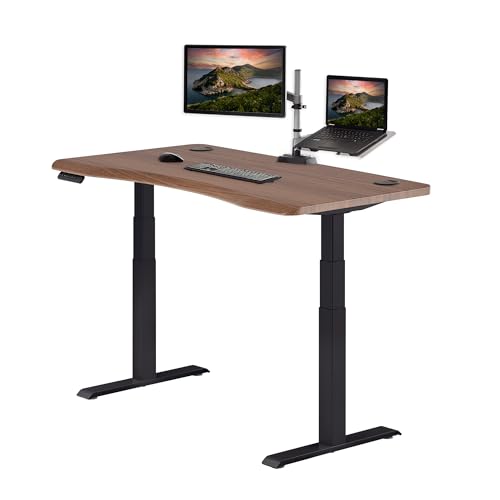
Vari Ergo Electric Standing Desk 54×26

BON AUGURE 54 Inch Modern Gaming Desk

SEDETA 78.7″ L Shaped Gaming Desk with Drawers

ODK 66″ L Shaped Gaming Desk with Power & LED

ODK 53″ L Shaped Gaming Desk with Shelves

ODK 48″ L Shaped Gaming Desk with LED

Mr IRONSTONE 51″ Gaming Desk with LED & Carbon Fiber

Reversible 69″ L Shaped Gaming Corner Desk
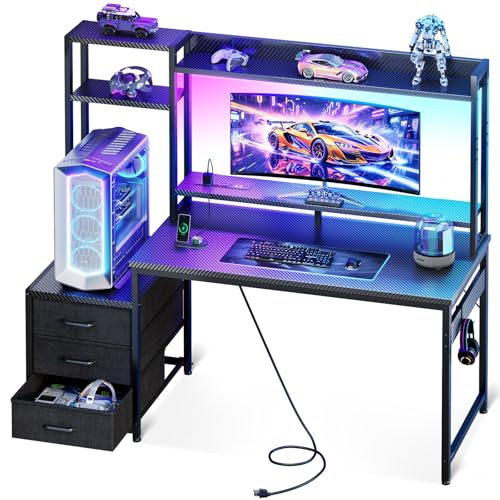
Casaottima 48″ Gaming Desk with Hutch & Drawers
A Deeper Look At The Lineup
The Vari ComfortEdge leans into a different mood than most gaming desks on this list. The 72-by-30-inch reclaimed-wood top gives the room a warmer, furniture-forward look that pairs well with a studio apartment or a converted spare bedroom. It also adjusts: dual motors raise the surface from about 25 inches up to 50.5 inches, so you can move from a seated raid to a standing creative session without clearing the desk.
The sloped ComfortEdge front is the quiet hero. A waterfall-style front curves down so your forearms rest at a more neutral angle, which matters during a long editing timeline or a ranked grind that stretches past midnight. Four programmable height presets let you store sitting, standing, and bar-height positions, and the whole frame stays stable even with three monitors bolted on top. You give up dedicated gaming flourishes like RGB and integrated power, but you get a desk that works as hard in a 9-to-5 context as it does after hours.
What Earns Its Place
- 72-inch reclaimed-wood surface handles triple-monitor rigs with room for a stream deck and notebook
- Dual-motor electric lift with four programmable height presets and a 25-to-50.5 inch range
- Sloped ComfortEdge front reduces wrist and forearm pressure during extended sessions
- Furniture-grade finish fits living spaces, not just dedicated gaming rooms
Things To Consider
- No built-in power outlets or USB ports; you will need a surge strip nearby
- Lacks dedicated gaming touches like RGB lighting or a headset hook
- Large footprint may overwhelm smaller rooms; measure your corner first
Feature Snapshot
Who It Suits Best
Remote professionals and streamers who split time between spreadsheets and ranked matches and want a desk that blends into a living space.
Look Elsewhere When
The ODK 66″ L Shaped Gaming Desk fits better when built-in power outlets and integrated LED lighting matter more than standing-desk ergonomics.
The Vari Ergo shrinks the ComfortEdge formula into a more compact 54-by-26-inch package. It keeps the curved waterfall front that softens the edge against your wrists, but pairs it with a walnut-and-black finish that reads more office than arcade. The same dual-motor lift, four memory presets, and 25-to-50.5-inch range carry over, so you still get genuine sit-stand flexibility in a footprint that fits a one-bedroom apartment.
Where the bigger ComfortEdge suits a triple-monitor studio, this one targets a cleaner two-monitor setup. It handles a 27-inch primary plus a 24-inch side panel with space left for a keyboard, mouse pad, and notebook. You sacrifice the reclaimed-wood warmth for a slightly more laminate-forward look, and there are no built-in charging ports, so a power strip lives underneath. The honest read is that this is the pick for someone who wants the wrist-friendly waterfall edge and standing-desk mechanics without dedicating an entire wall to the desk.
Well-Handled Touches
- Curved waterfall front edge eases forearm pressure during long sessions
- Electric height adjustment from 25 to 50.5 inches fits most heights
- Four memory presets simplify switching between sitting, standing, and creative modes
- Smaller 54-inch footprint works in tighter rooms and home offices
Honest Caveats
- No integrated power or USB ports, so a power strip is necessary
- Lacks gaming-specific touches like RGB or a headset hook
- 54-inch width is tight for triple-monitor setups
Quick Technical Notes
Made For
Players who log long sessions, deal with wrist or forearm fatigue, and want a sit-stand desk without giving up a guest room.
Consider Something Else When
The BON AUGURE 54 Inch Modern Gaming Desk suits shoppers who want a more industrial-gamer look at a friendlier price point and do not need height adjustment.
The BON AUGURE takes a different swing than the Vari desks. It skips sit-stand motors and built-in lighting in favor of a clean industrial-wood surface mounted on a sturdy metal frame, all sized at 54 inches wide. That makes it a more accessible entry point for a first real gaming desk, especially in a room that doubles as a homework station or a creative workspace.
The metal frame earns its keep when you park a chunky monitor and a tower on the surface. Owners commonly report that the assembly takes a little patience, but the result stays steady through accidental desk slams and mid-match mouse yanks. The look leans toward a warmer wood-and-black combo than pure gamer black, so it does not clash if you eventually move the setup from a bedroom to a den. You give up charging ports and LED mood lighting, but for many people that is a fair trade for a desk that looks grown-up.
Noteworthy Benefits
- Sturdy metal frame supports heavier monitor arms and mid-tower cases
- 54-inch surface fits dual monitors with room for a keyboard tray and notebook
- Industrial-wood finish reads as home-office furniture, not just a gaming piece
- Simpler assembly than many larger L-shaped alternatives
Small Caveats
- No built-in power outlets or USB ports
- No height adjustment; sits at a fixed standing-desk-style height
- Lacks integrated LED lighting for ambient gaming setups
Best Suited To
First-time gaming desk shoppers, students, and remote workers who want a solid surface without the cost of motors or LEDs.
A Better Fit Elsewhere
The Vari Ergo Electric Standing Desk makes more sense for anyone who values sit-stand ergonomics and a curved wrist-friendly edge.
The SEDETA goes big. At 78.7 inches across the main side and 47.2 inches on the return, this L-shaped desk is built for the kind of setup that needs a triple-monitor array, a streaming PC, a console, and still wants room for snacks. The L wraps around a corner so you can use one wing for the battle station and the other for paperwork, a second chair, or a wall-mounted display.
Storage sets it apart from the other L-shaped options here. A built-in display cabinet, a dedicated printer rack, and integrated drawers keep controllers, cables, and paperwork out of sight. LED strips add the ambient glow that most gaming setups expect, with enough surface area to actually appreciate the lighting. The trade-off is footprint: this desk wants a full corner, and the assembly is more involved than the simpler BON AUGURE. You may find the size excessive in a small bedroom, but for a dedicated game room it solves a lot of clutter in one piece of furniture.
Points In Its Favor
- Massive 78.7-inch L-shaped surface supports three monitors and a console side-by-side
- Built-in display cabinet, drawers, and printer rack consolidate storage
- Integrated LED lighting for ambient gaming atmosphere
- Wraps around a corner to define a dedicated play zone
Practical Considerations
- Footprint is too large for small rooms or studio apartments
- Assembly is more involved than simpler straight desks
- No built-in power outlets; you will need a surge strip for all those devices
Spec Overview
Perfect Match For
Dedicated gaming room owners running triple-monitor, multi-PC, or streaming setups who want everything in one L-shaped footprint.
Swap It Out When
The Reversible 69″ L Shaped Gaming Corner Desk fits a more typical bedroom where you need flexibility on which side the return faces.
ODK’s 66-inch L-shaped desk brings built-in power to the table, which sounds small until you actually try to plug a tower, two monitors, a stream light, and a charging phone into one wall outlet. Three standard outlets and two USB ports sit right on the desktop, so charging cables stay short and a power strip can stay on the floor. The integrated LED strip runs through 10 colors and 10 lighting modes, and remembers your last setting, so it behaves more like a permanent part of the desk than a stick-on afterthought.
The footprint is large enough to anchor a corner gaming room but smaller than the SEDETA, so it fits bedrooms with a bit more breathing room. The L shape gives you a side wing for a second monitor or a notebook without crowding the main keyboard area. You may find the LEDs are a touch gimmicky if you do not care about ambient lighting, but the power outlets alone justify the choice for anyone who has fought cable spaghetti under their current desk.
The Helpful Details
- Three built-in outlets and two USB ports reduce dependence on power strips
- LED strip with 10 colors, 10 modes, and memory function for ambient lighting
- 66-inch L-shaped surface fits dual monitors and a side workspace
- Side shelving for monitors, speakers, or collectibles
Room For Improvement
- Larger corner footprint than straight desks in this list
- LED lighting is decorative rather than functional task lighting
- No sit-stand height adjustment
Right Fit For
Multi-device gamers and streamers who want power and lighting built in, and who can dedicate a corner of a room to an L-shaped layout.
Not Your Match When
The BON AUGURE 54 Inch Modern Gaming Desk suits smaller rooms where a straight 54-inch desk is enough and built-in power is not required.
ODK’s 53-inch L-shaped desk shrinks the corner format for tighter spaces. The integrated storage is the real story: dual shelves, a CPU stand, an accessory hook, and a small tool bag cover the basics without forcing you to bolt on third-party shelves. Three power outlets and two USB ports on the desktop keep the charging situation tidy, which is unusual at this footprint.
It targets a realistic use case: a single 27-inch monitor or a smaller dual setup, a tower on the CPU stand, and a keyboard with a mouse pad. The LED strip runs along the back edge, so you get a soft glow without the LEDs competing with your screen. The honest read is that this is the ODK to choose when the bigger 66-inch model would dominate the room, but you still want power ports and a clean corner footprint.
A Strong Showing
- 53-inch L-shaped footprint fits in smaller bedrooms and dorm corners
- Three outlets and two USB ports built into the desktop
- Integrated shelving, CPU stand, and accessory hook reduce extra furniture
- LED lighting adds atmosphere without overpowering the room
Some Limits To Know
- Too compact for triple-monitor gaming rigs
- Fixed height; no sit-stand adjustment
- CPU stand sizing may not fit every full-tower case
Whose Shelf It Belongs On
High-school and college-age players, plus apartment dwellers, who want an L-shaped corner desk with power and storage in a smaller package.
Where A Sibling Pick Shines
The ODK 48″ L Shaped Gaming Desk with LED fits a slightly tighter budget and footprint when storage accessories are less important.
The 48-inch ODK is the smallest L-shaped option in this lineup, and it does not feel like a compromise. Three power outlets and two USB ports are tucked into the desktop, so even in a studio or a small bedroom you can plug in a monitor, a tower, and a phone without crawling behind furniture. The LED strip ties the corner together visually and pairs well with a 24- or 27-inch primary monitor.
A side hook holds a headset or a backpack, which keeps the floor clear. The L-shaped design still gives you a small return surface for a notebook or a stream deck, but the overall footprint stays friendly to studio apartments. The trade-off shows up when you want a wider keyboard tray or a second monitor; at 48 inches, you are choosing one main display and a tight setup rather than a sprawling battle station. For a single-PC player or a console-based setup, that is usually plenty.
What It Does Well
- 48-inch L-shaped design fits studio apartments and tight bedrooms
- Three outlets plus two USB ports on the desktop simplify cable management
- LED strip adds atmosphere for evening sessions
- Headset or bag hook keeps accessories off the floor
A Few Limitations
- Surface is tight for dual 27-inch monitors
- No sit-stand height adjustment
- Smaller L return limits side workspace
Who Should Grab It
Console-first players, students, and apartment dwellers who need an L-shaped corner desk with power and LEDs in the smallest practical size.
Another Choice May Suit
The ODK 53″ L Shaped Gaming Desk with Shelves fits a similar audience but with extra integrated storage for slightly larger rooms.
The Mr IRONSTONE leans into the gamer aesthetic without going overboard. The carbon-fiber-style surface adds a textured, race-inspired feel under the mouse, and the included RGB light strips can be controlled from your phone, which is a small but useful touch if you like to retune your ambient lighting on the fly. The 51-inch L-shaped footprint strikes a middle ground: roomy enough for a 27-inch primary and a 24-inch secondary, compact enough for a typical bedroom.
What sets this one apart is the included cup holder and headphone hook, which are the kind of accessories you usually end up buying separately. The monitor stand lifts your display to a more ergonomic height and frees up the desk surface. You give up dedicated power outlets on the desktop, so a power strip still lives underneath, but the overall package feels like it was designed by someone who has actually set up a gaming corner. The honest read is that this is the desk for someone who wants the look and the accessories out of the box.
The Good Stuff
- Carbon-fiber-style surface gives the desk a race-inspired gaming look
- RGB light strips controllable from a phone app for custom scenes
- Includes a cup holder, headphone hook, and monitor stand
- 51-inch L-shaped layout fits a wide range of bedrooms
Less-Strong Areas
- No built-in power outlets or USB ports on the desktop
- Phone-controlled RGB adds steps versus a simple inline remote
- Fixed height, no sit-stand adjustment
Built With In Mind
Mid-tier gaming enthusiasts who care about RGB ambience, included accessories, and a carbon-fiber-style aesthetic.
Where It May Fall Short
The ODK 66″ L Shaped Gaming Desk fits better when built-in power outlets are a non-negotiable part of the setup.
The Teraves reversible L-shaped desk solves a problem most other gaming desks ignore: not every room has the same corner orientation. The desk top and return can be flipped so the longer wing sits on the left or the right, which means you can adapt the layout to a window, a door, or a roommate’s side of the room. At 69 inches, it has more than enough surface for a dual-monitor gaming rig plus a side wing for paperwork or a laptop.
Two open shelves on the side give you room for books, game cases, or a small speaker pair. The reversible design is the headline feature, but the storage layout is the quiet strength: a lot of L-shaped desks leave you figuring out where to put things. The honest read is that this is the practical pick for renters and students who want flexibility without paying extra for RGB or built-in power. You may find the design understated compared to the flashier ODK models, and that is exactly the point.
A Few Strong Suits
- Reversible L-shaped layout adapts to left- or right-facing corners
- 69-inch surface fits dual monitors plus a side workspace
- Two-tier open shelving for books, games, and speakers
- Clean design that fits a bedroom or a shared-space office
Details To Watch
- No integrated power outlets or LED lighting
- Open shelves collect dust and require occasional reorganization
- No sit-stand height adjustment
Right Fit For
Renters, students, and anyone with an awkward room layout who wants the L-shaped format without committing to one corner direction.
Skip It When
The Casaottima 48″ Gaming Desk with Hutch fits better when enclosed storage and a built-in hutch matter more than corner flexibility.
The Casaottima wraps a 48-inch gaming desk with an overhead hutch, multi-tier display shelves, and three enclosed drawers. That last part is the headline: most gaming desks lean on open shelving, but three drawers give you a real place to hide cables, controllers, and small accessories. The dedicated PC shelf underneath is sized to fit most ultrawide monitors and full-tower cases, which is unusual at this footprint.
LED lighting ties the look together, and the hutch doubles as a place to show off collectibles, a stream deck, or a soundbar. It is a compact command center for a smaller room, and the enclosed storage makes it a strong fit for shared spaces or bedrooms where clutter needs to disappear at the end of the night. The trade-off is depth: with the hutch above and the drawer bank to the side, the usable desktop area is smaller than the headline 48 inches suggests. Still, for a tidy setup with everything in reach, this one punches above its size.
Practical Pluses
- Overhead hutch with multi-tier shelves for display and storage
- Three enclosed drawers keep controllers and accessories hidden
- Dedicated PC shelf sized for most full-tower cases
- LED lighting adds ambient atmosphere
Possible Compromises
- Hutch and side drawers reduce usable desktop depth
- No built-in power outlets or USB ports
- Fixed height with no sit-stand adjustment
Who Will Love This
Tidy gamers, collectors, and anyone who wants a compact command center with enclosed storage in a smaller room.
Where Another Pick Suits Better
The Mr IRONSTONE 51″ Gaming Desk with LED fits better when RGB lighting and a phone-controlled light strip matter more than enclosed storage.
What to Weigh Before Choosing Your Gaming Desk
Size and Room Footprint
The biggest decision is the size. Measure your corner or wall before picking a desk, then subtract room for chair movement and any doors or windows that swing in. A 78-inch L-shaped desk looks impressive on a product page but can swallow a 10-by-10 bedroom. Curved gaming desks in the 48-to-54-inch range tend to be the sweet spot for most bedrooms.
Surface Shape and Ergonomics
Curved and L-shaped surfaces do more than look the part. A curved or waterfall front edge softens the contact point for your wrists and forearms, which matters during long sessions. L-shaped layouts create a defined play zone and a separate workspace, but they also lock you into a corner orientation. If your room layout might change, a reversible design like the Teraves desk keeps your options open.
Power, Lighting, and Storage
Built-in power outlets and USB ports eliminate the need for a sprawling power strip on the floor. LED lighting is largely aesthetic, but it does reduce the need to buy RGB strips separately. Storage varies wildly: open shelves look clean but collect dust, while enclosed drawers hide clutter but eat into your desktop depth.
Weight Capacity and Build
Larger monitor arms and full-tower cases put real stress on a desk. Check the manufacturer’s weight capacity, especially for any L-shaped unit with a CPU stand. A solid metal frame and a thicker desktop surface tend to stay steady through accidental desk slams and aggressive mouse movements.
Smart Considerations Across These Picks
Where Shoppers Go Wrong
A common slip-up is picking the biggest desk on the page without measuring the room first. Oversized L-shaped units can dominate smaller bedrooms and force awkward chair placement. Another trap is assuming every “gaming desk” has power outlets and LEDs; many do not, and adding a power strip later can ruin a clean setup. Always confirm the actual weight capacity and the dimensions of any CPU stand if you run a full tower.
What Separates Premium From Basic
The jump from a budget desk to a premium one usually shows up in three places: the motor system on sit-stand models, the thickness and finish of the desktop, and the integration of accessories like power outlets, LED strips, and storage. A higher-tier desk typically adds features that reduce the need for third-party add-ons: a power strip, a separate monitor riser, a clip-on headset hook. The upgrade pays off most when you spend real hours at the desk, but for casual play or a smaller budget, mid-tier options still deliver a strong experience.


