


Your gaming rig deserves steady, reliable thermals whether you push a flagship processor through marathon sessions or just want quieter airflow in a small case. A mismatched CPU cooler turns into throttling, fan ramp, and that hot-air blast out the back panel. This lineup of air towers, dual-tower workhorses, and one AIO (all-in-one liquid cooler that combines a pump, radiator, and fans in a closed loop) covers everything from compact SFF (small form factor) builds to high-TDP (thermal design power, the maximum heat a cooler must dissipate, expressed in watts) gaming setups, so you can match the cooler to the case, the chip, and your tolerance for noise.
An Overview Of The Picks

Noctua NH-U12S chromax.Black Tower CPU Cooler
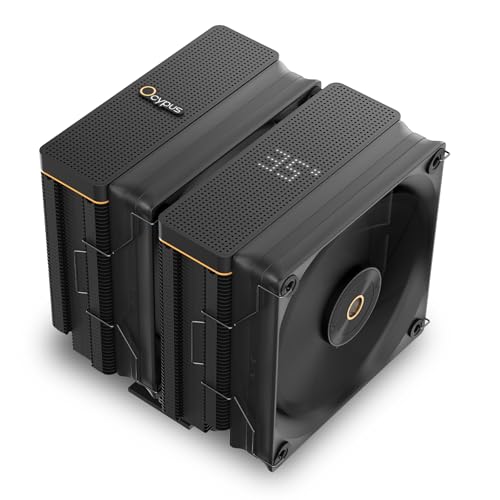
Ocypus Iota A62 AM5 Air CPU Cooler
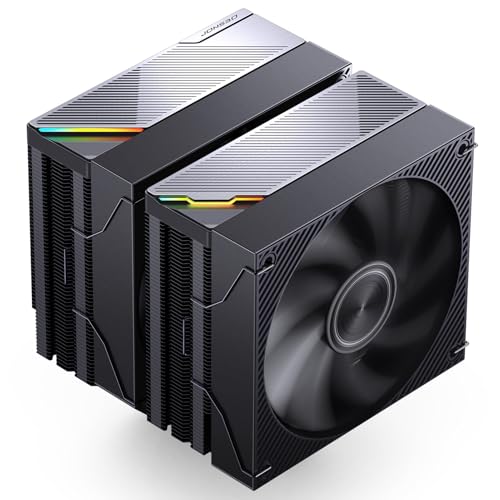
JONSBO CA90 Black Dual-Tower CPU Cooler

JONSBO CA80 Black Dual-Tower CPU Cooler

JONSBO CA40 Black CPU Cooler

Thermalright Phantom Spirit 120 CPU Cooler
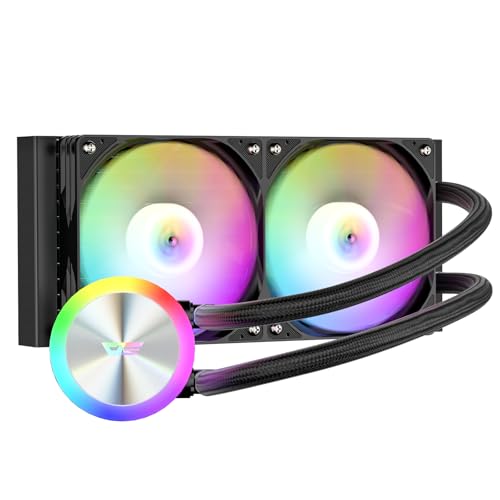
darkFlash DG240 AIO Liquid CPU Cooler

Ocypus Iota A40 CPU Cooler with Display

Ocypus Delta A40 SE BK ARGB CPU Cooler

Ocypus Gamma A40 ARGB CPU Cooler
Why These Options Stand Out
The Noctua NH-U12S chromax.Black is the kind of cooler you forget is there, and that’s the point. Standing 158mm tall with a single 120mm PWM (pulse-width modulation, a fan control method that varies speed based on temperature) fan, it slips into most mid-tower cases without crowding tall memory modules or blocking the top PCIe (peripheral component interconnect express, the standard slot for graphics cards and add-in cards) slot on an ATX board.
For most mid-range gaming builds, this hits a sweet spot of silence and capability. The all-black heatsink and fan swap the usual beige-and-brown scheme for something that actually matches darker builds, a small touch owners appreciate when the side panel stays on.
A Favorable Mix
- Low noise output at idle and moderate load, which matters during long multiplayer sessions
- 158mm height clears most tower cases without forcing low-profile RAM
- Proven heatsink platform backed by long-running industry recognition
- Doesn’t overhang RAM slots on most ATX and Micro-ATX motherboards
Honest Caveats
- Single-tower design means less thermal headroom than the dual-tower picks later in this list
- All-black aesthetic is more subtle than the ARGB options from Jonsbo and Ocypus
The Right Fit
Mid-range gamers who want near-silent operation and clean case compatibility over flashier lighting.
Consider Something Else When
Push a 270W-class chip, like a high-end Ryzen X3D or an unlocked K-series Intel, where the JONSBO CA90 offers more heat-pipe headroom.
The Iota A62 leans into the showcase-build crowd with a circular dot-matrix top panel that displays temperatures, fan speed, and a small looping graphic. It’s the kind of detail you catch yourself watching when you should be aiming. Built for AM5 (AMD’s current mainstream desktop socket), it also covers the usual AMD and Intel bases through compatible mounting hardware.
Compared to the slim Noctua above, this one is a chunkier dual-tower design that asks for case clearance. Owners running tempered glass side panels and a clean interior get the visual payoff they bought into.
What Works In Its Favor
- Matrix digital display adds a real-time readout that doubles as case bling
- Perforated top panel supports passive heat bleed through the tower
- Strong cooler height for serious AMD AM5 chips
- Standout visual identity for tempered-glass builds
Points To Note
- Display feature requires the Ocypus app and a working connection, which adds setup time
- Larger footprint rules out compact cases that fit the Gamma A40 below
Who It Suits Best
Builders who treat the inside of the case as part of the look and want thermal data visible at a glance.
Swap It Out When
A compact mATX case tops your shortlist, where the Ocypus Gamma A40 fits where the Iota A62 simply cannot.
The CA90 is the heavyweight of the Jonsbo Mute lineup, and it earns that title with a 270W TDP rating, dual-tower fin stack, and a 130mm mid-mounted fan paired with a 120mm front unit. Air pushed through six copper heat pipes is the quiet answer to a hot-running unlocked chip.
For builds that sit near a case window with a clear view of the cooler, the metallic pull grille and ARGB (addressable RGB lighting, where each LED can be individually controlled for color and effect) accents keep it from looking like a slab. It also covers both modern AM5/AM4 and Intel LGA 1700/1851 sockets, so it pairs with whatever CPU generation you’re running.
The Value In It
- 270W TDP headroom handles flagship gaming CPUs at stock or mild overclock
- Dual-tower airflow design keeps delta-T (the temperature difference between CPU and ambient air) comfortable during long sessions
- Six copper heat pipes spread thermal load efficiently across the fin array
- ARGB accents add personality without going full-RGB
- Wide socket coverage for both AMD and Intel current platforms
Worth Noting
- 159mm height demands case clearance, measure your tower before checkout
- Heavier than single-tower picks, which some lighter mounting brackets can struggle with
Key Specs
Made For
Gamers running flagship chips at sustained load, like high-refresh multiplayer titles or streaming workloads, who want air cooling without fan ramp noise.
Where Another Pick Suits Better
For budget-focused builders, the Thermalright Phantom Spirit 120 covers a similar dual-tower footprint at a friendlier entry cost.
Take the CA90’s dual-tower platform, swap the mid fan down to a 120mm unit, and you land at the CA80. A 260W TDP rating still gives the cooler plenty of room to breathe, and the same six-heat-pipe layout keeps the contact patch efficient.
It’s the practical sibling, slightly less ambitious than the CA90 but easier to source fans for down the road. If your case fan budget leans toward standard 120mm replacements, that’s a quiet win.
Where It Delivers
- Dual-tower cooling with mainstream 120mm fan support
- Six copper heat pipes handle sustained gaming loads
- ARGB top accent syncs with most motherboard lighting ecosystems
- 260W TDP covers the vast majority of gaming CPUs without thermal throttling (where the CPU automatically reduces its clock speed to avoid overheating)
- Full socket coverage for both AMD AM5/AM4 and Intel LGA 1700/1851
Trade Offs
- Drops 10W of rated TDP headroom compared to the CA90
- Mid-fan position limits clearance for tall RAM with light bars
Best Suited To
Builders who want most of the CA90’s thermal envelope in a friendlier 120mm-fan ecosystem for easier swaps later on.
Not Your Match When
You’re chasing the absolute thermal ceiling on a heavily overclocked chip, where the darkFlash DG240 AIO pulls heat off faster.
The CA40 lands in the middle of the Jonsbo Mute family. Four copper heat pipes and a single 120mm fan run through a 157mm tower, hitting a 225W TDP rating that’s more than enough for the average mid-range gaming CPU.
It skips the dual-tower bulk of the CA80 and CA90, which means it breathes easier in tighter cases while still showing off the metallic grille and ARGB top. For most gaming PCs that don’t push extreme overclocks, this is a comfortable middle path.
Bright Spots
- Single-tower form factor eases installation compared to wider dual-tower units
- 225W TDP handles mainstream gaming CPUs comfortably
- ARGB top accent matches the rest of the Mute Series visual language
- Broad socket support across AMD AM5/AM4 and Intel LGA 1700/1851
Less Ideal Details
- Less thermal overhead than the CA80 or CA90 for power-hungry chips
- 157mm height still rules out some SFF cases
Who Will Love This
Mainstream gamers with mid-range CPUs in standard mid-tower cases who want ARGB flavor without paying for dual-tower capacity they won’t use.
Look Elsewhere When
Your case tops out at 135mm CPU clearance, where the Ocypus Gamma A40’s 133mm profile actually fits.
The Phantom Spirit 120 punches above what most budget air coolers manage, packing seven heat pipes and dual 120mm TL-C12B V2 PWM fans into a dual-tower shell. AGHP 4.0 (an anti-gravity heat pipe design that keeps coolant distribution consistent regardless of cooler orientation) helps the contact plate stay efficient no matter how the cooler is mounted.
It’s a workhorse cooler for builders who care more about thermal numbers than top-cover LEDs. Coverage spans AM4, AM5, and a long list of Intel LGA sockets, including the newest LGA 1851.
What Pays Off
- Seven heat pipes push thermal transfer well for the price tier
- Dual 120mm fans move serious air without spinning to maximum
- AGHP 4.0 keeps contact-plate performance consistent in any orientation
- Broad socket coverage including LGA 1851 for Intel Arrow Lake builders
Practical Considerations
- Larger footprint needs careful RAM clearance checking on some boards
- Stock fans are fine, but aftermarket swaps are common for noise tuning
Key Specs
Perfect Match For
Builders prioritizing thermal performance-per-dollar on a tight budget who don’t mind skipping ARGB lighting.
A Better Fit Elsewhere
For showcase builds where lighting matters, the JONSBO CA80 brings ARGB alongside a comparable dual-tower profile.
The DG240 is the only AIO in this roundup, and it earns its place by clearing heat off the CPU faster than any air tower in the same footprint. A 240mm radiator (a long, thin heat exchanger that dissipates heat from the liquid using case airflow) pairs with PWM daisy-chain fans (multiple fans wired in series from a single header, simplifying cable management) and a 3-phase 6-pole pump that handles up to a 315W TDP load.
Compared to the Jonsbo dual-tower options above, the DG240 trades the chunky heatsink for a cleaner top-down look on the motherboard. The trade is installation complexity, since AIOs demand radiator mounting and tube routing. Most experienced builders handle it in under 30 minutes.
Strengths Worth Knowing
- 240mm radiator handles the most power-hungry gaming CPUs in this list
- Daisy-chain PWM fans simplify cable management to a single header
- ARGB sync across the pump and fans keeps lighting cohesive
- Broad LGA 1851, 1700, AM4, and AM5 socket coverage
Things To Weigh Up
- AIO installation takes longer than a single-tower air cooler
- Requires radiator mounting space at the front or top of the case
- Closed-loop pumps carry a long-term reliability question, though widely reported service life is solid
Right Fit For
Gamers running an overclocked or high-TDP chip who want the cleanest motherboard view possible and have radiator clearance to spare.
Reach For A Different Pick When
Your case can’t fit a 240mm radiator, where the JONSBO CA90 dual-tower gives up some peak cooling for case-friendly air-only installation.
The Iota A40 shrinks the Iota A62 concept into a single-tower design that still carries the dot-matrix top display. It feels like Ocypus answered the request, “give us the screen, but in a cooler that fits more cases.” Coverage includes both AMD and Intel current sockets, and the matrix display shows temperature, RPM, or a small animation depending on the software setting.
For mid-range gaming builds that want personality without the full dual-tower footprint, this lands as a real sweet spot. It sits between the A62 and the more compact Gamma A40 below in both size and ambition.
Standout Benefits
- Matrix digital display delivers real-time thermal data at a glance
- Single-tower form factor eases installation and case fit
- Visual identity matches the larger Iota A62 for coordinated builds
- Current-platform AMD and Intel socket coverage
Soft Spots
- Display feature needs the Ocypus app configured for full functionality
- Single-tower thermals trail the dual-tower Jonsbo options in the same family
Feature Snapshot
Who Should Grab It
Mid-range builders who want the Iota A62’s screen identity in a smaller package and a friendlier case footprint.
Skip It When
You need maximum thermal headroom, where the Iota A62’s dual-tower design handles the same screen with more cooling overhead.
The Delta A40 SE handles a common build annoyance with grace. If your motherboard lacks an ARGB header (a 3-pin 5V connector on the motherboard used to control addressable RGB lighting), you can still get a single-color glow by connecting the fan to a standard 12V 4-pin header. Plug into a 5V 3-pin ARGB header instead, and you unlock full motherboard-synced lighting.
A 190W TDP rating covers mainstream gaming CPUs comfortably, and the geometric top cover gives the cooler a distinct silhouette. It’s a thoughtful design for builders working with older or budget motherboards.
Practical Pluses
- Flexible lighting options for both ARGB and non-ARGB motherboards
- 190W TDP handles mainstream gaming CPUs without stress
- Geometric top cover adds visual texture through a glass side panel
- Direct-touch heat pipe design (where the copper pipes make physical contact with the CPU’s integrated heat spreader for faster thermal transfer) for efficient thermal transfer
Where It May Fall Short
- 190W TDP leaves thinner headroom than the Jonsbo dual-tower options for power-hungry chips
- Non-ARGB connection locks lighting to a single color, which may disappoint RGB purists
Built With In Mind
Builders using budget or older motherboards that lack ARGB headers but still want a cooler that lights up cleanly.
Another Choice May Suit
You own a modern AM5 board with full ARGB headers, in which case the Ocypus Iota A62 gives a richer lighting and cooling package.
The Gamma A40 is the shortest cooler in this lineup at 133mm, designed for cases that reject anything taller. The 100mm PWM fan and four 6mm heat pipes handle a 200W TDP rating, which is more than enough for compact gaming builds using efficient CPUs.
It also runs a hidden light strip under a matrix-pattern top cover for a clean ARGB look that doesn’t shout. Compared to the Jonsbo dual-tower picks earlier, this trades raw thermal headroom for the case-fitting flexibility SFF builders live for.
What It Does Well
- 133mm height fits the tightest mainstream tower and many SFF cases
- 200W TDP covers compact-build gaming CPUs without issue
- Hidden ARGB light strip under the top cover looks clean through glass panels
- Direct-touch heat pipes transfer CPU heat efficiently to the fin stack
Points To Keep In Mind
- 200W TDP is the lowest of the dual-tower-leaning picks, so heavy overclockers should look elsewhere
- 100mm fan moves less air than the 120mm units in larger coolers, so expect a bit more RPM under stress
Quick Facts
Whose Shelf It Belongs On
SFF builders and small-case enthusiasts who need clearance headroom without giving up ARGB visual flavor.
Where A Sibling Pick Shines
For a full mid-tower build with room to spare, the Ocypus Iota A62 delivers stronger cooling and the same Ocypus visual language.
What To Weigh Before Picking a CPU Cooler
Match TDP Headroom to the CPU You Run
Every CPU cooler carries a TDP rating, and matching it to your processor is the single biggest factor in keeping thermals in line. A 65W chip runs cool on almost any cooler here, but a 170W unlocked part demands the JONSBO CA90’s 270W envelope or the darkFlash DG240 AIO. Owners with mainstream gaming CPUs can comfortably land on the JONSBO CA40, Ocypus Delta A40 SE, or Thermalright Phantom Spirit 120 without leaving performance on the table.
Mind the Cooler Height Against Your Case
Cooler height is the most overlooked clearance number. A 159mm Jonsbo tower might physically not fit in a case rated for 155mm CPU coolers, even if everything else is compatible. Compact SFF builds often cap at 135mm, which is exactly why the Ocypus Gamma A40’s 133mm profile earns its slot. Always measure case clearance before picking, and remember that fan thickness adds to overall height.
Decide Between Air and Liquid Cooling
Air coolers win on simplicity, longevity, and zero pump noise. The trade is size: a beefy dual-tower is large and heavy. An AIO like the darkFlash DG240 handles the most power-hungry chips in a cleaner footprint, but it adds radiator mounting, tube routing, and a small pump that can become audible under load. For a typical mid-range gaming PC, air covers everything; for a heavily overclocked flagship, liquid is the cleaner answer.
Plan Around Socket Support and RAM Clearance
Socket support determines whether the cooler mounts to your board. All ten picks here cover the current AMD AM5/AM4 and Intel LGA 1700/1851 platforms, but exact bracket inclusion varies, so check the listing for your specific CPU. RAM clearance matters just as much. Some dual-tower coolers overhang the first memory slot, blocking tall RGB DIMMs (dual in-line memory modules, the standard RAM sticks that plug into motherboard slots). Slim towers like the Noctua NH-U12S chromax.Black and the Ocypus Gamma A40 leave RAM slots fully exposed.
Key Considerations Across These Picks
Mistakes Worth Dodging
Picking a cooler that physically fits the spec sheet but overhangs your RAM slots is the most common slip-up. Measure twice: cooler height, RAM height with heat spreaders, and case CPU clearance all in one go. Forgetting the second fan or bracket is another frequent miss, so confirm what’s in the box before mounting. Builders with older motherboards should also check for an ARGB header if they want full lighting control on picks like the Ocypus Delta A40 SE.
Where The Extra Money Goes
Stepping up to a dual-tower cooler like the JONSBO CA90 buys more heat pipes, larger fin stacks, and higher TDP headroom. Most of that extra thermal margin goes unused on a 65W or 105W CPU, but it pays off during long gaming sessions when boost clocks hold longer and fan ramp stays quieter. The darkFlash DG240 AIO justifies its premium by handling chips the air coolers can’t quite reach, with a cleaner motherboard look as a side benefit. For most mainstream gaming PCs, the middle of this roundup is the honest sweet spot.
Frequently Asked Questions
Do CPU coolers need to match the exact CPU model?
No, they only need to match the socket. All ten picks here support current AMD AM5/AM4 and Intel LGA 1700/1851, so they fit a wide range of gaming CPUs. TDP rating is what really matters, and that depends on how hard you push the chip.
Can a small air cooler handle a gaming PC?
For mainstream CPUs, yes. A compact cooler like the Ocypus Gamma A40 fits SFF cases and still covers a 200W TDP. High-end unlocked processors benefit from a dual-tower like the JONSBO CA90 or an AIO like the darkFlash DG240.
How loud are these CPU coolers under load?
Noise depends on fan speed and curve. PWM-equipped fans in picks like the Noctua NH-U12S chromax.Black, the Thermalright Phantom Spirit 120, and the Jonsbo Mute Series ramp up only when thermals demand it. Most owners report comfortable acoustics during typical gaming, with a noticeable ramp only during stress tests.
Is an AIO better than an air cooler for gaming?
Not always. An AIO like the darkFlash DG240 handles the highest-TDP chips with a cleaner motherboard footprint, but air coolers like the JONSBO CA90 match it on most gaming CPUs with simpler installation. The choice comes down to chip power, case clearance, and personal preference on aesthetics.
How often should CPU cooler thermal paste be replaced?
A common rule of thumb is every two to three years for active gaming rigs, or sooner if you remove the cooler for any reason. Standard thermal paste (a thermally conductive compound applied between the CPU and cooler base to fill microscopic gaps) does dry out gradually, and a fresh application restores full thermal transfer between the CPU and cooler base.
Closing Remarks
The right CPU cooler for your gaming PC comes down to matching TDP, case clearance, and the visual language you want behind the glass. Start with the CPU you’re running, then narrow the list by height, socket, and lighting. A 133mm tower handles compact builds, a 159mm dual-tower covers flagship gaming chips, and a 240mm AIO clears the heaviest loads cleanly. Whichever route you take, the picks above cover the realistic options most gaming builders actually consider.


