


Sweaty backs and numb shoulders are the price most people pay for marathon gaming or work sessions, and a regular office chair rarely solves either problem. The right seat keeps your spine aligned, lets you tilt back between rounds, and ideally moves air across the backrest when the room gets warm. This roundup focuses on chairs that lean heavily into ergonomic engineering, breathability, and active cooling features, so you can match a pick to your space, your body, and your habits.
A Quick View Of The Lineup

Hbada E3 Pro 2026 Ergonomic Mesh Office Chair (Black)

GTPLAYER Pink Cat Ear Gaming Chair with Memory Foam

MEENICE Cat Ear Gaming Chair with Footrest (Black/Purple)

LiberNovo Omni PRO Dynamic Ergonomic Chair with Fan

LiberNovo Omni SE Ergonomic Office Chair, 48cm
LiberNovo Omni SE Ergonomic Office Chair, 45cm
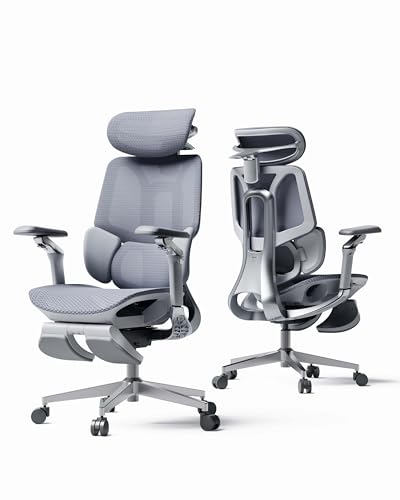
Hbada E3 Pro 2026 Ergonomic Mesh Office Chair (Grey)
Hbada E3 Air 2026 Ergonomic Mesh Office Chair
The Picks, Examined More Closely
The Hbada E3 Pro leans hard into the “posture-following” idea without any motors or batteries. A gravity-driven lumbar system pivots and slides as you shift, so the support point tracks your lower back whether you sit upright for spreadsheets or lean back for a quick breather. The mesh backrest is the real star for warm rooms, letting air move through instead of trapping heat the way a foam-and-fabric chair tends to.
You also get a 4D headrest (a headrest you can adjust in four directions: height, depth, tilt, and rotation) and armrests with a wide range of motion, plus a pull-out footrest for mid-session naps. If you’ve been bouncing between cheaper Amazon chairs, the build refinement here feels like a genuine step up. The look stays understated in black, so it fits home offices that double as gaming corners.
Where It Helps
- Gravity-driven lumbar wraps your back without needing you to dial in a knob every morning.
- Mesh backrest keeps airflow moving, which matters more than people expect on summer nights.
- 4D headrest and armrests let lankier frames find a neck position that doesn’t crane.
- Pull-out footrest turns the chair into a quick rest stop between long matches.
- Backed by an accidental-damage protection plan option for peace of mind.
Things To Consider
- Mesh takes a little more care to clean than bonded leather, since crumbs settle into the weave.
- The footrest adds length behind the chair, so tight rooms with a bed right behind the desk may feel cramped.
Who It Suits Best
Gamers and remote workers who toggle between focused desk time and reclined breaks, and who run warm in ordinary chairs.
Where Another Pick Suits Better
If you want a more expressive aesthetic for a streaming setup, the GTPLAYER Pink Cat Ear Gaming Chair leans into personality that the E3 Pro deliberately avoids.
Where the Hbada E3 Pro plays it neutral, the GTPLAYER chair leans all the way into kawaii territory without feeling like a toy. Velvet upholstery, cat-ear accents on the headrest, and embroidered motifs on the backrest make it a clear visual fit for pastel rooms, anime-themed battlestations, or any corner where personality matters as much as posture. The memory foam lumbar pillow is a small but meaningful upgrade over standard fiber fill, holding its shape through long sessions.
Adjustable lumbar and headrest support lets the chair adapt to different torso lengths, and the reclining back tilts back far enough for a relaxed watch-along. Velvet is softer against bare arms than PU leather (a polyurethane-coated faux leather common on gaming chairs), which is a quiet bonus during summer. For most viewers, this is a chair you’ll pick based on the vibe first, comfort a close second.
Points In Its Favor
- Distinctive silhouette that doubles as part of your room’s decor, not just furniture.
- Memory foam lumbar pillow keeps its supportive shape, where cheaper foam often flattens within months.
- Reclining back adjusts to a comfortable mid-recline angle for videos and chats.
Worth Noting
- Velvet attracts pet hair and lint, so a lint roller becomes part of the regular maintenance routine.
- The plush, fully upholstered backrest traps more heat than a mesh-back alternative, which is worth weighing if your room runs warm.
Made For
Streamers, content creators, and anyone building a setup where the chair is part of the visual brand.
Consider Something Else When
For pure cooling in a hot room, the LiberNovo Omni PRO Dynamic Ergonomic Chair with Fan is a more focused fit than this expressive option.
The MEENICE chair threads a similar needle to the GTPLAYER but swaps velvet for a more practical finish and adds a proper footrest. Cat-ear accents and paw-shaped cushions give it that signature playful look, while the reclining back and extendable leg rest make it surprisingly useful for late-night reading or controller-down breaks. The frame is rated to handle a wider range of body types, which gives it a longer useful life as your setup evolves.
It’s a sensible pick for smaller rooms and dorm setups where a chair has to multitask between gaming, streaming, and homework. The black-and-purple colorway is a touch subtler than the all-pink GTPLAYER, so it slips into a more grown-up space without losing the whimsy. You also get the same protection-plan option for accidental damage, which is rare at this tier.
Why It Works Well
- Built-in footrest turns it into a lounger for cutscenes, studying, or napping between sessions.
- Removable cat-ear decoration lets you tone the look down when you want a cleaner silhouette.
- Wider weight accommodation than many aesthetic gaming chairs in the same range.
Honest Caveats
- The plush seat cushion and armrests hold on to body heat, so a small desk fan becomes useful in summer.
- Color-rich PU leather is easy to wipe, but white stitching can show scuffs faster than a monochromatic chair.
Best Suited To
Students, dorm dwellers, and gamers who want expressive styling and a footrest without stepping up to a premium tier.
Look Elsewhere When
For breathable mesh and serious posture engineering, the Hbada E3 Pro 2026 in black handles long workdays more comfortably than this cushier option.
The LiberNovo Omni PRO is the only chair in this lineup that actively moves air across your back, and that single feature changes how a hot room feels during a long match. A built-in fan pairs with a dynamic recline system that keeps the headrest, backrest, and armrests moving in sync as you lean, so your screen and your spine stay roughly aligned. The 48cm seat depth suits taller frames better than the smaller LiberNovo variants you’ll see later in the list.
Compared to the Hbada E3 Pro, this chair trades the gravity-driven lumbar for a more articulated backrest that bends with you rather than pivoting on a single hinge. The trade-off is mechanical complexity, which means more parts to maintain over the years. For most setups running warm in summer, however, the active cooling alone justifies the closer look.
Everyday Perks
- Built-in fan actively cools the backrest, which mesh chairs can only approximate passively.
- Synchronized recline keeps your gaze level with the monitor through wide tilt ranges.
- 48cm seat depth supports taller users whose thighs run long.
- Dynamic lumbar adapts as you shift, so fidgeting no longer breaks your posture.
Trade Offs
- Active fan adds a soft whir that some users find noticeable in quiet recording setups.
- More moving parts mean long-term maintenance has more potential failure points than a simpler mesh chair.
- Heavier than the Hbada options, so moving it for cleaning the floor takes a little more effort.
Who Will Love This
Hot-room gamers, streamers in windowless setups, and anyone who runs warm enough that passive mesh still leaves a sweaty back.
Skip It When
If active cooling feels excessive and you just want refined ergonomics, the LiberNovo Omni SE 48cm delivers the same recline geometry without the fan.
The Omni SE strips the fan from the PRO and replaces automatic lumbar with a manual dial, which is a thoughtful trade for shoppers who like to set-and-forget. The 48cm seat depth mirrors the PRO’s generous sizing, and the same dynamic recline geometry keeps headrest, back, and arms moving together as you lean. Five recline positions, from an upright 105° to a laid-back 160°, cover the full range from spreadsheet focus to mid-day recharge.
It sits between the fan-equipped PRO and the simpler Hbada E3 Pro in both ambition and complexity. The honest read is that you give up active cooling but gain a quieter chair with fewer points of failure. For most climate-controlled home offices, that’s the right swap.
A Few Strong Suits
- Five-stage recline range lets you pick a precise angle for work, calls, and gaming without locking into a vague “lean back” zone.
- Manual lumbar is faster to dial in than automatic systems that drift over time.
- Quieter than the PRO since there’s no fan motor running in the background.
Points To Keep In Mind
- Manual lumbar means re-adjusting if you change tasks or hand the chair to someone else.
- Without a fan, hot-room comfort still depends on AC or a separate desk fan.
Perfect Match For
Taller users who want a wide recline range, a quiet seat, and don’t need active cooling in a climate-controlled room.
Reach For A Different Pick When
Smaller frames will find the LiberNovo Omni SE 45cm a more proportional fit than this 48cm version.
The 45cm Omni SE keeps every mechanical benefit of its bigger sibling and trims the seat depth for smaller bodies. Petite users and teens often find 48cm seats too long, leaving a gap behind their knees that pushes pressure forward onto the thighs. This version closes that gap without giving up the synchronized recline or the five-position tilt range.
It also fits tighter rooms where a longer chair would crowd the wall behind the desk. Manual lumbar keeps the chair quiet and easy to maintain, and the mesh backrest handles the breathability job that the PRO’s fan handles on the larger chair. If you’ve been sized out of premium ergonomic chairs in the past, this is worth a closer look.
A Favorable Mix
- 45cm seat depth fits shorter torsos and thighs without leaving a pressure gap behind the knees.
- Compact footprint suits small bedrooms, dorm desks, and narrow home offices.
- Same recline range and synchronized backrest articulation as the 48cm version.
Small Caveats
- Taller users above roughly 5’10” may find the shallower seat too short for full thigh support.
- Manual lumbar, like the 48cm SE, requires re-dialing after significant position changes.
Whose Setup It Belongs In
Petite gamers, students, and shorter adults who want premium ergonomics without paying for a seat depth they don’t need.
Where A Sibling Pick Shines
The Hbada E3 Pro 2026 (Grey) is a simpler mesh chair for users who don’t need dynamic recline and want an easier assembly.
The grey E3 Pro is mechanically identical to its black sibling, with the same gravity-driven lumbar, 4D headrest, and pull-out footrest. The difference is purely aesthetic, and it’s a meaningful one for shared spaces, partner setups, or home offices where a black gaming throne feels too aggressive. Light grey mesh also tends to hide dust less effectively than black, but the trade-off is a softer visual presence in a room full of light woods or pastel decor.
As with the black version, the breathable mesh backrest helps a warm room feel less oppressive. The 720° armrests (a marketing term describing the wide arc the armrests can swing through) provide flexibility for narrow tabletops and standing-desk transitions. If the black E3 Pro caught your eye but the palette didn’t match your room, this is the same chair in a friendlier finish.
Real Benefits
- Neutral grey palette blends into shared home offices, guest rooms, and minimalist decor.
- Same adaptive lumbar engineering as the black E3 Pro, so posture support is uncompromised.
- Mesh backrest supports airflow during long work or gaming sessions in warm rooms.
Areas To Watch
- Lighter mesh shows lint and pet hair more readily than the black version.
- Pull-out footrest still adds rear clearance that very tight rooms may not have.
Right Fit For
Shared home offices, partners sharing a desk, and shoppers who want ergonomic engineering without a stark black gaming look.
Another Choice May Suit
For a chair that moves with you through wider recline angles, the LiberNovo Omni SE 48cm handles work-to-rest transitions more dynamically.
The E3 Air sits at the top of the Hbada stack and adds auto recline on top of the E3 Pro’s gravity-driven lumbar. That means the chair reads your weight and reclines a touch when you lean back, then returns as you sit upright, without manual lever-pulling. The 140° tilt range isn’t as wide as the LiberNovo chairs, but the airier mesh backrest and 4D headrest make up for the smaller recline arc during long days.
For shoppers who liked the E3 Pro but wanted a chair that “responds” rather than waits to be adjusted, the Air is the natural step up. It also pairs well with standing-desk routines, since the auto recline handles the frequent sit-stand transitions smoothly. The honest read is that this is a thoughtful middle ground between mechanical mesh chairs and the more elaborate dynamic systems above.
Practical Advantages
- Auto recline reads your weight and tilts back as you lean, removing the manual lever from your routine.
- Mesh backrest prioritizes airflow for hot rooms or summer-heavy gaming sessions.
- 3-zone lumbar fills the gap at the lower back where flat-back chairs tend to leave you unsupported.
- 4D headrest and armrests adjust to a wide range of body types without tools.
Factors To Consider
- Auto recline is less intuitive to fine-tune than a manual lock when you want a specific angle for a task.
- Mesh maintenance requires more frequent vacuuming than a wipe-down leather-style backrest.
Built With In Mind
Long-haul desk workers, programmers, and competitive gamers who want ergonomic response without diving into a fully dynamic system.
Swap It Out When
For active cooling and a wider recline range, the LiberNovo Omni PRO with its built-in fan handles heat better than this mesh-only option.
What Matters Most Before Choosing Cooled Gaming Chairs
Cooling Method And Breathability
Mesh is the most common passive cooling approach because it lets air pass through the backrest, while built-in fans add active airflow for genuinely hot rooms. If you game in a basement or a sun-facing room without AC, a fan-equipped chair makes a noticeable difference. For climate-controlled spaces, mesh usually handles the job.
Lumbar Support And Posture Engineering
Look for lumbar systems that adapt as you shift, rather than a single static cushion that fits one position. Gravity-driven, dynamic, and manual-dial systems all work, but they behave differently during long sessions where you don’t want to fiddle with knobs. A chair that follows your spine saves you from breaking posture every time you lean forward for a keybind.
Seat Depth, Recline Range, And Frame Size
Seat depth matters more than people expect. A 48cm depth supports taller thighs, while a 45cm depth fits shorter users without leaving a pressure gap. Recline range, measured in degrees, controls how far back you can lean for breaks, and anything from 105° to 160° covers both focused work and full rest.
Build, Materials, And Long-Term Use
Mesh is breathable but needs occasional vacuuming, velvet is soft but attracts pet hair, and PU leather wipes clean but traps heat. Consider what fits your room’s temperature, your cleaning routine, and how often the chair gets used by multiple people.
Where Shoppers Go Wrong
Picking On Style Alone
A pink velvet chair looks great in photos, but if your room runs warm, that same upholstery can turn into a sauna. Match the cooling method to your room temperature, not just the look you want on camera.
Ignoring Seat Depth
A chair that’s too long for your legs pushes pressure onto the back of your knees, which leads to numbness and fidgeting. A chair that’s too short leaves your back unsupported. Always cross-check seat depth against your height.
When Paying More Pays Off
Active Cooling Vs. Passive Mesh
The jump from mesh to a built-in fan chair is one of the few upgrades that genuinely changes how a hot room feels. If you game or work in a space without reliable AC, the premium for a fan-equipped chair is one of the easier upgrades to justify.
Dynamic Recline Vs. Static Tilt
Chairs with synchronized recline keep your headrest, back, and arms moving together, so your gaze stays on the monitor through the whole arc. Static tilt chairs leave you readjusting as you lean. For anyone who shifts positions often, that added articulation reduces small daily frictions.
Frequently Asked Questions
Do cooled gaming chairs actually keep you cool?
Mesh-back chairs cool you passively by letting air pass through the backrest, while fan-equipped chairs push air across your back actively. In a hot room, the fan style makes a noticeable difference during long sessions.
Are gaming chairs good for everyday office work?
Most modern gaming chairs have adjustable lumbar, headrests, and recline that work just as well for spreadsheets and video calls. The aesthetic is louder than a traditional office chair, which is the main trade-off for shared spaces.
How long do ergonomic gaming chairs typically last?
Mesh and steel-frame chairs tend to outlast foam-and-PU-leather models because the breathable back doesn’t sag and the frame handles daily use without flexing. Owners commonly report five-plus years from well-built mesh ergonomic chairs with reasonable care.
What recline angle is best for gaming?
A recline range of about 105° to 140° covers most gaming postures, with the lower end for competitive focus and the upper end for casual single-player sessions. Chairs that go past 150° lean more toward napping than active play.
Is a footrest necessary on a gaming chair?
A footrest helps if you take regular breaks or alternate between sitting and semi-reclined positions. For pure competitive play where you stay upright, a footrest adds bulk without much benefit.
The Takeaway
A good cooled gaming chair should fit your body, your room’s temperature, and the way you actually use your desk. The Hbada E3 Pro covers everyday cooling and posture, the LiberNovo Omni PRO adds active fan cooling for hot rooms, and the GTPLAYER or MEENICE options handle the aesthetic-driven side of the market. Pick the chair that matches your real conditions, and the rest of your setup tends to fall into place.


