


A clean entertainment setup rarely happens by accident, and a packed controller drawer usually follows a crowded console shelf. The right add-ons free up space, cool the hardware, and stretch the ports you actually have. This list rounds up ten console gaming accessories that solve real headaches, from taming a tangled PS5 to giving your Xbox Series X the USB ports Microsoft forgot.
Your Options, Compared

HIDEit Switch Wall Mount with Controller Mounts
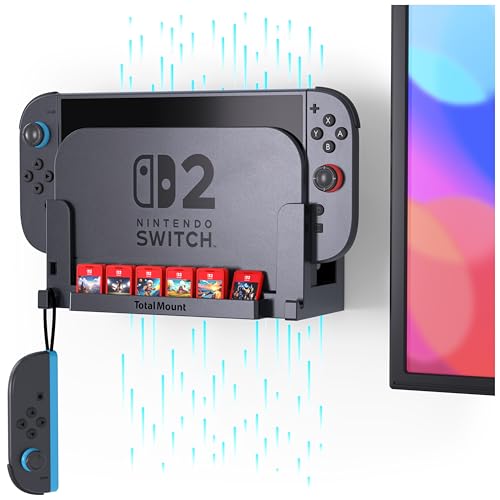
TotalMount Nintendo Switch 2 Wall Mount

Venssu Retro Console Deck Box Orange

PGmoon Console Backpack for PS5 Models
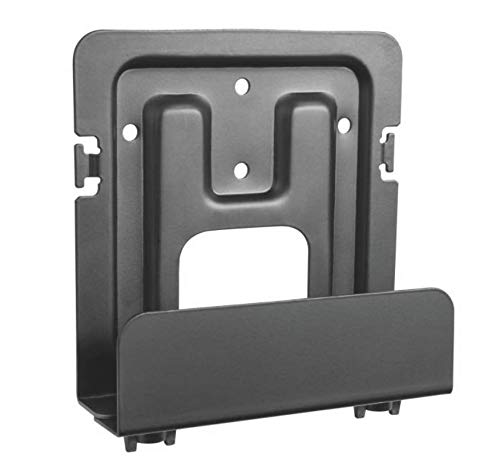
Mount Plus MP-06-02 Adjustable Wall Mount

Mount Plus D-06-03 Super Wide Wall Mount

Crotrain 4-Port USB 3.0 Hub Black for Xbox

Crotrain 5-Port USB Hub for Xbox

Crotrain 4-Port USB 3.0 Hub White for Xbox

Mount Plus MP-CPB-2 CPU and Console Holder
A Closer Look At Each Pick
Switch owners know the dock eats more shelf space than the console itself deserves. The HIDEit Switch Wall Mount solves that by lifting the dock off the entertainment center and pinning the two Joy-Cons or Pro Controllers to matching brackets beside it. For most people, that swap alone reclaims enough room for a soundbar or a row of games.
Made in the USA from powder-coated steel, the mount ships with drywall anchors and screws in the box. You will need a drill and a level, and a second pair of hands helps during the lift-and-mark step. For tight media centers, this mount is a tidy upgrade over the stock dock stand.
Where It Excels
- Steel construction holds the dock securely without flexing.
- Controller brackets keep two pads off the shelf and within reach.
- Clean, low-profile look blends with most wall-mounted TV setups.
- All mounting hardware ships in the box, so no extra trip to the hardware store.
Points To Keep In Mind
- Drilling and a stud check are required, so renters may want landlord approval first.
- Once the dock is on the wall, sliding a cartridge in and out feels a little less convenient.
- You may find the included anchors firm on older plaster walls.
Who It Suits Best
Switch owners with a wall-mounted TV and a shallow media shelf who want their dock out of the way.
Look Elsewhere When
The TotalMount for Nintendo Switch 2 is the smarter choice for anyone already on the newer dock generation, since it is built for that exact chassis.
Anyone upgrading to a Switch 2 dock runs into a familiar problem: yesterday’s mounts do not fit today’s hardware. The TotalMount for Nintendo Switch 2 is engineered around the larger chassis, with cutouts that line up with the dock’s airflow path. That focus on heat management makes it a smart pick for marathon sessions.
Designed in the USA, the bracket ships with the mounting hardware you need for a clean install. The dock clicks into place and stays put, and the open-back design keeps cables routed without pinching. The honest read is that this is a purpose-built mount, not a recycled first-generation part.
Standout Benefits
- Cutouts match the Switch 2 dock for proper airflow during long play.
- Open-back channel simplifies cable routing and HDMI hookup.
- Snug fit reduces vibration when the dock’s fan ramps up.
Honest Caveats
- Not compatible with original Switch, OLED, or Switch Lite docks.
- Requires a drill and basic wall anchors, so plan a small installation window.
Feature Snapshot
Made For
Early Switch 2 adopters who already have a wall-mounted display and want a clean, ventilated install.
A Better Fit Elsewhere
The HIDEit Switch Wall Mount suits you better if you are still running the original Switch dock and need controller brackets included.
Trading card nights tend to come with a pile of deck boxes, dice, and half-zipped sleeves sliding off the table. The Venssu Retro Gaming Console Deck Box leans into the tabletop crossover by shaping its case like a tiny game console, complete with a “game screen” window that frames your Commander card. It is a gift-able pick for the player who has everything functional already.
Inside, the lid props up for fast access during play, and two dividers keep tokens, spindowns, and extra decks separated. The PU leather exterior wipes clean after a soda spill, and the microfiber lining keeps card faces scratch-free.
Strengths Worth Knowing
- Holds around 100 double-sleeved cards or 120 single-sleeved, depending on your setup.
- Display window spotlights your Commander so opponents see it the second you sit down.
- Magnetic closure keeps the lid secure in a packed game bag.
- PU leather resists scuffs better than bare cardboard deck boxes.
Worth Noting
- Bulky profile eats more backpack space than a standard cardboard deck box.
- Window can show off a favorite card, but a heavy sleeve may sit slightly proud of the frame.
Right Fit For
MTG Commander and similar format players who want storage that doubles as table decor and conversation starter.
Not Your Match When
The PGmoon Console Backpack is the smarter pick for anyone whose main carry problem is a full-size console, not cards and tokens.
Anyone who has tried to cram a PS5 into a suitcase knows the pain. The PGmoon Console Backpack is shaped for the standard PS5, the PS5 Slim, and the PS5 Pro, with an adjustable padded strap that holds the console locked in place. The main compartment also swallows a 15.6-inch laptop or portable monitor for hybrid work-and-play trips.
Heavy-duty nylon on the outside and PE foam padding through the interior take the sting out of rougher transit. For most frequent flyers and dorm-room haulers, that combination beats tossing a console loose in a duffel.
The Value In It
- Compatible with all three current PS5 form factors, which protects your investment across upgrades.
- Built-in laptop sleeve makes the bag a true two-purpose carrier.
- PE foam liner absorbs shocks better than soft-shell sleeves.
Trade Offs
- You need to remove the console stand and route cables carefully to avoid pressure points.
- Backpack bulk when fully loaded can feel heavy on longer walks between transit and hotel.
Feature Rundown
Best Suited To
PlayStation owners who travel often, split time between homes, or haul their console to a friend’s place for co-op nights.
Skip It When
A wall mount like the Mount Plus D-06-03 Super Wide Wall Mount suits you better if your console lives in one spot and the goal is freeing shelf space, not mobility.
Media centers get crowded fast when the cable box, modem, and slim game console all want shelf real estate. The Mount Plus MP-06-02 lifts those slim and wide devices off the surface and pins them to the wall behind the TV. The adjustable arms clamp the device snugly without crushing the casing.
It accepts a vertical height up to 10 inches, with adjustable length between 3.5 and 10 inches and depth between roughly 38mm and 67mm. That range covers most cable boxes, modems, and slimmer consoles like a disc-less PS5 digital edition or an Xbox Series S.
Reasons It Performs
- Adjustable arms handle a range of device sizes without needing extra shims.
- Drywall screws and anchors come in the box for a same-day install.
- Steel bracket keeps heavier gear planted without sagging over time.
Room For Improvement
- Not deep enough for full-size PS5 or Xbox Series X consoles.
- Weight limits are not heavily advertised, so overloading with a UPS battery is risky.
Key Specs
Who Will Love This
Anyone organizing a wall-mounted TV with a cable box, modem, or slim console that needs to disappear behind the screen.
Swap It Out When
The Mount Plus D-06-03 Super Wide Wall Mount is the stronger match for full-size consoles, since its wider depth range handles larger hardware.
The MP-06-02 is a tidy option for slim gear, but full-size PS5 and Xbox Series X owners need deeper reach. The Mount Plus D-06-03 Super Wide fills that gap with a depth range between 2.9 and 4.9 inches, which swallows the chunkier consoles without strain. It can mount on the wall or directly behind a VESA-compatible TV, which is a nice touch for clean installs.
You get the same drywall-friendly setup as the smaller sibling, with adjustable width up to 10 inches. VESA support for 75×75 and 100×100 patterns means you can pair it with most TV mounts. Compared to the MP-06-02, this is the go-to when your console is the heaviest thing on the shelf.
What Stands Out
- Wider depth range handles PS3, PS4, PS5, and Xbox Series X with room to spare.
- VESA-compatible mounting lets the bracket hide behind the TV entirely.
- Sturdy build keeps heavier consoles planted during accidental bumps.
Practical Considerations
- Bulkier than the MP-06-02, so it stands out a bit more on visible walls.
- Behind-the-TV mounting requires checking VESA clearance and HDMI port angles first.
Quick Facts
Perfect Match For
PlayStation and Xbox owners with full-size consoles who want them hidden behind the TV rather than crowding the shelf.
Reach For A Different Pick When
The Mount Plus MP-CPB-2 CPU and Console Holder is the better call for tower PCs and battery backups, since it is designed to bear heavier loads under a desk.
The Xbox Series X has one USB port on the front, and that is not enough for a charging pad, a headset, a controller battery dock, and an external drive at the same time. The Crotrain 4-Port USB 3.0 Hub in black mounts directly to the console and adds three USB 3.0 ports plus a Type-C 3.0 port. It is a tidy fix that does not require a power brick.
Installation is genuinely plug and play. You peel the backing, stick the hub into the console’s USB slot, and the adhesive holds it in place. No driver hunt, no firmware flash, and no hunting for a spare outlet.
The Helpful Details
- Adds both USB-A and Type-C in one low-profile attachment.
- Stays put once mounted, with no wobble during cable swaps.
- USB 3.0 speeds handle external SSDs and charging simultaneously.
Where It May Fall Short
- Not compatible with Xbox One or Xbox 360, so older consoles need a different hub.
- Repeated removal can weaken the adhesive over time.
Spec Overview
Built With In Mind
Xbox Series X and S owners running multiple wired accessories and tired of swapping cables in and out of the lone front port.
Where A Sibling Pick Shines
The Crotrain 5-Port USB Hub is the stronger fit if you only need charging for older pads and do not need USB 3.0 throughput.
For households where the Xbox doubles as a charging station, the Crotrain 5-Port Hub offers four USB 2.0 ports plus a single Type-C port. That layout favors charging pads, headsets, and older controllers over external SSDs. If your bottleneck is keeping four pads topped up between sessions, this hub is built for that exact job.
The body uses the same peel-and-stick mounting as its 4-port sibling, so installation is consistent across both hubs. Pick this one if charging throughput matters more than data speed, since USB 2.0 tops out well below USB 3.0.
What Pays Off
- Five ports handle a full set of charging docks and headsets at once.
- Stays flush against the console once mounted, with no shift during use.
- Same quick install as the smaller hub, so no learning curve.
Possible Compromises
- USB 2.0 speeds are slow for external SSDs, so data use is limited.
- Like its sibling, the adhesive may weaken with repeated removals.
Whose Shelf It Belongs On
Xbox owners with multiple wireless controllers and a headset dock who want one attachment to charge everything at once.
Not Your Match When
The Crotrain 4-Port USB 3.0 Hub Black suits you better if external storage speed matters, since it trades one charging port for faster data throughput.
The white version of the 4-port Crotrain hub targets Xbox Series S owners and minimalists who want the accessory to disappear against the white chassis. You get the same three USB 3.0 ports, one Type-C 3.0 port, and tool-free installation, just in a color-matched shell.
For most setups, picking between black and white comes down to your console, and the spec sheet is otherwise identical to the black sibling. It is a clean option when aesthetics matter as much as function.
Practical Advantages
- White finish matches the Xbox Series S for a near-seamless look.
- Same USB 3.0 and Type-C mix as the black version for full accessory support.
- Low profile keeps the front of the console visually uncluttered.
Small Caveats
- White shell shows dust and scuffs more easily than the black version.
- Adhesive mount has the same lifespan concerns as other hubs in this lineup.
Who Should Grab It
Xbox Series S owners who want a hub that matches the console’s color without drawing attention to the install.
Another Choice May Suit
The Crotrain 4-Port USB 3.0 Hub in Black fits better in darker setups, or anywhere you would rather hide the hub visually than color-match it.
PC towers and battery backups hog floor space under a desk, and a toppled UPS is no joke. The Mount Plus MP-CPB-2 hangs the heaviest gear vertically off the side of the desk, freeing the entire floor footprint. The adjustable width, ranging from 4.8 to 8.3 inches, covers most mid-tower PCs and full-size consoles.
For shared desks where a console pulls double duty with a work PC, this bracket is a quiet upgrade. It mounts to the desk underside, so renters should check desk thickness and material before drilling.
Strong Points
- Adjustable width fits mid-tower PCs and full-size consoles.
- Metal bracket supports the heavier weight of UPS batteries without flex.
- Vertical orientation improves airflow around hot towers.
- Frees floor space under desks in tight apartments.
Details To Watch
- Requires drilling into the desk, so it is not renter-friendly without patching later.
- Weight limits vary by desk material, so solid wood or metal desks are the safer pairing.
The Right Fit
PC and console owners with cluttered desks who want heavy gear lifted off the floor and tucked under the work surface.
Consider Something Else When
The Mount Plus D-06-03 Super Wide Wall Mount is the better match for living room TVs, where the goal is hiding the console behind the display, not under a desk.
What To Weigh Before Choosing Console Gaming Accessories
Match the accessory to the specific bottleneck you actually have. A wall mount helps when shelf space is the pain point. A backpack helps when the console moves between homes. A USB hub helps when the console has too few ports for the accessories you have already bought.
Compatibility is the single biggest filter. A dock mount built for the original Switch will not fit a Switch 2. A USB hub designed for Xbox Series consoles will not power an Xbox One pad reliably. Confirm the model number in the listing matches the console you own, including sub-variants like Slim, Pro, or digital editions.
Material and mounting style matter for long-term use. Steel brackets and powder-coated finishes tend to last longer in humid rooms or basements. Adhesive-mounted USB hubs are quick to install but may need re-sticking after a year of cable swaps. Where possible, drill-in mounts stay put longer than sticky ones.
Consider cable management alongside the accessory itself. A wall-mounted console still needs HDMI and power routed cleanly, so pick mounts with open backs or channels. A backpack with internal straps protects the console better when you also pack cables, controllers, and a laptop in the same bag.
Picking Through The Noise
Traps First Timers Fall Into
The most common mistake is buying a dock mount for the wrong console generation, which leads to a tight fit that blocks vents. Measure your dock before ordering and cross-check the listing photos for the matching shape. Another slip is assuming any USB hub works on any console, when in reality hubs are often locked to specific firmware and port layouts.
A third trap is overpaying for a “premium” mount that does not actually fit your wall type. Drywall anchors are not the same as plaster anchors, and a brick wall needs different hardware entirely. Check the included hardware before checkout, since some listings ship with universal anchors that may not suit older plaster.
The Case For Spending Up
Higher-tier mounts tend to use thicker steel, more precise cutouts, and included hardware rated for the device’s actual weight. For a full-size PS5, that translates into a bracket that does not flex when the console’s fan ramps up. A premium hub, in turn, tends to include USB 3.0 throughput, which matters once you start connecting external SSDs.
The upgrade is most justified when the console is the heaviest thing in your setup or when you swap hardware often. A casual Switch Lite owner does not need the same bracket as a multi-console household running three generations at once. Match the spend to the weight, the heat, and how often you rearrange.
Key Considerations Across These Picks
Pitfalls Shoppers Hit
A surprisingly common miss is buying a mount based on looks without checking the listed depth range. Slim consoles and full-size consoles look similar in photos, but a 1.5-inch depth difference decides whether the bracket closes. Always match the mount’s depth and length numbers to the device’s actual dimensions, including any attached stand.
A second pitfall is treating “compatible” as a universal label. Many accessories list a family of devices but only support a specific variant. USB hubs often exclude last-gen consoles, and Switch 2 mounts exclude the original Switch. Reading the fine print saves a return trip later.
Where The Extra Money Goes
Premium picks in this category tend to add better materials, tighter tolerances, and inclusive hardware kits. Steel brackets resist flex, powder-coated finishes hide scratches, and included anchors save a hardware store run. Those upgrades matter most when the accessory is permanent, like a wall mount behind a TV, and matter less for travel gear that sees wear anyway.
Frequently Asked Questions
Do wall mounts damage the wall behind the TV?
Drill-in mounts leave screw holes that are easy to patch with a small dab of spackle when you eventually move or rearrange. Adhesive mounts leave less permanent marks but can pull paint on textured walls. The honest read is that neither is fully invisible, but a drill-in mount is sturdier and the holes are simple to fill later.
Are USB hubs safe for external SSDs on Xbox?
USB 3.0 hubs with adequate throughput can handle external SSDs on Xbox Series consoles for media playback and supported storage features. USB 2.0 hubs are generally limited to accessories like controllers and headsets, since data speeds cap out well below SSD needs. The 4-port Crotrain hub in this list is the safer pick for storage work because of its USB 3.0 rating.
Can a console backpack go in checked airline luggage?
Most console backpacks are designed for carry-on use, since checked baggage handling is rougher than overhead bins. Airlines also vary on lithium battery rules for charging accessories packed inside, so removable battery packs should travel in the cabin. For most travelers, carrying the backpack on board is the lower-risk path.
Will a Switch 2 mount work with the original Switch dock?
Most Switch 2 mounts are designed around the larger dock footprint and will not seat the original Switch dock properly. The vent cutouts, port openings, and chassis dimensions differ enough that the fit is loose at best. Stick with the mount that matches the console you actually own to avoid vibration or vent blockage.
Do adjustable mounts hold heavier consoles over time?
Adjustable mounts hold up well when the bracket’s weight rating matches the device and the wall anchors are suited to the wall type. A full-size PS5 or Xbox Series X puts real stress on the hardware, so check the bracket’s listed capacity before loading it. For heavier gear, steel brackets with proper wall studs behind them are the safer long-term choice.
Closing Remarks
The right console gaming accessories depend on what frustrates you most about your current setup. A tangled shelf calls for a wall mount, a lone front USB port calls for a hub, and a console that travels between homes calls for a padded backpack. Start with the single bottleneck that wastes the most time, then build out from there. The picks above cover the most common pain points without forcing you into a full rebuild of your entertainment center.


