


A gaming PC lives or dies by the parts bolted into its case, and choosing those parts with confidence gets harder every year as new architectures and memory standards arrive. Maybe you want a fresh build that handles today’s most demanding titles, or you’re upgrading an aging rig and trying to decide where the money actually matters. This roundup walks through ten components covering the major decisions, from processors and graphics cards to power supplies and memory kits, so you can match parts to the way you play.
Your Options, Compared

AMD Ryzen 9 3950X 16-Core, 32-Thread Desktop Processor
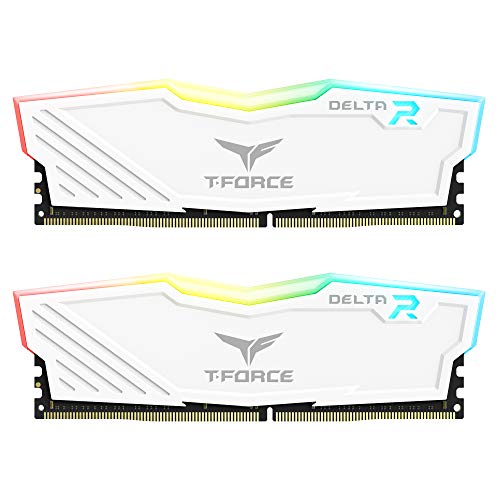
TEAMGROUP T-Force Delta RGB DDR4 16GB 3600MHz (White)
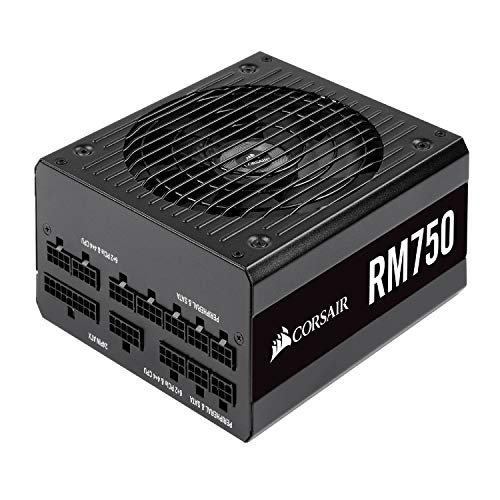
Corsair RM750 80 Plus Gold Fully Modular Power Supply

Intel Core i5-12400 LGA1700 12th Gen

Intel Core i5-4690K LGA 1150 Processor

EVGA 650 G5 80 Plus Gold 650W Fully Modular PSU

MSI GeForce RTX 4060 Ventus 2X Black 8G OC

Acer Predator Vesta II RGB DDR5 32GB 6000MHz (Black)

PowerColor Red Devil Spectral White RX 9070 XT 16GB

CORSAIR Vengeance RGB DDR5 32GB 6000MHz
More On The Choices That Made The List
The Ryzen 9 3950X is the kind of chip that changes what a mainstream desktop feels like. With sixteen cores and thirty-two threads (threads are virtual lanes that let a single core juggle multiple tasks at once), it tears through heavily parallel workloads like video encoding, 3D rendering, and game streaming without breaking a sweat. The unlocked multiplier means enthusiasts can push clocks higher with the right cooling, and a generous 72MB of game cache helps frame rates stay steady in CPU-bound scenes. For most people, this chip is overkill, but for the multitasker who also games at the end of the day, it earns its slot in a build.
Compared to the budget-focused Intel Core i5-12400 you’ll see later in this list, the 3950X trades affordability for raw headroom. Liquid cooling with at least a 280mm radiator is strongly recommended, so budget for a serious AIO (all-in-one liquid cooler) or custom loop. If your priority is high-refresh esports on a single title, a newer mid-range chip may actually deliver more frames per dollar.
Noteworthy Benefits
- Sixteen cores and thirty-two threads handle streaming, rendering, and gaming in parallel without choking.
- Unlocked multiplier invites manual tuning for those who like to chase higher sustained clocks.
- 72MB of game cache keeps frame pacing smooth in CPU-bound scenarios.
- Drop-in fit for AM4 boards means upgrades from older Ryzen chips don’t require a new platform.
Points To Note
- No included cooler, so a quality 280mm or larger AIO becomes a mandatory add-on.
- Runs warmer than today’s latest chips, so case airflow matters more than you might expect.
- Real-world gaming uplift over an i5-12400 shows up mostly in heavily threaded titles.
Quick Facts
Who It Suits Best
Creators and streamers who refuse to choose between editing and gameplay.
Skip It When
The Intel Core i5-12400 is a smarter buy for dedicated 1080p gamers chasing maximum frames per dollar.
The T-Force Delta RGB kit is built to be seen. A 120-degree ultra-wide light bar crowns the aluminum heat spreader, casting a soft glow that syncs with major motherboard ecosystems for a unified look across your build. Two 8GB sticks running at 3600MHz with CL18 timings hit the sweet spot for AMD Ryzen systems, which love memory bandwidth. In a tempered-glass case, the white heat spreader and rainbow lighting turn into the visual centerpiece of the rig.
This is a DDR4 kit, so it slots into older or mid-range AM4 and LGA1700 boards rather than the latest DDR5 platforms covered by the Acer Predator and Corsair Vengeance kits later in the list. Owners commonly report the XMP (Intel Extreme Memory Profile) 2.0 setting applies cleanly on compatible boards, though occasional manual tuning is sometimes needed for full stability.
Useful Strengths
- 16GB in a 2x8GB config is the comfortable baseline for modern gaming.
- 3600MHz speed pairs especially well with AMD Ryzen CPUs that benefit from memory bandwidth.
- Aluminum heat spreader keeps thermals in check under sustained load.
- Wide-angle RGB lighting turns a plain case window into a showpiece.
Trade Offs
- DDR4 platform means it won’t fit newer AM5 or LGA1851 boards looking for DDR5.
- CL18 latency is mainstream rather than tight, so synthetic benchmarks trail faster kits.
- RGB software sync depends on motherboard ecosystem support, which varies by brand.
Made For
Builders who want visible flair on a DDR4 platform without overspending.
Consider Something Else When
You’re stepping up to a current-gen AM5 board, in which case the Acer Predator Vesta II or Corsair Vengeance RGB DDR5 kits make more sense.
A power supply is the unglamorous part nobody brags about, and the Corsair RM750 is exactly the sort of “boring buy” that keeps a build stable for years. 80 Plus Gold certification means at least 87 percent efficiency at typical loads, which translates into less wasted heat and lower fan noise. Industrial-grade capacitors rated for 105°C push longevity upward, and the fully modular layout means you only plug in the cables your components actually need, keeping the inside of the case clean.
The fan’s zero-RPM mode keeps the unit completely silent at low to moderate loads, which is a noticeable perk for anyone who games with their PC sitting on the desk. Support for modern standby sleep modes also helps the system wake faster and sip less power overnight. For a mid-range build with one mid-tier GPU, 750W leaves comfortable overhead.
Points In Its Favor
- Zero-RPM fan mode means true silence during light workloads like browsing and video playback.
- Fully modular cabling reduces clutter and improves airflow inside the case.
- 105°C-rated capacitors suggest long-term reliability under sustained gaming loads.
- 750W capacity covers most single-GPU gaming systems with headroom to spare.
Small Caveats
- Higher-output units like the EVGA 650 G5 cover a different wattage class, so pair carefully with a power-hungry GPU like the RX 9070 XT.
- Modular cables are proprietary, so replacements come from Corsair rather than off-the-shelf packs.
Key Specs
Who Will Love This
Mid-range builders who want a quiet, reliable power delivery backbone for a single-GPU rig.
Look Elsewhere When
You’re building around the RX 9070 XT, which recommends a 900W minimum system PSU, in which case the EVGA 650 G5 isn’t quite right either but you’d want to size up.
The Core i5-12400 became the budget gaming chip of its generation for good reason. Six performance cores handle modern titles without dragging a discrete GPU down, and the included stock cooler is genuinely usable for most builds. For anyone stepping into PC gaming for the first time, or rebuilding a tired system on a sensible budget, this processor delivers strong 1080p performance without asking you to overcommit financially.
Compared to the Ryzen 9 3950X covered earlier, the i5-12400 has fewer cores, but the cores it has are very efficient on a per-clock basis. In pure gaming scenarios at common resolutions, the gap is much smaller than the spec sheets suggest. If your games live on one monitor and you don’t run heavy background tasks, this chip punches well above its class.
A Few Strong Suits
- Strong single-threaded performance lifts frame rates in popular esports and AAA titles.
- Low power draw keeps thermals and noise down with the stock cooler.
- Fits affordable LGA1700 motherboards, leaving budget for a better GPU.
- Intel 12th-gen platform supports both DDR4 and DDR5 on select boards.
Possible Compromises
- Locked multiplier rules out manual overclocking for enthusiasts who like to tinker.
- Only six cores can bottleneck during heavy streaming and gaming simultaneously.
- Stock cooler is functional but won’t win any noise awards under sustained load.
Perfect Match For
1080p gamers who want sensible spending and dependable performance without extras they won’t use.
Where Another Pick Suits Better
The Ryzen 9 3950X is the right call for content creators juggling editing and gameplay at the same time.
The i5-4690K is a Haswell-era classic, and it still shows up in builds that predate the LGA1700 and AM4 era. Four cores, four threads, and an unlocked multiplier make it a familiar upgrade path for anyone still holding onto an older LGA 1150 motherboard. It’s not a chip for cutting-edge gaming in 2026, but as a replacement part for a system that’s already running, it keeps a tired rig alive without forcing a full rebuild.
Turbo Boost to 3.9GHz (Turbo Boost is Intel’s automatic clock-speed bump under thermal headroom) helps single-threaded performance stay usable in older titles and indie games. The integrated HD Graphics 4600 also means the system can boot and run light tasks even if the discrete GPU fails. This is a niche pick, and it shows.
Real-World Strengths
- Drop-in replacement for LGA 1150 boards, reviving older systems without new parts.
- Unlocked multiplier still allows for moderate tuning on compatible motherboards.
- Integrated graphics provide a fallback display output for troubleshooting.
Where It May Fall Short
- Four cores without hyper-threading bottleneck in modern multithreaded games.
- No support for DDR4 or DDR5, limiting memory bandwidth to older DDR3 standards.
- Outdated platform means no upgrade path beyond this chip without a full rebuild.
At A Glance
The Right Fit
Owners of aging LGA 1150 systems looking for a replacement chip without a full platform swap.
Reach For A Different Pick When
You’re starting a new build, where the Intel Core i5-12400 offers a much stronger modern foundation.
The EVGA 650 G5 is the PSU to look at when your case space is limited. At just 150mm deep, it slips into compact and small-form-factor cases that would choke on a longer unit. 80 Plus Gold efficiency, fully modular cabling, and 100 percent Japanese capacitors (a common benchmark for long-life, low-ripple power delivery) round out a parts list that punches above the price tag. The fluid dynamic bearing fan stays quiet at lower loads and ramps up only under heavy stress.
650W is right in the sweet spot for mainstream gaming builds with a single mid-range GPU. For a system built around the RTX 4060 you’ll see next in this list, this PSU leaves comfortable headroom without running the fan at full tilt. If you’re aiming for a high-end card like the RX 9070 XT, sizing up to the Corsair RM750 or larger makes more sense.
The Good Stuff
- 150mm depth fits comfortably in compact cases where longer PSUs won’t clear the drive cage.
- 80 Plus Gold efficiency keeps heat output and energy waste low.
- 100 percent Japanese capacitors point to long-term build quality.
- Fluid dynamic bearing fan reduces noise compared to sleeve-bearing designs.
Honest Caveats
- ECO mode fan-stop behavior depends on internal load thresholds and ambient case temperature.
- 650W is not enough for power-hungry flagship GPUs that recommend 850W or more.
Best Suited To
Builders working in tight cases or mid-towers with a single mid-tier GPU.
Swap It Out When
Your GPU is a high-wattage card like the PowerColor Red Devil RX 9070 XT, where 900W is the recommended floor.
The RTX 4060 sits in the practical middle of the GPU market, and the MSI Ventus 2X variant is a clean, no-nonsense take on it. Built on NVIDIA’s Ada Lovelace architecture (the chip design that brought notable efficiency gains and AI-driven features like DLSS 3), it delivers playable frame rates at 1080p in demanding titles while sipping power compared to previous generations. DLSS 3 (Deep Learning Super Sampling, an AI-driven upscaling and frame generation technology) adds generated frames to smooth out motion, and ray tracing is genuinely usable rather than a slideshow.
8GB of GDDR6 memory on a 128-bit bus is enough for most current games at sensible settings, though the deepest texture packs in 4K can push past that. For creators, NVENC (NVIDIA’s hardware video encoder) acceleration helps streamers and editors work faster. Compared to the RX 9070 XT you’ll see later, the 4060 trades raw frames for a much friendlier power budget.
Practical Pluses
- Ada Lovelace efficiency means strong 1080p performance without a massive power supply.
- DLSS 3 frame generation adds noticeable smoothness in supported titles.
- Compact dual-fan design fits a wider range of cases than triple-fan flagship cards.
- Three DisplayPort outputs plus HDMI cover most multi-monitor setups.
Points To Keep In Mind
- 8GB VRAM can constrain the heaviest texture mods and future titles at 4K.
- 128-bit memory bus limits bandwidth in bandwidth-hungry scenarios.
Feature Snapshot
Whose Shelf It Belongs On
Mainstream 1080p gamers who want modern features without flagship pricing or power demands.
Not Your Match When
You want 4K resolution with maxed settings, where the PowerColor Red Devil RX 9070 XT is the better fit.
DDR5 is the current standard for new builds, and the Acer Predator Vesta II sits right at the performance sweet spot. Two 16GB sticks at 6000MHz with CL32 latency give modern CPUs the bandwidth they crave, and 32GB total is comfortable for gaming plus a few browser tabs, Discord, and a recording tool running in the background. Intel XMP 3.0 and AMD EXPO profiles are both supported, which is a quiet but important detail: it means the kit advertises its rated speed cleanly on either platform.
The Predator line leans into RGB, and the Vesta II is no exception, with a light bar that syncs to major motherboard ecosystems. Hand-screened memory ICs (integrated circuits, the actual memory chips on the module) tend to overclock a little further, depending on the silicon lottery. Compared to the DDR4 TEAMGROUP kit earlier, this one targets newer AM5 and LGA1851 boards exclusively.
Reasons It Performs
- 32GB capacity handles gaming, streaming, and productivity tasks at the same time.
- 6000MHz at CL32 matches the typical sweet spot for current-gen Ryzen and Intel platforms.
- XMP 3.0 and EXPO compatibility simplifies setup across AMD and Intel builds.
- RGB lighting adds visual flair through tempered-glass cases.
Practical Considerations
- DDR5 only, so this won’t drop into older DDR4 boards at all.
- Tall heat spreaders can interfere with oversized air coolers in tight builds.
Right Fit For
Builders on AM5 or current Intel platforms who want capacity and headroom without chasing exotic speeds.
A Better Fit Elsewhere
The TEAMGROUP T-Force Delta DDR4 kit is the right call for anyone still running a DDR4 board.
The PowerColor Red Devil RX 9070 XT is the high-end card in this roundup, and the Spectral White cooler makes a statement. Sixteen gigabytes of GDDR6 video memory gives serious headroom for 4K gaming, content creation, and AI workloads. DisplayPort 2.1a support (the latest display output standard, enabling higher refresh rates and resolutions) future-proofs the card for the next wave of high-refresh 4K monitors, and HDMI 2.1 covers most modern TVs.
Three 8-pin PCIe power connectors and a 340mm card length mean this is a chunky piece of hardware. Recommended minimum system power sits at 900W, so this card wants a serious PSU like the Corsair RM750 only if you have efficient components elsewhere, otherwise you’ll want to size up. For a build focused on 4K or high-refresh 1440p, it’s a true enthusiast pick.
Standout Benefits
- 16GB GDDR6 handles 4K textures and heavy creative workloads with confidence.
- DisplayPort 2.1a and HDMI 2.1 cover current and upcoming monitor standards.
- Spectral White finish stands out in light-themed builds and tempered-glass cases.
- 340mm card length leaves clearance in most mid-tower and full-tower cases.
Less-Strong Areas
- Three 8-pin power connectors mean cable management gets more involved in tight cases.
- 900W recommended PSU rules out pairing with lower-wattage units like the EVGA 650 G5.
- Physical size can conflict with compact builds and small-form-factor cases.
Core Details
Who Should Grab It
Enthusiasts targeting 4K or 1440p with high refresh rates and the budget to match the rest of the build.
Not Your Match When
You’re gaming at 1080p, where the MSI RTX 4060 delivers a more sensible experience for the resolution.
CORSAIR’s Vengeance line is a familiar name in PC builds, and the DDR5 refresh carries that reputation forward. Two 16GB sticks at up to 6000MHz cover the standard speed sweet spot for current-gen Intel and AMD platforms, and onboard voltage regulation (a DDR5 feature that lets the module manage its own power delivery for steadier operation) helps with stable overclocking headroom. The compact heat spreader keeps the modules low-profile, which is a quiet plus for builds with tall air coolers.
Compatibility with both AMD EXPO and Intel XMP means the kit advertises its rated speed cleanly on either platform. RGB lighting ties into CORSAIR’s iCUE ecosystem, which is mature and reliable for users already invested in the brand. Compared to the Acer Predator Vesta II earlier, this kit runs at a similar speed but takes a more understated design approach.
What It Does Well
- 32GB capacity leaves headroom for gaming plus multitasking workloads.
- Low-profile heat spreader clears most large air coolers without interference.
- AMD EXPO and Intel XMP support streamlines setup across both major platforms.
- iCUE integration gives full control over lighting, including per-LED effects.
Things To Consider
- iCUE software can be heavier than competing ecosystems on older systems.
- RGB modules cost slightly more than non-RGB equivalents for the same speed.
Perfect Match For
Mainstream DDR5 builders who want a clean look, low profile, and broad platform compatibility.
Consider Something Else When
You’re chasing top-tier overclocking headroom, in which case the Acer Predator Vesta II’s hand-screened ICs may deliver a few extra MHz.
What Matters When Choosing Components For A Gaming Pc
Match The CPU To The GPU You’ll Actually Pair It With
A high-end graphics card paired with a weak processor can leave frames on the table, and the reverse is just as wasteful. Builders targeting a card like the PowerColor RX 9070 XT benefit from a chip with strong single-core performance and enough cores to keep the rest of the system fed, while a system built around the RTX 4060 doesn’t need flagship silicon to shine. The Intel Core i5-12400 is the textbook example of a CPU that meets mainstream GPUs at the right level.
Plan Power Delivery Around The Worst-Case Load, Not The Average
A common slip is buying a power supply sized for the components on paper, then watching a transient spike trip protection during a frame-rate spike. PSUs like the Corsair RM750 and EVGA 650 G5 give clean overhead for mid-range systems, and a card like the RX 9070 XT that recommends 900W minimum wants a serious unit to match. Modular cabling also reduces internal clutter, which helps airflow and makes future upgrades less painful.
Memory Speed Matters More On Some Platforms Than Others
AMD’s Ryzen chips in particular reward faster memory bandwidth, which is why the TEAMGROUP T-Force Delta at 3600MHz and the DDR5 kits at 6000MHz hit widely recommended sweet spots. DDR4 and DDR5 are not interchangeable, so the platform choice drives the memory decision more than the other way around. For most 2026 builds, DDR5 is the right lane, with a 32GB kit being a sensible default for gaming and productivity.
GPU VRAM Is A Forward-Looking Decision
8GB of VRAM on the RTX 4060 handles today’s 1080p titles comfortably, but higher resolutions and mod-heavy games have a way of growing into that buffer over time. The 16GB on the RX 9070 XT is a more future-proof call for anyone eyeing 4K. Match the VRAM to the resolution you actually play at, with a little room above for the next year or two.
Navigating The Parts List Without Common Trip-Ups
Pitfalls Shoppers Hit
One of the most common slip-ups is buying a CPU and motherboard that don’t share a socket, or pairing DDR5 memory with a board that only accepts DDR4. A close second is underestimating power supply needs for a flagship GPU, which leads to shutdowns under load. It’s also easy to forget case clearance for a 340mm graphics card, only to discover the side panel won’t close. Check the compatibility lists on each product page before committing.
When Paying More Pays Off
Higher-tier components tend to cost more for measurable reasons: better capacitors in a PSU, hand-screened memory ICs, or simply more VRAM and wider memory buses. The upgrades that pay off most depend on the bottleneck. Going from a 650W to a 900W PSU only matters with a power-hungry GPU. Doubling VRAM from 8GB to 16GB matters most at 1440p and above. Pick the upgrade that lines up with how you actually play, rather than chasing the most expensive part on the list.
Frequently Asked Questions
What Is The Most Important Component For A Gaming Pc?
The graphics card usually sets the ceiling for gaming frame rates, so pairing the GPU with the right CPU and a capable power supply matters most. Imbalances between the two can leave performance on the table.
How Much RAM Do Modern Gaming Builds Need?
16GB is the floor for current titles, while 32GB is the comfortable standard for gaming plus background apps like Discord, browsers, and recording software. The kits from Acer and CORSAIR in this list both sit at 32GB.
Do I Need A New Power Supply For A GPU Upgrade?
It depends on the new card’s recommended wattage. Cards like the RX 9070 XT recommend a 900W minimum system PSU, while mainstream cards work fine with the 650W to 750W range.
Is DDR5 Worth It Over DDR4 For Gaming?
For new builds on current platforms, yes, because the bandwidth and capacity headroom benefit modern CPUs. DDR4 still works well in older systems, and a quality DDR4 kit like the TEAMGROUP T-Force Delta holds up nicely on AM4.
How Do I Know If A CPU Cooler Is Enough?
Check the chip’s thermal design power rating, called TDP, and match a cooler rated to handle at least that number with margin. Higher-end chips like the Ryzen 9 3950X specifically call for a 280mm or larger liquid cooler.
The Takeaway
Components for a gaming PC are most satisfying when they fit the way you actually play. Match the GPU to your monitor resolution, the PSU to the GPU, the memory to the platform, and the CPU to the workload, and the rest tends to fall into place. A mid-range system built around the RTX 4060, an i5-12400, the EVGA 650 G5, and 32GB of DDR5 will handle the vast majority of current titles. A 4K-focused build with the RX 9070 XT and 32GB of DDR5 at 6000MHz is a stronger long-term investment for the resolution. Pick the tier that matches your games, not the one with the loudest spec sheet.


