


Competitive play punishes anything that gets between your fingers and the next round. The right board is fast enough for sub-millisecond reactions, sturdy enough to survive a thousand sweaty ranked sessions, and shaped so your mouse hand actually has room to breathe. After sorting through ten current options, these are the models that earn their spot on a serious desk, whether you grind Valorant, scrim CS2, or just want the closest thing to a tournament setup at home.
A Snapshot Of The Selections

GravaStar Mercury K1 75% Wireless Mechanical Gaming Keyboard

Razer Huntsman V3 Pro TKL 8KHz Esports Gaming Keyboard

Razer Huntsman V3 Pro TKL Esports Gaming Keyboard

Razer Huntsman V3 TKL 8KHz Analog Optical Esports Gaming Keyboard

Razer Huntsman V3 Pro 8KHz Esports Gaming Keyboard, Analog Optical

Razer Huntsman V3 Pro Mini 60% Esports Gaming Keyboard

Razer BlackWidow V4 Pro 75% Wireless Gaming Keyboard, Orange Switches

Razer BlackWidow V4 TKL Wireless Gaming Keyboard, Orange Switches
Razer Pro Type Ergo Wireless Split Ergonomic RGB Keyboard
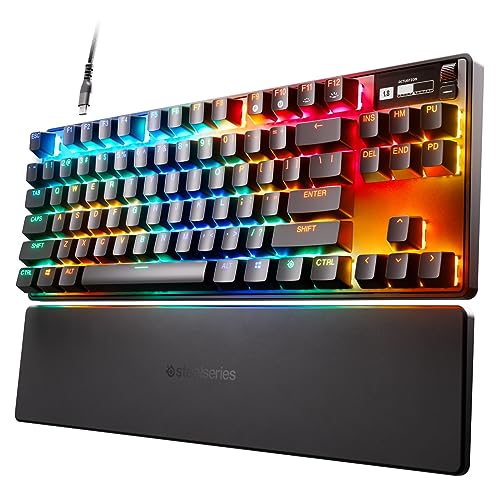
SteelSeries Apex Pro TKL HyperMagnetic Gaming Keyboard
A Closer Look At Each Pick
The Mercury K1 looks like nothing else on this list, and that’s not a marketing line, it’s an honest read the moment it lands on a desk. Its aluminum alloy shell curves and flows rather than forming a flat slab, so it doubles as desk jewelry for anyone who treats their battlestation as a setup worth photographing. Underneath that exterior sits a 75% layout that keeps arrows, a function row, and useful navigation keys within reach, which matters when you tab between Discord and a deathmatch.
Wireless freedom is the second pillar here, freeing cable routing so your mouse pad can stretch without a USB-C tether tugging at the corner. The board runs custom GravaStar x Kailh linear switches, so each press feels smooth and untextured, the way most FPS mains prefer. RGB backlighting rounds out the package, giving the case a soft under-glow that plays well with the sculpted frame. For anyone who ranks visual identity as high as actuation feel, the Mercury K1 earns a serious look.
Useful Highlights
- Sculpted aluminum chassis stands out from flat black boards
- 75% layout preserves arrows and a function row for actual work
- Linear Kailh switches stay smooth under long ranked sessions
- Wireless connection cleans up your desk cable situation
Things To Consider
- Unusual shape means replacement keycap sets are harder to source
- RGB is a fingerprint magnet on the polished surfaces owners commonly report
Whose Setup It Suits Best
Style-focused players who want wireless freedom and a board that looks like a centerpiece on stream.
Consider Something Else When
The Razer Huntsman V3 Pro TKL 8KHz suits you more if raw polling rate and analog actuation matter more than industrial design.
This is the board that shows up on tournament streams with the lights low and the keyboard glow just barely visible. Razer built the Huntsman V3 Pro TKL 8KHz around second-generation analog optical switches (a switch type that uses light to register keypresses instead of metal contacts), and that technology is the entire point. Rapid Trigger lets you reset a key the instant it travels back up, which is the difference between a strafing counter-strafe that lands and one that gets you domed.
The 8KHz polling rate is a measurable upgrade over standard 1KHz keyboards, meaning your PC receives switch updates eight times per millisecond. In practice that means your counter-strafe reads cleaner and your peeks feel more honest. Adjustable actuation between 0.1 and 4.0mm lets you set WASD feather-light and crouch keys deep, so accidental slides never trigger. Tenkeyless form factor means your mouse pad finally stretches the way low-sensitivity aimers have always wanted.
Good Reasons To Consider
- 8KHz polling rate feeds inputs to the PC faster than standard boards
- Rapid Trigger resets keys based on travel distance, not a fixed point
- Adjustable actuation from 0.1 to 4.0mm per key
- 100-million keystroke rated switch lifespan for years of ranked grind
Worth Noting
- Wired only, so cable drag matters for low mouse sensitivity players
- Software tuning has a learning curve for first-time analog users
Feature Snapshot
The Right Fit
FPS players chasing tournament-grade input speed who don’t mind a wired-only setup.
Skip It When
The SteelSeries Apex Pro TKL suits you more if you want per-key actuation levels without the 8KHz tax.
The non-8KHz sibling to the Huntsman above shares the same analog optical switch DNA at a more approachable tier. You still get Rapid Trigger, adjustable actuation, and Razer’s Snap Tap feature, which prioritizes the last directional key pressed so your counter-strafes don’t fight each other. The trade is the polling rate drops to a standard 1KHz, which is fine for most players and only matters once you’re chasing the literal last millisecond.
For someone stepping up from a basic mechanical board, this TKL hits a sweet spot. You get the same lean form factor that gives your mouse hand room to breathe, the same Razer Chroma RGB underglow, and the same wired reliability that tournament play demands. The build feels solid enough to handle transport to a friend’s place for a LAN without complaint.
What Earns Its Place
- Analog optical switches unlock Rapid Trigger and Snap Tap input handling
- TKL form factor frees up desk width for wide mouse sweeps
- Adjustable actuation lets you tune press depth to your play style
- Wired connection keeps latency consistent without battery worries
Trade Offs
- Standard 1KHz polling rate lags behind the 8KHz version in head-to-head specs
- No wireless option if you prefer a cable-free battlestation
Built With In Mind
Esports players stepping into analog optical switches who don’t need 8KHz polling.
Look Elsewhere When
The Razer Huntsman V3 Pro TKL 8KHz makes more sense when the higher polling rate is a non-negotiable for your matchup.
The V3 TKL 8KHz slots into the Huntsman family as a slightly stripped-down take on the analog optical concept, aimed squarely at clutch-moment FPS specialists. Rapid Trigger returns here, and Razer’s Snap Tap handles the simultaneous directional input that used to require you to lift one finger before pressing the other. For someone still learning counter-strafe mechanics, that single feature can shave rounds off your learning curve.
The 8KHz polling is the headline spec, and it pairs naturally with high-refresh-rate monitors so your input chain stops being the bottleneck. The TKL cut means no numpad, which most ranked players already prefer for mouse space. Build quality stays consistent with the rest of the line, so the board should hold up to the kind of abuse a six-hour Apex Legends night puts on a keyboard.
Where It Excels
- 8KHz polling keeps up with high-refresh competitive displays
- Rapid Trigger resets keys on the way back up for faster repeated inputs
- Snap Tap prioritizes your last directional press cleanly
- Adjustable actuation between 0.1 and 4.0mm per key
Minor Gripes
- Wired tether means cable management still matters at your desk
- Software customization takes time to dial in for newer players
Best Suited To
Clutch-round FPS players who already value Rapid Trigger and want the higher polling rate included.
Swap It Out When
The Razer Huntsman V3 Pro Mini 60% suits you better if mouse space matters more than the function row.
Most Huntsman V3 variants strip the numpad for mouse space, but this full-size Pro version keeps the arrows, function row, and numpad intact. That makes it the obvious pick for players who actually use the numpad for in-game macros, chat binds, or spreadsheet work between matches. You give up some mouse pad width, but you gain a complete toolset on a single board.
The 8KHz polling and Gen-2 analog optical switches are the same spec set as the TKL version, so input feel stays consistent across the line. Razer rates the switches for 100 million keystrokes, which is the kind of durability figure that means a competitive player can run this board for years before a switch even thinks about wearing out. For creators and analysts who game and work at the same desk, the layout argument alone is worth considering.
Where It Helps
- Full layout with numpad suits hybrid work-and-game setups
- 8KHz polling and analog optical switches for fast, tunable inputs
- 100-million keystroke rated switch lifespan
- Rapid Trigger and Snap Tap supported like the rest of the line
Points To Note
- Larger footprint cuts into available mouse pad width
- Wired only, which matters if you planned a wireless desk
Quick Facts
Who Should Grab It
Pro players and analysts who need a numpad on a tournament-grade analog board.
Another Choice May Suit
The Razer Huntsman V3 Pro TKL 8KHz fits you better if you’d rather reclaim the desk space.
The Mini takes everything good about the Huntsman V3 Pro line and crams it into a 60% footprint. If you run a low in-game sensitivity, you know the math: less keyboard on the desk means more room for a giant mousepad and the long arm swipes that low-DPI tracking demands. The 60% form factor shaves every key that isn’t alphanumeric, which on a desk that already holds three monitors and a Stream Deck, feels like a relief.
You keep the Gen-2 analog optical switches, Rapid Trigger, Snap Tap, and adjustable actuation that make the bigger Huntsmans so appealing. Function layers take over for arrows and the function row, which is a small adjustment if you’ve lived on a TKL for years. For anyone flying to a LAN weekend, the Mini also slips into a backpack sleeve without a fight.
Real Benefits
- 60% layout maximizes mouse pad real estate for low-sense aimers
- Same analog optical switch tech as the larger Huntsman boards
- Rapid Trigger and Snap Tap travel over from the bigger models
- Portable form factor suits travel and small desks
Points To Keep In Mind
- No dedicated arrows or function row without using a layer shortcut
- Wired only, so travel setups need a USB-C cable on hand
Who Will Love This
Low-sensitivity FPS players and LAN travelers who want maximum mouse space.
Not Your Match When
The Razer Huntsman V3 TKL 8KHz makes more sense if you rely on a physical function row for in-game binds.
The BlackWidow V4 Pro 75% is the most “do-everything” board on this list, and it leans into that role proudly. The integrated OLED display paired with Razer’s Command Dial lets you check system metrics, scrub through timelines, or tweak settings without alt-tabbing out of the game. For a streamer running OBS and Discord simultaneously, that little screen earns its place fast.
Wireless operation is the headline feature for a board that still wants to feel like a flagship, and the 75% layout keeps arrows and a function row within reach. The Orange switches give you a tactile bump with a click, which is the right feel for typing-heavy hybrid users who also game. Hot-swappable compatibility means you can swap in different switches later without a soldering iron, depending on the size you prefer.
Positive Takeaways
- OLED display with Command Dial offers at-a-glance system info
- 75% layout balances space savings with useful navigation keys
- Wireless connection cleans up the desk for creators and streamers
- Hot-swappable design supports future switch experimentation
Honest Caveats
- Heavier chassis takes up more pack space for travel than a TKL
- Tactile clicky Orange switches may not suit pure linear-preferring FPS players
Feature Card
Made For
Creators and streamers who split time between gaming, editing, and chat, and want a single board to rule them all.
A Better Fit Elsewhere
The Razer Huntsman V3 Pro TKL 8KHz fits better if you want the fastest possible wired polling rate instead of an OLED.
The TKL wireless BlackWidow takes the feature set people liked about the 75% Pro and trims it back to a simpler tenkeyless form. The result is a board that works equally well as a daily driver for both ranked sessions and long work-from-home days. Razer’s HyperSpeed wireless protocol keeps latency tight, and Bluetooth support means you can pair it to a laptop or tablet without eating a USB port.
Multi-device support is a quiet superpower here. The same dongle can connect to a compatible Razer mouse, and you can toggle between up to three Bluetooth devices for a phone, tablet, and PC setup. Hot-swappable compatibility for 3 or 5-pin switches means you can swap the Orange tactile switches for linear alternatives if your play style changes later, which most owners appreciate as a long-term investment.
What Makes Sense
- HyperSpeed wireless delivers tight wireless latency for competitive play
- Multi-device Bluetooth lets you pair across laptop, phone, and tablet
- Hot-swappable PCB supports both 3-pin and 5-pin switch swaps
- TKL form factor keeps desk width open for mouse movement
Possible Compromises
- Clicky tactile Orange switches may feel loud in shared rooms
- No 8KHz polling on the wireless BlackWidow TKL compared to the Huntsman V3 Pro TKL
Perfect Match For
Multi-device users and switch tinkerers who want wireless freedom and future swap flexibility.
Where A Sibling Pick Shines
The Razer Huntsman V3 Pro TKL 8KHz suits you more if maximum polling rate and Rapid Trigger matter most.
The Pro Type Ergo sits at an interesting crossroads: it’s a competitive-feeling wireless keyboard that also cares about your wrists after a six-hour coding-and-gaming day. The split layout pulls the two halves apart at a 10-degree slope, so your forearms rest at a more natural angle instead of bending outward. You can adjust the tilt by 4 or 7 degrees depending on how your shoulders feel by hour five.
Low-profile, fingertip-shaped keycaps are a noticeable departure from the chunky caps on most gaming boards, and the spherical indents help your fingers land consistently without bottoming out. Dual “B” keys on each side mean you can keep your hands in a home-row posture no matter which side is doing the heavy lifting. RGB lighting is restrained, more office-appropriate than party-mode, which fits the target audience.
The Upside
- Split ergonomic layout eases wrist strain over long sessions
- Low-profile keycaps reduce finger travel for faster typing
- Wireless connection keeps your desk uncluttered
- Adjustable tilt settings (4 or 7 degrees) match your posture
Details To Watch
- Not built for tournament-style play: no analog switches, no 8KHz polling
- Split layout has a learning curve for anyone used to flat boards
Who Will Love This
Hybrid workers and long-session typists who game on the side and care about wrist comfort.
Reach For A Different Pick When
The Razer Huntsman V3 Pro TKL 8KHz fits your competitive side better if tournament performance ranks above ergonomic comfort.
The Apex Pro TKL is the board that introduced adjustable actuation to the mainstream, and the OmniPoint 2.0 HyperMagnetic switches (a switch type that uses magnetic fields rather than metal contacts to register presses) keep that legacy going. Forty levels of per-key actuation between 0.1 and 4.0mm mean you can set your movement keys to fire on a whisper and your ability keys deep enough to prevent accidental presses. For a single game, that level of per-key tuning is hard to beat.
Rapid Trigger handles the same travel-distance reset behavior you’ll find on the Huntsman line, which makes repeated counter-strafes feel snappier. The integrated OLED smart display is a smaller affair than the BlackWidow V4 Pro’s Command Dial, but it’s still handy for switching profiles or showing in-game info at a glance. PBT keycaps (a tougher plastic that resists shine) on the top row keep the legends readable even after months of heavy use, and the USB-C connection standardizes the cable for travel.
The Case For It
- 40 levels of per-key actuation from 0.1 to 4.0mm
- Rapid Trigger for faster repeated movement inputs
- OmniPoint 2.0 switches rated for 100 million keypresses
- PBT keycaps resist shine and stay legible over time
A Few Limitations
- No 8KHz polling compared to newer Huntsman V3 Pro boards
- Wired only and a bit heavier than minimalist TKL competitors
Key Product Details
Right Fit For
Switch-tweaking enthusiasts who want per-key actuation depth and a refined TKL build.
Not Your Match When
The Razer Huntsman V3 Pro TKL 8KHz suits you better if 8KHz polling is the deciding factor in your setup.
What To Weigh Before Choosing Competitive Gaming Keyboards
Switch Type And Feel
Linear switches (smooth top-to-bottom, no bump), tactile switches (a small bump during the press), and clicky switches (tactile plus an audible click) each create a different feel under your fingers. Most FPS mains lean linear because nothing interrupts a fast repeated press. For mixed gaming and typing, tactile switches give you feedback without the noise.
Form Factor And Desk Space
A 60% board like the Huntsman V3 Pro Mini clears maximum space for a wide mouse pad. A TKL keeps arrows and a function row, which matters for games that rely on quick function-key binds. Full-size boards hold a numpad, which hybrid workers and analysts may need. Match the size to your actual desk and your mouse sensitivity, because the two interact more than people expect.
Polling Rate And Input Speed
Polling rate is how often the keyboard reports its key states to the PC. A 1KHz board reports 1,000 times per second, while an 8KHz board reports 8,000 times per second. The difference is real but small enough that it mainly shows up at high refresh rates and tight duels. Most players below the top competitive tier will not feel a practical gap.
Connectivity And Tethering
Wired boards remove battery anxiety and shave latency to the floor. Wireless boards free your desk and let you position the board wherever the ergonomic angle feels right. The newest wireless protocols are extremely fast, but if you play on a tournament stage, wired still tends to be the safer call.
Key Considerations Across These Picks
Mistakes Worth Dodging
Buying on polling rate alone is a common trap, because 8KHz is invisible on a 144Hz monitor and only matters above 240Hz. Match the keyboard spec to your display, not the other way around. Another frequent misstep is choosing a 60% board for the aesthetic, then realizing mid-match that you actually need arrow keys. Spend a week honestly tracking which keys you hit under stress, then size the board from there.
What Separates Premium From Basic
The gap between a budget mechanical and a board like the Huntsman V3 Pro TKL 8KHz is mostly in switch technology, build rigidity, and software polish. Analog optical switches enable Rapid Trigger, which is the genuine performance leap. A sturdier chassis means the board stays planted during long sessions, and mature software saves an hour of fiddling the first night. You pay for the engineering that disappears into the experience.
Frequently Asked Questions
What Switch Type Is Best For Competitive Play?
Linear switches are the most popular choice for FPS and competitive games because they offer smooth travel without a tactile bump. Tactile switches are a fine alternative if you want feedback, but they tend to slow rapid repeated presses slightly compared to a clean linear.
Does Polling Rate Really Matter On A Gaming Keyboard?
A higher polling rate means the keyboard reports inputs to the PC more often, which can shave milliseconds in tight duels. Most players running 144Hz monitors will not notice a real difference, while those on 240Hz or higher displays may see cleaner tracking during rapid counter-strafes.
Are 60% Keyboards Good For Competitive Gaming?
Yes, especially for low-sensitivity aimers who need every inch of mouse pad real estate. The trade is losing dedicated arrows and a function row, which you’ll access through a layer shortcut. If you don’t rely on those keys in your main game, the layout often feels freeing rather than limiting.
Is Wireless Competitive With Wired In 2026?
Modern wireless protocols from major brands are extremely close to wired in latency, and the gap is generally imperceptible outside of professional play. For tournament stages, wired still wins on absolute consistency. For ranked ladders and most home setups, a good wireless board is plenty.
How Long Do Mechanical Gaming Keyboards Last?
Most quality mechanical switches are rated for 50 to 100 million keystrokes, which translates to years of regular use. Boards with PBT keycaps tend to age better because the legends do not shine off the way they can on cheaper ABS plastic.
Wrap Up
A competitive keyboard should disappear under your hands, leaving only the game in your line of sight. Match the layout to your desk and sensitivity, the switches to your play style, and the polling rate to your display. Take your time, trust your own habits, and you’ll end up with a board that stays out of the way for years.


