


A smaller keyboard used to mean sacrificing arrow keys, a number pad, or that satisfying click. Not anymore. Today’s compact gaming keyboards pack full mechanical feel, tri-mode wireless, and tournament-grade polling into boards that leave room for a wide mouse sweep. The picks below cover entry-level tinkering boards right up to magnetic-switch competitors built for ranked FPS play, so you can find one that matches your desk, your games, and your budget.
The Lineup, Simplified

AULA F75 Wireless Mechanical Keyboard 75% (Pink)
AULA F75 Pro Wireless Mechanical Keyboard with Knob

Razer Huntsman V3 Pro TKL 8KHz Esports Keyboard

Razer Huntsman V3 TKL 8KHz Analog Optical Keyboard

Razer Huntsman V3 Pro 8KHz Esports Keyboard

Razer Huntsman V3 HE Magnetic TKL 8KHz

Razer Huntsman V3 HE Magnetic Mini 65%

Razer BlackWidow V4 Pro 75% Wireless Keyboard

Razer BlackWidow V4 TKL Wireless Keyboard
The Picks, Examined More Closely
The AULA F75 lands at the top of the list because it threads three different jobs into one board. Tri-mode wireless (Bluetooth, 2.4GHz, and USB-C) lets you bounce between a gaming PC, a work laptop, and a tablet without re-plugging dongles, while the 75% layout keeps arrows and a function row in play.
Hotswap support on a 3-pin or 5-pin base means swapping the LEOBOG Strawberry Mint switches later is a simple pull-and-replace job. That matters if you want a quieter linear feel for late-night sessions, since the creamy factory sound is soft but not silent.
Bright Spots
- Tri-mode wireless handles PC, console, and mobile with the same board
- 4000mAh battery stretches across long workdays and weekend sessions
- Pre-lubed stabilizers cut rattle on the spacebar and modifiers
- 16.8 million-color RGB is fully remappable through the driver
Things To Consider
- Macro programming is wired-only, so Bluetooth users lose that perk
- PBT keycaps are not standard on this variant, so shine may show over time
Quick Facts
Made For
Multi-device users who want one board for gaming, work, and couch play.
Look Elsewhere When
You need true 8KHz analog performance, in which case the Razer Huntsman V3 Pro TKL is the more responsive pick.
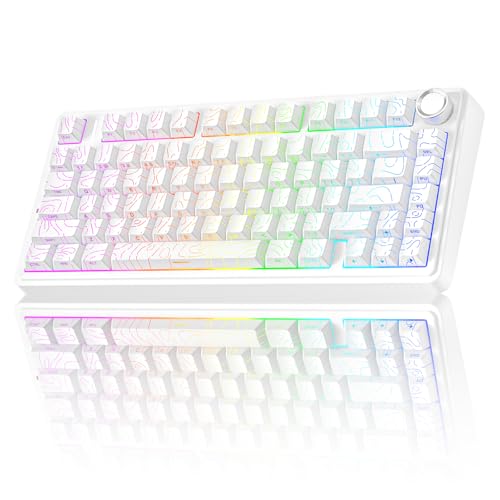
Take the AULA F75 and add a programmable metal knob, side-printed PBT keycaps, and refined factory lubing, and you land at the F75 Pro. The knob scrolls, mutes audio, or zooms in Photoshop, which makes it feel less like a gimmick once you wire it into your daily shortcuts.
Side-printed legends keep the top face clean for the RGB underglow, so the look stays minimal even when the lighting is loud. The creamy, pre-lubed switches ride on stabilizers that don’t rattle, giving the board a polished feel right out of the box.
Benefits That Matter
- Programmable knob adds real workflow control for editors and streamers
- Side-printed PBT caps resist shine and keep the top deck clean
- Tri-mode connection with shortcut keys for fast device switching
Worth Noting
- Wireless macro support is more limited than wired mode
- Knob placement may take a day or two to stop bumping with mouse movement
Right Fit For
Content creators and streamers who want a creamy-sound board with tactile control on the side.
Consider Something Else When
You play more than you edit, and the knob’s real estate would be better spent on extra macro keys; the AULA F75 makes more sense there.
The Huntsman V3 Pro TKL is where Razer’s analog optical switches get serious. Gen-2 analog optical switches register depth, not just contact, so a light tap and a full press can trigger different actions in-game. The 0.1 to 4.0mm actuation range (the distance a key travels before registering a press) opens up hair-trigger movement in shooters.
Rapid Trigger mode resets the key as soon as you lift, which lets strafing and counter-strafing happen without bottoming out every input. 8KHz HyperPolling pushes updates eight times faster than a standard 1000Hz board, which sounds like spec-sheet noise until you play on it and feel the snap.
What Works In Its Favor
- Adjustable actuation lets you set movement keys to a feather touch
- Rapid Trigger gives measurable speed gains in Valorant-style strafing
- 8KHz polling tightens input feel for high-Hz monitors
- 100-million-keystroke rated switches handle years of competitive play
- Tenkeyless layout frees a wide mouse area for low-DPI aimers
Trade Offs
- Software tuning takes patience; analog features need a learning curve
- Wired only, which rules out clean wireless setups
Feature Snapshot
Who Will Love This
Competitive FPS players who want every millisecond of input advantage on a clean desk.
Swap It Out When
You want wireless freedom; the Razer BlackWidow V4 Pro 75% Wireless trades some analog precision for cable-free living.
The Huntsman V3 TKL sits a step below the Pro in Razer’s analog lineup but keeps the same core switch technology. That means you still get adjustable actuation and Rapid Trigger behavior, just without the price bump of the flagship.
Where this board earns its keep is in mixed-use gaming. MOBAs, RPGs, and tactical shooters all feel responsive because the analog layer doesn’t force you into a single style. Compared to the larger Huntsman V3 Pro, this one simply trims the footprint for tighter desks.
Why It Works Well
- Same Gen-2 analog optical feel as the pricier Pro model
- 8KHz polling keeps input feel tight for high-refresh monitors
- TKL form factor is a sweet spot for FPS and MOBAs alike
Some Limits To Know
- Still wired, so cable management matters for clean setups
- No numpad means spreadsheet-heavy work takes more keystrokes
Best Suited To
Esports-curious players who want analog features without paying the flagship premium.
Where Another Pick Suits Better
If magnetic HE switches matter more to you than analog optical, the Razer Huntsman V3 HE Magnetic TKL delivers a different feel at a similar tier.
For streamers and serious ranked players, the full-size Huntsman V3 Pro delivers the same analog optical core as the TKL, with a numpad and extra macro keys added back in. That extra real estate is useful if you run OBS shortcuts, custom audio cues, or chat macros alongside your game keys.
The build is heavier than the TKL sibling, which can feel planted on a desk or like overkill on a small tray table. Most users will want to pair this one with a full-size mousepad to keep the wrist travel natural.
Everyday Advantages
- Full-size layout gives room for stream and chat macros
- 8KHz polling and analog actuation stay at the top of the lineup
- Heavier chassis feels stable during intense keypresses
Honest Caveats
- Full footprint fights against the “compact” goal of this list
- Wired-only design limits placement flexibility
- Software tuning is needed to get the most from analog features
Feature Snapshot
Whose Shelf It Belongs On
Streamers and pros who run multiple tools at once and want the analog edge without dropping to TKL.
Not Your Match When
You specifically want a compact desk; the Razer Huntsman V3 Pro TKL gives the same switch tech in a smaller frame.
Magnetic Hall Effect switches (HE stands for “Hall Effect”) change the actuation game by using magnets to detect key depth, which means a single switch can be tuned to multiple actuation points. The Huntsman V3 HE Magnetic TKL leans into that with Rapid Trigger behavior and the same 0.1 to 4.0mm actuation range as the analog optical sibling.
For Valorant and CS2 players, that translates into quicker counter-strafes and tap-flicks. The 8KHz HyperPolling adds the same low-latency feel you’d expect at the top of Razer’s esports line, with a tenkeyless layout that doesn’t crowd the mouse hand.
Where It Excels
- HE magnetic switches deliver crisp Rapid Trigger resets
- Adjustable actuation per key, saved to onboard memory
- TKL size suits wide mouse movement for low-DPI aim
- 8KHz HyperPolling keeps input lag to a minimum
Where It Is Less Suited
- Wired only, so expect a cable to manage on a clean desk
- HE tuning rewards patience; defaults feel stiff without software
Key Product Details
Perfect Match For
Ranked FPS mains who want magnetic switch precision and don’t mind staying tethered.
A Better Fit Elsewhere
If you crave 65% compactness with the same magnetic feel, the Razer Huntsman V3 HE Magnetic Mini 65% delivers it.
The 65% Mini is the most compact board in the Huntsman V3 line, and it keeps the magnetic HE switches that make the TKL special. You give up the function row and arrows, which forces a layer-shift workflow, but you gain a board that fits a 60% mousepad with room to spare.
For low-DPI players, that space is everything. Pairing the Mini with a wide cloth pad gives a natural arm-aim swing, while Rapid Trigger keeps movement inputs sharp. The 8KHz polling is unchanged from the larger Huntsman V3 models.
Everyday Perks
- 65% footprint leaves more desk real estate for mouse movement
- HE magnetic switches with Rapid Trigger feel consistent with larger siblings
- Same 8KHz polling as the TKL and full-size flagships
Points To Keep In Mind
- No dedicated arrows or function row, so layer switching is required
- Wired connection limits the clean-aesthetic appeal of a 65% board
- HE tuning is best done through Razer Synapse on a desktop
Built With In Mind
FPS players on a low-DPI setup who want minimal desk clutter and maximum mouse travel.
Where A Sibling Pick Shines
If you want magnetic switches but need arrows and a function row, the Razer Huntsman V3 HE Magnetic TKL is the better-balanced option.
The BlackWidow V4 Pro 75% is the showpiece of the lineup. An OLED screen with a clickable command dial sits in the upper-left corner, letting you monitor system stats, switch profiles, or load custom GIFs without alt-tabbing out of a game.
Underneath the flair, Razer Orange clicky switches deliver a tactile bump with audible click, and the wireless connection stays low-latency through a 2.4GHz dongle. Hotswap support on 3-pin or 5-pin sockets means you can swap the switches later if click fatigue sets in.
Useful Strengths
- OLED screen adds practical info for streamers and tinkerers
- Command dial gives tactile control without leaving the game
- Wireless 2.4GHz with hotswap-capable switch sockets
- 75% layout balances compactness with full arrow and function keys
Room For Improvement
- Clicky Orange switches are loud; open offices may push back
- Premium build brings added weight over simpler 75% boards
- Battery life shortens with the OLED display and RGB at full tilt
Key Attributes
Who Should Grab It
Tinkerers and streamers who want onboard data, custom dial control, and wireless freedom in one board.
Reach For A Different Pick When
You want the absolute lowest-latency competitive feel; the Razer Huntsman V3 Pro TKL is a wired analog board with sharper input timing.
The BlackWidow V4 TKL trims the OLED screen and command dial from the Pro, but keeps wireless freedom, Razer Orange clicky switches, and a clean tenkeyless footprint. The hotswap socket design carries over, so future switch swaps are still on the table.
This is the dependable middle ground in Razer’s 2026 wireless range. You give up a little flair, gain a simpler board that should age well. Bluetooth pairing is built in for quick laptop or tablet sessions, alongside the low-latency 2.4GHz option.
Useful Highlights
- Wireless 2.4GHz with Bluetooth for multi-device pairing
- TKL form factor suits both FPS and MOBAs
- Hotswap support for 3-pin or 5-pin switch swaps
Practical Considerations
- Clicky Orange switches can be loud in shared spaces
- Wireless mode requires occasional recharging during long sessions
- No screen means profile switching happens through software
The Right Fit
Everyday gamers who want wireless freedom and a familiar clicky feel without extra screen gimmicks.
Skip It When
You want magnetic switch performance; the Razer Huntsman V3 HE Magnetic TKL is the more advanced input design.
What Matters Most In A Compact Gaming Keyboard
Layout is the first fork in the road. A 65% board drops arrows and the function row, which is great for mouse-heavy FPS setups but punishing for spreadsheets or MMOs. A 75% keeps arrows, the top function row, and a small footprint that still fits a wide mousepad. TKL boards trim the numpad while keeping the function row, and full-size boards add the numpad back in.
Switch type changes how a board feels and sounds. Linear switches press smoothly with no bump, tactile switches add a small bump you feel at actuation, and clicky switches pair that bump with an audible click. Magnetic Hall Effect and analog optical switches layer depth sensitivity on top, so a single switch can trigger at different points depending on how hard you press.
Polling rate controls how often the keyboard reports to the computer. Standard 1000Hz is fine for most games. 8000Hz HyperPolling tightens the input loop, which matters on 240Hz or higher monitors where every millisecond shows up on screen.
Connection style splits the field. Tri-mode boards cover Bluetooth, 2.4GHz wireless, and USB-C, which suits mixed-use setups. Wired boards tend to have the lowest input lag, which is why most pro-tier models stay tethered.
Battery and hotswap support round out the practical side. A 4000mAh cell can stretch a board across days of casual use, and hotswap sockets let you change switch feel without a soldering iron.
Key Considerations Across These Picks
Common Shopping Slip Ups
The most common trap is buying on switch feel alone and ignoring layout. A 65% magnetic board sounds amazing until you need an arrow key for a level-select menu and discover the layer shift slows you down. Match the layout to your real workload, not just the spec sheet.
Another slip is overpaying for wireless when a wired board would do. Tri-mode boards cost more, and if you never leave the desk, the wireless feature is dead weight. For competitive FPS players especially, wired remains the lower-lag choice.
What The Higher Tier Buys
The jump from mid-tier to flagship in this category mostly buys switch technology and polling rate. Analog optical and magnetic Hall Effect switches add depth-sensitive actuation, which competitive players can actually feel. 8000Hz HyperPolling tightens the input loop, and on 240Hz-plus monitors that gap becomes visible in fast pans.
Premium boards also tend to add small but real quality-of-life touches: better stabilizers, hotswap sockets, and on higher-end models like the BlackWidow V4 Pro, an OLED screen with a command dial. None of those are necessary, but for daily-use boards, they add up to a more polished experience.
Frequently Asked Questions
What size compact gaming keyboard is best for FPS games?
A 65% or TKL board gives you the most mouse space, which matters most for low-DPI aiming. TKL is friendlier if you use the function row for communication pings or map overlays.
Are magnetic Hall Effect switches better than analog optical?
Both add depth-sensitive actuation, but Hall Effect switches use magnets and tend to feel slightly more consistent over time. Analog optical switches use light-based detection and are a proven choice on Razer’s analog lineup. Real-world feel is close enough that the layout and software ecosystem usually matter more.
Does 8000Hz polling really make a difference?
On a standard 60Hz monitor, no. On 240Hz or higher displays, the tighter input loop can show up in fast camera pans and counter-strafes. Most casual players won’t notice, but competitive users often do.
Can you use a compact gaming keyboard for office work?
Yes, especially 75% or TKL boards that keep the function row. 65% boards force more layer shifting, which slows down shortcuts and spreadsheet navigation.
How long do hotswap switches last?
Hotswap sockets themselves are rated for a finite number of insertions, often in the thousands. Most users swap switches a handful of times over a board’s life, well within that limit. The switches themselves are rated by the manufacturer for tens of millions of keystrokes.


