


A claw grip sits in the gap between fingertip control and palm comfort, so the wrong mouse quickly turns long sessions into wrist fatigue. Pickup patterns, sensor accuracy, weight distribution, and side-button placement all matter more when your fingers arch up rather than rest flat. This roundup sorts ten options by what they actually deliver for a hand that hovers rather than sprawls, so you can match hardware to grip without wading through spec sheets that don’t translate.
A Fast Comparison Of The Options

Razer Sphex V2 + Viper Mini Bundle

Razer Mamba Elite Wired Gaming Mouse
Razer Basilisk v2 Wired Gaming Mouse

GravaStar Mercury M2 Wireless Gaming Mouse
Logitech G502 Hero K/DA Gaming Mouse

Redragon M612 Wireless Gaming Mouse

TMKB Wireless White Gaming Mouse

TMKB Falcon M1SE White Gaming Mouse

TMKB Wireless Gaming Mouse Black

Razer Viper Mini Ultralight Mouse
A Breakdown Of The Leading Choices
Pairing a thin polycarbonate pad with a compact ambidextrous mouse, this bundle makes sense for anyone stepping into a claw grip for the first time. The pad’s micro-textured surface gives the optical sensor a stable readout without raising the desk height much, which suits shorter mouse strokes. The Viper Mini’s reduced footprint is friendly to smaller mitts where the bridge between palm and fingertips tends to flex.
Because the mouse and pad ship as one purchase, you avoid the spec-shopping rabbit hole and get a known-good pairing. Owners commonly report the pad sitting flatter than cloth alternatives, which keeps aim consistent on raised desks or glass tops.
Advantages To Know
- All-in-one setup removes guesswork for first-time buyers
- Compact mouse shape fits hands that struggle with larger shells
- Hard pad surface supports fast lift-off tracking for claw flicks
Trade Offs
- Hard pad surface feels cold and offers less wrist cushioning during long sessions
- Bundle pricing ties you to one mouse choice, limiting sensor upgrades later
Right Fit For
Beginners building a claw grip setup who want a matched pad and mouse without matching parts separately.
Skip It When
You already own a quality mousepad, since the Logitech G502 Hero K/DA Gaming Mouse (Pick 5) gives you a much heavier, more programmable shell instead.
Built around a 16,000 DPI optical sensor and a wider chassis than the Viper Mini, the Mamba Elite caters to claw grippers who want extended RGB along the side rails. The 9-button layout, configurable through Razer Synapse 3, suits hybrid playstyles where you may swap between shooters and strategy titles. Onboard memory holds several profiles, so switching between systems doesn’t reset your bindings.
Compared to the bundle in Pick 1, this mouse leans toward customization over portability. The extended lighting zones give your setup a more pronounced glow, useful in darker rooms where your hand position benefits from visual cues.
Where It Delivers
- 9 programmable buttons cover hotkeys, macros, and DPI shifts in one shell
- Onboard memory keeps up to 5 profiles available without software running
- Extended side lighting zones add a strong aesthetic anchor to a desk
Trade Offs
- Wider body may cramp users with small hands who want the compact feel of the Viper Mini (Pick 10)
- RGB customization requires Synapse 3, which some users find heavy on system resources
Best Suited To
Claw grippers who mix game genres and want programmable buttons without a wireless setup.
Not Your Match When
You prefer wireless freedom, since the TMKB Wireless White Gaming Mouse (Pick 7) offers tri-mode connectivity with longer battery endurance.
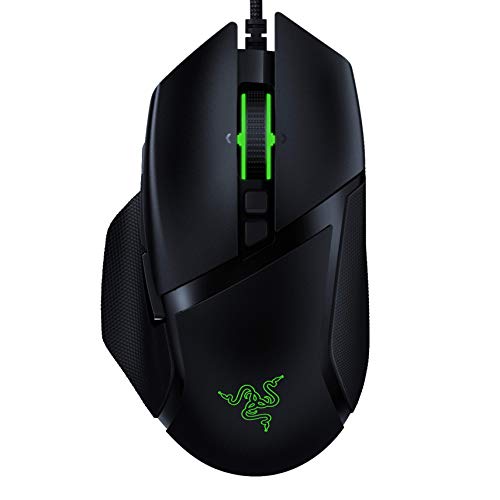
The Basilisk v2 pairs a 20K DPI Focus Plus optical sensor with light-beam-actuated switches, which register presses without the physical debounce delay of older mechanical designs. Eleven programmable buttons and an adjustable scroll wheel resistance let you tune the feel to specific game genres, from MMO ability bars to precise inventory work. Razer Speedflex cable construction reduces drag without a bungee.
For claw grip users with larger hands, the contoured right-handed shape and thumb rest give your ring finger and pinky more stability than the ambidextrous Viper Mini can offer.
A Few Strong Suits
- Tunable scroll resistance makes the wheel feel right for both weapon swaps and inventory scrolling
- Optical switches outlast traditional mechanical switches under heavy clicking
- Drag-reducing cable keeps wired play close to the feel of wireless
Trade Offs
- Right-handed ergonomic shape rules out left-handed use
- Higher DPI ceiling exceeds what most players need day to day
Quick Facts
Who It Suits Best
Right-handed claw grippers playing MOBAs, MMOs, or shooters who want one mouse that handles heavy macro loads.
A Better Fit Elsewhere
Small-handed users may find the Razer Viper Mini (Pick 10) far easier to reach across with a claw posture.
The Mercury M2 is built around a hollowed-out shell that reveals the internal PCB, giving it a sci-fi look without sacrificing rigidity where the palm rests. At 79g, it lands in the lightweight category while the PAW3395DM sensor pushes tracking up to 26,000 DPI, well above the range most players will use but useful for high-resolution multi-monitor setups. Five programmable buttons cover essential bindings without overcomplicating the layout.
Compared to the Basilisk v2, this mouse trades a sculpted ergonomic shape for a more symmetrical, transparent form factor. Dynamic LightSync RGB shines through the cutouts, which becomes a real feature on minimalist or photo-led desk builds.
Standout Benefits
- Transparent shell becomes a design centerpiece under RGB
- Wireless build removes cable drag for claw grip flicks
- 79g weight stays light enough for extended sessions
Trade Offs
- Hollow design collects dust in the cutouts and needs occasional cleaning
- Only 5 programmable buttons, which may feel light for MMO-heavy players
Made For
Style-driven claw grippers who want their peripherals to look as tuned as the rest of the desk.
Look Elsewhere When
You need a long button layout, since the Razer Basilisk v2 (Pick 3) gives you 11 programmable inputs.
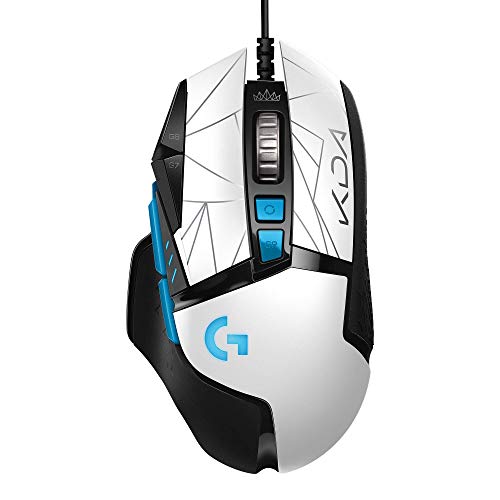
Co-developed with the K/DA League of Legends alt-universe, the G502 Hero K/DA leans into a heavier, more planted feel than the lightweight picks in this list. The Hero 25K sensor tracks at up to 25,600 DPI with 1:1 accuracy, while the adjustable weight system lets you add or remove up to five 3.6g cartridges to dial in balance. 11 customizable buttons and onboard memory make this a strong option for claw users who switch between genres.
Where the Mercury M2 (Pick 4) aims for transparent visual flair, this mouse focuses on mechanical solidity. Owners commonly report the metal spring button tensioning producing a crisp click that holds up under competitive-level spamming.
Real Benefits
- Tunable weight system personalizes glide and pivot response
- Onboard memory stores up to 5 profiles, useful for multi-PC setups
- Metal spring tensioning delivers a consistent click feel over time
Trade Offs
- Heavier default weight can fatigue smaller hands during long sessions
- K/DA styling may feel mismatched on a non-League-themed desk
Feature Snapshot
Perfect Match For
Claw grippers who want a heavy, planted feel and don’t mind the extra grams during longer matches.
Swap It Out When
You want something much lighter, since the TMKB Falcon M1SE (Pick 8) comes in at 75g with a honeycomb build.
The M612 brings tri-mode connectivity to a lower price tier, switching between Bluetooth, 2.4GHz wireless, and wired USB depending on the situation. The 8000 DPI ceiling won’t impress competitive FPS players, but the 5-step DPI presets cover typical use cases for casual shooters, MOBAs, and desktop work. Remappable keys give you the basics without overwhelming the layout.
Against the heavier Logitech G502 K/DA in Pick 5, this mouse prioritizes flexibility over solidity. The Bluetooth mode is genuinely handy for laptop gaming, where a 2.4GHz dongle may be in short supply.
Notable Gains
- Tri-mode connectivity covers wireless dongle, Bluetooth, and wired in one shell
- Remappable keys let you tailor basic commands without heavy software
- Lower entry cost makes it a sensible secondary mouse for travel or work
Trade Offs
- 8000 DPI ceiling trails the high-end sensors on picks 3, 4, and 5
- Plastic build feels lighter in hand, which some claw users read as cheap rather than nimble
Whose Shelf It Belongs On
Casual claw grippers who want wireless flexibility without the cost of a premium sensor.
Reach For A Different Pick When
You want a 1K Hz polling rate for fast competitive play, since the GravaStar Mercury M2 (Pick 4) handles that range more comfortably.
The TMKB wireless mouse pairs a 24,000 DPI sensor with a 1000mAh battery that runs up to 180 hours per charge, with a one-hour top-up via USB-C. Tri-mode connectivity covers 2.4GHz, Bluetooth 5.2 across two paired devices, and wired use. The honeycomb shell and PTFE skates keep glide smooth, and the 90g weight splits the difference between the heavy G502 and the lighter Mercury M2.
For claw grip users who hop between home and travel, the dual Bluetooth pairing means the same mouse can drive a laptop and a tablet without re-pairing.
Everyday Advantages
- 180-hour battery life covers multi-day trips between charges
- Bluetooth 5.2 dual pairing cuts down on dongle juggling
- PTFE skates support smooth glide on wood or cloth pads alike
Trade Offs
- White finish shows scuffs and palm sweat more visibly than darker shells
- Honeycomb design catches dust between sessions, requiring light cleaning
Who Should Grab It
Claw grippers who travel often and want one mouse to cover laptop, desktop, and casual console use.
Where Another Pick Suits Better
If you need a right-handed ergonomic shape, the Logitech G502 K/DA (Pick 5) gives a more sculpted grip.
At 75g with a honeycomb shell, the Falcon M1SE is built for fast flicks rather than planted tracking. The 200-12800 DPI range and 1000Hz polling rate cover competitive FPS play without overshooting into spec-sheet territory. Wired-only design keeps latency at its lowest and removes the battery weight you find in wireless siblings.
Compared to the Mercury M2 (Pick 4), this mouse loses wireless freedom and RGB flair in exchange for a lighter overall shell. The medium size suits claw grippers who found the Viper Mini (Pick 10) just slightly too small.
Features That Help
- 75g weight reduces fatigue during marathon competitive sessions
- Wired connection guarantees no battery anxiety mid-match
- Honeycomb grip channels airflow, helping during long hot sessions
Trade Offs
- Wired only, so no quick swap to a laptop without plugging in
- Honeycomb shell collects dust and skin oils in the open cells
Quick Facts
Who Will Love This
Competitive claw grippers in FPS or battle royale titles who want a light, wired shell without extras.
Consider Something Else When
You want a wireless option, since the TMKB Wireless Black (Pick 9) gives similar endurance in a cord-free form.
Functionally similar to the white TMKB wireless mouse, this black version targets claw grippers who prefer a darker finish that hides smudges from daily use. The 24,000 DPI sensor and 180-hour battery life are unchanged, so endurance and tracking carry over from the white sibling. The matte surface tends to grip well in dry hands, useful for claw users who lift the mouse often.
Against the wired Falcon M1SE (Pick 8), this mouse trades outright lightness for wireless flexibility. The honeycomb shell still runs 90g, which sits between the heavier G502 and the lightest ultra-light options.
Useful Touches
- Black finish hides palm oil and desk dust between cleanings
- Smart auto-sleep stretches the 180-hour battery further in standby
- Matte grip texture supports claw users with drier hands
Trade Offs
- Honeycomb cutouts still need periodic cleaning to stay presentable
- Sensor ceiling is higher than most claw users will ever push
Built With In Mind
Claw grippers who want a single wireless mouse for work, streaming, and play without recharging every few days.
Where A Sibling Pick Shines
For a smaller, ambidextrous claw-friendly shape, the Razer Viper Mini (Pick 10) gives a different feel.
About 10% smaller than the standard Viper and tipping the scale at 61g, the Viper Mini is one of the lightest ambidextrous claw grip mice you can pair with a fingertip-leaning style. Razer optical switches register presses via a light beam, removing the mechanical debounce delay, and the 8500 DPI sensor is honest about its ceiling. Six programmable buttons cover the essentials without overloading the layout.
Compared to the heavier G502 (Pick 5), this mouse is the opposite philosophy: minimal mass, small footprint, wired speedflex cable. The drag-free cord design means even wired play feels close to wireless without the battery trade-off.
Key Advantages
- 61g weight supports rapid claw flicks with minimal hand fatigue
- Ambidextrous shell suits left- and right-handed users equally
- Optical switches register presses at the speed of light
Trade Offs
- Smaller body may feel cramped for users with larger hands
- Only 6 buttons, so MMO-heavy claw users may need a different pick
Technical Highlights
The Right Fit
Small-handed claw grippers who want the lightest possible wired mouse with ambidextrous comfort.
Another Choice May Suit
If you want a wireless ultra-light, the GravaStar Mercury M2 (Pick 4) is 79g with a transparent design.
What To Weigh Before Buying A Claw Grip Mouse
Hand Size And Grip Reach
The defining trait of a claw grip is that the palm sits higher and the fingers arch up to the buttons. Mice with low humps and narrow bodies, like the Razer Viper Mini, fit smaller hands where the fingers need less travel. Larger hands often prefer contoured shapes with a thumb rest, such as the Razer Basilisk v2, where the ring finger can rest without strain. The honest read is that the wrong size will catch up with you faster than the wrong sensor.
Weight And Pivot Style
Lightweight shells (60-80g) support fast lift-offs and claw-style flicks, while heavier mice (100g+) feel planted for slow tracking. The Logitech G502 K/DA adds tunable weights for those who want to test both ends. Tri-mode wireless mice in the 90g range split the difference, with the trade-off being battery and structural cost.
Sensor And Switch Specs In Real Use
A 20K DPI sensor sounds impressive, but most claw users play at 400-1600 DPI. The real question is whether the sensor tracks at 400+ IPS (inches per second) without smoothing, which matters for flick-heavy games. Optical switches register presses faster than mechanical ones because they actuate via a light beam rather than a metal leaf, giving you a small but tangible edge in rapid-fire scenarios.
Wired Vs Wireless Workflow
Wired mice give the lowest latency and skip charging routines. Wireless options with tri-mode support, like the TMKB wireless picks, add flexibility for laptops and travel. For desk-only setups, wired is hard to beat; for shared spaces, wireless earns its place.
Key Considerations Across These Picks
Where Shoppers Go Wrong
Many assume a higher DPI always means a better mouse, when most claw users play below 2000 DPI. Others buy heavy “premium” mice expecting precision, only to find the weight slows their flicks. The honest read is to match weight and shape to your hand first, then check sensor and switches last.
What The Higher Tier Buys
Spending more usually nets a stronger sensor, optical switches, lighter shell materials, and more programmable buttons. For claw users, the jump that matters most is weight reduction and switch type. If your budget is tight, prioritize shape and weight over headline DPI numbers, since those rarely change how the mouse actually feels in a match.
Frequently Asked Questions
What DPI Should I Use For Claw Grip Gaming?
Most claw grip players land between 800 and 1600 DPI for FPS titles, with sensitivity adjusted in-game to taste. Higher DPI is useful for multi-monitor desktop work, but in-game tracking stays sharper at moderate settings where the sensor handles micro-corrections cleanly.
Are Lightweight Mice Better For Claw Grip?
For most claw users, yes. Lighter shells reduce the effort needed to lift the mouse for repositioning, which happens often in claw grips. That said, some players prefer a heavier, planted feel for tracking-heavy games, so the right weight depends on your playstyle.
Wired Or Wireless For Competitive Play?
Wired still delivers the lowest latency and no battery concerns. Modern wireless options with 1K Hz polling rates close the gap considerably, so the choice now comes down to whether you value cable-free desks or the lightest possible shell.
How Many Programmable Buttons Do I Need?
Six buttons cover most FPS and MOBA needs cleanly. MMOs and MOBAs with heavy ability bars benefit from 9-11 buttons, so consider how many keybinds your main games actually require before chasing the highest count.
Do Optical Switches Last Longer Than Mechanical?
Optical switches use light-based actuation, which avoids the metal contact wear that mechanical switches experience. The result is a longer rated lifespan and no debounce delay, though both types hold up well for typical gaming use.
Wrap Up
Claw grip is one of the most common pickup styles for a reason: it blends the aim precision of fingertip control with the stability of palm contact. The right mouse matches your hand size, weight preference, and button count, and the picks above cover the full range from ultra-light wired shells to heavy, fully programmable workhorses. Start with the two or three that fit your hand and desk, then narrow from there.


