


Building a gaming rig without draining your savings takes more than just chasing the lowest sticker. Real value comes from matching each part to how you actually play: case airflow that won’t choke a hot GPU, memory fast enough to keep frame pacing smooth, and a motherboard with the right expansion headroom for next year’s upgrades. The list below pulls together components that lean on proven tech, sensible thermals, and broad compatibility, so you can spend on what changes the experience instead of paying for logos.
An Overview Of The Picks
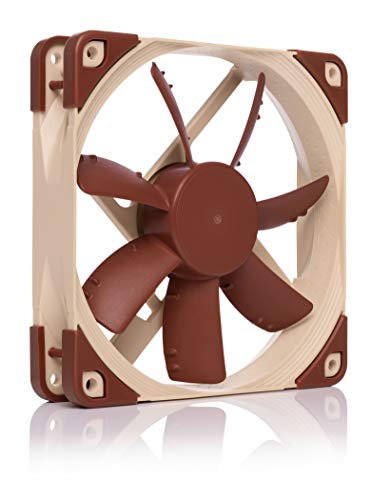
Noctua NF-S12A FLX Quiet Fan 120mm
Noctua NF-S12A PWM Quiet Fan 120mm

Noctua NF-A12x25 G2 PWM Fan 120mm

Samsung 8GB DDR4 3200MHz SODIMM RAM

Noctua NF-A12x25r PWM CPU Cooler Fan 120mm

Acer Predator Vesta II RGB DDR5 32GB 6000MHz

Netac Shadow S4 DDR4 32GB 3200MHz Kit

PowerColor Red Devil Spectral White RX 9070 XT 16GB
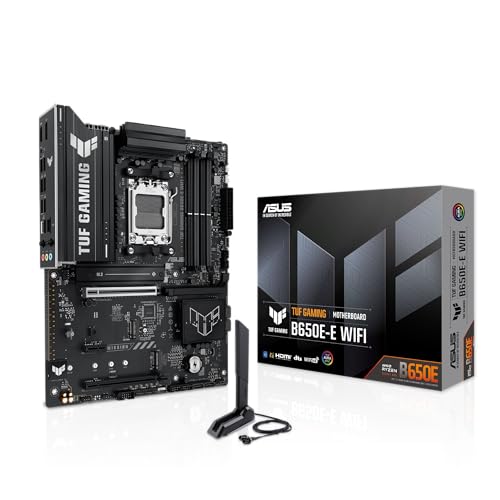
ASUS TUF GAMING B650E-E WIFI AM5 Motherboard

MPG Velox 300R Airflow PZ White Case
Taking A Closer Look At The Options
Start a budget build with quiet airflow, and the rest of the system stays calmer too. The Noctua NF-S12A FLX is a 120mm case fan built around low-noise operation, with a 3-pin connector and three included low-noise cables so you can dial between 1200, 900, and 700 RPM (revolutions per minute) without touching BIOS settings. In a small or mid-tower case running a modest CPU and a single mid-range GPU, that’s plenty of fresh air to keep thermals in check while the room stays library-quiet.
Compared to the bigger A12x25 series below, this S12 leans toward case ventilation rather than pushing air through a dense heatsink, so it slots in well as a front intake or rear exhaust. The trade-off shows up if you expect a 120mm fan to muscle past a thick radiator: that’s not really its job, and you’ll want a static-pressure-focused model instead.
Strengths Worth Knowing
- Three included low-noise adapters let you step down speed without BIOS tweaks
- Anti-stall bumps on the blade hub keep airflow consistent at lower RPMs, useful when the fan ramps down during desktop use
- Brown-and-beige colorway is a love-it-or-leave-it detail, but the build quality tends to outlive multiple system upgrades
- Operates quietly enough for bedroom setups where fan noise competes with game audio
Things To Consider
- No 4-pin PWM (pulse-width modulation) connector, so the motherboard can’t auto-control curve in step with CPU load
- Not the strongest pick for pushing air through a dense 240mm or thicker AIO (all-in-one liquid) radiator
- The signature Noctua color scheme clashes with most white or all-black builds unless you case them behind a shroud
Key Specs
Best Suited To
Builders putting together a quiet office or dorm rig who want case airflow without ever opening fan-control software.
Look Elsewhere When
The Noctua NF-A12x25 G2 PWM is the smarter match when you need pressure to drive air through a thick radiator or dense CPU cooler.
Take the same quiet blade design as the FLX version, swap the 3-pin connector for a 4-pin PWM header, and you get the NF-S12A PWM. The pitch here is convenience: your motherboard can ramp the fan up during a CPU-heavy gaming session and slow it back down when the system is idle, all without manual adapter swaps. For most builds under a mid-tier CPU, that automatic behavior is a quieter experience than constant full speed.
Where this fan earns its spot on a value list is in the front intake position, where the airflow-optimized blade curve does the most good. Set against the FLX model above, the main difference is control: if you want BIOS or software-driven fan curves, this is the version to grab. If your motherboard has no 4-pin headers left, the FLX is the safer plug-and-play path.
Where It Helps
- 4-pin PWM lets the board handle ramp-up and ramp-down based on CPU or system temperature
- Same near-silent acoustic profile as the FLX, around 17.8 dB(A) at full speed
- Drops easily into the same 120mm fan mounts used in most mid-tower cases
Trade Offs
- Limited static pressure, so it underperforms as a radiator or dense heatsink fan
- Cap speed of 1200 RPM means heavy CPU coolers may want a more aggressive replacement
Right Fit For
Anyone happy tweaking a fan curve in BIOS who wants whisper-quiet front-to-back airflow for a modest gaming build.
Skip It When
The Noctua NF-A12x25r PWM is a better target when you need a 120mm fan to push air through a tower cooler’s fin stack.
The A12x25 G2 is the second-generation take on Noctua’s flagship 120mm fan, and it shows in the engineering details. The blade uses a Progressive Bend profile with winglets and a Centrifugal Turbulator hub, all designed to push more air at the same noise floor as older designs. In a build that pairs a hot-running CPU or a thick 360mm AIO, the G2 keeps radiator water temps in check without sounding like a hair dryer.
Stepping up from the S12A models earlier in this list, the G2 trades a little extra cost for markedly better static pressure, which is what you actually need when forcing air through dense fins. The catch is that the Sterrox LCP (liquid crystal polymer) blade is precision-tuned, and the tight tip clearance (a measurement of how close the blade tips sit to the frame, smaller numbers mean better performance) means dust buildup is something to keep an eye on over time.
What It Does Well
- Strong static pressure for radiator and CPU heatsink use at noise levels below most case fans
- Sterrox LCP blade material resists warping under sustained heat output from flagship CPUs
- Flow Acceleration Channels and an AAO (Advanced Acoustic Optimisation) frame reduce turbulence noise at high RPM
Worth Noting
- Premium pricing compared to the simpler S12A models above
- Tight tip clearance makes periodic cleaning more important, as dust can noticeably hurt performance
Feature Snapshot
Who It Suits Best
Builders running a 240mm or 360mm AIO, or a chunky air cooler, who want radiator-grade airflow without the usual noise penalty.
Consider Something Else When
The Noctua NF-S12A FLX is a quieter, lighter option for plain case ventilation where radiator pressure isn’t required.
A slow laptop dragging through browser tabs is almost always a memory problem, and an 8GB DDR4 SODIMM (small-outline DIMM, the compact memory module used in laptops) from Samsung is the kind of no-drama fix that pays off immediately. This stick runs at 3200MHz with a CL22 (CAS Latency 22, the number of clock cycles the memory waits before responding) timing and a 1.2V operating voltage, which is the JEDEC (Joint Electron Device Engineering Council, the standards body that defines RAM specs) standard for current-generation notebooks. Pop it in the empty slot, boot, and your system suddenly keeps more browser tabs and game launchers alive at once.
On a desktop gaming PC this stick won’t physically fit, since SODIMMs are smaller than full-size DIMMs. The realistic use case is a budget gaming laptop upgrade or a small-form-factor build using SO-DIMM compatible boards. For the right machine, Samsung silicon tends to be reliable and broadly compatible with common Intel and AMD laptop chipsets.
Bright Spots
- 3200MHz speed gives aging laptops enough headroom for modern browser workflows and light esports titles
- Samsung memory chips tend to clear the memory compatibility list for most current laptop boards
- Low 1.2V draw keeps battery impact modest compared to older DDR3 sticks
Room For Improvement
- Only 8GB single stick, modern Windows games often want 16GB to behave
- Won’t fit a standard desktop motherboard, so this is a notebook-specific pick
Perfect Match For
Notebook owners trying to stretch a few more years out of an older laptop without buying a new system.
Not Your Match When
The Netac Shadow S4 DDR4 32GB kit is the right tool for desktop budget builds needing 32GB in dual-channel.
Some CPU cooler towers have fans that live between the heatsink fins and the case panel, where a square 120mm fan simply won’t fit. The NF-A12x25r is the round-frame version of Noctua’s flagship, sized to slip into those tight spots or to pair with the NH-D12L as a secondary fan. With a 2000 RPM top speed and roughly 22.6 dB(A) at full tilt, it adds real cooling headroom without the rotor-blade whoosh you’d expect at that speed.
Compare that to the square-frame A12x25 G2 above: same blade technology, different shape, with a 0.5mm tip clearance that helps static pressure. The honest read is that most people don’t need this fan unless they’re upgrading a specific Noctua cooler or wrestling with tight RAM clearance on a large heatsink.
The Good Stuff
- Round frame clears RAM slots and tight CPU cooler mounting situations where square fans won’t fit
- 0.5mm tip clearance keeps static pressure strong enough for fin-dense heatsink stacks
- 4-pin PWM control integrates cleanly with existing fan curves for CPU temperature response
Points To Note
- Round shape means it doesn’t drop into standard 120mm case fan mounts without adapters
- Higher noise floor at full speed than the S12A series, so it earns its place on the cooler, not the case
Whose Shelf It Belongs On
Owners of a Noctua NH-D12L or any cooler with constrained fan clearance who want a quiet high-RPM add-on.
Reach For A Different Pick When
The Noctua NF-A12x25 G2 PWM is the better universal option for case, radiator, and standard heatsink mounting.
For an AM5 or current Intel build where the rest of the budget already covers a fast CPU, the Predator Vesta II RGB is the kind of DDR5 (the latest generation of system memory, with higher bandwidth and lower power draw than DDR4) kit that doesn’t leave speed on the table. It runs 32GB (2x16GB) at 6000MHz with CL32 timings, and supports both Intel XMP 3.0 and AMD EXPO profiles (the one-click memory overclock profiles stored on the stick itself) so you can load the rated speed through BIOS without manual tuning. The hand-screened ICs (integrated circuits, the actual memory chips on the module) help with consistent overclocking headroom.
Set against the cheaper Netac DDR4 kit further down, this is a different platform conversation: DDR5 is required for current AMD Ryzen 7000/9000 and Intel Core Ultra CPUs. The RGB lighting is software-controllable, but check your motherboard’s RGB header ecosystem before assuming it will sync out of the box.
What Helps Most
- 6000MHz CL32 hits the sweet spot AMD officially recommends for Ryzen 7000/9000 memory controllers
- 32GB dual-strip configuration is enough headroom for modern game launches, browser, and a streaming app running together
- EXPO and XMP 3.0 support means rated speed is one BIOS click away on either platform
Soft Spots
- Higher platform cost than DDR4 builds, so it only makes sense on current-gen AM5 or LGA1851 motherboards
- RGB software compatibility varies by motherboard brand, sometimes requiring vendor-specific utilities
Quick Facts
Made For
Builders pairing an AMD Ryzen 7000/9000 or Intel Core Ultra CPU with a B650 or Z890 board who want DDR5 done right.
A Better Fit Elsewhere
The Netac Shadow S4 DDR4 32GB kit is a smarter budget play on older Intel or AMD AM4 platforms that don’t support DDR5.
For a budget DDR4 build on an Intel 12th- to 14th-gen Core i5 or an AMD Ryzen 5000 CPU, 32GB of dual-channel RAM has become the practical floor for modern gaming. The Netac Shadow S4 kit ships as 2x16GB sticks at 3200MHz with XMP 2.0 support, and the low-profile aluminum heat spreader fits under most tower coolers. You give up the RGB and the headline speed of the Predator Vesta II above, but the trade is straightforward capacity at a friendlier entry cost.
For most gamers running a single monitor at 1440p or below, this kit covers modern titles without the dreaded stutter from running out of system memory. Owners commonly report that the sticks clear CPU cooler height restrictions in mid-tower cases, which is the sort of practical detail that matters during a build.
Why It Works Well
- 32GB dual-channel at 3200MHz is the realistic sweet spot for current-generation mid-range gaming
- Aluminum heat spreader helps memory stay cool under sustained load
- XMP 2.0 (Intel’s memory overclock profile standard, version 2.0) profile applies rated speed with one BIOS selection
Small Caveats
- No ECC (Error-Correcting Code) support, so it isn’t suited to workstation roles where data integrity is critical
- Heat spreader height can interfere with very low-profile CPU coolers in some compact builds
Who Should Grab It
Anyone on an AM4 or 12th-14th gen Intel platform building a 1080p or 1440p gaming rig that needs 32GB without overspending.
Swap It Out When
The Acer Predator Vesta II RGB is the obvious step up for a current-gen AM5 build that needs DDR5.
On a “value GPU” list, the PowerColor Red Devil Spectral White RX 9070 XT 16GB sits in flagship territory, and that’s the point. The Spectral White finish matches a white build without resorting to vinyl wraps, while 16GB of GDDR6 (Graphics DDR6, a high-bandwidth memory type dedicated to graphics cards) covers current AAA titles at 4K with settings dialed in. The card is 340mm long, which is mid-tower territory, and it asks for a 900W minimum system PSU (power supply unit) with three 8-pin PCIe (Peripheral Component Interconnect Express, the slot standard used for modern graphics cards) power connectors.
Compared to the other parts in this list, this is the line item that moves the needle on frame rates. The honest trade-off is the 900W PSU requirement: a budget build on a 650W unit will need an upgrade before this card is happy. You may also find the 340mm length tight in smaller mid-towers, so measure first.
Everyday Wins
- 16GB GDDR6 holds up well at 4K and high-refresh 1440p in current-generation games
- Display outputs cover 1x HDMI 2.1 and 3x DisplayPort 2.1a (a video output standard supporting very high refresh rates and resolutions) for multi-monitor setups
- White shroud keeps the look cohesive inside a light-themed build
Things To Weigh
- 900W minimum PSU requirement can add real cost to an otherwise budget build
- 340mm length may not fit compact mid-towers or mATX cases without checking clearance
Technical Sheet
Built With In Mind
Builders putting together a high-refresh 1440p or 4K gaming rig in a white theme who can support a 900W PSU.
Where Another Pick Suits Better
The Netac Shadow S4 DDR4 kit and ASUS TUF B650E-E motherboard make more sense if a flagship GPU overshoots the rest of the budget plan.
A motherboard is the part you want to feel boring and dependable, and the TUF GAMING B650E-E WIFI leans hard into that role. The 8+2+1 80A DrMOS (a type of integrated power stage component rated for high current delivery) power stages, 8-layer PCB (printed circuit board, the green board everything solders to), and DDR5 support form the base for a current Ryzen 7000/9000 build. You also get PCIe 5.0 x16 (the next-generation expansion slot, doubling the bandwidth of PCIe 4.0) with a Q-Release latch, three M.2 slots (small internal slots for compact NVMe SSDs) including one PCIe 5.0 drive mount, and built-in Wi-Fi 6E plus 2.5Gb Ethernet for fast networking.
Versus a cheaper B650 board, the E-series variant in this TUF line gives you the PCIe 5.0 GPU slot that matters for next-generation graphics cards. Versus a flagship X670E board, you give up some rear I/O and expansion lanes, but most budget-conscious builders never use them anyway.
Noteworthy Benefits
- 8-layer PCB and 80A DrMOS power stages handle sustained Ryzen 9 loads without VRM (Voltage Regulator Module, the circuitry that converts PSU power to clean CPU voltage) throttling
- Three M.2 slots, one wired for PCIe 5.0, give you room for a fast boot drive and game library without compromise
- Wi-Fi 6E and 2.5Gb Ethernet cover both wireless and wired high-speed networking out of the box
A Few Limitations
- Fewer rear USB ports than some X670E boards, so a packed desk may need a hub
- Realtek 2.5Gb Ethernet is solid for most homes but lacks the higher 5Gb or 10Gb options on flagship boards
Quick Technical Notes
Right Fit
Builders wanting a durable AM5 foundation that won’t bottleneck a Ryzen 7 or 9 chip and still has PCIe 5.0 runway for future GPU upgrades.
Consider Something Else When
The Acer Predator Vesta II RGB is the memory pairing, but older DDR4 builds on AM4 won’t use this board and should look at a compatible DDR4 platform instead.
Cases can make or break a build, and the MPG Velox 300R Airflow PZ White leans into airflow and assembly convenience. The 160mm front and rear fans are dual-layer blade designs with three manual power modes, so you can pick between low-noise and high-cooling without entering software. The chassis supports up to a 360mm radiator (a liquid-cooling heat exchanger) in the front, and back-connector ATX motherboard support keeps cables hidden behind the motherboard tray, which is the kind of detail that turns a budget build into a clean-looking showpiece.
Step back from the rest of this list and the Velox 300R pulls everything together: the radiator support plays nicely with the Noctua A12x25 G2 from earlier, the white finish matches the PowerColor RX 9070 XT Spectral White, and the back-connector layout pairs well with the ASUS TUF B650E-E. The trade-off is the 160mm fans are large, so check GPU length clearance before pulling the trigger on a long card like the Red Devil above.
Real-World Strengths
- 160mm dual-layer blade fans with manual power modes for noise-versus-cooling flexibility
- Back-connector ATX support hides cables behind the motherboard tray for a tidy interior
- Front 360mm radiator support leaves room for high-performance liquid cooling
Less Ideal Details
- Mid-tower dimensions still won’t fit extended GPUs beyond 340mm without careful measurement
- Pre-installed fans use a manual mode switch, which is less convenient than full software fan control
Who Will Love This
Builders assembling a white-themed rig who want a clean look, strong airflow, and easy cable management from the start.
Not Your Match When
Compact mATX-focused builds should look at smaller cases, since this mid-tower is sized for full ATX boards like the ASUS TUF B650E-E above.
Building A Cheap Gaming PC That Still Performs Well
Choosing cheap gaming PC components that actually feel cheap to use comes down to three things: platform fit, airflow headroom, and memory bandwidth matched to your CPU. The motherboard sets the platform, so AM5 or current Intel buyers need DDR5 like the Predator Vesta II above, while AM4 and older Intel builds lean on DDR4 kits like the Netac Shadow S4. Airflow headroom matters most around the GPU, and cases like the MPG Velox 300R with large front fans keep cards like the Red Devil RX 9070 XT from throttling in extended sessions.
The third piece, memory bandwidth, is the most overlooked. Modern AMD Ryzen CPUs officially favor around 6000MT/s DDR5 with a 1:1 memory controller ratio (meaning the memory clock and Infinity Fabric clock run at the same speed, eliminating the performance penalty of a mismatched ratio), which is why the Predator Vesta II’s 6000MHz CL32 profile hits the sweet spot. Cheap doesn’t have to mean slow, it just means choosing parts that earn their slot in the build.
Thermal Headroom And Fan Placement
Static pressure and airflow are different jobs, and pairing the right fan to the right spot keeps noise low. Case intake and exhaust want airflow-optimized fans like the Noctua S12A series, while radiator and heatsink mounts need pressure-optimized fans like the A12x25 G2. Putting a pressure fan on an unrestricted case mount wastes its strength and adds noise, and the reverse leaves the radiator under-cooled.
Power And Form Factor Reality Checks
The RX 9070 XT’s 900W PSU requirement is the kind of detail that quietly doubles a budget when overlooked. Measure case clearance for the card’s 340mm length, check the motherboard’s M.2 slot count for storage plans, and confirm the PSU has the right 8-pin PCIe count before any other buy. These checks are tedious, but they keep a cheap build from becoming a parts-returns project.
Key Things To Watch Before You Commit
Pitfalls Shoppers Hit
The most common mistake in this category is buying a flagship GPU on a budget motherboard that can’t supply stable power, or pairing a hot-running card with a case that chokes its airflow. Memory mismatches are a close second: a 32GB DDR4 kit can’t drop into a board that needs DDR5, and a 6000MHz CL32 kit is wasted on a CPU that can’t run that ratio. Measure twice, especially for clearance and platform fit, since returns cost more than the savings.
Where The Extra Money Goes
Higher-tier components tend to cost more because of three things: better power delivery, better materials, and longer platform runways. The ASUS TUF B650E-E over a bare-bones B650 board, for instance, adds PCIe 5.0 and a sturdier VRM that won’t buckle under a future CPU upgrade. The Noctua A12x25 G2 over the S12A FLX adds static pressure for radiator use, and the cost reflects precision blade manufacturing rather than marketing. The honest read is that the upgrade pays off when the extra capability is something you’ll actually use, like radiator cooling or a planned next-generation GPU.
Frequently Asked Questions
Is 32GB Of RAM Really Necessary For Gaming In 2026?
For most current AAA titles at high settings, 32GB has become the practical floor to avoid background stutter from browser tabs and launchers. A single 8GB stick like the Samsung SODIMM in this list is a notebook fix, not a desktop gaming baseline.
Can I Mix DDR4 And DDR5 In The Same Build?
No, the two generations use different notches on the memory module and the motherboard only supports one type. Pick a platform (AM4 with DDR4 or AM5 with DDR5) and stick to it for the entire build.
Do Cheap Gaming PC Components Need A Better Power Supply?
Yes, especially with a power-hungry GPU. The PowerColor RX 9070 XT asks for a 900W PSU minimum, so cheap out elsewhere before skimping on the power supply.
How Many Case Fans Do I Actually Need?
A typical mid-tower build runs well with three to four fans: two intake in the front, one exhaust in the rear, and optionally one top exhaust. The MPG Velox 300R in this list comes pre-equipped with front and rear fans, so you can add a top fan later.
Is An Air Cooler Enough For A Modern Gaming CPU?
For most Ryzen 5 and Core i5 chips, a quality air cooler is enough, especially paired with strong case airflow. A 240mm or 360mm AIO becomes useful with Ryzen 7/9 or Core i7/i9 chips that run hotter under sustained load.
The Takeaway
A cheap gaming PC isn’t about cutting the most expensive corners, it’s about spending where the experience changes and saving where it doesn’t. Match the platform first, keep airflow honest around the GPU, and let the motherboard and memory give you room to grow into next year’s parts without rebuilding from scratch. For a 2026 build on a real-world budget, that approach beats chasing the lowest sticker every time.


