


A good PC case is half function, half vibe, and almost always the part budget shoppers agonize over longest. You want something that keeps a hot GPU cool, swallows a 360mm radiator without complaining, and still looks clean sitting next to your monitor. The lineup below leans into affordable mid-towers that punch above their weight, so you can spend the rest of the build on the parts that actually move frame rates.
The Lineup, Simplified

NZXT H5 Flow Compact ATX Mid-Tower PC Gaming Case (White)

Fractal Design Meshify 2 Compact Black Solid ATX Mid Tower (Black)

Sharkoon Rebel C70G Middle Tower PC Case (Wood Design)

NZXT H6 Flow CC-H61FB-01 Compact Dual-Chamber Mid-Tower (Black)
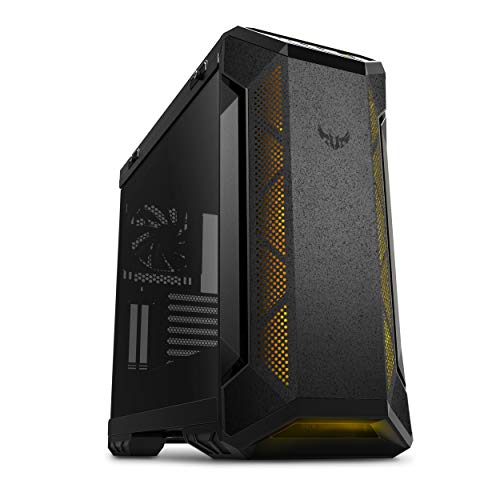
ASUS TUF Gaming GT501 Mid-Tower Gaming Case (Steel)

NZXT H6 Flow CC-H61FW-01 Compact Dual-Chamber Mid-Tower (White)
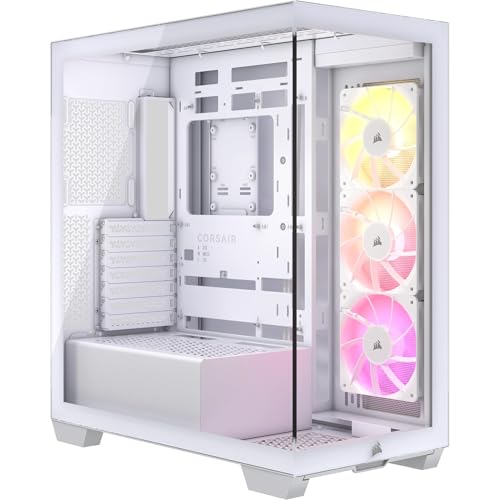
CORSAIR 3500X ARGB Mid-Tower ATX PC Case (White)

MPG Velox 300R Airflow PZ White Mid-Tower Gaming PC Case

CORSAIR iCUE 4000X RGB Tempered Glass Mid-Tower ATX Case (Black)

Phanteks Enthoo Pro ATX Chassis, Tempered Glass, RGB (Black)
What Each Pick Brings To The Table
The H5 Flow is a mid-tower that quietly gets the basics right, which is exactly what most budget builders actually need. A perforated front and top panel pull filtered air straight through the chassis, and NZXT ships two 120mm fans in the box so you can start building without a separate cooling shopping trip. The white finish and tempered glass side panel give it a clean, modern look that doesn’t scream “gamer,” which helps if your rig shares space with a work-from-home setup.
For first-timers, the spacious interior layout and clear cable channels take a lot of the stress out of your first build. Radiator support up to 280mm in front and 240mm up top covers most AIO liquid coolers (all-in-one liquid CPU coolers) without forcing you to check measurements twice. Where the Fractal Design Meshify 2 leans toward silence, the H5 Flow leans toward visual polish at a friendly footprint.
What Stands Out
- Perforated front and top panels feed components a steady stream of cool, filtered air.
- Tempered glass side panel shows off your build without a premium price tag.
- Two pre-installed 120mm fans mean you can boot a new build right away.
- Dedicated cable channels keep the back of the tray tidy, a real time-saver on a first build.
Things To Consider
- The compact mid-tower format leaves less room for oversized EATX motherboards (larger ATX boards with extra expansion slots).
- Only two included fans, so a high-TDP (heat-generating) CPU may push you to add a third.
Key Specs
Made For
First-time builders and budget shoppers who want a clean, modern mid-tower that just works out of the box.
Skip It When
You want a near-silent rig and should reach for the Fractal Design Meshify 2 Compact instead.
Where most budget cases try to win on RGB, the Meshify 2 Compact commits to a stealthy, angular mesh front that channels air aggressively into the chassis. The bold geometric pattern looks serious on a desk and the bolt-free tempered glass side panel keeps the interior framing clean. It’s the case that looks like it costs more than it does, which is the goal for many shoppers.
Daily owners tend to appreciate how quietly the mesh design works with quiet fans, and a fully removable top panel makes filter cleaning and component swaps far less painful. The front-mounted USB Type-C port (a small reversible connector for modern devices) is a small but welcome touch, especially as more motherboards ship headers for it. Compared to the NZXT H5 Flow, this is the pick for people who care about airflow discipline more than bright white aesthetics.
A Few Highlights
- Angular mesh front feeds the GPU and CPU a strong column of cool air.
- Flush, bolt-free tempered glass panel keeps the side view uncluttered.
- Removable top panel simplifies dust filter cleaning and radiator swaps.
- Front USB Type-C port adds modern connectivity for phones and drives.
Honest Caveats
- The “Compact” label means longer GPUs over 360mm need a clearance check.
- Comes with fewer fans than the Sharkoon Rebel C70G, so budget for extras.
At A Glance
Right Fit For
Builders who want a quiet, airflow-focused mid-tower with a more understated look than most gaming cases.
Look Elsewhere When
You want pre-installed RGB fans and a glassier aesthetic, where the CORSAIR 3500X ARGB is a better match.
The Rebel C70G is the case you buy when you want a friend to ask, “Wait, that’s a PC?” A wooden front panel paired with a screwless tempered glass side panel breaks up the typical all-black-and-RGB look that fills every PC building subreddit. The front mesh still feeds the components air, so the warmer visual style doesn’t come at the cost of thermal headroom.
Four pre-installed ARGB fans (addressable RGB fans whose colors and effects are individually controllable) mean your build lights up the moment you power it on, no extra fan shopping required. You also get a USB 3.2 Type-C front port, which lines up nicely with current and next-generation motherboards. Where the NZXT H6 Flow emphasizes dual-chamber thermal separation, the C70G leans into furniture-friendly styling.
Strong Points
- Wood-tone front panel stands out from the usual gaming case crowd.
- Four included ARGB fans cover most lighting and cooling needs out of the box.
- Modular fan mounts support up to eleven 120mm fans for ambitious air builds.
- USB 3.2 Type-C front port supports modern motherboards.
Worth Noting
- Wood-accent finish can clash with strictly black or strictly white themed builds.
- ARGB fan lighting requires a compatible motherboard header or controller.
Quick Facts
Who It Suits Best
Style-conscious builders who want a wood-accented statement piece that still cools like a proper gaming case.
Reach For A Different Pick When
You prefer a pure-black aesthetic and better cable management, where the CORSAIR iCUE 4000X RGB fits better.
The H6 Flow takes the familiar NZXT look and pushes it further with a dual-chamber layout, which is a design that splits the case into two zones so the power supply and cables stay out of the GPU’s airflow path. The result is a cleaner build picture and meaningfully better cooling for the components that actually run hot. Wraparound panoramic glass gives a near-360-degree view of your hardware, which matters if you spent extra on a fancy AIO or custom cable extensions.
Three 120mm fans come in the box, so you can boot a serious build without immediately visiting a fan retailer. Cable management is a strong point here, with channels and tie-downs that make the visible chamber look calm. Compared to the H5 Flow, the H6 is a more deliberate step up for shoppers chasing top-tier GPU thermals.
Useful Highlights
- Dual-chamber design keeps the PSU (power supply unit) and cables out of GPU airflow.
- Panoramic wraparound glass turns the build itself into decor.
- Three included 120mm fans cover baseline cooling for most rigs.
- High-airflow mesh panels keep thermals steady under sustained load.
Trade Offs
- Panoramic glass shows off messy cable runs more than other layouts do.
- Dual-chamber builds are slightly trickier for first-timers to plan around.
Best Suited To
Gamers running a flagship GPU who want a chassis that prioritizes GPU thermals and a clean interior photo.
Consider Something Else When
You want a simpler first build, where the NZXT H5 Flow is the easier path.
The TUF Gaming GT501 is a steel-bodied mid-tower that feels closer to a tank than the typical sheet-metal case. It supports EATX motherboards, which gives you room for the largest consumer boards and the most PCIe expansion. Smoked tempered glass hides a slightly less polished interior while still letting your lighting shine through, a nice compromise if you don’t want a totally bare show build.
Four fans ship in the box, including the rear exhaust, so air movement is strong from the first boot. There is space for up to seven 120mm fans and dual 360mm radiators, so ambitious air or AIO loops fit comfortably. The metal side panels and magnetic dust filters are easy to wipe down, and owners commonly report the chassis holding up well to moves and re-builds.
A Few Strong Suits
- Steel chassis feels durable and stable, useful if you move the rig often.
- EATX support opens the door to flagship motherboards and multi-GPU setups.
- Four included fans give a strong cooling baseline out of the box.
- Seven drive bays cover extensive storage and hybrid drive configurations.
Points To Note
- Larger footprint than compact mid-towers, so measure your desk space first.
- Smoked glass slightly dims RGB lighting compared to clear side panels.
Feature Snapshot
Whose Shelf It Belongs On
Builders using EATX motherboards, lots of storage, or large radiators who value a sturdy steel frame.
Swap It Out When
You want a compact case for a small desk, where the Fractal Design Meshify 2 Compact is a tighter fit.
The white version of the H6 Flow is essentially the same dual-chamber platform as its black sibling, with a finish that looks intentional in light-themed setups. A clean all-white build is one of the most popular aesthetics in modern PC building, and this case gives you the canvas to do it well. Panoramic glass wraps the front and side, so your white components, white cables, and white AIO read as one cohesive piece rather than a parts-bin collage.
Three pre-installed 120mm fans keep thermals honest, and the airflow panels do real work under load. The dual-chamber layout still hides the PSU and cables in the rear chamber, which is the difference between “nice” and “looks like a magazine photo” in a white build. The trade-off is the same as the black H6: panoramic glass shows cable mess more than other layouts do.
What Pays Off
- White finish is a clean canvas for light-themed builds.
- Dual-chamber layout keeps the visible interior looking tidy.
- Panoramic glass turns even modest components into a centerpiece.
- Three 120mm fans handle typical gaming loads without extras.
Room For Improvement
- White finish shows dust on the outside panels more than dark cases.
- Panoramic glass exposes any unhidden cable runs on the back chamber.
Perfect Match For
Builders committed to a white or pastel aesthetic who want a panoramic showpiece mid-tower.
Not Your Match When
You want something darker and quieter, where the Fractal Design Meshify 2 Compact is a better fit.
The 3500X ARGB is built for builders who want a wraparound glass look without paying flagship prices. Panoramic tempered glass covers the front and side, and three CORSAIR RS120 ARGB fans come mounted and ready, which removes a small but real headache from the parts list. It’s a forward-looking case too, with motherboard compatibility that includes the new wave of back-connect boards (motherboards where power and data connectors plug in from behind for a cleaner front view).
Cooling capacity is generous for a mid-tower at this tier, with side, roof, and PSU fan mounting points and room for up to ten 120mm fans. That means thermal headroom for a hot CPU and a flagship GPU without resorting to exotic cooling. Compared to the Sharkoon Rebel C70G, the 3500X leans glassier and more modern, while the C70G leans warmer and wood-accented.
Features That Help
- Reverse-connection motherboard compatibility future-proofs the build.
- Three included RS120 ARGB fans handle both lighting and baseline cooling.
- Wraparound panoramic glass shows off your build from multiple angles.
- Support for up to ten 120mm fans leaves room for aggressive cooling.
Small Caveats
- ARGB lighting control requires a compatible motherboard or CORSAIR controller.
- More glass means more fingerprints during the build process.
Spec Overview
Who Should Grab It
Builders planning a back-connect motherboard who want a glassy, modern mid-tower that grows with their parts.
A Better Fit Elsewhere
You want a stealthy, quiet look instead, where the Fractal Design Meshify 2 Compact fits the bill.
The Velox 300R Airflow PZ in white is built around a quiet, considered idea: you should be able to tune your case fans without rebooting into a BIOS menu. The included 160mm dual-layer blade fans come with three manual power modes, so you can pick the cooling-versus-noise balance that fits your session. That kind of physical control is rare in this tier, and it pays off during long gaming nights when you don’t want a case that whines.
It also supports back-connect ATX motherboards, which is a forward-looking move for shoppers who want to rebuild cleanly. EZ DIY features (tool-free panels, easy-drive bays) help newer builders get through assembly without stripping a thumb screw. Compared to the NZXT H6 Flow in white, this is the better choice if you want physical fan control rather than relying entirely on software.
Positive Points
- Three manual fan power modes let you trade noise and cooling on the fly.
- 160mm dual-layer blade fans move serious air with lower noise.
- Back-connect ATX motherboard support keeps the build looking clean.
- EZ DIY features shorten the time it takes to finish a first build.
Points To Keep In Mind
- White finish is a fingerprint magnet, especially on the glass.
- Physical fan control is less flexible than full software tuning for some users.
Built With In Mind
Gamers who want strong airflow, a quiet default profile, and real physical control over fan curves.
Another Choice May Suit
You prefer software-controlled RGB and quiet-first tuning, where the CORSAIR iCUE 4000X RGB is a strong match.
The iCUE 4000X RGB has been a popular mid-tower for several generations of CORSAIR fans, and the 2024 refresh keeps what worked: tempered glass on the front and side, dedicated front ventilation channels, and three SP120 RGB Elite fans. The included iCUE Lighting Node CORE controller lets you synchronize lighting with other CORSAIR peripherals, which is a real draw for shoppers already in that ecosystem.
RapidRoute cable management is a standout feature here, a single channel behind the motherboard tray with 25mm of space to route the thickest 24-pin and GPU cables. That single design choice is often what separates an “okay-looking” build from a clean one. Compared to the CORSAIR 3500X ARGB, the 4000X is the more traditional layout, with separate front and side glass instead of wraparound panoramic.
Real-World Strengths
- RapidRoute cable channel with 25mm of room keeps the back tidy.
- Three included SP120 RGB Elite fans provide both lighting and airflow.
- iCUE Lighting Node CORE centralizes control over fans and compatible peripherals.
- Dedicated front ventilation channels help feed the GPU cooler air.
Some Limits To Know
- iCUE software is the easiest way to unlock full fan and lighting control.
- Two separate glass panels take more time to clean than a single wraparound piece.
The Right Fit
Shoppers already invested in the CORSAIR iCUE ecosystem who want clean lighting and clean cables in one package.
Where A Sibling Pick Shines
You want a more modern, panoramic aesthetic, where the CORSAIR 3500X ARGB is the better showcase.
The Enthoo Pro is the veteran of the list, and it earns its place by solving problems modern cases sometimes forget. The brushed-aluminum-look front panel hides a chassis designed for builders with many drives, custom loops, and reservoirs. If you’ve ever tried to mount a pump bracket in a tight case, the Enthoo Pro’s dedicated reservoir mounts and pump slots are a small but real gift.
The interior is the kind of clean that hides the PSU and hard drives behind a PSU shroud, with optical drive support and integrated RGB lighting controlled by a front-panel switch. Front I/O includes USB 3.0 and USB-C Gen 2, which lines up with current motherboard standards. Compared to the compact mid-towers above, the Enthoo Pro trades desk-friendly size for storage, cooling headroom, and a much more flexible build canvas.
Bright Spots
- Plenty of room for custom loops, reservoirs, and pumps without crowding.
- Optical drive bay covers legacy and niche storage needs.
- Hidden PSU and drive bays keep the visible interior clean.
- USB-C Gen 2 front port supports modern motherboards.
Factors To Consider
- Full-tower-leaning footprint requires more desk space than compact mid-towers.
- Older styling feels less modern than panoramic-glass peers.
Who Will Love This
Storage-heavy builders and custom-loop enthusiasts who want maximum flexibility over minimum footprint.
Not Your Match When
You want a compact, modern aesthetic, where the NZXT H5 Flow or CORSAIR 3500X ARGB fits better.
Matching Your Build To The Right Mid-Tower
A few attributes matter more than the rest, and getting them right up front saves you from a case you outgrow in six months. Airflow design is the first one, and it usually comes down to mesh versus solid front panels. Mesh fronts, like the Fractal Design Meshify 2 Compact and the NZXT H6 Flow, feed the GPU and CPU more cool air at the cost of slightly more visible dust over time. Solid or glass fronts look cleaner but rely on side or roof ventilation to do the same work.
Motherboard support is the second attribute to lock in. Standard ATX boards fit almost any mid-tower on this list, but EATX boards (larger boards with extra slots for workstation-class hardware) narrow the field to the ASUS TUF Gaming GT501 and the CORSAIR 3500X ARGB. If you plan a back-connect motherboard (a board where connectors plug in from the rear for cleaner visuals), look at the CORSAIR 3500X ARGB or the MPG Velox 300R Airflow PZ. Finally, think about cooling headroom: if you want a 360mm AIO radiator (a 360mm-wide all-in-one liquid cooler) in the front, check the spec sheet first, since some compact mid-towers top out at 280mm.
Where These Picks Pull Apart
Common Shopping Slip Ups
The easiest mistake is choosing a case for its looks without checking GPU clearance, especially with the longer flagship cards on the market today. A card that just barely fits in a product photo can block front fans or radiator mounts in practice. The second common slip is underestimating cable management. Cases with dedicated routing channels and a wide back-tray gap, like the CORSAIR iCUE 4000X RGB, take a lot of stress out of the build, and skipping that feature can leave a finished rig looking messier than you’d hoped. The third is buying fans separately when a case already includes enough, like the Sharkoon Rebel C70G or the ASUS TUF Gaming GT501, which can quietly inflate the budget.
Where The Extra Money Goes
Higher-priced cases in this category usually spend the money on glass, cable routing, and fan ecosystems. A panoramic wraparound panel, like the one on the CORSAIR 3500X ARGB or the NZXT H6 Flow, costs more to manufacture and ship than a flat side panel. Pre-installed fans with proper RGB controllers, like the iCUE 4000X’s Lighting Node CORE, add cost but remove the need to research separate fan packs. Dual-chamber layouts, which isolate the power supply and cables from the GPU’s airflow path, also bump the price up. You only need to pay for these upgrades if you care about the look, the lighting, or the thermals they deliver; otherwise, a case like the NZXT H5 Flow does the job for less.
Frequently Asked Questions
How Much Should I Spend On A Cheap Gaming PC Case?
Most budget gaming cases fall in a similar tier, and the real cost difference comes down to fans, glass, and cable management. Spending a bit more for a case with pre-installed fans and good routing can save you from buying extras.
Do I Need A Mesh Front Panel For Gaming?
Mesh fronts feed the GPU more cool air, which helps during long gaming sessions. Glass or solid fronts look sleeker but rely on side or roof ventilation, so they work best in a room with steady ambient temperature.
What Size Motherboard Fits In A Mid-Tower?
Most mid-towers on this list support ATX, Micro-ATX, and Mini-ITX boards without issue. If you plan an EATX build, focus on cases like the ASUS TUF Gaming GT501 that explicitly list EATX support.
How Many Fans Come With These Cases?
Fan counts vary widely, from two in the NZXT H5 Flow up to four in the Sharkoon Rebel C70G and ASUS TUF Gaming GT501. Always check the spec sheet, since adding fans later is easy but adds to the total spend.
Are Tempered Glass Cases Harder To Maintain?
Tempered glass shows dust and fingerprints more than solid panels, so plan on a quick microfiber wipe every couple of weeks. The trade-off is a much better view of your components, which is the whole point of glass in the first place.
Wrap Up
Picking the right cheap gaming PC case is mostly about being honest with yourself about what you actually need from the build. A first-timer who wants the path of least resistance will be happy with the NZXT H5 Flow, while a builder chasing GPU thermals will appreciate the dual-chamber H6 Flow. A style-led desk setup points toward the Sharkoon Rebel C70G or the CORSAIR 3500X ARGB, and a custom-loop or storage-heavy project still has a friend in the Phanteks Enthoo Pro. Match the case to the parts you already have, and the rest of the build tends to fall into place.


