


You don’t need to drop a paycheck to get smooth, responsive gameplay. The current crop of cheap gaming monitors brings real 144Hz panels, FreeSync support, and surprisingly accurate colors to under-$300 territory, and a few portable options stretch your dollars even further when your play space doubles as a coffee shop table. The trick is knowing where each panel cuts corners and where it quietly overdelivers, so your next upgrade doesn’t feel like a compromise.
Your Options, Compared

cocopar 18.5″ Portable Monitor 2K QHD 120Hz

VisionOwl 18.5″ Portable Monitor 2K QHD 120Hz
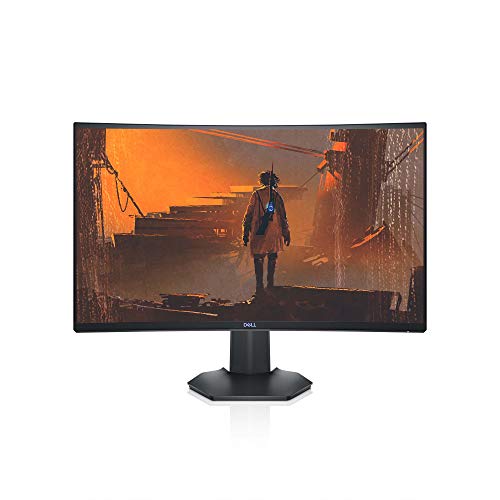
Dell S2721HGF 27″ Curved 144Hz FHD Monitor

cocopar 15.6″ Portable IPS Travel Monitor
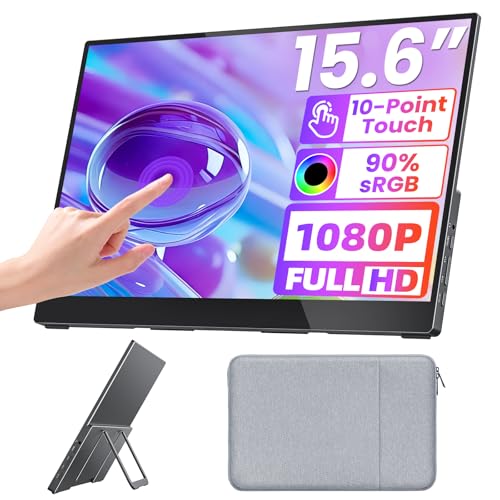
Upperizon 15.6″ FHD Touch Portable Monitor

Alienware AW2521HF 24.5″ 240Hz IPS Monitor

BenQ Mobiuz EX2510 24.5″ 144Hz IPS Monitor
Upperizon 23.8″ 4K Portable Monitor 144% sRGB

BenQ MOBIUZ EX2510S 25″ 165Hz IPS Monitor
The Picks, Examined More Closely
Most cheap gaming monitors pin you to a desk, but this cocopar panel happily rides in a backpack. The 18.5-inch IPS screen runs at 2560 x 1440 with a 120Hz refresh rate, which is a serious step up from the standard 60Hz you’d expect at this size. USB-C and HDMI inputs let it pair with a laptop, MacBook, Surface, PS5, or Xbox without dongle gymnastics, and a built-in kickstand plus VESA compatibility covers both grab-and-go and permanent setups.
For most setups you toss it on a coffee shop table, plug a single USB-C cable into your laptop, and suddenly you’ve got a second canvas for chat windows or game lobbies. The 120% sRGB coverage means indie and AAA games both look reasonably vivid without calibration fuss.
What Makes Sense
- 2K resolution at 120Hz on a portable panel, a rare combo under $250 in our experience
- Single-cable USB-C connectivity that charges your laptop while it mirrors the display
- Built-in kickstand folds flat for travel, with VESA mounting as a permanent option
- 120% sRGB color coverage gives games and movies a noticeable punch beyond basic panels
- Works with consoles, laptops, and phones that support USB-C video out
Things To Consider
- No internal battery, so it draws power from the host device or a wall adapter during long sessions
- At 18.5 inches the screen is larger than a standard laptop panel, so backpack space is a real factor
Quick Facts
Who It Suits Best
Console and PC players who split time between a dorm, an apartment, and a friend’s couch and need one screen that travels.
Look Elsewhere When
Esports competitors chasing maximum refresh should look at the Alienware AW2521HF instead, which pushes 240Hz on a desktop panel.
Take the cocopar concept, refine the screen surface, and you land on the VisionOwl 18.5-inch. It shares the 2K QHD resolution and 120Hz refresh rate that make its sibling appealing, but swaps in a matte anti-glare coating that genuinely helps in sunlit cafés or bright dorm windows. HDR support adds a little extra punch to cinematic single-player titles, and the integrated speakers keep your bag lighter when you don’t want to lug headphones.
You can plug in a MacBook, a Windows laptop, a PS5, or an Xbox through USB-C or HDMI, and the built-in kickstand sets up in seconds on uneven surfaces. For most users who game on the move, the matte finish is the feature that quietly wins daily.
The Helpful Details
- Matte anti-glare surface reduces reflections during daytime play and travel
- HDR support gives single-player games and movies richer contrast on the go
- Integrated speakers remove the need to carry a separate audio solution for casual sessions
- 120% sRGB coverage keeps colors consistent with your main display in mirrored mode
Worth Noting
- Built-in speakers are functional but thin, so dedicated headphones or external audio still win for serious gaming
- Requires a USB-C or HDMI source plus power during longer sessions
- No battery, so you may need a power bank for true off-grid use
Right Fit For
Students and remote workers who frequently game or stream from cafés, libraries, and shared spaces with unpredictable lighting.
Consider Something Else When
Color-critical designers should consider the Upperizon 23.8″ 4K portable monitor for sharper detail and wider gamut.
The Dell S2721HGF is what most people picture when they say “gaming monitor.” A 27-inch curved VA panel with a 1500R curve pulls your peripheral vision into the action, and 144Hz refresh with a 1ms MPRT response time keeps fast shooters feeling snappy. Nvidia G-SYNC Compatibility and AMD FreeSync Premium handle the heavy lifting on the variable refresh front, so screen tearing largely stays out of the picture whether you run an RTX card or an AMD GPU.
Compared to the portable panels above, this one anchors your desk. Height and tilt adjustment let you dial in posture for marathon sessions, and the rear joystick plus shortcut buttons make navigating the on-screen display far less painful than the old button-stalk approach.
Positive Points
- 1500R curve wraps the action around your field of view for deeper immersion in racing and RPGs
- 144Hz refresh with 1ms MPRT keeps motion blur under control in competitive shooters
- Dual FreeSync Premium and G-SYNC Compatibility support, rare at this price tier
- Height and tilt adjustment support long-session ergonomics
Trade Offs
- 1080p resolution on a 27-inch screen means pixels are visible up close, so a larger display may not suit everyone
- VA panel contrast is strong but viewing angles and color response lag behind the IPS Alienware below
- Curve depth can feel excessive for productivity tasks like spreadsheets and document editing
Feature Snapshot
Made For
Competitive PC players who want a roomy, curved, high-refresh display without stepping into premium pricing.
Where Another Pick Suits Better
Anyone chasing absolute speed at 240Hz should consider the Alienware AW2521HF, which delivers even smoother motion in a smaller 24.5-inch form factor.
The 15.6-inch cocopar portable is the panel most people end up buying for travel without realizing it. It’s barely larger than a standard laptop screen, runs full 1080p at 60Hz, and slides into most laptop sleeves with room to spare. The IPS panel delivers better viewing angles than older TN-based portable monitors, which makes it much easier to share a screen during presentations or couch co-op.
You connect through USB-C or HDMI, fold out the integrated kickstand, and you have an extra display for spreadsheets, Discord chats, or a quick Switch or PS5 session at a friend’s place. For most remote workers, this is the definition of a quiet, practical upgrade.
Notable Gains
- 15.6-inch form factor slips into a standard laptop sleeve without extra bulk
- IPS panel provides consistent colors across wide viewing angles for shared viewing
- USB-C and HDMI dual inputs cover laptops, tablets, and modern consoles
- Built-in kickstand plus VESA compatibility for flexible mounting on a monitor arm
Points To Note
- 60Hz refresh is fine for productivity but feels slow for fast-paced competitive games
- Glossy surface can pick up fingerprints during travel, so a microfiber cloth is worth keeping nearby
Best Suited To
Remote workers and students who want a second screen for spreadsheets, chat windows, and light gaming on the road.
Skip It When
Anyone needing touchscreen input should consider the Upperizon 15.6″ FHD Touch instead, which adds projected capacitive touch for navigation and creative work.
The Upperizon 15.6-inch steps in where the cocopar 15.6 leaves off by adding a glossy tempered glass surface with projected capacitive touch. You get the usual 1080p resolution and 60Hz refresh, plus genuine multi-finger gesture support that pairs beautifully with Windows and macOS. For most creative apps and productivity workflows, tapping the screen feels far more natural than hunting for the right hotkey on a laptop trackpad.
The 90% sRGB coverage holds up for general design and content work, and the built-in speakers keep things simple when you don’t want to reach for headphones. Setup is straightforward: a single USB-C cable handles video, touch, and power on compatible devices.
Good Reasons To Consider
- Responsive projected capacitive touch with multi-finger gesture support
- Glossy tempered glass feels premium and makes UI text pop
- Single USB-C cable can handle video, touch data, and power on supported laptops
- HDR support improves the look of supported games and video content
Honest Caveats
- Glossy glass shows reflections in bright rooms and attracts fingerprints during heavy use
- 60Hz refresh rate keeps the price low but feels dated for fast-paced games like Valorant or Apex
- Touch features depend on host OS support, so older consoles won’t see the benefit
Who Will Love This
Creative professionals, presenters, and students who want a touch-capable second display for design work, slideshows, and note-taking on the move.
A Better Fit Elsewhere
Gamers focused purely on speed should consider the BenQ MOBIUZ EX2510S, which delivers 165Hz on a desktop panel at a similar budget.
The Alienware AW2521HF is the panel that lives for twitch shooters. A 240Hz refresh rate combined with a 1ms GtG response time in IPS technology means motion looks almost liquid compared to a standard 144Hz screen, and the up to 99% sRGB coverage keeps colors true rather than washed out. AMD FreeSync Premium and NVIDIA G-SYNC Compatibility cover the adaptive sync side so you don’t get punished for picking a team in the GPU wars.
At 24.5 inches, the screen hits the sweet spot competitive players prefer, since every pixel sits within easy eye reach. The unique venting design at the top, bottom, and rear helps the panel stay cool during long CS2 or Valorant sessions, and the dark “Dark Side of the Moon” finish looks the part on a clean desk setup.
A Few Highlights
- 240Hz refresh rate delivers a meaningful step up over 144Hz for fast-twitch gameplay
- IPS panel with up to 99% sRGB color accuracy keeps visuals sharp from edge to edge
- FreeSync Premium and G-SYNC Compatible support covers both major GPU brands
- 1ms GtG response time keeps motion blur to a minimum during high-speed action
- Optimized ventilation design helps the monitor stay cool under extended load
Points To Keep In Mind
- Smaller 24.5-inch screen may feel cramped for productivity tasks and split-window workflows
- Premium positioning means the price climbs higher than the Dell S2721HGF despite the smaller panel
- 1080p resolution, while fast, looks softer compared to 1440p alternatives on the market
Feature Rundown
Perfect Match For
Esports and FPS players who care more about every millisecond of input lag than screen size or pixel density.
Swap It Out When
Creators and multitaskers wanting more screen real estate should look at the Dell S2721HGF, which trades refresh for a larger 27-inch curved display.
BenQ’s Mobiuz EX2510 takes a different swing at budget gaming: instead of pushing raw refresh rate, it focuses on visual quality. The 24.5-inch IPS panel runs at 144Hz with a 1ms MPRT response, and BenQ’s HDRi technology actively adjusts contrast and color based on ambient light. Built-in speakers mean you can hook up a console without a separate audio rig, and the bezel-less design keeps the screen feeling modern on a tidy desk.
The Light Tuner and Black eQualizer features help you spot enemies hiding in dark corners, which gives the panel a slight edge in shooters like Apex Legends. For most couch gamers and media fans, the EX2510 reads as a balanced pick that doesn’t demand you tune settings obsessively.
What It Does Well
- HDRi technology dynamically tunes contrast and color for games and movies
- Built-in speakers keep your desk clear of extra audio clutter
- Black eQualizer and Light Tuner highlight dark areas without washing out bright spots
- Bezel-less design looks clean in multi-monitor setups and tight desks
Softer Spots
- Built-in speakers handle voices and effects but won’t satisfy anyone serious about bass or music
- 144Hz ceiling is solid but trails the Alienware’s 240Hz in the same form factor
Technical Highlights
Whose Shelf It Belongs On
Couch gamers and media-first users who want HDR-enhanced visuals and good audio in a single, tidy package.
Reach For A Different Pick When
Speed-obsessed esports players should look at the Alienware AW2521HF, which doubles the refresh rate for even smoother competitive play.
The Upperizon 23.8-inch 4K is the rare portable that genuinely competes with desktop panels on sharpness. A 3840 x 2160 resolution spread across 23.8 inches gives a pixel density that makes UI text, photo edits, and 4K video look pin-sharp, and the 144% sRGB coverage combined with 1.07 billion colors keeps color work surprisingly accurate. HDR support rounds things out for content review and casual console gaming.
You connect via USB-C or HDMI, fold out the integrated kickstand, and you have a genuinely usable creative display that fits in a backpack. For most traveling designers and editors, this is the closest you get to a full desktop workflow away from the studio.
Everyday Perks
- 4K resolution delivers sharp detail for photo editing, code, and design work
- 144% sRGB coverage with 1.07 billion colors gives creators wider, more accurate color range
- 23.8-inch screen size offers a familiar workspace feel in a portable form factor
- VESA compatibility allows mounting on a monitor arm when at a fixed workstation
Some Limits To Know
- 60Hz refresh rate keeps the panel focused on creative work rather than competitive play
- 4K output requires a reasonably modern USB-C or HDMI source to drive it properly
- No internal battery, so longer sessions need wall power or a beefy power bank
Right Fit For
Designers, editors, and developers who want a sharp, color-accurate second display for travel and client meetings.
Not Your Match When
Pure gamers chasing speed should consider the cocopar 18.5-inch 2K 120Hz instead, which prioritizes refresh over pixel count.
BenQ’s MOBIUZ EX2510S takes the EX2510 formula and nudges everything up a notch. A 25-inch IPS panel runs at 165Hz with a 1ms MPRT response, and the 99% sRGB color coverage with a Color Optimizer setting keeps games and creative work looking balanced. Eye-care tech like flicker reduction and low blue light modes makes it easier to log long streaming or work sessions without your eyes staging a protest by midnight.
FreeSync Premium handles adaptive sync cleanly, and the adjustable height, swivel, and tilt stand helps you dial in posture. For most streamers, remote workers who game, and anyone clocking heavy hours in front of one screen, the EX2510S reads as the thoughtful choice in the budget tier.
Practical Pluses
- 165Hz refresh rate over standard 144Hz gives a small but noticeable bump in motion clarity
- Eye-care tech reduces flicker and blue light output during long sessions
- Color Optimizer settings help tune visuals per game or content type
- Full ergonomic stand supports height, swivel, and tilt adjustments
Where It Is Less Suited
- Smaller 25-inch screen feels modest next to 27-inch options like the Dell S2721HGF
- Built-in 2.5W speakers handle basics but won’t replace a dedicated audio setup
Who Should Grab It
Streamers, remote workers, and hobbyists who log long hours in front of one screen and want balanced performance without overspending.
Another Choice May Suit
FPS-focused players craving maximum speed should look at the Alienware AW2521HF, which trades ergonomic flexibility for 240Hz esports performance.
Picking The Right Panel For Your Setup
Choosing between cheap gaming monitors comes down to matching refresh rate, resolution, and panel type to your hardware and habits. Start with the GPU you actually have, since a 240Hz monitor is wasted on a system that pushes 90 frames in your favorite game, and a 4K panel feels sluggish on a card that struggles past 60 fps. For most people, a 1080p or 1440p panel at 144Hz hits the sweet spot of crisp visuals and smooth motion without demanding flagship hardware.
Size and curve are the next call. Curved 27-inch monitors like the Dell S2721HGF pull you into single-player games and racing sims, while flat 24.5-inch panels suit competitive shooters where every pixel should sit close to your eye line. Portable options add a third path: a 15.6 to 18.5-inch panel that pairs with a laptop and lives in your bag for travel, dorm rooms, or shared apartments.
Adaptive sync, including FreeSync and G-SYNC Compatibility, removes screen tearing and stuttering by matching the monitor’s refresh to your GPU’s frame output. For most modern setups, FreeSync support is enough, and dual-certified panels like the Alienware AW2521HF and Dell S2721HGF cover both AMD and NVIDIA users without a fuss. Finally, ergonomics matter more than spec sheets suggest: height, tilt, and swivel adjustment help you avoid neck strain during the long sessions these budget panels quietly encourage.
Key Considerations Across These Picks
Where Shoppers Go Wrong
A common slip is chasing the highest refresh rate on a panel that can’t deliver because of the resolution or GPU. A 240Hz 4K monitor at this budget is rare, and most shoppers end up with a 240Hz 1080p or a 60Hz 4K, neither of which is what they actually wanted. Another trap is ignoring the stand: a fixed or tilt-only stand turns a great panel into a literal pain in the neck over time, especially on the 27-inch curved and 25-inch IPS options in this list.
When Paying More Pays Off
Stepping up to a 1440p or 4K panel earns its keep when your GPU can push higher pixel counts and your games reward sharp detail, like RPGs, sims, and strategy titles. Premium-tier monitors also tend to ship with better factory calibration, more robust stands, and longer warranties. For most users, the upgrade is worth it once you’re already running a mid-to-high-tier GPU, since cheap gaming monitors scale best when paired with hardware that can actually push their native resolution and refresh.
Frequently Asked Questions
What refresh rate should you look for in a cheap gaming monitor? A 144Hz panel is the practical sweet spot for budget gaming, offering a clear upgrade from 60Hz without straining mid-range GPUs. Competitive players chasing maximum smoothness may prefer the 165Hz or 240Hz options, which keep motion blur minimal in fast-paced shooters.
Is a curved monitor better for gaming than a flat one? Curved panels like the Dell S2721HGF wrap your peripheral vision into the action, which enhances immersion in racing, RPGs, and flight sims. Flat panels generally feel more accurate for competitive shooters and productivity tasks, where straight lines and consistent geometry matter more.
Do you need FreeSync or G-SYNC on a budget monitor? Adaptive sync is one of the most noticeable upgrades you can add, since it eliminates screen tearing and stuttering without adding input lag. Panels with both FreeSync and G-SYNC Compatibility, like the Alienware AW2521HF, give you flexibility if you switch GPU brands down the line.
Can portable monitors actually game well? Portable gaming monitors in this list run at 120Hz or 60Hz with IPS panels and USB-C connectivity, making them solid picks for Switch, Steam Deck, and laptop gaming on the move. They won’t match a 240Hz desktop panel, but for casual and mid-tier competitive play, the experience is genuinely good.
What size monitor is best for a small desk? A 24 to 25-inch panel typically fits comfortably on a 24-inch-deep desk while leaving room for speakers and a keyboard. Portable 15.6 to 18.5-inch options also work well for tight spaces, and they double as travel companions when you move between rooms or cities.
The Takeaway
Your best cheap gaming monitor depends almost entirely on where and how you play. Competitive PC players get the most from the Alienware AW2521HF, traveling console gamers will love the cocopar 18.5-inch 2K, and remote workers who dabble in both will appreciate the flexibility of the BenQ MOBIUZ EX2510S. Pick the panel that matches your most common play scenario, and the budget tag stops feeling like a compromise.


