


Dropping real money on a flagship 144Hz panel feels wasteful when a budget screen handles your favorite shooter just as well. The trick is finding one that pairs a genuine 144Hz refresh with honest build quality and adaptive sync that actually works. These eight picks cover the sweet spots: tight desks, wide 27-inch curved panels, IPS color purists, and VA contrast lovers.
A Fast Comparison Of The Options
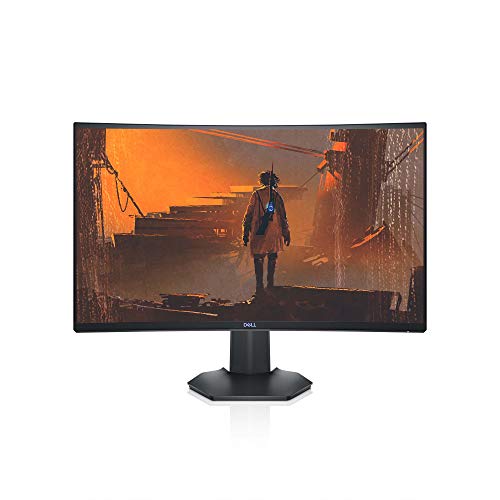
Dell S2721HGF 27 Inch 144Hz Curved Gaming Monitor

ASUS TUF Gaming VG27VH1B 27″ Curved Monitor (165Hz)
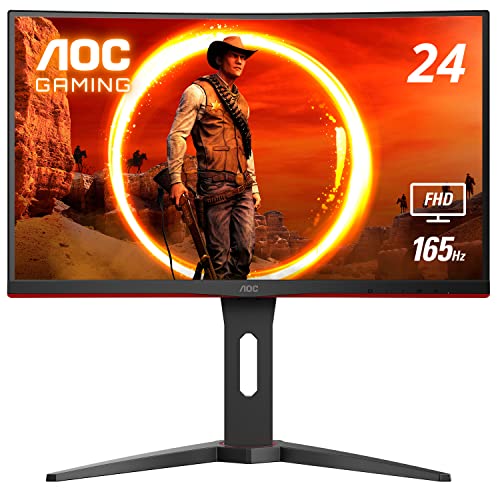
AOC C24G1A 24″ Curved Frameless Gaming Monitor 165Hz
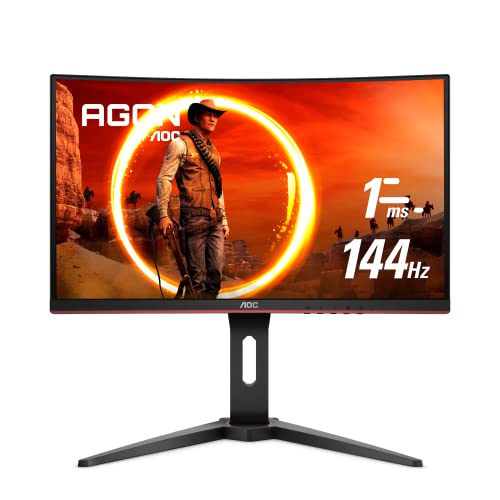
AOC C24G1 24″ Curved Frameless Gaming Monitor 144Hz

BenQ Mobiuz EX2510 24.5″ 144Hz IPS Gaming Monitor

BenQ MOBIUZ EX2780Q 27″ QHD 1440p 144Hz IPS Gaming Monitor

ASUS TUF Gaming VG27VQ 27″ Curved 165Hz Monitor
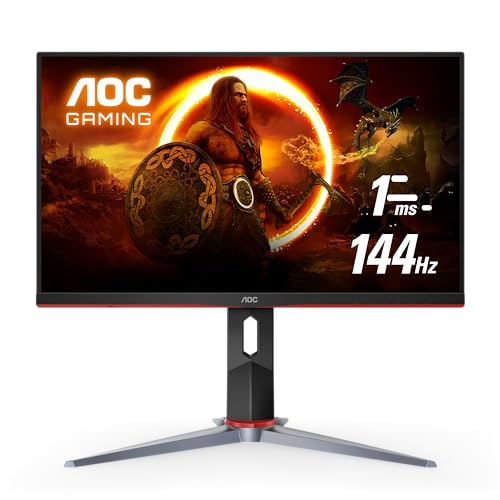
AOC 24G2 24″ Frameless Gaming IPS Monitor 144Hz
A Breakdown Of The Leading Choices
Pick the Dell when your desk has room for a 27-inch screen and you want one panel to handle both ranked Apex nights and a long movie on the weekend. The 1500R curve wraps the edges toward your eyes, which makes peripheral HUD elements feel closer to the action without forcing your neck to track them.
What sets it apart from the smaller 24-inch options here is the full ergonomic stand, a feature most budget panels skip. You get tilt plus height adjustment, so setting the top bezel at eye level for an eight-hour session takes a minute rather than a stack of books. Pair it with an AMD or Nvidia card and the adaptive sync keeps frames aligned to the panel.
Advantages To Know
- 1500R curvature reduces eye strain on wide peripheral action.
- Height- and tilt-adjustable stand encourages healthy posture.
- Joystick-controlled OSD makes menu diving less painful.
- G-SYNC Compatible and FreeSync Premium cover most graphics cards.
- VESA mount compatibility frees desk space later if you upgrade.
Things To Consider
- VA panel can show minor smearing in very dark scenes, depending on the game.
- 1080p on 27 inches means pixel structure is visible up close.
Key Specs
Who It Suits Best
Mid-range PC owners who want one immersive curved display for both competitive shooters and single-player story games.
Where Another Pick Suits Better
Shoppers on a tighter budget with a smaller desk will get more usable value from the AOC C24G1, which keeps the curved VA feel at 24 inches.
The VG27VH1B pushes past the 144Hz baseline to a 165Hz ceiling, which matters if your GPU can push frame rates that high. The TUF Gaming line also adds Extreme Low Motion Blur, a strobing technique that sharpens motion clarity beyond what the response time number suggests.
Compared to the Dell S2721HGF that opens this list, the ASUS trades some ergonomic flex (tilt only here) for a slightly faster refresh and that ELMB backlight trick. For Valorant or CS2 on a mid-tier card, those few extra hertz and the blur reduction are a meaningful step up.
Everyday Perks
- 165Hz refresh (144Hz supported) gives headroom for high-FPS titles.
- ELMB strobing tightens motion for twitchy competitive games.
- FreeSync Premium support keeps frames tear-free on AMD cards.
- Eye Care features reduce blue light during evening sessions.
Trade Offs
- Stand supports tilt only, no height or swivel adjustment.
- ELMB and FreeSync cannot run at the same time.
- VA panel may show minor ghosting in dark cinematic scenes.
Made For
Competitive multiplayer players who already run a capable GPU and want the cleanest possible motion on a 1080p curved screen.
Not Your Match When
Anyone who needs a height-adjustable stand for long mixed-use days should look at the BenQ MOBIUZ EX2780Q, which pairs 1440p with full ergonomic controls.
The C24G1A fits where 27-inch curved panels simply do not: a dorm desk, a converted bedroom office, or a tight corner where the wall sits 60 cm behind the monitor. You still get a 1500R curve, but on a 24-inch screen the curve feels more subtle, which some users prefer.
Where it edges past the older C24G1 covered next is the 165Hz ceiling, useful if your hardware can sustain frame rates above 144 fps. The height-adjustable stand with tilt and swivel is rare at this size and price tier, so posture and eye-level alignment stay within reach.
The Helpful Details
- 165Hz (144Hz supported) via DisplayPort gives the smoothest motion in the 24″ tier.
- Full ergonomic stand: height, tilt, and quick-release swivel.
- Three-sided frameless design suits dual- or triple-monitor builds.
- VESA mount compatibility lets you reclaim desk space with an arm mount.
Room For Improvement
- VA panel can show smearing in very dark or very bright transitions.
- Smaller 1080p screen feels tight for productivity and spreadsheets.
- Only DisplayPort unlocks the 165Hz ceiling, depending on your GPU.
Key Specs
Best Suited To
Small-desk dwellers who want the full 144Hz-plus experience with proper ergonomics, without giving up the curve.
Look Elsewhere When
Color-accurate content work belongs on the BenQ Mobiuz EX2510, whose IPS panel handles editing and grading more honestly than this VA.
The original C24G1 remains a sensible starting point for anyone stepping up from a 60Hz office panel. It pairs the same 1500R VA curve as its 27-inch sibling at a friendlier entry cost, and the 144Hz ceiling is more than enough for most mid-range GPUs.
You give up the 165Hz headroom of the newer C24G1A covered above, and the stand has fewer adjustment points. For a first 144Hz upgrade in a tight space, though, this panel still delivers the core experience that matters: a fast refresh, clean motion, and a curve that wraps just enough to feel different from a flat screen.
The Upside
- 144Hz refresh with FreeSync for smooth, tear-free play.
- VA contrast gives cinematic games a richer look.
- Height-adjustable stand supports healthy positioning.
- Three-year zero dead pixel coverage is rare at this tier.
Some Limits To Know
- Stand is height- and tilt-only, no swivel.
- Refresh tops out at 144Hz, no 165Hz boost.
- VA smearing may appear in dark shooters, depending on settings.
Who Will Love This
First-time 144Hz upgraders who want a curved VA experience at the lowest realistic cost.
A Better Fit Elsewhere
Gamers who already push frame rates above 144 fps should reach for the ASUS TUF VG27VH1B, which unlocks a 165Hz ceiling on the same screen size.
The Mobiuz EX2510 swaps the curved VA story of the AOC panels above for a flat IPS panel, which is a meaningful change if color accuracy matters to you. IPS (in-plane switching) technology reproduces color and viewing angles more faithfully than VA, so the screen looks consistent even from the side.
HDRi optimization and a Light Tuner give the EX2510 an edge for single-player games with moody lighting. The built-in speakers are not going to replace a desktop set, but they free up USB ports and desk space when you need a clean setup for travel or a small apartment.
Real Benefits
- IPS panel delivers wider viewing angles and cleaner color than VA.
- Built-in speakers remove the need for separate desktop audio in tight spaces.
- FreeSync Premium support across HDMI and DisplayPort.
- HDRi and Black eQualizer improve dark-scene visibility.
Potential Drawbacks
- 1080p at 24.5 inches can show pixel structure up close.
- IPS contrast trails VA panels in dark cinematic scenes.
Quick Facts
Perfect Match For
Players who split their time between gaming, photo editing, and streaming, and want one screen that handles all three with honest color.
Skip It When
Anyone chasing the deepest possible blacks in horror or RPG games will get more contrast from the Dell S2721HGF covered earlier.
The EX2780Q is the panel to choose when 1080p no longer feels sharp enough. QHD (2560 x 1440) on a 27-inch screen doubles the pixel density of the FHD models above, which means text looks crisper, scenes gain detail, and a single display handles both work and play without scaling compromises.
Where it stands apart from the rest of the list is the integrated 2.1 audio system, complete with a small built-in subwoofer. For a dorm room or a living-room PC, that removes the need for a separate speaker pair entirely.
Bright Spots
- 1440p resolution makes text and detail noticeably sharper than FHD.
- 2.1 channel speakers with subwoofer cover casual audio needs.
- USB-C single-cable connection simplifies laptop docking.
- HDRi and 95% DCI-P3 coverage suit content creators alongside gamers.
Where It May Fall Short
- 1440p at 144Hz demands a more powerful GPU than the FHD panels in this list.
- Built-in subwoofer is compact, not room-shaking.
- IPS glow may appear in dark scenes viewed off-center.
Who Should Grab It
Shoppers who want a single panel for both gaming and creative work, and value the cleaner 1440p picture enough to invest in a stronger graphics card.
Another Choice May Suit
Casual players still on a 60Hz card will find more value in the AOC 24G2, which keeps 144Hz at 1080p on a friendlier budget.
The TUF VG27VQ is the 27-inch sibling of the VG27VH1B covered earlier, with a similar 165Hz refresh ceiling and the same ELMB backlight trick. The larger screen gives single-player RPGs and racing games more room to breathe, while the curve keeps the edges within your natural field of view.
What you get over the smaller TUF is a more cinematic feel for slower-paced titles, without giving up the motion clarity needed for occasional competitive play. Build quality follows the TUF pattern, which leans toward sturdy plastic rather than the metal accents of premium tiers.
Practical Pluses
- 165Hz refresh (144Hz supported) over a curved 27-inch canvas.
- ELMB reduces perceived blur during fast camera sweeps.
- FreeSync support over DisplayPort and HDMI keeps most GPUs covered.
- Eye Care modes help during late-night sessions.
Honest Caveats
- Stand allows tilt only, so plan for a monitor arm if you need height control.
- ELMB disables when FreeSync is active, limiting simultaneous use.
- 1080p stretched across 27 inches shows pixel structure on a desk-mounted setup.
Built With In Mind
Action-game and racing fans who want a big curved screen with motion features tuned for fast-moving visuals.
Reach For A Different Pick When
Anyone who needs a 1440p upgrade for productivity should step up to the BenQ MOBIUZ EX2780Q, which adds sharpness without losing the high refresh rate.
The 24G2 closes this list as a flat IPS alternative to the curved AOC models above, and for many shoppers it is the most practical pick of the group. The flat 24-inch form factor fits on any desk, mounts cleanly to a VESA arm, and works in a single- or multi-monitor array without bezels curving away from your sightline.
IPS color accuracy makes it a sensible pick for anyone who edits photos or videos between gaming sessions, and the three-year zero dead pixel coverage is unusually generous at this price tier. You also get FreeSync Premium and a height-adjustable stand.
Practical Advantages
- IPS panel delivers accurate color and wide viewing angles.
- Three-year zero dead pixel warranty and one-time accidental damage cover.
- Low Blue mode and flicker-free backlight help long sessions.
- Height-adjustable stand supports posture-friendly setup.
A Few Limitations
- No curve means a slightly less immersive feel in racing or flight sims.
- 1080p on 24 inches is sharp but lacks the detail of 1440p models.
Feature Snapshot
The Right Fit
Anyone wanting a flat IPS panel with honest warranty coverage for daily mixed-use gaming, work, and study.
Swap It Out When
Buyers who prefer a curved screen at this size should consider the AOC C24G1A covered earlier, which adds curvature and a 165Hz ceiling.
What To Weigh Before Picking Your Next Panel
The first decision is panel type. VA panels like the Dell and AOC curved options push deeper blacks and stronger contrast, which helps moody single-player games. IPS panels like the BenQ Mobiuz models trade a little of that contrast for cleaner color and wider viewing angles, which matters for content work and shared viewing.
Refresh rate comes next. A native 144Hz panel is the practical floor for anyone buying in 2026, and the few extra hertz up to 165Hz only show their value when your GPU can sustain frame rates that high. For mid-range cards, 144Hz remains the realistic ceiling, and adaptive sync matters more than the raw number.
Resolution and size belong together. A 24-inch screen at 1080p is sharp enough at typical viewing distances, while a 27-inch screen at 1080p can show visible pixel structure up close. Stepping up to 1440p on 27 inches costs more in GPU power but delivers a noticeable jump in text and detail clarity.
Ergonomics and ports round out the decision. Height adjustment, tilt, and swivel are worth more than they seem over a multi-year ownership window. HDMI and DisplayPort cover most modern GPUs, and USB-C only becomes essential if you plan to dock a laptop through the same cable.
Smart Spending Across The Price Ladder
Common Buying Slip Ups
The most frequent mistake is buying a 27-inch 1080p panel and expecting it to look as sharp as a 24-inch 1080p panel. The pixel density drops, and the difference is visible at a normal desk distance. Match the resolution to the screen size before anything else.
Another misstep is ignoring stand ergonomics. A monitor that only tilts forces you to stack books or buy a separate arm later. Spending a little more now for a height-adjustable stand pays off across years of daily use.
Where The Extra Money Goes
Stepping into 1440p on a 27-inch screen like the BenQ MOBIUZ EX2780Q adds a noticeable jump in detail, color coverage, and audio quality, but it also demands a stronger GPU to drive 144 frames per second. The upgrade makes sense if your hardware can keep up, or if you split the panel between work and play.
A higher refresh rate above 144Hz is worth the premium only on fast-paced competitive games where your GPU already holds high frame rates. For slower RPGs or single-player adventures, the visual jump is much smaller than the price difference suggests.
Key Considerations Across These Picks
Pitfalls Shoppers Hit
Skipping adaptive sync to save a few dollars is rarely worth it. FreeSync Premium and G-SYNC Compatible features in this list eliminate screen tearing without measurable input lag, which is the entire point of paying extra for 144Hz in the first place.
Buying a panel with a fixed stand and ignoring VESA compatibility is another trap. A 100×100 VESA mount turns a budget monitor into a flexible desk arm setup later, which matters in tight workspaces.
Why Top Tier Costs More
The BenQ MOBIUZ EX2780Q costs more than the FHD panels here for clear reasons: QHD resolution, USB-C, integrated 2.1 audio, and a height-adjustable stand with a remote. The extra spend is real value if you need any combination of those features, but wasted money if you only game at 1080p on a single desktop.
Frequently Asked Questions
Is 144Hz worth it over 60Hz for casual gaming?
Yes, for most people, the jump from 60Hz to 144Hz is the most noticeable display upgrade available. Cursor motion, camera panning, and menu scrolling all feel smoother, and the benefit shows up even in non-competitive games.
Do I need a special cable for 144Hz?
Most modern HDMI and DisplayPort cables handle 144Hz at 1080p without issue. For 1440p at 144Hz, DisplayPort is the safer choice, and older HDMI cables may need to be replaced to reach the full refresh.
Can my graphics card run a 144Hz monitor?
That depends on the resolution and the game. At 1080p, most mid-range GPUs from the last several years can push frame rates that take advantage of 144Hz. At 1440p, only newer mid-to-high tier cards sustain those numbers in demanding titles.
What is FreeSync and do I need it?
FreeSync is AMD’s adaptive sync technology, which adjusts the monitor’s refresh rate to match the GPU’s frame output. It eliminates screen tearing without the input lag of traditional V-Sync, and it makes 144Hz feel meaningfully smoother.
Are curved gaming monitors better for desk use?
Curved screens help on 27-inch and larger panels by keeping the edges closer to your natural field of view. For 24-inch screens, the curve is subtle and mostly a style choice rather than a functional one.
Wrap Up
A 144Hz monitor in 2026 does not have to strain your wallet, and the right pick depends on what sits next to it: a tight desk, a capable GPU, or a workflow that splits between games and content work. Match the panel to your space and your hardware, and the upgrade pays off the moment a game loads. Pick the screen that fits your setup, and the rest falls into place.


