


Affordable mechanical keyboards used to mean flimsy plastic and mushy typing. That has changed. Modern budget-friendly boards now deliver hot-swappable switches, gasket mounts, and even wireless connectivity at prices that would have sounded impossible a few years ago. The trick is knowing where to spend and where to save.
This list covers nine cheap gaming keyboards worth your time, from playful 75% layouts to split spacebar travel builds. You’ll find wired and wireless options, plus a switches-only pick for anyone rebuilding an existing board. Every entry was chosen for genuine value, not just a low price.
Your Options, Compared

Logitech G713 Wired Gaming Keyboard (White Mist)

GravaStar Mercury K1 Pro 75% Wireless Gaming Keyboard

YUNZII C75 Cute 75% Wireless Mechanical Keyboard (Beige)

AULA F75 Wireless 75% Gaming Keyboard (Pink)

MechLands Aula F99 PRO 96% Mechanical Gaming Keyboard

Kailh Box White V2 Switches (36pcs, 5-Pin)

KINESIS Gaming TKO Mechanical Keyboard (60%, Aluminum)
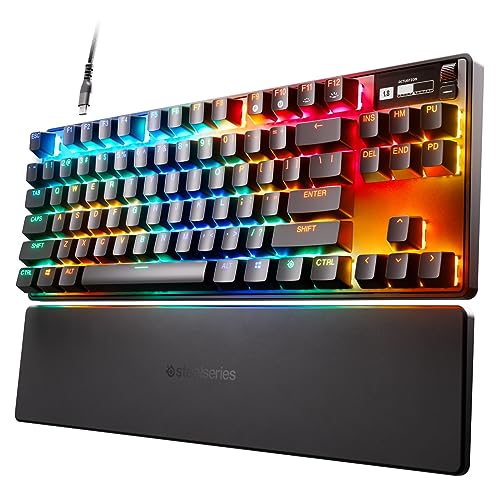
SteelSeries Apex Pro TKL HyperMagnetic Gaming Keyboard

GravaStar Mercury K1 75% Wireless Gaming Keyboard (Sakura)
A Breakdown Of The Leading Choices
Logitech’s G713 brings a soft, off-white aesthetic to a category that usually leans black or RGB-blasted. The cloud-shaped palm rest sets the tone the moment you sit down, and the tenkeyless layout (a form factor that drops the number pad for a more compact footprint) frees up desk space for sweeping mouse movements in shooters. GX Brown tactile switches give you a defined bump without the loud click, which makes the board a fair compromise for shared spaces.
Compared to the louder options later in this list, this one trades aural drama for typing comfort. It’s the most “mature” pick here, the kind of board that looks at home next to a work monitor and a coffee mug.
What Stands Out
- Cloud-shaped palm rest reduces wrist strain during long typing or raid nights.
- LIGHTSYNC RGB syncs with other Logitech gear for cohesive desk lighting.
- Tactile GX Brown switches offer a quiet bump that works for both gaming and writing.
- Tenkeyless footprint leaves room for wide mouse sweeps and keeps your shoulders relaxed.
Things To Consider
- Wired-only, so you lose the wireless freedom of the GravaStar boards below.
- Not hot-swappable, so swapping switches requires a soldering iron.
Feature Snapshot
Made For
Everyday gamers and writers who want a tactile, office-friendly board with a polished feel.
Consider Something Else When
Pick the AULA F75 instead if wireless freedom and switch swapping matter more to you than brand polish.
The Mercury K1 Pro is the kind of board that ends up in product photos. Its aluminum alloy exoskeleton and skeletal frame look more like industrial sculpture than desk accessory, and the 75% layout (which keeps function keys and arrows but drops the numpad) keeps the footprint tidy. Wireless connectivity means no cable dragging across your mouse pad.
It’s a louder statement than the G713, and arguably more fun. Hot-swap sockets (small slots that let you pull switches out and replace them without soldering) let you experiment with switch feel over time, which adds a hobbyist angle the Logitech doesn’t offer.
Notable Gains
- Aluminum frame delivers a sturdier, less hollow typing feel than plastic builds.
- Hot-swap switch sockets support both 3-pin and 5-pin switches for easy tinkering.
- Wireless setup keeps your desk clean and uncluttered.
Points To Note
- The skeletal design exposes the PCB (the green circuit board inside the keyboard), so crumbs and dust land directly on internals.
- Battery life on wireless will vary based on RGB brightness, so plan to top up weekly with lighting on full.
Right Fit For
Style-focused builders who want a board that looks as good on camera as it types in person.
Look Elsewhere When
The KINESIS Gaming TKO is a better match if you compete in FPS titles and need a tighter 60% form factor.
The YUNZII C75 is the friendliest board on this list, and that’s by design. The beige-and-color keycap scheme leans pastel rather than aggressive, and Candy Switches deliver a smooth, creamy typing sound that won’t rattle a shared apartment. Bluetooth and wired options cover both travel and desk use.
It’s the right starting point if you’ve never owned a mechanical before. The 75% layout keeps the learning curve gentle, and the wireless flexibility means you can use it with a laptop on the couch just as easily as a desktop tower.
Practical Advantages
- Creamy sound profile makes it one of the quieter boards here, ideal for shared spaces.
- Bluetooth and wired modes let you switch between laptop and desktop without re-pairing headaches.
- Compact 75% layout is approachable for shoppers new to the hobby.
Honest Caveats
- The “cute” aesthetic won’t appeal to anyone building a darker, stealth-themed setup.
- Candy Switches are fixed; no hot-swap support means you’re locked into that feel.
- Battery life drops noticeably with RGB at full brightness, based on common user feedback.
Best Suited To
First-time mechanical keyboard shoppers who want wireless convenience without a steep learning curve.
Swap It Out When
Choose the AULA F75 if you want hot-swap switches and a tri-mode connection from the start.
The AULA F75 is the most flexible board in this price tier, and the spec sheet reads like a wish list. Tri-mode connectivity covers Bluetooth 5.0, 2.4GHz wireless, and USB-C wired, which means one keyboard can hop between a PC, laptop, tablet, and phone. The 4000mAh battery is unusually large for this category.
Pre-lubricated LEOBOG Strawberry Mint switches and hot-swap support let you tune the typing feel without a soldering setup. The pink colorway isn’t for everyone, but the underlying hardware punches well above the price tag.
Where It Delivers
- Three connection modes (Bluetooth 5.0, 2.4GHz, USB-C) cover every device on your desk.
- 4000mAh battery supports multi-day use between charges, even with RGB active.
- Hot-swap base supports 3-pin and 5-pin switches for easy customization later.
- Full-key macro programming through the wired-mode driver adds productivity shortcuts.
Room For Improvement
- Macro programming is locked to Windows in wired mode, so macOS users lose that feature.
- Pink finish is bold; you may want a neutral option if your setup is monochrome.
Key Attributes
Who Should Grab It
Multi-device users who want one keyboard to cover work, gaming, and couch use without juggling cables.
Skip It When
The MechLands Aula F99 PRO makes more sense if you also need a full numpad and rotary knob for editing or spreadsheets.
The F99 PRO sits in a sweet spot most keyboards ignore. The 96% layout keeps nearly every key from a full-size board, including the numpad, but trims the bezels so it doesn’t dominate your desk. A rotary knob sits up top for volume or scrolling control, and the gasket-mounted structure (a build style that uses rubber or silicone pads to soften the typing feel) gives the board a softer, less harsh bottom-out than typical budget builds.
It’s the most productivity-ready pick on this list. Spreadsheets, video editing timelines, and chat windows all fit comfortably without the cramped feeling of a 60% board.
Useful Strengths
- 96% layout includes numpad, arrows, and function row in a trimmed-down footprint.
- Rotary knob adds tactile volume or scrubbing control for editing work.
- Gasket mount structure softens the typing acoustics compared to tray-mount boards.
Practical Considerations
- Larger footprint than the 75% options above; tight desks may feel crowded.
- More keys mean a steeper learning curve when remapping shortcuts.
Perfect Match For
Hybrid work-and-game users who want numpad access for data entry without a full-size board’s bulk.
A Better Fit Elsewhere
Pick the KINESIS Gaming TKO if you compete in FPS titles where a 60% layout gives your mouse more room.
This entry breaks the pattern, and intentionally. The Kailh Box White V2 pack is a bag of 36 clicky switches, not a finished keyboard. If you already own a hot-swap board (like the GravaStar K1 Pro or AULA F75 above), these drop right in and transform the feel of your typing. A clicky switch delivers a sharp, audible click at the actuation point, and the Box V2’s IP56 rating means dust and water splashes are less of a concern.
At 45gf actuation force, these are on the firmer side, so they’re not ideal for marathon typists. For gamers who like the feedback of a pronounced click, though, the sound and feel are genuinely satisfying.
The Good Stuff
- IP56 dust and water resistance protects the internals from everyday spills.
- 5-pin design fits a wide range of hot-swap PCBs.
- Self-lubricating gold crosspoint contacts help extend switch lifespan.
Worth Bearing In Mind
- Requires a hot-swap board; this is a component, not a complete keyboard.
- Clicky sound will not suit shared offices or late-night households.
- 36-piece count leaves a 60% board short by a few switches, so plan quantities carefully.
Feature Facts
Whose Shelf It Belongs On
Hobbyists with a hot-swap board who want a clicky switch upgrade without the soldering setup.
Reach For A Different Pick When
Choose the YUNZII C75 if you need a ready-to-type board and aren’t ready to swap internals yourself.
The KINESIS TKO is the smallest, meanest board on this list. A 60% layout drops everything but the essentials, which means your right hand sits closer to the mouse, where competitive players want it. Aluminum body construction adds weight that keeps the board planted during intense FPS matches, and the included SF Shock travel case means you can toss it in a bag without worrying about scuffs.
The split spacebar is a small detail with a big payoff. You can rebind the second space to crouch or another action, which frees up movement keys in shooters.
Bright Spots
- 60% aluminum chassis is compact yet heavy enough to stay put during fast play.
- Split spacebar opens up custom bindings for movement-heavy games.
- PBT keycaps (a denser plastic that resists shine over time) hold up better than ABS for daily use.
- Hot-swap sockets let you upgrade switches without tools.
Potential Compromises
- No arrow keys or function row, so productivity tasks like spreadsheets feel cramped.
- Clicky white switches get loud; the case amplifies the sound in quiet rooms.
Who Will Love This
Competitive FPS players who travel to LAN events or play in tight desk setups.
Where A Sibling Pick Shines
Choose the Logitech G713 if you need arrow keys, function rows, and a calmer typing sound for everyday work.
The Apex Pro TKL sits at the serious end of this list. Its OmniPoint 2.0 switches use magnetic actuation (a system where the key registers based on how far you press, with no physical contact required) instead of the traditional mechanical contact, which means each key can be set to trigger at any point between 0.1mm and 4.0mm of travel. For competitive players, that translates into faster reactions and fewer misfires.
The integrated OLED screen displays in-game stats, Discord info, or custom gifs, which feels a little extra in the best way. Rapid Trigger (a feature that lets keys re-register by lifting only a tiny amount) adds another edge in fast-paced shooters, where quick counter-strafing matters.
Benefits That Matter
- 40 levels of per-key actuation let you tune WASD light and ability keys deep to avoid misfires.
- Rapid Trigger mode enables faster directional changes in FPS titles.
- OLED smart display shows system info, Discord status, or custom animations.
- Esports-focused TKL footprint (a layout that omits the number pad) maximizes mouse movement space.
Where It May Fall Short
- Per-key actuation setup requires SteelSeries GG software, which adds a learning curve.
- Pricing sits above most other picks here, so value-focused shoppers may hesitate.
- Linear feel (a smooth press with no bump or click) won’t suit tactile-switch fans.
Tech At A Glance
Built With In Mind
Esports players and competitive FPS enthusiasts who want adjustable performance and don’t mind paying for it.
Not Your Match When
Pick the AULA F75 instead if wireless freedom and hot-swap tinkering matter more than sub-millisecond triggers.
The Mercury K1 is the K1 Pro’s slightly trimmed sibling, and it leans hard into the visual side. The Sakura Pink aluminum body looks like something out of a futurist anime, and the 79-key 75% layout offers a balance between function and footprint. Dual-layer PBT keycaps keep the color scheme consistent without developing the greasy shine ABS caps are known for.
It’s a more affordable entry into the GravaStar design language than the K1 Pro. For shoppers who want a statement piece on their desk without paying for hot-swap internals, this is a clean fit.
What Works In Its Favor
- Sakura Pink aluminum chassis stands out without resorting to RGB-as-decoration.
- PBT keycaps resist shine and keep their texture through years of typing.
- Wireless design keeps your desk setup clean and cable-free.
Small Caveats
- Pink colorway limits setup flexibility if you change themes later.
- Lacks the hot-swap socket of the K1 Pro, so switch swapping is off the table.
Who It Suits Best
Style-conscious shoppers building a coordinated pink or pastel battlestation and value aesthetics equally to function.
Where Another Pick Suits Better
Go with the MechLands Aula F99 PRO if you need a numpad and rotary knob for editing-heavy workflows.
What To Weigh Before You Pick A Budget Gaming Keyboard
Switches are the heart of any mechanical board, so start there. Linear switches press smoothly with no bump. Tactile switches give a small bump at the actuation point (the depth at which the key registers a press). Clicky switches add an audible click on top of that bump. Your choice affects both feel and noise, so think about whether you share the room.
Layout dictates desk footprint. A 60% board like the KINESIS TKO is great for travel and FPS mice, but arrow keys and function rows go missing. A 75% board keeps the arrows and a slim function row, which suits most users. A 96% or full-size board, like the F99 PRO, is the only way to get a numpad without an external accessory.
Connectivity changes how you use the board. Wired boards deliver the most stable, low-latency input. Wireless boards (Bluetooth or 2.4GHz) add flexibility but introduce battery management. Tri-mode boards like the AULA F75 cover both, which is helpful if you hop between devices.
Hot-swap support turns a static purchase into a hobby. Boards with hot-swap sockets let you pull switches out and replace them with different types without any soldering. If you enjoy tinkering, that feature alone is worth prioritizing.
Build materials affect long-term feel. Aluminum frames like the GravaStar boards and KINESIS TKO feel denser and less hollow than plastic. PBT keycaps (a denser, more durable plastic than ABS) resist shine over time, which matters for daily typists.
Smart Considerations Across These Picks
Where Shoppers Go Wrong
The most common slip is choosing a board by look alone. The GravaStar K1 and YUNZII C75 are gorgeous, but their colorways lock you into a theme. If your desk setup changes next year, the bold finish may not age well. Neutral boards like the Logitech G713 adapt to more setups over time.
Another trap is ignoring switch type until after purchase. A clicky switch sounds great in a YouTube review, but in a quiet apartment at midnight, it’s a liability. Read about each switch profile before committing, and remember you can sometimes hot-swap later if the board supports it.
Where The Extra Money Goes
Higher-tier boards like the SteelSeries Apex Pro TKL charge for performance features you can feel in fast-paced games. Adjustable actuation and Rapid Trigger aren’t gimmicks for casual play. They give competitive players measurable edges in directional movement and reaction time.
Premium pricing also buys build materials. Aluminum frames, PBT keycaps, and gasket-mounted structures (a construction style that uses rubber or silicone gaskets to cushion the typing feel) all add to the typing experience. The Apex Pro is overkill for a single-player gamer, but for someone grinding ranked matches, the cost often pays for itself in the first few weeks.
Frequently Asked Questions
Are cheap gaming keyboards actually any good for competitive play?
Budget boards have come a long way. The AULA F75 and MechLands F99 PRO both offer hot-swap switches, wireless options, and full macro support. For most casual and mid-level play, they perform at a level where the keyboard is no longer the bottleneck. At the very top of competitive play, the SteelSeries Apex Pro TKL’s adjustable actuation is hard to beat, but you pay for that advantage.
What is a hot-swap keyboard, and do I need one?
A hot-swap keyboard has sockets that let you pull out switches and replace them without soldering. You need one if you want to experiment with different switch types, or if you ever plan to upgrade the feel of a board without buying a whole new one. If you only ever want one type of switch, you can skip it and save money.
Are wireless gaming keyboards laggy for FPS games?
Modern wireless keyboards using 2.4GHz connections have latency low enough that most users cannot tell the difference from wired. The AULA F75’s 2.4GHz mode is a good example. Bluetooth can introduce slight delay, so competitive players typically stick to 2.4GHz or wired for the fastest response.
What does a 75% keyboard mean?
A 75% keyboard keeps the main alphanumeric keys, function row, and arrow cluster, but drops the numpad. It is a popular middle ground between compact 60% boards and full-size layouts. The GravaStar K1 and AULA F75 are both 75% picks, and they offer nearly full functionality in a smaller footprint.
How long do mechanical keyboards usually last?
Most mechanical switches are rated for 50 to 100 million keystrokes. The Kailh Box V2 switches in this guide are rated for over 80 million cycles. With normal daily use, that translates to many years before any reliability concerns typically appear. The case and keycaps may show wear before the switches do, especially if you opt for ABS rather than PBT keycaps.
Bottom Line
Affordable mechanical keyboards no longer mean compromise. The right pick depends on whether you value wireless freedom (AULA F75, GravaStar K1 Pro), compact play (KINESIS TKO, SteelSeries Apex Pro TKL), or design personality (YUNZII C75, GravaStar K1). Start with switch type and layout, then layer in extras like hot-swap support and wireless. Whichever board you land on, expect typing to feel a lot more satisfying than the rubber-dome keyboards most people grew up with.


