


Setting up a gaming rig on a modest budget means making smart trade-offs without giving up the feel of a responsive keyboard. This roundup focuses on wired and wireless mechanical and membrane boards that punch above their price tier, the kind of gear that handles daily matchmaking, late-night ranked sessions, and a full workday in between. Ten picks cover a range of layouts, switch types, and connection styles, so whether your desk is a corner of a bedroom or a dedicated battlestation, there’s something here that fits.
A Snapshot Of The Selections

Logitech G713 Wired Gaming Keyboard (White Mist)

GravaStar Mercury K1 Pro Wireless Mechanical Keyboard

YUNZII C75 Cute 75% Wireless Mechanical Keyboard (Beige)

YUNZII C98 Cute Cake Wireless Mechanical Keyboard (Purple)
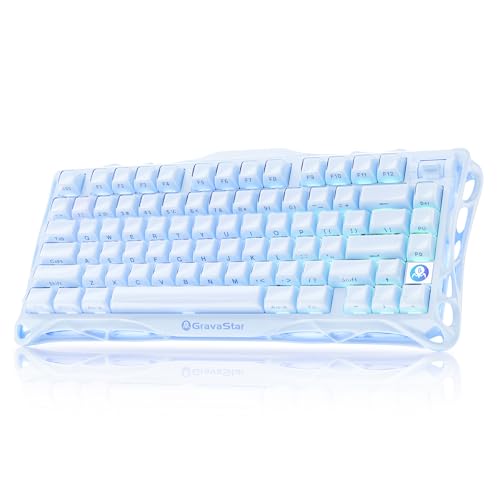
GravaStar Mercury K1 Wireless Mechanical Keyboard (Ice Blue)

COSTOM WK87 75% TKL Wireless Mechanical Gaming Keyboard (Black)

KINESIS Gaming TKO Mechanical Keyboard (Clicky White)

Redragon K552P Mechanical Gaming Keyboard TKL (Black)
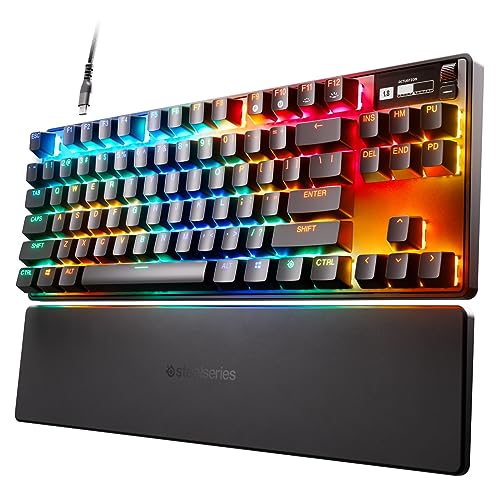
SteelSeries Apex Pro TKL HyperMagnetic Gaming Keyboard

Razer Cynosa Chroma Gaming Keyboard
The Picks, Examined More Closely
The Logitech G713 leans into a clean, low-key aesthetic that feels closer to a designer desk accessory than a typical gaming board. The white “White Mist” finish pairs with a soft cloud-shaped palm rest, and the tenkeyless layout (a smaller format that drops the number pad for more mouse space) keeps your shoulders in a more neutral position during long sessions.
Under the hood, GX Brown tactile switches give you a quiet bump with each press, which is friendlier for shared apartments than the clicky switches on the KINESIS TKO covered later. You also get LIGHTSYNC RGB (Logitech’s lighting system that syncs effects with on-screen action or other Logitech gear), so the lighting can react to gameplay. Compared to the compact YUNZII boards further down, this is a more grown-up, office-friendly look with a heavier build.
Positive Takeaways
- Tactile GX Brown switches offer a refined feel without the loud click of clicky alternatives.
- Tenkeyless layout frees up desk space for wider mouse movements in shooters.
- Included cloud palm rest reduces wrist fatigue on long writing or gaming stretches.
- LIGHTSYNC RGB integrates with other Logitech gear for cohesive battlestation lighting.
- Wired USB connection means zero input lag concerns for competitive play.
Things To Consider
- The white finish shows dust and smudges faster than darker boards, so plan on weekly wipe-downs.
- No wireless option may frustrate those wanting a clutter-free desk.
Who It Suits Best
PC and Mac users who want a quiet, refined mechanical board that blends into a clean, modern desk setup.
Where Another Pick Suits Better
Competitive esports players chasing maximum switch customization should look at the SteelSeries Apex Pro TKL, which offers per-key actuation control.
The Mercury K1 Pro reads like a piece of industrial art before you ever press a key. Its aluminum alloy exoskeleton and skeletal open-frame build make it the most visually aggressive option in this roundup, far removed from the soft white Logitech G713 above. At 75% layout (a compact size that keeps function keys and arrows but drops the number pad), it strikes a balance between desk footprint and full utility.
Hot-swap switch sockets let you pull out the stock switches and drop in your own without soldering, which is rare at this style of build. The board also runs wireless, so you can keep cable clutter to a minimum. For most people, the Pro version is the right pick over the standard K1 if you want that customization ceiling, though the cost premium may not always feel justified.
Practical Pluses
- Aluminum exoskeleton gives the board genuine heft and desk stability during heavy typing.
- Open-frame design turns the keyboard into a desktop showpiece when not in use.
- Hot-swap switch support means no soldering iron needed for future upgrades.
- 75% layout retains arrow keys and function row for productivity work.
Worth Noting
- The skeletal design can trap dust between exposed components, so routine cleaning is essential.
- Open frame lets sound escape more freely, which may bother desk neighbors in quiet homes.
- Style-first design carries a cost premium over plain-Jane mechanical boards.
Key Specs
Right Fit For
Style-driven gamers and content creators who want a wireless board that doubles as a desk centerpiece and welcome the cleaning routine that comes with it.
Swap It Out When
Quiet-office users should reach for the Logitech G713, whose closed chassis and tactile brown switches keep noise under control.
The YUNZII C75 in beige leans into a soft, dessert-inspired aesthetic that breaks the usual “all black or all RGB” keyboard mold. The 75% layout is genuinely compact, freeing up several inches of desk space compared to a full-size board, which helps if your mousepad crowds the area. Candy switches (a YUNZII-branded linear) are pre-lubed, so the keystroke feels smooth right out of the box.
Wireless connectivity via Bluetooth and a wired USB-C option both work, and the board plays nicely with Windows, Mac, and mobile. Owners commonly appreciate the creamy typing sound, which is a far cry from the clicky profile of the KINESIS TKO later in this list. The trade-off is that the cute styling is divisive, and serious esports players may want a board with more software-driven customization.
Notable Gains
- Compact 75% layout maximizes usable desk space for mouse movement.
- Pre-lubed Candy switches deliver a smooth, creamy keystroke from day one.
- Bluetooth and wired USB-C give flexible connection options across devices.
- Beige finish softens the typical aggressive gaming board appearance.
Trade Offs
- Styling may not appeal to users wanting a more traditional gaming aesthetic.
- Lacks the per-key customization depth of higher-end boards like the SteelSeries Apex Pro TKL.
Best Suited To
Style-conscious students and remote workers who want a small-footprint wireless board with a friendly, conversation-starting look.
Skip It When
Hardcore competitive players should consider the KINESIS Gaming TKO, which is purpose-built for esports with its 60% layout and clicky switches.
The C98 is the “I need a number pad” answer to the smaller C75. The 96% layout (a near-full-size design that trims only a few seldom-used keys) crams in a full numeric keypad while still saving desk space compared to a traditional full-size board. That makes it a natural fit for folks who split their time between spreadsheets and shooters, since you don’t have to relearn key positions when switching tasks.
Milk switches, another YUNZII house brand, lean toward a smooth linear feel that pairs nicely with the dye-sub PBT keycaps (printed legends that won’t fade with use, unlike cheaper pad-printed caps). The purple cake theme continues the playful direction the brand is known for. Versus the standard C75, the C98 is the more productivity-friendly pick without sacrificing the wireless freedom.
Real Benefits
- 96% layout keeps the numpad for accounting, coding, and games that bind macros to it.
- Dye-sub PBT keycaps resist shine and fading over years of heavy use.
- Wireless connectivity cuts cable clutter on minimalist desks.
- Purple finish adds a distinct look that stands out from typical black or white boards.
Points To Note
- Larger footprint than the C75, so tight desks may feel cramped.
- Styling skews cute, which may not match a serious professional environment.
Feature Snapshot
Built With In Mind
Hybrid users who game after work and crunch numbers during the day, and want a numpad without a full-size board’s bulk.
A Better Fit Elsewhere
For pure compact gaming with no work-from-home component, the YUNZII C75 saves more desk space and is easier to toss in a bag.
The standard Mercury K1 swaps the Pro version’s hot-swap sockets for a fixed switch setup, which keeps the price lower while keeping the same striking ice blue exoskeleton. With 79 keys in a 75% layout, it skips the numpad and trims a few function row keys compared to the YUNZII C98 above, shaving a meaningful amount of width off your desk footprint.
The dual-layer PBT keycaps (two-shot molded plastic that won’t develop a greasy shine) and RGB backlighting give it a premium feel, and the wireless design is a natural fit for anyone hauling a setup to LAN events. GravaStar’s collaboration switch gives a balanced feel, though you can’t swap them out like on the K1 Pro. For most LAN-goers, the tradeoff between customization and cost is worth it.
The Upside
- Eye-catching ice blue finish stands out in any streaming backdrop.
- Wireless design simplifies transport to friends’ houses and LAN parties.
- Dual-layer PBT keycaps maintain texture and legends over years of travel.
- 75% layout balances portability with retained arrow and function keys.
Honest Caveats
- Fixed switches mean no upgrade path without replacing the whole board.
- Style may not suit minimal or matte-black desk aesthetics.
Who Will Love This
Traveling gamers and content creators who want a wireless board that photographs well on camera and travels easily in a backpack.
Not Your Match When
Switch tinkerers who want to swap key feel over time should look at the COSTOM WK87, which supports 3-pin and 5-pin hot-swap switches.
The COSTOM WK87 is the most tech-loaded budget-friendly board in this list. It packs a 5000mAh battery (rated for up to 400 hours with the backlight off), three connection modes (2.4GHz wireless, Bluetooth 5.1, and USB-C wired), and a gasket-mounted structure. A gasket mount uses soft padding between the PCB (printed circuit board) and the case, which softens the bottom-out feel and reduces hollow sound.
The pre-lubed POM linear switches (POM is a type of plastic known for a smooth, slick feel) and 1.2mm single-key slotted FR4 PCB (a fiberglass-reinforced board material that flexes slightly for a softer typing feel) work together to deliver a creamy, marbly sound profile that rivals more expensive customs. The 5-layer sound-absorbing padding keeps noise low for shared spaces. Versus the GravaStar K1 above, the WK87 is plainer visually but far more flexible under the hood.
Notable Upsides
- 5000mAh battery supports weeks of wireless use between charges.
- Gasket mount with 5-layer padding creates a quieter, softer typing experience.
- Hot-swap support for 3-pin and 5-pin switches opens wide customization options.
- Three connection modes cover desktop, laptop, and tablet workflows.
Room For Improvement
- Battery life drops significantly with the backlight on, so RGB enthusiasts will recharge more often.
- Software for macro and lighting customization may feel less polished than mainstream brands.
Quick Technical Notes
Perfect Match For
Wireless-first users who want marathon battery life, deep customization, and a creamy typing sound without paying customs prices.
Reach For A Different Pick When
Anyone who prioritizes a striking visual centerpiece should look at the GravaStar Mercury K1 Pro, which trades customization for a sculpted aluminum look.
The KINESIS TKO is the only true 60% board in this roundup, meaning it strips away arrow keys, function row, and number pad for the most mouse-room possible. The aluminum body gives it a tank-like feel, and the modular triple spacebar setup is a thoughtful touch for FPS players who rebound keys or want to tune the spacebar position. PBT keycaps keep the legends crisp through years of travel.
Clicky Kailh Box White switches produce that signature sharp sound and tactile bump, which is satisfying at a desk but a real headache in shared spaces or late-night sessions. The TKO also comes with an SF Shock limited-edition travel case, which is rare at this tier. Versus the COSTOM WK87 above, you lose wireless freedom but gain a more compact, esports-focused footprint.
Positive Points
- 60% layout offers maximum mouse movement space for low-DPI aiming.
- Aluminum chassis adds weight and durability for travel between events.
- Modular split spacebar allows personal tuning of movement inputs.
- Hot-swap sockets let you swap Kailh Box switches for other 3-pin options.
Some Limits To Know
- Clicky switches are loud, potentially disruptive in shared rooms or apartments.
- 60% layout means relying on layered function combinations, which slows down productivity work.
- No wireless option keeps you tethered to a USB cable.
Whose Shelf It Belongs On
Hardcore FPS players and esports competitors who prioritize mouse space, fast inputs, and a tactile click over wireless convenience.
Where A Sibling Pick Shines
Remote workers or shared-desk households should look at the Logitech G713, whose tactile-but-quiet brown switches suit mixed use better.
The Redragon K552P is the textbook entry-level mechanical gaming keyboard. Its 87-key TKL (tenkeyless, meaning no numpad) layout keeps things compact, and the metal frame adds a sturdiness you don’t always find in this tier. Double-shot PBT keycaps (two layers of plastic molded together so the legend never wears off) are a nice bonus at the price, and the spill-resistant design is a quiet safety net for late-night snack sessions.
Hot-swappable red switches mean you can pull them out and replace them with other 3-pin or 5-pin switches without any soldering. The 18 RGB backlight modes are controlled by software or keyboard shortcuts, and the per-key rollover (N-key rollover, the ability to register many simultaneous keypresses) is a serious feature for fighting games and MMOs. Compared to the more premium COSTOM WK87, you give up wireless and gasket acoustics, but the price difference is meaningful.
Reasons It Performs
- Hot-swap red switches let beginners experiment with switch feel over time.
- Metal frame and double-shot PBT keycaps punch above the price tier.
- Spill-resistant design offers some protection against everyday drink mishaps.
- N-key rollover supports complex key combinations in fighting and MMO titles.
Potential Drawbacks
- Wired-only design limits placement flexibility on minimal or wall-mounted desks.
- Switch quality is decent but not as refined as the pre-lubed options on the COSTOM WK87.
At A Glance
Who Should Grab It
First-time mechanical keyboard owners who want hot-swap flexibility, solid build, and gaming features without spending on premium extras.
Look Elsewhere When
Users who want wireless freedom should reach for the COSTOM WK87, which offers Bluetooth and 2.4GHz alongside hot-swap support.
The SteelSeries Apex Pro TKL is the only board in this roundup that lets you set a different actuation point for every single key. OmniPoint 2.0 switches use Hall-effect sensors (magnetic sensors that detect key position rather than physical contact) so you can dial in 40 levels of actuation (the distance the key must travel before it registers a press) from 0.1mm to 4.0mm. That means WASD can register on the lightest tap, while ability keys can demand a deeper, more deliberate press to avoid misfires.
Rapid Trigger, another OmniPoint feature, dynamically activates and deactivates keys based on travel distance, which can shave crucial milliseconds off movement inputs in competitive shooters. An integrated OLED screen displays in-game stats or custom animations, and PBT keycaps round out the premium build. The trade-off is cost: this is the priciest board here, and it earns that position by doing things mechanical-only boards physically can’t.
Points In Its Favor
- Adjustable per-key actuation gives unmatched control over input feel.
- Rapid Trigger functionality benefits movement-heavy games like Valorant and CS2.
- OLED screen delivers at-a-glance info without alt-tabbing.
- TKL layout and USB-C connection keep the desk setup clean and modern.
Where It May Fall Short
- Premium price tag puts it out of reach for budget-focused shoppers.
- Software customization has a learning curve for first-time users.
Made For
Esports competitors and tuning-obsessed enthusiasts who want hardware-level control over how each key responds.
Consider Something Else When
Casual gamers who don’t need adjustable actuation will get more value from the Redragon K552P, which delivers mechanical feel at a much lower cost.
The Razer Cynosa Chroma rounds out the list as the only true membrane keyboard (a design using rubber-dome contacts under each key rather than individual mechanical switches) in the roundup, and that’s actually a strength for the right user. Membrane keys produce a softer, cushioned press that many people find easier on the fingers for long typing sessions, and they’re far quieter than the clicky KINESIS TKO covered earlier.
Per-key Chroma RGB lighting (Razer’s lighting system that supports 16.8 million colors and syncs with supported games and hardware) is rare on membrane boards, and the spill-resistant design is reassuring for desk setups near drinks. Razer Hypershift lets you remap any key or key combo into a complex macro, which is handy for productivity and games alike. Versus the mechanical Redragon K552P, you trade tactile feedback and switch longevity for a quieter, cushioned feel.
Everyday Advantages
- Soft cushioned keys are comfortable for long typing and casual gaming sessions.
- Per-key RGB lighting with Chroma sync adds personality to any setup.
- Spill-resistant design protects against common desk accidents.
- Fully programmable macros through Razer Synapse software expand function.
Things That May Matter
- Membrane switches lack the tactile feedback and longevity of mechanical options.
- Requires Razer Synapse software for full customization, which uses system resources.
- Full-size layout takes up more desk space than TKL options like the Redragon K552P.
Feature Rundown
Best Suited To
Casual gamers, students, and shared-room setups who want a quiet, comfortable keyboard with strong RGB and simple software customization.
Where Another Pick Suits Better
Competitive players wanting tactile feedback and switch upgrades should consider the Redragon K552P, which is a real mechanical board at a comparable price.
Choosing The Right Cheap Gaming Keyboard Mouses For Your Setup
Switch Type Sets The Tone
Mechanical switches come in three broad flavors: linear (smooth, no bump, great for fast gaming), tactile (a small bump on each press for feedback without loud noise), and clicky (tactile plus an audible click, satisfying but loud in shared spaces). Membrane boards, like the Razer Cynosa Chroma, use a rubber-dome design that’s quieter and softer but less precise for fast inputs. Pick the feel that matches your environment first, since the rest of the board sits on top of that choice.
Layout Tradeoffs For Your Desk
Tenkeyless boards (TKL, 87 keys without the numpad) free up desk width for wider mouse movements, which helps in shooters. 75% boards like the GravaStar Mercury K1 and YUNZII C75 keep arrow and function keys while trimming more space. 60% boards such as the KINESIS TKO remove arrows and require function-layer combos but give the cleanest mouse area. Full-size and 96% boards keep the numpad for productivity work.
Wired Vs Wireless Considerations
Wired boards eliminate battery concerns and input lag worries but tether you to a cable. Wireless options like the COSTOM WK87 and GravaStar K1 free up your desk and travel better, though you’ll need to monitor battery life, especially with RGB on. Tri-mode boards (2.4GHz, Bluetooth, USB-C) cover the most situations at the cost of slightly higher prices.
Build Features That Matter Long-Term
Hot-swap switch support, found on the Redragon K552P, COSTOM WK87, and GravaStar K1 Pro, lets you change switch feel over time without buying a new board. PBT keycaps resist the greasy shine that ABS caps develop after a year or two. Spill resistance, seen on the Redragon and Razer boards, is a small feature that pays off the first time a drink tips over. Adjustable actuation on the SteelSeries Apex Pro TKL is a serious perk for esports players who want every key tuned to a specific depth.
Key Considerations Across These Picks
Pitfalls Shoppers Hit
The most common mistake is buying on style alone. A board like the GravaStar Mercury K1 Pro looks stunning but its open frame traps dust, so owners who skip regular cleaning may regret the choice within months. Another trap is overlooking switch type: clicky boards feel amazing at 2 a.m. but can sour a roommate relationship by morning. Always match switch feel to your environment, and check whether the board needs software for full customization, since some ecosystems are heavier than others.
The Case For Spending Up
Higher-tier boards like the SteelSeries Apex Pro TKL earn their price through features that cheaper boards physically can’t replicate, like per-key adjustable actuation. The COSTOM WK87 justifies a step up through gasket acoustics and marathon battery life. If you game daily or stream for hours, that extra spend translates into better comfort and durability. For casual play a few nights a week, a budget board like the Redragon K552P delivers most of the experience without the premium.
Frequently Asked Questions
Are membrane gaming keyboards bad for gaming?
Not necessarily. The Razer Cynosa Chroma proves membrane designs can handle casual and even moderately competitive play, especially for genres that don’t demand split-second key differentiation. They fall short in fast-paced esports where tactile feedback and faster actuation matter more.
What is a hot-swap keyboard?
A hot-swap keyboard has sockets that let you pull out switches and replace them with new ones without soldering. The Redragon K552P, COSTOM WK87, and GravaStar K1 Pro all support this, making it easy to experiment with different switch feels over time.
Is 60% layout good for gaming?
It can be excellent for FPS games because the smaller footprint leaves more room for sweeping mouse movements. The KINESIS TKO is the prime example here. The trade-off is losing arrow keys and dedicated function row, which complicates productivity work and MMOs.
How long do mechanical switches last?
Most mechanical switches are rated for tens of millions of keypresses, which translates to many years of typical gaming and typing. The switches themselves rarely fail before the rest of the board does, and hot-swap designs make individual switch replacement trivial.
Do I need RGB lighting on a gaming keyboard?
RGB is purely cosmetic. It adds visual flair and, in some ecosystems, can sync with on-screen gameplay for immersion. If you don’t care about lighting aesthetics, opting out of RGB can save money and extend wireless battery life on boards like the COSTOM WK87.
Final Verdict
A good gaming keyboard at a fair price comes down to matching the board to your space, your switch preference, and how you actually use your desk. The Logitech G713 is the most well-rounded pick for most people, while the COSTOM WK87 and SteelSeries Apex Pro TKL serve users willing to pay for deeper customization. Pick the one that fits your daily routine, and you’ll get years of solid service from any board on this list.


