


Affordable gaming keyboards come in more flavors than most people realize. A wired tenkeyless board with tactile switches and a detachable wrist rest can feel just right for marathon sessions, while a wireless 75% mechanical with hot-swap switches opens the door to custom tuning. The right pick depends on your desk space, your tolerance for noise, and how much you want to tinker.
This roundup cuts through the noise. Every keyboard below is a current retail option, vetted for build quality, switch type, connectivity, and day-to-day usability. You’ll find traditional membrane boards for budget shoppers alongside premium mechanicals with adjustable actuation, so you can match your spend to your play style. Most of these pair easily with any standard gaming mouse, keeping your total setup cost reasonable.
The Main Contenders

Logitech G713 Wired Gaming Keyboard White Mist

GravaStar Mercury K1 Pro 75% Wireless Mechanical

YUNZII C75 Cute 75% Wireless Mechanical (Beige)

YUNZII C98 Cute Cake Wireless Mechanical (Purple)
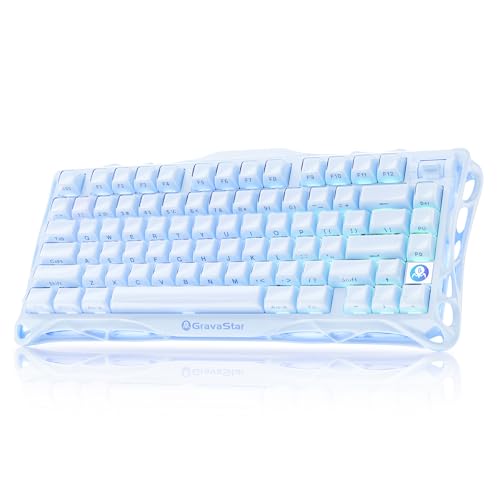
GravaStar Mercury K1 75% Wireless Mechanical Ice Blue

COSTOM WK87 75% TKL Wireless Mechanical (Black)

Razer Ornata Chroma Hybrid Mechanical Keyboard

KINESIS Gaming TKO 60% Mechanical (SF Shock)
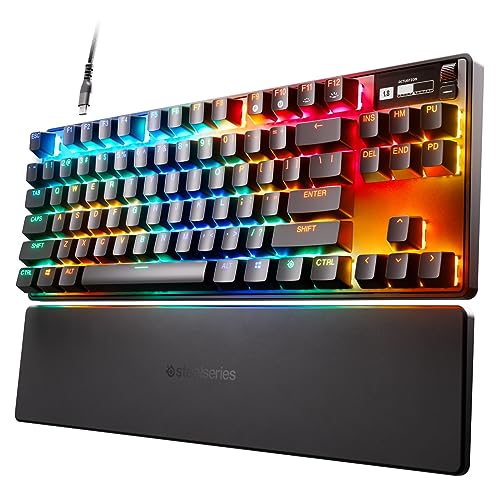
SteelSeries Apex Pro TKL HyperMagnetic

Razer Cynosa Chroma Membrane Keyboard
What Each Pick Brings To The Table
The Logitech G713 is the kind of board you set up once and forget about. Its tenkeyless layout frees desk space for sweeping mouse movements, and the White Mist colorway blends into bright, minimalist setups without screaming for attention. Tactile GX Brown switches give you a clear bump on each press, which is the right kind of feedback for both gaming and long typing stints.
The included cloud-shaped palm rest is the real surprise here. Most stock rests feel like an afterthought, but this one stays put during heated sessions. Compared to the GravaStar and YUNZII boards further down, the G713 trades wireless freedom and switch-swapping for a sturdier, more comfort-focused package. Most owners report the LIGHTSYNC RGB pairing with other Logitech gear works smoothly, though you’ll want the G Hub software for full customization.
The Helpful Details
- Tactile GX Brown switches feel responsive without the loud click of blue switches, keeping shared rooms happier.
- Tenkeyless form factor pulls the mouse hand closer to center, easing shoulder strain on long sessions.
- Dedicated palm rest cradles the wrists, a small touch that matters when you’re grinding for hours.
- LIGHTSYNC RGB syncs with other Logitech peripherals for a unified battlestation look.
Points To Keep In Mind
- Wired-only connectivity means cable management matters on smaller desks.
- White Mist finish shows dust and fingerprints faster than darker boards, so plan on weekly wipe-downs.
Who It Suits Best
Casual and mid-core gamers who want tactile feedback, a comfy wrist rest, and a clean aesthetic without fussing with software beyond basic RGB tweaks.
Where Another Pick Suits Better
Shoppers who need wireless freedom and a smaller footprint will find the GravaStar Mercury K1 Pro a more desk-friendly match.
The Mercury K1 Pro looks like it rolled out of a sci-fi prop shop, and that skeletal aluminum frame is genuinely structural, not just decoration. The open-frame design also helps the board stay cool during long sessions, which anyone running a summer-battlestation will appreciate. Hot-swap switches let you swap in your own feel without soldering, a real perk if you like to experiment.
Wireless operation across 2.4GHz and Bluetooth cuts cable clutter for good. Compared to the wired Logitech G713 above, the K1 Pro leans harder into desk aesthetics and customization. Owners commonly report the keyboard’s weight gives it a planted, premium feel, though the exposed frame collects dust in the gaps, so keep a can of compressed air handy.
Everyday Advantages
- Aluminum exoskeleton shrugs off desk bumps and gives the board a satisfying heft.
- Hot-swap switch sockets mean you can fine-tune typing feel without buying a new keyboard.
- Wireless dual-mode cuts the cord without sacrificing low-latency gaming on 2.4GHz.
- Skeletal frame doubles as a visual centerpiece, sparing you the hunt for matching decor.
- Compact 75% footprint leaves room for wide mouse sweeps in FPS titles.
Worth Noting
- Open-frame design demands regular dusting, especially around the switch plate.
- Smaller key count means you’ll rely on function-layer shortcuts for arrows and navigation.
Made For
Style-conscious tinkerers who want a wireless mechanical board they can open up, mod, and show off on a camera-ready desk.
Consider Something Else When
You prioritize palm-rest comfort and a full-size layout, in which case the Logitech G713 is the more relaxed daily driver.
The YUNZII C75 leans hard into personality, with a beige colorway and Candy switches that reward light typists. It’s a 75% board, so you keep the function row and arrow cluster, which is a meaningful step up from the 60% layout if you actually use those keys. The wireless connection handles both Bluetooth and a wired USB-C fallback, so you stay flexible across devices.
For most desk setups, the compact footprint lets your mouse breathe without forcing you into a full-numpad compromise. Compared to the heavier GravaStar boards, the C75 trades raw metal heft for a lighter, more gift-friendly package. You may find the Candy switches a touch light for aggressive FPS play, but for cozy setups and MOBAs, the creamy sound profile is genuinely pleasant.
What Helps Most
- 75% layout preserves arrows and function keys, sparing you constant layer switching.
- Candy switches produce a softer, lower-pitched typing sound that suits shared spaces.
- Triple-mode connectivity means the board travels between laptop, phone, and desktop seamlessly.
Honest Caveats
- Lighter switch weight can feel mushy if you prefer deep, defined keypresses for gaming.
- The beige-and-cute styling won’t blend into every battlestation theme.
Right Fit For
Creators, students, and home-office gamers who want a wireless mechanical that doubles as desk jewelry and stays quiet enough for late-night work.
Skip It When
You primarily play competitive shooters, where the heavier linear switches on the SteelSeries Apex Pro TKL would serve you better.
The C98 is the C75’s bigger sibling, and the 96% layout is the move for anyone who refuses to give up the numpad. Purple keycaps and Milk switches carry the same cute theme but lean a bit deeper on the typing feel, which makes them more forgiving for touch typists. PBT keycaps resist shine over time, so the legends stay readable through years of daily use.
This is the board for split-duty users who game at night and crunch spreadsheets by day. Compared to the C75 above, the C98 gains a full numpad without bloating the desk footprint too dramatically. Owners commonly report the dye-sub PBT caps feel noticeably better than the ABS plastic on older boards, and the wireless range holds up across a normal-sized home office.
Strong Points
- 96% layout keeps the numpad, sparing accountants and editors a daily keyboard swap.
- Milk switches deliver a balanced, mid-weight feel that works for both typing and gaming.
- PBT keycaps resist oil shine, so the board looks cleaner longer than typical ABS sets.
- Wireless connectivity covers both Bluetooth and a wired USB-C option for low-latency use.
Soft Spots
- Larger footprint than 75% boards means less room for wide mouse sweeps on small desks.
- Milk switches may feel muted to anyone coming from crisp clicky tactile boards.
Who Will Love This
Remote workers, students, and hobbyist gamers who split time between spreadsheets, creative apps, and evening matches.
A Better Fit Elsewhere
Hardcore competitive players who want adjustable per-key actuation should look at the SteelSeries Apex Pro TKL instead.
The Ice Blue Mercury K1 is the non-Pro sibling of the K1 above, and it trades hot-swap flexibility for a tighter entry-level price. The aluminum exoskeleton still anchors the build, and the symmetrical 79-key layout keeps the desk clean without forcing you to relearn arrow placement. Dual-layer PBT keycaps handle sweat and oil without developing that glossy patina cheaper sets tend to pick up.
Wireless operation is straightforward across Bluetooth, and the RGB backlighting gives you enough flair to match a cool-toned setup. Compared to the YUNZII boards, the K1 feels sturdier and noticeably heavier on the desk. You may find the lack of hot-swap limiting if you enjoy modding, but for daily gaming and typing, the pre-built switch feel should satisfy most people.
Positive Points
- Ice blue aluminum finish stands out from the sea of black and white boards on the market.
- Symmetrical 79-key layout balances function and compactness, with easy reach to arrows.
- Dual-layer PBT keycaps age well, keeping the legends crisp and the surface matte.
- Wireless connectivity removes a cable from the desk without complicating the setup.
Trade Offs
- No hot-swap support means you’re locked into the factory switch feel until you commit to a full mod.
- Heavier aluminum body is less travel-friendly than the 60% KINESIS TKO below.
Perfect Match For
Aesthetic-focused gamers building a cool-toned battlestation who want a sturdy wireless mechanical without paying for hot-swap hardware.
Swap It Out When
You travel often to LAN events, where the KINESIS Gaming TKO 60% and its included case are a much easier carry.
The WK87 is a gasket-mounted 75% board, and that internal suspension is the secret to its creamy typing feel. Five layers of sound-absorbing padding plus pre-lubed POM linear switches give every keypress a soft, marbly bottom-out. A 5000mAh battery is unusually large for the category, so you can go days between charges with the backlighting off.
Triple-mode connectivity covers 2.4GHz wireless, Bluetooth 5.1, and USB-C wired, which is enough flexibility for PC, Mac, and mobile use. Compared to the YUNZII C75 above, the WK87 trades the cute aesthetic for a more serious, modder-friendly build. Owners commonly report the 1.2mm single-key slotted FR4 PCB deepens the acoustic profile, though the included software takes some patience to learn.
Everyday Wins
- Gasket mount with five-layer padding softens every keypress, making long typing sessions easier on the fingers.
- 5000mAh battery stretches to roughly 15 days with backlighting off, sparing you constant charging.
- Triple-mode connectivity covers PC, Mac, and mobile through a single board.
- Hot-swap PCB supports 3-pin and 5-pin switches, opening the door to custom switch experimentation.
- 1.6 million-color RGB with 19 effects lets you tune the visual mood to your taste.
Worth Bearing In Mind
- Companion software is functional but takes a learning curve if you want deep macro and lighting customization.
- Linear switches may feel too smooth for typists who prefer a tactile bump on every press.
Best Suited To
Wireless purists and keyboard enthusiasts who want long battery life, deep acoustic tuning, and a hot-swap-ready PCB under one roof.
Look Elsewhere When
Cute desk aesthetics matter as much as performance, in which case the YUNZII C75 is the more gift-friendly alternative.
The Razer Ornata Chroma takes a middle path: mecha-membrane switches that blend the cushioned feel of a rubber dome with the click of a mechanical. For shoppers who find pure mechanical boards tiring on the wrists, this hybrid is a friendlier daily driver. The detachable magnetic wrist rest snaps on with satisfying alignment and soft-touch leatherette that holds up to long sessions.
Razer Chroma RGB integrates with a wide ecosystem of games and partner devices, so the lighting reacts to in-game events when paired with compatible titles. Compared to the budget Cynosa Chroma below, the Ornata adds a more defined tactile bump and a more comfortable rest. Owners commonly report the construction feels solid for the category, and Razer rates the switches for up to 80 million clicks.
The Good Stuff
- Mecha-membrane switches reduce finger fatigue during long work-and-play rotations.
- Detachable magnetic wrist rest aligns easily and softens the impact of marathon sessions.
- Chroma RGB syncs with popular games and partner gear, so the lighting reacts in real time.
- Razer Hypershift remaps any key, giving you deep macro control for productivity and MOBAs.
Where It May Fall Short
- ABS keycaps develop shine faster than PBT alternatives, especially on heavily used keys.
- Hybrid switches won’t satisfy purists who want the crisp feel of a true mechanical.
Who Should Grab It
Hybrid users who type and game in equal measure and want a softer key feel with full RGB and macro support.
Another Choice May Suit
Hardcore mechanical-only fans will appreciate the deeper customization of the COSTOM WK87 over the Ornata’s hybrid design.
The KINESIS TKO is built for two very specific kinds of users: esports players who want every gram off the desk, and LAN travelers who need a board that survives a backpack. The aluminum body is genuinely light for its size, and the included SF Shock limited-edition travel case adds real drop protection. Kailh Box White clicky switches give that sharp, audible feedback competitive players tend to crave.
Hot-swap sockets let you customize the WASD cluster without pulling out a soldering iron, which is a rare feature in a 60% board. The modular split spacebar is a small but useful touch, letting you tune the layout to your thumb reach. Compared to the larger GravaStar boards, the TKO trades visual flair and desk presence for portability. You may find the clicky switches too loud for shared spaces, so keep that in mind for late-night sessions.
Notable Upsides
- Aluminum chassis keeps the weight low while still feeling rigid during travel.
- Hot-swap sockets are rare at this size, letting you mod WASD without soldering.
- Modular split spacebar adapts to different thumb preferences and play styles.
- PBT keycaps resist shine through long-term heavy use.
Less Ideal Details
- Clicky Kailh Box White switches are loud, which can disturb roommates or family.
- 60% layout lacks arrows and function row, requiring layer shortcuts for everyday typing.
Whose Shelf It Belongs On
Competitive FPS players and LAN-event regulars who want a portable clicky mechanical with a real travel case in the box.
Where A Sibling Pick Shines
Home-only users who need a numpad for work will get more daily value from the YUNZII C98.
The Apex Pro TKL is the high-end choice on this list, and the headline feature is OmniPoint 2.0 switches with adjustable actuation. Translation: each key can be set to fire at a different travel distance, so your WASD cluster can register at a feather-light 0.1mm while your modifier keys demand a deeper 4mm press to avoid misfires. That kind of per-key tuning is genuinely useful in competitive play.
Rapid Trigger technology activates and deactivates keys based on travel distance rather than a fixed reset point, which sharpens movement in shooters like Valorant and CS2. The integrated OLED screen shows in-game stats and system info at a glance, sparing you alt-tabbing mid-match. Compared to the Logitech G713 above, the Apex Pro is a serious step up in raw performance, though most shoppers will need to invest real time in the SteelSeries GG software to unlock its full potential.
A Strong Showing
- Per-key adjustable actuation (0.1–4.0mm) gives you unmatched control over every key’s feel.
- Rapid Trigger reduces input latency on repeated directional presses, helping movement-heavy games.
- OLED screen delivers live in-game data without breaking your focus.
- PBT keycaps hold up to heavy daily use without developing shine.
- Tenkeyless layout balances performance with desk space, leaving room for wide mouse sweeps.
Some Limits To Know
- Premium positioning means a steeper investment than most boards on this list.
- SteelSeries GG software is required to dial in actuation settings, adding setup complexity for first-time users.
The Right Fit
Competitive esports players and serious tinkerers who want to micro-tune every key for measurable reaction-time gains.
Not Your Match When
You only game casually, since the COSTOM WK87 gives you most of the wireless flexibility at a friendlier entry point.
The Razer Cynosa Chroma is the easy entry point on this list, and it covers the essentials without overcomplicating your first setup. Membrane keys keep the typing experience quiet and cushioned, which is a real plus for shared rooms or late-night work. The spill-resistant design adds a safety net for the inevitable coffee moment, though it isn’t truly waterproof.
Chroma RGB individual key backlighting syncs with popular games and partner gear, so you still get the visual flair Razer is known for. Programmable macros through Razer Hypershift give you more depth than typical budget boards. Compared to the Ornata above, the Cynosa is softer and quieter but lacks that tactile bump. Most owners report the construction feels light, which is worth knowing if you prefer a heftier board on your desk.
Useful Touches
- Cushioned membrane switches stay quiet, making the board shared-space friendly.
- Spill-resistant design gives you a margin of safety against everyday drink accidents.
- Razer Hypershift remaps any key for custom macros, rare at this price tier.
- Individual key RGB backlighting lets you highlight essential keys for specific games.
Where It Is Less Suited
- Lighter plastic construction may feel insubstantial if you prefer a planted, heavy board.
- Membrane keys won’t deliver the crisp mechanical feel competitive players expect.
Built With In Mind
First-time gaming keyboard shoppers, students, and casual players who want quiet keys, RGB, and macro support at a budget price.
Reach For A Different Pick When
You want a real mechanical feel, in which case the COSTOM WK87 is a meaningful upgrade without breaking the bank.
What To Weigh Before Choosing A Gaming Keyboard
A few attributes matter more than the marketing claims. Switch type is the biggest one. Mechanical switches come in three main flavors: linear for smooth, fast keypresses; tactile for a defined bump; and clicky for an audible click on top of the bump. Membrane boards like the Cynosa use rubber-dome contacts, which are softer and quieter but less precise for fast inputs.
Layout is the next decision. Full-size boards include the numpad and function row, which is great for productivity. Tenkeyless (TKL) drops the numpad for more mouse room. 75% keeps arrows and the function row, while 60% strips everything but the core keys for maximum portability and minimal desk footprint. The KINESIS TKO and GravaStar K1 both lean into 60% and 75% form factors, while the YUNZII C98 stays closer to a full layout with a numpad.
Connectivity changes everything about your desk. Wired boards never need charging and add zero latency, which is why competitive options like the Razer Ornata stay wired. Wireless boards use either 2.4GHz (lower latency, gaming-friendly) or Bluetooth (more compatible, slightly higher latency). Tri-mode boards like the COSTOM WK87 and the YUNZII C75 give you both, plus a wired USB-C option for charging and low-latency play.
Build materials affect how the board feels over time. Aluminum frames like the GravaStar exoskeletons and the KINESIS TKO add weight and rigidity, which makes the board feel planted during intense play. Plastic frames are lighter and easier to travel with, but tend to flex under heavy-handed typing. PBT keycaps resist shine and oil better than ABS, which matters if you type on the same keys thousands of times a day.
Finally, RGB and software are worth a look. Chroma RGB on the Razer boards syncs with partner gear, while LIGHTSYNC on the Logitech G713 ties into Logitech’s own ecosystem. Some boards include deep macro and lighting software, while others stick to onboard controls. If you already own peripherals from one brand, sticking within that ecosystem often saves setup time and unlocks tighter cross-device lighting.
Smart Spending Across The Range
Mistakes Worth Dodging
Chasing the lowest price on a board with switches you don’t enjoy is the most common error. A cheap mechanical with harsh, scratchy switches is worse than a slightly pricier board with smooth factory lubes. Test switch types in person when you can, or read honest long-term feedback before committing.
Ignoring layout trade-offs is the next pitfall. A 60% board saves desk space but forces you into layer shortcuts for arrows, which slows down everyday tasks. Conversely, a full-size board can crowd a small desk and limit mouse movement. Match the layout to your real workflow, not just to a photo on the page.
Forgetting about software is the third. Some boards need vendor software for macros, RGB, and per-key tuning, and that software ranges from polished to clunky. If you game on a work laptop or in restricted environments, onboard controls and saved profiles matter more than deep software features.
What The Higher Tier Buys
Premium boards like the SteelSeries Apex Pro TKL add features that actually change how you play, not just how the board looks. Adjustable actuation, gasket mounts, hot-swap sockets, and metal frames all translate to better feel, longer lifespan, and more personalization. For casual gaming, those gains are hard to notice. For competitive play or multi-hour typing sessions, the upgrade usually pays for itself in comfort and reduced fatigue over time.
Frequently Asked Questions
Are membrane keyboards fine for gaming?
Yes, especially for casual titles. The Razer Cynosa Chroma delivers macro support, RGB, and spill resistance that work well for most everyday gaming. Competitive players who want faster, more consistent inputs usually prefer mechanical switches, but for casual play, a good membrane is a legitimate choice.
What is a tenkeyless keyboard?
A tenkeyless, or TKL, keyboard drops the numeric keypad from a full-size layout. The Logitech G713 and the SteelSeries Apex Pro TKL both use this form factor. TKL boards free up desk space for wider mouse movements, which is useful for FPS and MOBAs, while still keeping the arrow keys and function row.
How important is hot-swap support?
Hot-swap support matters if you want to experiment with different switch feels without buying a new board. The GravaStar Mercury K1 Pro and the COSTOM WK87 both let you pull and replace switches with no soldering. If you only need one reliable feel for years, hot-swap is optional. If you enjoy tinkering, it’s a real perk.
Do wireless gaming keyboards lag?
Modern 2.4GHz wireless keyboards add almost no noticeable input lag compared to wired. Bluetooth can introduce a small delay, but it’s fine for typing and casual play. The COSTOM WK87 and the GravaStar K1 Pro both include 2.4GHz wireless for low-latency gaming when you need it, with Bluetooth as a backup for travel and mobile use.
Can I pair any gaming keyboard with any mouse?
Yes. Keyboards and mice connect independently to your computer, so any standard USB or wireless gaming mouse works with any keyboard on this list. Mixing brands is normal, and most RGB ecosystems only sync within the same brand, so consider that if you want unified lighting across your setup.
Closing Remarks
The right keyboard depends on what you do most. Casual gamers and shared-room users will find the Razer Cynosa Chroma and the Logitech G713 cover the essentials without fuss. Enthusiasts who want to tune every detail should look at the SteelSeries Apex Pro TKL, while tinkerers get a friendlier on-ramp with the COSTOM WK87 or the GravaStar Mercury K1 Pro. Pick the board that matches your desk, your games, and your tolerance for noise, and you’ll be set for a long time.


