


A good gaming desk doesn’t have to drain your wallet. Plenty of affordable models give you sturdy frames, useful features, and enough surface area for a monitor, keyboard, and mouse without forcing you into a corner of the room. The trick is knowing which ones actually hold up over months of daily use and which ones wobble after a few weeks.
This roundup breaks down nine budget-friendly desks covering everything from minimalist flat tops to standing desks with electric motors. You’ll find options for small apartments, dedicated gaming rooms, shared home offices, and anywhere in between. Whether you need RGB lighting, ergonomic height adjustment, or simple storage for books and cables, there’s something here that fits.
A Side-By-Side Look
A Side-By-Side Look

JJS 48″ Home Office Gaming Computer Desk (Black/Red)

SIAGO Brown 60×28 in Standing Desk, 1″ Thick Tabletop

EUREKA ERGONOMIC Gaming Desk 60″ with RGB LED Lights

Desktronic HomeOne Standing Desk 54×28 (Dual Motor)
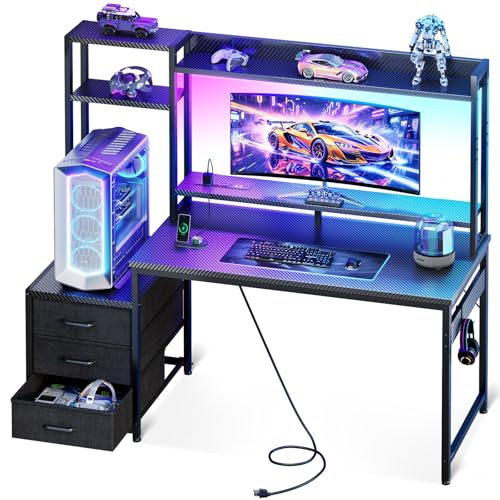
Casaottima 48″ Gaming Desk with Hutch & Drawers

BON AUGURE Farmhouse Computer Desk (Rustic Oak, 54″)

Desktronic HomePro Standing Desk 54×28 (Dual Motor)

IBF 47″ Computer Desk (Rustic Brown)

Aquzee Computer Desk with Shelves & Hutch (47″)
What Each Pick Brings To The Table
The JJS desk opens the list because it covers the basics without piling on extras most beginners don’t need. The 48-inch top fits a single monitor plus a laptop or second screen, and the included mouse pad, cup holder, and headset hook save you from buying them separately.
Assembly is straightforward enough that most people finish within a half hour, according to the included instructions. The R-shaped frame design helps distribute weight more evenly than flat-leg desks, which matters if you lean on the surface during long sessions.
A Favorable Mix
- Included accessories (mouse pad, cup holder, headset hook) reduce extra purchases
- R-shaped frame supports up to 110 lbs for a monitor, PC, and peripherals
- Four adjustable leveling feet protect floors and steady the desk on uneven surfaces
- Step-by-step instructions make it approachable for first-time builders
Things To Consider
- Top surface is thinner than standing desks, so heavy leaning can cause minor flex
- Mouse pad included is basic; serious players may swap it for a larger cloth pad
Who It Suits Best
This one fits casual gamers and students who want a turnkey setup with no extra shopping list and a small-to-medium footprint.
Where Another Pick Suits Better
Step up to the EUREKA ERGONOMIC Gaming Desk if RGB lighting and a wider 60-inch surface matter more to you than the included accessories.
The SIAGO desk is the thickest tabletop in this roundup, and that 1-inch surface changes how the whole desk feels. Less flex under your wrists, less bounce when you slam a hotkey mid-match, and more room to spread out dual monitors across 60 inches of width.
The 2.5mm steel base with a reinforced double-beam frame supports up to 220 lbs, which covers most full-tower rigs plus peripherals without complaint. The brown finish adds warmth compared to the typical black gaming aesthetic, making it easier to blend into a home office.
Practical Advantages
- 1-inch thick top resists flex better than standard 0.75-inch tabletops
- 220 lb lift capacity handles full towers, dual monitors, and streaming gear
- 60×28 inch surface fits ultrawide monitors without overhang
- Double-beam steel frame adds lateral stability during intense mouse movement
Worth Noting
- Heavier frame makes initial setup a two-person job
- Brown finish may clash with setups built around black or RGB hardware
Right Fit For
Multi-monitor users and anyone with a full-tower PC who wants a desk that won’t sag under serious weight.
Look Elsewhere When
Pick the BON AUGURE Farmhouse Computer Desk if you want a similar wide surface but prefer a rustic oak look for a shared living space.
The EUREKA desk leans hard into the gamer aesthetic with built-in RGB LED lighting that runs along the edges. Set the mood for late-night matches or sync it with your peripherals if your setup supports that. The 60-inch surface gives dual monitors, speakers, and a keyboard plenty of breathing room.
Underneath, a Z-shaped metal frame provides stability from end to end. Leveling feet help balance the desk on uneven floors, which matters more than people expect when you’re making fast mouse flicks and need a steady reference point.
A Few Highlights
- Integrated RGB lighting adds ambiance without buying separate LED strips
- 60-inch width accommodates dual monitors, speakers, and streaming gear
- Z-shaped frame resists wobble during aggressive mouse movement
- Leveling feet compensate for uneven flooring in older homes
Points To Note
- RGB controller adds another cable to manage behind the desk
- Wider footprint requires at least 5 feet of wall clearance
Made For
Streamers and RGB enthusiasts who want lighting built into the desk rather than tacked on with adhesive strips.
Consider Something Else When
The JJS 48″ Home Office Gaming Desk makes more sense in tighter rooms where 60 inches of width won’t fit comfortably.
The Desktronic HomeOne addresses a real problem with cheap standing desks: wobble. Two synchronized motors and a reinforced steel frame promise zero wobble at any height, which matters when you’re typing at full speed with a monitor shaking beside you.
The touchscreen controller stores three memory presets, so switching between sitting and standing takes one tap instead of holding a button until you hit the right height. USB and USB-C charging ports built into the frame keep your phone and peripherals topped up without reaching for a wall outlet.
What Pays Off
- Dual motor system provides smoother, quieter height transitions
- 264.6 lb capacity handles full monitor arms plus PC towers
- Three memory presets eliminate guesswork when switching positions
- Built-in USB and USB-C ports reduce cable clutter on the surface
Minor Gripes
- European manufacturing typically places it at the higher end of the price spectrum for this list
- 54-inch width is narrower than the SIAGO 60×28 standing option
Feature Snapshot
Best Suited To
Home office workers who split their day between sitting and standing and want European build quality with reliable motors.
A Better Fit Elsewhere
The Desktronic HomePro Standing Desk suits shoppers carrying heavier rigs, thanks to its higher 352.7 lb lift capacity.
The Casaottima desk crams an unusual amount of storage into a 48-inch footprint. The overhead hutch, multi-tier display shelves, and three drawers turn this into a command center for anyone with a growing collection of controllers, headsets, and figurines.
An 11.6-inch elevated PC shelf keeps your tower visible and accessible while acting as a monitor riser at the same time. That’s a neat double use of space, especially in smaller rooms where you can’t afford to dedicate a separate shelf unit to your tower.
Points In Its Favor
- Overhead hutch adds storage without expanding the desk’s footprint
- Three drawers keep small accessories out of sight
- Elevated PC shelf doubles as a monitor riser, saving desk space
- Built-in LED lighting adds accent glow without extra strips
Trade Offs
- Hutch assembly adds time compared to flat-pack desks
- Storage-heavy design increases overall weight and shipping bulk
Who Will Love This
Collectors and hobbyists who want their gear displayed and organized without buying separate shelving units.
Skip It When
The Aquzee Computer Desk with Shelves is a lighter alternative if you need a hutch but not the extra drawers or LED lighting.
The BON AUGURE desk looks nothing like a typical gaming setup, and that’s the point. Rustic oak laminate paired with black metal framing gives it a farmhouse-industrial feel that blends into living rooms, guest bedrooms, and shared home offices where a glowing RGB battlestation would feel out of place.
The 54-inch surface holds monitors, laptops, and keyboards without crowding. An X-shaped metal frame underneath keeps things stable, and the wood-and-metal combination ages well in homes where you want furniture that looks intentional rather than purely functional.
Advantages To Know
- Rustic oak finish complements traditional and modern decor
- 54-inch top fits dual monitors or a single ultrawide with room to spare
- X-shaped metal frame provides lateral stability
- Neutral aesthetic works in shared spaces without looking “gamer”
Room For Improvement
- No built-in cable management means you’ll add your own tray or clips
- Wood laminate can show scratches from heavy keyboard or mouse use
Perfect Match For
Remote workers and shared-space dwellers who need a desk that looks like furniture, not a gaming accessory.
Another Choice May Suit
Pick the IBF 47″ Computer Desk if you want a similar rustic look at a slightly smaller footprint for tight corners.
The HomePro shares its sibling’s DNA with the HomeOne but cranks up the weight capacity significantly. At 352.7 lbs, it handles full dual-monitor arms, a heavy tower, and studio speakers without straining the motors or making the frame groan during transitions.
The dual motors lift at roughly 2 inches per second, which is fast enough to feel responsive but not so quick that items rattle around on the surface. The touchscreen and three memory presets work the same way, so you can save your sit, stand, and bar-height positions and recall them instantly.
Benefits That Matter
- 352.7 lb lift capacity is among the highest in this price bracket
- 2 inches-per-second lift speed feels responsive without being jarring
- Reinforced steel frame keeps the surface steady at full extension
- Three memory presets speed up position changes during work transitions
Points To Keep In Mind
- Higher capacity comes at a noticeable price increase over single-motor desks
- 54-inch width may feel tight for triple-monitor setups
Technical Highlights
Built With In Mind
Heavy-rig enthusiasts and ergonomic users who want maximum lift capacity and a wobble-free surface at any height.
Reach For A Different Pick When
The Desktronic HomeOne Standing Desk covers similar ergonomic needs at a lower capacity for lighter, simpler setups.
The IBF desk keeps things simple, which is exactly the point for anyone furnishing a dorm, guest room, or small apartment. The 47.2-inch surface fits a monitor, laptop, and a few books without dominating the room, and the rustic brown finish adds warmth without feeling dated.
Open storage space below the top accommodates a compact PC tower or a row of storage bins, keeping the visible surface clear. The straightforward design means assembly goes quickly, and the metal frame underneath handles daily use without complaint.
What Helps Most
- 47-inch footprint fits where wider desks won’t
- Open shelf below holds a compact tower or bins
- Rustic brown finish pairs with most existing furniture
- Simple assembly gets the desk ready in under an hour
Honest Caveats
- Open storage exposes cables and tower dust more than closed cabinets
- Smaller surface limits dual-monitor arrangements to compact screens
Feature Card
Whose Shelf It Belongs On
Students, renters, and small-space dwellers who need a no-fuss work surface that doesn’t overwhelm the room.
Swap It Out When
The Aquzee Computer Desk with Shelves is a better fit if you need an overhead hutch for books and supplies.
The Aquzee desk ends the list with a practical feature many budget desks skip: a real hutch. Three storage shelves measuring 47 inches wide and 6 inches deep run along the top, giving you room for books, plants, office supplies, and the kind of clutter that usually piles up beside a monitor.
The 47 by 23.6-inch main surface works for a single monitor setup or a laptop and notebook combo. The open hutch design means you can grab what you need without opening doors, which is faster during a study session or a long work call.
Real-World Strengths
- Three-tier hutch adds vertical storage without expanding the footprint
- Open shelves keep frequently used items within arm’s reach
- Compact 47-inch width suits smaller rooms and corners
- Wood-look finish blends into most home office setups
Less-Strong Areas
- Hutch weight requires careful anchoring to prevent tipping in homes with kids or pets
- Shelf depth of 6 inches limits storage to flat items like books and notebooks
Quick Technical Notes
The Right Fit
Students and book-heavy workflows who need vertical storage but don’t want a separate bookcase crowding the room.
Not Your Match When
The Casaottima 48″ Gaming Desk with Hutch covers similar overhead storage but adds drawers and a dedicated PC shelf.
What To Weigh Before Choosing a Budget Gaming Desk
Surface Size and Monitor Layout
The single biggest factor is whether your monitor setup will actually fit. Measure your current or planned monitor width, add at least 4 inches of clearance on each side, and that’s your minimum surface length. A 47-inch desk handles a single 27-inch monitor comfortably, while dual 24-inch screens need at least 54 to 60 inches. The SIAGO 60×28 and EUREKA 60-inch models give you breathing room for bigger ambitions.
Frame Material and Weight Capacity
Cheap desks sometimes skimp on the frame, which leads to wobble and sagging within months. Look for steel frames with reinforced crossbeams, especially if you plan to mount a monitor arm or load up a full-tower PC. Weight capacity ratings above 150 lbs suggest the manufacturer actually tested real-world loads. The SIAGO and Desktronic HomePro both exceed 220 lbs, which is a good benchmark for heavier setups.
Static vs. Adjustable Height
Standing desks cost more but pay off if you sit for more than six hours a day. Electric dual-motor models like the Desktronic HomeOne and HomePro lift smoothly and store height presets, which removes the friction that makes manual standing desks go unused. If your day is mostly seated, a fixed-height desk frees up budget for better accessories like chairs or monitor arms.
Storage and Cable Management
A desk with a hutch, drawers, or built-in shelves keeps your surface clear, but each feature adds assembly time and weight. Open shelves, like those on the Aquzee, are easy to access but show clutter. Closed drawers hide mess but reduce quick access. Plan based on whether you need visible storage for items you grab often or hidden space for things you want out of sight.
Key Considerations Across These Picks
Where Shoppers Go Wrong
The most common mistake is buying a desk that’s too small. It’s tempting to save space or money, but cramming a 27-inch monitor onto a 40-inch desk leaves no room for a notebook, a drink, or your phone. Always measure first and add a buffer.
Another trap is ignoring frame thickness. A thin top flexes when you lean on it or type aggressively, which gets annoying within a week. The SIAGO’s 1-inch tabletop is the kind of detail that separates desks you’ll keep for years from ones you’ll replace in a season.
Where The Extra Money Goes
Higher-tier gaming desks invest in better motors, thicker steel, and European manufacturing standards. The Desktronic HomePro, for example, justifies its position with a 352.7 lb lift capacity and dual synchronized motors that hold calibration longer than cheaper units. You’re paying for longevity and stability, not just brand recognition.
Spending up also gets you features that matter over time: memory presets, USB charging ports, and wobble-free engineering. Whether those are worth it depends on how many hours per day you spend at the desk. For casual users, a solid mid-range pick like the JJS or EUREKA delivers plenty. For full-time streamers or remote workers, the upgrade to a standing desk typically pays for itself in comfort.
Frequently Asked Questions
What size gaming desk do I need for a 27-inch monitor?
A 27-inch monitor is about 24 inches wide including the bezel, so aim for at least a 47-inch desk surface. That gives you room on each side for a mouse, notebook, or a second smaller screen. Dual 27-inch monitors need 54 to 60 inches of width to sit side by side without overlap.
Are cheap gaming desks stable enough for daily use?
Stability depends more on frame construction than price. Desks with steel crossbeams, X-shaped or Z-shaped supports, and leveling feet stay steady even at lower price points. The EUREKA and JJS desks both include leveling feet, which helps on uneven floors.
Is a standing desk worth it over a regular one?
Standing desks help if you sit for long stretches and want to alternate positions throughout the day. Electric dual-motor models are easier to adjust than manual crank versions, but they cost more. A fixed-height desk is fine if you’re happy sitting for your full session.
What is a dual motor desk?
A dual motor desk uses two synchronized electric motors to raise and lower the surface, one on each leg. Compared to single-motor designs, dual motors lift heavier loads, run more quietly, and stay level during transitions without one side lagging behind the other.
Can I put a full tower on a 48-inch gaming desk?
Most 48-inch desks support a full tower if the weight capacity is at least 100 lbs and the surface depth is at least 20 inches. The JJS desk, for example, supports up to 110 lbs and has enough depth for a mid-tower. Check the dimensions of your tower’s base against the desk’s listed depth before ordering.
Bottom Line
The right cheap gaming desk depends on your space, your gear, and how many hours you spend at the screen. Casual setups get plenty of life from the JJS or IBF, while heavy rigs and ergonomic needs push you toward the SIAGO or Desktronic HomePro. Measure your room, check your monitor width, and pick the desk that fits both your gear and your daily routine.


