


A 1080p monitor still hits a sweet spot for plenty of PC players, especially anyone running mid-range GPUs or older rigs where chasing 1440p just wastes frames. The category has quietly improved: faster panels, IPS color, and adaptive sync now reach price points that would have felt laughable a few years ago. This list rounds up ten displays that balance price, panel quality, and real-world playability, including a few portable picks for couch and travel setups.
A Side-By-Side Look
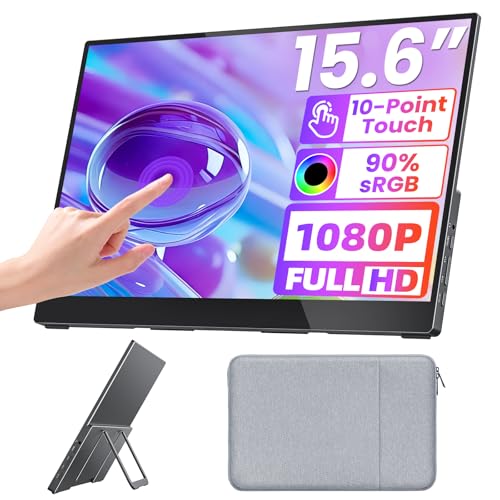
Upperizon 15.6-Inch Portable FHD Travel Monitor

Upperizon 21.5-Inch FHD 120Hz IPS Travel Monitor
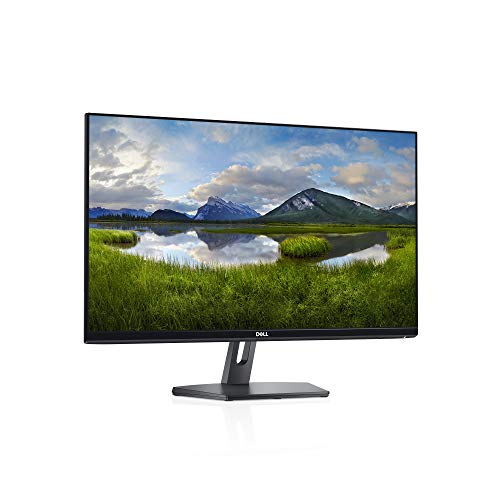
Dell SE2419Hx 23.8-Inch IPS Full HD Monitor

ASUS TUF Gaming VG27VH1B 27-Inch Curved Monitor

UPERFECT 18.5-Inch 1080P Wireless Portable Monitor

BenQ Zowie XL2546 24.5-Inch 240Hz Esports Monitor
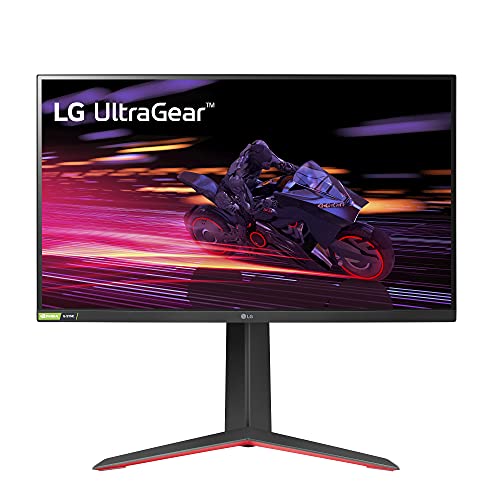
LG 27GP750-B 27-Inch Ultragear FHD IPS Monitor

ViewSonic VA2756A-MHD 27-Inch Full HD IPS Monitor
Newsoul 21.5-Inch QLED 100Hz Portable Monitor
Philips 27E2N1100L 27-Inch Full HD Monitor
Meet The Standout Selections
Hot-desking from a hotel room or a corner café is the natural home for this Upperizon panel. The 15.6-inch footprint is small enough to toss in a laptop bag, and the glossy tempered glass surface supports projected capacitive touch (the same touch tech used in phones and tablets) with multi-finger gestures on compatible Windows and macOS devices.
Where it earns its keep is pure portability: a folding kickstand sets up in seconds, dual USB-C ports and HDMI cover laptops, consoles, and phones, and built-in speakers handle the basics. The 60Hz refresh caps the motion ceiling, which matters for fast shooters, though for productivity and casual play it feels perfectly adequate.
The Good Stuff
- Responsive multi-touch input through the tempered glass surface
- Single-cable USB-C connectivity keeps your bag uncluttered
- VESA mount compatible for permanent desk or arm setups
- Genuinely travel-friendly size and weight for daily commuters
Points To Keep In Mind
- 60Hz cap holds back competitive multiplayer titles
- Glossy glass surface tends to show fingerprints during long sessions
Right Fit For
Remote workers and digital nomads who want a second screen that survives the daily commute without adding bulk.
Look Elsewhere When
Gamers chasing high-frame-rate shooters should reach for the ASUS TUF Gaming VG27VH1B instead, since its 165Hz panel and curved 27-inch canvas handle motion far better.
Step up from the 15.6-inch sibling and the picture grows noticeably more comfortable. The 21.5-inch IPS panel pushes 1920×1080 with 110% sRGB color coverage, 8-bit color depth, 16.7 million colors, 300 nits of brightness, and a 1300:1 contrast ratio. The 120Hz refresh rate is a real upgrade for anyone hopping between spreadsheets and console play.
HDR support stretches highlights further, and the larger surface turns this into a genuine second monitor rather than a window-dressing accessory. The same kickstand, USB-C, HDMI, and speaker package carries over, plus VESA mounting for a more permanent arrangement when you reach the desk.
What It Does Well
- 120Hz motion feels meaningfully smoother than typical 60Hz portables
- Wide sRGB color makes photo edits and streaming content look more natural
- Strong 300-nit output holds up in sunlit rooms
- Full HDMI plus dual USB-C connectivity covers nearly any source
Trade-Offs
- Larger size makes packing into smaller laptop bags noticeably tighter
- 120Hz benefits depend on host hardware that can actually push those frames
Made For
Console gamers and hybrid work-and-play users who want a portable panel big enough to feel like a real desktop monitor.
Consider Something Else When
Travelers prioritizing minimum bag weight will find the UPERFECT 18.5-inch wireless portable monitor easier to carry, with the bonus of a built-in battery.
The Dell SE2419Hx leans into clean, understated design. Thin bezels and a small footprint base make it a friendly match for cramped desks, dorm rooms, or a work-from-home corner where every inch counts. The 23.8-inch IPS panel delivers consistent color and wide viewing angles, which is handy when a partner or roommate wanders into the frame.
This is firmly an everyday monitor rather than a competitive gaming weapon. The 60Hz cap and modest connectivity make it a steady choice for mixed-use setups, pairing well with an office laptop during the day and a console or older PC in the evening. Owners tend to appreciate the no-fuss build more than flashy specs.
What Helps Most
- Compact base frees up desk space for keyboards and notebooks
- IPS panel keeps colors consistent from off-center angles
- Thin bezels work nicely in side-by-side configurations
- Clean Dell aesthetic fits modern home and office environments
Some Limits To Know
- 60Hz refresh is limiting for twitchy multiplayer genres
- Modest port selection may require adapters for some workflows
Best Suited To
Home office users and casual gamers who want a tidy, dependable display for everyday tasks and light play.
Not Your Match When
Esports-focused players will find far more responsive motion in the BenQ Zowie XL2546, which is purpose-built for tournament play.
Wraparound viewing pulls you into the action, and the TUF Gaming VG27VH1B leans hard into that idea. The 27-inch 1500R curve wraps the edges closer to your peripheral vision, and the 165Hz refresh rate (it can run at 144Hz too) means competitive shooters and racing games feel noticeably more fluid than standard 60Hz screens.
Extreme Low Motion Blur technology uses backlight strobing to sharpen fast movement, while FreeSync Premium keeps frame delivery smooth when your GPU fluctuates. TUF Gaming’s eye care features (flicker reduction and a low-blue-light filter) help during late-night sessions. The HDMI and D-Sub ports cover most setups, though the absence of DisplayPort may bother some.
Positive Takeaways
- 165Hz refresh is a genuine upgrade for fast-paced competitive play
- 1500R curve creates immersive single-monitor gaming
- ELMB backlight strobing reduces motion blur in quick camera pans
- FreeSync Premium support smooths out frame-rate hitches
Things To Consider
- No DisplayPort input limits some GPU and dock combinations
- Curved screens feel less natural for spreadsheet-heavy office work
Who Will Love This
Gamers chasing high refresh rates and immersion in shooters, racing sims, and story-driven adventures on a curved panel.
Where Another Pick Suits Better
For IPS color accuracy and even higher 240Hz speed, the LG 27GP750-B is the smarter choice, especially for shared work-and-play setups.
The standout trick here is genuine wireless freedom. The built-in 10000mAh battery delivers roughly 3 to 4 hours of cordless use, which means no scrambling for a power outlet at a coworking space or client meeting. The 18.5-inch QLED screen hits 145% sRGB coverage and 100Hz motion, which is impressive for a portable display in this range.
Wireless screen casting keeps the desk clean since you mirror or extend from a phone or laptop without juggling cables. The included stand, carrying bag, and VESA mount provide flexibility whether you set it up at a hotel desk or clamp it to an arm at home. It feels more like a real secondary monitor than a phone-sized add-on.
Real Benefits
- Built-in battery removes the hunt for outlets during travel
- Wireless casting simplifies cable-free mirroring from phones and laptops
- QLED color range covers wider gamuts than typical portable LCDs
- Carrying bag and VESA mount ship in the box
Honest Caveats
- Battery life caps extended gaming or movie sessions without a charge
- Wireless casting can introduce small input lag compared to wired USB-C
Who Should Grab It
Travelers, presenters, and hybrid workers who need a second screen that runs without being tethered to a wall.
Swap It Out When
Wired reliability matters more than mobility, in which case the Upperizon 21.5-inch 120Hz IPS portable monitor delivers smoother motion over USB-C.
The Zowie XL2546 is built for one job, and that job is helping you click heads faster. The native 240Hz refresh rate, the highest in this roundup, keeps motion razor-sharp during flick shots and tracking targets. DyAc (Dynamic Accuracy) technology adds a backlight strobe layer that further reduces motion blur during sudden directional changes.
Console compatibility is limited but real: Xbox Series X accepts a 120Hz signal, and PS5 runs up to 60Hz, so this is really a PC-first purchase. The included side shield blocks peripheral distractions, the S-Switch controller lets you swap between custom display profiles on the fly, and Black eQualizer reveals enemies hiding in dark corners. It is the kind of focused tool that pros keep on their desks.
Useful Touches
- 240Hz refresh rate delivers tournament-level motion clarity
- DyAc backlight strobing sharpens intense motion sequences
- S-Switch puck swaps custom profiles between games instantly
- Side shield blocks visual distractions during ranked play
Worth Noting
- Console support caps at 120Hz for Xbox and 60Hz for PS5
- Specialized feature set feels excessive for casual single-player use
The Right Fit
Competitive FPS players, CS2 and Valorant grinders, and streamers who want tournament-grade motion clarity at their home setup.
Reach For A Different Pick When
You split time between gaming and content creation, where the LG 27GP750-B’s IPS color and 240Hz combo work harder for both.
Fast panels and rich color do not always play well together, but the 27GP750-B pulls off both. The 27-inch IPS screen runs at 240Hz with a 1ms GtG (gray-to-gray) response time, so motion clarity matches what TN panels used to deliver exclusively, while colors stay accurate. HDR10 support lifts contrast on supported games and movies.
Both NVIDIA G-SYNC Compatibility and AMD FreeSync Premium are present, which means adaptive sync works regardless of your GPU brand. The ergonomic stand handles tilt, height, and pivot adjustments, so long workdays and long gaming nights can share the same screen without contorting your neck. Owners commonly appreciate the thin bezels for clean multi-monitor layouts.
The Upside
- 240Hz IPS pairs speed with strong color accuracy
- Both G-SYNC and FreeSync work regardless of GPU brand
- Ergonomic stand adjusts tilt, height, and pivot for shared work and play
- HDR10 support lifts contrast in compatible content
Points To Note
- 240Hz benefits require a GPU that can actually push those frames
Key Feature Snapshot
Made For
Versatile gamers who want a single display that handles competitive titles, content creation, and long work sessions without compromise.
Where A Sibling Pick Shines
Hardcore tournament competitors will find the BenQ Zowie XL2546’s DyAc and S-Switch features more directly aimed at ranked play.
The VA2756A-MHD works hard at being everything to everyone. The 27-inch IPS panel hits 120Hz, which is plenty smooth for casual play, while the SuperClear IPS technology keeps colors consistent from wide angles. Three-sided thin bezels make it a natural pick for side-by-side multi-monitor arrangements.
Connectivity is one of its quiet strengths: HDMI, DisplayPort, and VGA cover everything from modern laptops to older desktops. Eye care features (flicker reduction and a blue-light filter) help during long document days. Built-in speakers handle calls and casual video. Anti-glare coating keeps reflections at bay under overhead office lights.
Notable Upsides
- Triple input options (HDMI, DisplayPort, VGA) fit mixed office and home setups
- 120Hz refresh makes everyday scrolling and casual play feel smoother
- Eye care features reduce fatigue during long workdays
- Three-sided thin bezels work well in dual-monitor configurations
A Few Limitations
- 250-nit brightness falls short in very sunlit rooms
- Built-in speakers are functional but not rich for media consumption
Feature Card
Best Suited To
Work-and-game hybrid users who want one monitor that handles spreadsheets, video calls, and after-hours gaming equally well.
Consider Something Else When
Speed-focused players should grab the LG 27GP750-B, which doubles the refresh rate and adds proper adaptive sync support.
Color work and gaming tend to want different displays, but the Newsoul 21.5-inch QLED tries to bridge both. The 125% sRGB coverage and 2000:1 contrast ratio give it richer color and deeper blacks than most portable panels in this range, and the 100Hz refresh rate keeps motion clean during gameplay and video.
The built-in stand pops out for instant setup, and the VESA mount option lets you add an arm later. USB-C and HDMI inputs handle modern laptops and consoles. The IPS panel (IPS stands for In-Plane Switching, a panel technology known for accurate color and wide viewing angles) maintains color accuracy across positions, so sharing the screen with a colleague does not wash out the picture.
A Few Highlights
- 125% sRGB coverage supports photo and video editing workflows
- 2000:1 contrast adds depth to dark gaming scenes and movies
- 100Hz motion feels smoother than typical 60Hz portables
- Built-in stand plus VESA compatibility for flexible placement
Practical Considerations
- QLED color benefits show most clearly with color-managed source content
- Portability is solid but not as compact as 15.6-inch options
Who Will Love This
Creators, students, and hybrid users who need color-accurate work and decent gaming performance in one travel-friendly package.
A Better Fit Elsewhere
Gamers wanting battery freedom should pick the UPERFECT 18.5-inch wireless portable monitor, which trades some color range for true cordless play.
The Philips 27E2N1100L is the definition of a sensible everyday monitor. The 27-inch panel runs at 100Hz, which is a meaningful step up from 60Hz for general use, and the 1ms MPRT (Moving Picture Response Time) response keeps fast motion clean enough for casual gaming. Full HD resolution keeps text sharp at typical desk distances.
LowBlue mode and flicker-free technology reduce eye strain during long days, which is the kind of feature you only really appreciate after a year of use. The Adaptive Image Synchronization feature handles basic variable refresh behavior to reduce tearing. Inputs include HDMI 1.4 and a D-Sub port for legacy devices, so older hardware still has a home here.
The Helpful Details
- 100Hz refresh feels smoother than 60Hz for everyday scrolling and play
- LowBlue mode and flicker-free tech support long work sessions
- Adaptive sync reduces screen tearing in casual gaming
- HDMI plus D-Sub inputs cover modern and older devices
Small Caveats
- 100Hz is solid but falls short of 144Hz-plus competitive panels
- Plain black design is functional but unremarkable on the desk
Feature Rundown
Right Fit For
Casual users and home setups that need a reliable, easy-on-the-eyes monitor for browsing, streaming, and light gaming.
Another Choice May Suit
For pure gaming speed, the LG 27GP750-B offers a much faster 240Hz IPS panel that handles both work and competitive play.
What Really Matters When Picking a 1080p Gaming Monitor
Panel Type and Color Accuracy
IPS, VA, and TN panels each have their own personality. IPS offers the best color and viewing angles, which is great for shared viewing and creative work. VA delivers deeper contrast for cinematic games and movies, while TN traditionally wins on raw speed, though IPS has caught up in recent years. If your gaming leans single-player or mixed-use, IPS gives you the best balance of color and motion.
Refresh Rate and Response Time
A 60Hz panel still works for slow-paced genres, but anything above 100Hz makes a real, visible difference in how motion feels. 1ms response times (whether GtG or MPRT) reduce ghosting and trailing during quick camera pans. For competitive shooters, 144Hz and up is the practical minimum. For adventure and RPG titles, 100Hz to 120Hz is a comfortable middle ground.
Adaptive Sync Support
Screen tearing and stuttering show up when your GPU output does not match the monitor’s refresh cycle. FreeSync (AMD’s adaptive sync standard) and G-SYNC (NVIDIA’s equivalent) solve this by syncing the panel’s refresh to the GPU’s frame delivery. Many modern panels support both standards, which protects your setup if you switch GPU brands later.
Size, Ergonomics, and Desk Fit
A 27-inch monitor has become the mainstream sweet spot for 1080p, since 24-inch remains a common alternative for tighter desks. Adjustable stands (tilt, height, pivot) matter if you spend full days in front of the screen. VESA compatibility opens the door to monitor arms, which can be a real game-changer for shared workspaces.
Key Considerations Across These Picks
Common Shopping Slip Ups
The easiest trap is buying a high-refresh monitor and feeding it a GPU that cannot push those frames, since the benefit quietly disappears. Another is ignoring the stand: a great panel with a wobbly base is frustrating on a small desk. Glossy screens on portable displays tend to look gorgeous in the store and pick up fingerprints the second you start using them. Always check the included cable situation, since some monitors ship only with HDMI, leaving USB-C users to buy a separate cable.
Where The Extra Money Goes
Stepping up from a basic 1080p panel to a more premium option usually buys you three things: better panel technology (IPS over TN), smoother motion (120Hz to 240Hz), and adaptive sync support. Higher-end picks also tend to include proper ergonomic stands, richer color coverage, and longer warranty support. For most casual and mixed-use gamers, the sweet spot sits in the mid-range, where 120Hz to 165Hz IPS panels deliver most of the real-world benefit without overspending.
Frequently Asked Questions
Is 1080p Still Good for Gaming in 2026?
Yes, 1080p remains an excellent resolution for budget builds, esports titles, and anyone whose GPU struggles at higher pixel counts. Modern 1080p panels run at high refresh rates and offer adaptive sync, which was rare just a few years ago. For competitive play, 1080p is still the standard at professional events.
What Refresh Rate Should I Look for in a Budget Monitor?
100Hz is a comfortable starting point for casual and mixed-use gaming, while 144Hz to 165Hz is the practical sweet spot for most competitive titles. Anything 240Hz or above is best reserved for serious esports players with the GPU horsepower to match. Choosing 120Hz as a minimum is a safe baseline for most shoppers today.
Do I Need FreeSync or G-SYNC for a Budget Monitor?
Adaptive sync (FreeSync or G-SYNC, technologies that eliminate screen tearing by syncing your monitor’s refresh to your GPU’s output) is genuinely useful even on budget panels, especially when your frame rate fluctuates. Without it, you may see screen tearing (horizontal lines during motion) or stutter (small freezes in animation). Most modern monitors support FreeSync at minimum, and many now support G-SYNC Compatible mode too.
Are Portable Gaming Monitors Worth It?
Portable monitors are a smart add-on for laptop users, frequent travelers, and console gamers who want screen space on the go. They are not replacements for a primary desk display, since they tend to be smaller, dimmer, and more expensive per inch. They shine as a second screen for hotel rooms, client meetings, or couch play.
What Size Monitor Is Best for 1080p?
24-inch to 27-inch remains the practical sweet spot for 1080p, since 32-inch panels at 1080p start to show visible pixel structure at typical desk distances. For competitive play, 24 to 25 inches is the traditional favorite. For mixed work and gaming, 27 inches is the most popular size today.
Closing Thoughts
A great 1080p monitor does not require a big spend, and the lineup above shows just how far the category has come. The honest read is that the best pick depends on what you spend most of your time doing: competitive shooters reward raw speed, creative work rewards color accuracy, and mixed-use setups benefit from balanced IPS panels. Pick the option that matches your real habits, and the rest tends to fall into place.


