


A long gaming session can stretch into the small hours, and the wrong seat will remind you of every minute. You need something that supports your spine, keeps you cool, and stays out of the way while you focus. This roundup breaks down seven chairs built to hold up under marathon play, whether you stream, raid, or grind ranked matches.
A Snapshot Of The Selections

COMHOMA Pink Gaming Chair Cat Ears Velvet Recliner

LiberNovo Omni PRO Ergonomic Office Chair 48cm

LiberNovo Omni PRO Ergonomic Office Chair 45cm
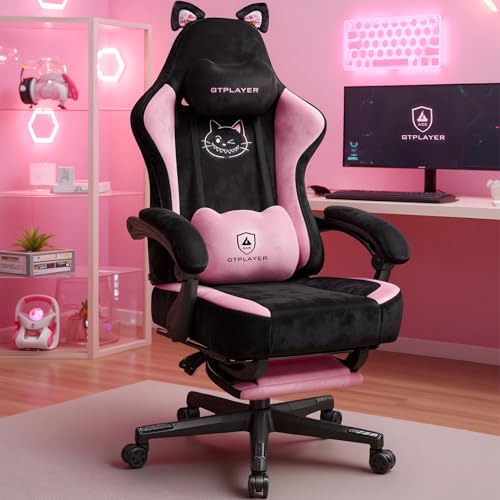
GTPLAYER Pink Gaming Chair Cat Ears Velvet Recliner
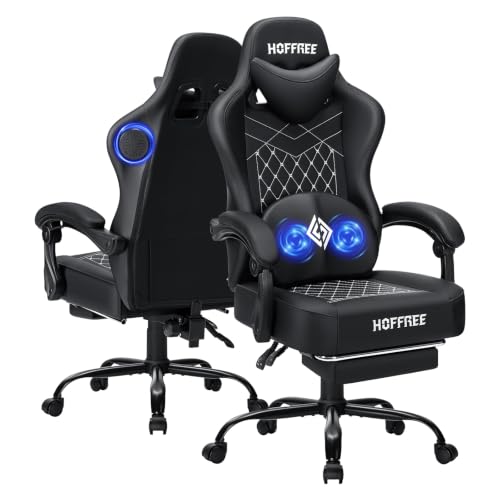
HOFFREE Gaming Chair with Speakers and Massage
LiberNovo Omni SE Ergonomic Office Chair 48cm

LiberNovo Omni SE Ergonomic Office Chair 45cm
More Details On Our Top Picks
The COMHOMA chair leans hard into personality, and it earns its place on a streamer’s desk precisely because of that. Wrapped in soft velvet with embroidered cat shapes, cat ears perched on the headrest, and a matching memory foam lumbar pillow, it looks like a chair from an anime opening rather than a generic gaming rig.
Beyond the looks, the reclining backrest and adjustable lumbar support matter during a six-hour grind session. You can lean back between matches, and the plush fabric stays comfortable against bare arms in warmer rooms. It works best for gamers who care about their on-camera setup as much as their K/D ratio.
A Few Highlights
- The cat-ear headrest and embroidered details give your stream a recognizable visual hook.
- Memory foam lumbar pillow keeps the lower back cushioned through long queues.
- Velvet upholstery feels softer than standard PU leather against bare skin.
- Reclining back lets you shift posture between competitive and casual play.
Things To Consider
- Velvet tends to attract pet hair and dust, so regular brushing becomes part of the routine.
- The cute aesthetic may not fit a minimalist battlestation, depending on your taste.
Built With In Mind
Streamers and content creators who want a chair that reads well on camera without sacrificing basic lumbar support.
Consider Something Else When
Shoppers who prefer a more understated look should look at the HOFFREE Gaming Chair, which trades the cat motif for a clean black profile.
The Omni PRO positions itself as a serious ergonomic chair, and the spec sheet backs that up. A bionic backrest designed to follow the curve of your spine, headrest and armrests that move in sync as you recline, and a built-in fan to keep air moving during long sessions. The 48cm seat suits most adult frames.
Where the COMHOMA leans on charm, this one leans on engineering. The differential tilt, meaning the back, headrest, and arms shift at different rates as you recline, helps keep your screen line of sight stable when you lean back for a cutscene. Compared to the cat-ear chair above, this is the grown-up desk equivalent.
The Good Stuff
- The bionic FlexFit backrest follows your spine’s natural S-curve through full recline.
- Built-in fan takes the edge off in warm rooms, useful for hardware-heavy builds.
- Dynamic tilt keeps your gaze aligned with the monitor even when leaning back.
- 5 recline positions span work focus, casual gaming, and full rest.
Worth Noting
- The 48cm seat depth may feel roomy for shorter users, so check the dimensions.
- Premium engineering typically carries a higher cost, which matters if you’re setting up a first gaming chair.
Key Product Details
Who Will Love This
Hybrid work-and-game users who want a chair that handles spreadsheets at 9 AM and ranked matches at 9 PM without compromise.
Look Elsewhere When
Anyone under about 5’4″ will likely find the 45cm LiberNovo Omni PRO a better ergonomic match.
Same flagship engineering as the 48cm version, just sized down. The 45cm Omni PRO keeps the bionic backrest, the synchronized tilt, and the built-in fan while making the seat a better fit for smaller frames or tighter desk setups.
For users who found the 48cm model too deep in the seat, this variant solves the most common fit complaint. It also fits better in a corner desk or a small bedroom office where every centimeter of depth matters. Versus its larger sibling, the trade-off is mostly about who the chair was drawn for.
What Works In Its Favor
- 45cm seat depth suits users around 5’0″ to 5’8″ without leaving knee-gap pressure.
- Same dynamic tilt system as the 48cm, so ergonomic benefits carry over fully.
- Smaller footprint helps in narrow gaming nooks or shared-spaces setups.
Trade Offs
- Taller users may find the seat edge pressing into the back of the knees.
- Reduced seat depth means less room to cross your legs, which some gamers do between rounds.
Right Fit For
Petite gamers or anyone working with a shallow desk depth who still wants serious spinal support.
Another Choice May Suit
Taller shoppers wanting the same engineering should consider the LiberNovo Omni SE 48cm, which trades the fan for a slightly lower cost.
GTPLAYER brings a near-identical blueprint to the COMHOMA chair we covered first, with the same velvet wrap, cat ears, and embroidered accents. The difference lives mostly in the brand and small build details, so the choice between them often comes down to availability and minor styling preferences.
For someone building a soft, pastel-themed room, this chair slips in without clashing. The reclining back and memory foam lumbar pillow deliver the same core comfort you’d expect for extended play. If you liked the COMHOMA’s concept but want a different brand behind it, this is the natural sibling.
Everyday Wins
- Soft velvet upholstery feels gentle during long, static sessions.
- Adjustable lumbar pillow gives the lower back a real cushion against hard reclines.
- The pink palette reads as warm and inviting on webcam.
Points To Note
- Velvet shows hand oils and smudges more than synthetic leather, so spot cleaning matters.
- Like most themed gaming chairs, the unique look narrows the room’s decor options.
Quick Facts
Best Suited To
Gamers curating a cute, cozy bedroom setup who want comfort and personality in equal measure.
Skip It When
Anyone wanting a serious ergonomic workhorse should pivot to the LiberNovo Omni PRO 48cm instead.
The HOFFREE is the gadget-lover’s pick. Bluetooth 5.3 dual speakers built into the chair handle your game audio or music, while a USB-powered massage motor in the lumbar pillow handles the lower back tension that builds up after a few hours. The black finish keeps it from screaming “gamer chair.”
It’s a fun setup for solo gaming in a den or bedroom, where you can lean back, let the speakers do the work, and run a quick massage cycle between rounds. Compared to the cute-themed chairs earlier in this list, the HOFFREE goes for a more grown-up, feature-heavy identity.
The Value In It
- Dual Bluetooth speakers reduce the need for a desktop speaker set in smaller rooms.
- Massage lumbar pillow targets the muscle group that tires first in long sessions.
- Neutral black design fits a wider range of desk setups than pastel options.
- High-rebound memory foam holds its shape through daily use.
Honest Caveats
- Speaker quality won’t replace a good headset for competitive play where positional audio matters.
- USB-powered massage needs an open port or a powered USB hub nearby.
At A Glance
Made For
Casual gamers building a single-seat battlestation who want audio and comfort extras built right in.
A Better Fit Elsewhere
Esports-focused players who need precise positional audio should look at the LiberNovo Omni PRO and pair it with a proper headset.
The Omni SE strips out the built-in fan and swaps to manual lumbar adjustment, but keeps the dynamic tilt and bionic backrest. If you work in a climate-controlled room where airflow isn’t a problem, the SE delivers nearly all the ergonomic value of the PRO at a more accessible tier.
For someone splitting time between spreadsheets and Steam, the SE handles both with equal competence. The 48cm seat fits taller users well, and the recline range covers everything from upright focus to a near-flat recovery position. The honest read is that this is the value sweet spot in the LiberNovo line.
The Case For It
- Manual lumbar lets you tune support to your exact lower-back curve.
- 5 recline positions cover work, gaming, and rest in a single chair.
- Dynamic tilt keeps headrest, back, and arms moving with you as you shift.
- No fan means one less moving part to potentially service later.
Possible Compromises
- No cooling fan, which matters in warm bedrooms or summer setups.
- Manual lumbar requires a few minutes of dialing in to find the right setting.
Feature Snapshot
Who Should Grab It
Hybrid users who want serious ergonomics without paying for features they won’t use, like the cooling fan.
Where A Sibling Pick Shines
Gamers in warmer rooms will be happier with the LiberNovo Omni PRO 48cm, which adds the cooling fan.
The 45cm Omni SE rounds out the lineup by bringing the manual-lumbar ergonomic platform to a smaller frame. You get the same dynamic tilt, the same recline range, and the same general build quality, just packed into a footprint that fits tighter spaces.
Studio apartments, small bedrooms, and shared office setups benefit most from this sizing. Versus the 48cm SE, the trade-off is seat depth versus spatial efficiency. For shorter users, this version may actually be the more comfortable daily choice.
Good Reasons To Consider
- 45cm seat depth fits users around 5’0″ to 5’8″ without knee pressure.
- Same dynamic tilt and recline range as the larger SE.
- Compact footprint suits corner desks and small-room layouts.
Some Limits To Know
- Taller users will find the seat edge less supportive over long sessions.
- Manual lumbar, like the 48cm SE, takes a few minutes of adjustment to dial in.
Whose Shelf It Belongs On
Shorter gamers or anyone furnishing a small home office who still wants engineering-grade spinal support.
Reach For A Different Pick When
Users above 5’9″ will likely get better long-session comfort from the LiberNovo Omni SE 48cm.
What Matters Most Before Choosing Chairs For Long Hours Of Gaming
Seat Depth And Frame Fit
Seat depth, measured from the front edge to the backrest, determines whether your thighs get proper support. Too shallow and you slide forward; too deep and the edge digs into the back of your knees. Measure from your hips to your knees while seated, and aim for a chair within an inch of that number.
Recline Range And Posture Variety
A chair that locks only upright forces you to sit the same way for hours. Look for a recline range that spans roughly 105° to 160°, so you can shift from focus to casual play to rest without leaving the seat. The dynamic tilt systems in the Omni PRO and SE lines help your body stay supported through every angle.
Cooling And Breathability
Long sessions generate heat, and the wrong upholstery traps it against your back. Velvet feels soft but runs warm; mesh breathes better; leather-style finishes vary. Built-in fans, like the one on the Omni PRO, solve the problem at the cost of an extra moving part.
Aesthetic Versus Ergonomics
Cute chairs and serious ergonomic chairs serve different priorities. The COMHOMA and GTPLAYER velvet chairs win on personality, while the LiberNovo line wins on engineering. The honest read is that the right choice depends on whether your camera, your back, or both drive the decision.
Key Considerations Across These Picks
Mistakes Worth Dodging
The most common slip-up is choosing a chair based on style alone and ignoring seat depth. A chair that looks perfect on camera but pushes against your knees will have you shopping again within a year. Measure first, then match the spec to your frame.
Where The Extra Money Goes
Higher tiers like the LiberNovo Omni PRO add features that solve real problems, including the built-in fan for warm rooms and dynamic tilt for posture variety. Whether the upgrade pays off depends on how long you sit daily and how climate-sensitive your setup is. A four-hour-a-day gamer may not need the fan; an eight-hour streamer likely will.
Frequently Asked Questions
How important is lumbar support for long gaming sessions?
Lumbar support matters a lot because the lower back is the first area to fatigue when you sit still for hours. Adjustable memory foam pillows or manual lumbar systems let you tune support to your spine’s natural curve.
Are cat-ear gaming chairs actually comfortable?
The cat-ear chairs here use soft velvet and memory foam lumbar pillows, so comfort is solid for most users. The trade-off is that velvet runs warmer than mesh or leather alternatives, which matters in summer or in rooms without air conditioning.
What is dynamic tilt on an ergonomic chair?
Dynamic tilt means the backrest, headrest, and armrests move at coordinated angles as you recline, rather than only the back tilting. This keeps your screen line of sight stable and maintains support through the whole recline range.
Do built-in speakers replace a gaming headset?
Built-in speakers handle casual music and general game audio well, but they lack the positional accuracy a good headset provides. Competitive players will still want a dedicated headset for directional cues.
How do I choose between the 45cm and 48cm LiberNovo chairs?
Pick the 45cm if you’re under about 5’8″ or working with a shallow desk. Go with the 48cm if you’re taller or want extra room to shift your legs during longer sessions.
Wrap Up
The right chair depends on what your sessions look like and what your room demands. Cute velvet options bring personality to a streamer setup, while ergonomic flagships like the LiberNovo Omni PRO and SE prioritize long-term spinal health. Match the chair to your frame, your climate, and the kind of gaming you do most, and your back will thank you at hour five.


