


Hours at your desk shouldn’t leave your back barking or your hips numb. The right chair turns an all-night raid, a marathon stream, or a long workday into something your body tolerates, even enjoys. This roundup cuts through the noise and matches seven chairs to the way you actually sit, play, and recover.
The Shortlist At A Glance

COMHOMA Cat-Ears Gaming Chair with Lumbar & Headrest

MEENICE Pink Cat-Ears Gaming Chair with Footrest
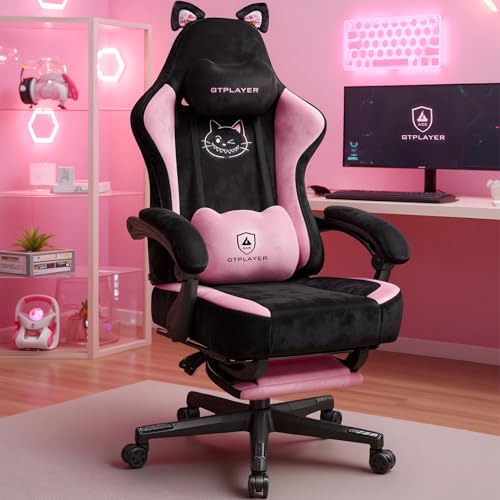
GTPLAYER Pink Cat-Ears Velvet Gaming Chair

LiberNovo Omni PRO Dynamic Ergonomic Chair 48cm

JECQCUPG 7-Point Support Ergonomic PC Chair

LiberNovo Omni SE Dynamic Ergonomic Chair 48cm
LiberNovo Omni SE Dynamic Ergonomic Chair 45cm
What Each Pick Brings To The Table
COMHOMA leans hard into personality with this one, wrapping a memory foam seat and back in soft velvet, then topping the headrest with cat ears and a dog-embroidered motif. The lumbar pillow is shaped to cup the lower back, while the headrest cradles the neck, two zones that wear out fastest during long sits. It’s a chair that announces itself the second you wheel into a room.
For a teen bedroom or a streaming nook where vibe matters as much as padding, this lands well. Compared with the MEENICE below, it skips the footrest but offers a similarly plush feel. You may find the cat-ear panel shifts a little if you lean back hard, and the velvet surface catches pet hair easily, so plan for light vacuuming between sessions.
Why It Works Well
- Memory foam lumbar pillow actually fills the lower-back gap most gaming chairs leave open.
- Velvet upholstery feels warmer and softer than the standard PU leather on racier chairs.
- Headrest pillow stays in place during recline, keeping your neck supported when you tilt back.
- Adjustable height and recline cover both desk gaming and laid-back movie-watching postures.
Things To Consider
- Velvet requires regular brushing or vacuuming to keep dust and pet hair from matting.
- The decorative ears and embroidery are sewn on, so a heavy leaner may stress the stitching over time.
At A Glance
Best Suited To
Teens, students, and casual gamers who want a chair that doubles as bedroom decor and a place to crash for homework and long game nights.
Skip It When
You’re a heavier or taller adult who needs broader support; the JECQCUPG 7-Point chair below covers the same ground with a more neutral, full-body fit.
Where the COMHOMA leans purely into visual flair, the MEENICE adds real seating hardware: a spring-packed seat cushion (a layered foam-plus-coil seat that resists flattening) and a pull-out footrest for full recline. The paw-shaped lumbar pillow and matching cushion carry the same cat theme without dominating the silhouette, and the listed 300-lb capacity gives the frame more backbone than its playful look suggests.
Long sessions where your legs go numb are exactly what the footrest fixes, and the spring seat helps prevent that mid-afternoon sag you feel in cheaper foam. Compared with the GTPLAYER entry below, it trades a touch of embroidery polish for genuine leg support. The footrest adds a few inches to the chair’s footprint, so a tight desk corner may force you to angle the base.
Practical Pluses
- Built-in footrest turns a recline into a near-flat resting position, easing pressure on the lower back.
- Spring-packed seat cushion bounces back instead of going pancake-flat after months of use.
- 300-lb weight capacity hints at a sturdier gas lift and base than the cat-theme styling suggests.
- Removable cat-ear decoration lets you tone down the look when company comes over.
Worth Noting
- Reclining fully to use the footrest pushes the chair footprint back, which tightens small rooms.
- The pink upholstery is sensitive to denim transfer, so light-colored denim can leave a faint tint over time.
Who It Suits Best
Anyone who games or works reclined and wants their legs fully supported without bolting on a separate ottoman.
Look Elsewhere When
You need a chair that disappears into a grown-up office; the LiberNovo Omni SE reads as professional gear and fits a more neutral aesthetic.
GTPLAYER’s pink velvet chair sits at the visual crossroads of the first two picks, adding plush cat embroidery across the backrest and sticking with a memory foam lumbar and headrest rather than a footrest. The result reads more like a piece of furniture than a piece of gear, which is the point if your setup doubles as a bedroom or a streaming backdrop.
Long sessions favor the supportive duo of the lumbar pillow and the headrest, both of which can be raised, lowered, or removed as your body changes position. Against the COMHOMA above, the GTPLAYER swaps dog embroidery for cat-themed stitching and keeps the velvet feel. The armrests are fixed rather than multi-directional, which can feel limiting if you shift between keyboard and controller often.
The Value In It
- Velvet upholstery and embroidered detailing make it one of the more photogenic chairs in this list.
- Memory foam lumbar pillow adjusts vertically, so it actually meets your spine at the right height.
- Reclining backrest supports a leaning-back rest break between matches without forcing a full nap posture.
Trade Offs
- Fixed armrests don’t pivot or telescope, so they may feel too high or too low for different body types.
- Velvet can crush under constant shoulder pressure, leaving visible flat patches where you rest.
At A Glance
Made For
Streamers and content creators who want a chair that looks intentional on camera while still keeping them comfortable through long recording blocks.
Not Your Match When
You share the chair with multiple people of different heights; the MEENICE chair above offers a footrest that better fits shifting body positions.
The LiberNovo Omni PRO is the chair you buy when you want a real ergonomic tool, not a costume. The Bionic FlexFit backrest is a contoured back panel that flexes with the spine, and a 105–165 degree recline range covers everything from a forward gaming hunch to a flat-out rest. The 48 cm seat depth suits average-to-taller adults, and the built-in fan is the surprise feature, pushing air through the backrest to keep you from sticking to the upholstery during long, intense sessions.
For a person who works and games in the same chair, the dynamic tilt sync keeps the headrest, back, and arms moving together so you don’t lose contact support when you lean. Compared with the cat-themed chairs above, it’s a wholly different design language, and the price band is too. The fan is USB or battery powered, so you may need to route an extra cable behind the desk to keep it running.
A Few Strong Suits
- Dynamic tilt synchronizes the backrest, headrest, and armrests so support follows you as you shift.
- Built-in cooling fan reduces sweat on the lower back during hot summer gaming marathons.
- 48 cm seat depth supports taller users whose thighs need extra room to sit without edge pressure.
- Wide 105–165 degree recline range covers focused gameplay, casual lounging, and mid-session naps.
Room For Improvement
- The cooling fan requires its own power source, so cable management gets a little more crowded.
- The frame is heavier than typical gaming chairs, making it harder to move between rooms on your own.
Feature Snapshot
Right Fit For
Remote workers, streamers, and competitive gamers who put in six-to-ten-hour days and treat the chair as a piece of equipment, not furniture.
A Better Fit Elsewhere
Shoppers on a tighter budget who still want dynamic recline; the LiberNovo Omni SE below trims the fan and automatic lumbar for a lower tier.
The JECQCUPG 7-Point chair tackles the whole body, not just the back. It targets seven zones: head, neck, shoulders, upper back, lumbar, hips, and legs, with adjustable support at each. For adults who feel pain in more than one spot after a long day, that distributed approach is the main draw. The cushions are generic black, so it blends into a grown-up office or a shared family computer station without standing out.
Unlike the plush velvet chairs earlier in this list, the 7-Point leans toward utility and full-body alignment. The lumbar and headrest cushions adjust to match your proportions, and the leg support helps during extended keyboard sessions. One thing worth considering: the 7-Point setup looks simple in photos but takes a few minutes of tinkering to dial in the cushions correctly, and most owners find the first week of sitting reveals small misalignments.
Strengths Worth Knowing
- Targets seven contact zones, so the shoulders and hips get as much attention as the lumbar.
- Neutral black finish fits an office, a den, or a family computer station without clashing.
- Adjustable lumbar and headrest cushions let you tune the fit to your body instead of the other way around.
Honest Caveats
- Initial setup involves positioning each cushion, which adds ten to fifteen minutes of fiddling before the chair feels right.
- With multiple cushions attached, the chair feels a bit warmer against the back than a mesh alternative would.
Key Product Details
Who Will Love This
Adults with back, neck, or hip complaints who want a single chair to address several problem areas at once.
Reach For A Different Pick When
Your main goal is temperature control; the LiberNovo Omni PRO above includes an active cooling fan that the JECQCUPG does not.
The Omni SE is the calmer sibling of the PRO, dropping the cooling fan and the automatic lumbar in favor of a manual lumbar dial. You still get the Bionic FlexFit backrest, the 105 to 160 degree recline, and a 48 cm seat depth, which makes it the better pick for a work-and-game setup where the chair needs to look professional. The manual lumbar gives you hands-on control over how much push you get in the lower back, and you don’t need a spare USB port to run the chair.
For remote workers who game in the evening, this is the crossover chair of the list. It cleans up nicely for video calls and still reclines far enough to take a break. The headrest, backrest, and armrests move together during recline, similar to the PRO, so support stays consistent. Without the cooling fan, hot summer sessions can feel a touch warmer against the back.
Good Reasons To Consider
- Manual lumbar adjustment lets you tune the exact pressure on your lower back without electronics.
- Professional silhouette looks right at home on a Zoom call or in a shared office.
- 48 cm seat depth suits taller adults, while the dynamic tilt keeps support during posture shifts.
- No extra cables or fans, so the chair is genuinely plug-and-play out of the box.
Points To Keep In Mind
- Without the cooling fan, the backrest can feel warm during summer or high-intensity sessions.
- Manual lumbar means you’ll need to readjust it whenever you change how upright you’re sitting.
Perfect Match For
Remote workers and hybrid professionals who need one chair that handles a workday and an evening gaming session without screaming “gamer” in every meeting.
Swap It Out When
You run hot or live in a warm climate; the LiberNovo Omni PRO above adds the cooling fan that makes a real difference over long summer days.
Same chair as the Omni SE 48cm above, but with a 45 cm seat depth, the right size for petite users, teens, and anyone who has felt the front edge of a chair dig into the back of their knees. The shorter seat pushes the backrest into the right place relative to your shoulders, which is where most ergonomic chairs lose petite users. You get the same Bionic FlexFit backrest, the same 105 to 160 degree recline, and the same manual lumbar dial, just sized down.
For a small desk in a bedroom, a dorm, or a tight apartment, this 45 cm version saves inches without giving up the dynamic support that makes the Omni line interesting. Tall users will find the seat feels short, and that 45 cm depth may leave several inches of empty cushion behind their knees, a real possibility for anyone above about 5’10”.
Key Advantages
- 45 cm seat depth fits shorter legs comfortably, eliminating the knee-edge pressure that plagues tall chairs.
- Compact footprint works in dorms, small bedrooms, and apartment corners where a 48 cm chair won’t.
- Same dynamic tilt and recline range as the larger Omni SE for consistent support.
Some Limits To Know
- Shorter seat means taller users may feel unsupported behind the knees or scrunched at the shoulders.
- Smaller seat also means the lumbar dial’s effective range is narrower, since the backrest sits closer to the body.
Quick Facts
Who Should Grab It
Petite adults, teens, and small-framed gamers who want real ergonomic engineering rather than a scaled-down toy chair.
Where A Sibling Pick Shines
Anyone above average height; the Omni SE 48cm above gives that same dynamic support with the seat depth to match a longer torso.
What Matters Most When Choosing Chairs For Long Gaming Sessions
Match The Chair To Your Body, Not The Photo
Most gaming chair listings look dramatic in marketing images, and the same chair can feel completely different to a 5’4″ frame and a 6’1″ frame. Seat depth, the distance from the front edge of the cushion to the backrest, matters as much as overall height, because a seat that’s too deep pushes the lumbar pillow out of reach. Look for a chair whose listed seat depth lands within an inch or two of your thigh length.
Recline Range And Tilt Sync Are The Real Comfort Levers
A chair that reclines to 160 degrees sounds great, but the better question is whether the backrest, headrest, and armrests stay in contact with you as you lean. Tilt sync, a system that lets the seat and back recline together, keeps the lumbar and neck supported whether you’re locked in on a competitive match or leaned back watching a stream. Chairs that only recline the back tend to leave a gap at the lumbar the moment you tilt.
Upholstery Affects Both Comfort And Maintenance
Velvet feels warm and soft against bare skin, but it attracts pet hair and can crush under repeated pressure. PU leather wipes clean in seconds but can feel sticky in summer and cold in winter. Mesh breathes well but offers less padding for bony hips. For long sessions, the material matters as much as the cushion underneath, since you’ll be in contact with it for hours at a stretch.
Weight Capacity Hints At Real-World Durability
A higher listed capacity usually means a sturdier gas lift cylinder and a broader base, two parts that wear out first on cheaper chairs. The lift cylinder is the metal post that raises and lowers the seat. For anyone above average weight, paying attention to that number can save you from the slow, irritating sink that hits bargain chairs after a year of use.
Key Considerations Across These Picks
Common Shopping Slip Ups
The most common mistake is choosing a chair by look alone, then wondering why your back hurts after a month. A plush velvet chair that photographs beautifully can still leave your lumbar unsupported, and a high-recline chair without tilt sync still leaves a gap at the small of your back when you lean. Always cross-check seat depth against your thigh length, and treat “ergonomic” as a feature to verify, not a buzzword to trust.
The second slip is underestimating the role of armrests. Fixed-height armrests push your shoulders up or let them slump, both of which feed neck pain over time. Look for armrests that adjust in at least one direction, ideally height and pivot, especially if you split your time between a keyboard and a controller.
Where The Extra Money Goes
Higher-tier chairs in this category spend the premium on three things: a real gas-lift cylinder (instead of a generic one rated to a lower weight), a synchronized tilt mechanism (instead of a single-axis backrest lean), and a contoured back panel (instead of a flat cushion with a separate pillow). These parts aren’t visible in a glamour shot, but they determine whether the chair still feels supportive after three years.
Paying up also tends to mean better warranties and more substantial bases, which matters because a wobbly five-point base undermines every ergonomic benefit above it. If you sit for more than four hours a day, that upgrade usually pays for itself in fewer replacement cycles.
Frequently Asked Questions
How Many Hours A Day Counts As A Long Session?
Anything over four hours at a stretch qualifies as long, and the chair requirements change past that mark. Short sits survive on basic padding, but multi-hour sessions need real lumbar support, tilt sync, and a breathable back panel to keep your spine aligned and your skin comfortable.
Do Gaming Chairs Actually Help With Back Pain?
A well-designed ergonomic chair can reduce the muscle fatigue that turns into pain over time, but no chair corrects an existing injury or replaces movement breaks. Look for adjustable lumbar support and a backrest that moves with you, and pair the chair with a routine of standing and stretching every hour or so.
Is Recline Range Really That Important?
Yes, because rigid upright chairs force your spine into one shape all day. A 105 to 160 degree range lets you shift between focused gameplay, casual browsing, and a near-flat rest, which spreads load across different muscle groups. The key is whether the backrest and headrest stay in contact with you as you recline, not just whether the chair leans back.
Are Velvet Gaming Chairs Harder To Maintain?
Velvet needs more attention than PU leather, especially if you have pets, since hair clings to the fibers. A weekly pass with a lint roller or soft brush keeps the surface from matting. The trade-off is that velvet feels warmer and softer against bare arms, which many people prefer during long sessions.
What’s The Difference Between The Omni PRO And The Omni SE?
The PRO adds a built-in cooling fan and an automatic lumbar system, while the SE uses a manual lumbar dial and skips the fan. Both share the same backrest, tilt sync, and recline range, so the choice comes down to whether you want active cooling and hands-off lumbar tuning or a simpler, lower-cost setup.
Wrap Up
The right chair for long gaming sessions depends on more than your favorite color or a brand name. Match the seat depth to your frame, look for tilt sync over raw recline angle, and decide how much maintenance you’re willing to put in. Any of these seven picks can carry you through a long night, provided the one you pick is the one built for your body and your habits.


